-
-
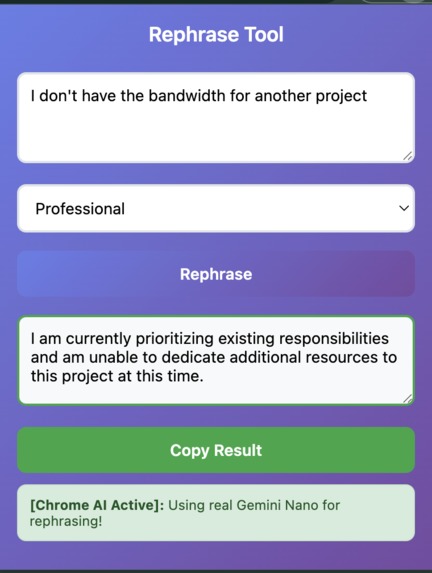
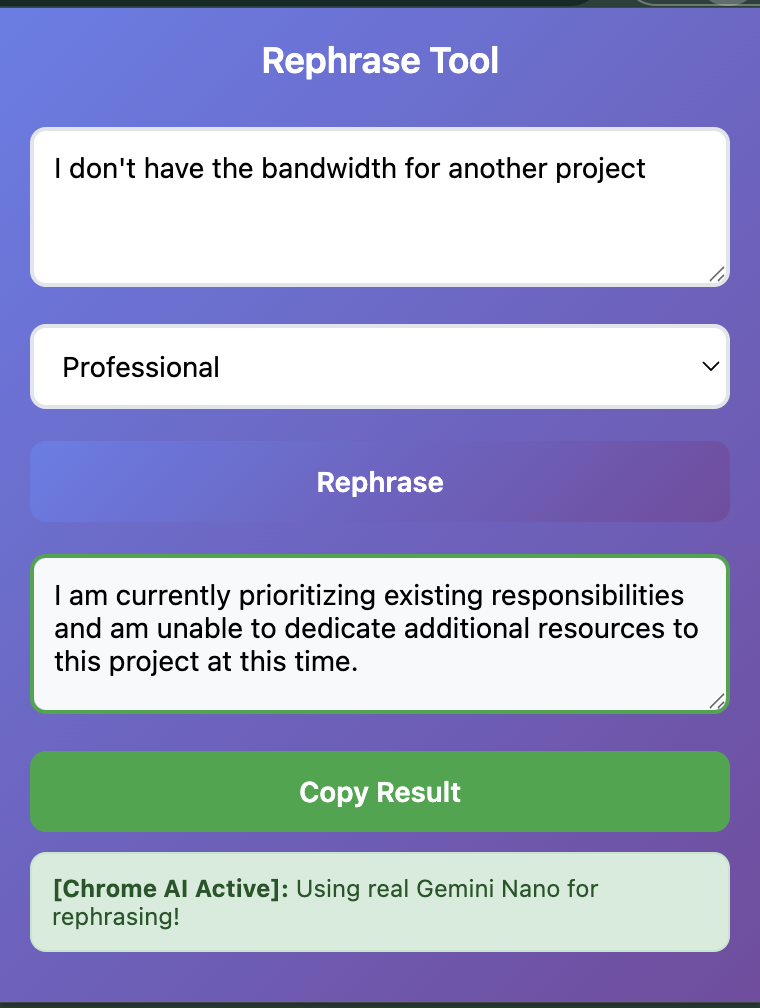
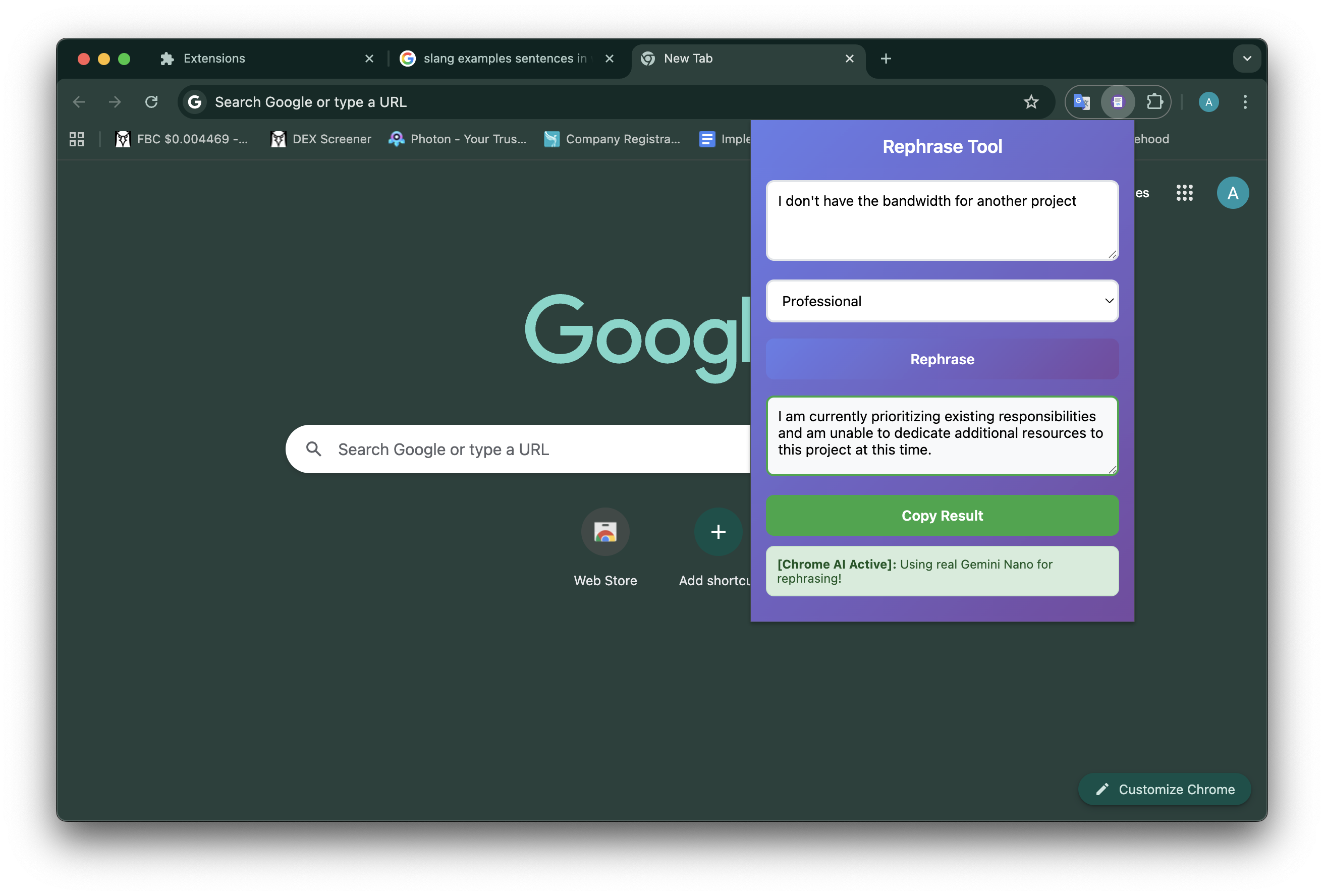
click the extension icon
-
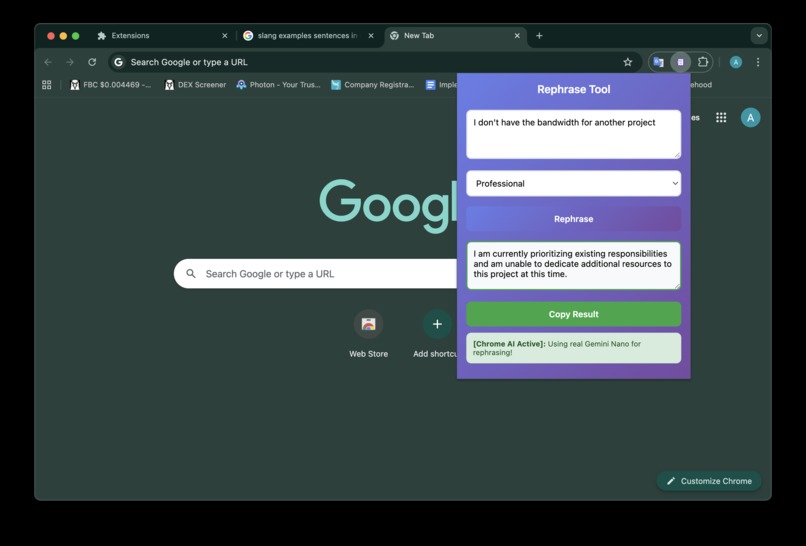
click the extension icon
-
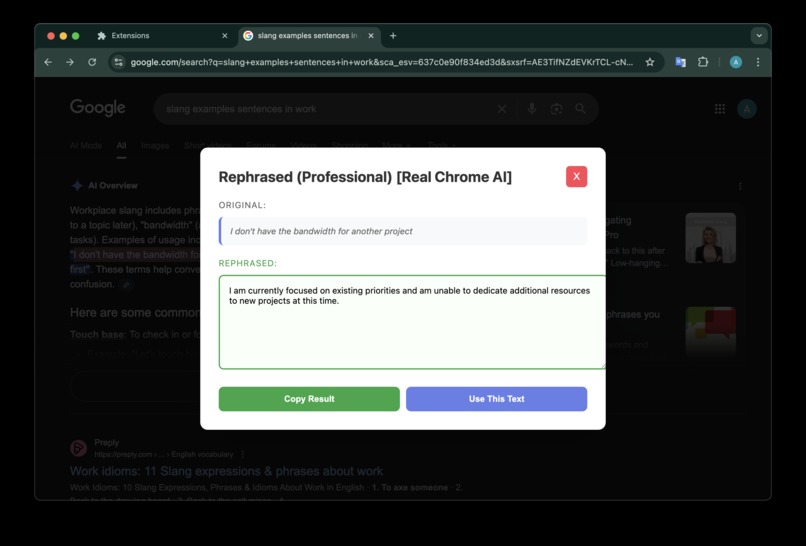
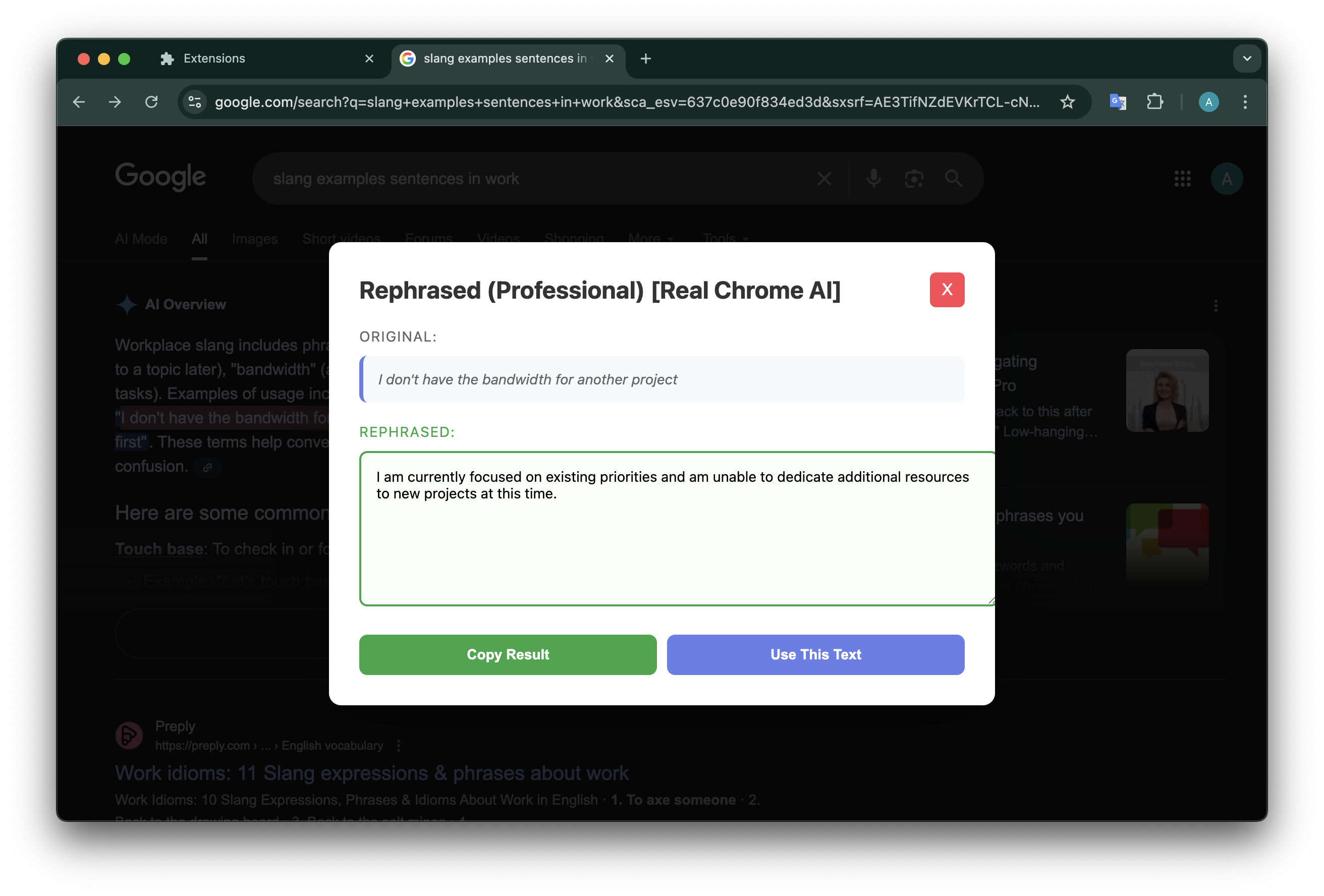
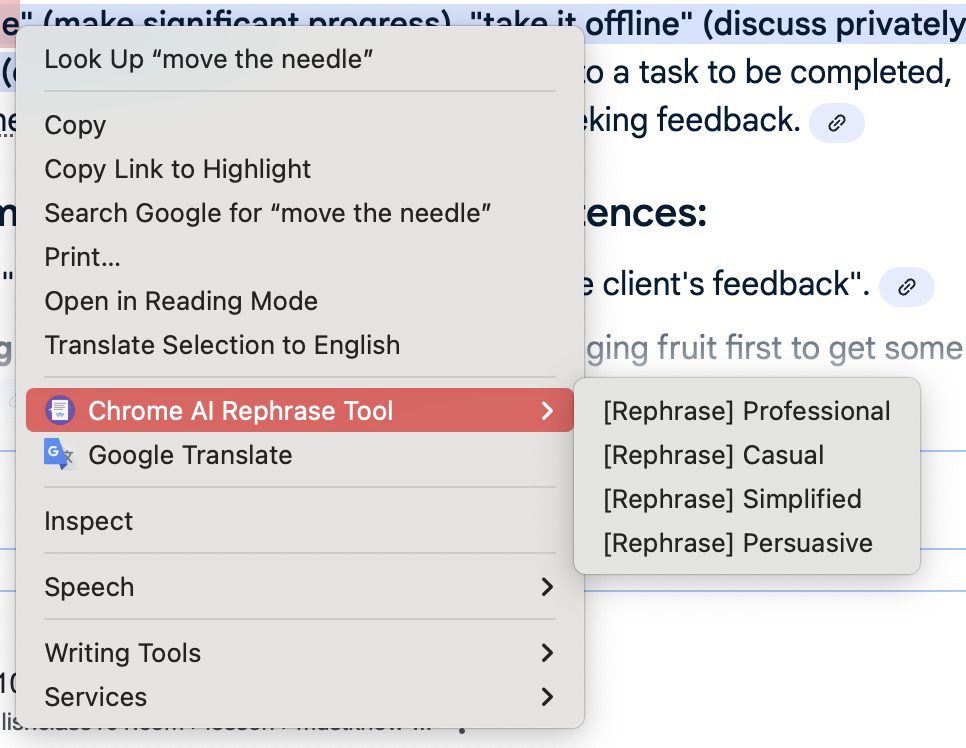
right click
-
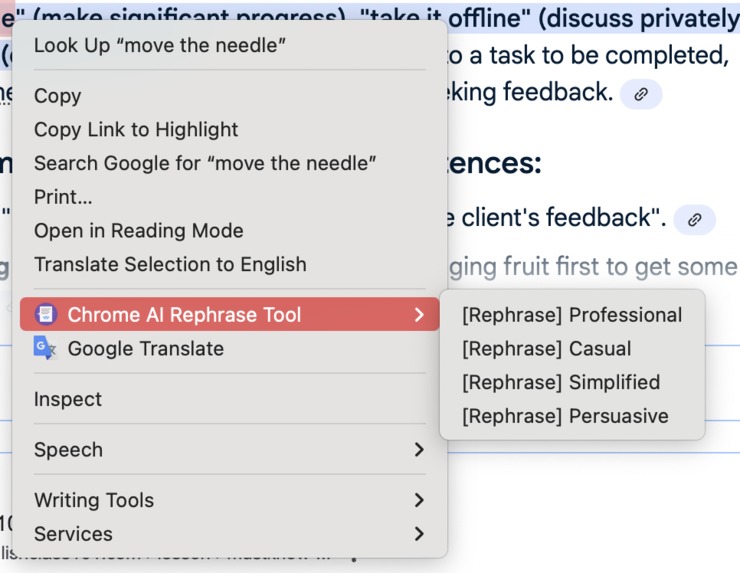
right click
🎯 Inspiration
We all write daily — emails, posts, documentation — but often struggle with tone. Sometimes we need text to sound more professional, simpler, or even persuasive.
Existing tools send your data to the cloud, which raises privacy concerns. With Chrome AI Rephrase Tool, rephrasing happens directly in your browser, private and instant.
The inspiration came from watching people struggle with:
- Students writing essays that need different academic tones
- Professionals crafting emails that require varying levels of formality
- ESL learners trying to express themselves more naturally
- Anyone who wants to improve their communication without compromising privacy
💡 What it does
Chrome AI Rephrase Tool transforms any text into different tones instantly:
- Context menu integration: Highlight text on any website → right-click → rephrase
- Popup interface: Paste text, choose tone (Professional, Casual, Simplified, Persuasive)
- One-click copy of results for easy sharing
- Privacy-first: All processing happens locally using Chrome's built-in AI
- Multiple tones: Adapt your writing style for any situation
- Universal compatibility: Works on any website or text input
Perfect for:
- Students improving essay writing
- Professionals crafting business communications
- ESL learners practicing natural expression
- Content creators adapting tone for different audiences
🛠️ How we built it
Tech Stack:
- Manifest V3 Chrome Extension for modern browser compatibility
- Background service worker handles context menu creation and AI API calls
- Vanilla JavaScript for popup functionality (no frameworks needed)
- Chrome AI APIs for local text processing
Key Components:
manifest.json- Extension configuration and permissionsbackground.js- Context menu integration and Chrome AI API callspopup.html/js- User interface for manual text inputstyles.css- Clean, modern UI design
Chrome AI APIs Used:
chrome.ai.rewriter.rewrite()- Core rephrasing functionalitychrome.ai.proofreader.check()- Grammar correction (future feature)chrome.ai.translator.translate()- Multilingual support (future feature)
Architecture:
- Service worker handles background tasks
- Context menu integration for seamless webpage interaction
- Fallback system for when Chrome AI isn't available
- Local processing ensures zero data transmission
🚧 Challenges we ran into
1. Chrome AI API Limitations
- Chrome AI APIs are experimental and only available in Chrome Canary/Dev
- Required extensive testing across different Chrome versions
- Had to implement fallback systems for users without AI features enabled
2. Context Menu Integration
- Getting the context menu to work seamlessly across all websites
- Handling different text selection scenarios (partial selections, nested elements)
- Ensuring the extension works consistently across various web page structures
3. Privacy vs Functionality Balance
- Balancing local processing capabilities with user experience
- Implementing graceful degradation when Chrome AI isn't available
- Maintaining performance while keeping everything client-side
4. User Experience Design
- Creating an intuitive interface that works for both context menu and popup
- Designing tone options that are clear and useful
- Ensuring the extension feels native to Chrome's ecosystem
5. Documentation and Setup
- Chrome AI features require specific setup steps that aren't well-documented
- Creating clear installation instructions for non-technical users
- Explaining the difference between Chrome versions and AI capabilities
🏆 Accomplishments that we're proud of
✅ Privacy-First Architecture
- Built a completely local text processing system using Chrome's built-in AI
- Zero data transmission - everything happens on-device
- No external API dependencies or server costs
✅ Seamless Integration
- Created intuitive right-click context menu integration
- Works on any website without requiring page modifications
- Clean popup interface that feels native to Chrome
✅ Multiple Tone Support
- Successfully implemented 4 distinct tone options (Professional, Casual, Simplified, Persuasive)
- Each tone produces contextually appropriate rephrasing
- One-click copy functionality for easy sharing
✅ Robust Fallback System
- Implemented graceful degradation when Chrome AI isn't available
- Extension works in both Chrome Canary/Dev and regular Chrome
- Clear user feedback about which mode is active
✅ Clean Code Architecture
- Well-structured Manifest V3 extension
- Modular JavaScript code with clear separation of concerns
- Comprehensive documentation and setup guides
✅ Real-World Impact
- Solves actual problems for students, professionals, and ESL learners
- Demonstrates practical use of cutting-edge Chrome AI APIs
- Shows how privacy and functionality can coexist
📚 What we learned
Technical Learnings:
- Chrome AI APIs are powerful but still experimental - requires careful error handling
- Manifest V3 service workers have different lifecycle patterns than traditional background scripts
- Context menu integration requires understanding of Chrome's permission system
- Local AI processing can be surprisingly fast and effective
Development Insights:
- Privacy-first design doesn't have to compromise on functionality
- Fallback systems are crucial when building with experimental APIs
- User experience matters more than technical complexity
- Documentation is essential for cutting-edge features
Product Learnings:
- Tone adaptation is a universal need across different user groups
- Right-click integration feels more natural than separate interfaces
- Local processing is a significant competitive advantage
- Clear feedback about system status builds user trust
Chrome Extension Development:
- Service workers require different debugging approaches than regular scripts
- Permissions need to be carefully considered for user privacy
- Cross-origin restrictions affect how extensions interact with web pages
- Extension lifecycle management is crucial for reliable performance
🚀 What's next for Chrome AI Rephrase Tool
Short-term Improvements (Next 1-2 months):
- Grammar correction integration using Chrome's Proofreader API
- Side-by-side comparison view to see original vs rephrased text
- Custom tone creation - let users define their own tone preferences
- Keyboard shortcuts for power users
- Export options (PDF, Word, etc.) for rephrased content
Medium-term Features (3-6 months):
- Multilingual support using Chrome's Translator API
- Bulk text processing for longer documents
- Tone analysis - analyze existing text to suggest improvements
- Integration with Google Docs and other writing platforms
- Offline-first PWA mode for complete independence
Long-term Vision (6+ months):
- AI-powered writing suggestions beyond just rephrasing
- Collaborative features for team writing projects
- Learning mode that adapts to user's writing style preferences
- Integration with other Chrome AI features (summarization, translation)
- Cross-browser support as other browsers adopt similar AI capabilities
Community & Growth:
- Open source the project to encourage community contributions
- Chrome Web Store publication once APIs are stable
- User feedback system to prioritize feature development
- Educational partnerships with schools and universities
- Developer documentation for extending the extension
Technical Roadmap:
- Performance optimization for larger text blocks
- Advanced AI model integration as Chrome AI evolves
- Accessibility improvements for users with disabilities
- Mobile Chrome support when available
- Enterprise features for business users
Built With
- css3
- gemini
- html5
- javascript
- rewriter


Log in or sign up for Devpost to join the conversation.