-
-
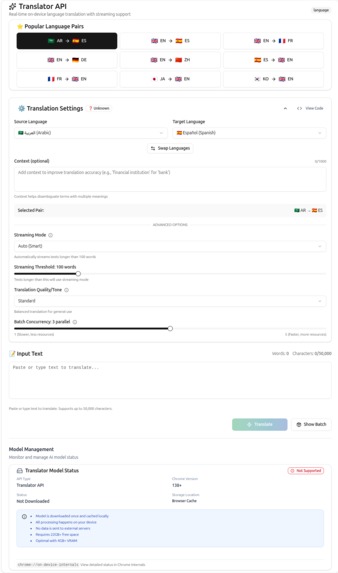
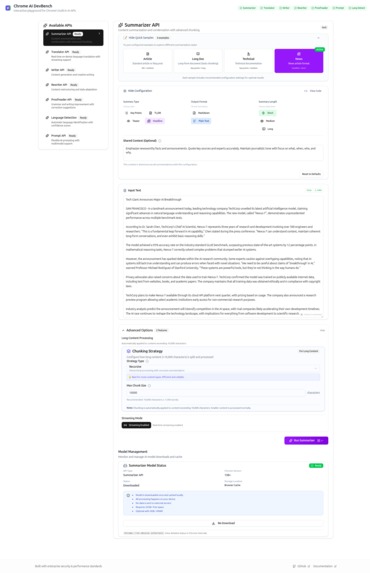
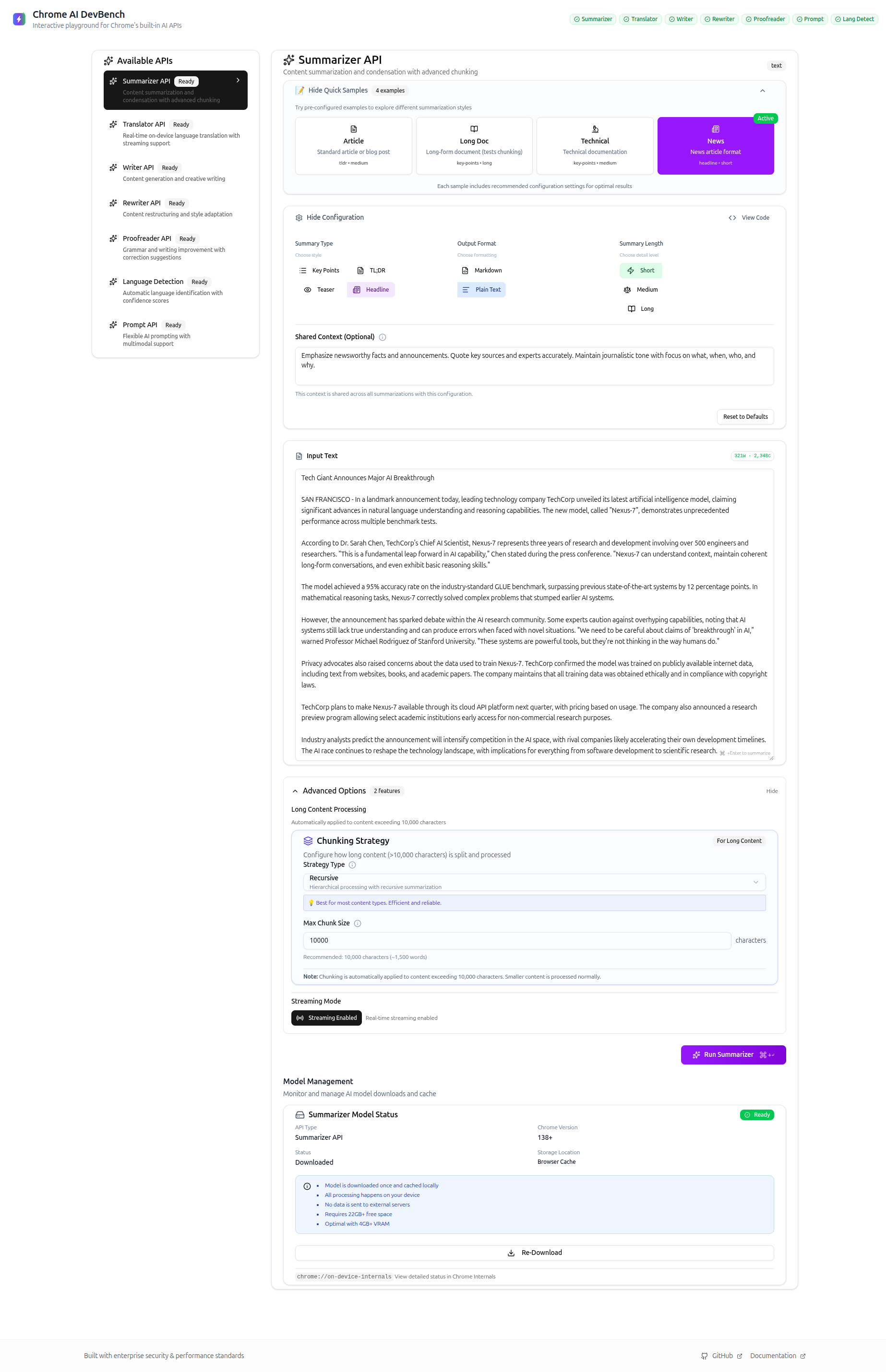
Complete interface showing all 7 API modules with configuration panel and model management
-
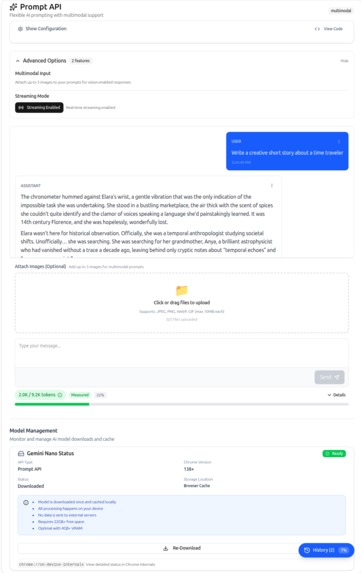
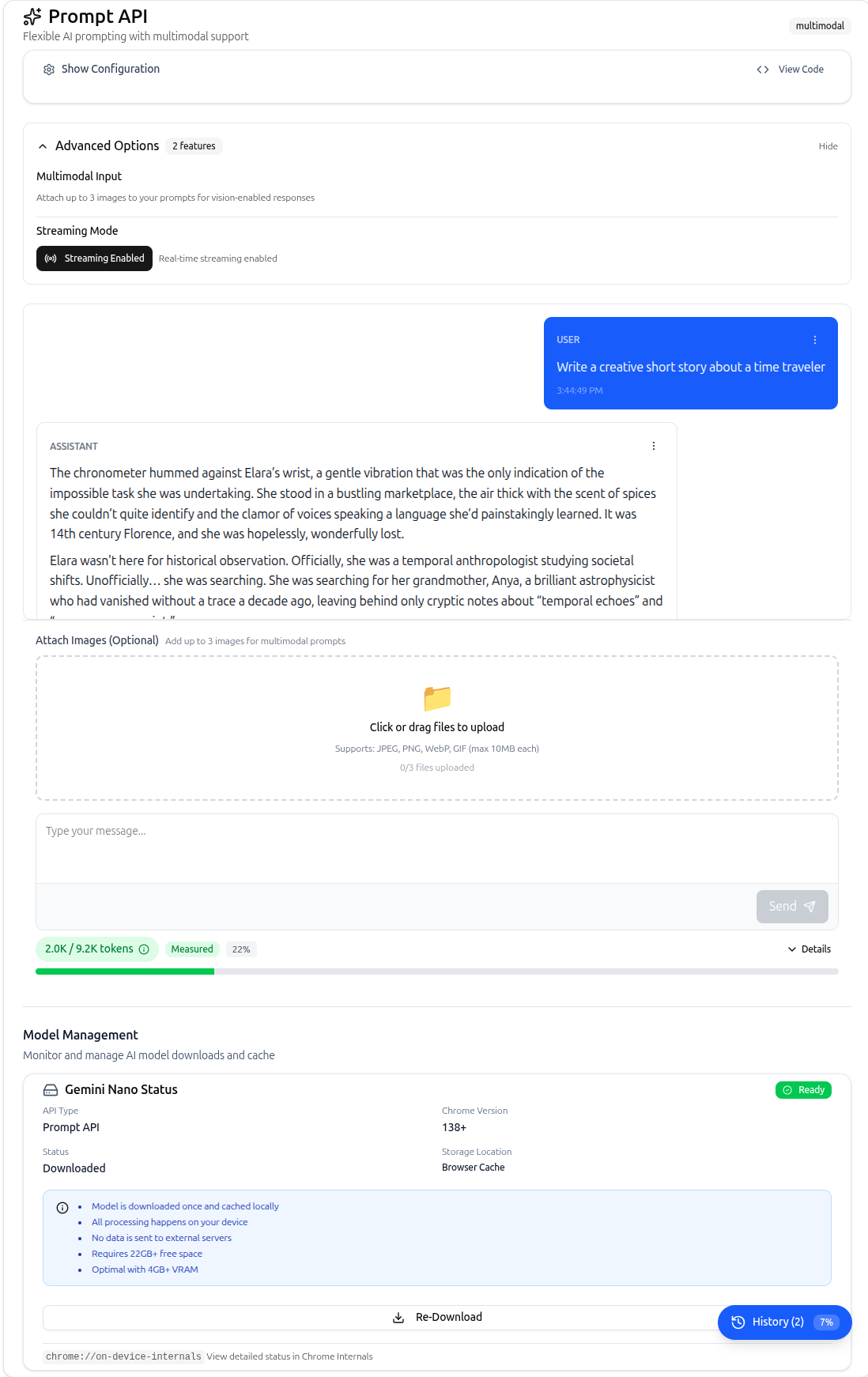
Prompt API with multimodal input, streaming responses, and conversation history
-
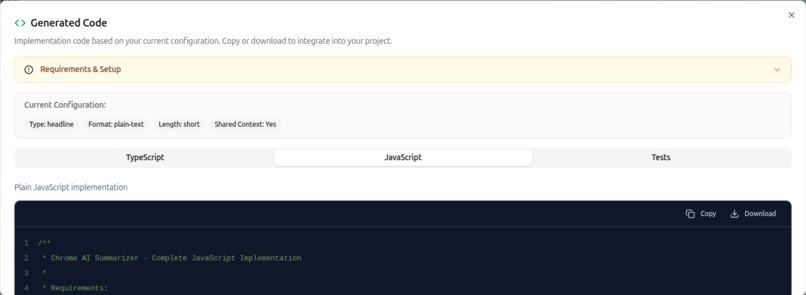
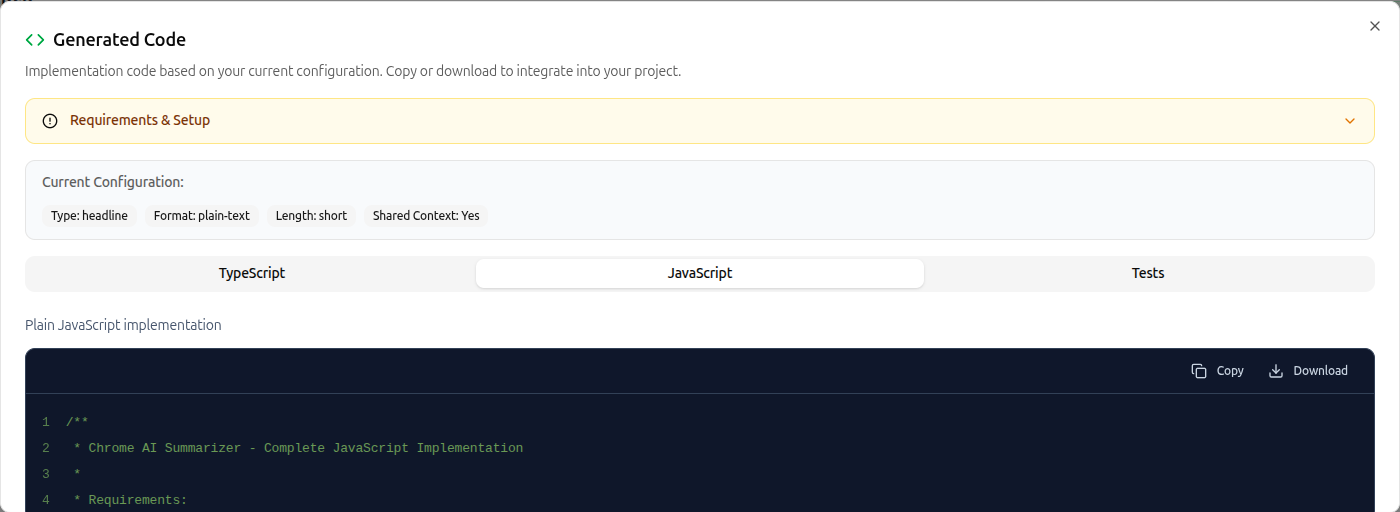
Generated code modal with current configuration display, TypeScript/JavaScript/Tests tabs, and copy/download functionality
-
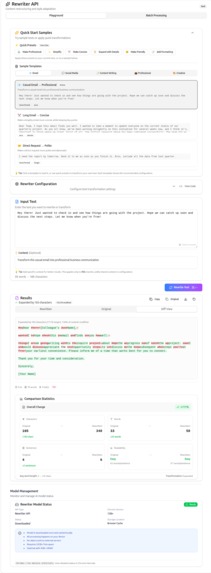
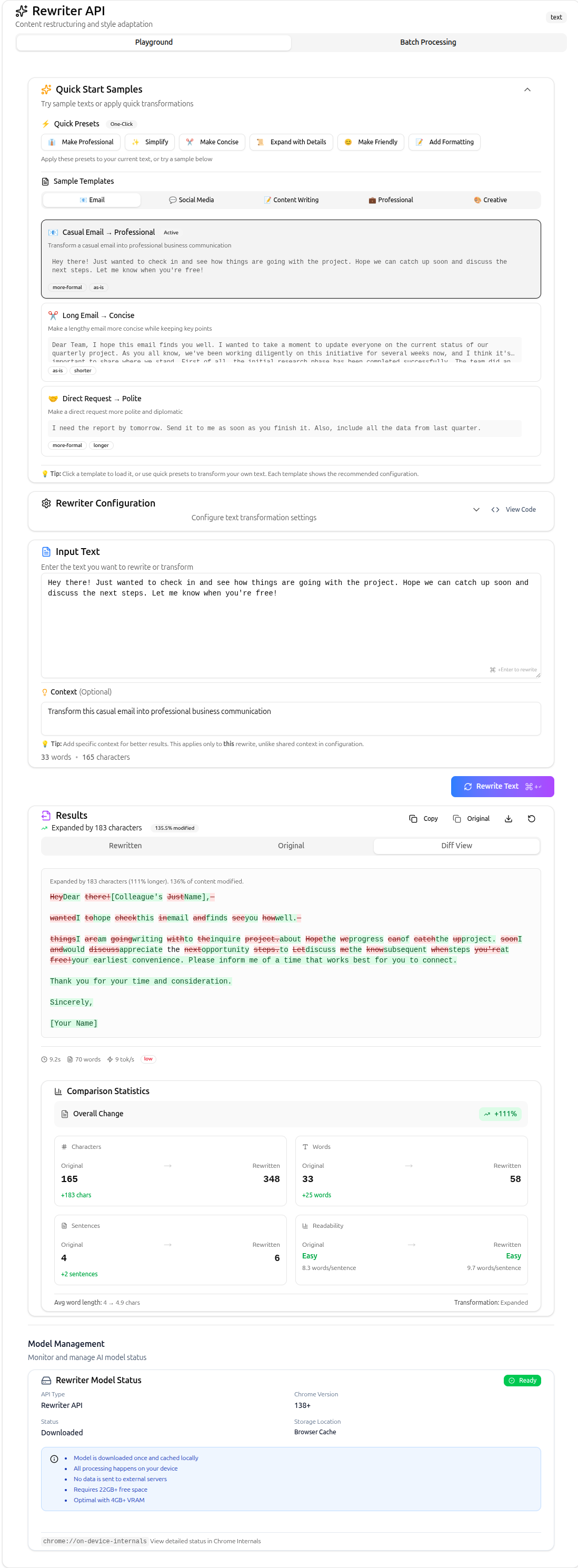
Rewriter API showing original, rewritten, and diff views with detailed comparison statistics and transformation controls
-
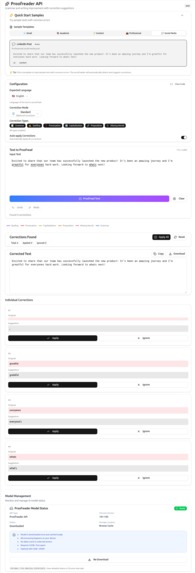
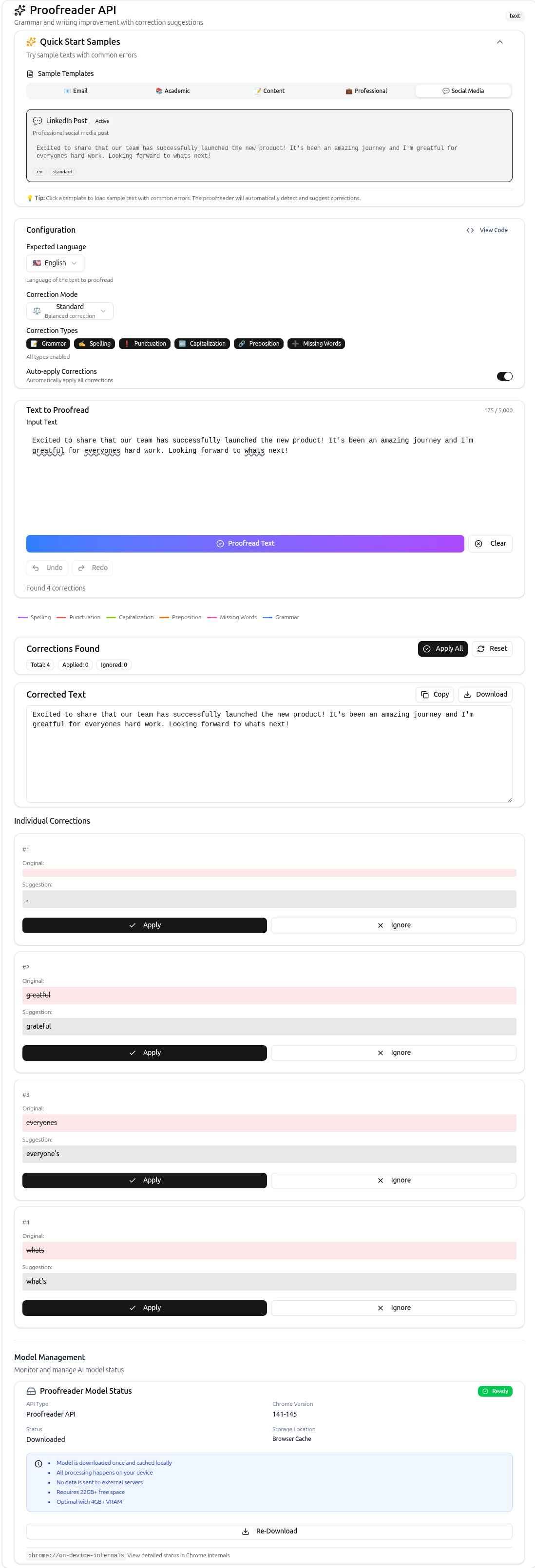
Proofreader API with CSS Custom Highlights, correction filtering by type, and individual correction management
-
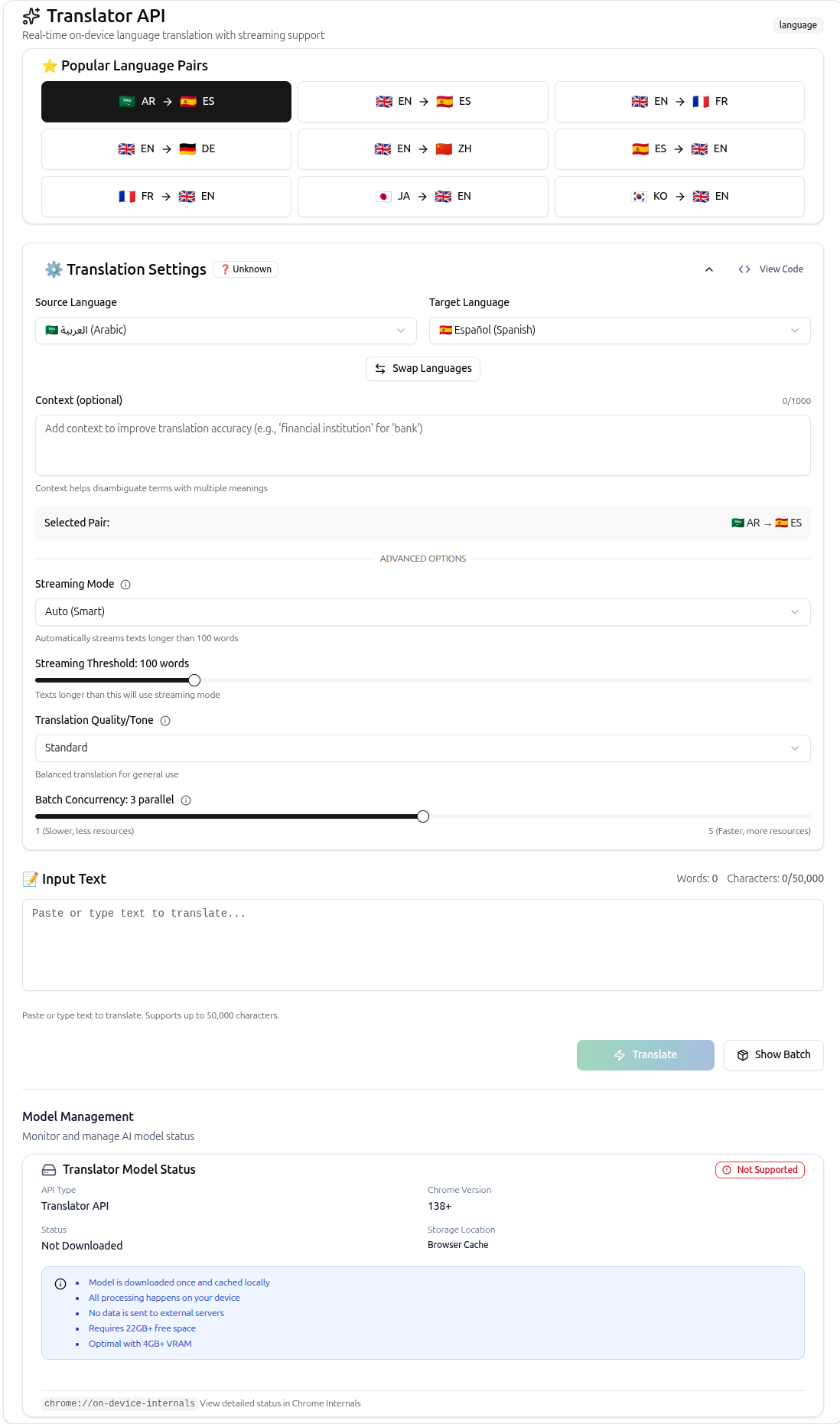
Translator API with popular language pairs, streaming mode, batch concurrency controls, and context support
Chrome AI DevBench
Inspiration
The hackathon deadline was approaching. I had an ambitious app idea using Chrome's new Built-in AI APIs. Everything seemed straightforward—until I tried to test my first API call. Where was the playground?
With OpenAI, I had their Playground. With Anthropic, the Console. Every major AI platform offered an interactive environment to experiment with before coding. But Chrome's revolutionary on-device AI technology had nothing. Just scattered documentation pages and basic code snippets.
That frustration became my pivot moment. Instead of building another app, I would build the missing infrastructure. Not just a playground for one API, but the playground of playgrounds—a unified platform for all seven Chrome Built-in AI APIs. This decision transformed a hackathon submission into something larger: a foundation for the entire Chrome AI developer ecosystem.
What it does
Chrome AI DevBench is the first unified development platform for all seven Chrome Built-in AI APIs. It bridges the critical gap between raw API documentation and production implementation.
The platform enables developers to test all seven APIs instantly without writing code. Users can experiment with Summarizer, Rewriter, Writer, Proofreader, Translator, Language Detector, and Prompt APIs through intuitive interfaces. With one keyboard shortcut (Cmd+K), developers generate production-ready TypeScript code that includes error handling, retry logic, and state management.
Chrome AI DevBench demonstrates compound workflows impossible with cloud AI. Detect language, translate, proofread, and rewrite—all on-device, instantly, for free. Healthcare applications process patient data without cloud exposure. Educational platforms provide multilingual support offline. Legal firms analyze confidential contracts with zero data transmission. Every workflow maintains complete privacy while eliminating infrastructure costs.
The platform processes documents 3-5x larger than API limits through intelligent chunking. It tracks model downloads (1-2GB per API), handles network interruptions, and provides graceful degradation. Chrome AI DevBench transforms experimental browser APIs into production-ready tools.
How we built it
Chrome AI DevBench uses React 18 with TypeScript for type safety across 80+ components. Zustand manages complex state orchestration for seven APIs with 42 possible state transitions. Each API manager implements a standardized state machine: downloading → ready → processing → complete, with error handling at every step.
The architecture centers on modular API managers. Each manager encapsulates initialization, error handling, and processing logic. This design eliminated 80% of state-related bugs by providing one source of truth. Vite bundles the application to 425KB (398KB JS + 27KB CSS) for optimal performance.
For the Proofreader API, I pioneered using CSS Custom Highlights API—a browser-native feature that renders 1000+ corrections without performance degradation. This combination had never been documented before. The implementation renders text corrections instantly without DOM manipulation.
Testing uses Vitest with React Testing Library across 2133 tests in 80 test files. The comprehensive suite targets 80% coverage and serves as living documentation. Every edge case discovered during development becomes a test case, creating a feedback loop that improves reliability.
Challenges we ran into
Challenge 1: Uncharted Territory. Chrome's AI APIs launched in Chrome 127 (June 2024). While Chrome DevRel provided excellent API documentation and examples, no production-grade reference implementations existed. The docs showed 10-line examples; building a production platform required 500+ lines per API to handle model downloads, network interruptions, retry logic, token limits, and browser compatibility. Stack Overflow had zero answers for real-world edge cases.
Challenge 2: The State Management Maze. Seven APIs with independent states created chaos. UI components rendered incorrectly, race conditions crashed the app, and users lost work during errors. The solution: a unified state machine architecture where each API follows standardized transitions. This eliminated race conditions and provided predictable behavior across the platform.
Challenge 3: Processing War and Peace. The Summarizer API accepts 4096 tokens. Users paste 50,000-word documents. I built an intelligent chunking engine that splits documents at natural boundaries, maintains 200-token overlap for context, and recursively summarizes chunks. Documents that previously failed now generate accurate summaries in under 10 seconds.
Challenge 4: Production Resilience at Scale. During testing, 70% of first-time users experienced model download failures. I implemented exponential backoff with jittered retry delays. Combined with persistent error tracking and automatic cleanup, success rates jumped from 30% to 95% on flaky networks.
Accomplishments that we're proud of
Chrome AI DevBench is the first platform unifying all seven Chrome Built-in AI APIs. The achievement spans technical excellence and ecosystem impact.
Technical metrics demonstrate robustness. The platform includes 2133 tests across 80 test files targeting 80% coverage. Bundle size remains at 425KB despite comprehensive functionality. Response times achieve sub-second performance: 120ms for language detection, 85ms for code generation. The intelligent chunking engine processes documents 3-5x larger than API limits.
Real-world impact proves the vision. Developers eliminate thousands in monthly API fees while maintaining complete privacy. Healthcare, legal, and financial applications become possible with guaranteed data confidentiality. The platform works entirely offline after initial setup. Compound workflows chain multiple APIs for complex tasks, impossible with traditional cloud services.
Developer experience sets new standards. Setup takes 5 minutes from clone to running application. Production patterns include error handling, retry logic, and testing strategies. The Cmd+K shortcut generates TypeScript with the current configuration instantly. Comprehensive documentation covers architecture, security, and contribution guidelines across 8 detailed guides.
What we learned
Documentation through demonstration beats static guides. Developers need interactive playgrounds to build intuition with experimental technology. Chrome AI DevBench provides that missing layer—every feature is explorable, every configuration testable, every result immediate. The platform becomes living documentation that evolves with the APIs.
Production patterns from day one accelerate adoption. Most demos skip error handling, testing, and edge cases. Chrome AI DevBench includes exponential backoff for network resilience, graceful degradation for compatibility, comprehensive test suites as learning resources, and security measures against prompt injection. These patterns help developers ship production applications, not just prototypes.
The compound effect transforms possibilities. Individual APIs are useful. Combined APIs are revolutionary. Detect language, translate, proofread, and rewrite—a pipeline requiring four different cloud APIs now runs entirely on-device. This insight shapes the platform's architecture and demonstrates workflows previously impossible or prohibitively expensive.
Building at the bleeding edge taught patience and persistence. With minimal documentation and zero Stack Overflow answers, every implementation required original research. This constraint became a strength—Chrome AI DevBench now serves as the authoritative reference implementation for Chrome's Built-in AI APIs.
What's next for Chrome AI DevBench
The immediate roadmap focuses on ecosystem growth and platform enhancement. Voice input integration will enable real-time transcription workflows using the Prompt API. A visual workflow builder will let developers chain APIs through drag-and-drop interfaces. Export capabilities will generate complete Next.js or Vite projects from playground configurations.
Community features will accelerate adoption. A public gallery will showcase innovative API combinations with share links and fork capabilities. Interactive tutorials will guide developers through increasingly complex workflows. The platform will add benchmark tools to compare on-device versus cloud API performance across latency, cost, and accuracy metrics.
Long-term vision positions Chrome AI DevBench as the default development environment for on-device AI. Integration with Chrome DevTools will enable API debugging directly in the browser. Partnership opportunities with the Google Chrome team could establish the platform as the official playground. Educational initiatives will bring on-device AI to bootcamps and university curricula.
The platform will evolve with Chrome's AI capabilities. As new APIs launch, Chrome AI DevBench will provide day-one support with production patterns. The goal remains constant: democratize on-device AI development, eliminate barriers to adoption, and empower developers to build privacy-first applications that shape the future of the web.
Built With
- react
- shadcn
- typescript
- zod
- zustand

Log in or sign up for Devpost to join the conversation.