Chromatic Pro - Chrome Extension
Inspiration
I created Chromatic Pro because I’ve always found working with colors a bit complicated. As a developer, I often switch between tools just to get the right color shades and formats, which can be time-consuming. I wanted to create a simple Chrome Extension that would allow me to easily pick colors from a webpage, convert them between different formats, and generate color shade without leaving my browser. The idea was to make something that would help me and other developers/designers save time and streamline the color-related tasks we do every day.
What it does
Chromatic Pro is a Chrome Extension that makes color selection and manipulation super easy. Here's what it can do:
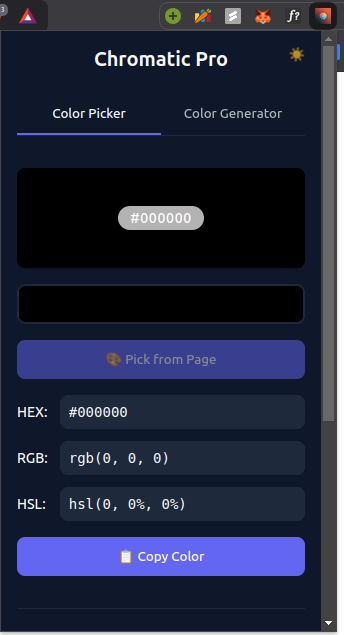
- Color Picker: Pick any color from a webpage directly or choose a color from a color wheel.
- Color Conversion: Instantly convert colors between HEX, RGB, and HSL formats.
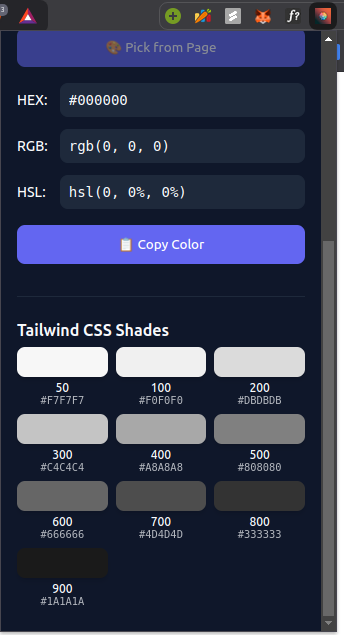
- Tailwind CSS Shade Generator: Automatically generate different shades of a color in the Tailwind CSS format, which is great for developers using Tailwind.
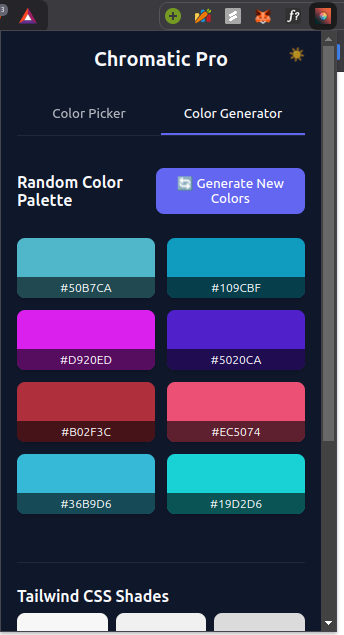
- Random Color Generator: Create random colors for inspiration or use in your projects.
- Copy to Clipboard: Copy color values with one click to paste them into your project.
- Simple Interface: It’s easy to use, even if you’re not a color expert.
How we built it
I built Chromatic Pro as a Chrome Extension using a few simple web technologies:
- HTML5: To create the basic structure of the popup window and settings page.
- CSS3: To style the interface and make sure it’s clean and easy to navigate.
- JavaScript: This is where all the logic happens—converting colors, picking colors from the page, and generating color shades.
- Clipboard API: This made it possible for users to copy color values with just one click.
The process started by setting up the basic Chrome Extension, and then I added the color picker, conversion tools, and the shade generator. After that, I worked on improving the design to make the extension simple and fun to use.
Challenges we ran into
Creating a Chrome Extension was a fun challenge, but there were a few things I had to figure out:
- Color Conversion: I had to learn how to properly convert colors between HEX, RGB, and HSL. There are math formulas involved, and getting the conversion right took some time.
- Chrome Extension Limitations: Chrome Extensions come with specific rules (like permissions and security restrictions), so I had to make sure everything worked within those boundaries.
- Picking Colors from Webpages: I needed to figure out how to pick colors from any webpage, even when the colors weren’t easy to spot or were transparent.
- Designing the Interface: I had to make sure the extension’s design was simple but functional. The popup space in Chrome is small, so I had to keep everything easy to use without overcrowding it.
Accomplishments that we're proud of
There are a few things I’m really proud of with Chromatic Pro:
- Tailwind CSS Shade Generator: This feature makes it so easy to get color shades in the exact format Tailwind CSS uses, which is perfect for developers.
- Color Picker: The ability to pick colors right from any webpage is super helpful and works really smoothly.
- Clipboard Support: I love how easy it is to copy color values to the clipboard with just one click. It makes integrating colors into projects so much faster.
- Simplicity: The extension is lightweight and fast, which makes it easy to use without being distracted by unnecessary features.
What we learned
Building Chromatic Pro taught me a lot:
- Chrome Extension Development: I learned how to create a Chrome Extension, handle permissions, and use the Chrome Extension APIs effectively.
- Color Theory: I had to learn more about how colors work and how to convert between different color models (HEX, RGB, HSL) accurately.
- User-Centered Design: Creating something that was both useful and easy to use for people was a big takeaway. I had to make sure it wasn’t too complicated and that anyone could figure it out.
What's next for Chromatic Pro
There are a few things I plan to add to Chromatic Pro in the future:
- Palette Saving: I want users to be able to save their favorite color palettes, so they don’t have to start from scratch every time.
- Color Scheme Generator: I’d love to add a feature that automatically generates complementary or matching color schemes based on the color you select.
- Accessibility Features: I’d like to add tools for checking color contrast and options for colorblind users to make it more inclusive.
- Customization Options: In the future, I might add ways for users to customize the interface, like switching to dark mode or choosing their own themes.
