-
-
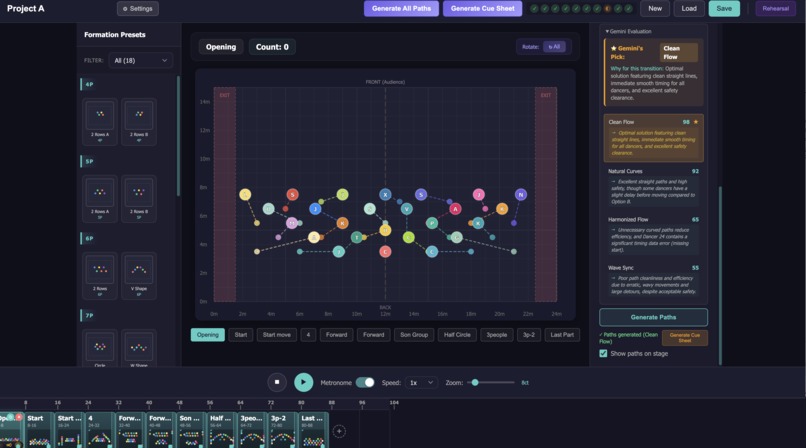
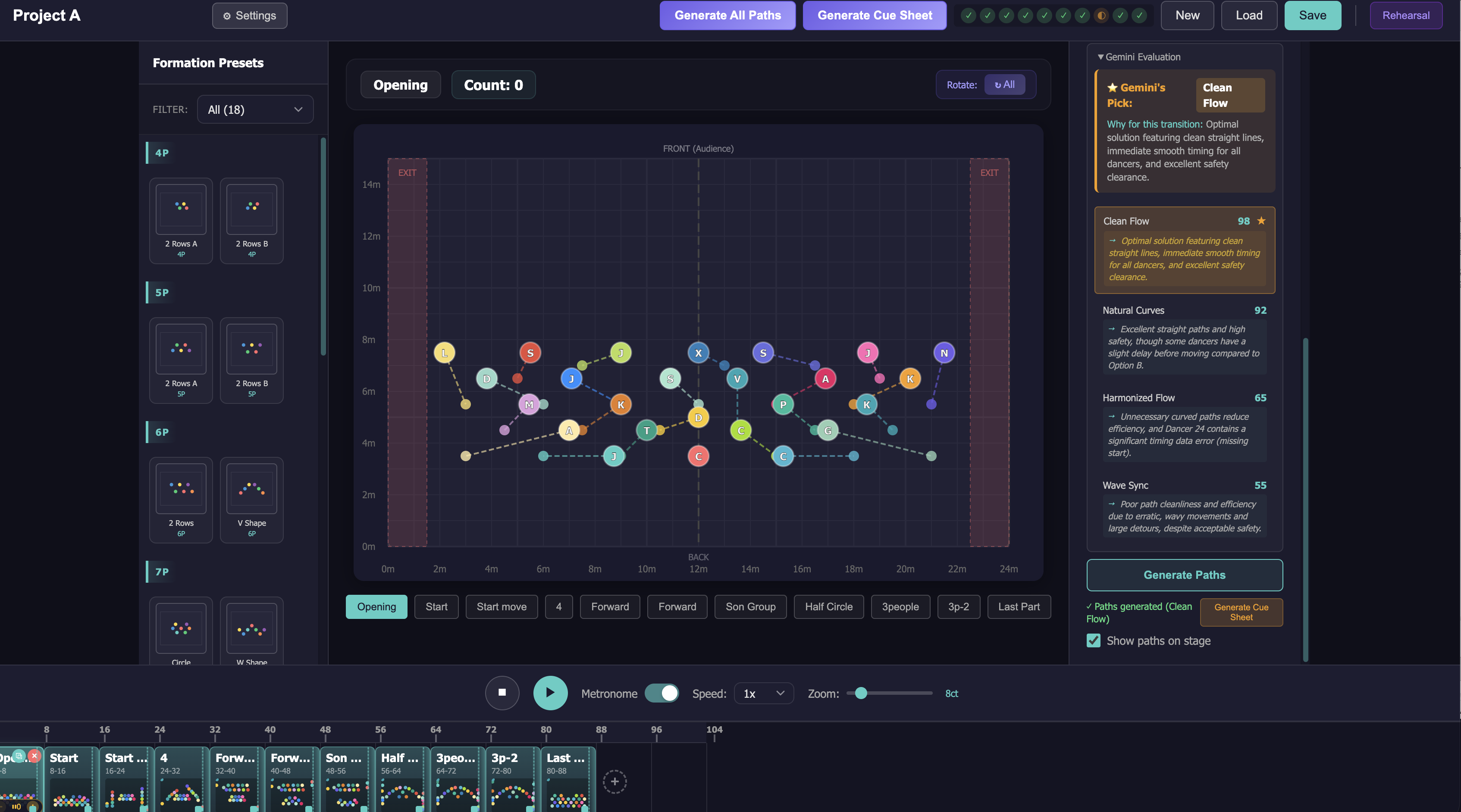
Main Screen: Path Generation and Gemini’s Reasoning on Formation Properties
-
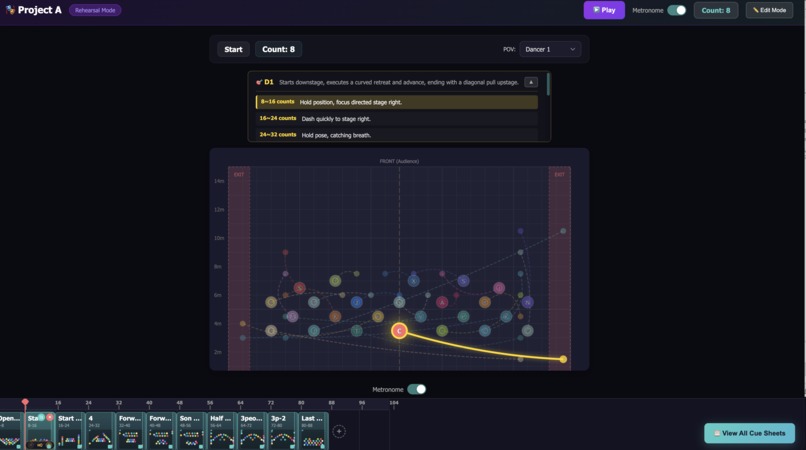
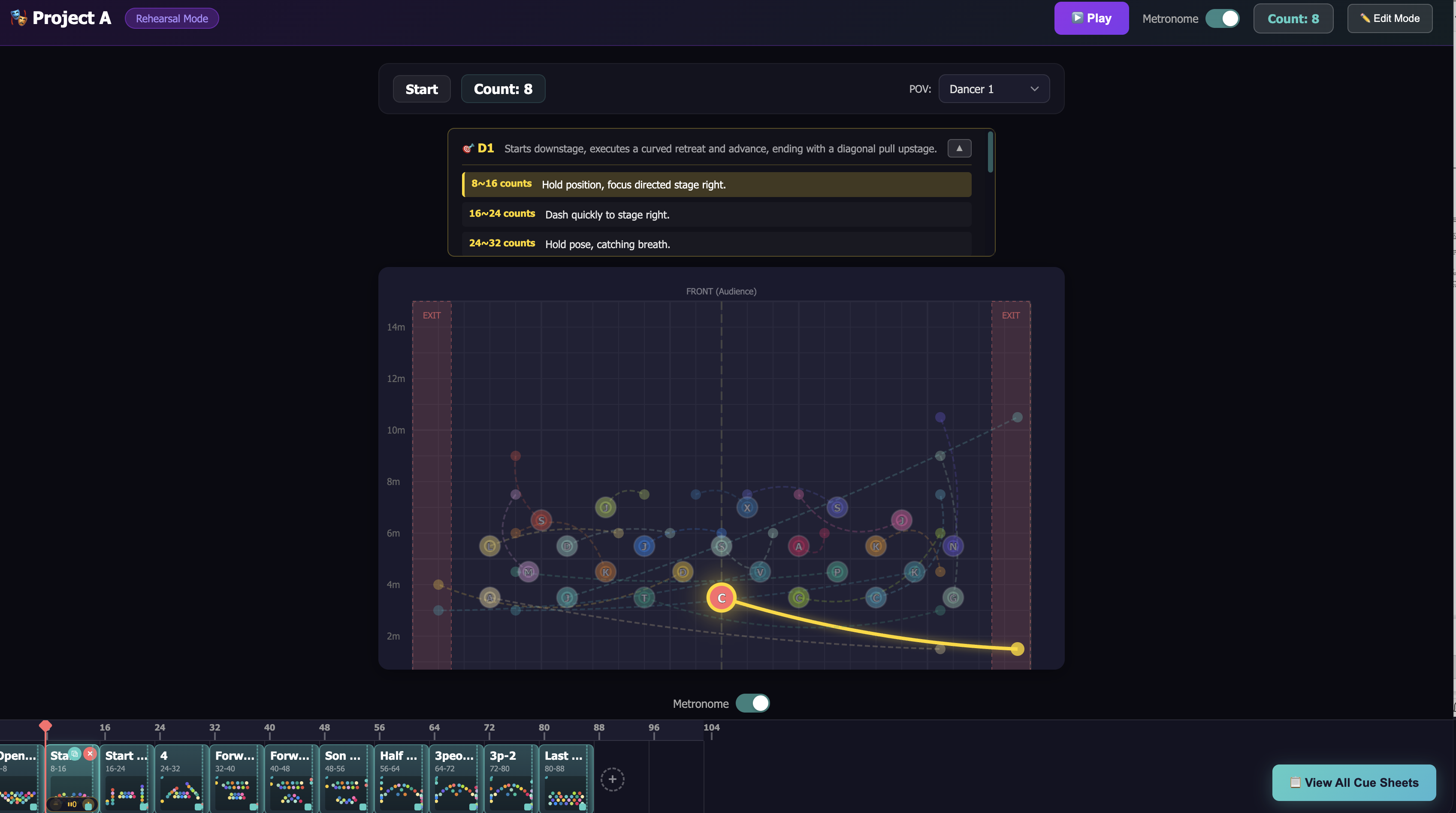
Rehearsal Mode – Dancer-centric POV showing formation-by-formation cues.
Inspiration
If you've ever been on a large dance team, you know the pain, It's 3 AM, everyone's exhausted, and you're still trying to nail down formations.
I was part of a 20+ member dance crew preparing for a World of Dance competition. We had 4 choreographers splitting the work by sections, which meant each person was responsible for directing 20+ dancers through complex formation changes alone.
As a dancer, I had three constant frustrations:
- Where do I stand? I could never confirm my exact position outside of practice.
- Where do I go next? Transitions between formations were explained verbally and forgotten instantly.
- Who am I going to crash into? Collision paths were discovered the hard way by actually colliding.
The only way to figure any of this out was to physically be in the room, moving together. There was no tool that let us visualize, plan, or rehearse formations outside of practice.
So we built one.
What It Does
ChoreoFlow transforms dance formations into AI-generated cue sheets, delivering personalized rehearsal instructions to every dancer automatically.
Think of it as Google Maps for dancers on stage. You set the formations, and ChoreoFlow calculates collision-free paths while generating step-by-step cue sheets so every dancer knows exactly where to go and when.
The Real Problem: Communication Breakdown
In performances with 20+ dancers, choreographers face a nearly impossible task. A single choreographer (or a small team) must plan the movements and formations for dozens of performers. But the challenge isn't just planning—it's communicating those plans.
When you're Dancer #15 in a 20-person formation, you don't inherently know:
- Where you should be positioned
- Who's supposed to be next to you
- Where you're moving to in the next formation
- How the overall formation even looks from above
The choreographer can't give individual cues to all 20 dancers during rehearsal. There's simply not enough time. So dancers learn through repetition, trial and error, and muscle memory alone. The gap between the choreographer's vision and each dancer's understanding creates hours of wasted rehearsal time.
How ChoreoFlow Bridges the Gap
We use Gemini API to automate the hardest part of choreography: translating spatial data into clear, personalized instructions that every team member can understand.
AI-Powered Cue Sheet Generation
The core communication tool. Gemini transforms raw $(x, y)$ coordinates into natural language instructions tailored to each dancer:
- "Start at center-left, slide two steps stage-right, then curve behind the front line."
- "Watch for Dancer #8 crossing from your left at count 4."
- "Slow down in the second half to avoid crowding near center."
- "End position: between Dancers #3 and #12, slightly upstage."
No more spreadsheets. No more verbal explanations to 20 people one-by-one. Every dancer gets a personalized instruction sheet they can review before rehearsal.
AI Path Evaluation & Team Alignment
Helps choreographers make better decisions faster. When you generate paths using our 6 algorithms, Gemini analyzes each option and scores them on:
- Smoothness and flow
- Spacing balance
- Collision risk
- Visual appeal
This gives the choreography team objective data to discuss and choose the best transition together, instead of relying on gut feeling or running each option 10 times in the studio.
Rehearsal Mode: Individual POV
Each dancer switches to their personal view to see:
- Their own path visualization
- Their AI-generated cue sheet
- Their transitions formation-by-formation
Dancers arrive to rehearsal already knowing their marks. Choreographers spend less time explaining logistics and more time refining artistry.
How We Built It
Tech Stack
- React 19 + TypeScript + Vite for fast iteration with type safety
- SVG-based Stage Visualization : custom-built component with coordinate transformation, grid overlay, and smooth dancer rendering
- Google Gemini API for AI-powered cue sheet generation and path quality evaluation
Path Algorithms : The Math Behind the Motion
The core challenge of formation transitions is: given $n$ dancers in formation A and $n$ target positions in formation B, calculate smooth, collision-free paths for everyone simultaneously.
For Natural Curves, we generate cubic Bézier paths. Each dancer's trajectory is defined by:
$$\mathbf{B}(t) = (1-t)^3 \mathbf{P}_0 + 3(1-t)^2 t \, \mathbf{P}_1 + 3(1-t) t^2 \, \mathbf{P}_2 + t^3 \mathbf{P}_3, \quad t \in [0, 1]$$
where $\mathbf{P}_0$ and $\mathbf{P}_3$ are the start/end positions, and $\mathbf{P}_1$, $\mathbf{P}_2$ are control points offset perpendicular to the direct path to create natural S-curves.
Collision detection runs at discrete time steps. For each pair of dancers $(i, j)$ at time $t$, we check:
$$| \mathbf{B}i(t) - \mathbf{B}_j(t) | > r{\text{safe}}$$
where $r_{\text{safe}}$ is an adjustable safety radius. When violations are detected, control points are iteratively adjusted to resolve conflicts.
Gemini Integration
We use Gemini in two key ways:
Cue Sheet Generation : We serialize path data (start/end coordinates, waypoints, timing) into structured prompts. Gemini interprets spatial relationships relative to stage landmarks and outputs human-readable directions with musical count references. This bridges the gap between computational paths and what dancers actually need to hear in rehearsal.
Path Quality Scoring : After algorithms generate candidate paths, Gemini evaluates them holistically — assessing factors like visual symmetry, audience-facing aesthetics, and whether transitions feel "natural" from a choreographic perspective. This gives choreographers a second opinion that goes beyond pure math.
Challenges We Ran Into
Path Collision Avoidance Was Harder Than Expected. Ensuring 20+ dancers never occupy the same space at the same time is a deceptively hard problem. Linear paths are simple to check, but curved paths with varying speeds create edge cases everywhere. We implemented time-stepped collision detection with adjustable safety radii, but tuning the resolution (too few steps = missed collisions, too many = performance hits) took significant iteration.
Smooth ≠ Simple. Our first interpolation attempts were either too rigid (linear) or too chaotic (high-degree polynomials). Cubic Bézier curves hit the sweet spot, but choosing good control points (especially when avoiding collisions ) required balancing mathematical constraints with visual aesthetics.
Real-Time Performance with Multiple Algorithms. Running 6 different path algorithms simultaneously for 20+ dancers risked freezing the UI. We implemented progressive generation with visual progress indicators and Web Workers to keep the interface responsive during heavy computation.
Translating Math to Stage Language. Coordinates mean nothing to dancers. Getting Gemini to consistently produce useful, accurate stage directions (using terms like "stage-left," "downstage," "behind the front line") from raw $(x, y)$ data required careful prompt engineering and iterative refinement.
Accomplishments That We're Proud Of
- Built 6 fully functional path algorithms from scratch, each implementing different computational geometry concepts
- Gemini-powered cue sheets that turn coordinate arrays into directions a dancer can actually follow in rehearsal
- Smooth real-time playback with metronome sync formations transition on the beat
- POV Rehearsal Mode that lets individual dancers see their path from their perspective
- Went from "we practice until 3 AM because formations are chaos" to a working tool in under a week
What We Learned
Computational geometry is beautiful and brutal. Implementing Bézier curves and collision detection from scratch gave us a deep appreciation for the math behind motion planning — and for how many edge cases exist when you move from theory to practice.
Prompt engineering is its own skill. Getting Gemini to reliably produce stage-appropriate language required understanding both the AI's tendencies and the domain-specific vocabulary of dance. It wasn't just "send coordinates, get directions" .It took structured prompts, examples, and iteration.
The best tools solve real pain. Every design decision was informed by actual frustrations from our dance competition experience. That grounding kept us focused and helped us prioritize features that matter over features that just sound cool.
What's Next for ChoreoFlow
- Music Integration : Sync formations directly to audio tracks with beat detection, so transitions are choreographed to specific moments in the song
- Collaborative Editing : Real-time multi-user editing so all choreographers can work on the same piece simultaneously
- Deeper Gemini Integration : Natural language commands like "move the back row into a diamond" or "create a ripple effect from center" to edit formations conversationally
- Export to Video : Generate shareable rehearsal videos with annotated paths that dancers can review on their phones
- Mobile Companion App : A dancer-facing app that shows only your cue sheet and your POV, synced to the choreographer's master plan
Built With
- geminiapi
- node.js
- pathgenerationalgorithms
- railway
- react
- typescript
- vercel
- vite

Log in or sign up for Devpost to join the conversation.