-
-
chinwag logo
-
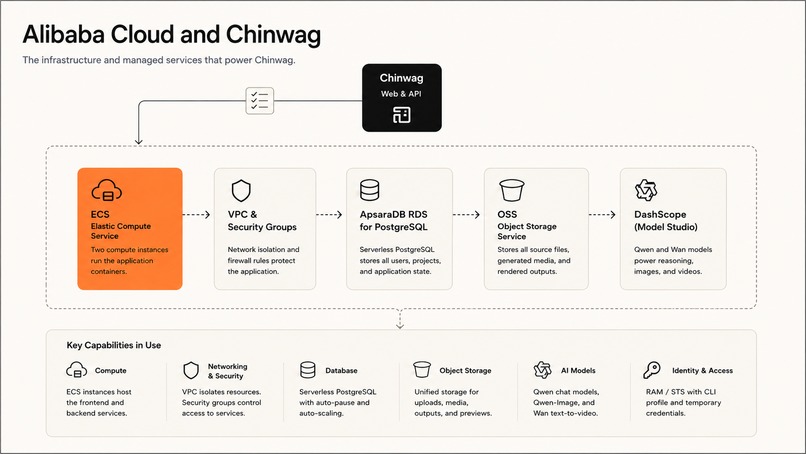
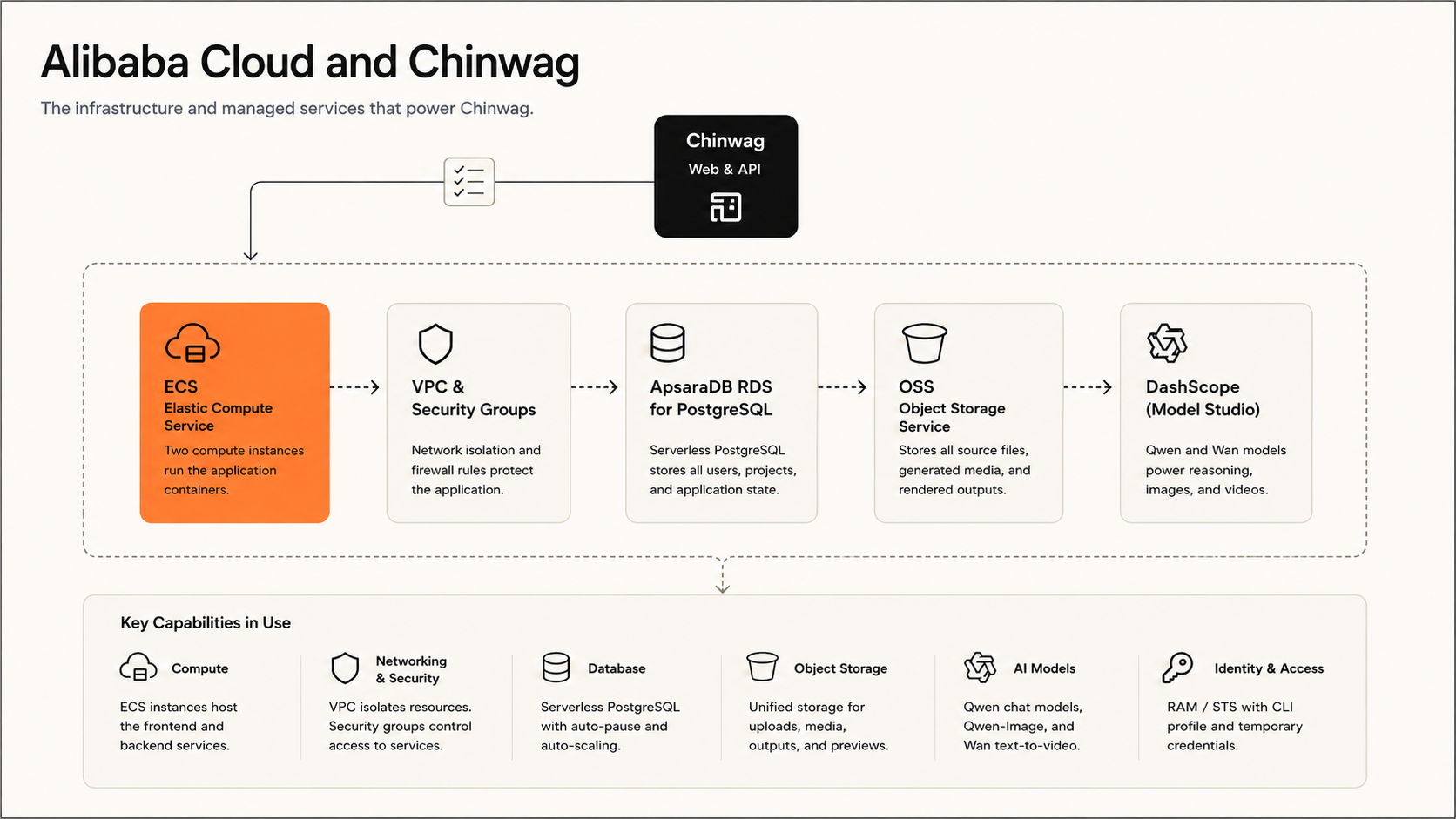
alibaba cloud setup
-
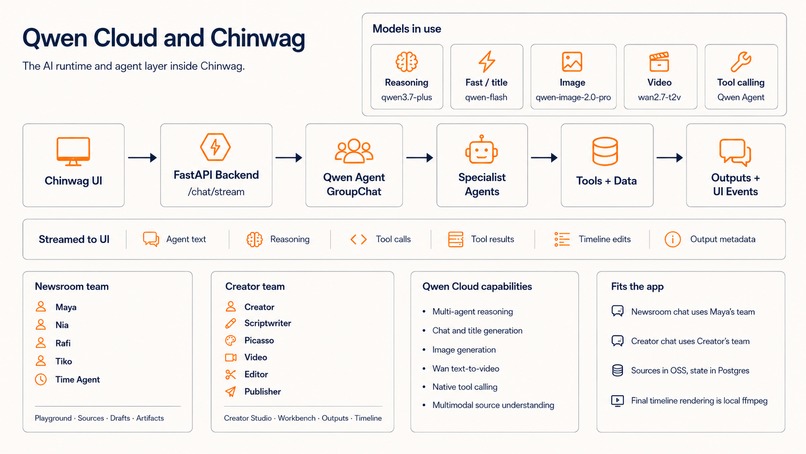
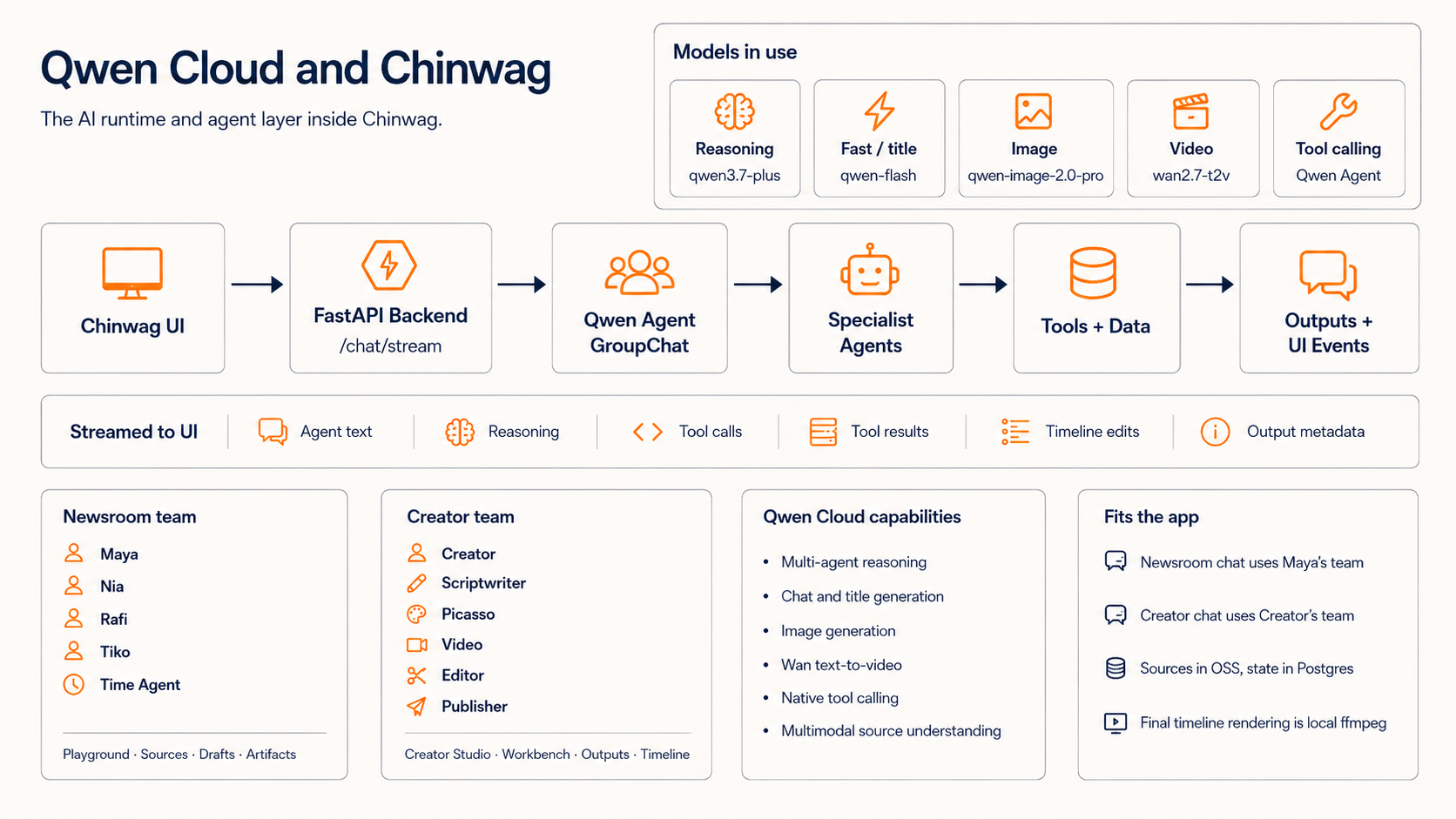
chinwag -qwen intergration
-
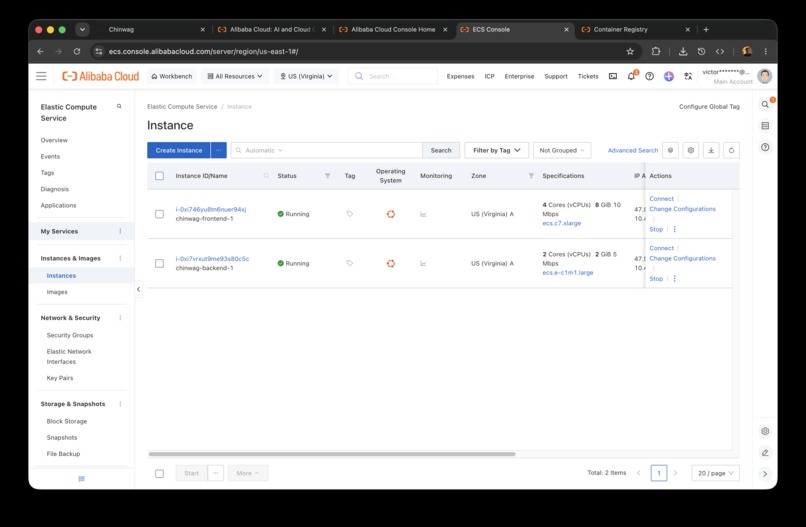
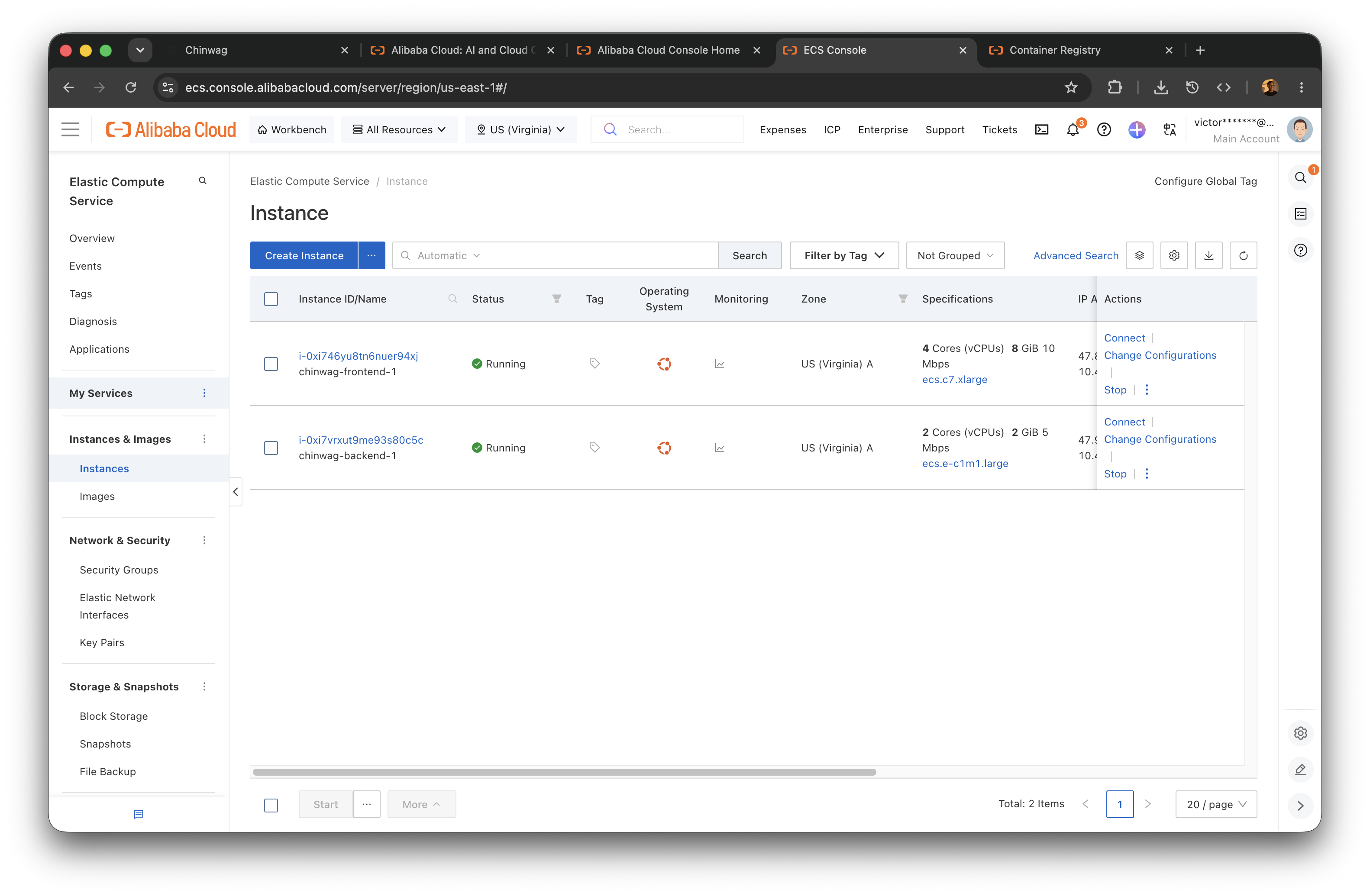
frontend and backend instance
-
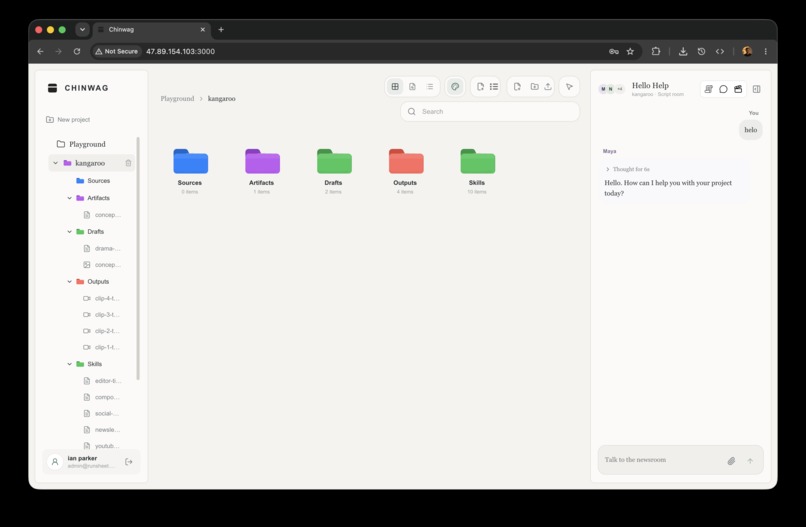
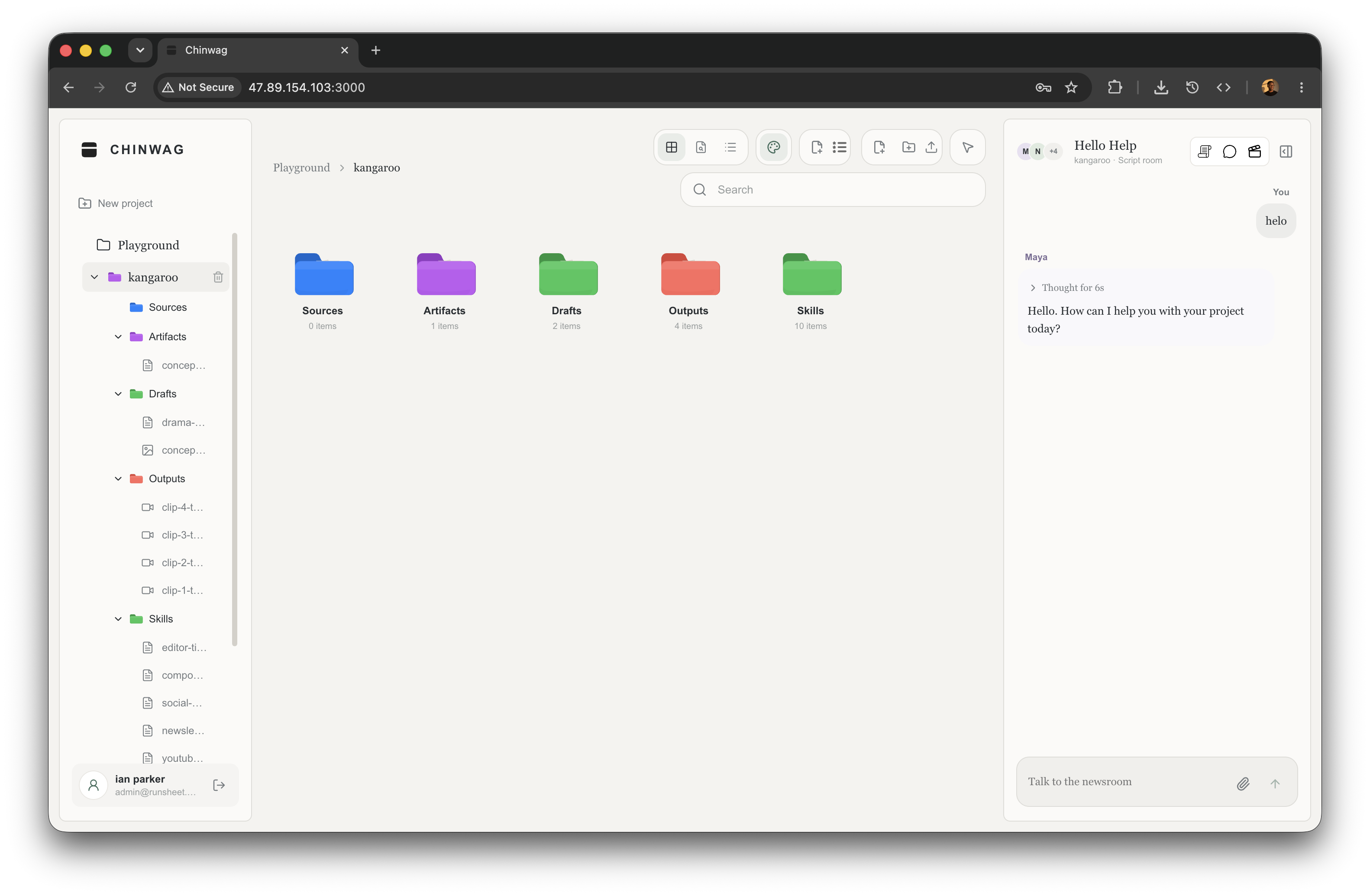
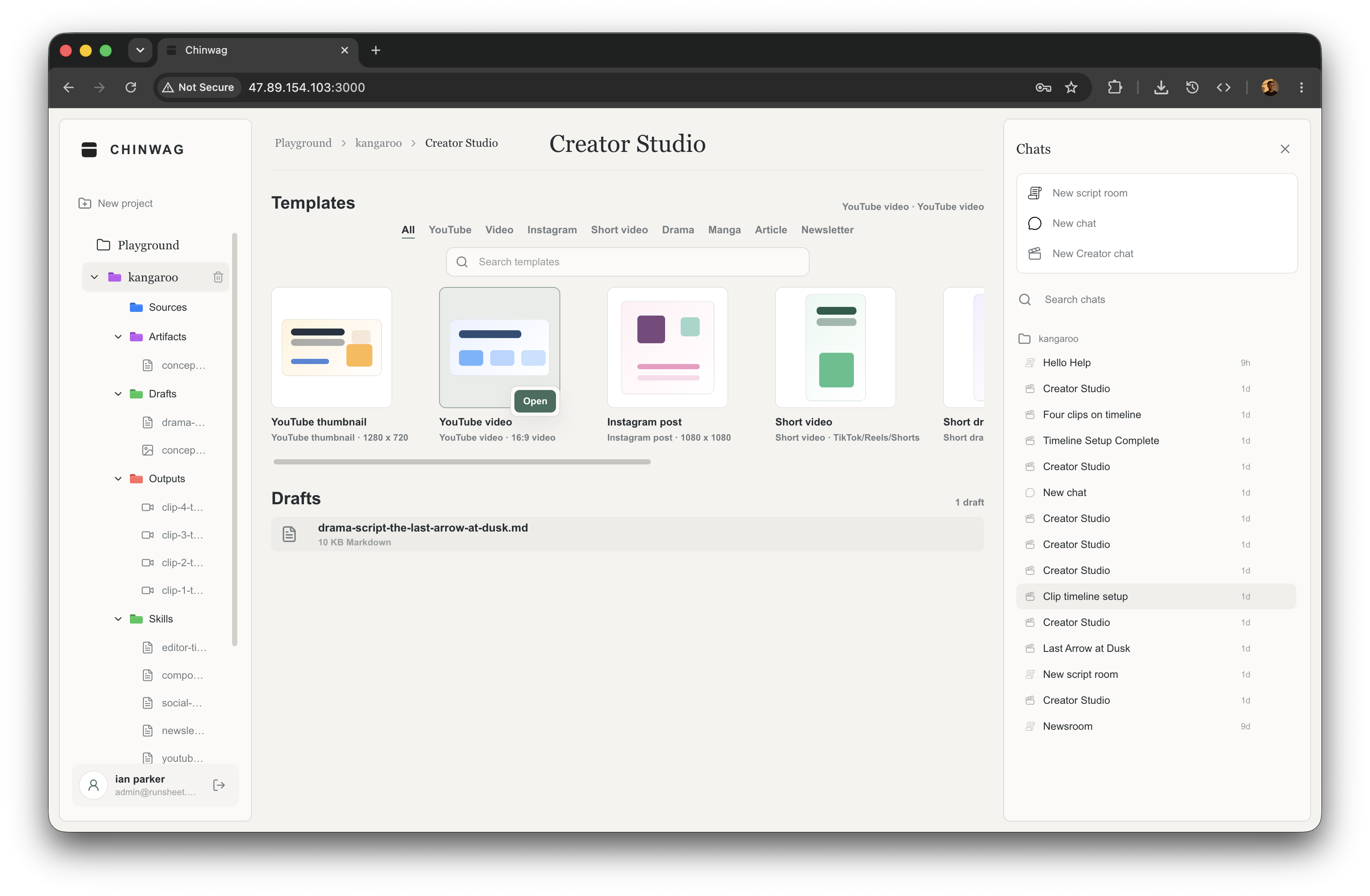
chinwag playground
-
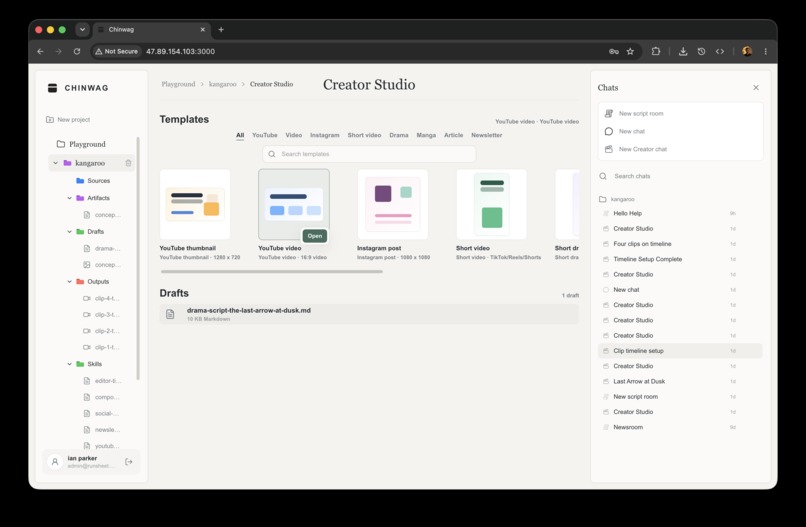
chinwag studio
-
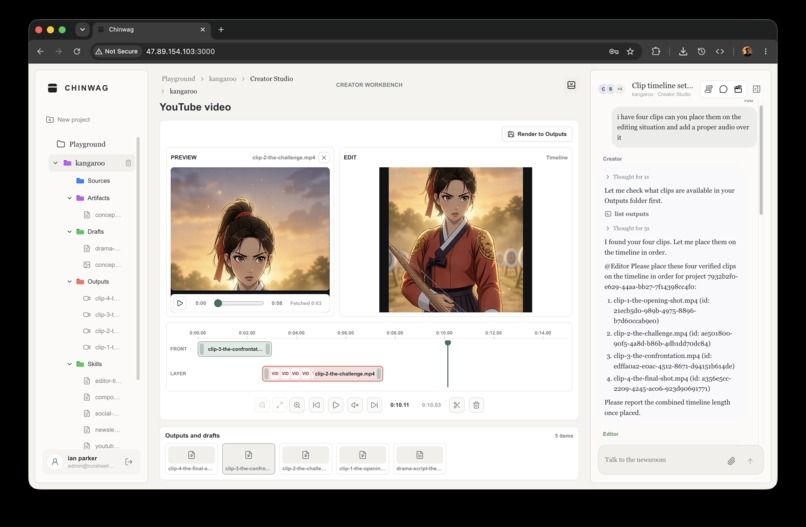
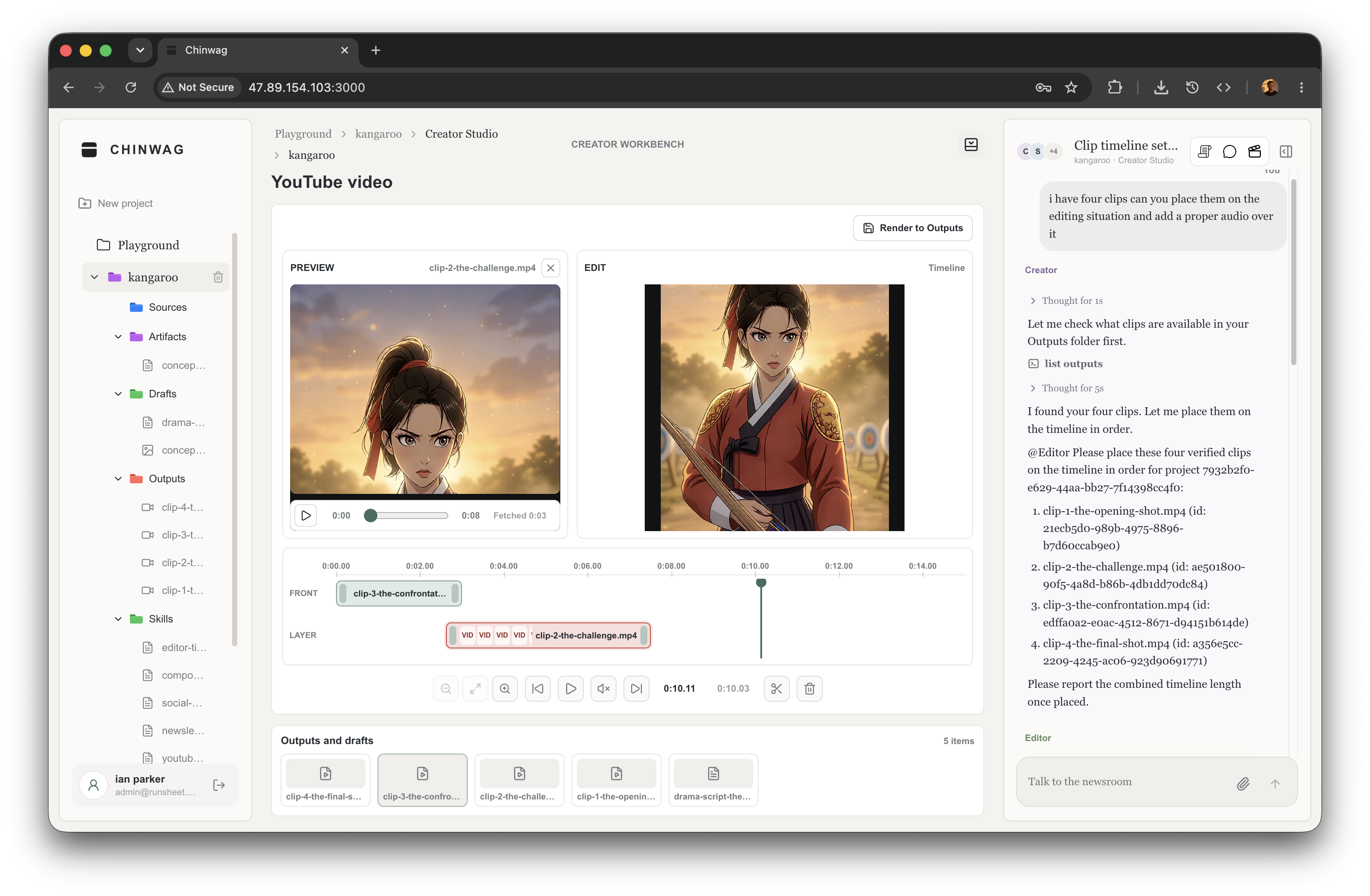
chinwag editing timeline
Chinwag: An AI Showrunner Workspace for Research-Backed Media Production
Chinwag is a source-grounded AI production system built on Qwen and Alibaba Cloud. It coordinates research and production agents to move a project from evidence to a rendered, publishable output while preserving the sources, prompts, assets, and edit decisions behind it.
Most AI media workflows optimize for the first generation. Chinwag is engineered for everything that must happen next. Generated media is normalized, stored, registered as project state, verified before another agent can depend on it, assembled into a structured timeline, and rendered back into the same workspace. A model response is not treated as finished work; it must become a durable production asset.
Production architecture
- Reasoning and orchestration:
qwen3.7-plusacross two bounded Qwen Agent teams- Media generation:
qwen-image-2.0-proandwan2.7-t2vthrough DashScope- Durable state: PostgreSQL project metadata with OSS-backed sources and outputs
- Runtime: Separate Next.js and FastAPI containers validated on Alibaba Cloud ECS
System invariant: A generated clip cannot enter the timeline until it has been normalized, persisted, registered, and verified as a project output.
Inspiration
AI media has a handoff problem. Research tools can understand a source. Generation models can create an image or clip. Editors can assemble media. Publishing tools can prepare release copy. But when work moves between them, the context that made the asset useful is often lost.
A report becomes notes with no path back to the source. A script becomes a collection of prompts. Generated clips arrive without stable IDs, continuity history, or edit state. The final package becomes a folder of files whose relationship to the original evidence exists only in chat history.
Chinwag was built around those handoffs. The workspace carries evidence into writing, writing into media generation, verified media into editing, and the finished edit into publishing. Specialist agents narrow the decision at each stage; project files preserve what the next stage needs; deterministic checks decide whether an output is safe to use. The user experiences one production room, even though the work crosses models, tools, storage systems, and runtimes.
What it does
A user can begin with a report, an uploaded source, a web link, a draft, or a premise. The Newsroom reads and researches that material, then produces evidence-backed artifacts and drafts. Creator turns approved work into a script, storyboard, visual direction, and a bounded clip plan.
Picasso creates still assets with qwen-image-2.0-pro. Video generates one wan2.7-t2v clip at a time and verifies the saved output before the sequence advances. Editor places only verified output IDs into the live timeline. Publisher prepares the titles, captions, descriptions, articles, metadata, and release material around the finished work.
Each handoff becomes project state rather than another message in a transcript:
| Production stage | What remains in the project |
|---|---|
| Evidence | Sources, extracted content, research artifacts, and source-grounded notes |
| Direction | Scripts, storyboards, shot lists, continuity anchors, and bounded clip plans |
| Media | Generated images and normalized, verified Wan video outputs |
| Edit | Stable clip IDs, ordered timeline state, trims, layers, and rendered MP4s |
| Release | Titles, captions, descriptions, articles, metadata, and publishing packages |
The result is not a loose download. It is a typed project output with a name, kind, storage path, prompt context, and stable ID that agents and editors can reopen without reconstructing the production history from chat.
How we built it
The architecture grew from one rule: a successful model call is only an intermediate state.
Source material
      │
      ▼
Evidence-aware research ──► script / storyboard / clip plan
                                      │
                                      ▼
                              one Wan task per clip
                                      │
                           download → transcode → probe
                                      │
                                      ▼
                              persist in OSS + Postgres
                                      │
                              verify the saved output
                                      │
                                      ▼
                         append / replace timeline state
                                      │
                                      ▼
                         validate → ffmpeg render → Outputs
The application is split into a Next.js workspace and a FastAPI agent service. PostgreSQL stores users, projects, folders, files, and chat state. Alibaba Cloud OSS stores the heavier binary objects: uploaded sources, images, audio, generated clips, and rendered video.
This follows the natural boundary of the data: relational state remains queryable while media remains object storage. Alibaba Cloud describes OSS as object storage for unstructured data including documents, images, audio, and video.
The agent layer uses Qwen Agent Assistant, GroupChat, BaseTool, and explicit function_list capability sets. That is important: each worker can call only the tools needed for its job. Qwen Agent's own extension model defines custom tools through BaseTool and gives each assistant an explicit tool list. Chinwag uses that primitive to make agent roles enforceable in code rather than merely suggested in prompts.
Each model has a specific job
Chinwag does not send every task to one model. Model choice follows the shape of the work:
qwen3.7-plusis the shared reasoning model for the Newsroom and Creator teams. It handles planning, source-grounded synthesis, multimodal source understanding, delegation, and tool use.qwen-image-2.0-prois Picasso's default image model for thumbnails, key art, reference frames, and other still assets.wan2.7-t2vis the video model. Chinwag uses its 2–15 second generation range as a production boundary and builds longer sequences from verified clips.qwen-flashhandles the small utility task of naming chats, where a full reasoning run would add cost without improving the result.
The distinction is architectural rather than cosmetic. High-context reasoning stays with qwen3.7-plus; specialized media work goes to the corresponding generation model; and a short, low-cost model handles a bounded utility request.
Custom skills turn instructions into runtime policy
In Chinwag, skills are project-scoped operating procedures. An agent reads the relevant skill through a restricted Qwen tool before it begins work, so the method travels with the project instead of depending on a growing system prompt or the agent's recollection of an earlier conversation.
Three examples are provisioned with every project:
nia-source-reader-skill.mddefines typed source selection and evidence rules. Nia must use the text/PDF reader for textual material and the multimodal reader for images. If a read fails, it must stop rather than infer content from metadata.video-creator-skill.mdconstrains Video to one production-ready clip, then requiresgenerate_video_assetfollowed byverify_video_output. One retry is allowed for the same clip; a second verification failure stops the sequence.editor-timeline-skill.mdrequires stable output IDs and a complete order before Editor can emit an append or replace timeline mutation.
The skill readers themselves are capability-scoped. Video receives read_video_creator_skill but cannot browse unrelated project skills. Editor receives read_editor_timeline_skill. Nia receives read_source_reader_skill. The general drafting worker can use broader list_skills and read_skill tools when the assignment genuinely requires them.
Worker       Required skill                 Allowed production tools
──────────   ─────────────────────────────   ─────────────────────────────────────
Nia         source-reader method            list/read source, write artifact
Video       video-creator method            generate clip, verify saved output
Editor      editor-timeline method          open timeline, place verified clips
Publisher   publication role contract       read materials, write final package
The distinction is useful in practice. A prompt can suggest how an agent should behave; the combination of a required skill reader and a narrow function_list determines what it can actually do. Chinwag's extension point is this custom Qwen tool and skill system. The implementation is visible in backend/tools/skills.py, the default skill definitions in src/lib/projectDefaults.ts, and the role-specific capability lists in backend/agents.
Why the system uses multiple agents
A source-reading task and a timeline mutation carry different kinds of risk. Source work must preserve evidence and stop when content cannot be read. Production work must preserve asset identity, ordering, provider constraints, and edit state.
Putting both inside one universal agent would give a single context every instruction, every tool, and every intermediate result, even when most of them are irrelevant to the next decision. This is not only a token-budget concern: the original Lost in the Middle study found that language models can use long contexts unevenly depending on where relevant information appears. Chinwag therefore keeps durable knowledge in project artifacts and brings the relevant method, evidence, and tools into the active stage.
Chinwag instead uses two Qwen GroupChat teams. The newsroom is led by Maya and includes Nia for source reading, Rafi for research, a drafting worker, and a time-aware worker. Creator mode is led by Creator, with Scriptwriter, Picasso, Video, Editor, and Publisher. Each worker receives the context and capabilities required for one stage, while durable artifacts carry knowledge between stages.
One universal agent                     Chinwag's bounded teams
──────────────────────────────          ──────────────────────────────
all sources                              source evidence
all research                                  │
all production instructions              Newsroom
all generation tools                         │ research artifact / draft
all timeline state                           ▼
all publishing tools                     Creator lead
        │                                    │
        ▼                              specialist handoffs
one expanding context                 ┌───────┼────────┬────────┐
one expanding capability surface      Script  Image   Video   Edit/Publish
This structure does three things at once. It reduces context competition, because a video worker does not need the full research tool history to generate one approved clip. It narrows authority, because Editor cannot generate media and Video cannot mutate the timeline. And it improves diagnosis, because every streamed action has a named worker, tool, and result rather than appearing as an opaque step inside one large run.
Shared project context
        │
        ├── evidence needed now ──► the active worker's context
        ├── method needed now ────► the worker's required skill
        └── actions allowed now ──► the worker's function_list

The user still experiences one production room; the system avoids one unbounded agent.
The agents are specialized by failure contract as much as by job title. Scriptwriter cannot generate video. Video cannot quietly edit a timeline. Editor cannot invent a missing clip. Nia cannot produce source-backed claims without successfully reading the source. The lead agent coordinates these boundaries and passes durable file IDs instead of relying on conversational memory alone.
Chinwag also avoids treating multi-agent as automatic parallelism. The benefit here is specialization: the right worker receives the right capability surface. The video path remains sequential because clip 2 should not begin before clip 1 has been saved and verified. The architecture uses specialization where it improves context and control, and serialization where downstream correctness depends on an earlier result.
For the user, this still feels like one room. The lead agent chooses the specialist, the interface streams the handoff, and each result returns to the same project. The complexity is inside the capability boundary rather than pushed onto the person making the work. The orchestration is implemented in backend/newsroom_group.py and backend/agents/creator/team.py.
The token budget shapes the workflow
The track asks teams to maximize output quality under a limited token budget. In Chinwag, that constraint is handled by reducing unnecessary model work rather than shortening the final result indiscriminately.
Only the 12 most recent chat messages are carried into a new agent run. Older knowledge remains available as named sources, artifacts, drafts, skills, and outputs, so the system can retrieve the relevant file instead of repeatedly sending an ever-growing transcript. Skills are loaded by the worker that needs them, and each worker sees a narrow tool surface rather than the union of every capability in the application.
The lead agents also avoid repeated discovery calls once useful files are known. Handoffs contain the compact information required for the next stage—project ID, source or output IDs, filenames, order, continuity notes, and the production prompt—instead of replaying the entire research process.
Video makes the budget rule especially concrete. A clip prompt is kept under 120 words when possible. One generation call creates one clip. Wan task progress is polled through ordinary HTTP requests, not repeated Qwen reasoning turns. When the result is saved, verify_video_output performs a deterministic project lookup instead of asking another model to judge whether the operation probably succeeded.
Successful clip
plan → one generation → deterministic verification → next clip
                       └── no regeneration, no success retry

Missing or unverified clip
plan → generation → verification fails → one regeneration → verify once
                                                        ├── success → continue
                                                        └── failure → stop exactly
A successful clip is never generated twice “just to be safe.” Only a failed verification permits one bounded regeneration; a second failure stops the sequence instead of consuming more tokens and provider calls. Small utility work follows the same discipline: chat naming uses qwen-flash, disables thinking, and caps the response at 20 tokens.
This preserves tokens for the places where reasoning changes quality—research, planning, continuity, and editorial decisions—while deterministic code handles polling, storage checks, media validation, and rendering.
Why video generation is deliberately sequential
The tempting implementation was one long request: give a script to a video model and ask for the finished piece. That made continuity hard to control and failure impossible to localize.
Chinwag instead compiles a production request into a compact clip plan. Every clip has a source beat, target length, exact size, a shared continuity anchor, and one production-ready prompt. Creator sends only the next missing clip to Video. Video creates an asynchronous Wan task, waits for completion, downloads the result, normalizes it to a browser-safe MP4, probes its duration, saves it, and verifies that the registered output can be found. Only then can Creator request the next clip. Editor is not called until all planned clips have been verified.
This mirrors the actual provider boundary. Alibaba Cloud documents Wan video generation as an asynchronous create task → poll result operation. Chinwag adds a transaction-like application protocol around that API:
PLANNED → REQUESTED → GENERATED → NORMALIZED → STORED → VERIFIED
                                                    │
                                                    └── only VERIFIED clips may enter editing

Any exact failure ──► stop the sequence ──► report the failed clip and stage
The novelty is not simply calling a video API. It is turning an eventually completed provider task into a durable, verified project artifact before downstream agents are allowed to depend on it. The relevant code is in backend/agents/creator/video.py, backend/tools/media.py, and backend/stores/artifacts.py.
The media pipeline continues after generation
A generated URL is not a production asset. Provider output must be downloaded before it expires, validated, made browser-compatible, persisted, streamed, edited, and rendered.
Chinwag transcodes generated clips to H.264 with yuv420p, AAC when audio exists, and MP4 +faststart. FFmpeg documents faststart as moving the MP4 index to the beginning of the file for better playback. The backend then uses ffprobe to record and validate duration. A zero-length or unreadable output fails explicitly.
For preview, the Next.js file route supports HTTP byte ranges and returns 206 Partial Content, Accept-Ranges, and Content-Range. The implementation also handles suffix ranges such as the final N bytes of a file.
That matters because browsers do not always consume video linearly. RFC 9110 defines range requests for partial representation transfer, and Alibaba's OSS GetObject API supports byte-range retrieval from stored objects.
Preview state and timeline state are deliberately separate. Opening a clip does not mutate the edit. Placing clips emits a typed timeline_edit payload with stable output IDs, order, and append or replace semantics. The browser applies that mutation immediately, while final rendering remains a server-side operation.
The render route validates every input before invoking FFmpeg: missing media, unsupported types, negative starts, invalid trims, unreadable duration, blank timeline gaps, and missing Outputs folders all produce specific errors. Valid timelines are normalized to a fixed canvas and frame rate, composited by layer order, mixed with available audio, encoded to H.264/AAC, and saved back into the same Outputs model. The full path is implemented in src/app/api/projects/[projectId]/outputs/render-video/route.ts.
Streaming is part of the observability model
Agent runs combine operations with very different latency profiles: source reads can be immediate, search can take seconds, and video generation can take minutes. Waiting for a single final response would make the application feel frozen and would hide the stage at which a failure occurred.
The FastAPI backend therefore streams typed Server-Sent Events for content, reasoning, tool calls, tool responses, tool errors, terminal errors, and completion. SSE uses the standardized text/event-stream format, allowing the backend to push incremental events over a normal HTTP response.
The frontend parses that stream incrementally and preserves tool identity, so a user can see whether the system is reading a source, generating a clip, verifying an output, or editing the timeline.
This is not cosmetic progress text. It is an operational boundary: tool failures remain tool failures instead of being flattened into a plausible assistant sentence. The stream contract lives in backend/main.py, backend/newsroom_group.py, and src/lib/newsroomStream.ts.
Hosting is part of the media pipeline
Chinwag is packaged as separate frontend and backend containers for Alibaba Cloud ECS, Alibaba's virtual-server compute service. The frontend uses a multi-stage Docker build to install dependencies, compile the Next.js standalone server with an explicit backend URL, and copy only the runtime output into the final image.
The backend image installs the deploy-only dependency set, compiles the Python package, exposes a health endpoint, and runs FastAPI through Uvicorn. Both images include the media binaries required by their runtime path.
The deployment architecture keeps responsibilities clear:
Browser
   │
   ▼
Next.js container on ECS ──────► PostgreSQL project metadata
   │                                      ▲
   │ SSE / API                            │ stable file records
   ▼                                      │
FastAPI agent container on ECS ──► Qwen / DashScope async tasks
   │
   ├──► OSS source and output objects
   └──► ffmpeg / ffprobe normalization and validation
The data plane is project-scoped. OSS keys are namespaced by user, project, source/output ID, and sanitized filename. The app can authenticate with direct access keys or temporary STS credentials, which Alibaba defines as short-lived, limited-privilege credentials for RAM roles.
The Next.js storage client refreshes STS credentials, retries once after credential expiry, distinguishes transient network failures from authorization failures, and wraps OSS operations in explicit timeouts. It does not silently swap storage backends.
The production scar that shaped this pipeline was simple: a generated Wan clip succeeded, but the deployed backend could not finish the asset because ffmpeg was absent. The fix was not another runtime fallback. Both Docker builds now install the binaries and execute ffmpeg -version and ffprobe -version during the build, so an invalid media image fails before deployment. See backend/Dockerfile, frontend.Dockerfile, and src/server/chinwagOssStorage.ts.
Challenges we ran into
Context grew faster than chat could safely carry it
A production request may depend on uploaded sources, research notes, a draft, a storyboard, visual references, generated outputs, and a partially assembled timeline. Treating that as chat history made consistency degrade as the project grew. The solution was to move authority out of the transcript and into typed project files. Chat coordinates the work; the workspace records it.
Continuity and reliability pulled in opposite directions
Longer prompts can describe more of a story, but a larger generation unit makes failures more expensive and continuity corrections less precise. Clip planning gives the system a shared style anchor while keeping every generation small enough to verify and replace independently.
Caching improved previews until URLs expired
Signed URLs made private OSS objects easy to preview, and caching removed unnecessary round trips. But a cached signed URL could outlive its authorization. Chinwag now treats the cache as a performance layer rather than the source of truth: previews can request a fresh signed URL once, while the authenticated byte-range route remains the durable media path.
A model success could still become a product failure
The missing-FFmpeg deployment bug made this concrete. The AI layer had completed its work, but the media pipeline could not normalize and inspect the result. That failure moved media binaries from an assumed host dependency into a build-time contract.
Accomplishments that we're proud of
Chinwag is not a chat interface with a media button. It has two bounded Qwen agent teams, project-scoped custom skills, typed tools, evidence-aware source handling, asynchronous media generation, sequential verification gates, durable OSS/PostgreSQL persistence, SSE tool observability, byte-range video delivery, structured timeline mutations, and a real FFmpeg render path.
The part I am most proud of is the system's refusal to call intermediate work finished. A clip is not complete because a provider returned a URL. It is complete when the file has been normalized, persisted, registered, and verified. A collection of clips is not an edit. It becomes an edit only after explicit timeline placement. A timeline is not a final video until validation and rendering succeed.
That discipline is what makes Chinwag feel less like a demo and more like the beginning of a production system.
What we learned
The biggest lesson was that an AI production tool needs a filesystem-shaped product around it. Creative work becomes useful when it can be named, found, reopened, traced, edited, and handed from one specialist to another.
The second lesson was that agent architecture is mostly capability design. Giving every agent every tool is easy; defining the smallest useful tool surface, the required operating skill, and the exact failure boundary produces a system that is easier to trust and debug.
The final lesson was that infrastructure participates in the creative workflow. Object keys, expired credentials, HTTP ranges, codecs, container packages, and event streams are not supporting details once the product promises a playable, editable result. They are part of the showrunner pipeline.
What's next for Chinwag
The next step is to make long-running production work durable across request and process boundaries: persistent job state, background workers, idempotent task recovery, and deeper run-level observability. The current sequence is explicit and fail-fast, but an in-flight generation should eventually survive a browser refresh or backend restart.
Continuity also deserves its own first-class model: reusable character sheets, location definitions, style bibles, reference-frame lineage, and clip-to-clip comparison. Timeline work will expand toward transitions, audio control, version history, and more render targets. Source-to-output provenance will become visible enough for an editor to answer not only “what made this?” but “which source, draft, prompt, model task, and revision made this?”
The roadmap follows five connected lines of work:
- Durable execution: persisted jobs, idempotency keys, resumable polling, and restart-safe state transitions.
- Continuity: character sheets, style bibles, reference lineage, and clip comparison.
- Provenance: source → artifact → draft → prompt → provider task → output traceability.
- Editing: transitions, audio control, version history, and additional render formats.
- Operations: structured run logs, provider latency metrics, task health, and failure analytics.


Log in or sign up for Devpost to join the conversation.