-
-
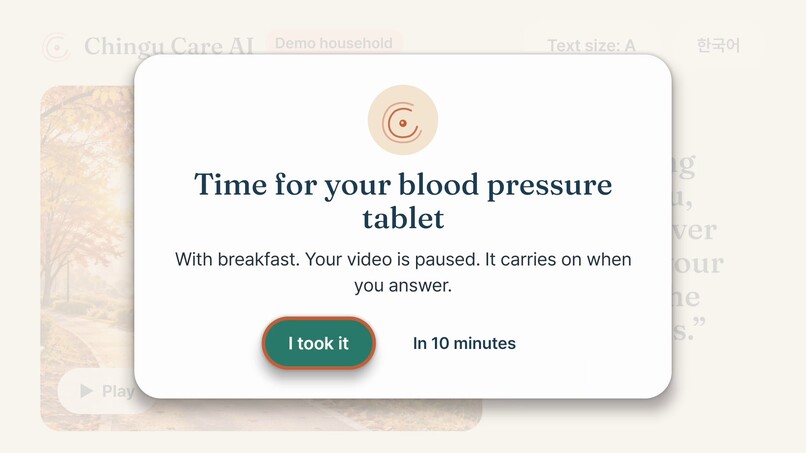
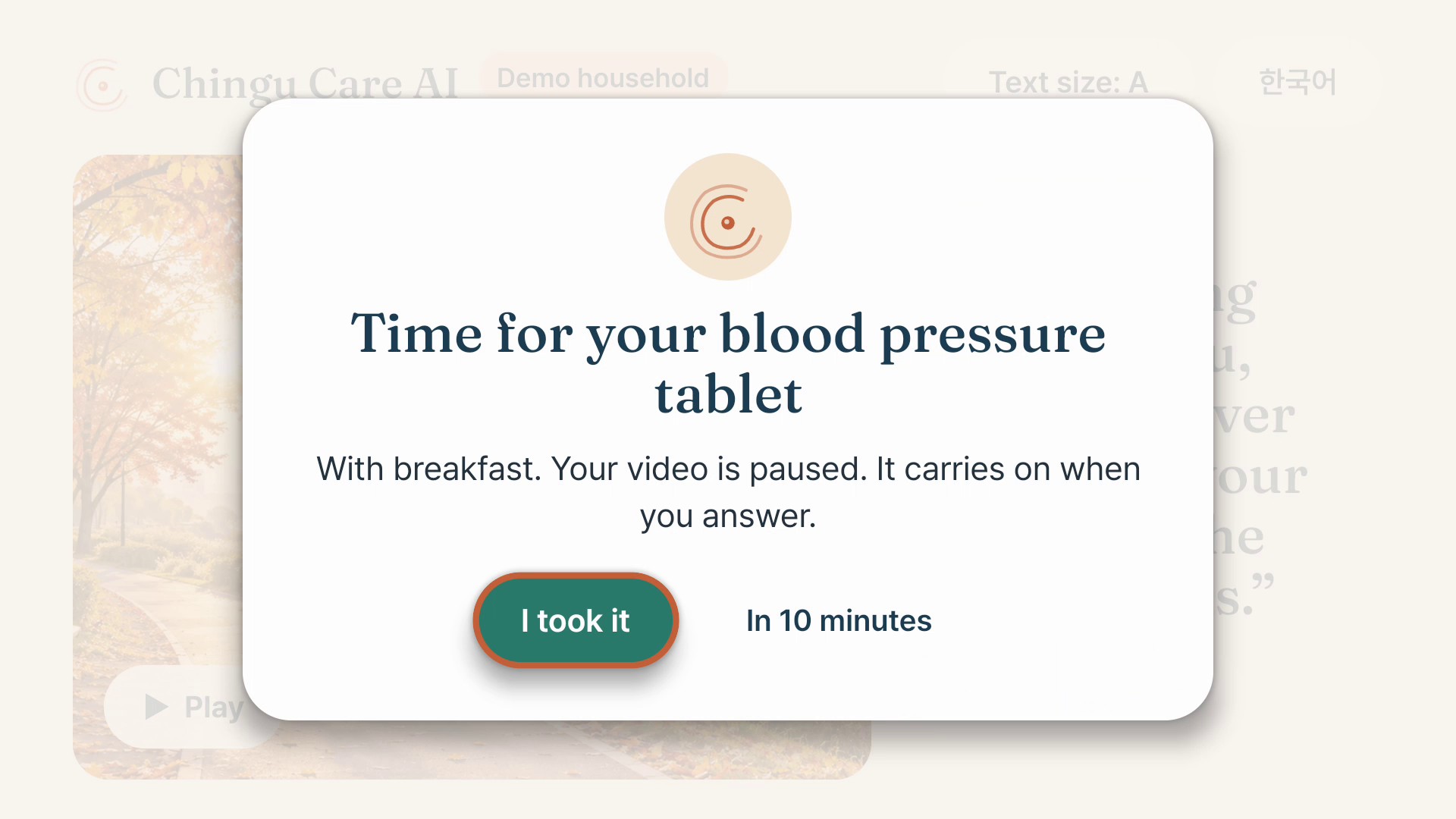
A medicine reminder pauses the video postcard and holds focus on "I took it"; the video resumes after she answers.
-
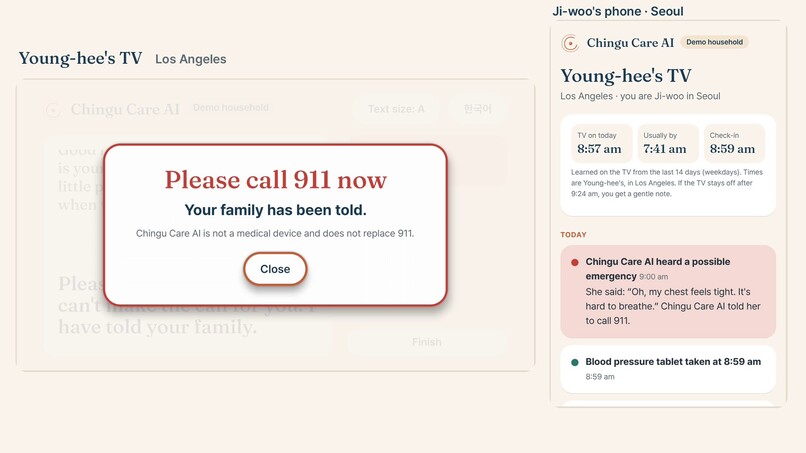
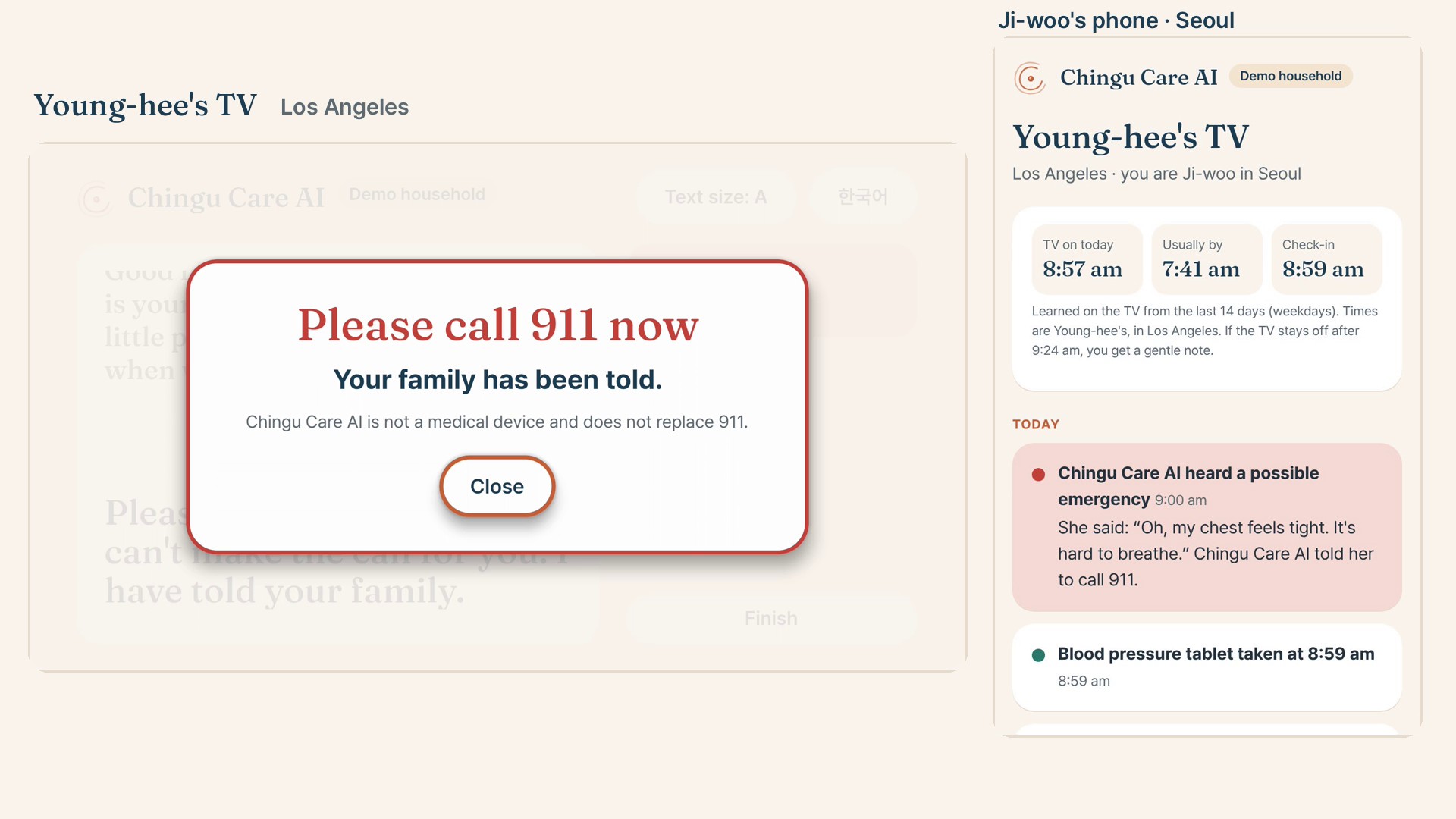
"My chest feels tight": the companion names 911 and the family is alerted in the same second.
-
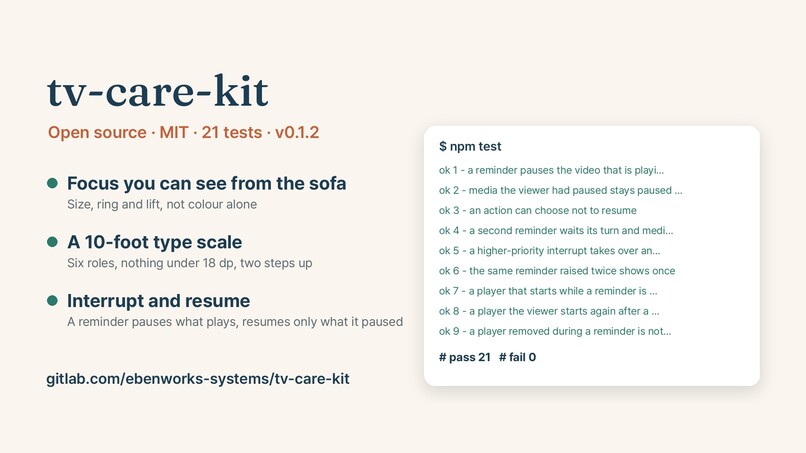
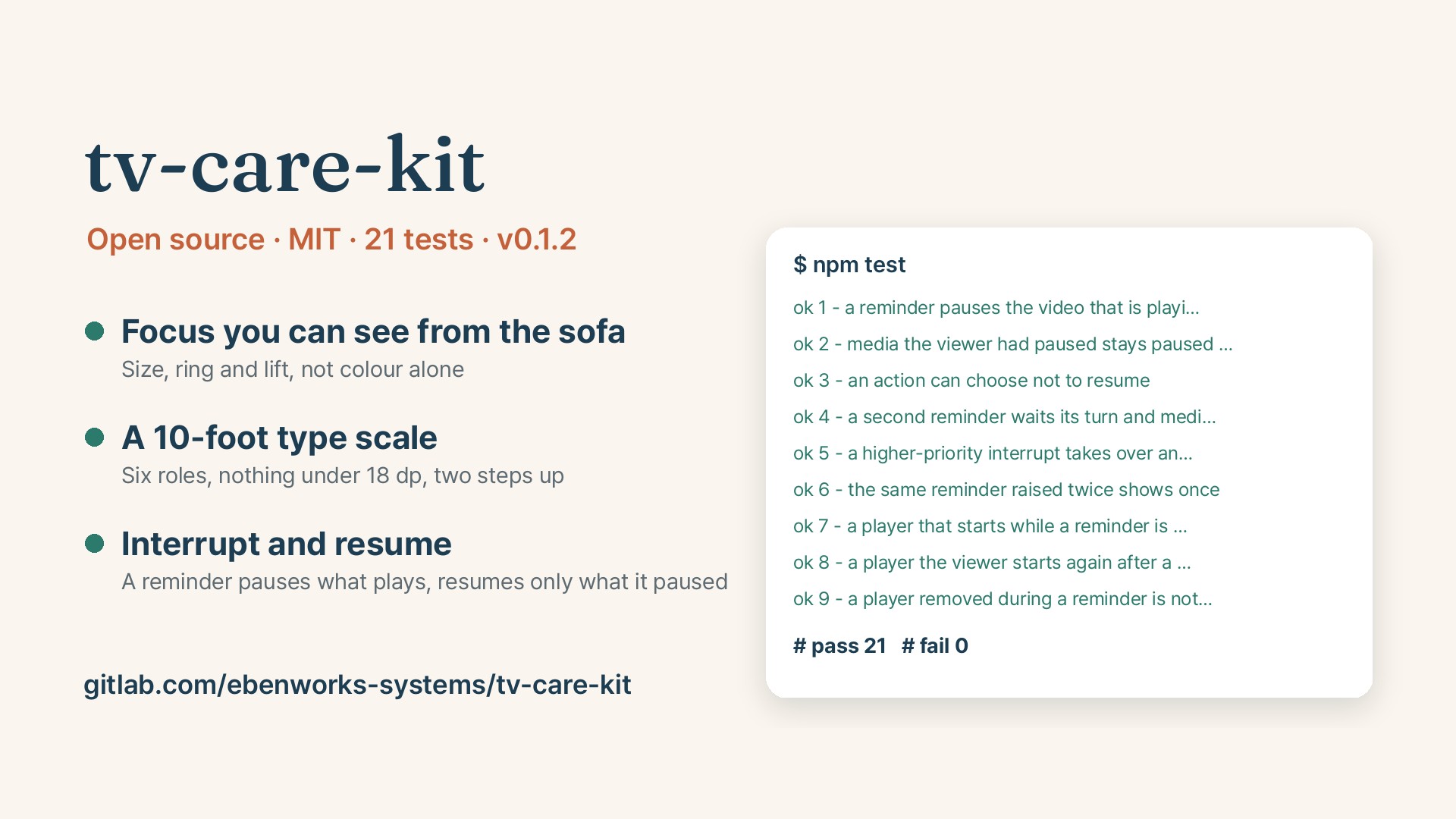
tv-care-kit, the open-source part: visible focus, a 10-foot type scale and interrupt-and-resume, with 21 tests.
-
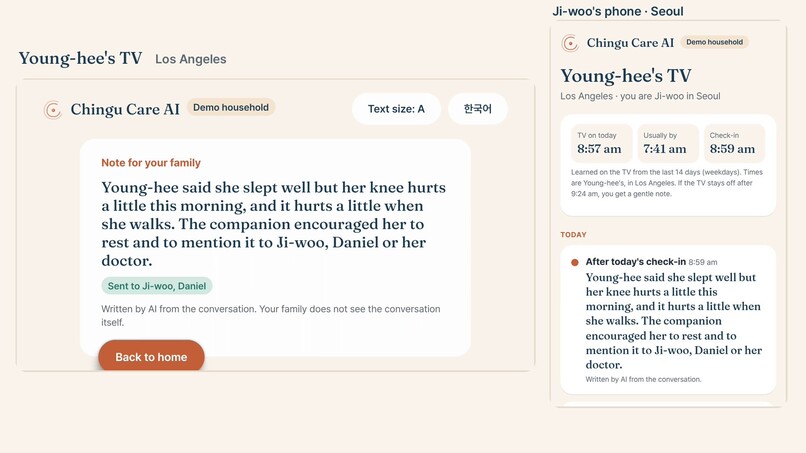
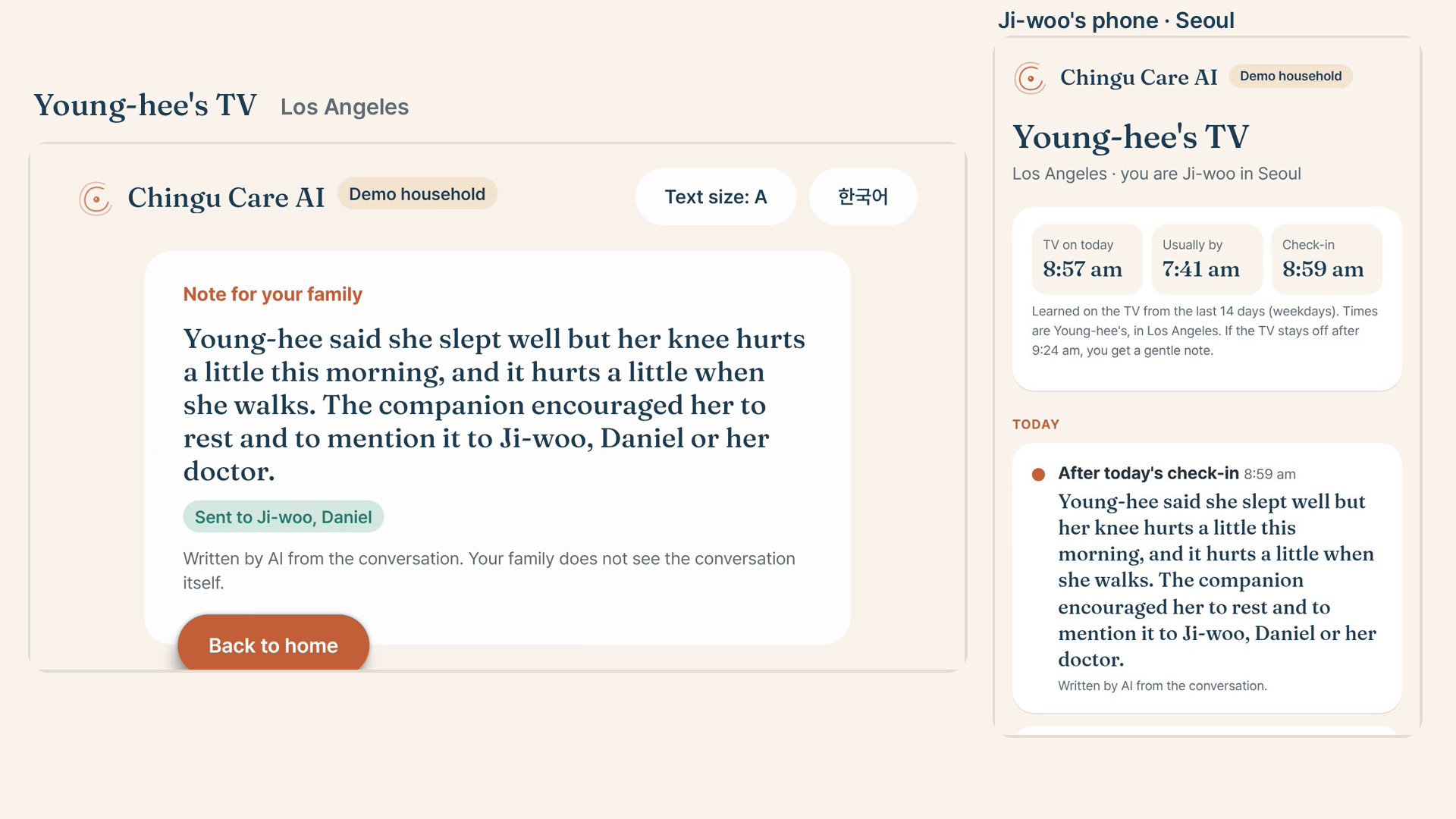
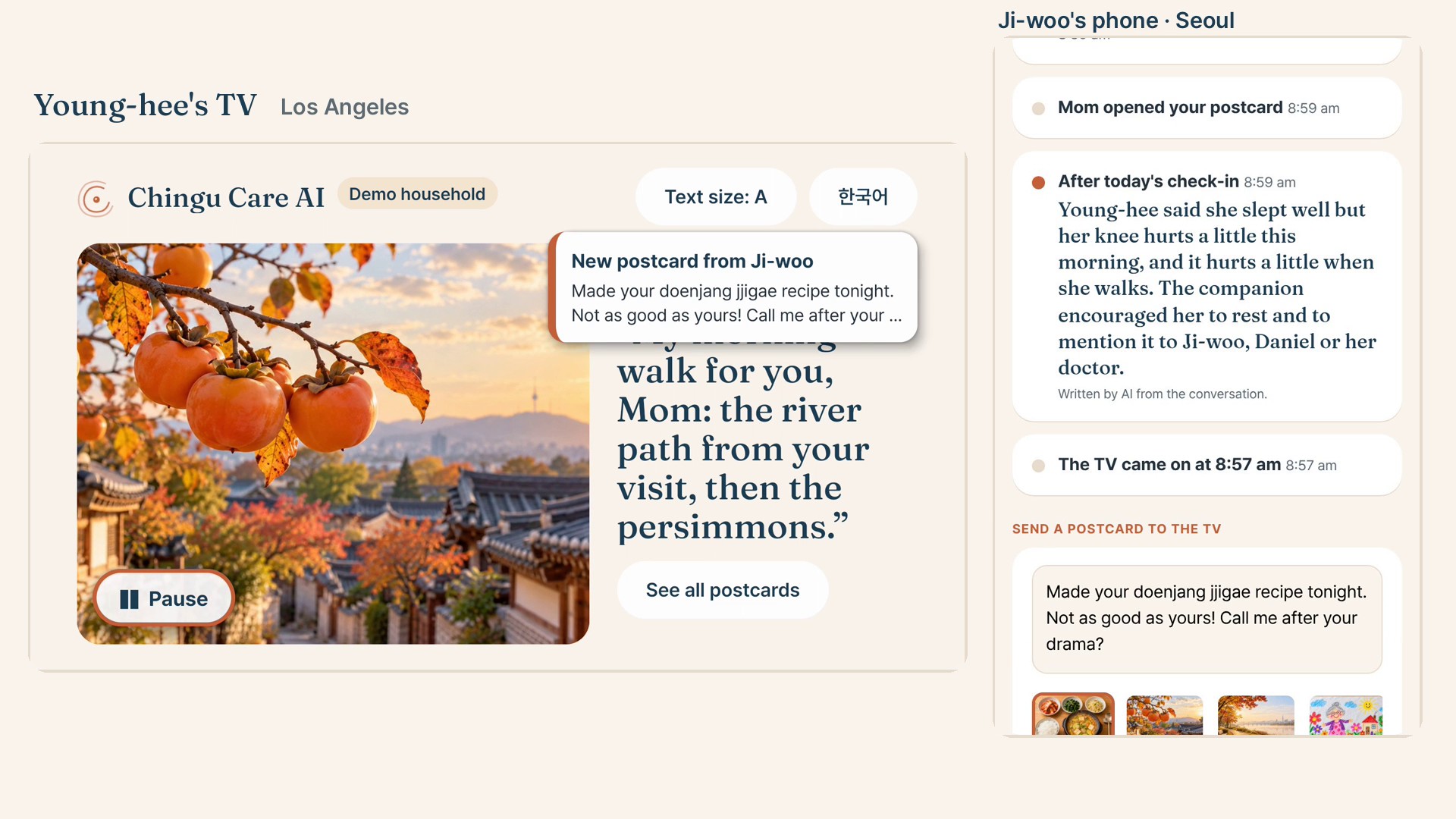
Finish sends the note; Ji-woo's phone in Seoul shows it beside the TV-on time learned from 14 days.
-
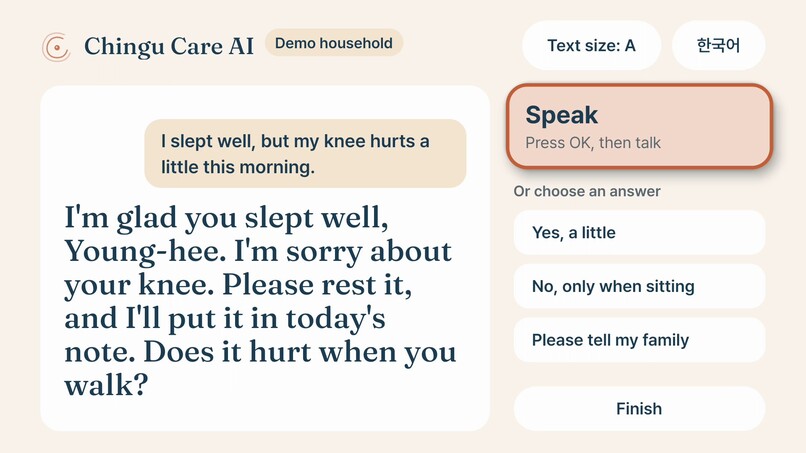
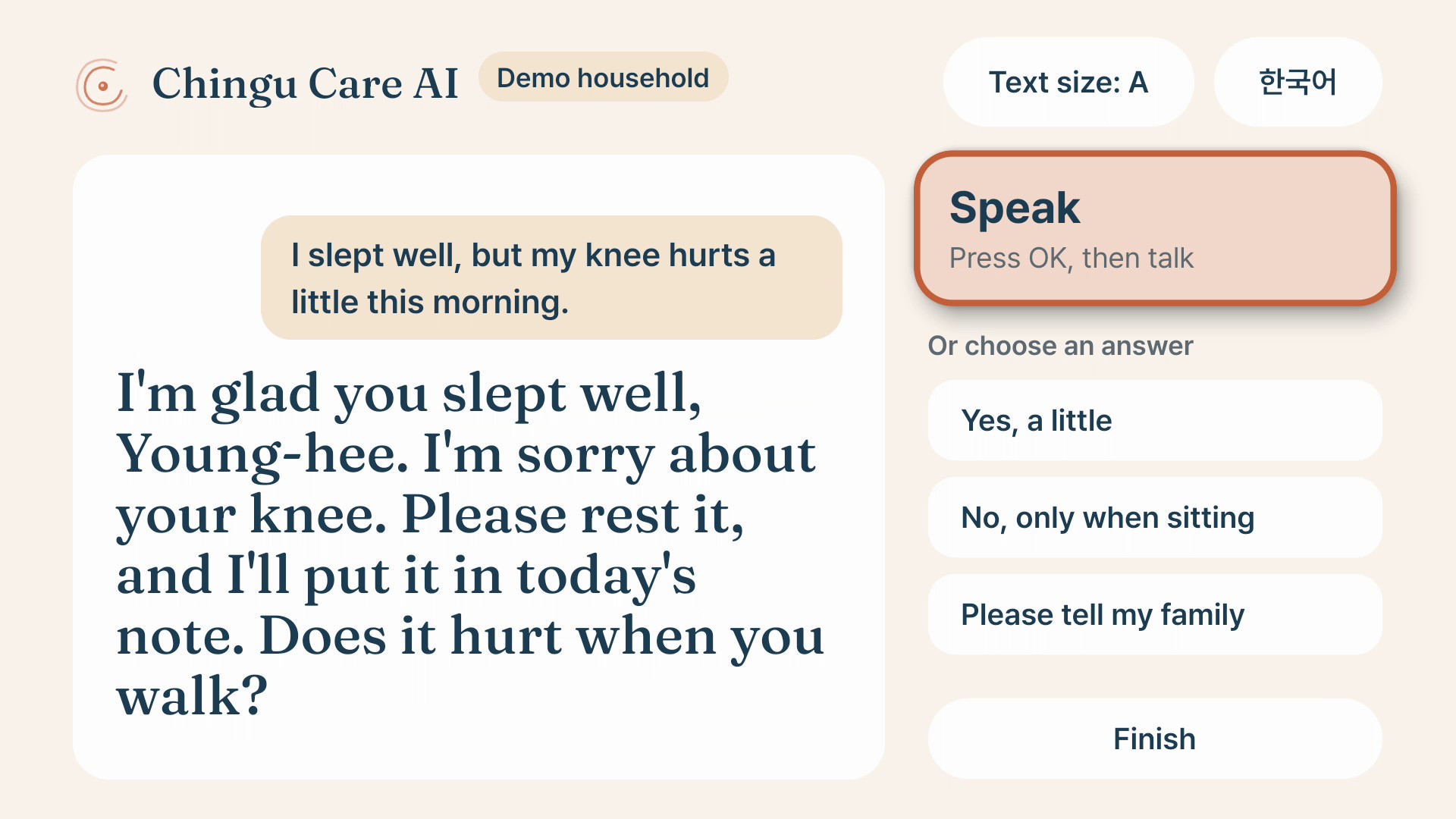
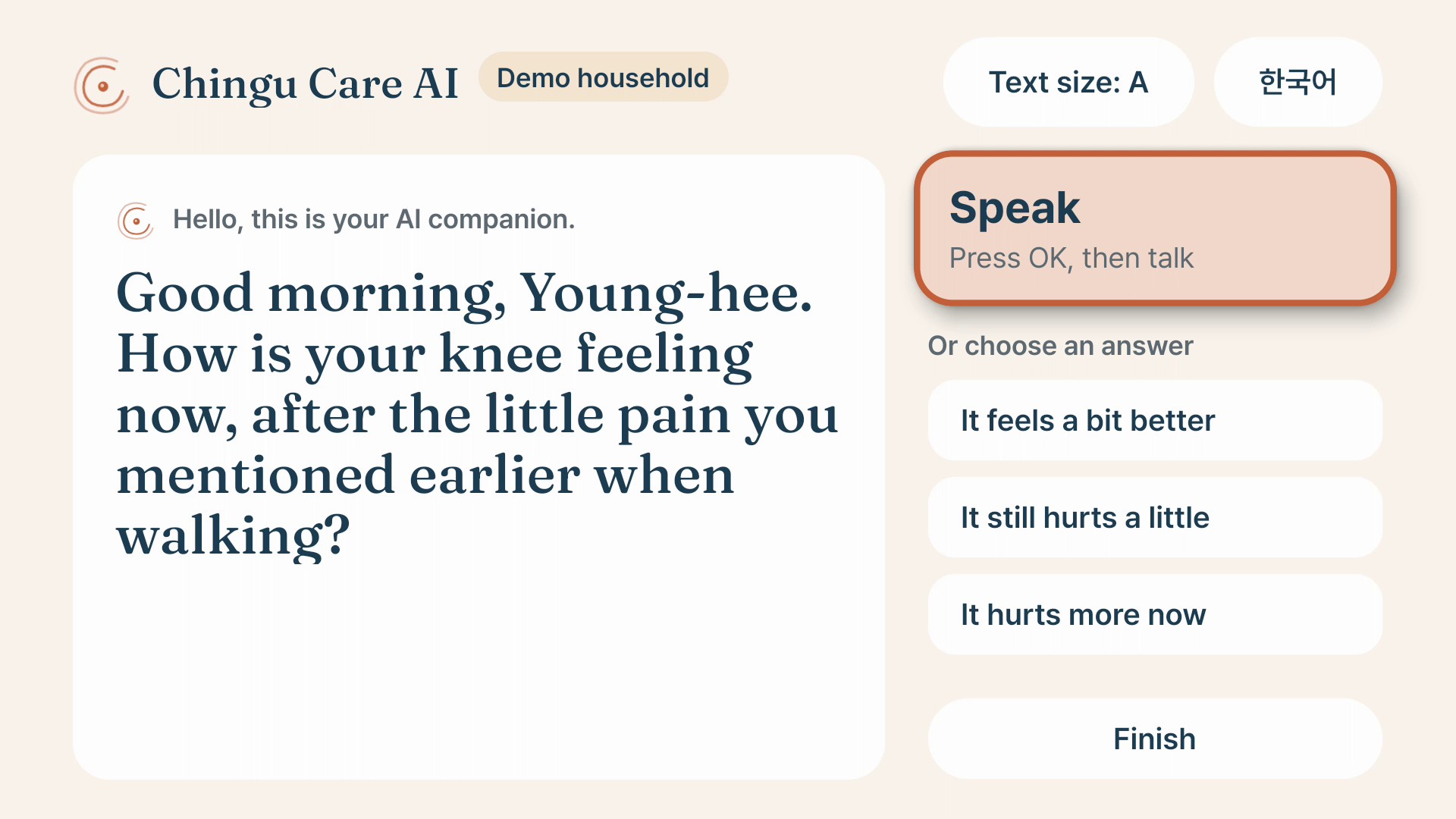
She answered by voice; the companion replies and the AI writes three answers she can pick with the remote.
-
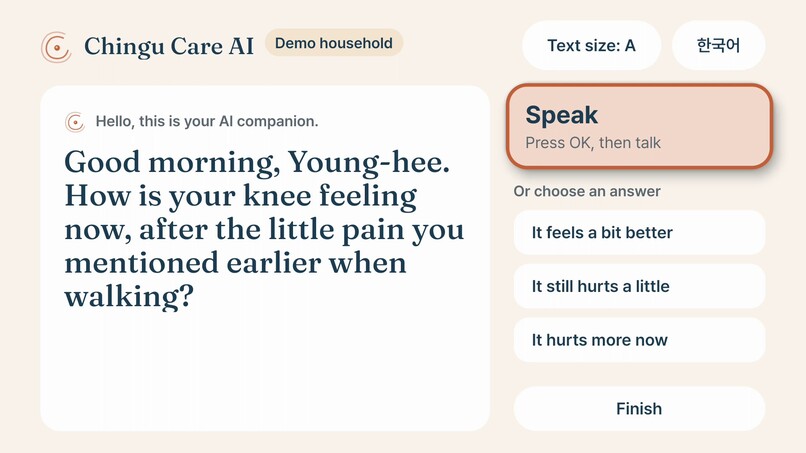
The next check-in follows up on the morning's knee pain.
-
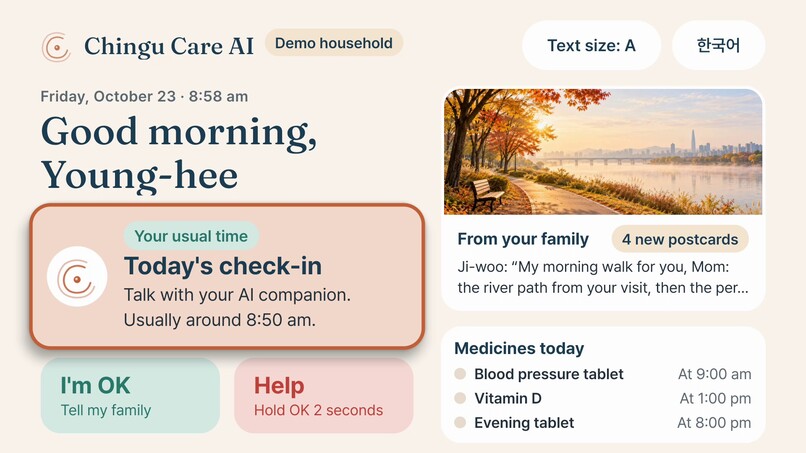
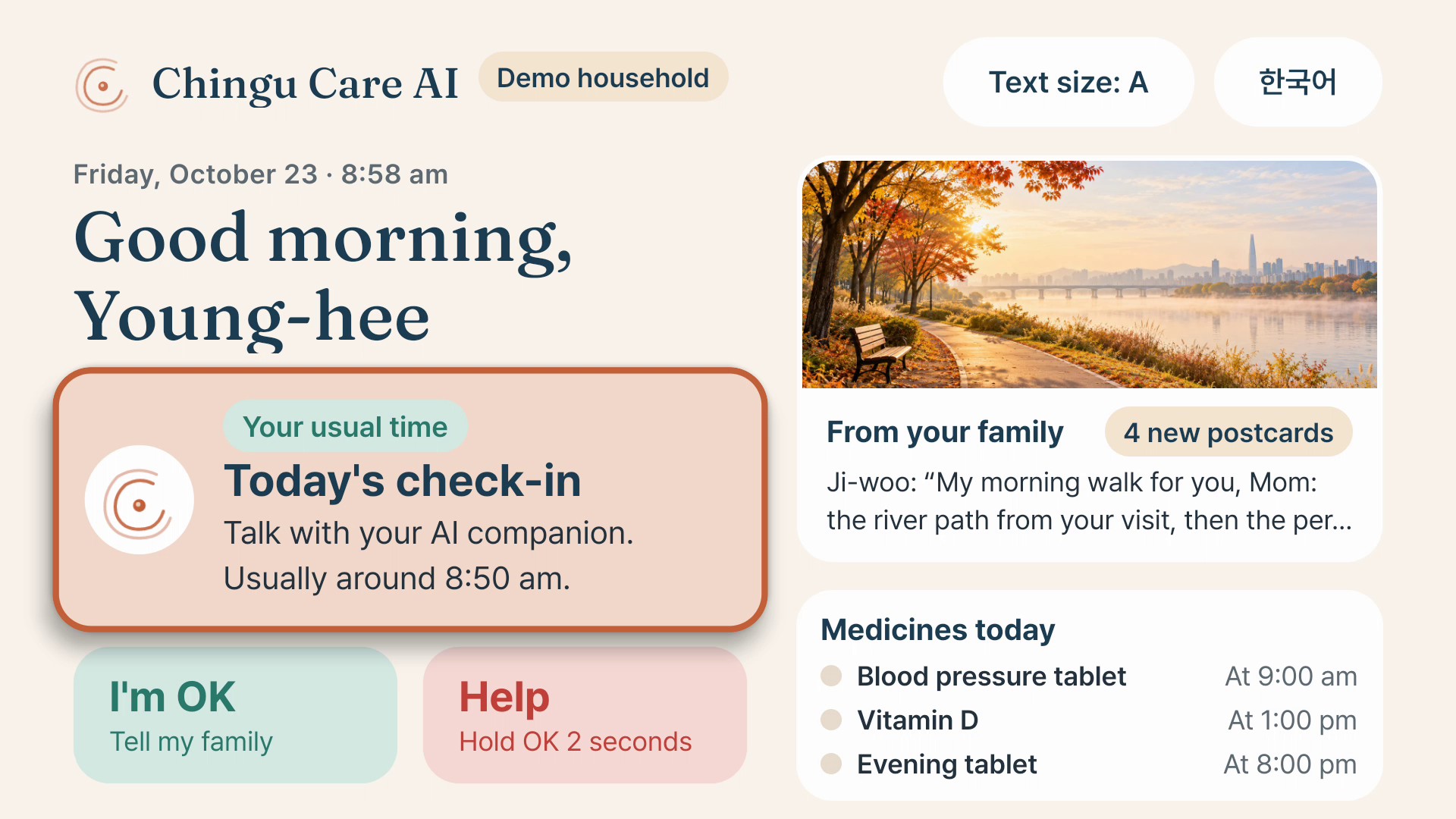
Home screen: "Your usual time" from the learned routine, I'm OK and Help, postcards and today's medicines, in 10-foot type.
-
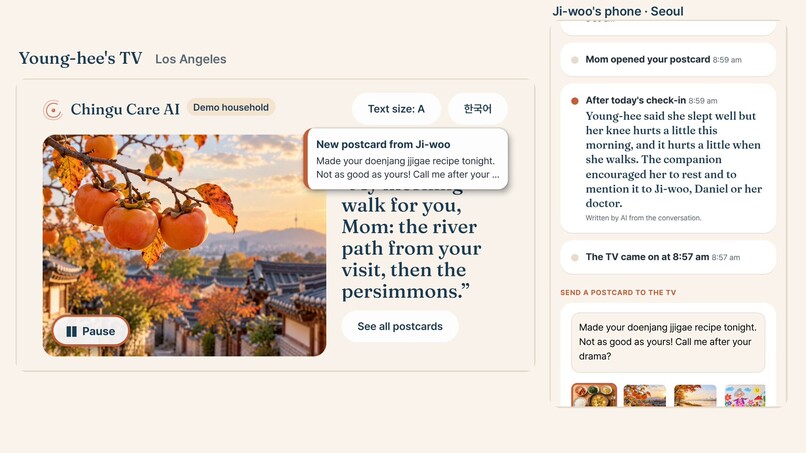
Ji-woo writes back from Seoul and her postcard appears on the TV at once.
-
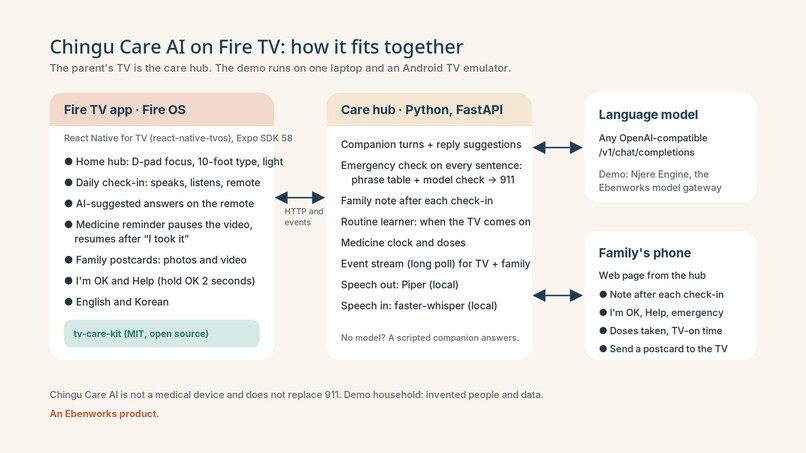
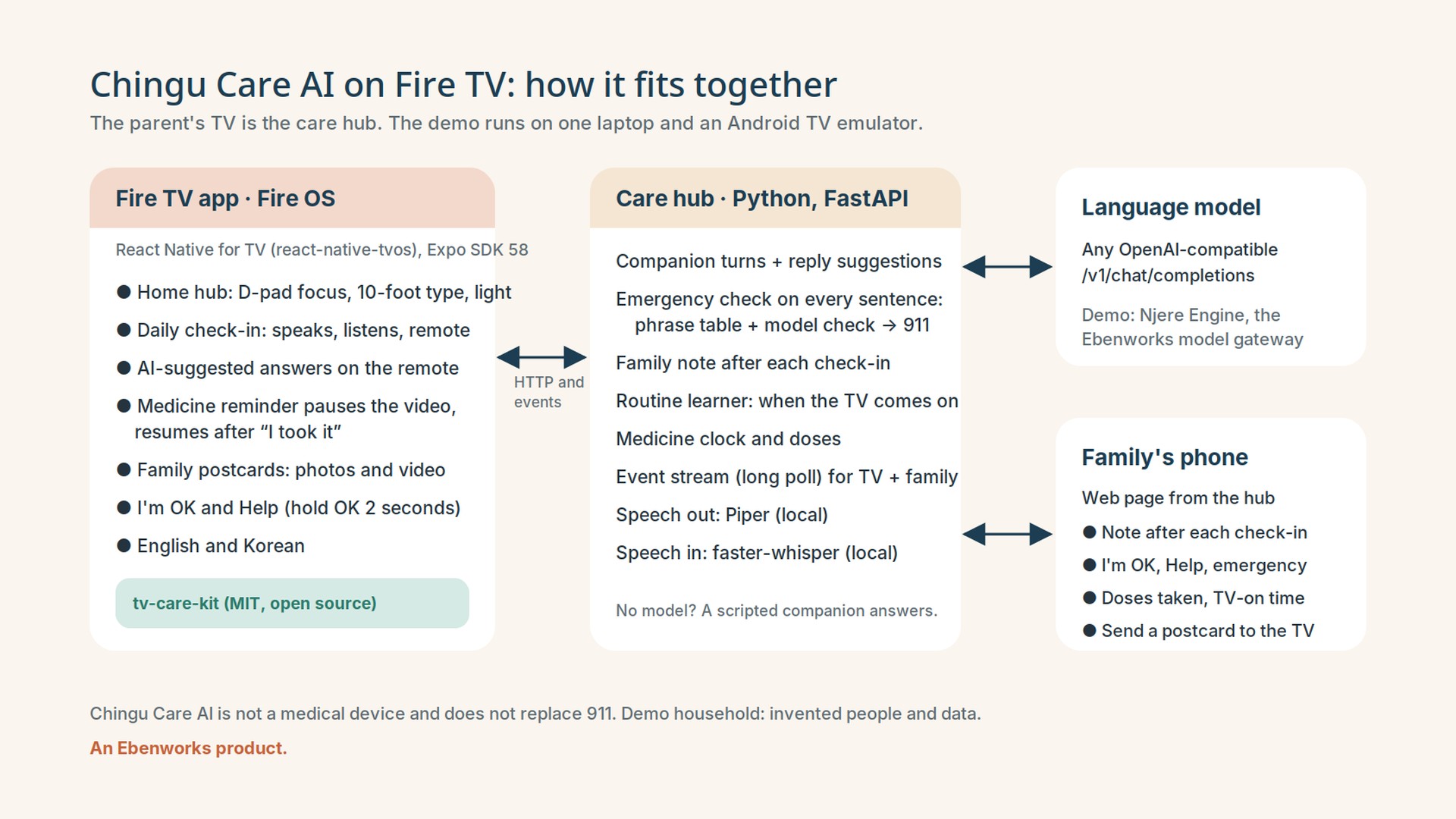
How it fits together: Fire TV app, care hub, any OpenAI-compatible model, the family's phone.
-
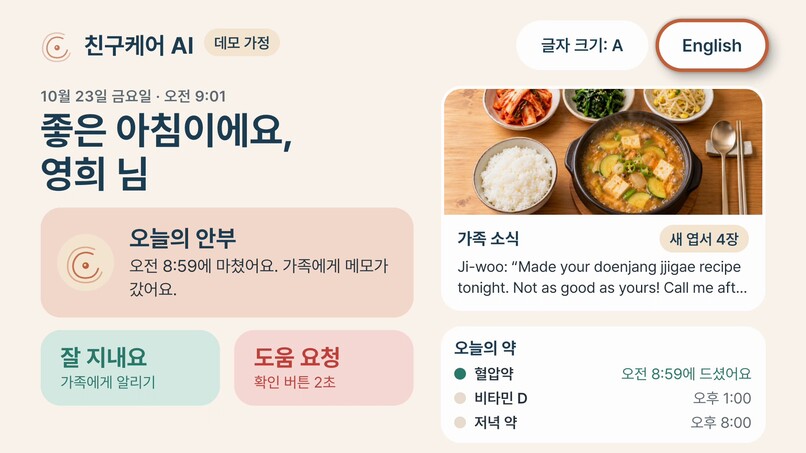
The whole TV app in Korean, switched live with the remote.
-
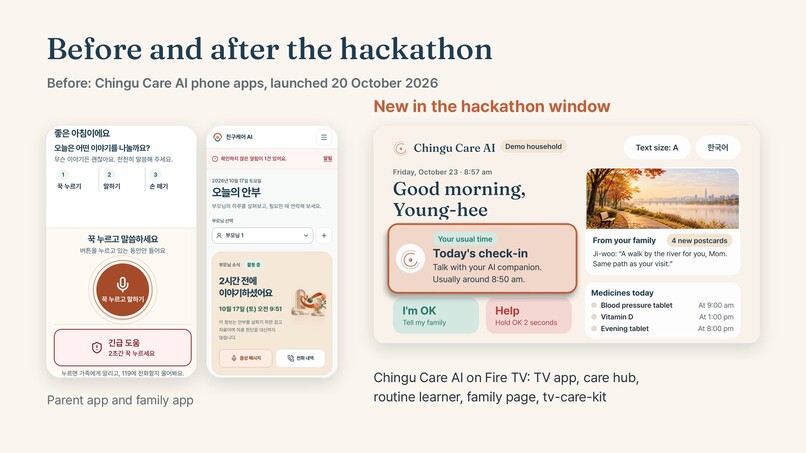
Before the hackathon, Chingu Care AI's phone apps; new in the window, the TV app.
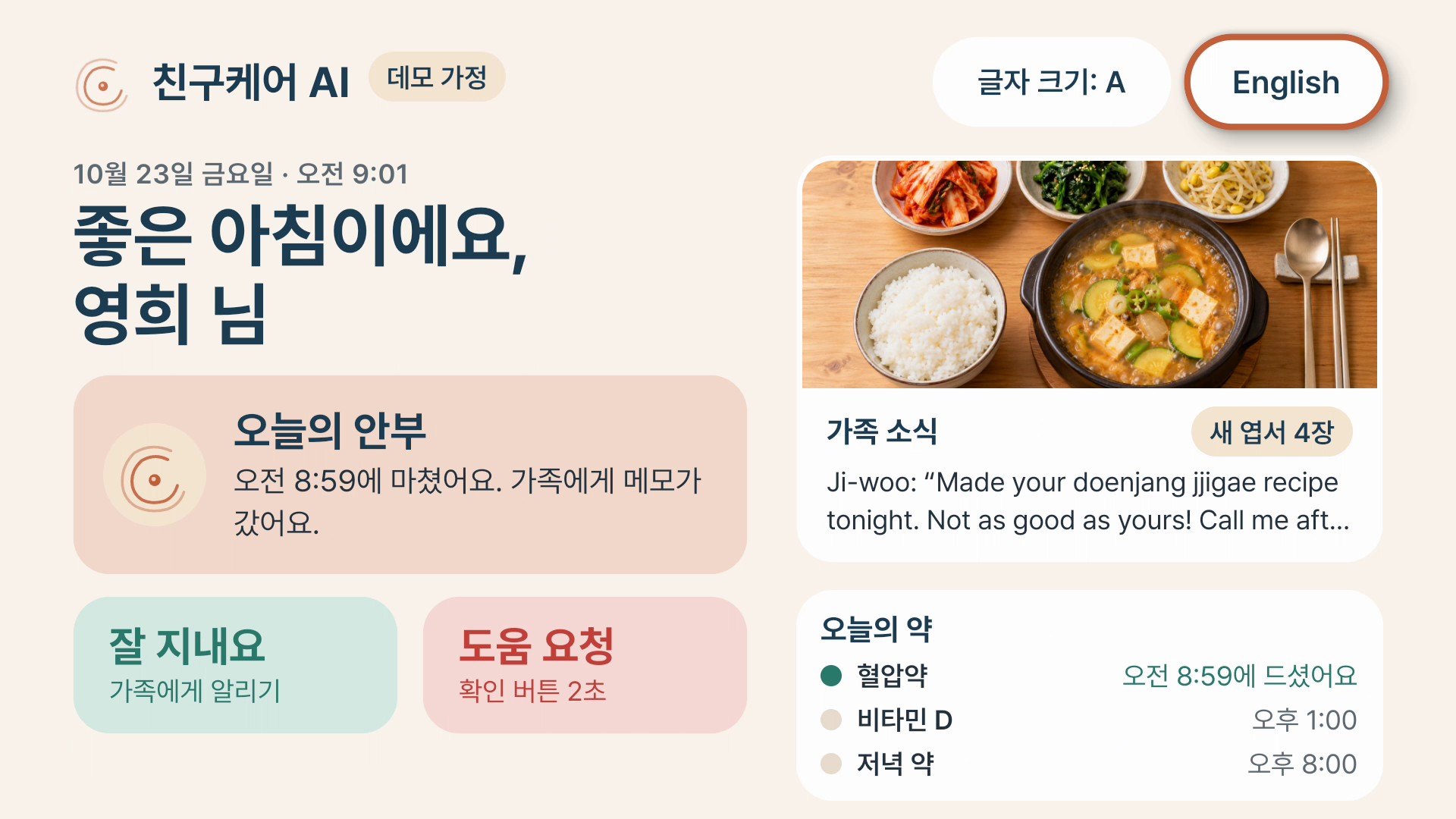
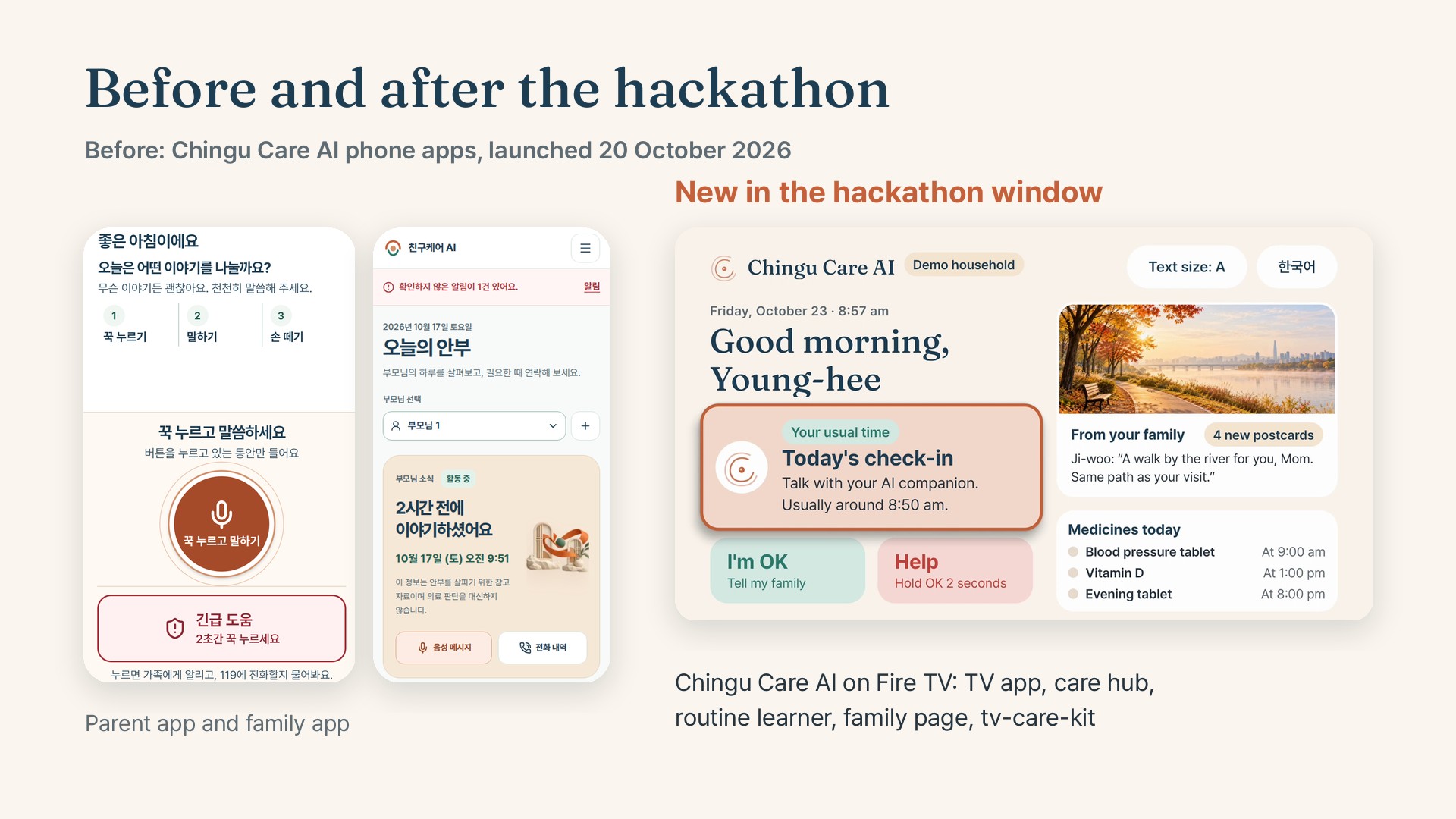
Chingu Care AI on Fire TV turns an older parent's television into their care hub. Each morning the parent talks with an AI companion on the big screen and answers by voice or with answers the AI writes for that moment, picked with the remote. The next check-in follows up on what they said before. Medicine reminders pause the video they are watching in the app and resume it after "I took it". Postcards from the children arrive on the TV, and one press says "I'm OK" or asks for help. After every check-in the family gets a short note written by AI, never the conversation itself. Every sentence the parent says is checked for an emergency.
Where a judge can see each point
| Criterion | What to look at |
|---|---|
| Quality of the idea | Voice, D-pad and visuals in one flow: film 0:00 to 1:07, with each remote key captioned. It adapts to the household: "Your usual time" from a routine learned from 14 days of TV-on times (0:12), answers the AI writes for each moment (0:42), the family sees today against the usual morning (1:07), and the next check-in follows up on the morning's knee pain (1:39). |
| Design | 10-foot type with an 18 dp floor and three text sizes; focus shown by size, ring and lift, not colour alone; focus that returns where it was after a reminder (1:27); Back always steps towards home; English and Korean, switched live with the remote (2:14); light theme; captions show each remote key in the film. |
| Potential impact | A specific person and day; a product already launched on phones; a TV the parent already watches for hours a day, on a platform with almost 300 million devices purchased; the family learns how the morning went without a transcript, and a missed dose or a quiet morning reaches them without anyone asking. |
| Tech implementation | React Native for TV on Fire OS; a small Python hub; any OpenAI-compatible model; speech in and out run locally; emergency check by a phrase table beside a second model (1:48); 12 hub tests and 21 kit tests; one-command run. Architecture at 2:16. |
| Open Source mini challenge | tv-care-kit 0.1.2, a new MIT kit with 21 tests, CI and a changelog, installed by the app from its release: focus, type scale and interrupt-and-resume for any React Native TV app. |
| Friction log | Nine real entries, five about Amazon Devices Builder Tools: docs/FRICTION-LOG.md. |
Inspiration
Chingu Care AI already helps families who live apart from an older parent. Chingu means friend in Korean. On phones, the parent talks with an AI companion, gets medicine reminders and has an emergency button, and the family sees how each day went. Its line is "Apart, but always near."
Many parents struggle with the phone part. The screen they use most is already in the living room. In the United States about 28% of older adults living in the community live alone (Administration for Community Living, 2023 Profile of Older Americans), and people 65 and over report more than four hours of television a day (U.S. Bureau of Labor Statistics). Fire TV reaches a great many living rooms: Amazon counts almost 300 million Fire TV devices purchased around the world (Amazon, September 2025). So we asked what Chingu Care AI looks like on the TV they already watch, with a remote they already know.
What it does
The demo household is invented: Park Young-hee, 76, lives alone in Los Angeles; her daughter Ji-woo is in Seoul and her son Daniel in Seattle.
- Daily check-in. One press on the remote opens it. The companion always starts with "Hello, this is your AI companion." and asks one short question at a time, aloud and in large type. The parent presses OK on Speak and talks, or picks one of three answers the AI writes for that moment with the D-pad. If the TV has no microphone the app may use, Speak gives way and focus moves to the suggested answers. The companion never diagnoses, and if asked it says it is an AI, not a person.
- It remembers. The companion reads the last three notes sent to the family, so the next check-in starts by following up. In the film it asks: "How is your knee feeling now, after the little pain you mentioned earlier when walking?"
- Emergency check on every sentence. A phrase table and a second, smaller model check each answer side by side. If either finds an emergency, the companion says "Please call 911 right now. I can't make the call for you." and the alert appears on the family's phone page at once. Chingu Care AI is not a medical device and does not replace 911, and the screen says so.
- A note for the family. After the check-in the hub writes one or two sentences in the third person, shows the parent exactly what was sent and to whom, and sends it to the family's phone page. Only an emergency alert quotes the sentence that raised it.
- Medicine reminders. At the set time a reminder covers the screen, pauses a video playing in the app (other apps' video is out of its reach for now), holds the remote's focus until the parent answers, and resumes the video after "I took it". "In 10 minutes" asks again ten minutes later; no answer for 30 minutes tells the family, as in the phone apps.
- Family postcards. Photos and video postcards from the children, newest first. A new one appears as a notice wherever the parent is.
- I'm OK and Help. One press tells every family member the parent is fine. Help asks to confirm, or sends at once if OK is held for two seconds, and names 911.
- The household's routine. The TV tells the hub when it comes on, and each day's TV-on and check-in times go into the household's log. From the 14 days before today, weekdays and weekends apart, the hub takes the median TV-on time and the usual gap to the check-in. This is a median, not a model. The check-in card shows "Your usual time" near it, the family sees today's time against the usual one, and if the TV stays off 90 minutes past the latest morning it has seen, the family gets one gentle note that day. The demo starts from 14 invented days; real days replace them.
- For older eyes. Nothing under 18 dp, three text sizes, a light theme, and the whole screen in English or Korean. The companion writes its Korean replies on screen; its voice is English only for now.
How we built it
- The TV app is React Native for TV (react-native-tvos 0.88) on Expo SDK 58, prebuilt for Fire OS and Android TV with
@react-native-tvos/config-tv(leanback launcher, 320×180 banner, no touchscreen required, app backup off). Focus useshasTVPreferredFocusandTVFocusGuideView: rows remember focus, dialogs trap it, and focus comes back to the control the parent was using after a reminder or dialog. The companion's voice plays throughexpo-audio; answers are recorded withexpo-audio; postcards play throughexpo-video. New lines and reminders are announced to the TV's screen reader; we have not yet tried that with VoiceView on Fire TV hardware. - The care hub is one small FastAPI service. It runs the conversation on any OpenAI-compatible model (ours goes through Njere Engine, Ebenworks' model gateway, to Claude), the emergency check, the family note, the medicine clock, the routine learner, the household's memory and an event stream the TV and the family page long-poll. Speech out is Piper with a public-domain voice; speech in is faster-whisper. Both run on the hub's own computer. Without a model, a scripted companion answers so anyone can run the demo. The hub listens on the local computer unless a Fire TV on the home network needs it.
- tv-care-kit holds the reusable TV parts as a separate MIT project, which the app installs from its 0.1.2 release: the focus look, the 10-foot type scale and the interrupt-and-resume state machine, which pauses only media that was playing (including a player that starts during a reminder), queues reminders by priority, and resumes only after the last answer.
- Tests. 12 hub tests cover the routine learner, today's log entry, the quiet-TV note, the medicine clock (reminder, snooze, missed dose, a new day's doses), the memory of earlier notes, the emergency phrases in English and Korean, a full check-in, an emergency reaching the family, a postcard reaching the TV and the Korean voice rule.
npm testbuilds the hub's environment on a fresh clone. The kit's 21 tests run on Node's built-in runner and in GitLab CI, including fake players registered outside React. - The film was recorded in one take on an Android TV emulator (Android 11, the version Fire OS 8 is built on), with the family's phone page captured alongside. The parent's spoken answers were streamed into the emulator's microphone through its gRPC
injectAudiocall; the transcription, replies and voice in the film are the app's own. The edit shortens waits for the model and pauses between lines, and the captions name each remote key; it adds nothing the app did not show or say.
Challenges we ran into
The emulator has no speech engine and, on our machine, no microphone, so we moved speech to the hub and fed the parent's voice in through the emulator's own audio injection. Expo's fetch rejected React Native's file uploads, so voice answers failed silently until we found it. Long family notes once pushed their card over the header, and an early badge ran out of its card; we found both in the film's frames and fixed them. A review of our own entry found a real bug in the kit (a player that started during a reminder kept playing); 0.1.1 fixes it, a test covers it, and 0.1.2 moves the player registry out of React, with tests that drive it with fake players. Amazon Devices Builder Tools gave us good Fire OS focus guidance but is still mostly built for Vega OS; the friction log has the details.
Accomplishments that we're proud of
A parent can do the whole morning with four buttons and their voice. The reminder never talks over the video: it pauses it and gives it back. The companion remembers the morning's worry and asks about it first. The family learns how the morning went without reading a transcript. And the parts other TV developers need are in an open kit with tests.
What we learned
On a TV, the hard part is not drawing the screen; it is where focus goes after something interrupts. Writing the interrupt-and-resume logic as a small state machine, tested apart from React, made every reminder case predictable, and the same tests caught the bug our review found. We also learned that answers written by the AI for each moment are a better remote control than a keyboard.
What's next for Chingu Care AI on Fire TV
Connect the TV to Chingu Care AI's existing family accounts and plans, test on Fire TV hardware with VoiceView and a voice remote, add the daily call from the product's phone apps as a TV call, and bring the Korean voice to the TV. We would also like to try the kit on Vega OS.
The code is on GitHub, public and MIT-licensed.
Built With
- amazon-devices-builder-tools
- android-tv
- claude
- expo.io
- fastapi
- faster-whisper
- fire-os
- murf
- openai-compatible-api
- piper
- python
- react-native
- react-native-tvos
- typescript

Log in or sign up for Devpost to join the conversation.