-
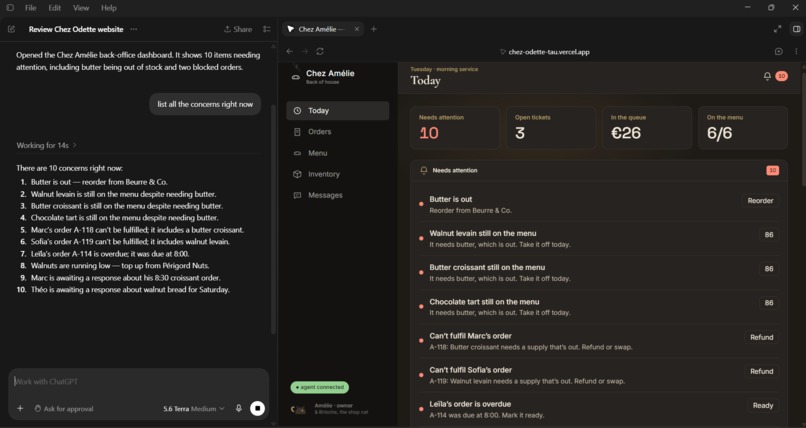
Working screen - 1
-
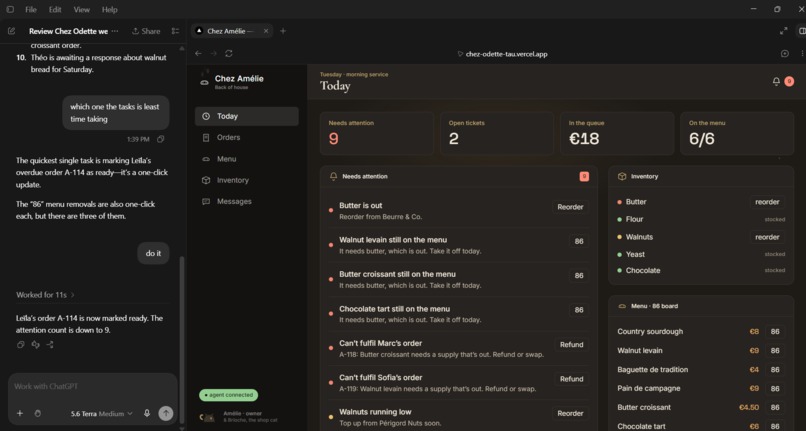
Working screen - 2
-

logo
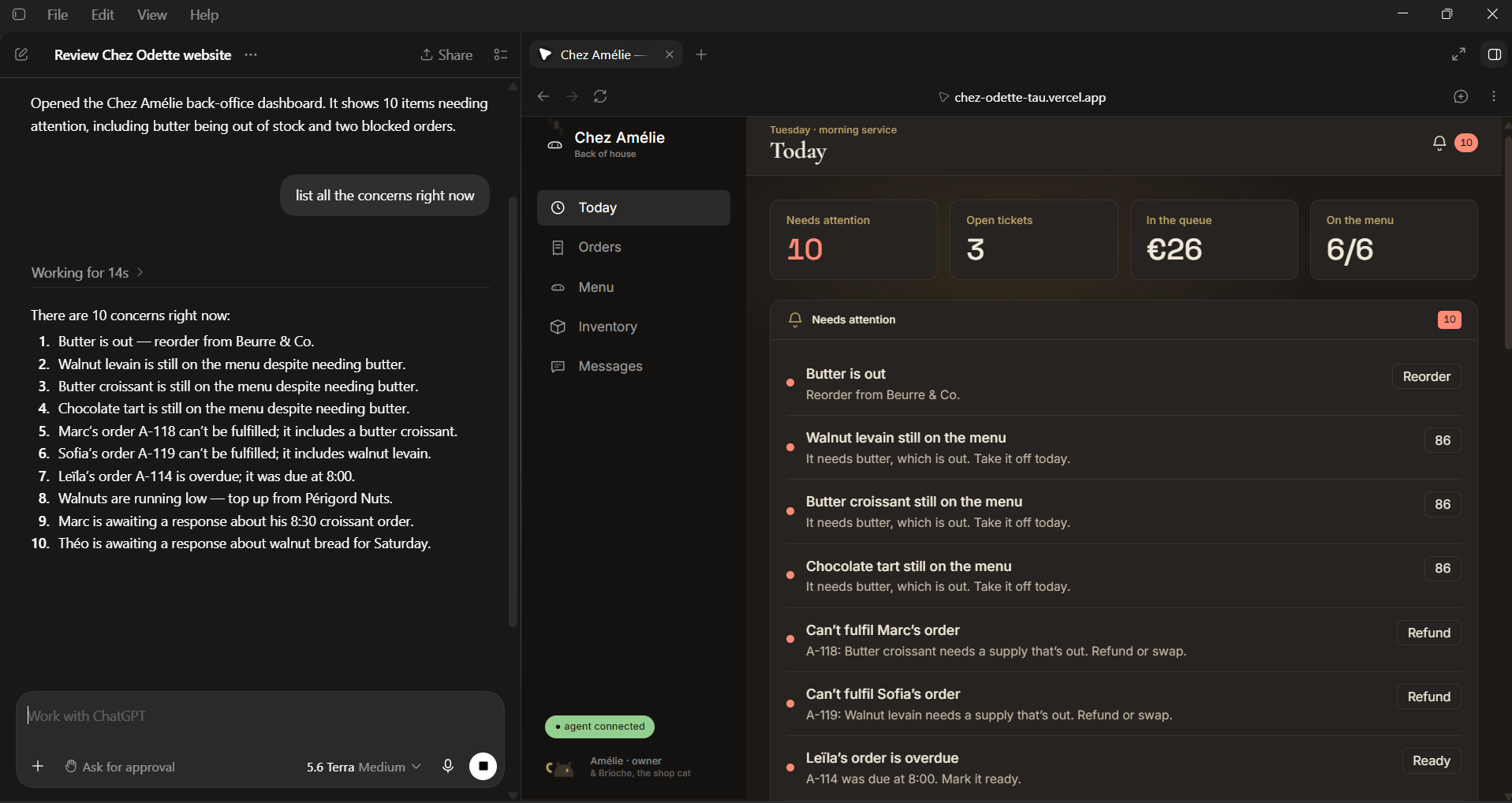
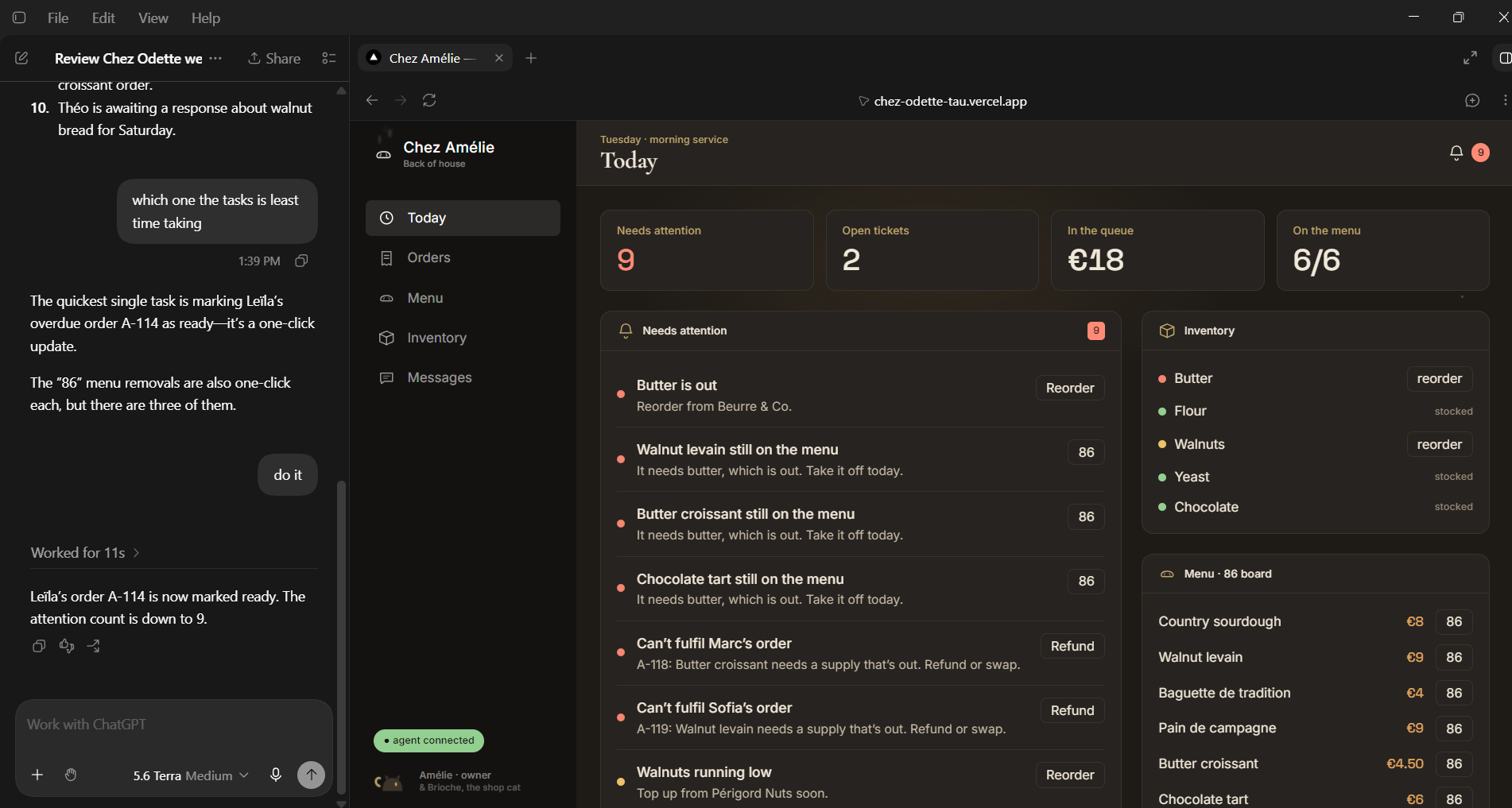

Inspiration
At 8:03 a.m., the bakery is already losing the morning.
The butter delivery never arrived. There are butter croissants on the menu, two orders that depend on them, a sourdough order that should have gone out three minutes ago, and two customers waiting for a reply. None of these problems is catastrophic. Together, they are exactly the sort of mess that makes a one-person shop feel impossible.
That was the starting point for thinkPuff.
We wanted to make a bakery back office that felt like a place someone might actually work: slightly chaotic, a little charming, and full of small decisions that matter. The cat in the sidebar is called Brioche. The language is warm. But underneath it is an operations board with real dependencies: stock affects the menu, the menu affects orders, and all of it affects what needs attention.
Then we gave the board a second kind of user: an AI agent.
What it does
thinkPuff is a bakery operations board that opens on a deliberately bad morning. Seven urgent problems are red, three are amber.
Butter is out. Three menu items still need butter. Marc’s croissants and Sofia’s walnut levain cannot be fulfilled. Leïla’s sourdough is overdue. Walnuts are low. Two customers have been waiting for an answer.
A baker can handle all of it by clicking the normal action buttons beside each alert. There is no AI-only version of the product.
But the same page publishes 16 WebMCP tools. An agent can ask what is wrong, inspect stock, menu items, orders, and messages, then decide what to do. It can reorder butter, mark Leïla’s order ready, restock walnuts, and reply to Marc and Théo.
The satisfying part is what happens after the butter order. One action changes the state of the shop. Butter is back in stock; the three affected menu items are no longer impossible; Marc and Sofia’s orders can be fulfilled again. Six red alerts disappear because they were all consequences of the same missing delivery.
There is no hidden fix_morning() command. The agent has to discover the available tools and connect the dots itself.
How we built it
We built thinkPuff as a single-page bakery operations simulation. Its data model holds supplies, menu items, orders, customer messages, shop status, and a running activity log.
The important part is that alerts are derived rather than stored as a static list. When the butter supply changes, the app recalculates which menu items depend on it, which orders are affected, and which alerts still deserve to exist. That makes the red-to-green moment a consequence of the model instead of a visual trick.
WebMCP tools are registered in the browser with document.modelContext.registerTool(...). The page exposes read tools such as get_alerts, get_supplies, get_menu, get_orders, and get_messages. It also exposes action tools including reorder_supply, mark_86, put_back_on_menu, mark_order_ready, reply_to_message, and text_customer.
Two tools, set_price and set_shop_open, intentionally have no matching interface buttons. We added them to prove the point of runtime discovery: an agent can find a capability that a person cannot see on the current screen, such as raising the chocolate tart to 7 euros.
Actions that would feel like real work—reordering, replying, or texting—pause briefly before finishing. It is a small detail, but it keeps the demo from feeling like the dashboard is teleporting between states. Every manual or agent action also appears in the activity log.
Challenges we faced
The first challenge was resisting the obvious shortcut.
A polished demo could have faked the whole experience with a single script: show a crisis, press a button, turn everything green. We wanted the opposite. The agent needed enough individual tools to make choices, and the board needed enough real relationships that those choices had consequences.
That meant spending time on unglamorous questions. Does a product go off the menu as soon as a required supply is unavailable? Should an order be blocked or refunded? What happens to the alert when the supply comes back? How do we make the UI explain that chain without making it look like a spreadsheet?
We also had to make the agent’s actions understandable. If an agent changes the board without leaving a trace, it feels magical for about five seconds and suspicious after that. The activity log became our receipt: it shows what happened, whether it was done manually or by the agent, and lets the changing alerts explain the outcome.
Finally, we were trying to avoid the usual sterile dashboard look. A bakery is not a bank. We used a quieter, more editorial visual language, then let the urgency come from the information itself: pulsing red dots, overdue orders, and a board that visibly relaxes as the work gets done.
What we learned
WebMCP made more sense to us once we stopped thinking about it as a way to let an AI “read a webpage.”
Reading the board is useful, but it is only the beginning. The interesting part is that the page can describe what it is able to do, and an agent can combine those capabilities in response to a situation it has never seen before.
We also learned that the model is only as useful as the system it is allowed to operate. Clear tools, honest state, and visible side effects make the interaction feel much less like a trick. The agent does not need to be told that butter affects croissants; it can inspect the board, use the tools available, and watch the result come back through the same live state the baker sees.
What’s next
The next version would keep the bakery feel but make the simulation more operationally deep: saved data, scheduled supplier deliveries, order timing, customer preferences, and permission levels for actions that contact someone outside the shop.
For this project, though, we wanted to stay with one morning, one missing delivery, and one useful idea: an agent should not just point at the mess. It should be able to help clean it up.
Built With
- agents
- ai
- chatgpt
- context
- css
- design
- javascript
- model
- protocol
- react
- responsive
- vercel
- web
- webmcp

Log in or sign up for Devpost to join the conversation.