Inspiration
I love playing online chess and solving chess puzzles. It's a great way to improve logical abilities. I wanted to create a tool that could help other chess players learn and improve their game.
What it does
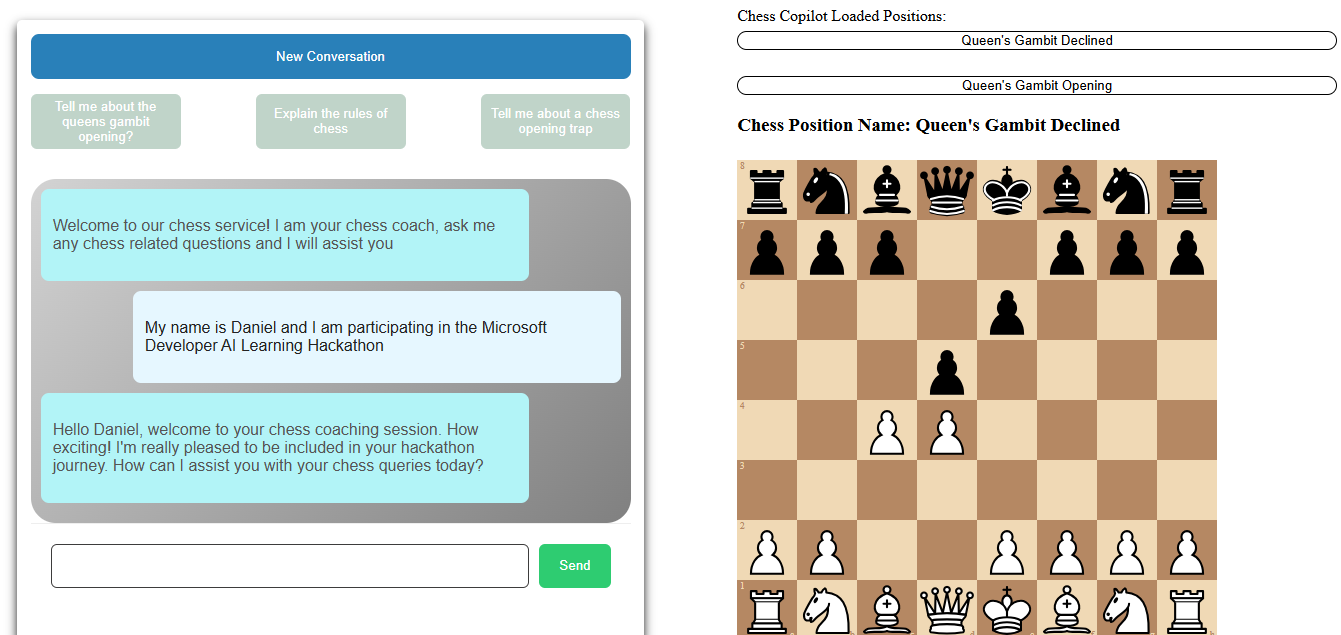
The Chess Coach Copilot answers chess-related questions about openings, tactics, and other aspects of the game. It provides accurate and precise answers using a combination of vector search and GPT-4. The copilot also features an interactive chess board that displays positions in real-time as the AI discusses them.
How we built it
Embeddings & Storage: Generated embeddings from a collection of great chess books and stored them in MongoDB.
Question Handling: When a user asks a question:
- A vector search finds the most relevant answer from the embeddings.
- The result is sent to GPT-4 to generate a precise response.
Tech Stack:
- Frontend: React with Docker
- Backend: Node.js with Express and Docker
- Database: MongoDB
- Deployment: Azure services for Docker containers and web hosting
- Interactive Chess Board: Integrated a chess board to visualize positions.
Challenges we ran into
GPT-4 Response Time: Initially, GPT-4 requests took over a minute to process. Solution:
- Optimized vector search to return the single most relevant result.
- Combined the query result and GPT-4 response for faster processing.
- Implemented a character limit on prompts to avoid sending large requests.
Accomplishments that we're proud of
- Interactive Chess Board: Real-time position display is a key feature.
- Response Time Optimization: Successfully reduced GPT-4 processing time to under 30 seconds.
What we learned
- Handling Docker containers effectively
- Creating and saving text embeddings to MongoDB
- Utilizing vector search for efficient query processing
What's next for Chess Coach Copilot
- Adding user accounts with login and signup
- Further improving response time
- Implementing chess game analysis features
- Integrating a chess engine
- Adding functionality to navigate to specific moves within a game


Log in or sign up for Devpost to join the conversation.