
Inspiration
We started with a simple idea: we suck at chess. Faced with losing every friendly game, our 2-person team had two choices: spend years practicing, or build an AI to cheat for us. Of course, we choosed the latter 😉. Instead of clicking pieces ourselves, we built Chess AI: a Chrome extension that reads any live game on chess.com and plays every move automatically. With this setup, the user never touches the board. The AI analyzes each position and submits what it thinks is the best move. We simply sit back and watch the game unfold.
What It Does
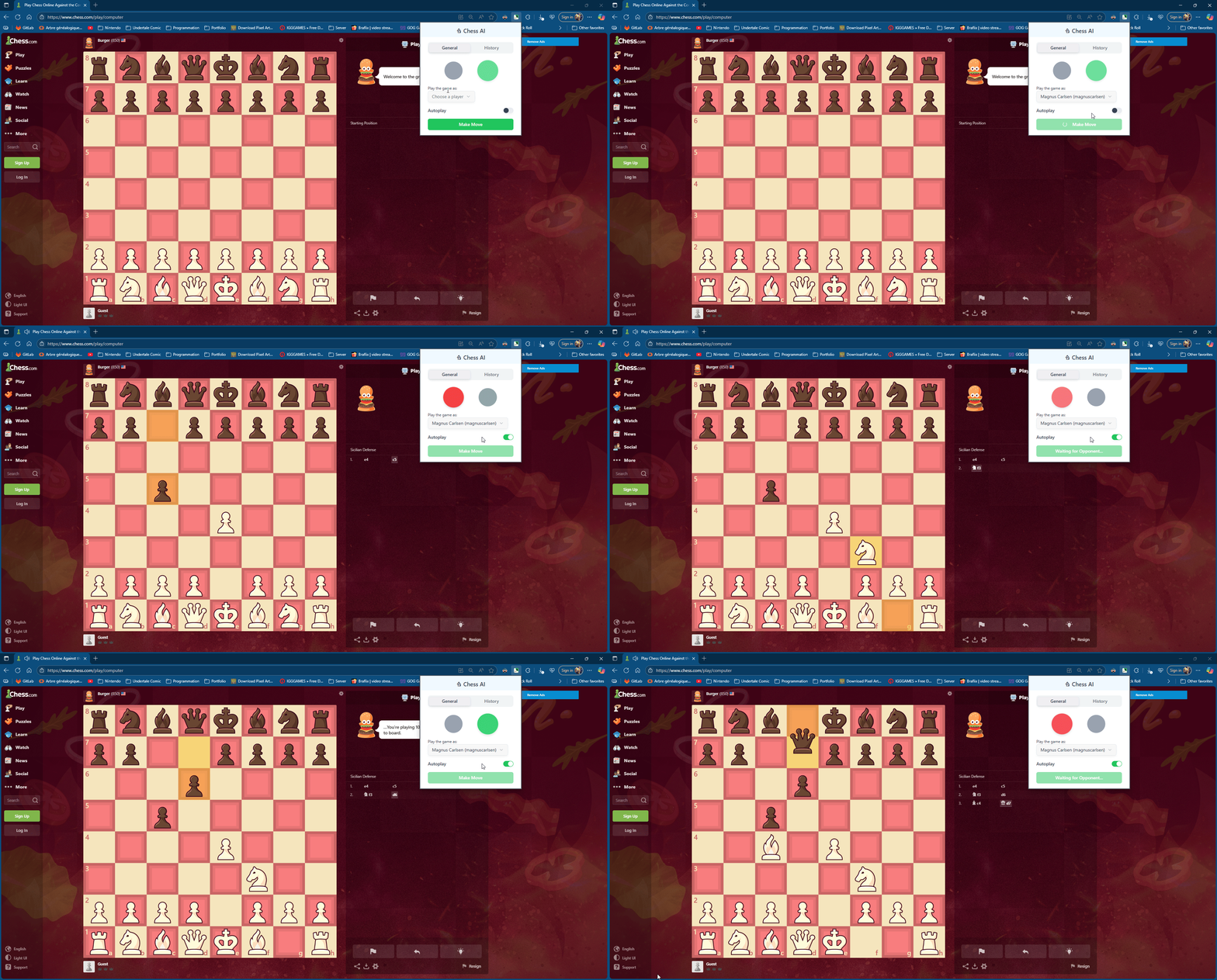
Chess AI hooks into chess.com and automatically plays every move of your game. Once enabled during a match, our extension reads the current board position and uses an LLM to select and click the best move each turn. The user never has to make a move. The AI does it all.
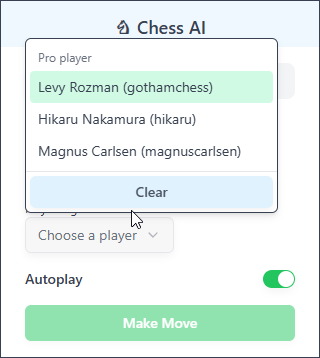
We also added a move-history panel so the user can review every decision. Each move the AI makes is logged in a sidebar with a brief explanation of why it chose that move. To give our AI a winning edge, we seeded it with grandmaster strategy: we fetched archived games of masters like Magnus Carlsen, Hikaru Nakamura, and Levy Rozman from Chess.com’s database chess.com. In practice, this means the AI can recommend the exact moves a world-class player once played in a similar position, blending LLM intuition with proven chess lines.
How We Built It
We built Chess AI as a web-based Chrome extension using modern tools. We used CRXJS to scaffold and bundle the extension with zero-config setup. The interface is a React/TypeScript app styled with Tailwind CSS and the open-source shadcn/ui component library for clean, accessible UI elements. For the AI logic, we integrated Vercel’s AI SDK, a TypeScript toolkit that standardizes calling LLMs across providers. Through this SDK we send each board position to OpenAI and get back the best move. We also tapped Chess.com’s public Games API to fetch high-level games for our grandmaster move library. Finally, for the project branding we used ChatGpt to create a cool logo.
Key tools we used:
CRXJS – Build and bundle the Chrome extension with hot-reload and minimal config.
Vercel AI SDK – A library that provides a unified API for calling LLMs (like OpenAI) from JavaScript.
shadcn/ui – A collection of beautiful, accessible React UI components (Tailwind + Radix) for the frontend.
OpenAI API – Powers the AI “brain”. It offers a general “text in, text out” interface, which we use to have the model evaluate board descriptions and output the best move.
Chess.com Games API – Public database of master games
Challenges
Building a Chrome extension was new to us, and integrating all the pieces wasn’t straightforward. We struggled initially to extract the current board state from Chess.com’s page: the extension itself can’t directly access the DOM inside the site. Another hurdle was cross-context communication—passing the board state from the page to the extension required extra messaging layers. We solved this by injecting a script into the page to read the board state, then relaying it back to the extension for processing.
Gathering the grandmaster games was also time-consuming. Chess.com’s archives are vast, and filtering for specific players (like Magnus or Hikaru) meant downloading and parsing many PGN files. Fortunately, chess.com provides a public games API, but even using it to fetch just the games we needed ate up much of our hackathon time. In the end, we managed to compile a database of high-level games that the AI can reference in play.
Accomplishments
LLM Integration: We successfully integrated a cutting-edge language model into our extension. Using the AI SDK, we call OpenAI’s GPT model at runtime to decide moves.
Master Game Library: We imported real games from world-class players, enriching our AI with proven strategies chess.com. This allows Chess AI to play like a grandmaster.
Finished Extension: We delivered a complete Chrome extension that can autonomously play full chess.com matches without any user input. It smoothly reads the board, communicates with the AI, and clicks moves all on its own.
Move History UI: We built an in-app log showing each move and the AI’s reasoning. This “explainability” feature helps users learn from the AI’s decisions and trust the system.
What We Learned
This project taught us the ins and outs of Chrome extension development and AI integration. We learned how to inject content scripts into a live webpage and manipulate the DOM to read board state and issue clicks. Working with the AI SDK and OpenAI API deepened our understanding of prompt design and handling AI responses in real time. We also honed our teamwork: with just 48 hours and two people, we had to split tasks smartly, stay in constant sync, and adjust plans quickly. By the end, we had significantly sharpened both our technical skills and our ability to collaborate under pressure.
What’s Next
Add More Grandmasters: Extend our game library by importing moves from additional top players. In the future, users could choose an “AI style” (e.g. Carlsen’s style vs. Nakamura’s style).
Incorporate Feedback: Allow users to rate or comment on each AI move so the system can learn from corrections. For example, if a move is suboptimal, the AI could adapt its strategy based on user feedback.
Built With
- ai-sdk
- crxjs
- openai
- react
- tailwind
- trpc
- vite

Log in or sign up for Devpost to join the conversation.