Inspiration I'm currently between jobs, and my wife works full-time. I've become "Mr. Mom"—handling cooking, meal planning, and grocery shopping for our family. Let me tell you: it's harder than any tech job I've had.
Every week, the same struggle:
Browse hundreds of saved recipe videos on TikTok and YouTube Try to remember which ones looked good Manually write ingredients on a shopping list Forget half the items at the store End up ordering takeout (again) I thought: "I'm a developer. There has to be a better way."
That's when ChefSync was born. Not just for me—but for millions of busy parents, working professionals, and home cooks who face the same daily battle. We're all drowning in recipe inspiration but starving for solutions that help us actually cook.
The problem isn't lack of recipes—it's the friction between inspiration and action. Watching Gordon Ramsay or Babish make an amazing dish is easy. Writing a shopping list, planning when to cook it, and remembering all the ingredients? That's the hard part.
ChefSync bridges that gap. It turns recipe inspiration from any source (voice, image, video) into actionable shopping lists and meal plans—so busy people like me can actually cook what they save, spend less on takeout, and feel accomplished at the end of the day.
Being "Mr. Mom" taught me that the smallest friction points can derail your whole meal plan. ChefSync removes that friction—one recipe at a time.
What ChefSync Does ChefSync is an AI-powered cooking companion that captures recipes from 4 different sources:
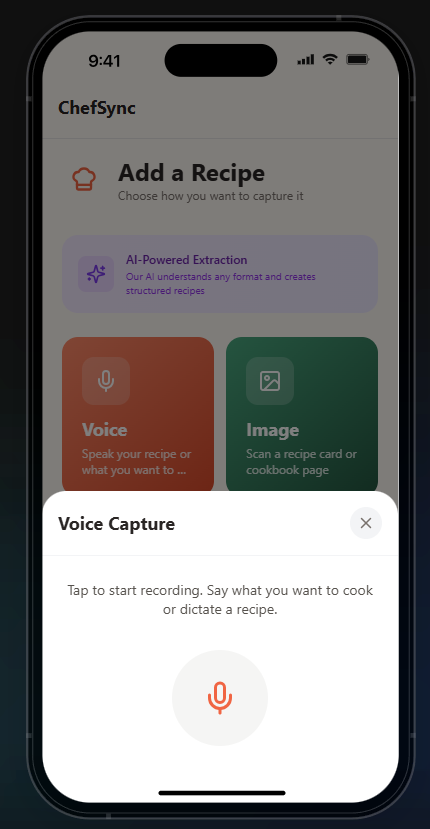
🎤 Voice Capture Speak what you want to cook and AI generates a complete structured recipe with ingredients and steps.
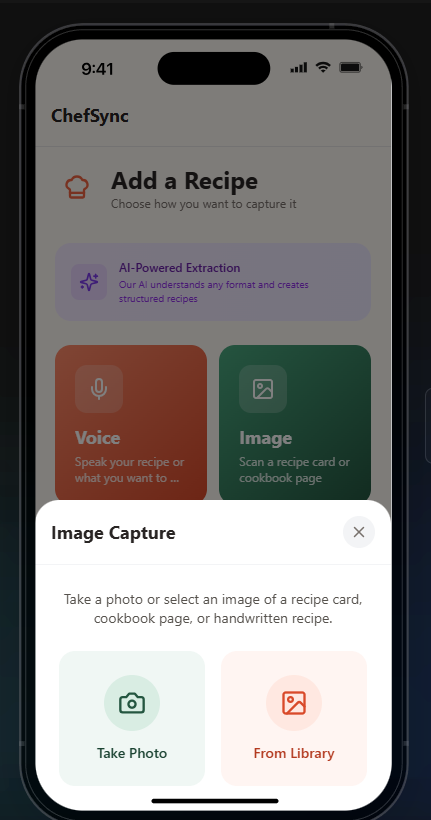
📸 Image Capture Snap a photo of handwritten recipe cards, cookbook pages, or magazine clippings—AI extracts everything via OCR.
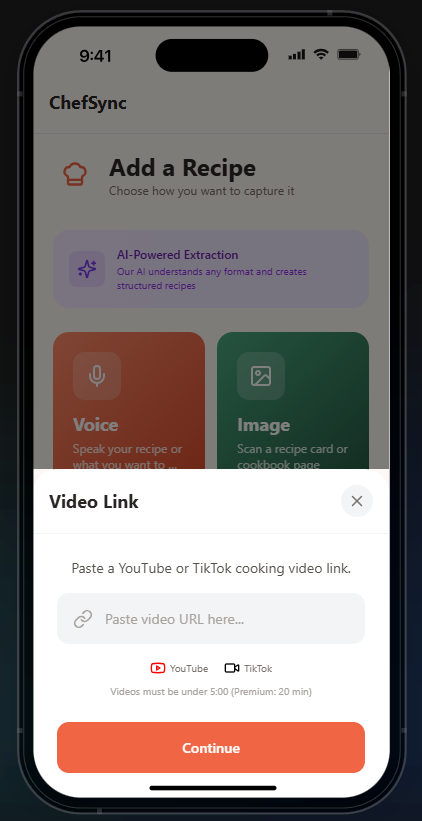
🎥 Video Link Capture Paste a TikTok or YouTube cooking video URL and ChefSync automatically extracts the recipe from the video transcript (powered by Supadata API).
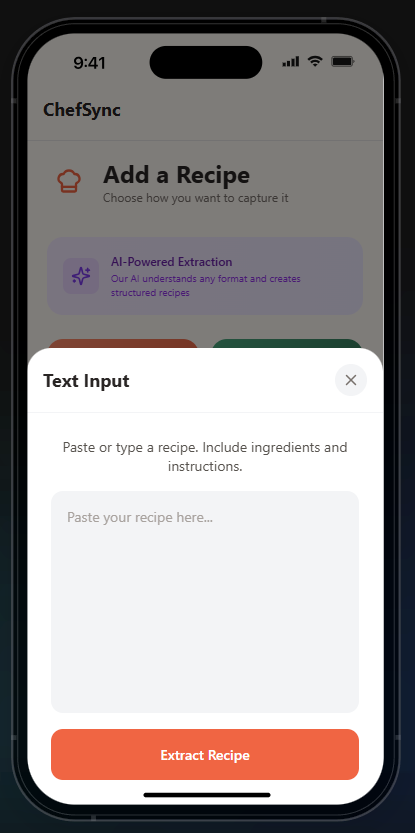
✍️ Text Capture Paste or type any recipe from anywhere—AI structures it into a clean, organized format.
Key Features Smart Shopping Lists
Automatically consolidate ingredients from multiple recipes Items grouped by category (produce, dairy, meat, pantry, etc.) Check off items as you shop Share lists via share code AI Meal Planning
Generate weekly meal plans based on your saved recipes Filter by preferences: vegetarian, budget-friendly, quick meals, high protein Add all planned meals to your shopping list with one tap Ingredient Intelligence
Tap any ingredient to get AI-powered substitution suggestions Normalize quantities across recipes (e.g., "2 eggs + 3 eggs = 5 eggs") How I Built It Tech Stack Frontend: React Native + Expo SDK 53 Styling: NativeWind (Tailwind for React Native) Backend: Convex (real-time serverless database) AI: Groq API (Llama 3.3 for text, Llama 4 Scout for vision, Whisper for voice) Monetization: RevenueCat for subscription management APIs: Supadata for YouTube/TikTok transcript extraction Architecture ChefSync uses a local-first architecture with cloud sync:
Capture Layer: Voice/image/video/text inputs → AI processing Extraction Layer: Groq AI extracts structured recipe data (title, ingredients, steps, servings) Storage Layer: Convex stores recipes, shopping lists, and meal plans with device-based sync Intelligence Layer: AI-powered meal planning, ingredient substitution, and category assignment Key Technical Decisions Why Groq over OpenAI? Groq offers extremely fast inference (~50 tokens/sec) with a generous free tier—perfect for rapid recipe extraction without breaking the bank.
Why Convex? Real-time sync, serverless functions, and zero infrastructure management let me focus on features instead of DevOps.
Why Supadata? Getting YouTube transcripts programmatically is surprisingly hard—Supadata provides a clean API with 100 free transcripts/month, which I cache aggressively to serve thousands of users.
Monetization Strategy ChefSync uses a freemium subscription model powered by RevenueCat:
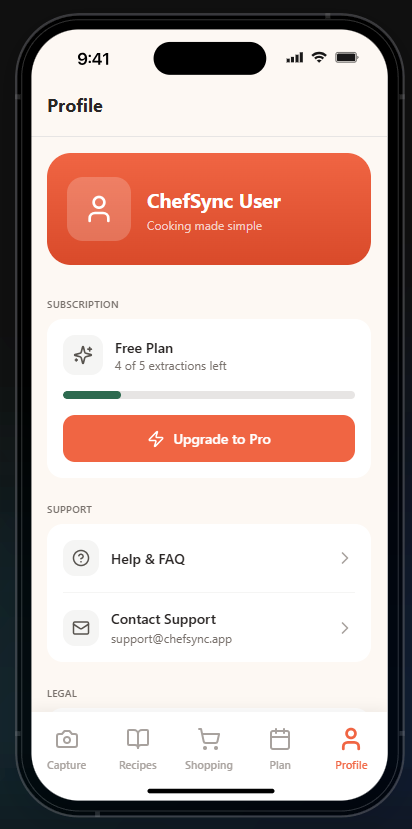
Free Tier (5 extractions per device) Try all 4 capture methods Save up to 5 recipes Basic shopping lists Limited meal planning Premium Tier ($4.99/month or $39.99/year) Unlimited recipe extractions Multi-recipe shopping list consolidation AI-powered weekly meal planning Ingredient substitution suggestions Priority AI processing Why This Pricing Works Target audience: Home cooking enthusiasts who watch 10+ recipe videos per week Pain point solved: Reduces meal planning friction from 30 minutes → 30 seconds Recurring value: New meal plans every week = ongoing subscription justification Market validation: Similar apps (Mealime, Paprika) charge $5-10/month with millions of users
Revenue Potential TAM: 50M+ people watch recipe videos daily on TikTok/YouTube Target: 0.01% conversion = 5,000 paid users ARR: 5,000 users × $60/year = $300,000 ARR at scale Challenges I Faced
Learning to Build Fast As a solo developer wearing all the hats (design, backend, AI integration, mobile dev), I had to make tough scope decisions. Early versions tried to do too much. I learned to focus on the core loop: capture → recipe → shopping list. Everything else is secondary.
AI Model Deprecations Groq deprecated 3 different models during development. Had to constantly update to their latest models—learned to future-proof by making model names configurable.
Cross-Platform File Handling Reading audio/image files on web vs. native iOS/Android required completely different APIs. Solution: Platform detection with dynamic imports.
Recipe Extraction Accuracy Early AI extractions mixed up ingredients and instructions. Fixed by using structured JSON output with strict schemas and few-shot prompting.
Transcript Caching Strategy With only 100 free Supadata transcripts/month, I needed to serve potentially thousands of users. Solution: Cache every transcript in Convex by video URL—popular cooking videos get fetched once and served to everyone.
Balancing "Mr. Mom" Duties with Development Coding between school drop-offs, grocery runs, and meal prep taught me ruthless prioritization. Every feature had to justify its existence. This constraint actually made ChefSync better—no feature bloat, just what busy people actually need.
What I Learned Speed matters for AI apps: Users expect instant results. Groq's fast inference makes ChefSync feel magical. Freemium limits drive conversions: Users hit the 5-extraction limit within their first week, creating natural upgrade pressure. Video transcripts are gold: YouTube/TikTok recipes contain perfect structured data—just need to extract it. Building for yourself = better product: I use ChefSync every single week for my family's meal planning. That real-world usage surfaces edge cases no amount of user testing could find. What's Next for ChefSync Short-term (Post-Hackathon) [ ] Ingredient pantry tracking (mark what you already have) [ ] Recipe search and filtering by tags [ ] Social sharing: "Share my meal plan" feature [ ] Recipe collections/folders Medium-term (3-6 months) [ ] Integration with grocery delivery APIs (Instacart, Amazon Fresh) [ ] Nutritional analysis (calories, macros) [ ] Voice-controlled cooking mode [ ] Community recipe sharing Long-term (1 year+) [ ] Partner with food creators for exclusive recipes [ ] B2B: White-label solution for meal kit companies [ ] Smart kitchen appliance integration Personal Note This app started as a way to help myself be a better "Mr. Mom" while supporting my wife's career. But building ChefSync showed me that millions of families face this same challenge every single day.
If ChefSync can save just 30 minutes per week for a busy parent, that's 26 hours per year—more than a full day back with your family. That's why I'm committed to making this a real product beyond the hackathon.
My wife deserves home-cooked meals when she gets home from work. My family deserves less stress around dinner time. And I deserve to feel like I'm actually using my developer skills to make our daily life better.
That's the mission behind ChefSync.
Built with ❤️ for busy parents who want to cook more and order less.
Built With
- android
- asyncstorage
- convex
- expo.io
- groq-ai
- ios
- javascript
- llama-3.3
- llama-4-scout
- nativewind
- node.js
- react-native
- react-navigation
- revenuecat
- supadata-api
- tailwind-css
- typescript
- whisper-ai
- zustand


Log in or sign up for Devpost to join the conversation.