-
-
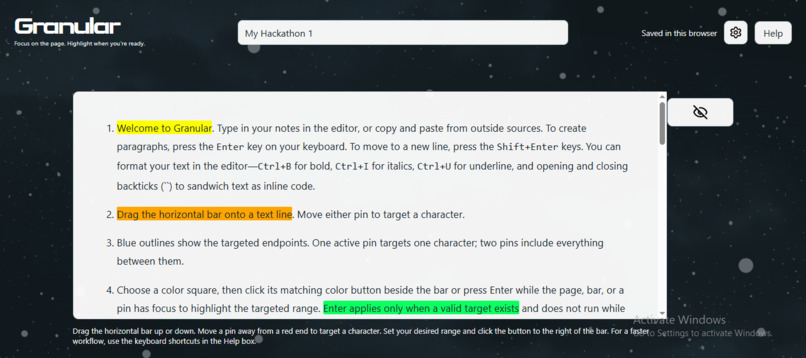
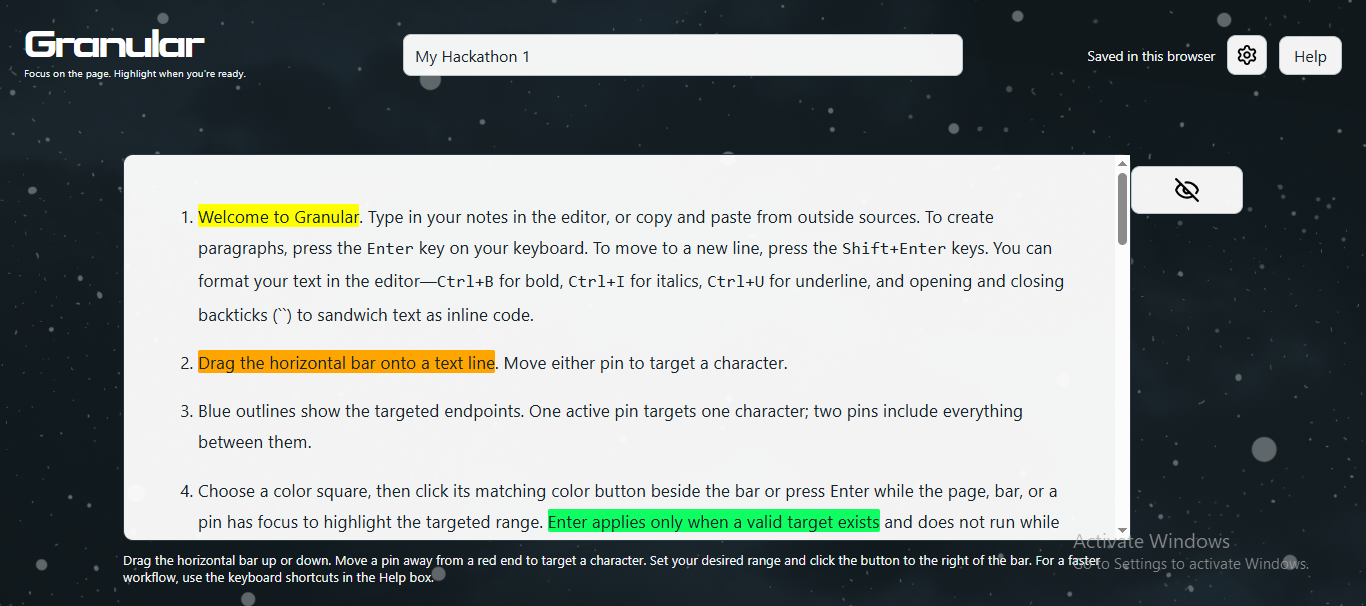
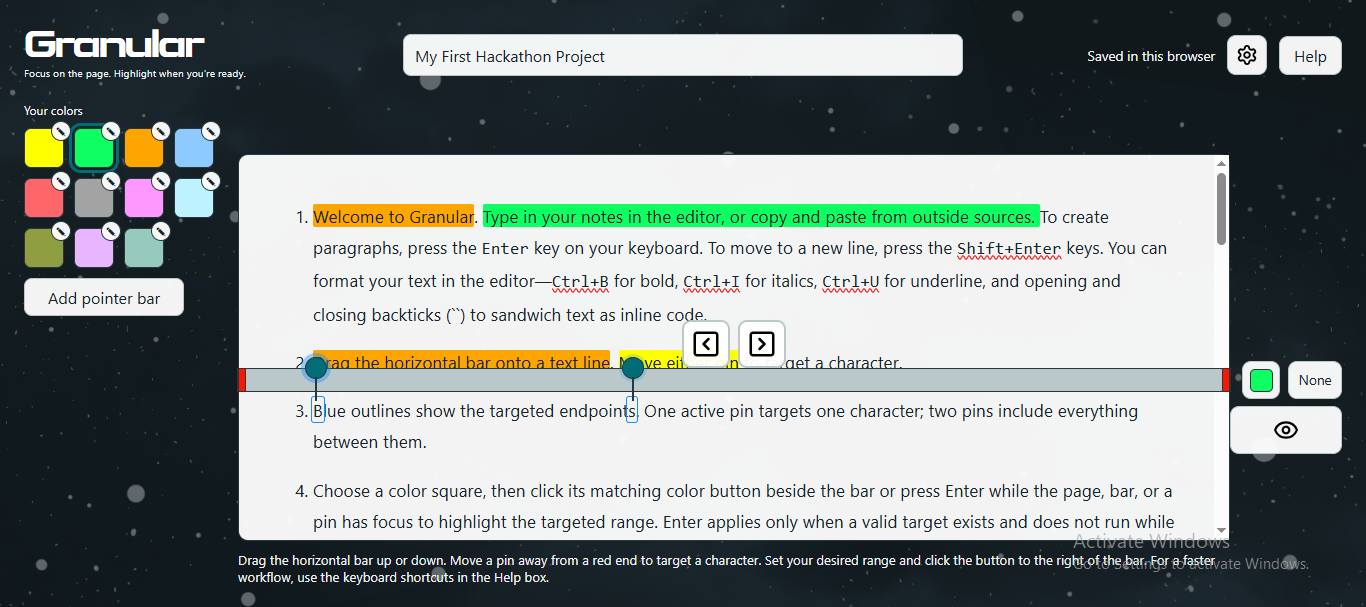
Visibility Toggle
-
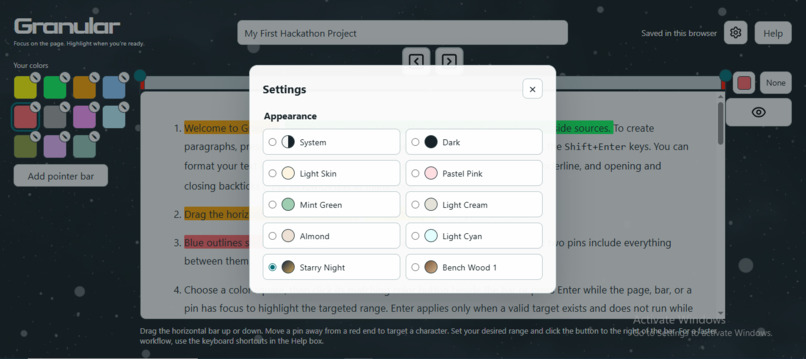
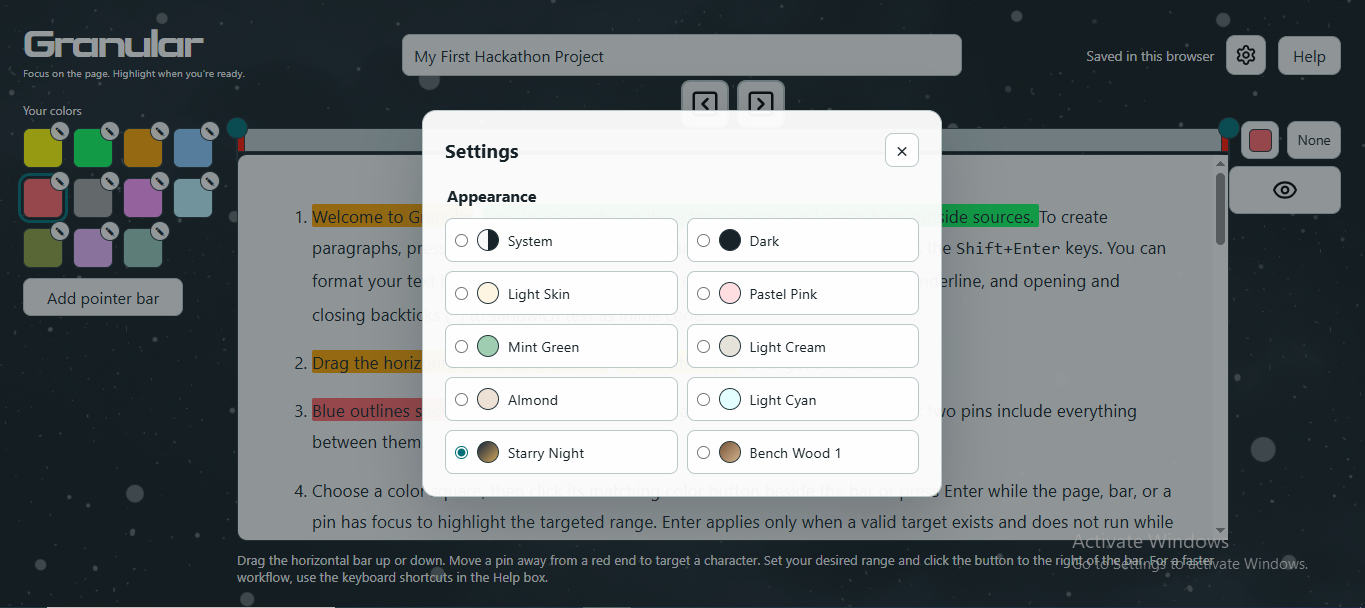
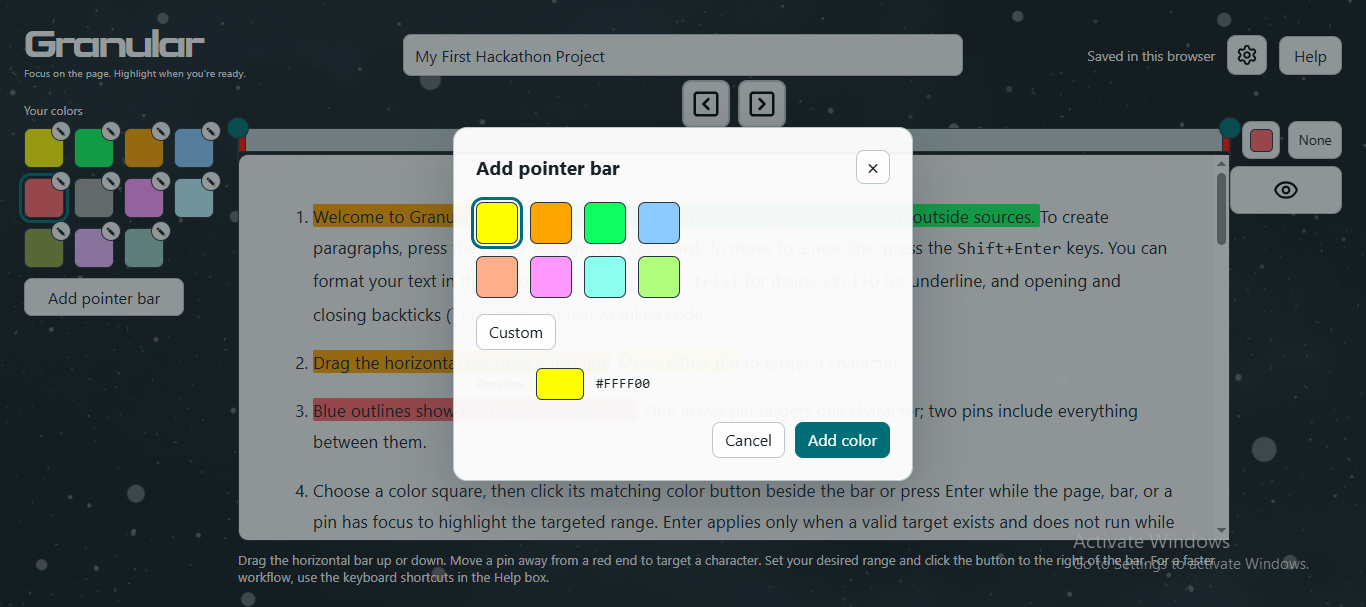
Settings Modal
-
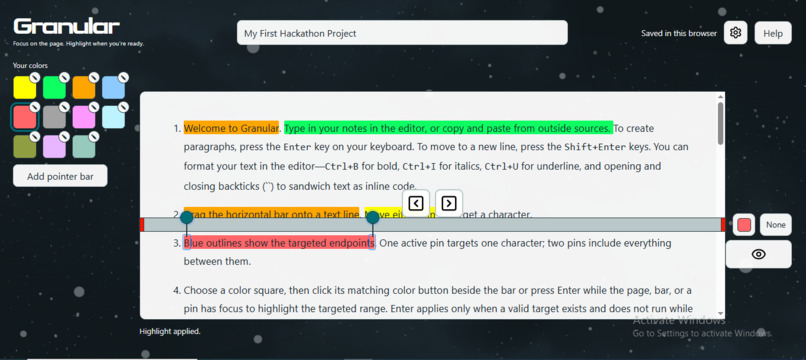
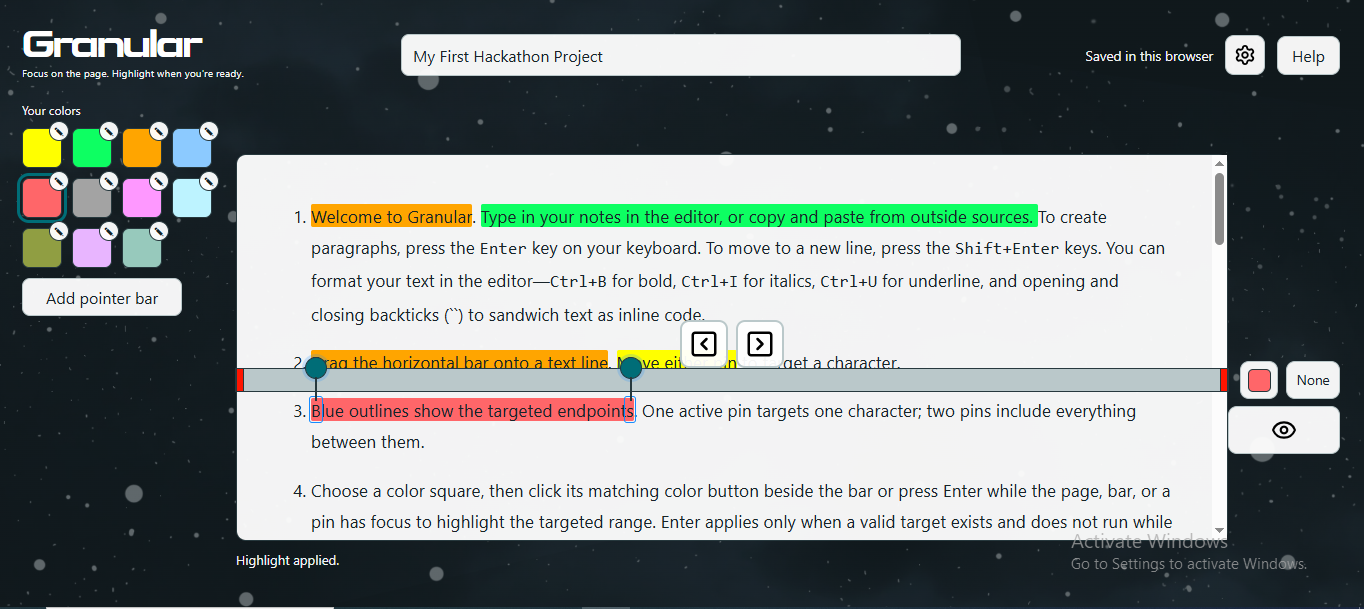
Applied Highlight with Control in Focus
-
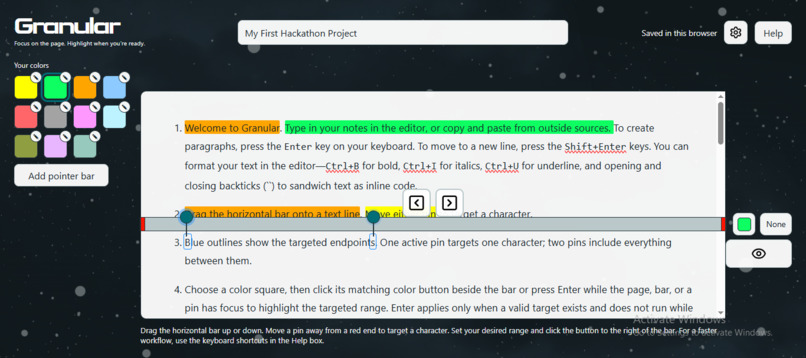
Character Targeting
-
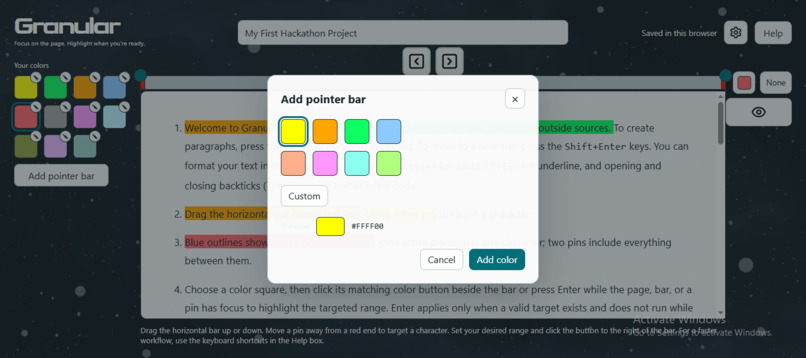
Color Selector
Inspiration
I first thought of the concept of Granular after observing a lot of mobile apps pre-programmed how much text you could highlight at a go—constraining you to either blocks of text—which kind of forces you to highlight what you might not want to highlight—or to a single color per highlighted block.
I really wanted to have the freedom to highlight a single word in a block of text, a few words, a phrase, a sentence, or partial lines in a block. I felt the concept, if successfully adopted, could enhance the value users get from apps with a text highlighting feature.
I thought builders should not assume every user sees text blocks as one single unit. Rather, like shooting stars—one word, one phrase, or one sentence in a block—could mean a million things to a user. That little grain, highlighted, among a thousand words, could be what a user just needs for deep meditation, reflection, and better retention.
What it does
Granular lets users highlight their notes in color—whether typed or pasted—and dynamically decrement or increment highlights with less friction. The ability to extend a highlight, contract it, add or remove highlights one character at a time, and step up the pace by holding down the buttons, gives room for users with different needs—from slow and easy-does-it to mid- or quick-paced.
It essentially provides a way for users to take more notice of their notes, while at the same time letting them make granular adjustments in a much more fluid manner.
So that's the core differentiator—the ability to dynamically decrement or increment highlighted text without needing to first remove the highlights from a word, a full sentence, or a paragraph, then re-highlight. Eraser-based highlight removal tools either remove an entire highlight or make their precise removal from each character feel somewhat like performing a surgical operation. Users need something faster—that can remove or add highlights more carefully, intentionally, and fluidly.
How I built it
I built Granular using a provided Skill Pack for Devpost Learn's hackathon track, in collaboration with GitHub's Copilot agent using the flipped interaction technique. This means I didn't just tell Copilot to build Granular and hand me a finished proof of concept (POC), then I walk away, hoping for the best. Rather, I was heavily invested in the process—taking interviews at all stages of the full skill pack implementation, thinking through my responses (knowing that my decisions would ultimately determine the app's quality and direction), weighing Copilot's recommendations, going back to the drawing board when my logic was flawed, and being required to demonstrate leadership, initiative, and risk-taking.
The skill pack had 6 skills, of which I used the command, start, typed before each skill name, to initiate a skill. Each time I initiated a skill (when a previous one was completed, but start 1-start was the kick-off), Copilot would locate the contents of that skill to understand its requirements before commencing an interview. The Skill Pack included the following skillset:
- 1-start
- 2-scope
- 3-prd
- 4-spec
- 5-build
- 6-ship
The first step I took before any interaction with Copilot was to make a sketch of what I wanted to build--essentially, a visual representation or picture of what the app or a certain part could look like. I found this approach super helpful, as I can be referencing a visual to develop my prompts before responding to Copilot. Visuals helped me with greater clarity in developing my prompts for logic flows.
My job focused mainly on carefully crafting responses based on my visuals, taking the agent's feedback, and studying the draft documents for scope, prd, spec, and checklist, to ensure my ideas and context were captured. There were occasions I had to draw the agent's attention to either misconstrued meanings or outright omissions. Since this involved plain English language, capturing my intended contexts were crucial.
While approvals mostly signaled a move to the next skill, I occasionally instructed the agent to not begin implementing the next skill till I explicitly gave the instruction. I used these occasions to do further reviews to enhance the application's logic.
In all, a combination of my original thoughts of the idea—which included supplied visuals—Copilot's interviews, critical feedback and recommendations, and collaborative problem-solving, helped shape the final outcome—something I can say that I engineered and architected using the flip interactive technique for building.
Challenges I ran into
Power cuts
Power supply is almost a luxury where I live, so using odd hours helped me push forward with my project.
Dearth of Shortcut Keys
Keyboard shortcuts were scarcely available, often clashing with system and browser-reserved shortcuts. At a point, Copilot suggested a combination of 4 key presses for the bar and targeting pins, which would have been a real UX challenge. I needed combinations that would bear less cognitive load on the user. I had to settle for the ones the app is currently using. I would have preferred Ctrl+Shift+Spacebar for focusing the bar, but it wasn't working. This shortcut search took quite a while, but I'm glad I could eventually provide the ones available.
Occasional stoppage of my GitHub Codespace
In some cases, it was due to poor internet connectivity, while in others, GitHub stopped the space when it was inactive for some minutes. During those inactive periods, I was actually crafting careful responses to give to the agent. I often had to be working on my responses while at the same time keeping an eye out to prevent the Codespace from stopping.
Non-rendering of 3 button images on the live server version of Granular
The square chevron buttons for the decrement and increment buttons were missing in the UI of the live version on Cloudflare Workers, including the eye image for toggling visibility of the controls. It took a bit of a while resolving, but with the help of the Google Gemini assistant, which provided some clues, I finally exposed to the assistant where the issue was arising from.
My local project folder didn't have a public/ directory that should contain the devpost/ and image/ subfolders. After creating the public/ directory at the project root (mkdir public), I placed the devpost/ sub-directory inside it, then ran npm run build to rebuild the project. I then deployed using npx wrangler deploy, then rebuilt in Cloudflare. The live server then rendered the images successfully.
Dwindling credits
It got critical, at a point I had to ask Copilot to do a risk assessment of including an additional feature I wanted for my demo (normal text selection and highlight with a keyboard shortcut). Copilot returned a non-affirmative evaluation, so the feature had to be deferred.
Video demo prep
I didn't have much experience with making videos, so I struggled a while with screen recording software in terms of hardware-appropriate settings. This took a while, with my batteries running low. I tried a direct TV screen recording via HDMI, using Open Camera on my phone and a wireless mic to record. That drained my battery quickly, interrupting the recording. I finally found a software called Bandicam, which lets free tier users record up to 5 minutes of video.
However, the next challenge was trying to keep my video under 3 minutes without speaking too fast. It was like a struggle between dividing my attention between the time limit required and explaining with words—which I now perceive is a skill in itself. I made two I considered satisfactory and ready for submission, but overshot the durations by a minute and 22/23 seconds; so I had to redo the demo, deciding to go with silent mode for this POC submission.
Accomplishments that I'm proud of
I started the project with an empty folder on October 18, and closed my last review for the POC on October 24. I built a functional app within 6 days of brainstorming and intensive interaction using the Devpost Learn Skill Pack and the GitHub Copilot agent.
I deployed my first-ever application to a live server.
What I learned
Planning is key
Plan a project around the 6 skills for objective and predictable results. When approaching my next project—even in the absence of an agent—I'll be asking myself the same kind of questions I was asked in the interviews, but likely more targeted and in-depth. Asking more in-depth questions is as a result of the challenges that arose while implementing the skills.
Take responsibility for my projects
Thinking through agent questions or responses, and providing thoughtful prompts, helped to steer the project in the direction I envisioned. I learned the agent puts a lot of responsibility on the human builder in the flipped interaction approach, so my inputs largely determined the direction the project took.
Resource management
Thoughtful prompts help to conserve scarce resources—especially agent usage credits. Poorly-framed or thought-through descriptions imply either spending more credits to fix bugs (which credits could run out before getting to 6-ship), or approving bugs to get things moving, which is counter-productive.
Scope is Everything
Before now, I had heard of the term, "feature creep". It didn’t have that much weight until now. With direction and guidance from the agent, I scaled down the POC, which had included notes management and additional screens. This helped me conserve resources and complete the POC with GitHub's generous free tier. I was at 98% credit usage by the end of the final review. It's easy to assume a feature is inexpensive in terms of implementation complexity, time, and risk, but my experience tells me every feature, behavior, and architected design has its own weight in gold. I'm wiser and better molded by the experience.
More Technical Stuff
I've learned more Git commands and how to navigate GitHub. I've learned about making commits, pushing changes, making pull requests (PRs), what a local versus remote repository is, the main branch, branches, what merging branches means, etc.). This hackathon marks my first live deployment of a working application using Cloudflare Workers with the Wrangler Command Line Interface (CLI).
What's next for Granular
- Fuller notes management besides basic localStorage for editor content
- A dedicated screen for read-only note access and a notes library
- Improved controls design concept for less friction (selecting controls and highlighting text with different colors should take a few seconds)
- A few essential shortcuts for a faster workflow, top of which is
Ctrl+Shift+Enterto highlight normal selected text with an actively selected color. - Improved layout design
- Direct sharing of notes from within Granular
- Download notes
- AI integration (AI reads a user's highlighted text and can explain it to the user for better clarity based on context)
- Bug fixes, bug fixes, bug fixes!
- A highly improved and valuable Granular.
Built With
- cloudflare
- css
- html
- react
- tiptap
- typescript
- vite
- wrangler

Log in or sign up for Devpost to join the conversation.