Inspiration
Inspiration Nurses work in some of the most cognitively demanding, interruption-heavy environments on earth. During medication administration alone, they’re verifying the right patient, drug, dose, route, and time—while being constantly pulled away by alarms, colleagues, and new patient needs. We kept hearing the same story: coming back from an interruption and thinking, “Wait… did I already give this dose?” That moment of uncertainty is stressful, unsafe, and invisible to most hospital systems.
We were inspired to treat task context itself as a first-class object: something that should be captured, validated, and restorable—just like a draft in an editor or a breakpoint in code. Checkpoint is our attempt to give nurses a simple, humane “save my place” button in the real world.
What it does
Checkpoint is a cognitive continuity system for nurses:
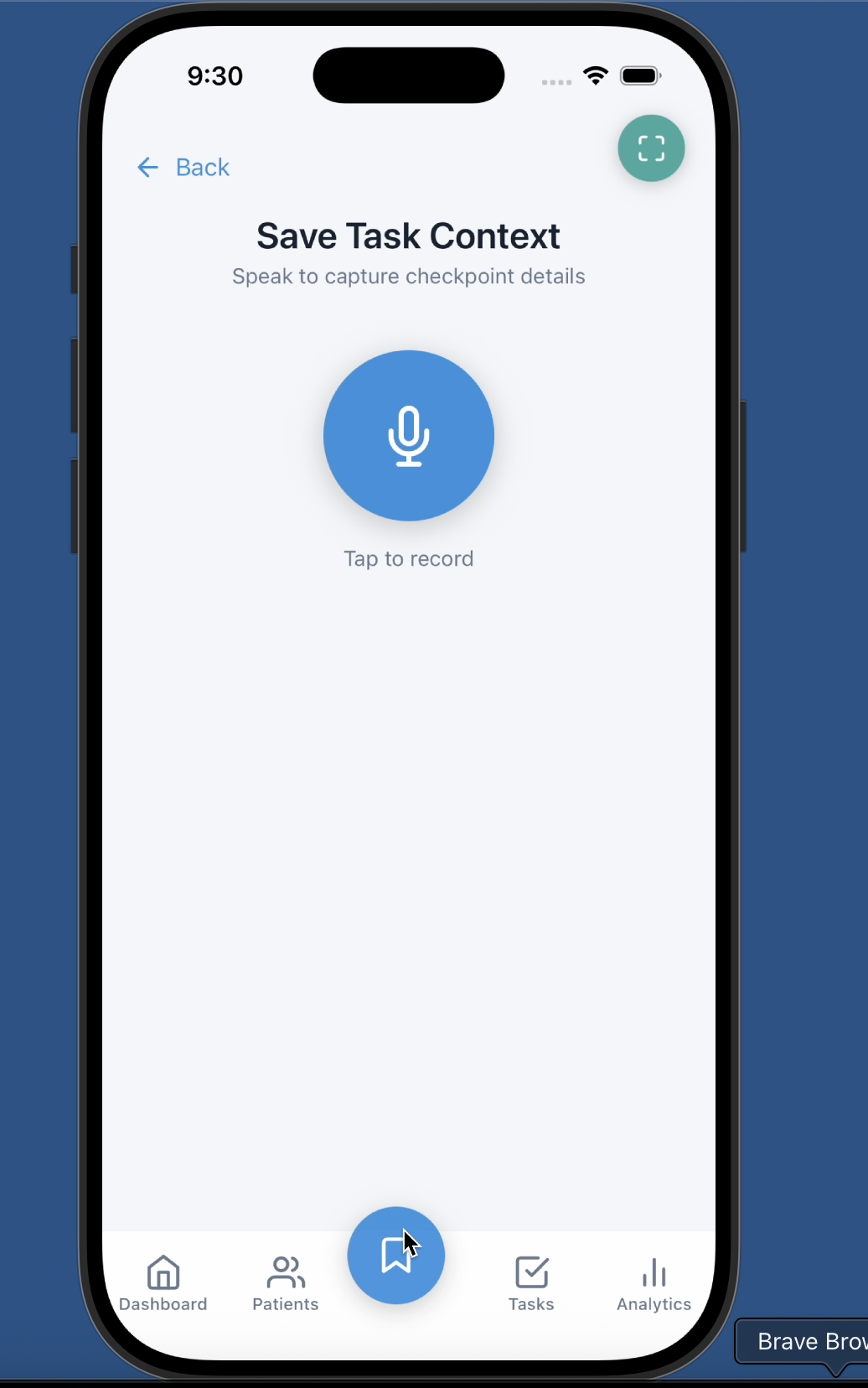
One-tap context capture A large center button in the mobile app lets a nurse quickly “checkpoint” their current task before an interruption. They speak a short phrase like: “Patel, room 204, metoprolol 25 milligrams, bed alarm.”
Voice → structured context We record a short voice memo, transcribe it with speech-to-text, and pass the transcript to an AI parser that extracts key fields:
patient name room number medication and dosage task type / notes timestamp Validation and safety labels Each extracted field is labeled as confirmed, uncertain, or missing based on how confidently it can be parsed or matched against known context. The UI makes uncertainty explicit instead of hiding it.
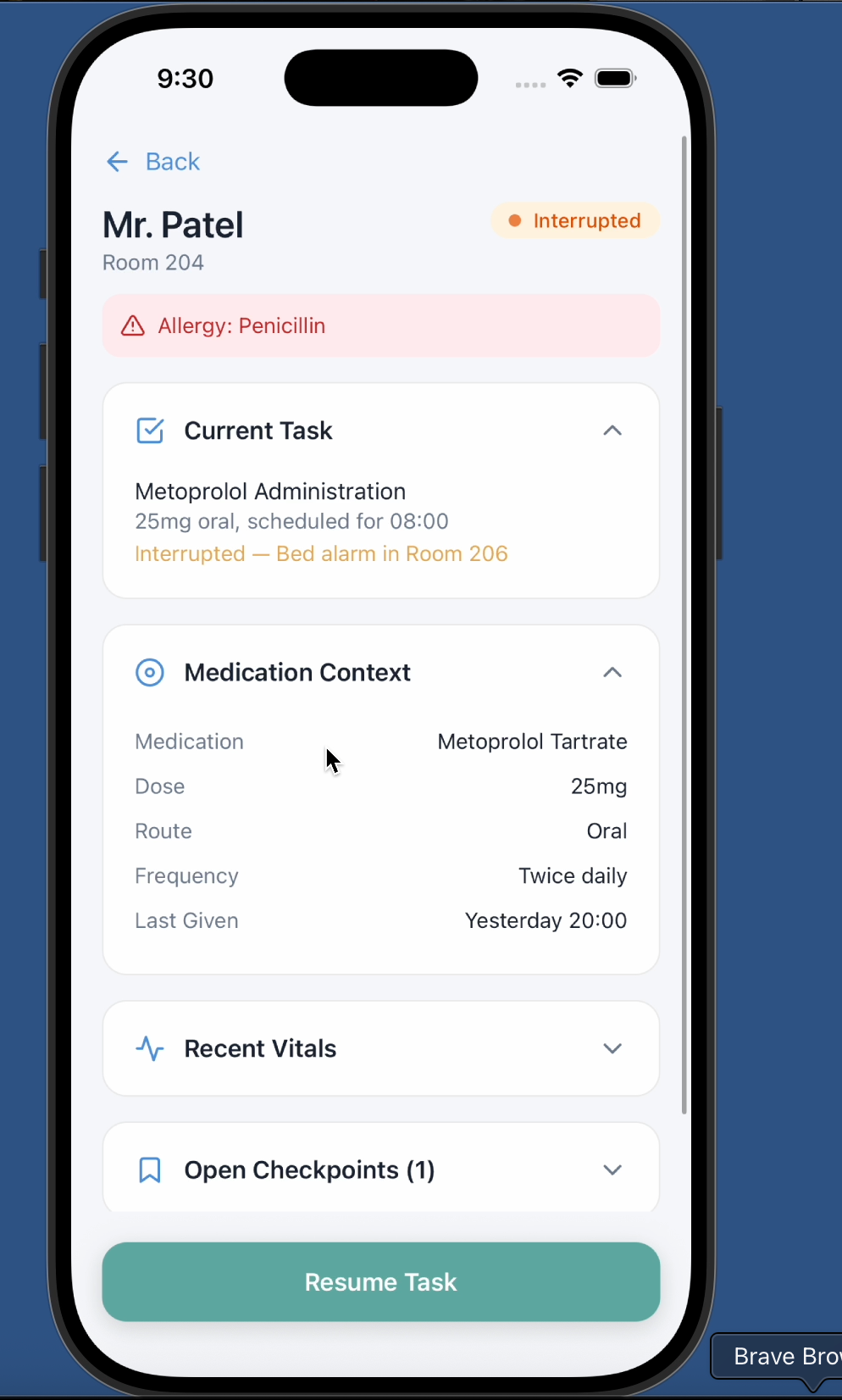
Resume Task interface When the nurse is ready to resume, Checkpoint surfaces a Resume screen showing:
who the patient is what medication and dose were involved what the nurse said last time how long it’s been since the checkpoint which details are uncertain Unfinished tasks queue & analytics Saved checkpoints appear as unfinished tasks in the mobile app, and the system logs interruption events (time, type, workflow) to feed analytics on interruption patterns.
In short: Checkpoint lets nurses “save state” during an interruption and safely restore it later.
How we built it
Frontend (Mobile) We built a React Native / Expo mobile app focused on nurse workflows:
Navigation and structure
React Navigation with a bottom tab bar and stack navigation. A prominent center tab opens the Context Save (Checkpoint) screen. Additional screens for Tasks, Dashboard/Analytics, Patient List, and Barcode Scanning. Context Save flow
The Checkpoint screen has a large microphone button: First tap: request mic permission (iOS-friendly expo config, Info.plist updates). Start recording using modern expo-audio APIs. Second tap: stop recording and begin processing. UI shows a pulsing recording orb, a timer, and state transitions: recording → transcribing → parsing → done When transcription and parsing complete, we render: The full transcript (for trust and verification). Parsed fields as validation chips (confirmed/uncertain/missing). Unfinished Tasks & Dashboard
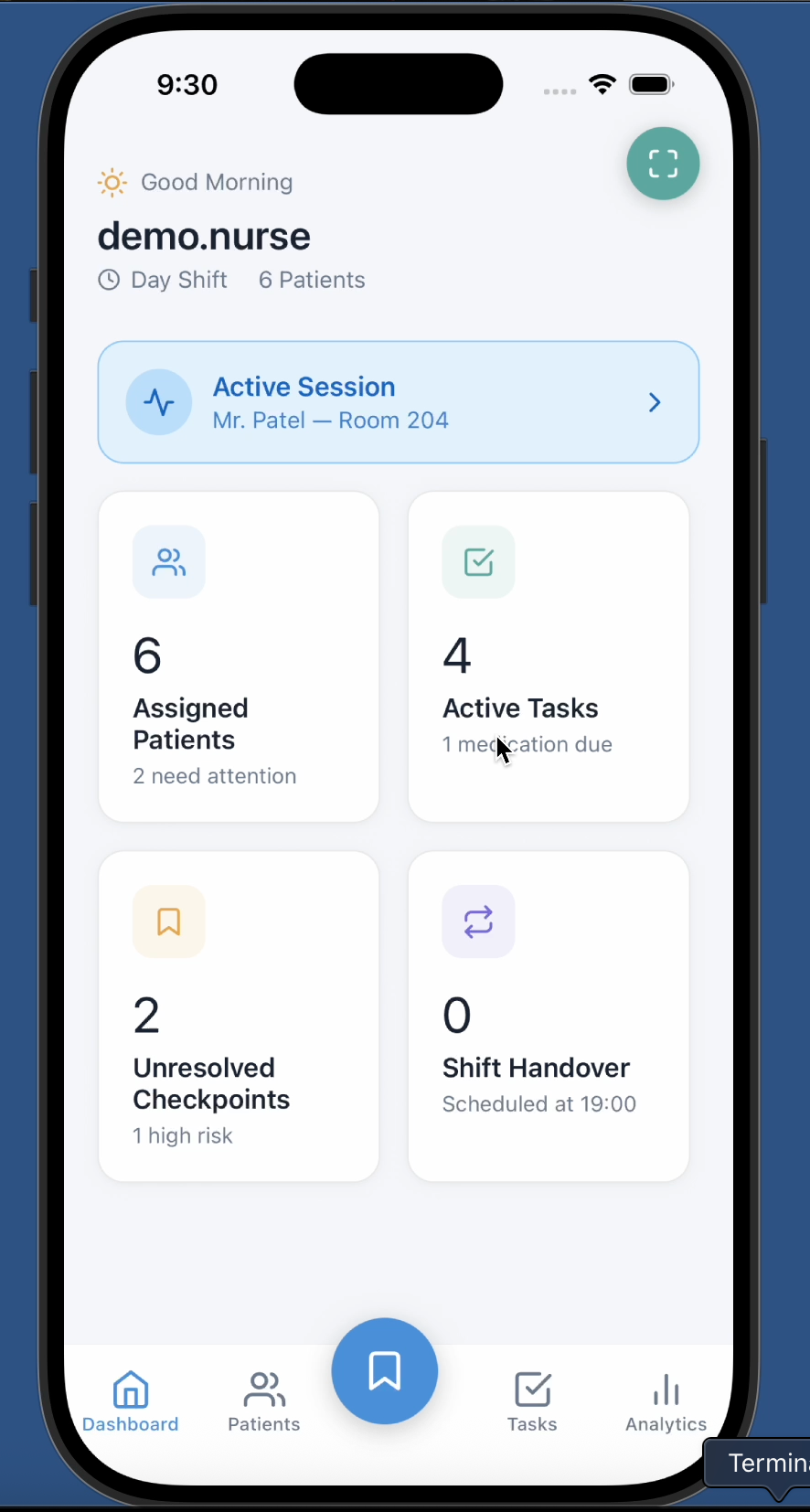
A shared TaskContext in React stores all structured checkpoints as unfinished tasks. The Tasks screen shows: A section of AI-generated unfinished tasks (from Checkpoint). Existing scheduled tasks. The Dashboard screen reads from the same context to show: Counts of unresolved checkpoints. Dynamic summaries (e.g., “3 unresolved interruptions”). Barcode scanner & patients
A camera-based wristband scanner uses expo-camera to read barcodes/QR codes. For the simulator, we added debug buttons that simulate real scans without a physical wristband. Scanned patients are surfaced into the Patients screen and/or context flows. Analytics screen
Built with react-native-chart-kit, customized to: Render interruption frequency charts. Support scrubbing / drag-based tooltips via a custom gesture overlay. Show vertical indicator lines and values as the user drags. Backend & APIs Backend services
A Node/Express backend exposes routes for: Audio processing, Checkpoints, Handover summaries, Analytics. Uses mock data for patients and tasks, structured to later plug into real EHR APIs. Speech-to-text (Deepgram)
Mobile app records audio locally. We upload the audio via a REST call to Deepgram (or a similar STT API), then receive a text transcript. AI parsing (Gemini)
The transcript is sent to a Gemini model with a strict prompt: Extract and return JSON fields: patientName, room, medication, dosageGiven, dosageRemaining, notes, timestamp. Respond with only JSON, no prose. We parse and sanitize the JSON, then store it as a SavedTask in the TaskContext. Validation & labeling
On the demo path, we simulate validation logic: Detect obviously missing fields. Mark uncertain or N/A values. The UI presents these labels visually, mimicking how a real integration would confirm against EHR data. Architecture Conceptually, we modeled it as three layers:
Mobile app – nurse-facing UI, recording, visualization. Backend – auth, patient context, checkpoint storage, analytics. AI layer – transcription + structured extraction, tightly constrained and validated.
Challenges we ran into
Mobile audio on modern Expo / React Native The legacy expo-av APIs conflicted with the latest Expo SDK (missing native headers, breaking builds). We migrated to expo-audio, realigned Info.plist permissions, and rebuilt Pods until native compilation was stable.
Camera & barcode scanning in the iOS Simulator
The Mac’s camera integration is limited / not always available in Simulator. We worked around this with realistic debug buttons that simulate scanned codes, letting us demo the flow reliably without physical devices. Gesture-rich analytics that still feel smooth
Out-of-the-box chart libraries didn’t support the kind of fine-grained scrubbing we wanted. We implemented a custom gesture overlay on top of charts to handle drag gestures, snap to data points, and render a vertical indicator + tooltip, all without interfering with scroll behavior.
Accomplishments that we're proud of
End-to-end interruption flow actually working on-device You can press the center button, record your voice, watch it transcribe, see structured fields appear, and then see the resulting “unfinished task” show up live in the Tasks list and Dashboard.
A nurse-centered interaction design
Large, obvious buttons. Minimal steps during high-stress moments. Clear “what’s certain vs. what’s guessed” visual language. Barcode scanner and patient context integration
Even with simulator limitations, we deliver a believable wristband scanning UX that ties into patient context and navigation. Analytics that tell a story
Charts that show how interruptions cluster over time and by type. A scrubbing UX that feels more like a modern analytics tool than a static dashboard.
What we learned
AI should be tightly scoped, not magical
When AI is used to extract structured fields from noisy speech, guardrails and validation matter more than model cleverness. Making uncertainty visible is as important as being “accurate.” Healthcare UX needs to respect cognitive load
Every extra tap or ambiguous screen increases the chance of error. Designing for interrupted attention is different from designing for calm, focused usage. Mobile-native constraints are real in hackathons
Pods, Info.plist, and Expo SDK versions can easily derail timelines. Investing early in a clean build pipeline and simulator-friendly fallbacks (like scan simulators) pays off. Context is a first-class data type
Treating “where the nurse is in the workflow” as data you can capture, store, and restore opens up new patterns: Resume safely, Hand over seamlessly, Analyze interruptions over time.
What's next for Checkpoint
Deeper EHR integration Connect to real hospital systems to:
Validate medications, orders, and rooms against live data. Attach checkpoints directly to charting events. Barcode-based medication verification
Expand the wristband scanner to also verify medication barcodes and cross-check “five rights” of medication administration. Smarter risk scoring and recommendations
Use interruption history, elapsed time, and task type to compute a richer resume risk score, and tune recommendations accordingly.
Built With
- expo.io
- handover
- node.js
- react-native
- react-native-safe-area-context
- react-native-screens-@expo/vector-icons-backend-express-(node.js)-custom-rest-apis-for-audio
- typescript

Log in or sign up for Devpost to join the conversation.