-
-
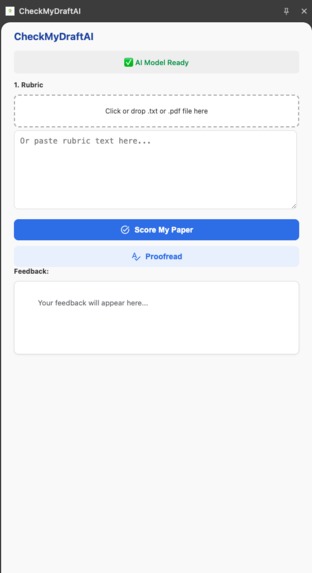
Side Panel
-
Inspiration
Educational institutions face an impossible choice with AI writing tools: help students improve or maintain compliance and integrity. The Privacy Problem: Cloud-based AI tools require uploading student essays—protected educational records under FERPA—to third-party servers, creating legal liability. The Integrity Problem: Generic AI writing tools write essays for students rather than teaching them, undermining learning. We built CheckMyDraftAI to solve both problems: an AI writing assistant that IT departments and teachers can confidently approve.## What it does
What it does
CheckMyDraftAI is a Chrome extension that works as a private, on-device AI tutor—cheat-proof and 100% FERPA-compliant.
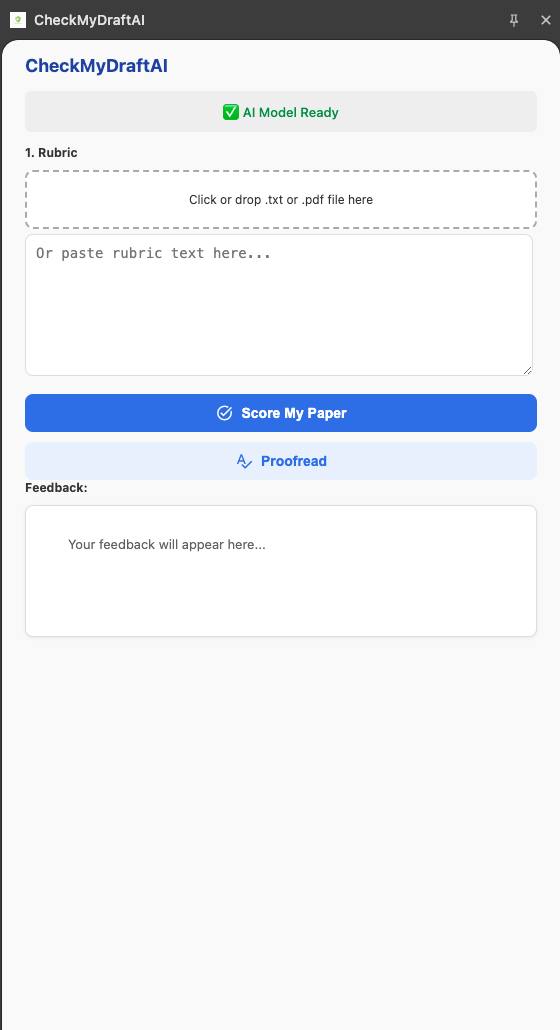
How it works: One-Click Setup: Initialize the on-device Gemini Nano model with one button. Load Rubric: Upload assignment rubrics (.txt or .pdf)—parsed locally. Capture Draft: Auto-extracts text from Google Docs Get Feedback: Receive an alignment score (e.g., "85/100") and actionable improvement checklist—never rewritten content. Proofreader: On-device grammar and spelling corrections.
Zero data leaves the device. Everything runs locally on the student's computer
How we built it
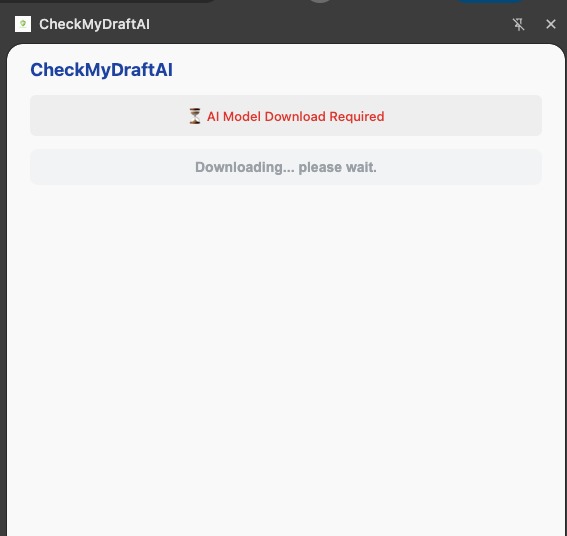
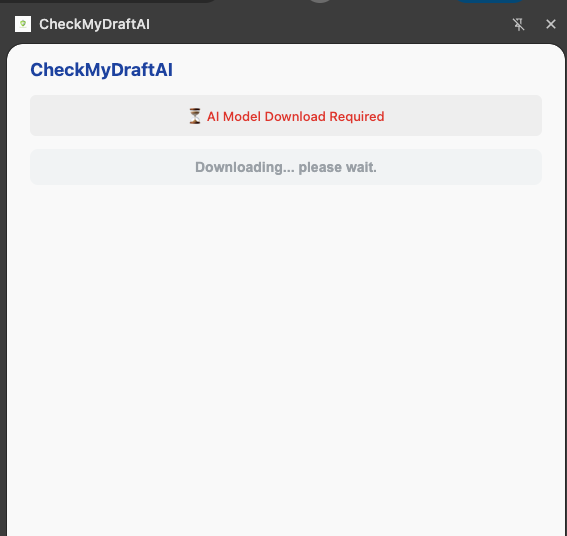
Core AI Engine: We use Gemini Nano in Chrome for all AI tasks. The main app is hidden until the user provides a one-time gesture to click Initialize AI Model. This click is the only thing that can safely call LanguageModel.create() and begin the on-device model download.
API 1: Prompt API for Scoring: The "Score My Paper" button uses aiSession.prompt() with our custom, guard-railed buildScorePrompt (from prompts.js). This prompt forces the AI to act as a teaching assistant, return a score in a parsable format (SCORE: XX/100), and only give feedback.
API 2: Proofreader API: The "Proofread" button uses a smart fallback. It calls aiSession.prompt() with our buildProofreadFallbackPrompt to provide corrections, ensuring the app is functional even if the Proofreader API isn't available.
Key Feature: Google Docs Extraction: This is our "secret sauce." Instead of trying to scrape the complex Google Docs DOM, our fetchGoogleDocContent function uses fetch with credentials: 'include' to call the document's /export?format=txt URL. This gives us the 100% clean, reliable text of the draft. (Thanks Gemini for your help on this one)
Client-Side PDF Rubrics: We use the pdf.js library (loaded as a module) to perform 100% client-side text extraction from uploaded PDF rubrics, maintaining our privacy promise.
General Page Scraping: For non-GDoc pages, we use chrome.scripting.executeScript to inject getPageTextInFrame and find the frame with the most text.
Dual Prompt System
Scoring Engine: Custom buildScorePrompt() constrains AI to act as a teaching assistant, returning structured feedback (SCORE: XX/100) without generating content. Proofreading: buildProofreadFallbackPrompt() provides grammar checking.
In addition to the built-in AI APIs, this project was developed with the assistance of Google's Gemini, which was used as an AI pair programmer to help brainstorm solutions, debug complex issues like the Google Docs fetch implementation, and write boilerplate code.
Challenges we ran into
Model Initialization Error: Our biggest hurdle was the error: "Requires a user gesture when availability is 'downloading'". We solved this by building a two-stage UI. The main app is hidden until the user gives explicit consent by clicking the "Initialize AI Model" button.
Scraping Google Docs: This was the hardest part. document.body.innerText was useless. The breakthrough was discovering the Google Docs /export?format=txt endpoint. Using fetch from the extension (which has the correct permissions) solved it instantly.
Accomplishments that we're proud of
100% On-Device & FERPA-Compliant: We built a full AI application (PDF parsing, GDoc extraction, and two different AI features) that runs entirely in the browser.## What we learned
What's next for CheckMyDraftAI
- Google Classroom Integration: Automatically fetch the rubric .pdf or text directly from the active Google Classroom assignment page to make it even more seamless.
- Multi-language support for international students
- Local progress tracking showing writing improvement over time
- Citation format checker (APA, MLA, Chicago)
- Accessibility features for students with learning differences
Built With
- gemini-nano-in-chrome
- html5
- javascript
- pdfjs
- prompt-api
- proofreader-api


Log in or sign up for Devpost to join the conversation.