-
-
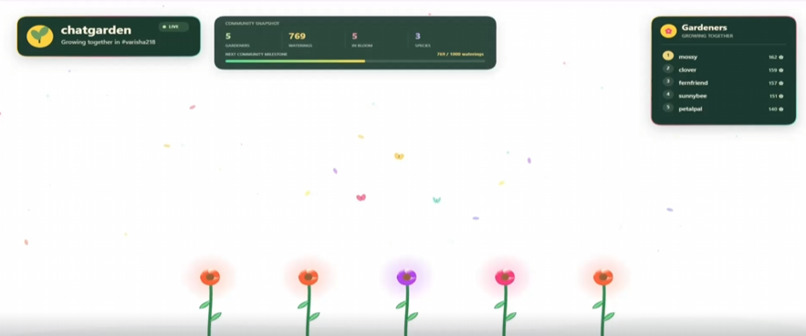
layout
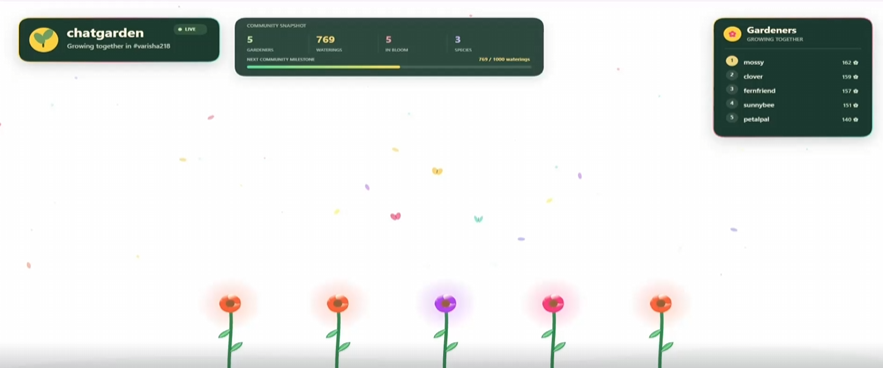
Inspiration
Twitch chat moves fast, and most viewers never see their own presence on the stream. I wanted chat to have something to look at and something to come back to. ChatGarden gives every chatter a plant that grows as they take part, so the community builds one shared garden together.
What it does
ChatGarden is a stream overlay that turns Twitch chat into a garden.
- Every chatter gets a plant. The first message plants a seed, and the overlay shows it growing on screen.
- Chatting waters the plant, and it grows from seed to sprout to bloom over time.
- A plant's species comes from the chatter's most-used emote.
- When chat activity spikes, a "sunshine" effect speeds up growth for everyone.
- A "Top gardeners" panel, and the
!plantand!forgetcommands. - A simulate mode for testing without a live stream.
It runs as a browser page, so streamers can add it to OBS as a Browser Source.
How I built it with Codex
I built the whole project in one OpenAI Codex thread. I described the idea and the rules (how plants grow, what gets stored, and that it should work with no login), and Codex wrote the code. I then ran it, tested it on my own Twitch channel by chatting from my account, and went back to Codex with what I saw.
- What I decided: the idea, the garden mechanics, and the privacy rules (anonymous chat reading, no message text stored).
- What Codex did: wrote prompt and it made the website.
- What I checked myself: I ran it with real chat on my channel and confirmed a plant appears for each chatter.
Challenges
None ; however, i struggled in improving the layout.
What I learned
- Twitch chat is easy to read. I learned that a program can read a channel's chat without anyone logging in, so I could build something live without any passwords or secret keys.
- Chat can drive what's on screen. Seeing a plant appear a moment after I typed a message showed me how a stream overlay can react to viewers in real time.
- How to work with an AI coding assistant. I learned to give Codex clear instructions, run what it built, and tell it exactly what I saw. When I explained a problem clearly, the fixes came faster. ## Privacy
- Overlays can go in OBS. I learned that a web page can be added to OBS as a Browser Source, so it shows up on a live stream.
The app reads chat anonymously and needs no keys or login. It stores only usernames, counts and plant types, and never saves message text.
Run it yourself
Find instructions from the repository in GitHub in README file
What's next
- Reacting to raids and follows. I'd like the garden to respond to big stream moments, like a rainstorm when a raid arrives or a golden seed when someone follows. That needs Twitch EventSub, which I haven't built yet.
- More plant species. Right now a plant's species depends on the emote its owner uses most. I'd add more plant types and seasonal themes, like snow in winter.
- Controls for streamers. I'd add a simple settings page so a streamer can change how fast plants grow, hide certain users, or reset the garden without touching any code.
- Sharing gardens. I'd like viewers to be able to see their plant outside the stream, for example on a small page with their garden's growth over time.
Built With
- codex
- express.js
- html5
- javascript
- node.js
- openai-codex
- tmi.js
- twitch
- websocket
