-
-

App icon (1024 x 1024, uncropped)
-
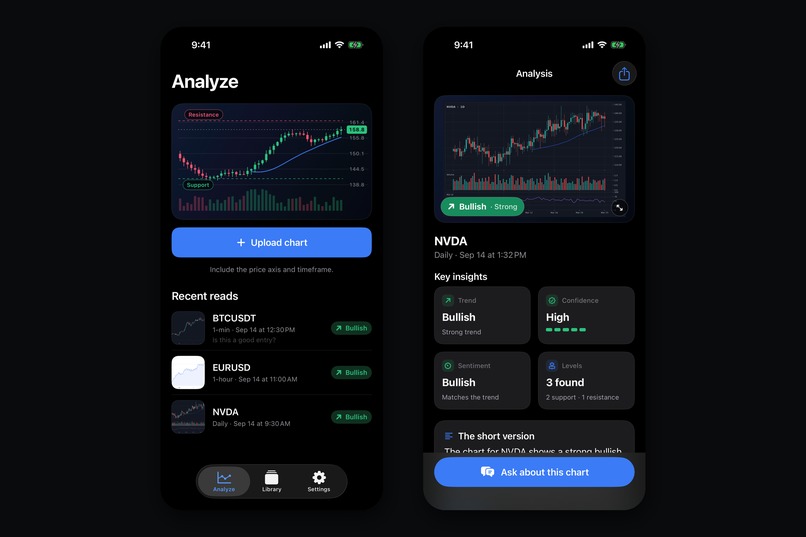
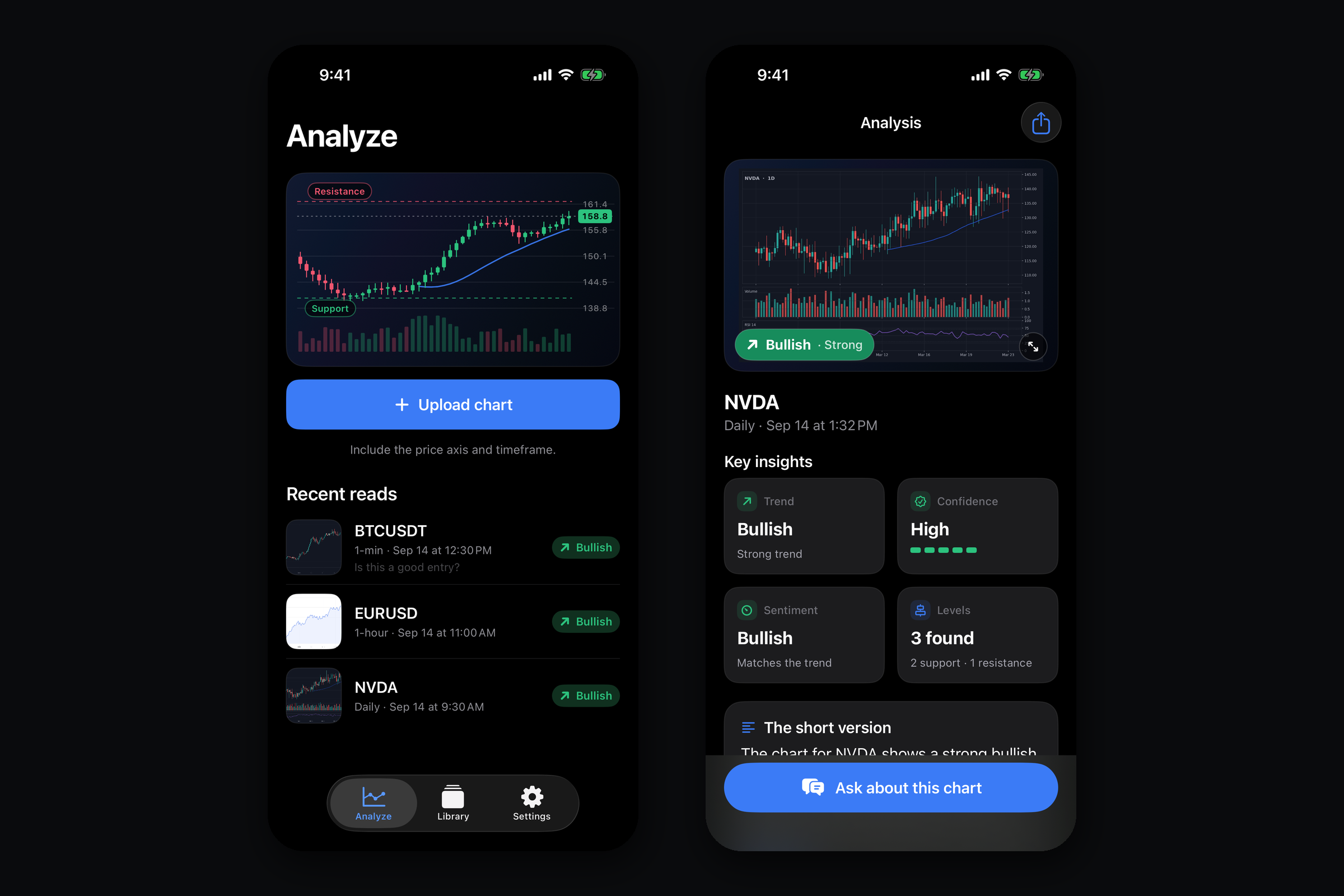
Analyze tab with recent reads, and the result screen: direction badge, trend, confidence, sentiment and levels
-
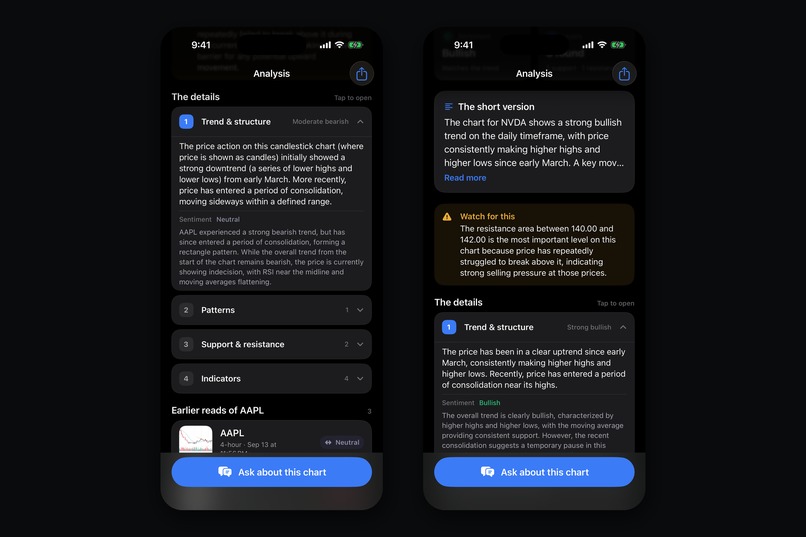
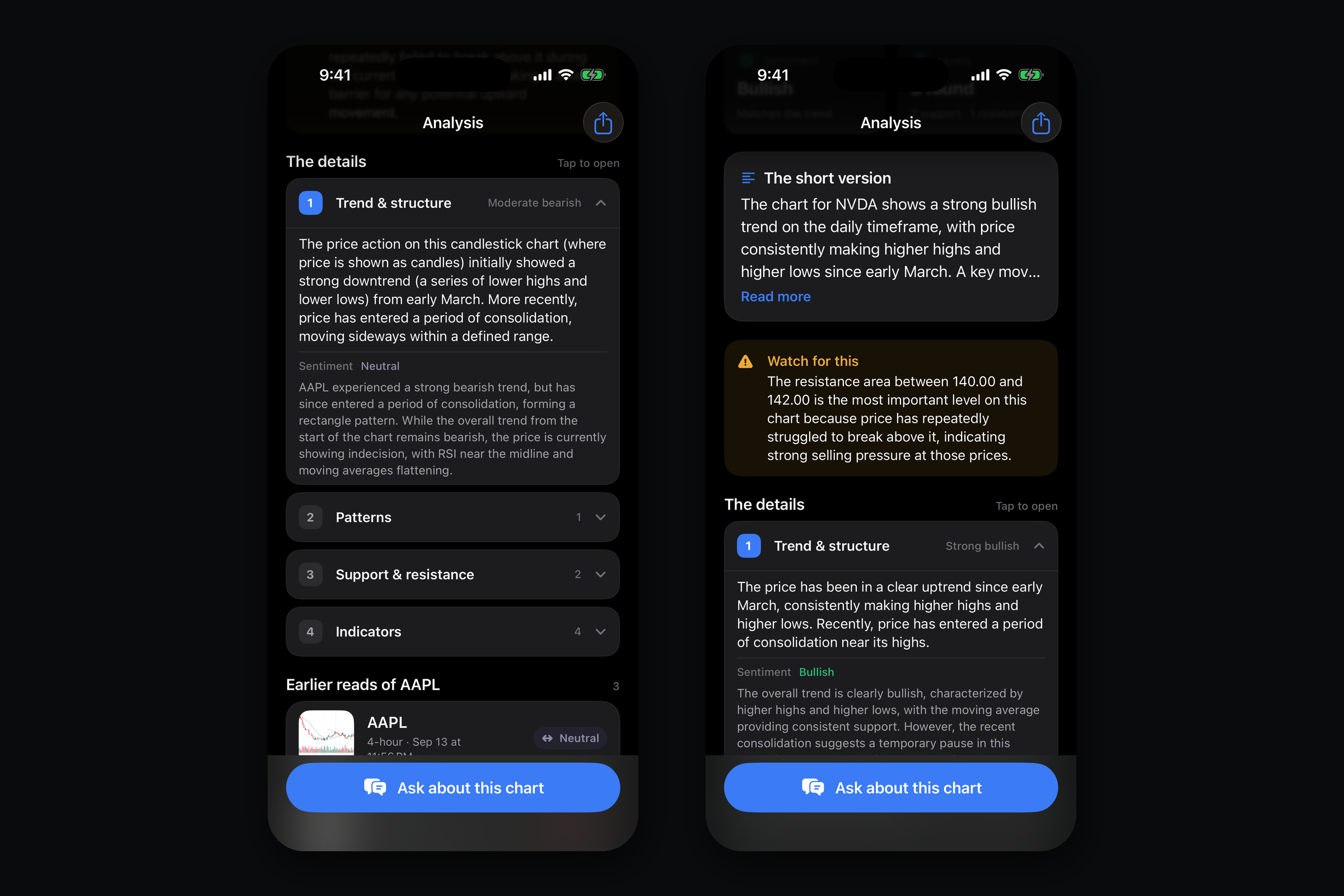
The full breakdown: structure, support and resistance, patterns, indicators, and the plain language short version
-
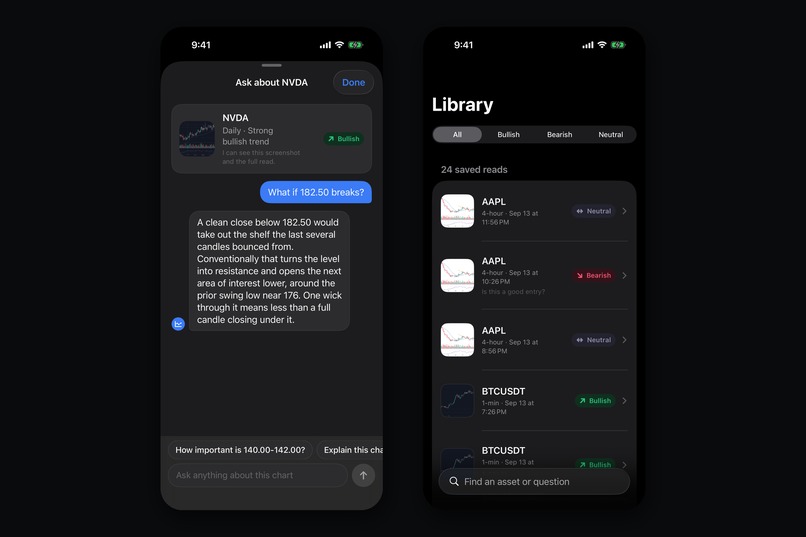
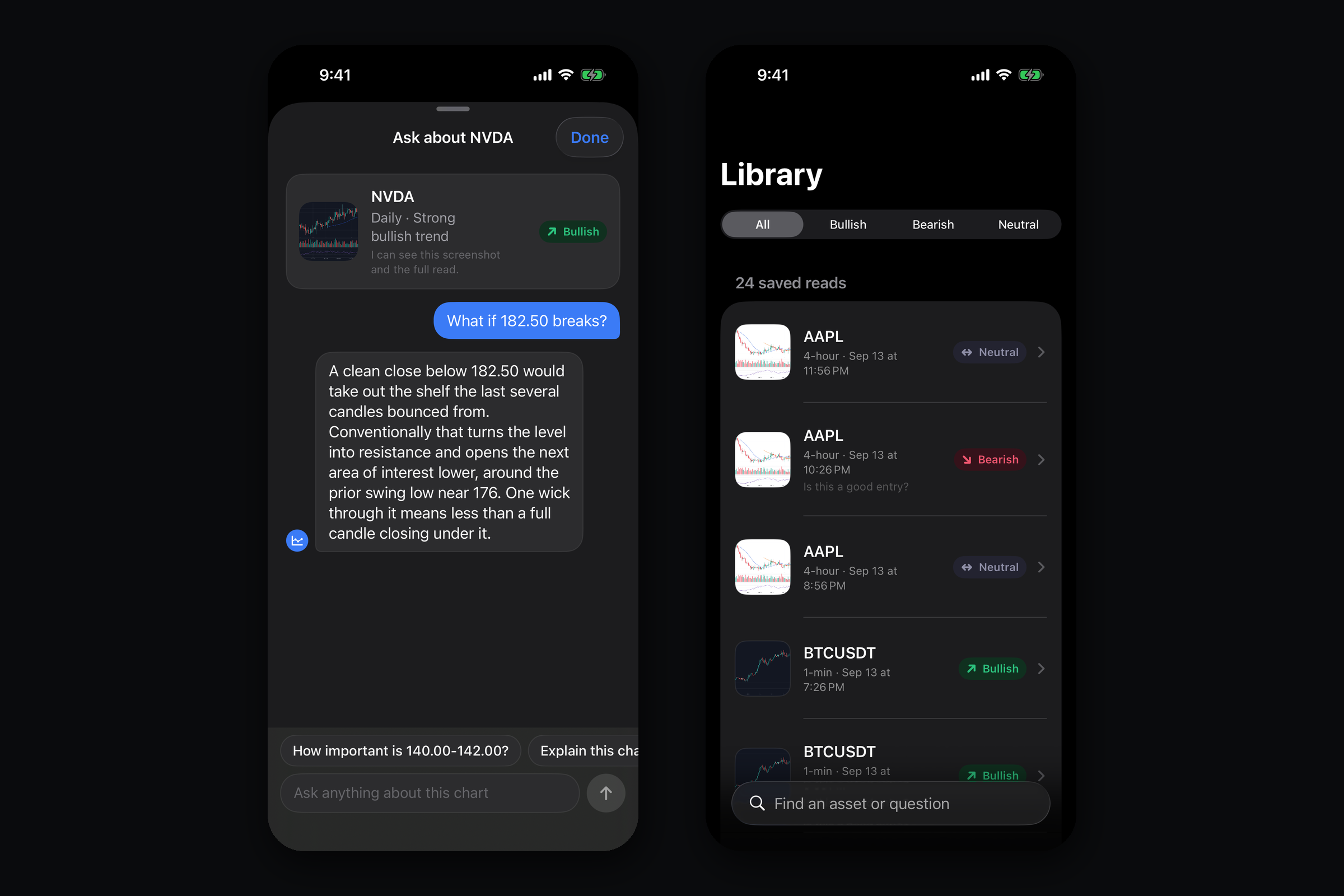
Follow-up chat that sees the same chart and read, and the on-device history

Inspiration
Every trader has had the same moment: you open a chart, you stare at it, and you quietly have no idea what you are looking at. There is a wall of candles, three indicators you turned on six months ago, and a feeling that something is happening. The advice everybody gives is "learn to read charts," which takes years and a lot of expensive mistakes.
Meanwhile the answer is already sitting on your screen. The chart is a complete picture of what price has done. Reading it is a skill problem, not an information problem. That felt like exactly the kind of gap a multimodal model should close: not by telling anyone what to buy, but by naming what is on the screen the way an experienced trader would if they were sitting next to you.
So the whole app is one gesture. Screenshot the chart. Get the read.
What it does
ChartCheck turns a screenshot of any trading chart into a structured technical read in about fifteen seconds.
You share or pick a screenshot from any platform, any asset, any timeframe: stocks, crypto, forex, futures, TradingView, a broker app, a screenshot of a screenshot. You get back trend and structure, the support and resistance levels that actually matter, candlestick and chart patterns, a pass over whichever indicators are visible in the image, sentiment, a plain language summary, what to watch for next, and a confidence meter that is honest when the image is ambiguous.
Then you can ask it things. The follow-up chat can see the same chart and the same structured read, so "why is that a resistance level" or "what would invalidate this" gets answered about your chart, not in general.
Two details that changed how it feels to use:
- Onboarding tunes the read to the trader. Beginners get plain language with every term explained inline. Experienced traders get the jargon with no hand-holding, and the sections are ordered by what they said they care about.
- History is on device. Your charts stay yours.
ChartCheck is informational and educational. It never gives signals, picks, price targets, or advice, and it says so in the product.
How we built it
Client. Native SwiftUI, roughly 30 files, no cross-platform layer. A small design system (tokens, components, motion) so the surfaces stay consistent, and an image prep step that downscales and normalizes screenshots before upload.
Backend. A TypeScript service on Google Cloud Run that proxies Gemini behind a strict structured-output schema. The schema is the product: the model is never asked for prose and then parsed, it is required to return typed fields for trend, levels, patterns, indicators, confidence and summary. That is what makes the results screen possible and what makes bad output a validation failure instead of a weird paragraph.
Attestation. App Attest on the client so the backend is not an open Gemini proxy for anyone who finds the URL.
Monetization, all RevenueCat. A ChartCheck Pro subscription group with a
yearly and a weekly product, entitlements checked through a thin Entitlements
service, and a hard paywall with no free analyses. On top of that a dedicated
winback offering with its own discounted yearly product, surfaced through
three doors including a Home Screen quick action that is registered at runtime
with the live discount percent and removed again the moment someone subscribes.
RevenueCat made that last piece a config change rather than a release.
We also wired Purchases.enableAdServicesAttributionTokenCollection() next to
configure(), plus the RevenueCat Apple Ads integration and scheduled data
exports, so paid acquisition can be measured as cost per paid subscriber per
keyword instead of cost per install.
Evaluation. We generated a corpus of about a hundred synthetic charts with known ground truth (we knew the real trend, the real levels, the real patterns because we drew them) and ran the whole pipeline against it. That corpus caught more real bugs than manual testing did.
Challenges we ran into
The model refused to answer. The first working build of the follow-up chat would regularly decline trading questions outright. It had pattern-matched "trading" to "financial advice" and bailed, which is the correct instinct and completely wrong behavior for a tool whose entire job is describing what is on a chart. Fixing it meant being precise in the system prompt about the difference between describing a chart and recommending a trade, rather than just telling the model to be more helpful.
Thinking tokens ate the answer. Chat replies kept truncating mid-sentence. The output cap was set to 400 tokens, which seemed generous for a chat reply, but Gemini 2.5 Flash's thinking tokens were being drawn from that same budget, so the visible answer got whatever was left. Turning thinking off for that route and raising the cap to 1024 fixed it immediately. It took a while to find because the failure looked like a streaming bug, not a budget bug.
Firestore contention. Concurrent writes on the same document under load produced retries and latency spikes in exactly the flow that is supposed to feel instant.
The results screen was wrong twice. The first version put the conversation inline under the analysis with a permanently pinned text field. In testing people looked at it and asked what the box was for. It became a single "Ask about this chart" bar that opens a sheet with the chart pinned at the top and four tappable starter questions built from the read, and it immediately made sense to people.
Small screens. The paywall looked fine everywhere except an iPhone SE, where the two plan cards collided with the call to action. Compact header and bullets below a height threshold.
Naming. The app shipped as ChartCoach and became ChartCheck a day before submission. Everything user-facing changed. The bundle ID, the Cloud Run service, and the RevenueCat records deliberately did not, because renaming plumbing that nobody sees is pure risk for zero benefit.
Accomplishments that we're proud of
- The fifteen second read is real, on real screenshots, from any platform.
- The structured schema. Forcing typed output instead of prose is what makes the results screen, the chat context, and the eval corpus all possible.
- A follow-up chat that genuinely sees your chart and stays inside the lines on financial advice without being useless.
- A full subscription stack including a real winback flow, shipped by one person, with RevenueCat doing the parts that would otherwise have been weeks.
- A hundred-chart ground-truth eval corpus, which is not a thing most apps this size bother to build.
- Submitted to the App Store on time.
What we learned
Structured output is an architecture decision, not a prompting trick. Once the model had to return typed fields, half the product questions answered themselves and the failure modes became visible instead of subtle.
Refusals are a prompt design problem. A model declining to describe a chart is not a safety win, it is a spec that failed to distinguish description from advice. Being specific about that boundary made the app both more useful and better behaved.
Token budgets are not what they look like. Reasoning tokens coming out of the output budget is the kind of thing that only shows up as a weird symptom.
Ship the honest version. The confidence meter tells you when the screenshot is ambiguous. It would have been easy to hide that. Keeping it is what makes the rest of the read trustworthy.
Build the eval before you need it. Synthetic charts with known answers found regressions that no amount of tapping around would have.
What's next for ChartCheck: AI Chart Analysis
- Watchlists and repeat reads. Point it at the same chart over time and get what changed, not just what is there.
- Multi-timeframe. Feed it the daily and the 15 minute together and let it reconcile them, which is what a real trader does and the single most requested thing in testing.
- A learning mode that compounds. The app already adapts to experience level. Next is having it actually teach: quiz the pattern it just named, and move you up as you get it right.
- Android and iPad.
- Share cards. An export of a read that looks good enough to post, which is both a feature and the cheapest acquisition loop available to an app like this.
- Pricing work through RevenueCat experiments. The yearly and weekly split, the trial length, and the winback discount are all currently best guesses. They should be tested, not assumed.
Built With
- appsflyer
- cloud-run
- gemini-api
- posthog
- revenuecat
- swiftui
- typescript

Log in or sign up for Devpost to join the conversation.