-
-
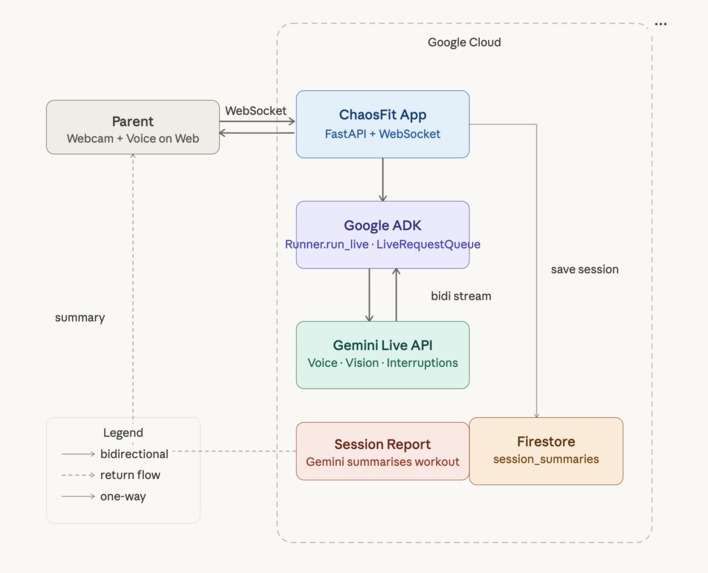
Chaosfit Architecture
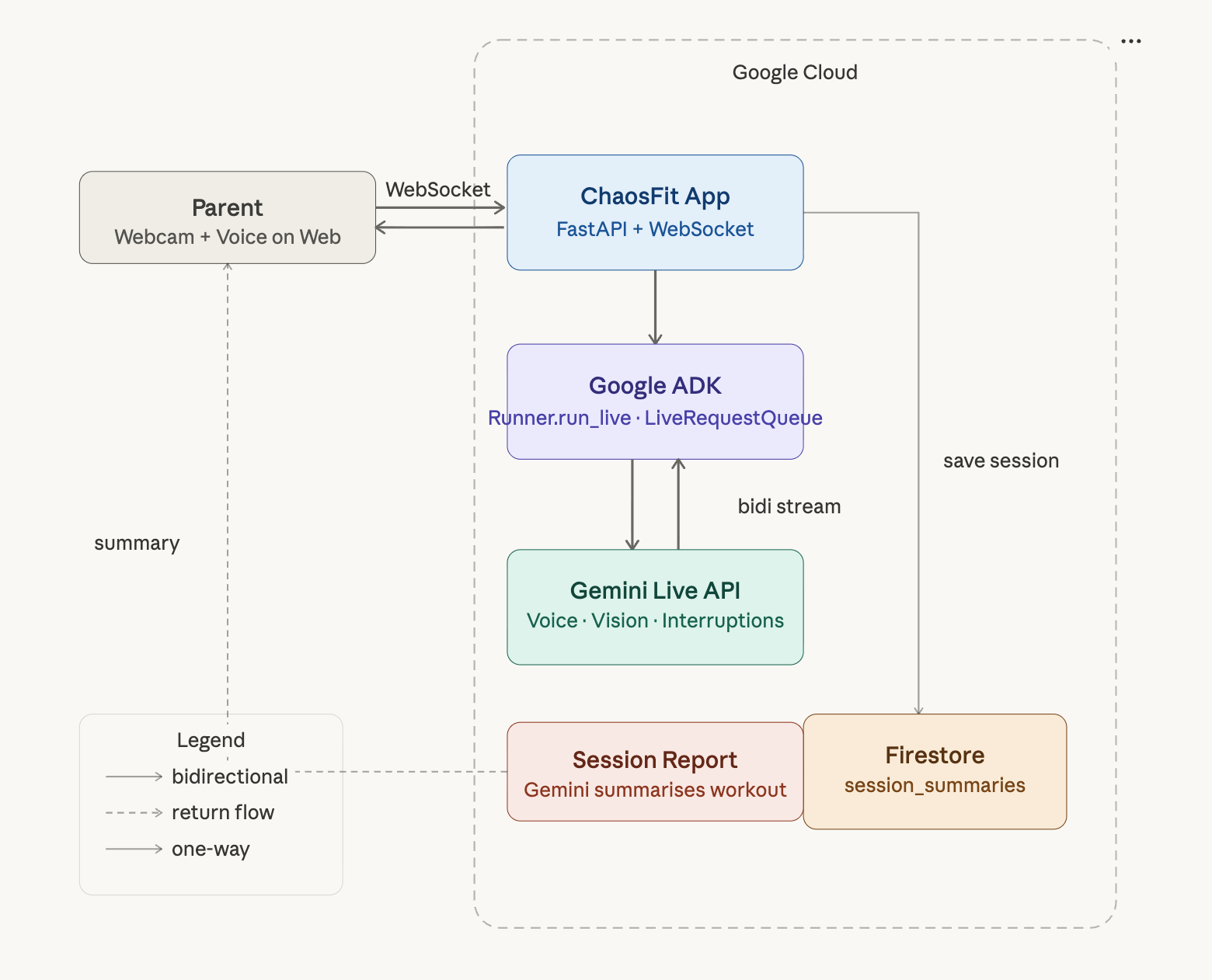
ChaosFit — Real-Time AI Coaching for Chaotic Lives
Inspiration
Parents with young children face a unique fitness paradox: the motivation is there, but every fitness solution assumes something they don't have—uninterrupted time, a dedicated space, expensive equipment, or a predictable schedule.
The traditional fitness landscape offers three broken patterns:
Premium content apps (Peloton, Apple Fitness+) deliver excellent content but zero personalization. You follow the video; it doesn't watch you back or adapt to your chaos.
Human coaching (online trainers ~$150/month) provides personalization but requires you to self-film, send footage manually, and maintain a coaching schedule that doesn't exist in early parenthood.
Smart hardware (Tempo, Tonal, $2,000+) offers real-time form feedback but demands dedicated space, expensive equipment, and a life structured enough to use them.
The common thread: every serious fitness solution requires money, equipment, space, or a predictable schedule. None adapts to a life where everything changes every 20 minutes.
ChaosFit changes that. It's built for parents who love their kids more than their abs—and deserve to stay fit anyway.
What it does
ChaosFit is a real-time workout coaching app that pairs users with an AI coach via live video, audio, and text streaming. The coach watches your form, hears your breathing, understands your context, and delivers in-the-moment corrections without requiring perfect conditions.
Core features:
- Live video form feedback: Your phone or laptop camera streams frames to the model (~1 FPS), which analyzes your movement and provides real-time coaching cues.
- Native audio streaming: Microphone input enables natural, continuous conversation with the coach. You can interrupt the coach; the coach can interrupt you with urgent form corrections.
- Adaptive session pausing: Hit a wall? Baby crying? Click "pause session"—media and text are held back from the model until you resume, preserving coach context without starting over.
- Chat + coaching: Text prompts let you ask follow-ups, adjust difficulty, or describe what's happening in the moment.
Why it works for chaos: Setup takes 30 seconds. You need only your phone or laptop. The coach adapts mid-workout to your reality.
How I built it
Architecture:
- Backend: FastAPI + WebSocket server handling bidirectional streaming.
- AI/Coaching: Google ADK (Application Development Kit) with native-audio Gemini Live model (
gemini-2.5-flash-native-audio-preview-12-2025), ensuring low-latency interruption and natural duplex conversation. - Frontend: Static HTML/CSS/JavaScript adapted from ADK bidi-demo, supporting live camera preview, mic input, and event console.
- Environment: Python 3.10+,
uvfor dependency management, configurable for Gemini Live API or Vertex AI.
Key technical decisions:
1 FPS video streaming: Rather than high-frequency motion tracking, we opted for steady-state frames at 1 FPS. This balances:
- Stable end-to-end latency for interactive coaching
- Lower bandwidth and token pressure
- Fewer browser encode/backpressure issues
- Better UX when audio + text + video run together
Native-audio bidi models: Bidi (bidirectional) native-audio models enable true duplex conversation—the model can interrupt and provide urgent corrections while you're speaking, mimicking real human coaching.
Session pause/resume logic: Media input (audio, video, text) is queued but not forwarded to the model while paused. The model's context is preserved, allowing seamless resumption.
Tech stack:
- Python (backend)
- FastAPI + WebSocket
- Google ADK + Gemini Live
- JavaScript/CSS (frontend)
- Language breakdown: JavaScript 38.7%, Python 35.9%, CSS 16.4%, TypeScript 6.1%, HTML 2.9%
Challenges I ran into
Adaptive Scheduling
The most ambitious feature I attempted was dynamic mid-session workout adaptation — restructuring exercise blocks in real time based on remaining time, fatigue signals, and interruptions. I hit two hard walls: the Gemini Live API rejected large workout plan payloads with 1008 "policy violation" errors (text content exceeding size limits), and managing the race conditions between manual end events, auto-end timers, and live model state proved too complex to stabilize in the hackathon window. I got partial behavior working — truncated coaching cues that respond to interruptions — but true adaptive block scheduling with timeboxed plans did not ship. The architecture is designed to support it, and it's the first thing I'd finish with more time.
FPS and Motion Tracking
The primary challenge was deciding between FPS-based visual context and high-frequency motion tracking for the ADK Live integration, struggling to find the optimal balance between performance and functionality. While 1 FPS provided stable end-to-end latency and prevented browser encode/backpressure issues, implementing full motion analytics would have required dedicated computer vision pipelines beyond our current architecture. This limitation forced us to compromise on detailed movement analysis in favor of reliable real-time coaching interactions, creating a trade-off between visual fidelity and system stability that impacted our overall user experience design.
Model Selection and Audio Architecture
Selecting the appropriate model architecture presented significant challenges, particularly when choosing between bidi native audio models and gemini-2.5-flash for real-time coaching interactions. The native-audio models proved essential for achieving true duplex conversational flow, but integrating them required extensive configuration and testing to ensure compatibility with our continuous streaming requirements. This architectural decision created ongoing maintenance challenges, as we needed to keep DEMO_AGENT_MODEL configurable for fallback testing while maintaining production-grade native-audio bidi models, adding complexity to our deployment and testing workflows.
Firestore Integration and Exercise Tracking
Implementing Firestore integration revealed critical challenges with session data persistence, particularly around race conditions where multiple cleanup handlers could overwrite properly ended session summaries. The authentication setup required precise environment configuration with GOOGLE_CLOUD_PROJECT and ENABLE_FIRESTORE=true, creating deployment complexity that wasn't immediately apparent during development. Exercise tracking proved especially fragile, depending on exact library ID matching between frontend detection patterns and coach responses, where any naming mismatch or data flow break resulted in "unknown" exercise data, forcing us to implement extensive validation and error handling throughout the pipeline.
Exercise Routine Design Philosophy
Designing the exercise library presented unexpected challenges in balancing predictability with variety, as deterministic rotation reduced user confusion but limited the dynamic feel of workouts. Treating client input as untrusted was necessary to prevent mid-session failures from unknown history IDs, but this added complexity to our input validation logic. The "unknown-time" flows required careful architectural decisions to work as small repeatable blocks rather than large generated plans, forcing us to reconsider our entire approach to coaching text generation and prioritize short, concrete cues over elaborate explanations to maintain system responsiveness.
Debugging Session Data Pipeline
Debugging exercise summary issues became a significant challenge due to the complex data flow and multiple points of failure, making it difficult to trace where data was being lost or corrupted. We struggled with verifying the entire pipeline from frontend detection through backend processing to Firestore storage, often discovering issues too late in the development process. The fragility of the exercise tracking chain—where naming mismatches, network issues, or timing conflicts all resulted in "unknown" exercise data—forced us to implement comprehensive logging and validation systems, adding significant overhead to our debugging workflow and making it difficult to isolate root causes quickly.
Accomplishments I'm proud of
- Natural conversational coaching: The app successfully demonstrates duplex conversation, the coach listens, the user listens, both can interrupt naturally. This feels like real coaching, not a canned video.
- Practical pause/resume: I solved the session lifecycle without disconnecting the WebSocket. Pressing "Pause Session" while the model is mid-sentence gracefully halts media forwarding while preserving context.
- Multimodal streaming at scale: Simultaneously streaming video, audio, and text through a single WebSocket to a live model, maintaining stable latency and natural UX, is genuinely hard. I made it work.
- Zero-setup form feedback: Unlike hardware-based solutions (Tempo, Tonal), this runs on any device with a camera. No expensive hardware, no dedicated space.
- Parent-centric design: The entire UX acknowledges reality, interruptions happen, time is fragmented, setup must be instant. No assumption of a 45-minute uninterrupted block.
- Shipped with a skeleton crew: Three out of five team members dropped out mid-project, and one contributed minimally. Despite that, I shipped a fully functional multimodal streaming app with production-grade UX. This project is a testament to clear priorities, ruthless scope management, and the ability to execute when the team isn't there to lean on.
What I learned
- FPS matters more than frame quality: 1 FPS streaming is surprisingly effective for form feedback. Higher FPS doesn't meaningfully improve coaching quality but degrades latency and UX. This is a lesson from practical ADK experience, not theoretical ML knowledge.
- Bidi native-audio is real-time: The difference between regular Gemini models and bidi native-audio models is profound for conversational coaching. Bidi enables true interruption and natural turn-taking. Don't skip this for real-time voice apps.
- Pause/resume is a user expectation, not a nice-to-have: The moment I built session pausing, I realized users might expect it. For chaotic environments, pause is as important as start.
- Model instruction precision matters: Coaching quality lives in the system prompt. We built
form_feedback_prompt.pyas a source of truth and iterate on it continuously. Vague instructions lead to vague coaching. - Browser UX details compound: Permission errors, HTTPS/localhost duality, camera preview on reconnect, these aren't showstoppers individually but wreck user trust in aggregate. QA protocol is essential.
What's next for ChaosFit
- Adaptive Scheduling Engine: Dynamically restructure workout blocks mid-session based on remaining time, fatigue signals, and interruption history. The groundwork is in place — this is the highest-priority unfinished feature.
- Improved Pause/Resume Workflow: The current pause/resume works but is rough. Next step is smoother state recovery, clearer UI feedback during paused state, and preserving coach context more gracefully across longer pauses.
- Better Session Setup Experience: Replace the current "just press Start Session and talk" flow with a guided pre-session screen — set your goal, exercise type, available time, and constraints before streaming begins. This would improve first-session quality significantly.
- Pose-specific coaching: Integrate a dedicated pose-estimation pipeline (OpenPose, MediaPipe) to enable frame-to-frame joint tracking. Currently, the model provides visual feedback from frames; dedicated pose data would unlock more precise cues.
- Workout templates & progression: Build a library of parent-friendly workouts (15-min HIIT, 5-min strength snacks, postpartum-safe routines) with built-in progression tracking.
- Interruption intensity tuning: Let users control how aggressively the coach interrupts form failures vs. allowing them to self-correct. Some prefer tough love; others prefer gentler cues.
- Offline mode / video fallback: Prepare recorded coach sessions for offline use, so users without stable internet can still access form feedback.
- Integration with wearables: Pull heart rate, step count, sleep from Apple Watch / Oura Ring to personalize coaching intensity and rest days.
- Community & motivation: Leaderboards, peer challenges, and async video form checks (users submit a 10-sec clip; coach reviews it asynchronously) to build community without requiring live coaching every session.
- Postpartum-specific content: Pelvic floor awareness, diastasis recti modifications, mental health integration. Build domain expertise in the unique needs of postpartum bodies.
- Cost optimization: Explore cheaper model tiers or caching strategies to bring the per-session cost down, making it accessible to parents on tight budgets.
- Mobile app (native): Move beyond web to iOS/Android for better camera/mic integration and offline capability.
- Coaching marketplace: Eventually, pair users with human coaches (physical therapists, postpartum specialists) for form reviews on top of AI coaching. Hybrid model: AI for every-session coaching, human for monthly form checks.
- ** CI/CD Pipeline ** For reliable deployments.
Summary
ChaosFit is a real-time AI fitness coaching app built for the lives of busy people. It uses Google ADK + Gemini Live API to deliver natural, interruption-aware coaching via video, audio, and text streaming. No equipment, no space, no predictable schedule required—just your device and a few minutes whenever you can steal it.
By solving the "chaos problem," we're making fitness accessible to the people who need it most but can afford it least in terms of time and money.
Built With
- canvasapi
- css3
- fastapi
- geminiliveapi
- googleadk
- googlecloudfirestore
- html5
- javascript
- python
- uv
- webrtc
- websocket

Log in or sign up for Devpost to join the conversation.