Inspiration
I think fractals are really cool. Their algorithms are often fairly simple as well. Perfect for my first hackathon!
What it does
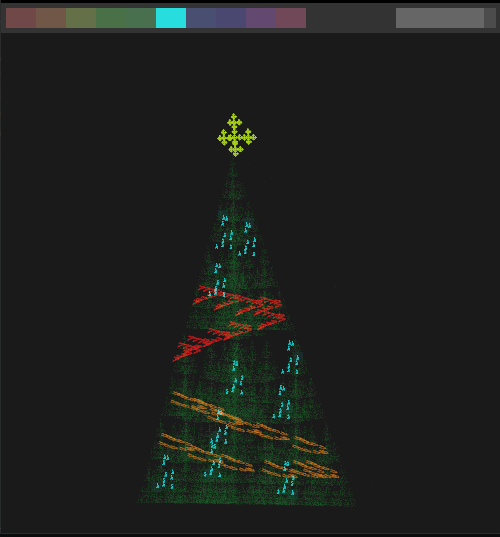
Uses chaos game / chaos theory to build fractal structures. When applied in the right way, and if you have a bit of creativity, it creates Christmas trees.
The wikipedia page https://en.wikipedia.org/wiki/Chaos_game
A great article about programming it https://beltoforion.de/en/recreational_mathematics/chaos_game.php
How we built it
I used Rust and Piston2d to create this. It's a fairly simple algorithm; just finding a point between two other points.
Challenges we ran into
The math behind the various colours was a bit difficult to get how I wanted, but ultimately I figured it out.
Accomplishments that I'm proud of
There are definitely some things that could be improved, and there are some feature's I'd like to add, but overall I'm happy with how it turned out
What we learned
This is my first hackathon, so I didn't pick something super challenging. Because of this, I didn't learn any specific skills. This was still good practice in math on a cartesian plane, algorithms, and project management
What's next for Chaotic Christmas!
I'm looking at adding a lot of new features. Those include, but are not limited to, UI, presets, and algorithm changes. Currently, it's rather slow when dealing with larger iterations, and more fractals. I'm looking into using a different graphics library for this purpose.
Usage
You can use 10 different fractals at a time. Use the controls below to define and manage them.
Starting
The program takes 4 arguments in order.
- Window width
- Window height
- Iterations for each fractal
- Opacity for every point
For example, recommended settings: cargo run 500 500 100000 0.01
Controls
- Number keys -> Change fractal slot
- Enter -> Generate selected fractal
- Up / Down -> Increase or decrease jump size
- Space -> Sets the optimal jump size for the fractal
- C -> Clear current fractal
- Comma -> Change vertex visibility
- Period -> Change fractal visibility
- Left click -> Add vertex on cursor
- Right click -> Remove vertex on cursor
You can also interact with the bars on top to change slot and jump size
Built With
- piston2d
- rust


Log in or sign up for Devpost to join the conversation.