Changelog AI — About the Project
Inspiration
Release notes are one of those tasks that everyone underestimates until they have to do it. Engineering teams ship fast, and by the time a sprint ends there is a wall of git commits, a handful of Jira tickets, and one very tired product manager trying to figure out what actually matters to users. Most teams either skip the changelog entirely, dump raw commit messages into a file, or spend hours rewriting the same information three different ways — for customers, for executives, and for their team Slack channel.
We kept asking: Why isn't there a tool that just does this? The gap isn't technical complexity — it's that the workflow is fragmented. Developers write commits, PMs translate them, marketers polish them, and somewhere in between something important always gets lost. We built Changelog AI to close that gap.
What it does
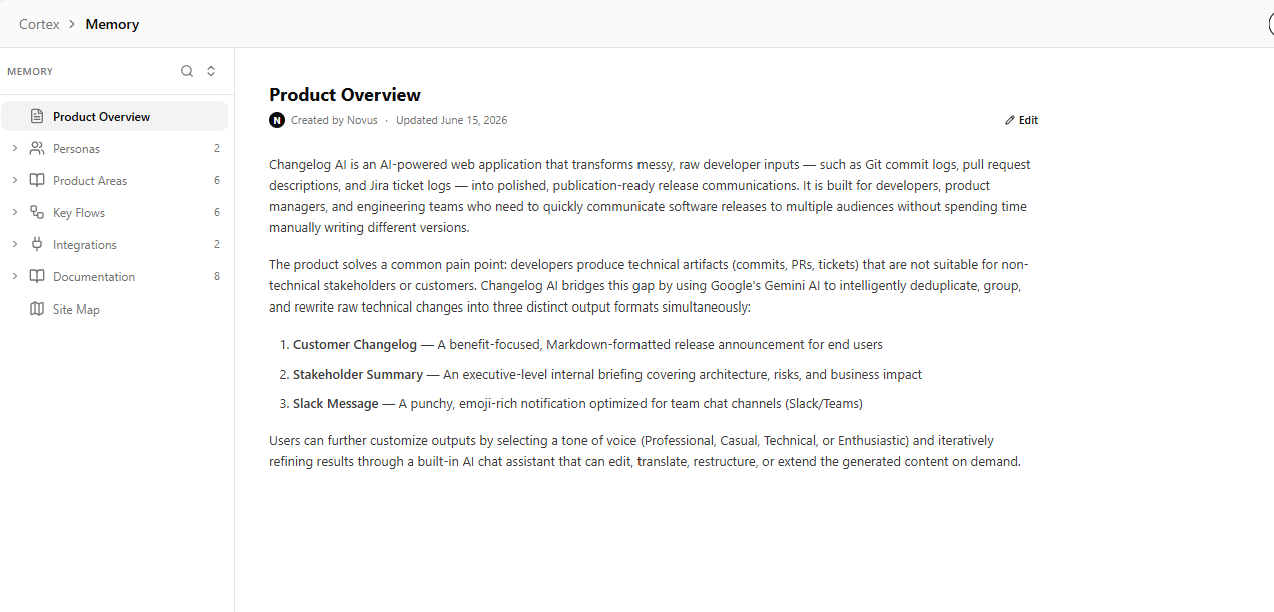
Changelog AI is an AI-powered release-note assistant built specifically for product and engineering teams. It takes messy raw engineering inputs — git commits, Jira ticket logs, PR descriptions, or uploaded files — and transforms them into three distinct, publication-ready outputs in seconds:
- Customer-facing changelog — structured, benefit-focused Markdown ready for your public changelog, blog, or in-app announcement.
- Internal stakeholder summary — an executive brief covering technical risks, architectural changes, and business impact for engineering leads and product leadership.
- Slack/Teams announcement — a punchy, emoji-friendly message ready to paste directly into your team channel.
Beyond generation, Changelog AI includes an interactive PM Chat Assistant that can refine, translate, expand, or completely restructure any output on demand. Want the Slack message more enthusiastic? Need the internal brief translated to French? Just ask. The assistant updates the artifacts in real time without losing context.
The app also supports drag-and-drop file uploads (JSON, CSV, Markdown, text, YAML), tone selection (Professional, Casual, Technical, Enthusiastic), local generation history with one-click restore, copy-to-clipboard, PDF export, and light/dark mode. It stores the last 15 generations locally so nothing is lost between sessions.
How we built it
Frontend
The UI is built with React 19 and TypeScript, styled with Tailwind CSS v4, and bundled with Vite. We chose Vite for its fast HMR during development and straightforward production build pipeline. Key frontend libraries:
- lucide-react for a consistent icon set
- motion (Framer Motion) for animated loading phases and smooth transitions
- react-markdown for safe Markdown rendering of AI output
- html2canvas + jsPDF for PDF export functionality
- A custom EmojiPicker component built from scratch
The frontend communicates with the backend through two REST endpoints (/api/generate and /api/chat). Generation state is managed with React hooks and persisted to localStorage. The entire app is responsive and supports both light and dark themes with system-preference detection.
Backend
The server is an Express application running on Node.js, also written in TypeScript. We used the @google/genai SDK to interface with Gemini 3.1 Flash Lite, chosen for its strong structured-output capabilities and fast response times.
Both endpoints use the same core prompting strategy: a system instruction that defines the AI as an elite Technical Product Manager with strict rules for noise filtering, deduplication, and tone adaptation, combined with a response schema enforced by Gemini's responseMimeType: "application/json" configuration. This ensures every generation returns valid, parseable JSON with the exact fields the frontend expects.
A lazy singleton pattern is used for the GoogleGenAI client so it is only instantiated once per server lifecycle, and the API key is validated eagerly to fail fast with a clear error message.
Architecture overview
User Input (text / file upload)
         │
         ▼
  React Frontend
  (state management, UI, copy/export)
         │
  POST /api/generate ──► Express Server
         │                     │
         │                     ▼
         │            Gemini 3.1 Flash Lite
         │            (system prompt + schema)
         │                     │
         │                     ▼
         │              JSON response
         │                     │
  ◄─────────────────────────┘
  setState + render outputs
         │
  POST /api/chat (PM assistant)
         │
  refine / rewrite / explain
Challenges we ran into
1. Controlling LLM hallucination in structured output
The biggest risk with an AI-generated changelog tool is that the model invents features, mixes up tickets, or returns malformed JSON. We solved this with a two-layer approach: a carefully engineered system instruction that explicitly forbids fabrication, and Gemini's native responseMimeType: "application/json" with a strict responseSchema that forces the model to emit exactly three named fields. If the API returns an empty or unparseable body, the backend catches it and sends a descriptive 500 error rather than crashing silently.
2. Filtering noise from raw developer input
Git history is full of noise — chore: bump lodash, fix: typo, Merge branch 'main' into feature/x. Our system prompt instructs the model to ignore these, but we also built input flexibility so users can pre-filter on their end before pasting. We added preset sample templates (git commits, Jira tickets, PR description) so users have a clear mental model of what good input looks like.
3. Multi-format file parsing
Supporting JSON, CSV, Markdown, YAML, and plain text in a single upload handler required careful extension sniffing and safe fallback parsing. For JSON arrays, we normalize heterogeneous shapes (different keys for id, message, status) into a consistent bullet format. If parsing fails entirely, the file is imported as raw text with a visible warning so the user never loses their data.
4. Synchronizing chat state with output artifacts
The chat feature needed to know about the current state of all three outputs and the raw input at every turn. We embed the full current state into the system instruction for every /api/chat call. This stateless approach is simple but means the system prompt grows with context length — a tradeoff we accepted for hackathon reliability over building a full conversation memory layer.
5. Generating varied output across three audiences
Getting one good output is hard; getting three coherent but purpose-built outputs from the same input is harder. Our system prompt solves this by prescribing distinct roles for each output: the customer version prioritizes user benefit, the internal version focuses on risk and architecture, and the Slack version is short and energetic. Tone selection further modulates all three simultaneously.
Accomplishments that we're proud of
- Three-audience generation in one API call: Most similar tools produce one output. We deliver customer-ready, executive-ready, and team-ready content simultaneously.
- Built-in PM chat assistant: The chat feature isn't a chatbot bolted on — it can actually read and rewrite the generated artifacts, making it a true co-pilot for product communication.
- Multi-format ingestion: JSON, CSV, and arbitrary text files are parsed and normalized in the browser before reaching the AI, reducing prompt complexity and improving output quality.
- Structured AI output with schema enforcement: Using Gemini's
responseMimeTypeandresponseSchemagives us reliable, parseable JSON every time — a critical reliability win for a hackathon demo. - Local-first with history persistence: Generations survive page refreshes via
localStorage, and the restore feature lets users pick up exactly where they left off. - Production-grade UX: Loading phases, dark mode, drag-and-drop upload, copy feedback, PDF export, undo on upload — the polish goes well beyond a typical hackathon MVP.
What we learned
On AI prompting
System instructions are more important than prompt templates. We found that giving the model a strong persona ("elite Technical Product Manager") combined with explicit anti-rules ("do not invent features not present in the input") dramatically reduced hallucination compared to neutral prompts. Schema-enforced JSON output is not optional — it is the difference between a working feature and a broken demo.
On product scope
Picking a narrow, painful real-world problem beats building a general-purpose AI tool. Release notes are a problem every product team has, and almost no one enjoys doing them. The constraint of "three audiences from one input" gave the project a clear, defensible scope that made every feature decision easy.
On engineering tradeoffs
For a hackathon, a stateless chat is acceptable, but we now appreciate how much better the assistant would be with conversation memory and a real state store. We also learned that lazy-loading the AI client and validating the API key at startup avoids the most common deployment failure mode — a missing environment variable surfacing as a cryptic 500 error deep in a generation call.
On user workflow
The file upload feature was a late addition that ended up being one of the most impactful. Users don't want to type out commits manually; they want to paste a GitHub export or a Jira CSV. Designing for the actual input formats teams already use made the tool feel immediately useful.
What's next for Changelog AI
Short-term (weeks 1–4)
GitHub and Jira native integration Instead of copy-pasting, users will authenticate with GitHub or Jira and pull commits, PRs, and tickets directly into the tool. The AI will then operate on real repository data with full commit hashes, authors, and linked issue metadata.
Persistent backend storage
Replace localStorage history with a proper backend store (SQLite or Supabase). This enables multi-device access, shared team histories, and organization-level settings like custom tone presets.
Template marketplace Let users save, share, and import custom output templates — e.g., "Stripe-style changelog," "enterprise security bulletin," "SaaS monthly digest." Templates would encode audience, tone, section structure, and branding preferences.
Diff-aware archaeology For each raw input, generate an automatic technical diff summary that maps which code paths, services, or database schemas were affected — feeding richer context into both the customer and internal outputs.
Medium-term (months 2–4)
Slack and Teams direct publishing One-click publish of the Slack/Teams announcement directly to a configured channel via webhook. Customer changelog posts can be published to Notion, Confluence, or a custom CMS via Zapier/Make integrations.
Multi-language support Full localization of all three output types, powered by the chat assistant's translation capability but with persistent language preferences and locale-aware tone calibration.
Diff comparison across versions Let users compare two changelog generations side-by-side and highlight what changed between releases — useful for tracking messaging drift or identifying dropped features.
Budget and risk scoring Extend the internal summary with a quantified risk/impact score based on the type of changes detected (database migration = high risk, CSS fix = low risk), helping PMs prioritize their internal communications.
Long-term vision
Changelog AI aspires to be the connective tissue between shipping code and telling its story — an always-on communication layer that sits alongside your CI/CD pipeline, watches what ships, drafts the notes in real time, and pushes them to the right audiences without a human lifting a finger. The dream is a world where no team ever skips a changelog because it was "too much work."
Built with ❤️ by the Changelog AI team for Mind the Product Hackathon 2026.
Built With
- gemini
- node.js
- react
- tailwind
- typescript
- vite

Log in or sign up for Devpost to join the conversation.