This is a work in progress! We'll be diving deeper on how the feed was built in subsquent updates (RabbitMQ, Stream, etc), as well as talk about our progress.
Hello, Feed!
You might see Devpost as the leading platform powering hackathons, in-person or online, and you're right, it is. But it's first and foremost a social network for the maker community.
Makers are adding projects they're working on, posting comments to give helpful feedback, liking projects, following friends... But until very recently, all this was going unnoticed by most as we were just sending individual emails.
Enter the Feed!
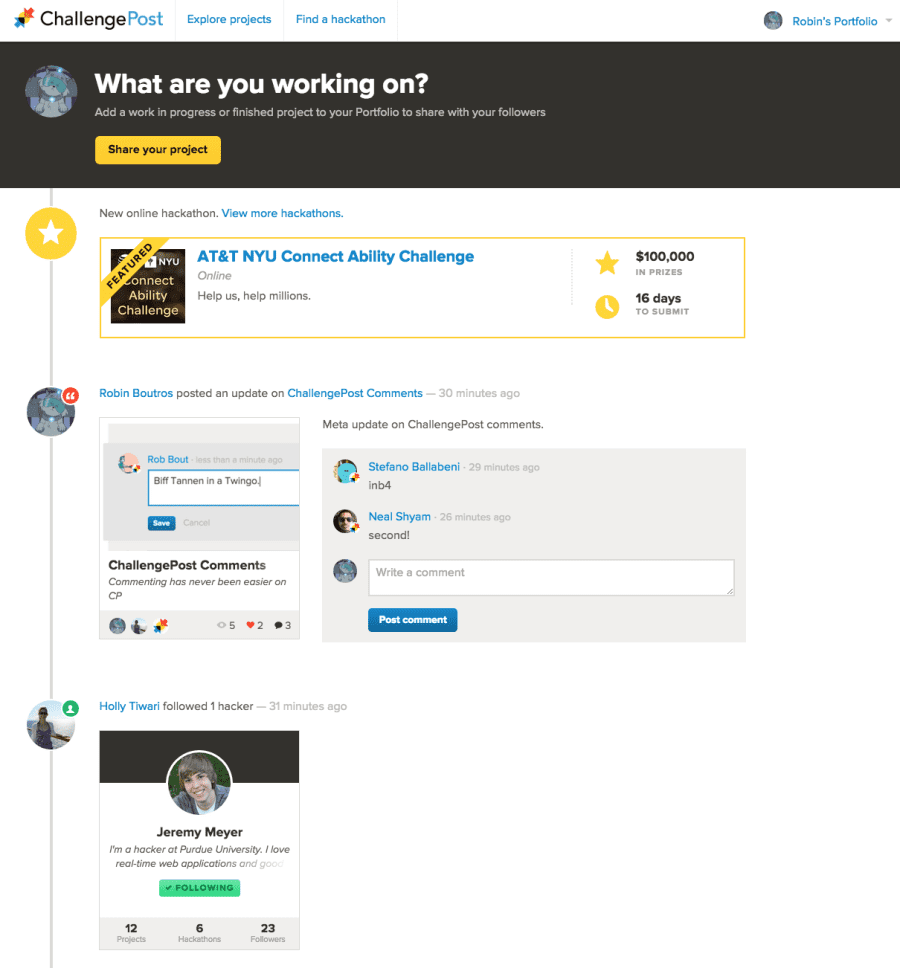
How it works
User feeds
As a user, you have 2 feeds on Stream:
- a timeline
- a news feed
Timeline
The timeline represents everything you have done. Any time you create a project, post a comment, we push it to your timeline. It's not displayed anywhere as is.
News feed
Your news feed is the aggregation of all the activities coming from the timelines of users you follow.
When you, John (if your name is not John, now it is), follow your friend Colin (if you don't have a friend called Colin, go get one and come back), we ask Stream to make your news feed follow Colin's timeline.
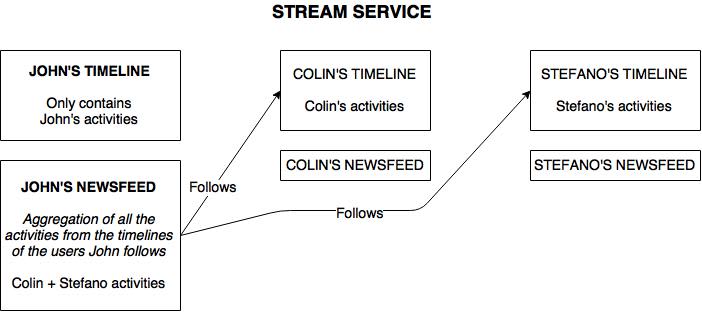
It's a great concept, isn't it? It means that when you do something, we don't have to push an activity to everyone you follow. We just push it to your timeline (that is followed by your friends' newsfeeds), and we're done!
So, when you visit your feed on the Devpost homepage, you're actually seeing... your newsfeed, you guessed it.
Activity creation
Let's take the example of a user liking a project, and see what happens at the top level:
- a user likes the "Devpost Feed" project
- the plaform sends a RabbitMQ message with a routing key looking like this:
activities.users.likealong with the relevant data - this message is eventually processed by a Hutch consummer from a queue bound to a topic represented by the routing key. In our example, the job of this consummer is to send a
likeactivity to the Stream service.
As I said earlier, we'll be posting updates with a lot more details on how RabbitMQ was used in updates.
Challenges we ran into
Should we build the feed ourselves from scratch, or use a service?
That was the big question. We decided we wanted to get it up and running as fast as possible, and learn from there. The decision was made to go with Stream. [spoiler]We never regretted it![/spoiler]
We short-circuited our usual process, and built the feed as fast as possible, barely writing any tests, using a different Trello board. Overall, it worked great, and we had something people could actually try in about 2 weeks.
RabbitMQ
The first implementation of the feed was using our existing infrastructure to process activities in the background, namely Sidekiq. But Stefano, a developer at Devpost thought that it would be the perfect time to introduce RabbitMQ and move towards a more evented architecture. So he did.
He'll talk about that in more details in an upcoming blog post, but the main challenge for the team was to still get the feed moving, adding new features, while Stefano was adding RabbitMQ to our stack, and integrating the feed with it.
Accomplishments that we're proud of
I'm proud of how fast this large feature was released, and how fast we're iterating. Great technical changes were also made that is going to improve the platform as a whole.
But what excites me the most is that all the activity happening in our maker community is finally visible to anyone who decides to join it. And it's only going to get better.
What's next for Devpost Feed
What's coming? Well, lots of things. Here are the ones I'm the most excited about:
- smart recommendations that we can push to your feed
- more variation in the types of activities
- more interaction (inline comments, and liking)
- activities coming from other sites you love and use every day like StackOverflow or Github, so that the CP Feed can become your developer timeline
- improved design
Built With
- getstream.io
- hutch
- marionette.js
- rabbitmq
- ruby-on-rails
- stream





Log in or sign up for Devpost to join the conversation.