-
-
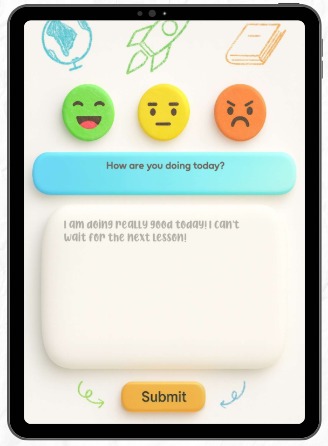
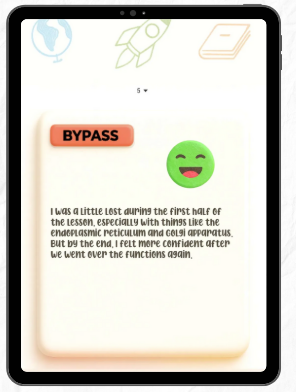
Student Screen
-
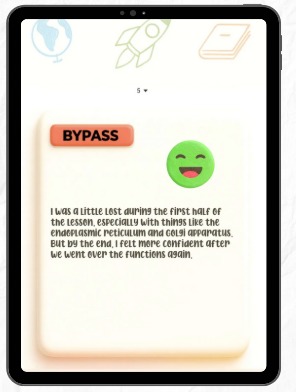
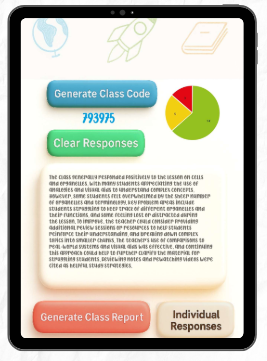
Teacher Screen
-
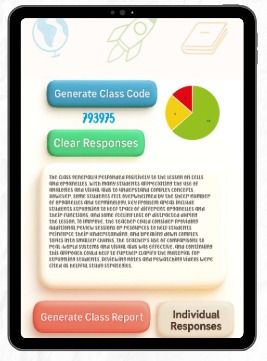
Class Report
Inspiration
Our project began with a personal story from Giada, a 16-year-old neurodiverse student with ADHD and anxiety.
Even with a 504 plan and supportive teachers, Giada found herself falling behind, not because she didn’t care, but because she hesitated to ask questions and didn’t want to slow the class down. When we realized that many students experience similar struggles, silently zoning out, feeling unheard, and building up learning gaps, we saw a clear opportunity for change.
Teachers care deeply, but with hundreds of students, they often don’t have the tools to check in meaningfully with everyone. We wanted to create something that would: Make it easier for students to express their needs without fear or embarrassment.
Give teachers actionable insights to support all students, especially neurodiverse learners. That vision became ChalkIT, an AI-powered communication bridge between students and teachers.
What we Learned
Through surveys of 78 students and 16 teachers & parents, we found: 90% of students admitted to zoning out or falling behind.
Teachers said the biggest challenges were asking for help and staying focused. 100% of teachers lacked a trusted real-time tool for student check-ins.
Parents noticed frustration during homework — often a direct result of unclear classroom learning.
We also learned from existing tools (like Google Forms and Panorama Education Surveys) that while basic feedback collection exists, daily, real-time insights for teachers are still missing in classrooms.
What it does
ChalkIT is an AI powered communication tool that bridges the gap between students and teachers in middle and high school classrooms. It allows students to quickly share their feelings and learning needs through emojis short responses or anonymous check ins without the pressure of speaking up in front of peers. Teachers receive real time AI analyzed reports and class mood summaries helping them spot who needs extra support track trends and address issues before they become learning gaps. Designed with neurodiverse friendly features ChalkIT makes classrooms more inclusive supportive and effective for everyone.
How we built it
We built ChalkIT using MIT App Inventor, which allowed us to rapidly prototype and test features on mobile devices.
Our development process focused on: AI for analysis, interpreting student feedback and generating actionable insights for teachers.
Mobile user-friendly design, ensuring accessibility for all students, whether on phones or tablets. We also researched what design/color scheme is helpful for students especially neurodiverse, and tailored our design towards it.
Human-centered features, shaped directly by surveys, educator interviews, and parent input.
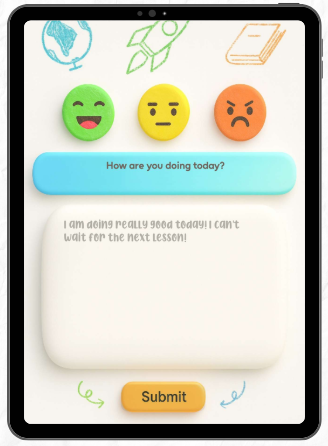
Student Features: Emoji-based mood check-ins for quick, non-intimidating feedback. Optional anonymous responses for sharing concerns honestly. Reminders for learning accommodations, reducing the need for constant self-advocacy.
Teacher Features: AI-driven analysis of responses with real-time reports and mood graphs. Option to override anonymity for urgent safety concerns. Streamlined dashboard for quick, data-driven support.
Challenges we ran into
- Privacy and Safety — Ensuring student data was protected while allowing intervention in emergencies.
- Merging Components in MIT App Inventor — Integrating different aspects of the app into a cohesive, bug-free build.
Accomplishments that we're proud of
- User-friendly UI/UX that will help students navigate the app easily.
- Unique app idea which is not solved yet in the real world.
- AI Summarization feature that converts the students responses to a teacher report
- Centralized hub for both teachers and students with easy connectivity between the users through a quick code
What we learned
While building ChalkIT we learned the importance of designing for real classroom environments rather than just theoretical use cases. Testing with students and teachers showed us that simplicity and speed were critical for adoption. We discovered that neurodiverse friendly design choices such as clear visual layouts and minimal text clutter make the app more approachable for everyone. We learned how to integrate AI analysis into MIT App Inventor through external APIs and how to optimize data flow so reports generate in real time. We also realized that privacy and safety features must be built in from the start rather than added later. Most importantly we learned that gathering direct feedback during development leads to better features and a smoother user experience.
What's next for ChalkIt
We see ChalkIT expanding to: Workplaces — anonymous employee feedback and inclusivity tracking to improve company culture. Global classrooms — with multilingual and localized versions adaptive to each location. Gamification — engagement boosts with challenges, badges, and rewards from teachers. Family Connect — a dashboard for parents to monitor their child's progress and growth.
Built With
- chatgptapi
- mit-app-inventor


Log in or sign up for Devpost to join the conversation.