Inspiration
Online teaching has become increasingly visual, with tutors relying heavily on digital whiteboards to explain concepts. During classes, we noticed that rough diagrams, unclear handwriting, and constant redrawing often break the teaching flow and make it harder for students to follow along. Not every tutor is comfortable drawing neat diagrams, and switching tools mid-class is disruptive.
This inspired us to build ChalkAI a tool that helps tutors focus on teaching concepts, not perfecting drawings.
What it does
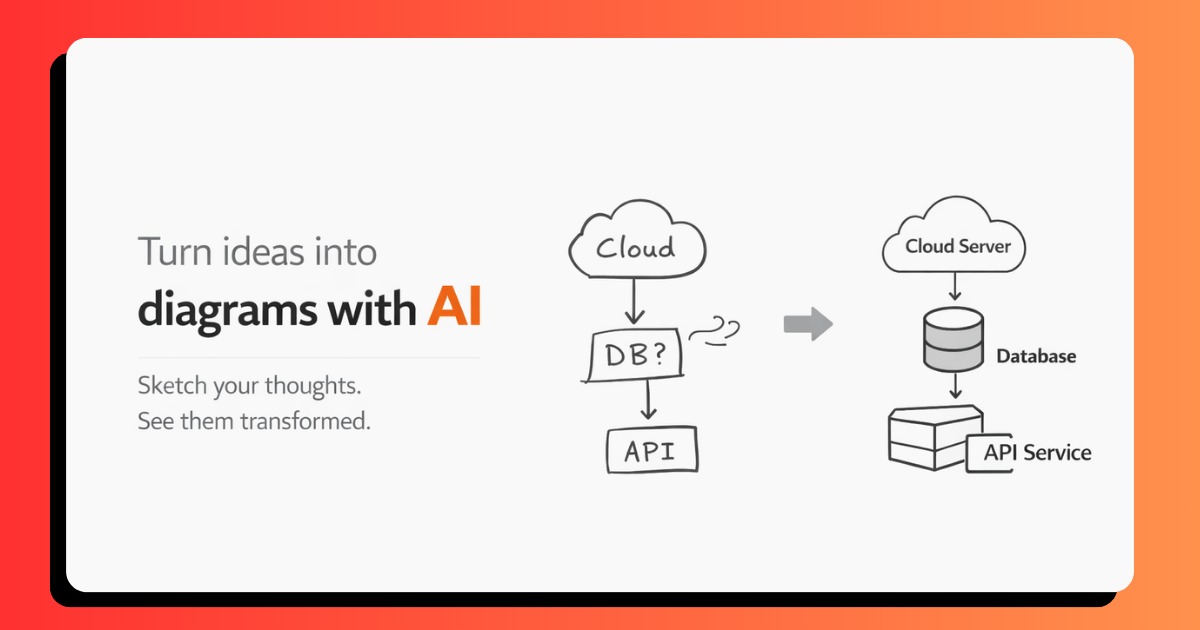
ChalkAI is an AI-powered assistant integrated into a digital whiteboard (tldraw). Tutors can draw diagrams naturally, and ChalkAI enhances those diagrams to make them clearer and more structured.
It also listens to the tutor’s voice explanation and, when the tutor pauses speaking or drawing, automatically suggests improved versions of the diagram. Tutors stay fully in control and can accept or reject any suggestion. ChalkAI also provides an image cache so tutors can reuse previously enhanced diagrams without redrawing them.
How we built it
We built ChalkAI using Next.js as a full-stack framework, handling both the frontend and backend in a single codebase.
The whiteboard experience is powered by tldraw, which allows freehand drawing on the canvas. When a tutor requests an enhancement (or when a voice pause is detected), the canvas is exported as an image and converted into a base64 representation.
This image, along with contextual instructions, is sent to the backend API, which uses the Gemini 2.5 Flash Image model via Google AI Studio to perform image-to-image enhancement. The enhanced diagram is returned as a PNG and displayed back on the canvas.
We also implemented caching to store enhanced diagrams so they can be quickly recalled later.
Challenges we ran into
One of the biggest challenges was handling real-time image processing while keeping latency low enough for live teaching.
Ensuring that the AI output remained educational clean diagrams rather than artistic images required careful prompt design.
Another challenge was integrating AI suggestions in a way that felt helpful but not intrusive, which led us to implement a clear accept/reject flow to keep tutors in control.
Accomplishments that we're proud of
- Building a fully working prototype within a hackathon timeframe
- Successfully integrating AI image enhancement into a live whiteboard workflow
- Implementing voice-based context awareness for proactive suggestions
- Designing a human-in-the-loop system that prioritizes tutor control
- Open-sourcing the project for others to learn from and build upon
What we learned
We learned that image-to-image AI works far better than text-only approaches for diagram enhancement, especially when spatial layout matters.
We also learned the importance of keeping AI assistive rather than automatic giving users control builds trust.
Hackathons reinforced how quickly meaningful prototypes can be built when the problem is well-defined and the scope is focused.
What's next for ChalkAI
Next, we plan to add features like diagram version pinning so tutors can lock a clean explanation and recall it later without drift.
We also want to expand voice-driven interactions, add subject-specific intelligence, and generate diagrams directly from spoken explanations.
Long term, ChalkAI could integrate with EdTech platforms to support clearer, more effective digital learning experiences.

Log in or sign up for Devpost to join the conversation.