Inspiration
Nowadays every volunteer youth coach still explains plays on a whiteboard, 5 circles, 5 crosses and a few arrows. The problem is that a 10 year old does not read a diagram, he watches. The living room TV is where the family already sits and the kitchen smart display is where the coach plans the week, so I decided to put the play there instead of on paper.
What it does
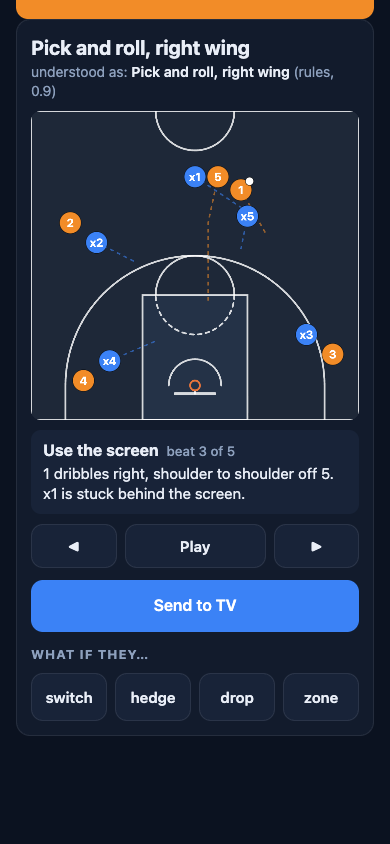
On the phone the coach sketches the play on a court or just says it, for example "backdoor cut from the left wing". Chalk Talk maps that to 1 of 8 basketball templates (pick and roll, pick and pop, backdoor cut, give and go, dribble handoff, flare screen, horns, fast break 3 on 2) and fills in the side, the roles, the number of players from 3v3 to 5v5 and the age group, which sets how fast everyone moves.
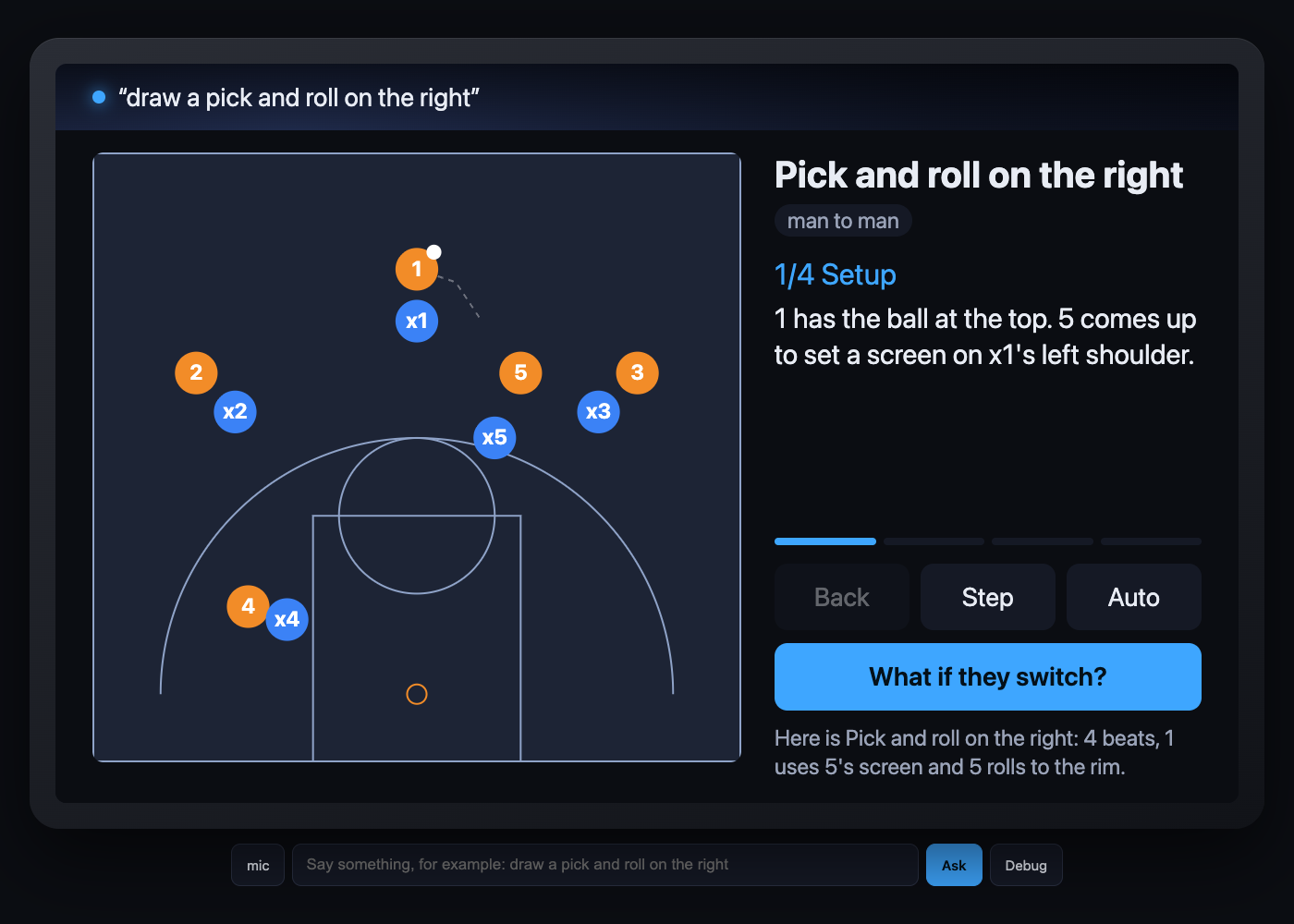
On the smart display it works as an Alexa+ add-on through MCP. A self-hosted MCP server has 6 tools, one per thing a coach actually says: draw a play, counter it, save it to the playbook, show the playbook as a carousel, build a practice plan from saved plays and send a play to the TV. Each tool comes with an MCP Apps view, so the court animates on the screen step by step with one caption line a kid can follow.
The coaching moment is "what if they switch?" (or hedge, drop, zone). The defence re-plans and the caption changes to what the kids should look for. Every play goes through a validator: inside the court, no 2 players closer than 3 ft, nobody faster than a child of that age, the ball always with someone. The model never draws freehand.
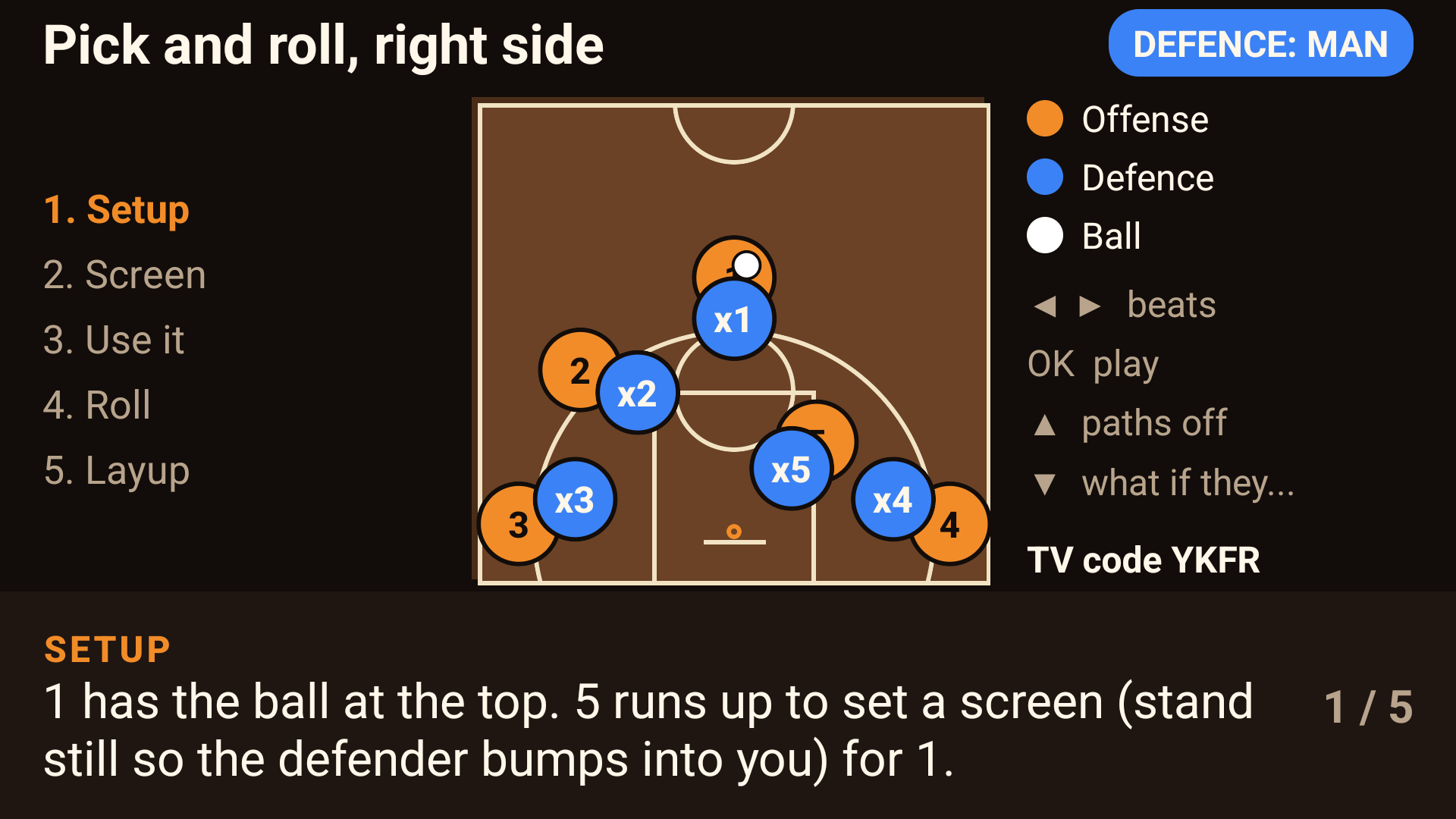
The TV app is React Native for TV, verified on the Android TV emulator: it pairs with the backend, renders the play with all 10 players and captions, and the D-pad steps through the beats (left and right) with OK for play and pause. It is not entered as a Fire TV track because it is not in the demo video. The honest list is in docs/STATUS.md.
A note on the demo video
The narration is a generated voice: my microphone was not working on recording day. All footage is real screen capture of the live app.
How we built it
First of all, the template engine and validator are plain Python with no dependencies: 8 hand-written templates with keyframes for the offence, a plausible man defence and counter re-plans for switch, hedge, drop and 2-3 zone. Second of all, the backend is FastAPI on Modal with a fastmcp server mounted at /mcp (MCP spec 2025-11-25, Streamable HTTP, stateless) and state in a Modal Dict. Besides that, Qwen2.5-3B-Instruct runs on llama.cpp on Modal and turns the coach's words into a template choice through a JSON schema, with a keyword parser as fallback, around 2 s warm.
Nobody outside Amazon's partner programme can see an Alexa+ simulator, therefore I built one: a generic MCP Apps host that speaks MCP from the browser (initialize, tools/list, tools/call, resources/read) and renders the views in a sandboxed iframe with the entire ui/initialize handshake. It is a separate MIT project, so any developer can demo their own add-on with it. The phone page is plain HTML and canvas with the Web Speech API, served by the same backend.
I also measured why the model is not allowed to draw. 40 coach phrasings ran 3 ways through the same validator: template engine with the model gave 100% legal plays and 92.5% template accuracy, keyword rules alone gave 85% legal and 75% accuracy, and freehand coordinates from the same model gave 2.5% legal plays. Table in eval/results/table.md.
Challenges we ran into
fastmcp mounted inside FastAPI answers MCP requests with a 307 redirect that clients do not follow, so I inverted the app layout. Modal refuses CPU functions in an app that declares a GPU when the account has no card, so I moved the entire app to CPU. Ring's Playground needs a sign-in I did not have and the Vega SDK needs about 20 GB of disk plus a GUI to start its virtual device, so I dropped both. The Android TV system image is about 8 GB unpacked and it filled the disk once. On the TV app, D-pad keys never reached the app until a focusable view existed and the handler accepted key-up events; both fixes are in the repo.
Accomplishments that we're proud of
A coaching idea that only works with the current generation of language models, built so the model cannot produce a physically wrong play. 1 backend serving the phone, the smart display and the TV app. A reusable open-source simulator for MCP Apps on a smart display, which did not exist before this week.
What we learned
Constrain the model to a choice, not to coordinates: the same 3B model went from 2.5% legal plays to 100%. A sandboxed MCP Apps view cannot be measured by its host, therefore far-field rules need a probe or an extension point in the spec. The main cost of a TV app at the moment is toolchain weight, not code.
What's next for Chalk Talk
1) A release APK, later on a Vega OS build. 2) Football, netball and hockey templates, the engine is sport-agnostic apart from the court drawing. 3) Voice through the Fire TV remote once the Alexa integration opens to developers. 4) Shared playbooks for a club and a kids mode that quizzes them on the read. The deadline version is what you see in the repo on 23 October 2026.
Try it
Smart display simulator, no install: https://m-simakhov--chalk-talk-web.us-east.modal.run/sim
Phone page, demo TV code KQZT: https://m-simakhov--chalk-talk-web.us-east.modal.run/phone
MCP endpoint: https://m-simakhov--chalk-talk-web.us-east.modal.run/mcp
Built With
- fastapi
- javascript
- llama.cpp
- mcp
- modal
- python
- react-native


Log in or sign up for Devpost to join the conversation.