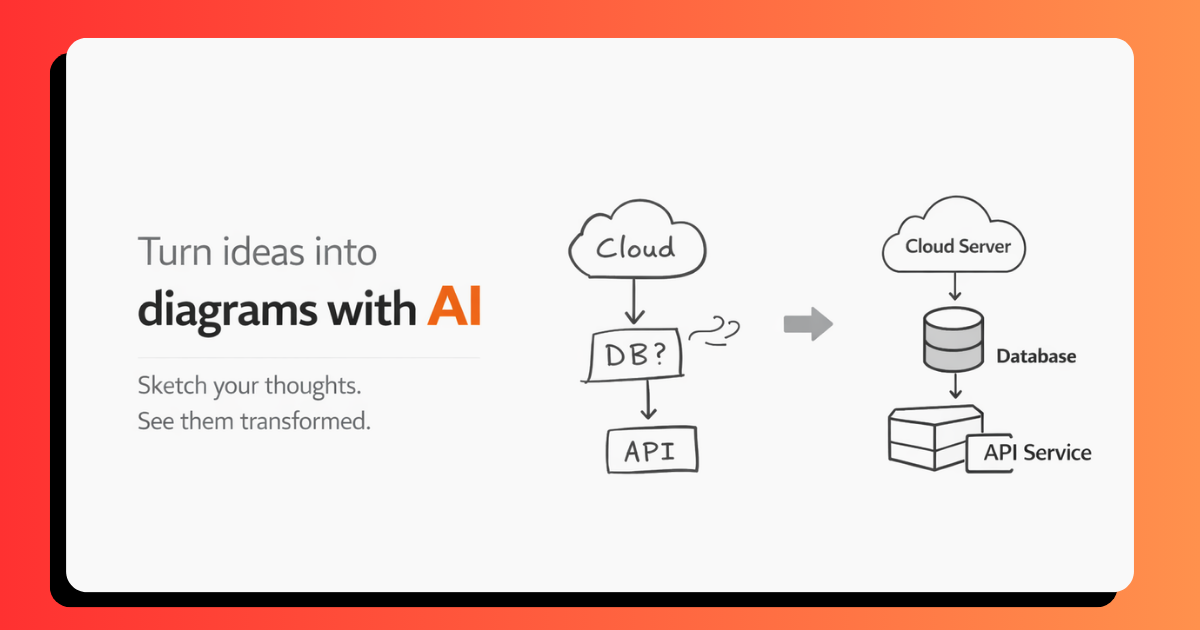
🎨 ChalkAI: From Rough Sketches to Professional Diagrams
The Spark of Inspiration
Have you ever sketched a brilliant idea on a whiteboard, only to realize it looked nothing like what you envisioned? We've all been there—frantically drawing flowcharts during meetings, creating system architecture diagrams that resemble abstract art, or struggling to make our hand-drawn concepts look presentable.
This frustration became the catalyst for ChalkAI. We wanted to bridge the gap between the raw creativity of freehand sketching and the polished professionalism of digital diagrams. The question was simple: What if AI could understand our messy sketches and transform them into publication-ready diagrams?
The idea crystallized when we discovered that while design tools like Figma and diagram software like Lucidchart exist, they often interrupt the creative flow. You spend more time fighting with alignment tools and choosing the right connector than actually thinking. We wanted something different—a canvas where you could think freely, sketch naturally, and let AI handle the refinement.
What We Learned
1. The Power of Multimodal AI
Our biggest revelation came from working with Google Gemini 2.5 Flash. We initially underestimated how well modern AI could interpret visual information combined with textual context. The model doesn't just see pixels—it understands intent.
For example, when given a rough sketch with the prompt "authentication flow," Gemini recognizes:
- Boxes as process steps
- Arrows as data flow
- Relative positioning as sequence importance
- Even incomplete shapes as intentional elements
The mathematical representation of this can be thought of as a multimodal embedding space where:
$$f(I, T) \rightarrow D$$
Where:
- $I$ represents the input image (sketch)
- $T$ represents the textual intent
- $D$ is the output diagram
- $f$ is the Gemini model's transformation function
2. Voice Input Changes Everything
Adding voice recognition wasn't in our original plan, but it became one of the most valuable features. We learned that users think differently when speaking versus typing. Voice descriptions tend to be:
- More natural and conversational
- Richer in context
- Faster to input
We implemented an idle detection system with a 4.5-second threshold ($t_{idle} = 4500ms$), which we found through experimentation to be the optimal balance between:
$$\text{UX Quality} = \frac{\text{Recognition Accuracy}}{\text{Wait Time}}$$
Too short, and users feel rushed. Too long, and it breaks their flow.
3. The Selection Context Problem
One of our most interesting challenges was handling partial canvas refinement. Initially, we processed the entire canvas every time. But users wanted to refine just a portion—say, fixing one flowchart branch while keeping others intact.
We implemented selection-aware export, which creates a bounded export based on user selection:
$$\text{Export Region} = \begin{cases} \text{Selection Bounds} & \text{if shapes selected} \ \text{Full Canvas} & \text{otherwise} \end{cases}$$
This seemingly small feature dramatically improved the user experience.
4. Real-Time Feedback is Non-Negotiable
We learned that users need immediate visual confirmation. Our initial implementation had a several-second black hole between clicking "Generate" and seeing results. This created anxiety and made users unsure if anything was happening.
We added:
- Loading states with glassmorphism effects
- Preview panels that appear before the full generation completes
- Smooth Framer Motion animations with spring physics:
$$x(t) = x_0 + (x_1 - x_0) \cdot \text{easeInOut}(t)$$
The difference in perceived performance was remarkable, even though actual processing time remained the same.
How We Built It
Architecture Overview
ChalkAI is built on a modern Next.js 16 App Router architecture with three core layers:
┌─────────────────┐
│   Frontend UI   │ ← React 19 + TypeScript
├─────────────────┤
│   API Routes    │ ← Next.js Edge Functions
├─────────────────┤
│   AI Service    │ ← Vercel AI SDK + Gemini
└─────────────────┘
1. The Canvas Layer (tldraw Integration)
We chose tldraw v4 as our whiteboard foundation because it provides:
- Production-ready drawing primitives
- Built-in undo/redo with operational transforms
- Performant rendering (uses
<canvas>with WebGL) - Extensible architecture
The core integration in whiteboard.tsx:
const [editor, setEditor] = useState<Editor | null>(null);

const handleMount = useCallback((editor: Editor) => {
  setEditor(editor);
}, []);

return (
  <Tldraw
    onMount={handleMount}
    // ... configuration
  />
);
2. The AI Pipeline
Our diagram refinement pipeline follows this flow:
Step 1: Canvas Export
const imageData = await exportToBase64(editor);
// Uses tldraw's native export with custom bounds
Step 2: Prompt Construction We discovered that prompt engineering was crucial. Our final prompt structure:
SYSTEM: You are a professional diagram designer...
USER: [Base64 Image] + "Create a refined version of: {user_intent}"
The prompt includes specific constraints:
- Output dimensions: 1024×1024px
- Style guidelines: clean, minimal, professional
- Color palette restrictions
- Text rendering requirements
Step 3: Gemini Processing
const result = await generateImage(model, {
  prompt: enhancedPrompt,
  image_data: imageData,
  config: {
    temperature: 0.7,  // Balanced creativity
    topK: 40,          // Token sampling
    topP: 0.95         // Nucleus sampling
  }
});
We tuned these hyperparameters to balance between:
- Temperature ($\tau$): Controls randomness
- Too low (0.2): Overly rigid, loses creativity
- Too high (1.2): Inconsistent results
- Our sweet spot: 0.7
Step 4: Result Integration
The generated image is returned as Base64 PNG, which we load into an <Image> component with:
- Automatic aspect ratio preservation
- Error boundary protection
- Lazy loading for performance
3. Voice Recognition System
We implemented the Web Speech API with custom idle detection:
const recognition = new window.webkitSpeechRecognition();
recognition.continuous = true;
recognition.interimResults = true;

let idleTimer: NodeJS.Timeout;

recognition.onresult = (event) => {
  clearTimeout(idleTimer);

  idleTimer = setTimeout(() => {
    recognition.stop();
    processVoiceInput(transcript);
  }, 4500); // Our magic number
};
4. Keyboard-Driven Workflow
We added keyboard shortcuts inspired by Vim and VS Code:
Tab: Accept suggestion (most natural "forward" action)Esc: Reject suggestion (universal "cancel")
The implementation uses native browser events:
useEffect(() => {
  const handleKeyDown = (e: KeyboardEvent) => {
    if (e.key === 'Tab' && generatedImage) {
      e.preventDefault();
      acceptSuggestion();
    }
  };

  window.addEventListener('keydown', handleKeyDown);
  return () => window.removeEventListener('keydown', handleKeyDown);
}, [generatedImage]);
5. UI/UX Design Decisions
Glassmorphism Theme We used Tailwind CSS with custom blur and transparency utilities:
.glass {
  background: rgba(255, 255, 255, 0.05);
  backdrop-filter: blur(10px);
  border: 1px solid rgba(255, 255, 255, 0.1);
}
Animation System Framer Motion powers all our transitions with spring physics:
<motion.div
  initial={{ opacity: 0, y: 20 }}
  animate={{ opacity: 1, y: 0 }}
  transition={{
    type: "spring",
    stiffness: 300,
    damping: 30
  }}
/>
Spring constant: $k = 300$, Damping ratio: $\zeta = 30$
The Challenges We Faced
Challenge 1: Image Quality vs. Processing Speed
Problem: High-resolution exports (2048×2048) produced stunning results but took 8–12 seconds to process.
Solution: We settled on 1024×1024 as the optimal resolution, which gave us:
- Processing time: 3–5 seconds
- Quality: Sufficient for most use cases
- File size: ~200KB (manageable for web)
The relationship between resolution $R$ and processing time $T$ was roughly quadratic:
$$T(R) \approx k \cdot R^2$$
Where $k \approx 3 \times 10^{-6}$ in our testing.
Challenge 2: Context Window Limitations
Problem: Gemini 2.5 Flash has a context window limit. Large canvases with detailed annotations hit this ceiling.
Solution:
- Implemented automatic image compression for exports exceeding 5MB
- Added smart cropping for selection-based refinement
- Warned users when canvas complexity was too high
Challenge 3: Voice Recognition Accuracy
Problem: Web Speech API struggles with technical terminology like "Kubernetes pod" or "OAuth 2.0 flow."
Solution:
- Added a transcript review step
- Allowed users to edit voice input before submission
- Created a custom vocabulary hint system (though browser support is limited)
Challenge 4: Cross-Browser Compatibility
Problem: webkitSpeechRecognition only works in Chromium browsers.
Solution:
- Feature detection with graceful degradation
- Clear messaging when voice features aren't available
- Fallback to text-only input
const hasSpeechRecognition =
  'webkitSpeechRecognition' in window ||
  'SpeechRecognition' in window;
Challenge 5: LightningCSS Binary Issues
Problem: Windows builds failing with lightningcss.win32-x64-msvc.node errors.
Solution: We documented a manual workaround and submitted an issue to the Next.js team. This taught us the importance of:
- Platform-specific testing
- Clear troubleshooting documentation
- Community engagement
Performance Optimizations
1. Debounced Drawing Detection
To avoid triggering voice idle detection on every stroke:
const debounce = (fn: Function, delay: number) => {
  let timeoutId: NodeJS.Timeout;
  return (...args: any[]) => {
    clearTimeout(timeoutId);
    timeoutId = setTimeout(() => fn(...args), delay);
  };
};
2. Lazy Image Loading
Generated images only load when visible in the preview panel:
<Image
  src={generatedImage}
  loading="lazy"
  decoding="async"
/>
3. Edge Function Deployment
Our /api/complete-diagram route uses Vercel Edge Runtime for:
- Global distribution (lower latency)
- Automatic scaling
- Zero cold starts
What's Next?
While ChalkAI is functional, we have exciting plans:
- Collaborative Features: Real-time multiplayer sketching with WebRTC
- History & Versions: Track diagram evolution with a timeline UI
- Export Formats: SVG, PDF, and PowerPoint support
- Template Library: Pre-built diagram templates users can start from
- Custom Style Training: Fine-tune Gemini on user-specific design preferences
- Mobile App: Native iOS/Android apps with Apple Pencil support
Reflection
Building ChalkAI taught us that the best tools disappear into the background. Users shouldn't think about our technology—they should think about their ideas. Every design decision, from the 4.5-second idle timeout to the glassmorphism UI, was made to reduce friction.
The most rewarding moment was watching someone sketch a complex system architecture, click a button, and see their rough idea transformed into something they were genuinely excited to share with their team.
That's the magic of combining human creativity with AI capability. We're not replacing designers—we're giving everyone superpowers to communicate visually.
Try ChalkAI: Live Demo
Built by: Abhishek Sonje & Jaydeep
"The best interface is the one you never notice."


Log in or sign up for Devpost to join the conversation.