-
-
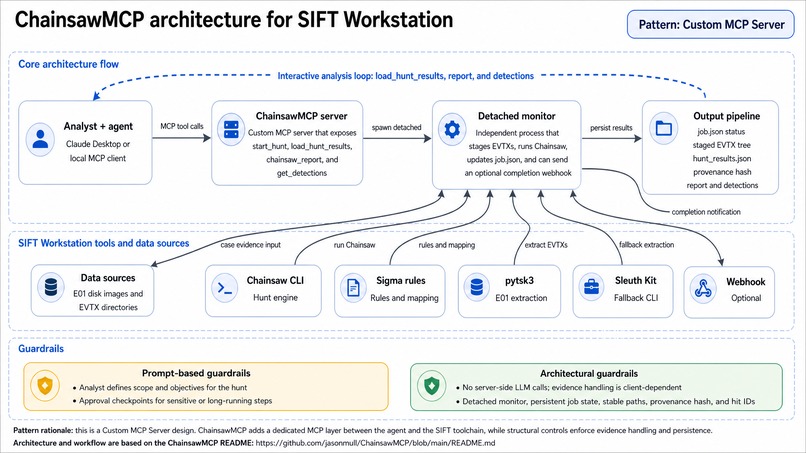
Architecture Diagram
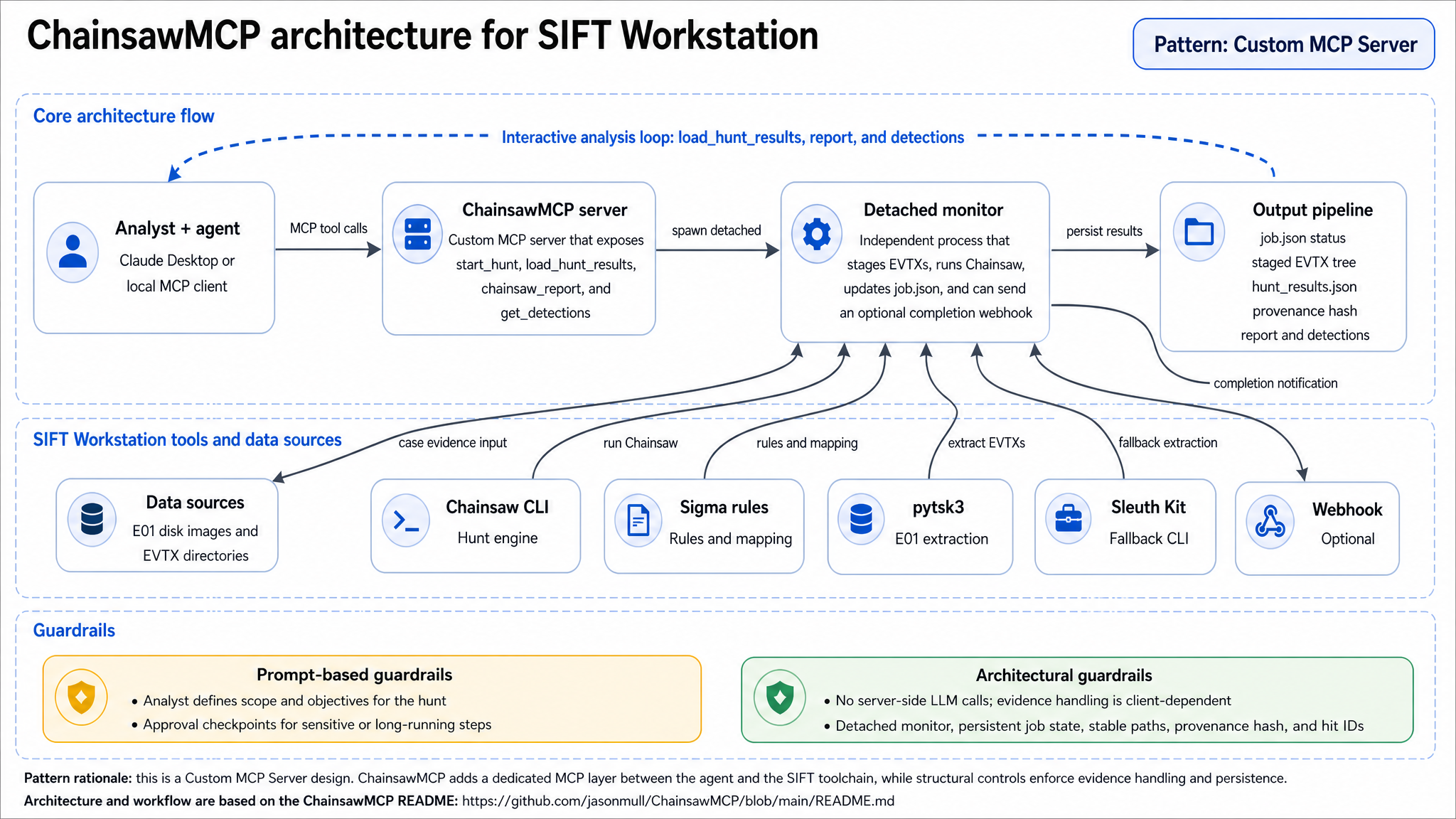
Inspiration
As an Incident Response consultant, I'm frequently called into IR engagements where I don't immediately know what data sources (SIEM, EDR, or otherwise) I have available in the environment, or I quickly discover those data sources don't even exist. In these scenarios, I needed a way to quickly orient myself in the environment and get some initial indication of where an attack is coming, as well as the indicators I need to start hunting for.
One of the data sources I've always found, in some form, in ever IR engagement I've performed is Windows Event Logging. It's not always perfect, and I've dealt with cases of threat actors clearing event logs before, but between RDP authentication logs, SMB client / server logs, and task scheduler logs, I usually find useful indicators of compromise within these logs that help point me in the right direction.
One of the tools that I've found invaluable for Windows Event Log Analysis is Chainsaw, by WithSecure Labs. It's an amazing tool that scans Windows Event Logs and compares them against the Sigma Detection Library, and highlights these matches for further investigation. This is a huge timesaver that quickly brings up the event logs of interest up to the service. As I've used Chainsaw more and more over time, I've thought of the benefits AI analysis might bring to this process, both in terms of analyzing larger Windows Event Log environments in scale, as well as a way to give less experienced analysts another way to interact with this this data and hunt for threats in a more conversational way.
What it does
ChainsawMCP is an MCP server that connects Chainsaw with an LLM, such as Claude Code. With this connection, analysts get end to end automated extraction, analysis, and reporting of threats within Windows Event Logs. With a simple prompt, such as "Run a hunt on all of the E01 files in this directory," ChainsawMCP can:
- Search the .E01 files for any event log files
- Extract those EVTX files to the case folder for analysis
- Run Chainsaw against each of the event logs
- Compile aggregate reporting data on the number and type of Sigma detection hits
- Review the output and provide recommendations to the analyst on the most critical signs of threat actor activity, as well as mitigation recommendations
How we built it
ChainsawMCP was developed as a Python-based MCP server using Claude Code.
Challenges I ran into
This has been my first exposure to the development of MCP servers. Many of my challenges came from understanding the core functions and capabilities of MCP servers. For instance, one challenge I fought with was how to handle the long processing times that can be involved with Chainsaw running through hundreds of event logs. When I started, I ran into a number of MCP timeout issues due to the long processing times. This caused me to go to a detached processing model, where the MCP server would trigger the Chainsaw process in a detached python process and then stop. This worked, but getting feedback from the MCP at the completion of the Chainsaw hunt process was problematic. I then discovered the concept of MCP Monitors, which ultimately was a "best of both worlds" situation: A script that would continuously monitor the Chainsaw process for completion, and then notify me
Accomplishments that we're proud of
Being able to make a tool that I could see using in an enterprise IR scenario one day was a huge accomplishment. It was also a lot of fun to run this against a dataset that I've spent hours looking for IOCs on in the past, and have those IOC's be presented to me, with only a few minutes of human time involved.
What we learned
This was my first foray into application development with Claude Code. As someone who did not come from an application development background, this was certainly an interesting experience! The biggest takeaway I've taken from this project, is that being able to clearly articulate a set of requirements for an application is an even more critical requirement for AI-assisted software development than it was before. While I thought I had clear instructions at the outset, I quickly learned that there were a number of details that I did not initially think through.
What's next for ChainsawMCP
Integration with Local LLMs. While testing against Claude is great as a proof of concept, the reality is that the data that will frequently be accessed with ChainsawMCP is sensitive information that never needs to be exposed to a cloud-hosted LLM. Building deeper capabilities around local LLM processing will help turn this tool into something that can one day be used in enterprise-level engagements.
Built With
- chainsaw
- claude-code
- python
- sift-workstation

Log in or sign up for Devpost to join the conversation.