Chad the AI Mock Interviewer
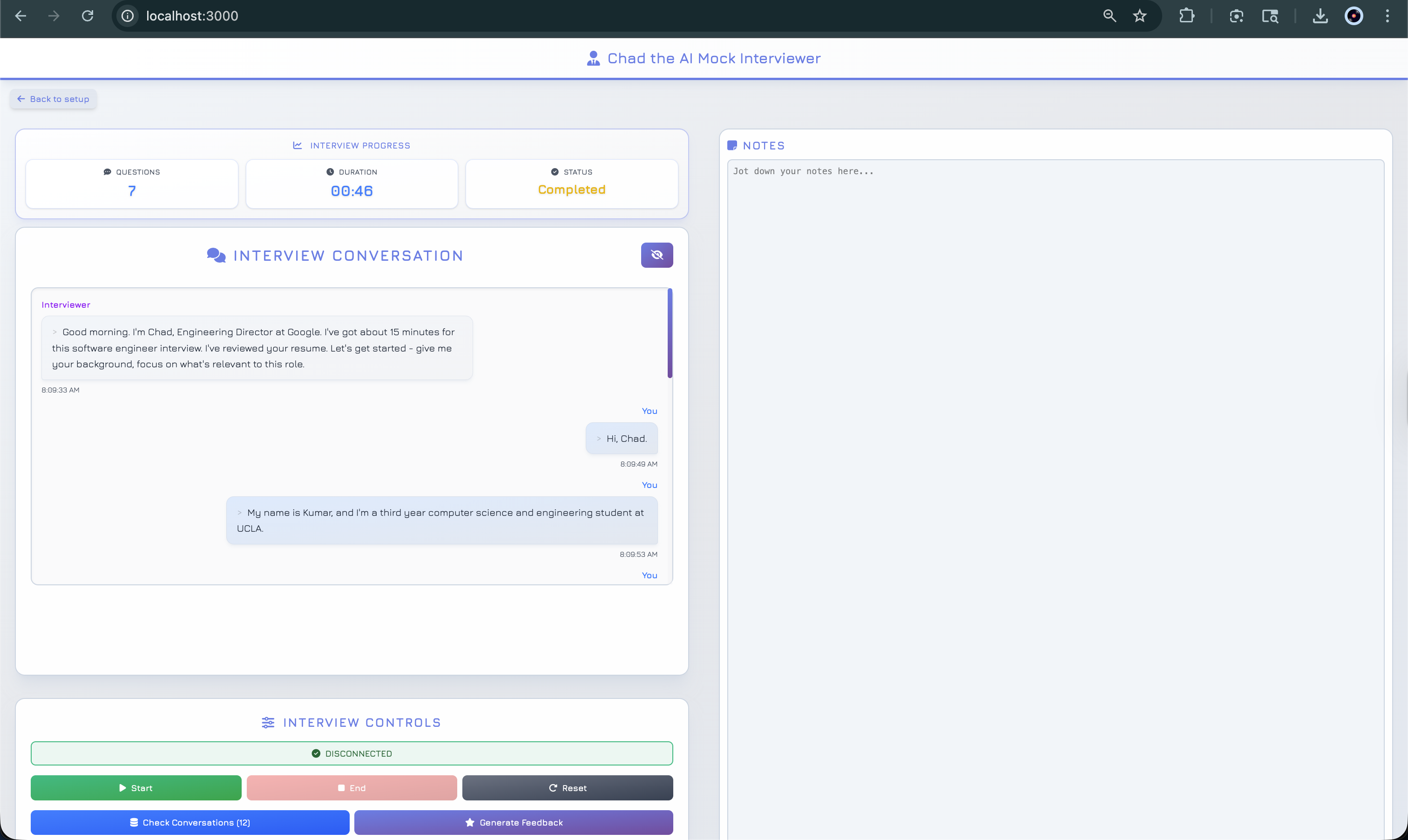
An intelligent interview practice platform powered by Deepgram's Voice Agent API. Features real-time voice or text-based interviews with AI-driven behavioral and technical questions, resume analysis, and AI-powered feedback generation.
Features
- Real-time voice and text interview modes
- Resume upload with PDF/TXT support for personalized questions
- Multiple interview types: behavioral, technical, system design, and mixed
- Configurable difficulty levels from entry to lead positions
- Interview time tracking with automatic notifications
- Smart interruption detection for rambling responses
- Live conversation history with transcript display
- Session management - Store and track all interview sessions
- Conversation persistence - All conversations are saved to the database
- AI-powered feedback generation - Generate comprehensive feedback reports using OpenAI
- Performance analysis - Get detailed scores and recommendations after each interview
Prerequisites
- Deepgram API Key
- OpenAI API Key (for feedback generation)
- MongoDB (local installation or MongoDB Atlas account)
- Node.js 24.0.0+
- pnpm 10.0.0+
Setup
1. Clone and install dependencies
git clone https://github.com/yechanlin/SB-Hacks.git
cd SB-Hacks
pnpm install
cd frontend && pnpm install && cd ..
2. Configure environment
Create a .env file in the root directory (you can copy from sample.env):
# Required API Keys
DEEPGRAM_API_KEY=your_deepgram_api_key_here
OPENAI_API_KEY=your_openai_api_key_here

# MongoDB - Choose one option:

# Option 1: MongoDB Atlas (Cloud)
MONGODB_URI=mongodb+srv://username:[email protected]/database-name?retryWrites=true&w=majority

# Option 2: Local MongoDB (Development)
MONGODB_URI=mongodb://localhost:27017/interview-agent
Notes:
- Get your Deepgram API key from Deepgram Console
- Get your OpenAI API key from OpenAI Platform
- For MongoDB Atlas: Create a free cluster and whitelist your IP address
- For local MongoDB: Install MongoDB and ensure it's running on the default port (27017)
3. Run the application
Development mode with hot reload:
pnpm dev
Production mode:
pnpm build
pnpm start
4. Access the application
Open http://localhost:3000 in your browser.
Tech Stack
- Frontend: React 18, Vite, Tailwind CSS v4
- Backend: Node.js with Express
- Database: MongoDB (with Mongoose ODM)
- Voice AI: Deepgram Voice Agent API (Speech-to-Text, GPT-4, Text-to-Speech)
- Feedback AI: OpenAI GPT-4o-mini (for generating interview feedback)
- Audio: Web Audio API for microphone input and audio playback
- PDF Processing: PDF.js for client-side resume parsing
Backend API
The backend provides RESTful API endpoints for managing interview sessions, conversations, and feedback:
Session Management
POST /api/sessions- Create a new interview sessionGET /api/sessions/:sessionId- Get session detailsPUT /api/sessions/:sessionId/end- Mark session as completed
Conversation Management
POST /api/sessions/:sessionId/conversations- Save a conversation messageGET /api/sessions/:sessionId/conversations- Get all conversations for a session
Feedback & Reports
POST /api/sessions/:sessionId/feedback/generate- Generate AI-powered feedback using OpenAIGET /api/sessions/:sessionId/report- Get the latest feedback report for a session
All conversations are stored in MongoDB during the interview, and feedback is generated using OpenAI's GPT-4o-mini model to provide comprehensive performance analysis.
Getting Help
- Open an issue in this repository
- Join the Deepgram Github Discussions Community
- Join the Deepgram Discord Community
Contributing
See our Contributing Guidelines to learn about contributing to this project.
Code of Conduct
This project follows the Deepgram Code of Conduct.
Security
For security policy and procedures, see our Security Policy.
License
MIT - See LICENSE
Acknowledgement
We set this project up based on the template developed by John Vajda and Naomi Carrigan
Built With
- deepgram
- javascript
- mongodb
- node.js
- react

Log in or sign up for Devpost to join the conversation.