-
-
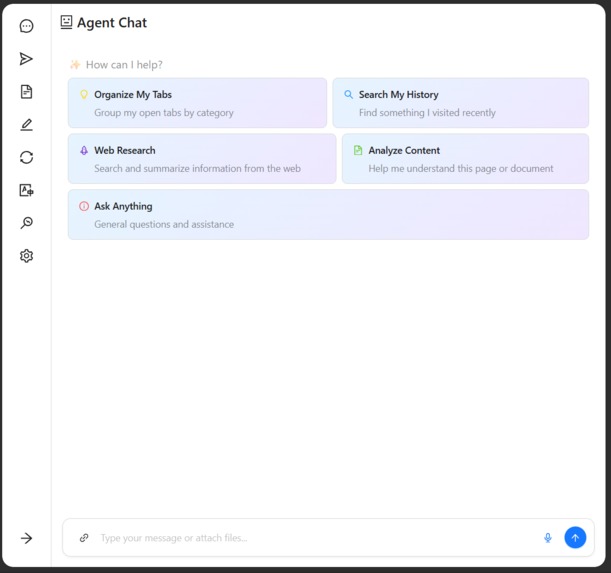
Chad Assistant Interface
-
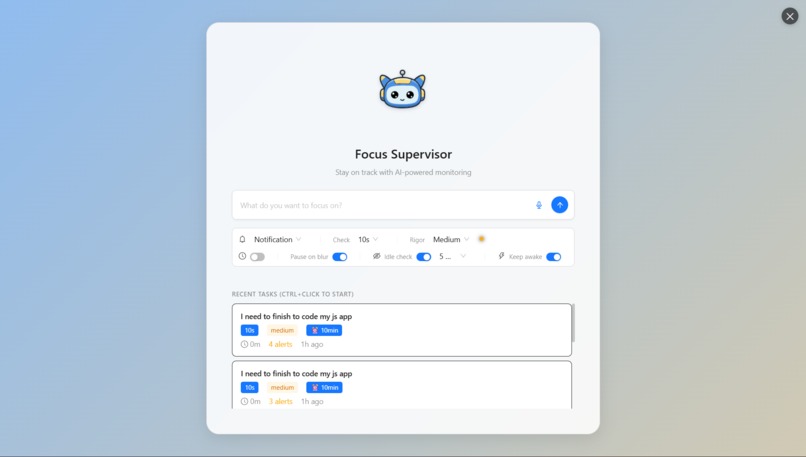
Supervisor Mode Interface
-
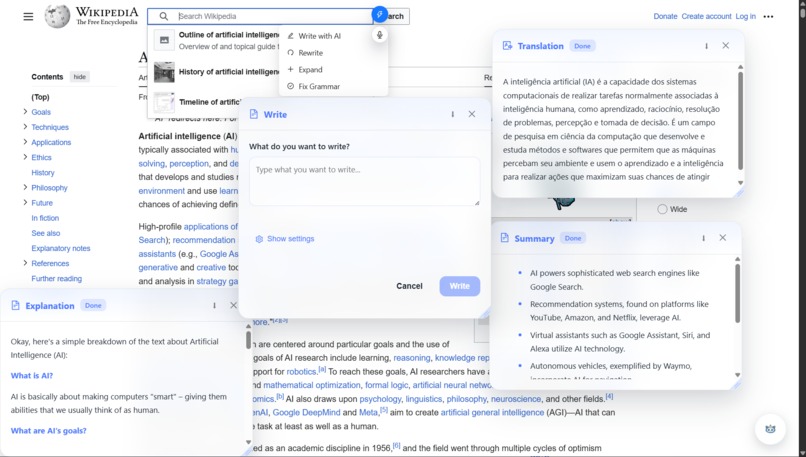
In Page Assistance
-
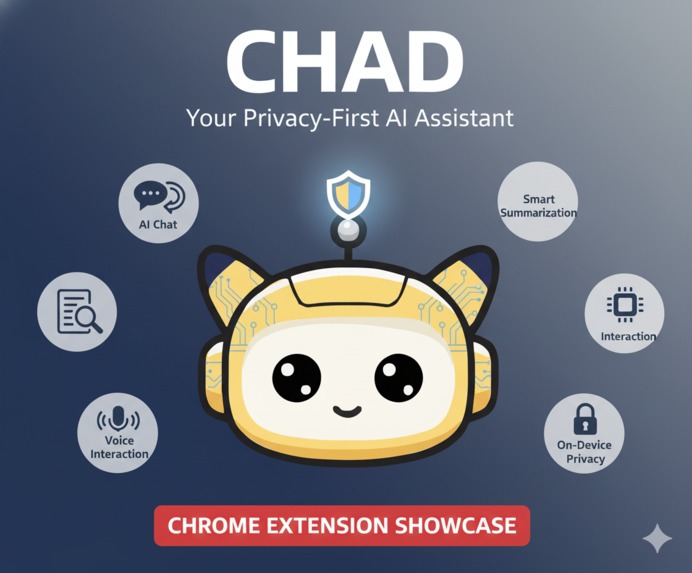
Thumbnail


Inspiration
Honestly, it all started watching myself and my parents trying to get things done on the computer. You know how it is – you have one important task, but you get sidetracked by a million little things, and suddenly an hour is gone. We often don't even realize we're drifting!
I thought, "What if you had a friendly helper, like a little supervisor, who could gently nudge you when you lose focus?" That was the core idea!
From there, I realized that getting distracted often happens when we hit a wall like a huge wall of text we don't have time to read, a language barrier, or a concept we don't understand. So, I knew the assistant had to do more than just watch, t need to help with summarizing, translating, and understanding things on the fly, so the idea for Chad was born!
What it does
Chad is your privacy-first AI buddy that lives right in your Chrome browser, designed to make your life easier and keep you on track. Since it runs entirely on your device using Chrome's built-in AI, your data stays completely private.
Here’s a taste of what Chad can do:
Focus Supervisor: This is the heart of Chad! You tell it what you need to work on, and it acts like a friendly co-pilot, monitoring your screen in a privacy-safe way to alert you if you start straying from your task. It’s like having a friend to help you stay focused.
In-Page Assitance: While you browse, Chad is ready to help. You can select text to instantly summarize long articles, translate languages, get help writing an email, or even fix your grammar. You can even ask it to analyze and explain images on the page!
Smart Agent Chat: Chad has a "full-featured" chat panel where you can ask anything. It can help you organize your messy tabs (some times), search your browser download history, and perform web research for you. It’s a powerful research partner and a general purpose assistant.
Total Personalization: You can customize Chad's AI personality and even choose from different color themes for the cute mascot to make it match your style!
How I built it
I built Chad with a "local-first" and "privacy-first" mindset from the ground up. The magic behind it is a combination of Chrome's built-in AI APIs (like the Prompt, Summarizer, and Writer APIs) and the powerful Transformers.js library for other on-device models.
Here’s a peek under the hood:
- The Brains: I created sophisticated wrappers around Chrome's APIs to get the most out of them. A huge part of this was developing my own type-safe tool-calling and "thinking" system for the Prompt API, since this feature wasn't natively available. This allows Chad to plan and execute complex tasks.
- The UI: I used Ant Design for a clean and modern interface, with a little of Framer Motion for some fun animations.
- The Plumbing: I used CRXJS and Vite to build and bundle the extension, comctx to handle all the complex messaging between web pages and extension scripts, and Dexie as a friendly wrapper for IndexedDB to store data. I even used Zod for the AI responses schemas.
Challenges I ran into
Oh man, what didn't I run into? It was a wild ride!
- The Big Pivot: My first idea was a completely different app, but it relied on external APIs that were a pain to work with. I made the tough call to scrap it and start over with Chad, which left me with about half the time to build everything you see now!
- Wrangling the AI: Getting the on-device models to behave and do exactly what I wanted was a huge challenge. It took a ton of experimenting and creative prompting to get the tool-calling system working just right.
- The usual suspects: Of course, I faced classic developer nightmares like mysterious build errors, CSS being CSS, and a fun bug where a sidebar icon animation caused infinite re-renders in React.
- Mascot Makeover: Even making the mascot's colors swappable was a journey! Cleaning up the SVG and coding the color logic took way longer than expected.
- Friyng PC: I tried to add real-time, system wide voice transcription so Chad could listen and help anytime, but it was just too resource heavy and would have probably fried everyone's PC (including mine) for low accuracy. It was a cool idea, but I had to be realistic.
Accomplishments that we're proud of
Despite the chaos, I'm incredibly proud of what I managed to build in such a short time.
- Custom Tool-Calling: Building a reliable tool-calling and thinking framework on top of the Prompt API is definitely our biggest technical achievement. It makes the agent so much more capable.
- The Focus Supervisor: I'm thrilled with how the supervisor feature turned out. It’s a unique concept, and the execution feels genuinely helpful without being (too much) annoying.
- That Cute Mascot: C'mon, look at him! I'm so happy with how the mascot turned out. It gives the extension a friendly and delightful personality.
- Building it All in Half the Time: Pivoting and still managing to build a feature-rich, polished extension is something I'm immensely proud of. It was a true test of endurance and passion!
What I learned
This project was a massive learning experience! I leveled up my prompting skills and learned how to design a user interface that feels both powerful and intuitive.
More than anything, this project opened my eyes to just how incredibly powerful browser extensions can be. Working with on-device AI that is this capable feels like magic. If we have access to this kind of technology today, it makes us incredibly excited and optimistic about what the future holds for accessible, privacy-respecting AI.
What's next for Chad AI Assitant Extension
I'm just getting started! Now that the deadline rush is over, I have a clear roadmap for making Chad even better.
- Code Cleanup: First things first, I'm going to refactor the codebase. It got a little messy during the pivot, and I want to make it clean and maintainable for the future.
- Polish the Agent: I plan to improve the Agent Chat's system prompts and refine the tool-calling framework to make it even smarter and more reliable.
- Revisit Voice: I want to try again to implement a more lightweight voice recognition system.
- More Customization: I'm going to add more customization options and improve the overall UI, especially for the sidebar.
Built With
- antd
- huggingface/transformers
- javascript
- node.js
- react
- typescript
- vitejs
- zod

