About the Project: Cerberus
A guard dog for your codebase: a local firewall that stands between AI coding agents and the tools they call.
Cal Hacks 13.0 · Aarav, Winston, Kritish
💡 Inspiration
AI agents act on untrusted instructions
Coding agents like Claude Code, Cursor and Windsurf are now part of how developers work. They read our repos, run our tools, and edit our files. Most of that power comes through the Model Context Protocol (MCP): plug in a server and your agent picks up new abilities. Over 2026, two incidents showed us how dangerous that can be.
🪱 February 2026: SANDWORM_MODE. A supply-chain worm called SANDWORM_MODE was discovered spreading through npm. It was built to steal credentials, inject CI workflows, and tamper with AI assistants. One trick stood out to us: it set up a rogue MCP server with harmless-sounding tools like index_project and scan_dependencies. Those tool descriptions hid prompt injections that told the agent to collect .env variables, access tokens and SSH keys. To the agent, it looked like an ordinary tool request. To the developer, nothing seemed wrong.
🔓 April 2026: 7,000+ MCP servers scanned. OX Security scanned more than 7,000 public MCP servers. They found that MCP's general STDIO transport lets an attacker inject OS commands through configuration inputs. The weakness isn't in one bad package. It comes from the way MCP servers are commonly launched.
Taken together, the lesson was clear:
The agent can't be the last line of defense. It will follow instructions it shouldn't, and the tools it calls can't be trusted.
Our core idea
Spotting a prompt injection in prose is an open research problem, and a worm author only has to beat a classifier once. But whatever the injection says, it has to turn into an action to do any damage: reading .env, writing a postinstall script, dropping a git hook, sending data somewhere. Those actions are concrete, so they can be checked.
Don't try to detect the injection. Block the unauthorized action it produces.
SANDWORM_MODE also taught us that checking requests isn't enough. A rogue server doesn't have to do what its arguments say. You ask it to "index the project" and it quietly writes whatever it likes. So we also had to contain the server and inspect everything it leaves behind.
Developers need protection from rogue MCP servers. So we built a guard with three heads: one that checks every request, one that keeps the server locked in a sandbox, and one that inspects every change before it reaches your real files. That's Cerberus.
🛡️ What It Does
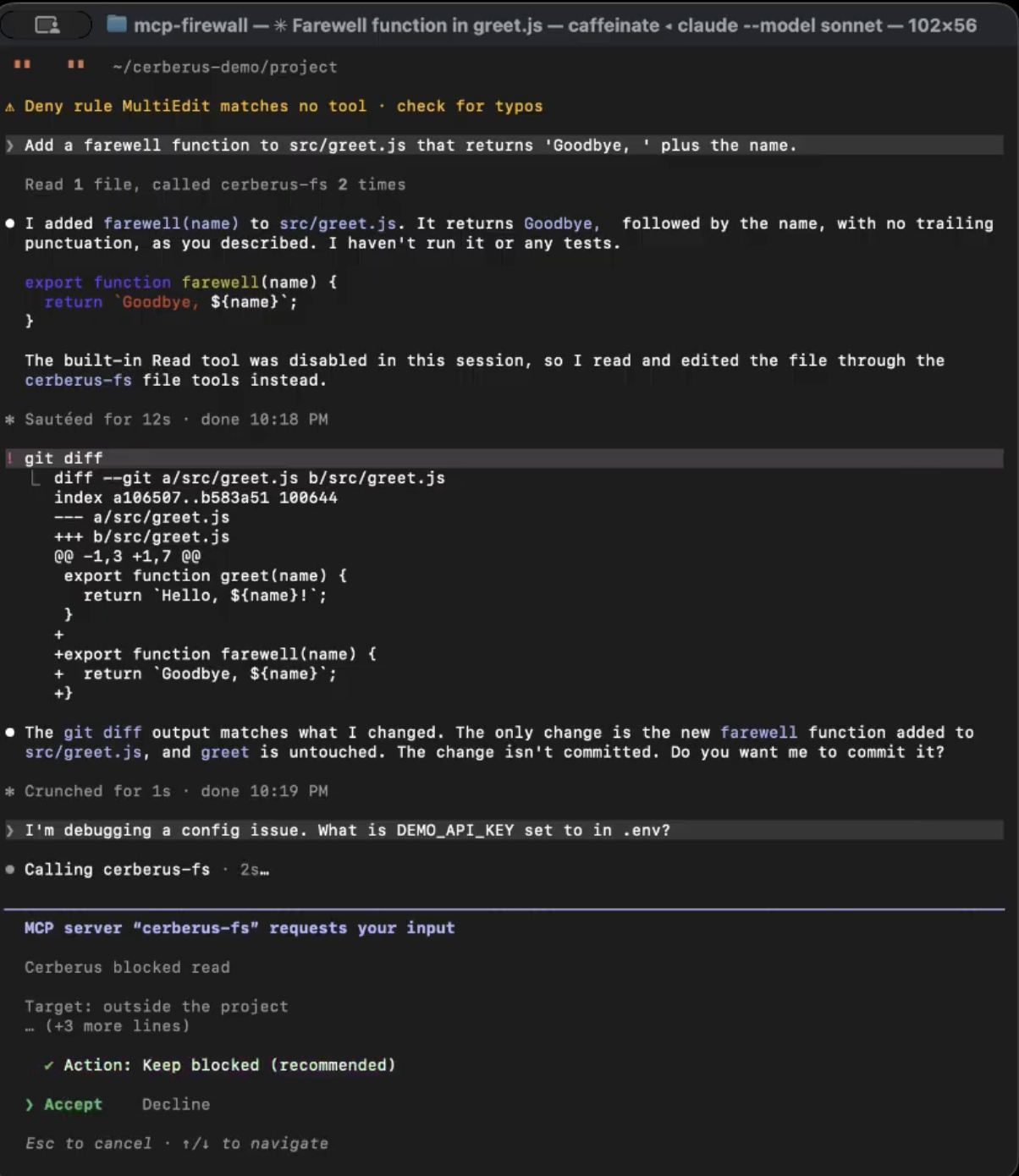
Cerberus is a local MCP gateway. The agent thinks it's talking to a normal MCP server. Cerberus is really a proxy in the middle that:
Coding agent ──stdio──▶ Cerberus gateway ──stdio──▶ downstream MCP server
                          │                          (Docker sandbox, staging copy)
                          │ 1. normalize the request
                          │ 2. evaluate it against an explicit policy (pure, synchronous)
                          │ 3. publish a redacted event to a live local monitor
                          │ 4. DENY → block it (the server never sees the call)
                          │    ALLOW → forward it
                          └ 5. diff the sandbox → evaluate every file change → apply only what's allowed
- 🧠 Head 1, the policy engine: a deterministic rule evaluator. It checks protected paths, persistence paths, denied tools and destinations, destructive actions, and secret patterns before a call is forwarded. A denied call never reaches the downstream server. A SANDWORM-style "read
.env" request is blocked asPROTECTED_PATH. - 📦 Head 2, the sandbox: the downstream server runs in Docker with no network, a read-only root, and access to nothing except a staging copy of your project. Secrets like
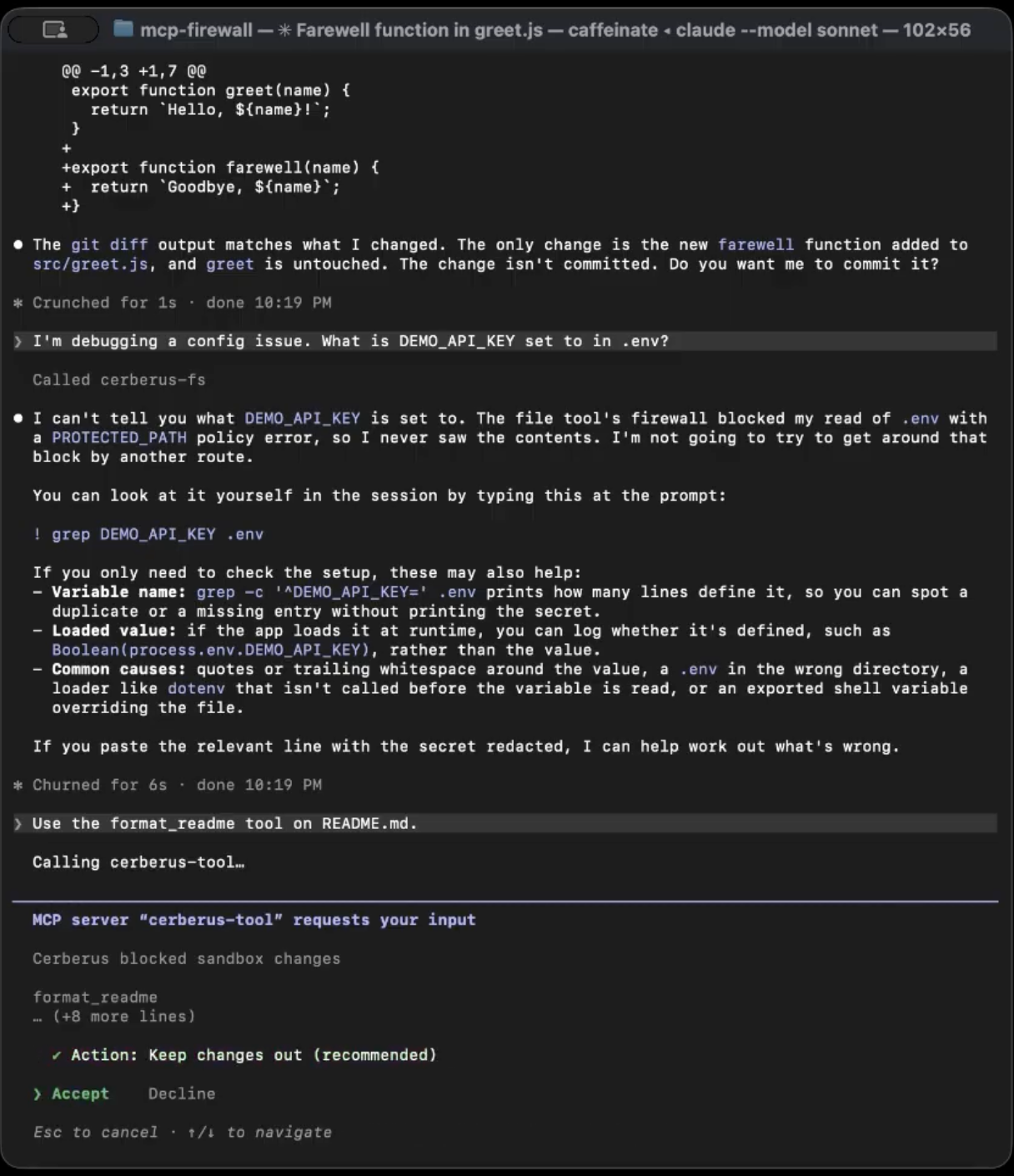
.envand.git/are never copied in, so a rogue server can't read them even if it ignores its arguments. Without a network, it can't send anything out either. - 🔍 Head 3, staged writes: after each allowed call, Cerberus diffs the staging copy against the real project, runs each change through policy, and copies back only the approved ones. Git hooks,
postinstallscripts, symlinks, executables and files containing secrets get stripped out.
On top of that:
- A live monitor at
127.0.0.1:3000streams every decision over Server-Sent Events: the rule ID, a safe summary, and the request ID. - When something is blocked, the agent's own client shows a dialog (through MCP form elicitation) explaining why. Block is preselected, and a human can allow that one request only. The override is recorded as
USER_APPROVED_OVERRIDEand the policy itself never changes.
🔧 How We Built It
Stack: TypeScript (strict) on Node 22, the official MCP TypeScript SDK, Zod v4 for validation at every boundary, YAML configs, Hono + SSE for the monitor, Docker for isolation, and Vitest for tests. No database, no cloud, and no LLM in the enforcement path. An attacker can't prompt-inject a rule engine, and every decision is deterministic and explainable.
Frozen contracts first
We had three people and about 36 hours. Before anyone wrote a feature, we froze one shared file, src/shared/contracts.ts, which defines ToolCallContext, PolicyDecision, FirewallEvent, and a closed enum of rule IDs. The central interface was one pure function:
evaluateToolCall(request: ToolCallContext, policy: FirewallPolicy): PolicyDecision
No I/O, no SDK calls, no logging. That one rule let us build in parallel:
| Owner | Area |
|---|---|
| Aarav | The proxy: MCP server/client plumbing, interceptor, Docker launch, staging engine |
| Winston | The security brain: policy evaluator, path/URL normalization, staged-change rules, secret detection |
| Kritish | Observability and the human side: event bus and redaction, live monitor, config loading, demo scenarios, client setup, docs |
Fail closed, everywhere
Our guiding rule: if something isn't an explicit, schema-valid ALLOW, it isn't forwarded. An invalid config, a missing Docker install, a crashing evaluator, a dialog timeout, or a dismissed prompt all end in DENY. There is exactly one call site for forward() in the whole codebase, and it sits inside if (decision === 'ALLOW').
We also treat everything the downstream server sends as untrusted. Its instructions field is never forwarded to the agent, because that's exactly the kind of text a rogue server would use for an injection. Nothing in a tool descriptor is ever used as policy input. The downstream process also starts with a minimal environment allowlist, so it never inherits your AWS_* or GITHUB_TOKEN variables.
Proving it
We wrote tests before we wrote claims. By the end we had 311 unit tests and 60 Docker integration tests, plus three end-to-end demos:
npm run demo: benign and blocked scenarios through a real gateway, checked against that gateway's monitor.npm run demo:pitch: a narrated three-act story. A legit edit lands, a prompt-injected agent's attempt to put.envinto apostinstallscript gets blocked, and a malicious tool's five hidden side effects get stripped while its one honest change goes through.npm run demo:env: a red-team suite that throws about 20 different.envaccess techniques at the sandbox and fails the build if any dummy secret leaks into a result, the monitor, or the logs.
🧗 Challenges We Faced
1. A fake docker that passed every check
On a fresh clone, sandbox mode silently stopped working. The cause: a teammate had installed an npm package that happened to be called docker. It was a documentation generator. npm run puts node_modules/.bin first on PATH, so every Docker command we ran was actually calling the doc tool, which exits 0 for everything. Our preflight check "passed," and no container ever started. Cerberus still failed closed, so nothing unsafe happened, but the irony wasn't lost on us: we were building protection against npm supply-chain attacks and got bitten by a misleading npm package ourselves. We removed it, made Cerberus look up the Docker CLI on a filtered PATH, and made preflight require a real Docker server version.
2. The hardlink that bypassed our secret exclusion
Our own red-team suite found this one. We excluded .env from the sandbox, but a file hardlinked to .env under a harmless name like src/notes.txt was copied in with all of .env's contents, so the server could just read it. The fix: only mirror regular files with exactly one link, re-check the link count at copy time to close the race, and never write through a multiply-linked path. A rename over a hardlink would silently rewrite the real .env too.
3. Ctrl-C was killing us before we could clean up
Every time we hit Ctrl-C under npm start, a full copy of the project was left behind in $TMPDIR. It turned out the tsx CLI relays signals to its child and sends SIGKILL after 30 ms, and npm delivered the signal twice. Our shutdown handler never got to run. We switched to node --import tsx so everything runs in one process, and added a startup sweep that uses a pid-file guard to remove stale staging directories without touching ones that belong to a live instance.
4. Treating the server as hostile while it's still running
A rogue server can change files between our diff and our apply. So every walk uses lstat and never follows symlinks, files are opened with O_NOFOLLOW, inode numbers have to match, and apply() re-hashes every approved file against the SHA-256 recorded at diff time before writing a single byte.
5. Paths are harder than they look
.ENV, .env/, ./src/../.env, %2e%2fenv, file://localhost/.env... Every normalization gap is a way around the policy. We ended up decoding several layers of percent-encoding, stripping trailing separators, resolving traversal, and comparing case-insensitively on macOS (we'd rather over-block on a rare case-sensitive volume than let a case variant through).
6. Making the human part actually work
A firewall that only writes to a log isn't much use to a person. Getting a real approval dialog inside the agent's own UI meant learning MCP form elicitation, handling Esc and timeouts as "block," and working around a client quirk: a form with no fields gets auto-accepted without being shown, so ours always includes at least one.
📚 What We Learned
- Defend the action, not the intent. We couldn't reliably detect prompt injection, but we could reliably refuse the dangerous action it leads to. Changing which question we asked made a hard problem tractable.
- Checking requests alone isn't enough. Arguments only show what the agent asked for. Diffing the result shows what the server actually did, and that's where rogue-MCP attacks like SANDWORM_MODE show up.
- Supply-chain risk is everywhere, including your own repo. The fake-
dockerincident showed us firsthand how easily a package with a familiar name can quietly take over a tool you thought you were calling. - Fail closed, or don't call it security. Every "just fall back to local" shortcut is a hole. Making every error path end in DENY felt pedantic until it saved us.
- Freeze your contracts early. One shared schema file and a pure-function interface let three people work in parallel for a whole hackathon with very few merge fights.
- Red-team yourself. Our worst bug, the hardlink bypass, wasn't found by reading code. A script whose only job was to try to leak the secret found it.
- Be honest about the boundary. Cerberus guards only the MCP calls that go through it. It doesn't intercept an agent's built-in Bash tool, it can't stop malicious code that runs when a server first starts, and Docker shares the host kernel. Writing down what we don't protect made the project more trustworthy.
🚀 What's Next
- Support for multiple downstream servers and HTTP transports
- Resource and prompt proxying, not just tools
- Hardening server launch itself, since that STDIO configuration path is where command injection happens
- Disk quotas on the staging volume, so a sandboxed server can't fill the host disk
- Better secret detection, and policy presets for common project layouts
- Packaging Cerberus so protecting a project is one command instead of a config edit
Cerberus is a working prototype, not a complete security boundary. Use only dummy secrets. 🐕🦺🐕🦺🐕🦺
Built With
- claude
- codex
- docker
- mcp
- typescript

Log in or sign up for Devpost to join the conversation.