-
-
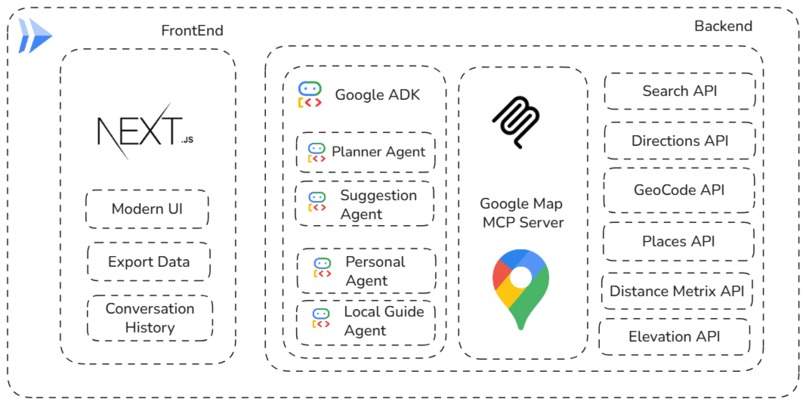
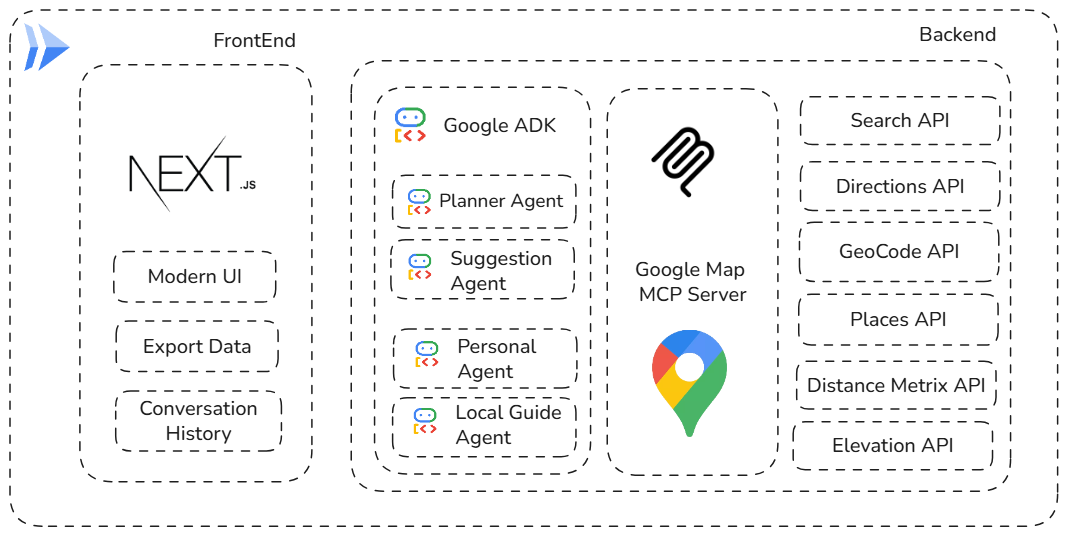
Architecture Diagram
-
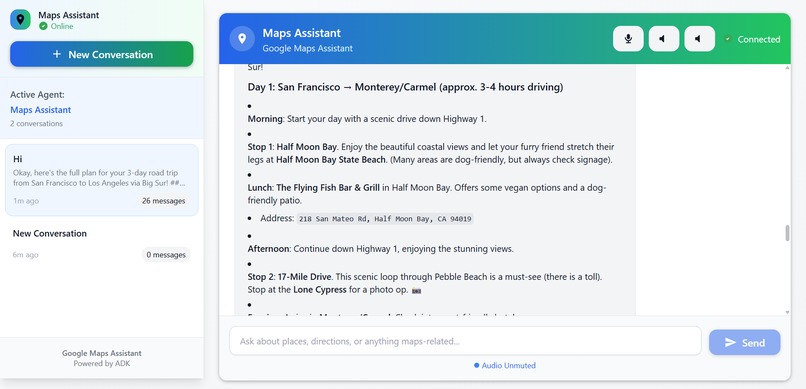
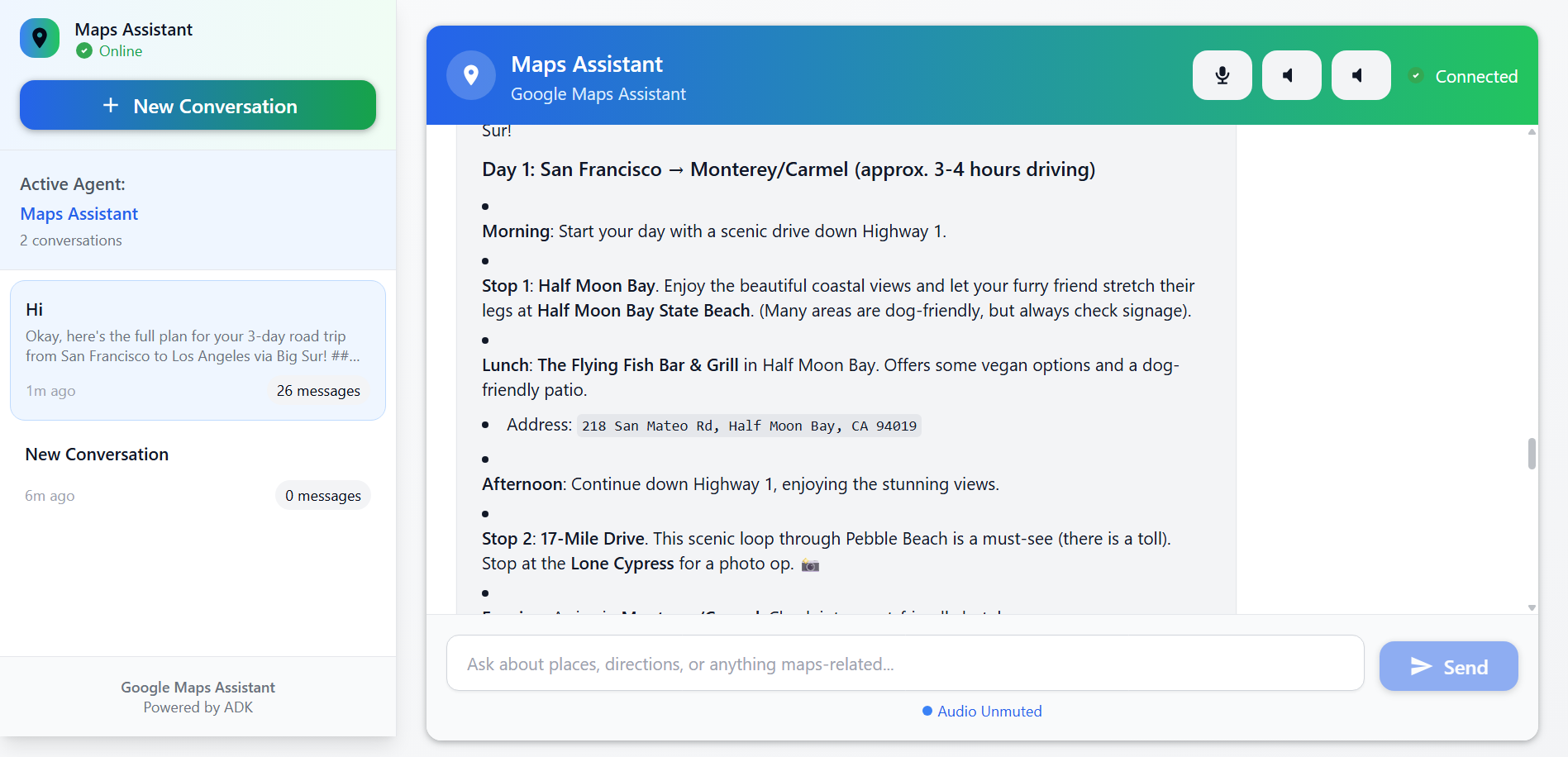
UI
-

-

-
-

Google Maps AI
Sync your journey to your beat, powered by Gemini 2.0 Flash AI 🗺️
An AI-powered Google Maps assistant that helps you plan amazing road trips and explore the world with intelligent route planning, location discovery, and personalized travel recommendations.




🌟 Overview
Google Maps AI is a powerful tool designed to simplify and enhance Google Maps integration in your applications. Whether you're building location-based services, route optimization systems, or geographic data visualization tools, Google Maps AI provides the essential features you need.
Google Maps AI is an intelligent road trip planning assistant powered by Google's Agent Development Kit (ADK) and the Model Context Protocol (MCP). It combines the power of AI with Google Maps services to create personalized travel experiences, complete with route optimization, weather forecasts, accommodation suggestions, and local recommendations.
 Modern and intuitive chat interface for seamless trip planning
🔗 Links & Resources
🏆 Project Showcase
- Devpost: Celebrating Google Maps - Our project submission showcasing the capabilities and features
👥 Contributors & Team
✨ Features
🤖 AI-Powered Trip Planning
- Intelligent Route Optimization - AI analyzes your preferences to create the perfect itinerary
- Conversational Interface - Natural language interaction for easy trip planning
- Personalized Recommendations - Tailored suggestions based on your interests and budget
- Multi-Day Trip Support - Break down long journeys with strategic stopping points
🗺️ Advanced Mapping Capabilities
- Real-time Directions - Get up-to-date routing with traffic considerations
- Location Discovery - Find attractions, restaurants, and points of interest
- Place Details & Reviews - Comprehensive information about destinations
- Custom Waypoints - Add multiple stops to your journey
🌤️ Smart Travel Assistance
- Weather Forecasts - Get weather information for your entire route
- Clothing Recommendations - AI suggests appropriate attire for each destination
- Pet-Friendly Options - Special accommodations for travelers with pets
- Budget-Conscious Planning - Options for every budget level
🏗️ Technical Features
- Google ADK Integration - Built on Google's Agent Development Kit
- Model Context Protocol (MCP) - Seamless tool integration and extensibility
- Next.js Frontend - Modern, responsive web interface
- FastAPI Backend - High-performance Python API
- Docker Support - Containerized deployment ready
- Cloud Run Compatible - Easy deployment to Google Cloud
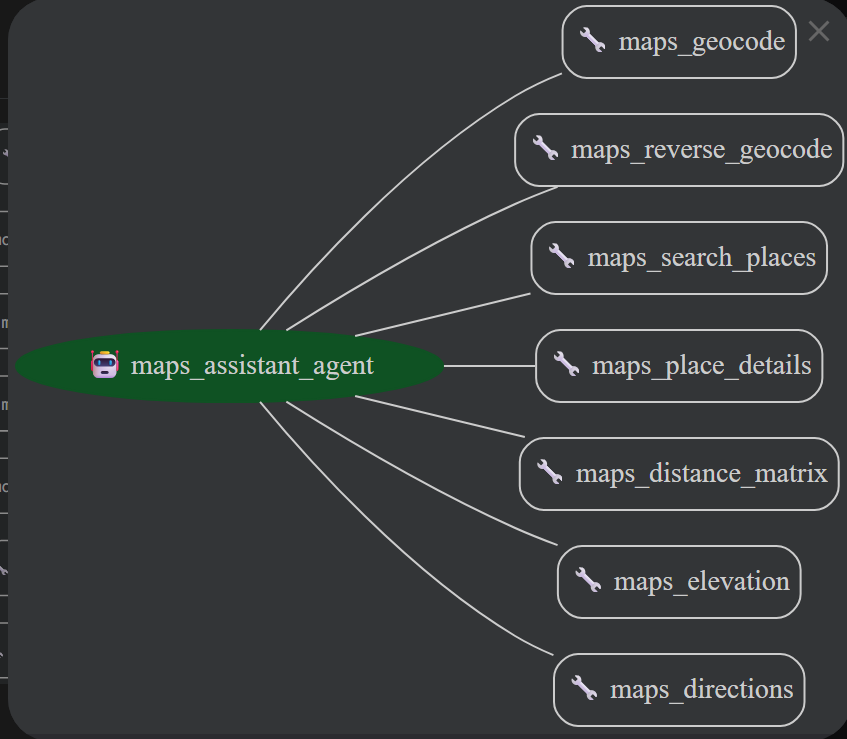
 Model Context Protocol (MCP) integration showing available map tools and capabilities
🚀 Getting Started
Prerequisites
- Python 3.11+ - For the backend API and AI agent
- Node.js 18+ - For the Next.js frontend
- Google Maps API Key - Get one here
- Docker (optional) - For containerized deployment
- Google Cloud CLI (optional) - For Cloud Run deployment
Quick Start
Clone the repository:
git clone https://github.com/Yash-Kavaiya/GMap-Buddy.git
cd GMap-Buddy
Set up environment variables:
# Create and configure your environment
export GOOGLE_MAPS_API_KEY="your_api_key_here"
Choose your deployment method:
Option A: Docker (Recommended)
# Build and run with Docker
docker build -t gmap-buddy .
docker run -d \
  -p 8080:8080 \
  -e GOOGLE_MAPS_API_KEY="your_api_key_here" \
  --name gmap-buddy-container \
  gmap-buddy
Your GMap-Buddy will be available at http://localhost:8080
GMap-Buddy provides a conversational interface where you can naturally describe your travel needs:
👋 Hi! I'm your road trip planning assistant. Where would you like to start your journey?

User: I want to plan a 3-day road trip from San Francisco to Los Angeles via Big Sur

🗺️ Great choice! That's one of the most scenic routes on the West Coast. Let me help you plan this amazing trip...
Conversation Flow
The AI assistant follows a structured approach:
- Starting Point - Where your journey begins
- Destination - Where you're heading (with scenic route options)
- Duration - How many days you have available
- Preferences - Travel style, budget, interests, pets, dietary needs
- Custom Itinerary - Personalized recommendations with weather and packing advice
🛠️ Configuration
Environment Variables
# Required
GOOGLE_MAPS_API_KEY=your_api_key_here

# Optional
PORT=8080                    # Server port (default: 8080)
GOOGLE_ADK_MODEL=gemini-2.0-flash  # AI model to use
Google Maps API Setup
- Go to the Google Cloud Console
- Create a new project or select an existing one
- Enable the following APIs:
- Maps JavaScript API
- Places API
- Directions API
- Geocoding API
- Create credentials (API Key)
- Restrict the API key to your domain/IP for security
 Technical architecture showing the integration between Google ADK, MCP tools, and Maps APIs
📁 Project Structure
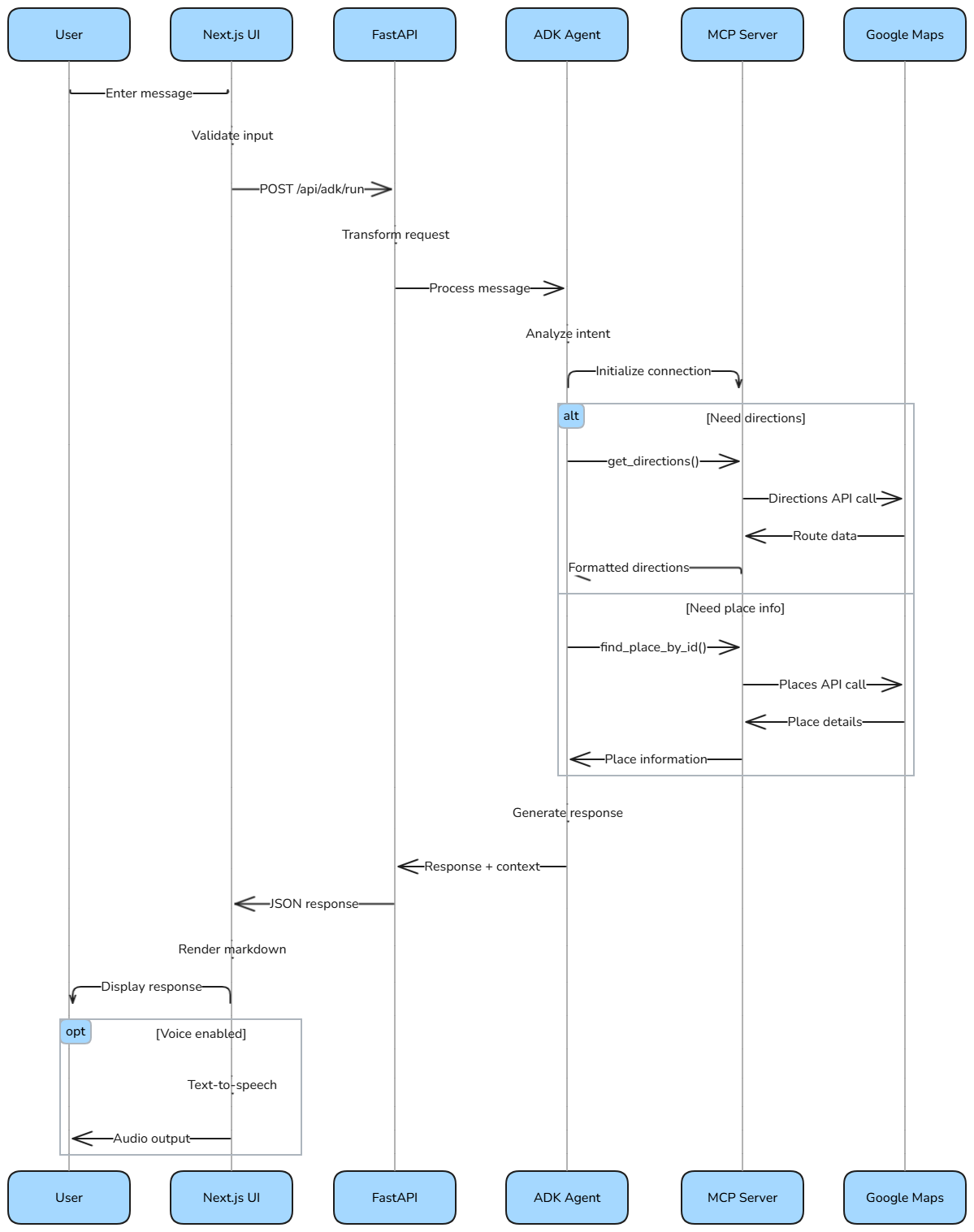
 Data flow diagram showing how user inputs are processed through the AI agent and MCP tools
GMap-Buddy/
├── 📁 gmap-buddy/           # Python backend
│   ├── agent.py            # Google ADK AI agent configuration
│   ├── main.py             # FastAPI web server
│   ├── prompt.py           # AI prompts and conversation flow
│   └── __init__.py
├── 📁 adk-ui/              # Next.js frontend
│   ├── app/                # Next.js 14 app directory
│   │   ├── layout.tsx      # Root layout
│   │   ├── page.tsx        # Homepage
│   │   ├── globals.css     # Global styles
│   │   └── api/            # API routes
│   │       └── adk/        # ADK integration endpoints
│   ├── components/         # React components
│   │   ├── chat/           # Chat interface components
│   │   ├── session/        # Session management
│   │   ├── sidebar/        # Navigation sidebar
│   │   ├── ui/             # UI components (buttons, inputs, etc.)
│   │   └── voice/          # Voice controls
│   ├── lib/                # Utility libraries
│   │   ├── adk-service.ts  # ADK service integration
│   │   └── utils.ts        # Helper functions
│   └── types/              # TypeScript definitions
├── 📁 Images/              # Documentation images
│   ├── UI.png             # User interface screenshot
│   ├── Tech-Diagram.png   # Technical architecture
│   ├── DataPipelineDiagram.png  # Data flow diagram
│   ├── SequenceDiagram.png     # Sequence diagram
│   └── mcp_map_tools.png       # MCP tools overview
├── 📄 Dockerfile          # Container configuration
├── 📄 requirements.txt    # Python dependencies
├── 📄 README.md          # This file
└── 📄 .gitignore         # Git ignore rules
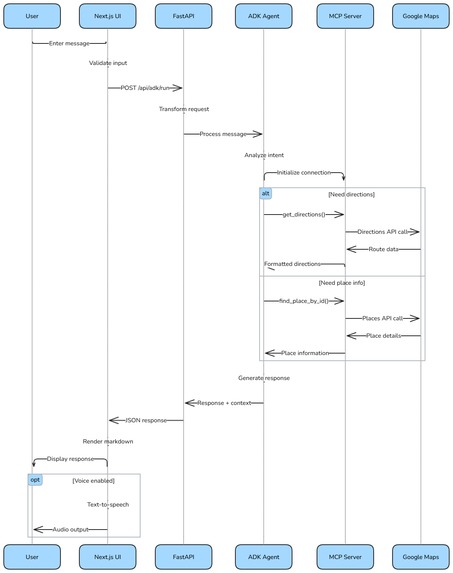
 Sequence diagram illustrating the interaction flow between user, frontend, backend, and Google Maps APIs
🧪 Development & Testing
Local Development
# Backend development
cd gmap-buddy
python -m pip install -r ../requirements.txt
python main.py

# Frontend development (separate terminal)
cd adk-ui
npm install
npm run dev
Building the Frontend
cd adk-ui
npm run build    # Creates optimized production build
npm run start    # Serves the production build
Testing API Endpoints
# Test health endpoint
curl http://localhost:8080/health

# Test chat functionality
curl -X POST http://localhost:8080/api/chat \
  -H "Content-Type: application/json" \
  -d '{
    "message": "I want to plan a weekend trip from New York to Boston"
  }'
Docker Development
# Build development image
docker build -t gmap-buddy:dev .

# Run with volume mounting for development
docker run -d \
  -p 8080:8080 \
  -e GOOGLE_MAPS_API_KEY="your_api_key" \
  -v $(pwd):/app \
  gmap-buddy:dev
🔧 Architecture & Technology Stack
Core Technologies
- 🤖 Google ADK (Agent Development Kit) - AI agent framework
- 🗺️ Model Context Protocol (MCP) - Tool integration protocol
- ⚡ FastAPI - High-performance Python web framework
- ⚛️ Next.js 14 - React framework with App Router
- 🎨 Tailwind CSS - Utility-first CSS framework
- � Docker - Containerization platform
- ☁️ Google Cloud Run - Serverless container platform
Key Components
AI Agent (
agent.py)- Powered by Gemini 2.0 Flash model
- Integrates MCP tools for Maps functionality
- Handles conversational flow and context management
FastAPI Backend (
main.py)- RESTful API endpoints
- Health checks for deployment
- Static file serving for frontend
Next.js Frontend (
adk-ui/)- Modern React application
- Real-time chat interface
- Responsive design with Tailwind CSS
MCP Integration
- Google Maps server via npm package
- Seamless tool calling from AI agent
- Extensible architecture for additional tools
Data Flow
User Input → Next.js UI → FastAPI → Google ADK Agent → MCP Tools → Google Maps API → Response
🤝 Contributing
We welcome contributions to make GMap-Buddy even better! Here's how you can help:
Ways to Contribute
- 🐛 Bug Reports - Found an issue? Let us know!
- 💡 Feature Requests - Have ideas for new features?
- 📖 Documentation - Help improve our docs
- 🔧 Code Contributions - Submit pull requests
- 🧪 Testing - Help us test on different platforms
Development Process
- Fork the repository
- Create a feature branch
bash git checkout -b feature/amazing-feature - Make your changes
- Follow the existing code style
- Add tests if applicable
- Update documentation
- Test your changes ```bash # Test backend python -m gmap_buddy.main
# Test frontend cd adk-ui && npm run build
5. **Submit a pull request**

### Code Style

- **Python**: Follow PEP 8 guidelines
- **TypeScript/React**: Use ESLint and Prettier
- **Commit Messages**: Use conventional commits format

### Getting Help

- 📫 **Issues**: [GitHub Issues](https://github.com/Yash-Kavaiya/GMap-Buddy/issues)
- 💬 **Discussions**: [GitHub Discussions](https://github.com/Yash-Kavaiya/GMap-Buddy/discussions)

### Performance Tips

- **API Optimization**: The MCP integration handles caching automatically
- **Rate Limiting**: Google Maps APIs have rate limits - the agent respects these
- **Memory Usage**: The Docker container is optimized for memory efficiency
- **Scaling**: Use Cloud Run for automatic scaling based on traffic

### 🆘 Get Help
- 📋 **Issues**: [Report bugs or request features](https://github.com/Yash-Kavaiya/GMap-Buddy/issues)
- 💬 **Discussions**: [Community discussions](https://github.com/Yash-Kavaiya/GMap-Buddy/discussions)
- 📖 **Documentation**: [Wiki & Guides](https://github.com/Yash-Kavaiya/GMap-Buddy/wiki)

Log in or sign up for Devpost to join the conversation.