-
-

Document loader and Pinecone dB Creation
-
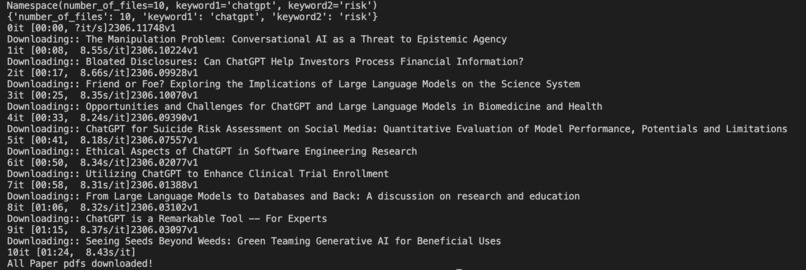
Downloading pdfs according to keyword specifications
-
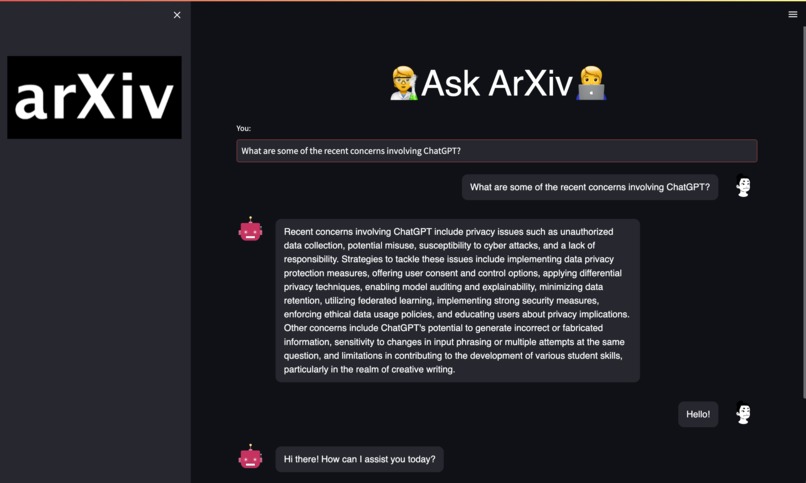
The Arxiv Web App


Inspiration
Back when I did my PhD, I found that looking for new directions of research always turned out to be one of the more challenging aspects. In addition, once most of the paper was done, it took so much time to find the relevant papers to cite. It would have been extremely helpful to have a tool that I can query to get me the latest papers, and then have a chatbot interface that I can ask intelligent questions to regarding the areas of research, and get an idea of future directions of research. This also applies to writing review articles about a topic.
What it does
It downloads the pdf versions of the most recent research papers from arxiv.org according to the user's specifications. It then converts these documents into a vector representation via Pinecone, and then uses a Large Language Model (via Langchain and OpenAI) and Streamlit to build a chatbot interface to enable the user to ask research specific questions.
How I built it
This is currently in the form of a pipeline (using shell scripting and python scripting) with 3 major parts.
- Part 1 queries the arXiv.org API based on keywords provided and downloads the pdf versions of the most recent "n" papers for a particular combination of keywords.
- Part 2 then loads in the downloaded pdfs and chunks them and converts them into vectors for a Pinecone database via Langchain and OpenAI embeddings.
- Part 3 builds a chatbot using Streamlit, that uses OpenAI's ChatOpenAI() LLM and Langchain to query the stored documents
A master shell script runs the entire pipeline comprising 3 Python scripts.
Built via::
- Bash scripting
- Python scripting
- The arXiv API queried via the arxiv package to download pdfs of research papers
- Langchain for document loading and Document chunking
- Pinecone vector database created using the split documents and the default OpenAI Embeddings model
- A Streamlit chatbot, built to use the ChatOpenAI() model and the Pinecone dB to create a QA chatbot.
- Some simple CSS formatting for the Streamlit bot appearance
Challenges I ran into
- The arXiv API kept timing out (I used a custom client to query the API for abstracts, paper titles etc. but I have to figure out how to use this client to download pdfs). In the current formulation, downloading more than 20 pdfs at the same time still times out.
- As of now, it is extremely non-trivial to custom format Streamlit web-apps, but it can be done via python workarounds (using an n number of columns and adjusting the width etc.) and some CSS.
- It can be tricky to deploy a LangChain on Streamlit. It took me a long time to debug this, even with templates on Github.
Accomplishments that I'm proud of
Just getting this thing up and running in a weekend, really. I genuinely think this idea has potential, and with a bit more work, can end up being an actually helpful tool for research.
What I learned
- Most tutorials currently on the internet use the Pinecone UI to create a new index. It is much easier to do this programmatically via Python. I tried to make sure all of this could be fit into one seamless pipeline, so this was crucial.
- There are many more subtleties inherent in LangChain's chat capabilities, especially when trying to use Streamlit to wrap code to make a chatbot app. Agents kept breaking, and needs to be explored.
What's next for arxiv_app
- Make the pdf downloader part more intuitive, and add more options for keywords, time of query etc.
- Address the API call timeout issues for the arXiv API
- Try other LLMs (HuggingFace specifically)
- Implement Conversational Memory and Agents when querying the Chatbot
- Give the LLM access to other tools such as Wikipedia (might help with broader context) and Google Search
- Try and wrap the whole pipeline in a Streamlit webapp


Log in or sign up for Devpost to join the conversation.