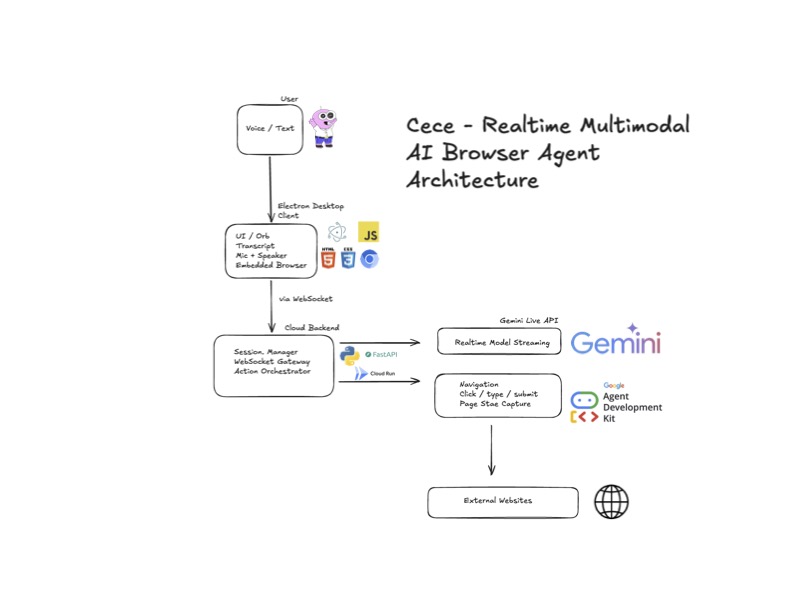
Cece - Realtime Multimodal AI Browser Agent Status Frontend Backend AI
Project Overview Cece demonstrates how Google Gemini's live audio agent can move beyond traditional chat interfaces and act directly within live environments such as web browsers.
The architecture enables:
Realtime voice interaction Multimodal AI reasoning Browser navigation and interaction Live page context awareness Cloud-hosted orchestration This repository serves as the central project hub linking the frontend and backend components of the system.
Quick Start macOS Download the .dmg file. https://github.com/jar10221/ceceFrontend/releases/download/Cece-1.0.0/CeCe-1.0.0.dmg Open the .dmg and drag CeCe into the Applications folder. Run CeCe from Terminal: /Applications/CeCe.app/Contents/MacOS/CeCe
Windows Download the .exe installer. https://github.com/jar10221/ceceFrontend/releases/download/Cece-1.0.0/CeCe.Setup.1.0.0.exe Run the installer and complete setup. Run Cece from PowerShell or CMD: C:\Program Files\CeCe\CeCe.exe If Windows shows a security warning:
Click More info Select Run anyway Allow Microphone access if prompted.
Notes An internet connection is required to connect to the backend. Microphone access is required for realtime voice interaction. Architecture Overview The CeCe system consists of three primary layers.
Desktop Client Responsible for user interaction and browser control.
Electron desktop application audio capture and playback UI rendering and transcripts embedded browser environment Cloud Backend Responsible for orchestration and AI interaction.
WebSocket session management streaming AI model interface action routing and execution logic AI Model Layer Provides reasoning and multimodal understanding.
realtime inference streaming responses action/tool invocation TechStack Frontend Electron JavaScript / TypeScript WebSocket client Chromium BrowserView Backend Python FastAPI Uvicorn asyncio AI Integration Gemini Live API Google GenAI SDK Communication WebSockets JSON event streaming Repositories Frontend Electron desktop client responsible for user interaction and browser control.
https://github.com/jar10221/ceceFrontend
Backend Cloud orchestration service responsible for realtime AI interaction and session management.
https://github.com/jar10221/ceceBackend
Example Use Cases CeCe can be used to:
navigate websites using voice commands automate browser workflows assist with research and information gathering interact with complex web applications Future Improvements Planned enhancements include:
expanded browser automation capabilities persistent agent memory improved reasoning and action planning multi-user support mobile and web clients Meet the Team Juan A. Rodriguez Cybersecurity/Software engineer specializing in distributed systems, AI integrations, and cloud infrastructure.
Github: https://github.com/jar10221 LinkedIn: https://www.linkedin.com/in/juan-rodriguez-a460a91a2/ Gary Casey Data Engineer/Scientist specializing in ETL pipelines and integrations.
Github: https://github.com/garycasey42 LinkedIn: https://www.linkedin.com/in/garycasey42/ Tianxu Zhou Experienced multidisciplinary technologist specializing in AI, AR/VR apps, and full stack web applications.
GitHub: https://github.com/zhoutx001 LinkedIn: https://www.linkedin.com/in/tianxu-zhou-908206157/ Website: https://tianxuzhou.webflow.io/
What we learned
What's next for Cece - Realtime Multimodal AI Browser Agent
Built With
- chromium
- client
- electron
- fastapi
- javascript
- python
- typescript
- uvicorn
- websocket

Log in or sign up for Devpost to join the conversation.