-
-
-
-
Deployment Proof
Accord
A society of AI agents that build real software, together.
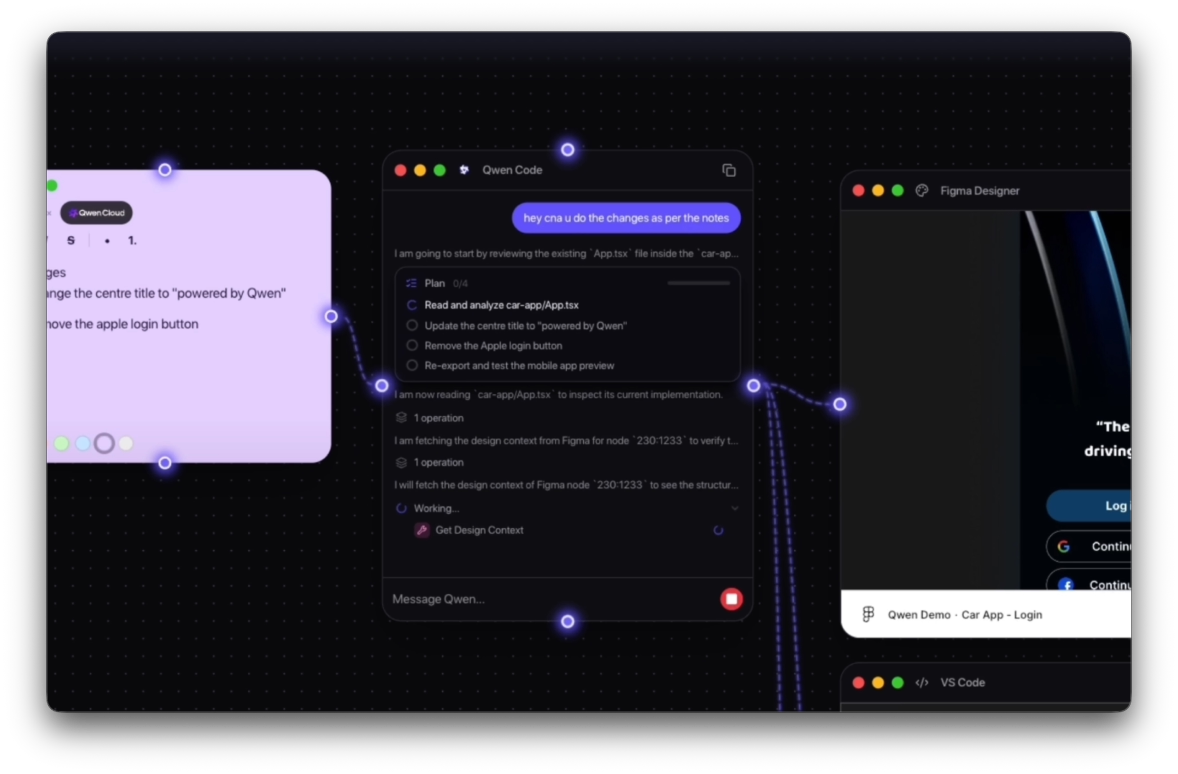
Accord is a visual workshop for multi-agent coding. You compose intent on an infinite canvas — wire a prompt, a Figma design, and notes into a Qwen chat node — and a master agent plans the build, delegates to specialist sub-agents, and mirrors their work as live windows on the same canvas: VS Code, terminal, browser preview, mobile preview, and clarifying questions.
Each project runs in its own Docker sandbox. Reasoning and code generation are powered by Qwen models on Alibaba Cloud (DashScope, OpenAI-compatible API).
Built for the Qwen Cloud Hackathon — Track 3: Agent Society.
Repository: github.com/ineffablesam/accord-ai · Built by: heysam.dev
Why Accord is different
Most AI coding tools are a single chat box. Accord is an agent society on a spatial canvas:
| Single-agent chat | Accord | |
|---|---|---|
| Interaction | One thread, one assistant | Many specialist nodes you can arrange and wire |
| Context | Paste files / @ mentions | Draw connections between Figma, notes, and the agent |
| Execution | Hidden tool calls | Live VS Code, terminal, web & mobile previews as canvas nodes |
| Collaboration | Sequential turns | Qwen decomposes tasks, assigns roles, negotiates conflicts |
Agent Society flow: Qwen reads every wired node → splits the goal into roles (Builder, Verifier, Negotiator) → specialists run in parallel → build errors loop back for fixes → ties escalate to you through a form node.
Features
- Infinite canvas — drag, resize, and connect nodes with React Flow
- Qwen chat node — master agent backed by
qwen-code+ custom MCP tools - Wired context — link Figma designs, sticky notes, and prompts into the agent
- Live surfaces — VS Code (
code-server), terminal PTY, Safari-style web preview, iPhone-frame mobile preview - Clarifying questions — form nodes when the agent needs a human decision (e.g. Expo vs Flutter)
- Isolated workspaces — one Docker container + volume per project, seeded from Next.js or Expo templates
- Web or desktop — Electron app locally, or a static web build served same-origin by the Accord Server
Architecture
- Accord Server (
backend/) — workspace registry in Postgres, Docker orchestrator, reverse proxy to in-container services under/workspaces/{id}/…. In web mode, also serves the built SPA same-origin. - Bridge (
bridge/) — runs inside each workspace container: file API, terminal WebSocket, dev-server manager, agent sessions (SSE), and MCP tools (scaffold_from_template,start_dev_server, spawn canvas nodes, Figma MCP bridge). - Client (
src/+electron/) — React canvas with specialist nodes; agent tool calls auto-open the relevant windows. - Qwen auth — root
.env.exampleOPENAI_*vars are read by the Accord Server and injected into every workspace container at creation time.
Project structure
accord-ai/
  src/                 Client — React canvas, nodes, dock, stores
  electron/          Electron main + preload (desktop shell)
  shared/            IPC types shared by main/preload/renderer
  backend/           Accord Server — FastAPI, Postgres, Docker orchestrator, proxy
  bridge/            In-container service — files, terminal, dev servers, agent
  docker/            Workspace image, entrypoint, Next.js & Expo templates
  arch/              Architecture diagram (HTML, export-ready for Devpost)
  public/            Static assets, favicons, branding
Quick start
Prerequisites
- Node.js 20+
- Python 3.12+
- Docker (Desktop or daemon)
- A DashScope API key for Qwen models
1. Configure Qwen Cloud
cp .env.example .env
Edit .env:
OPENAI_API_KEY=sk-your-dashscope-key
OPENAI_BASE_URL=https://dashscope-intl.aliyuncs.com/compatible-mode/v1
OPENAI_MODEL=qwen-plus          # or qwen3-coder, qwen3.6-max-preview, etc.
The Accord Server forwards these into every workspace container — set once, applies everywhere.
2. Run locally
./init.sh    # installs deps, starts Postgres + backend (:8000) + Electron dev app
./stop.sh    # tears down containers/processes (DB volume preserved)
Open the app, create a workspace, add a Qwen chat node, and start building.
3. Web-only mode
npm run build:web
cd backend && docker compose up --build
# → http://localhost:8000
Deploy to Alibaba Cloud
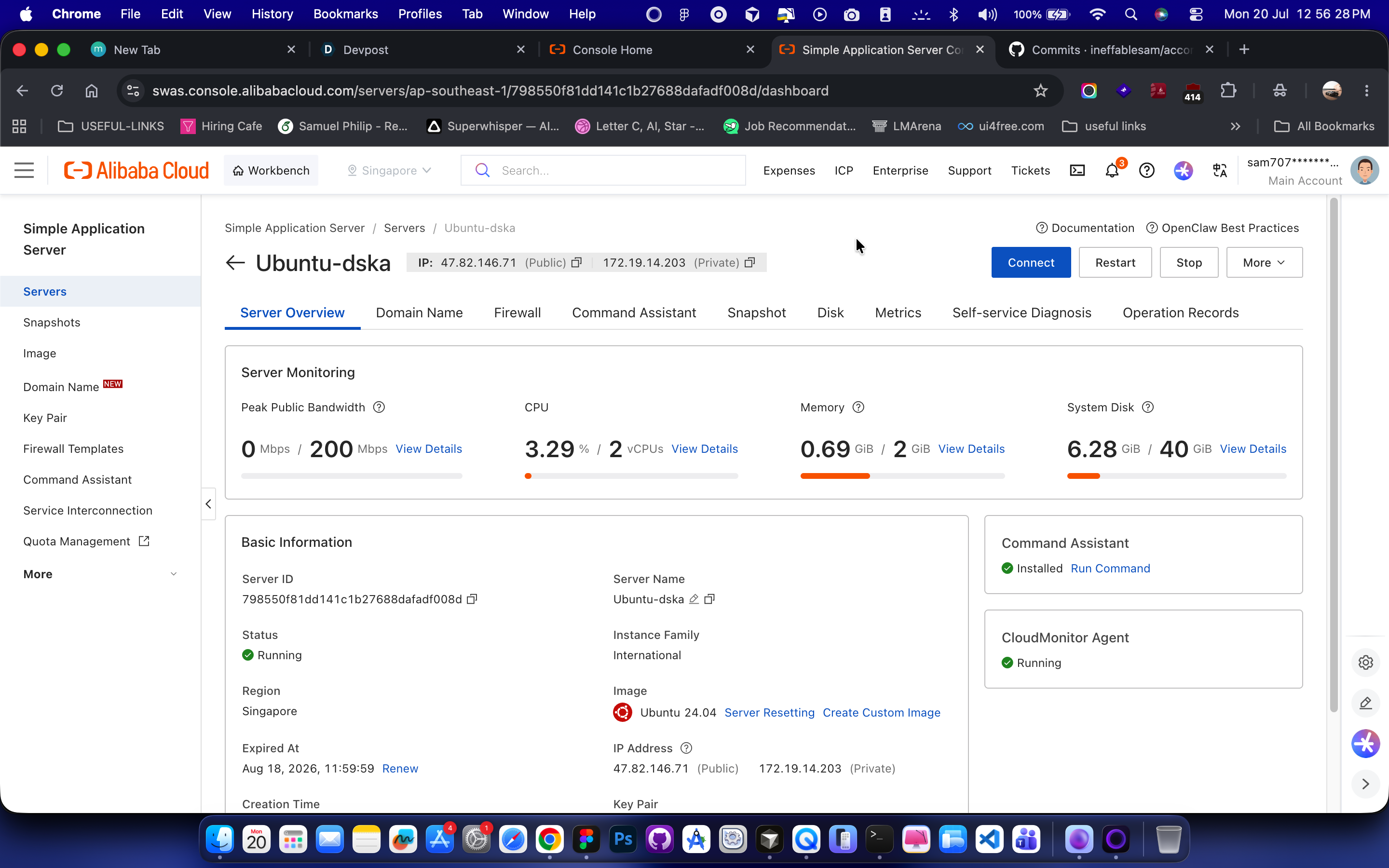
The backend is designed to run on Alibaba Cloud ECS with only environment changes between local and production.
# on your ECS instance (Docker + compose installed)
git clone https://github.com/ineffablesam/accord-ai.git accord && cd accord/backend
cp ../.env.example ../.env   # fill in DashScope key + model
docker compose up -d --build
curl localhost:8000/health     # → {"status":"ok"}
Full runbook: backend/DEPLOY.md
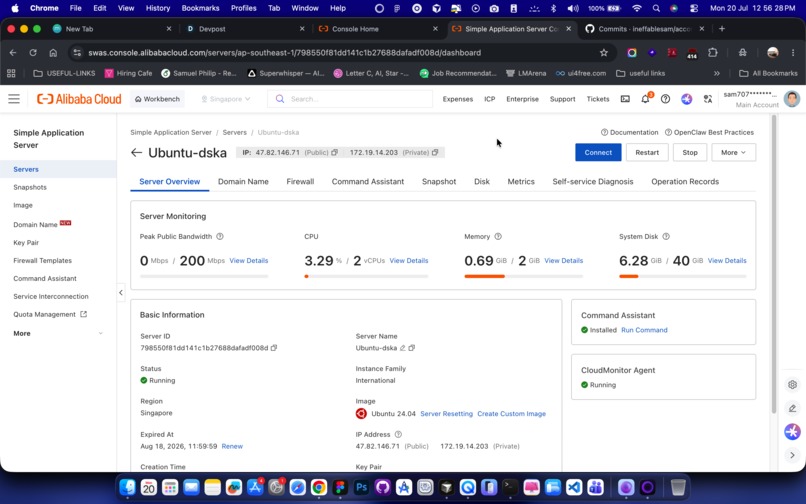
Hackathon proof of deployment:
- backend/DEPLOY.md — ECS deployment runbook
- docker/workspace.Dockerfile — qwen-code installed from Alibaba Cloud OSS
- backend/app/workspaces/service.py — Qwen Cloud creds forwarded into workspace containers
Show a video clip of the running backend on ECS and/or your live /health URL.
Canvas nodes
| Node | Role |
|---|---|
| Qwen Chat | Master agent — plans, delegates, streams tool calls |
| VS Code | Live in-browser editor (code-server) |
| Terminal | PTY shell inside the workspace |
| Preview | Live web app in a Safari-style frame |
| Mobile Device | Live mobile preview in an iPhone frame |
| Figma Designer | Embed a Figma file; wire to Qwen for design context + MCP |
| Notes | Sticky-note specs, links, assets — wire into the agent |
| Form | Clarifying questions when the agent needs your input |
Draw edges between nodes to pass context. The agent reads everything wired into the Qwen chat node.
Tests
npm test                                    # client — vitest
npm run typecheck                           # tsc --noEmit

cd backend && python -m venv .venv && source .venv/bin/activate
pip install -r requirements-dev.txt && python -m pytest

cd bridge && python -m venv .venv && source .venv/bin/activate
pip install -r requirements-dev.txt && python -m pytest
Tech stack
| Layer | Stack |
|---|---|
| Client | React 19, Vite, React Flow, Zustand, MUI, Tailwind v4, Framer Motion |
| Desktop | Electron 43 |
| Server | FastAPI, SQLAlchemy, PostgreSQL, docker-py |
| Agent | qwen-code SDK, custom MCP tools (FastMCP) |
| LLM | Qwen models via DashScope (OpenAI-compatible) on Alibaba Cloud |
| Sandbox | Docker, code-server, Next.js / Expo templates |
| Design | Figma Desktop MCP (local, host-side) |
Author
Sam — heysam.dev
- GitHub: github.com/ineffablesam/accord-ai
- Demo video: youtu.be/O3XSHkfqPwI


Log in or sign up for Devpost to join the conversation.