
Inspiration
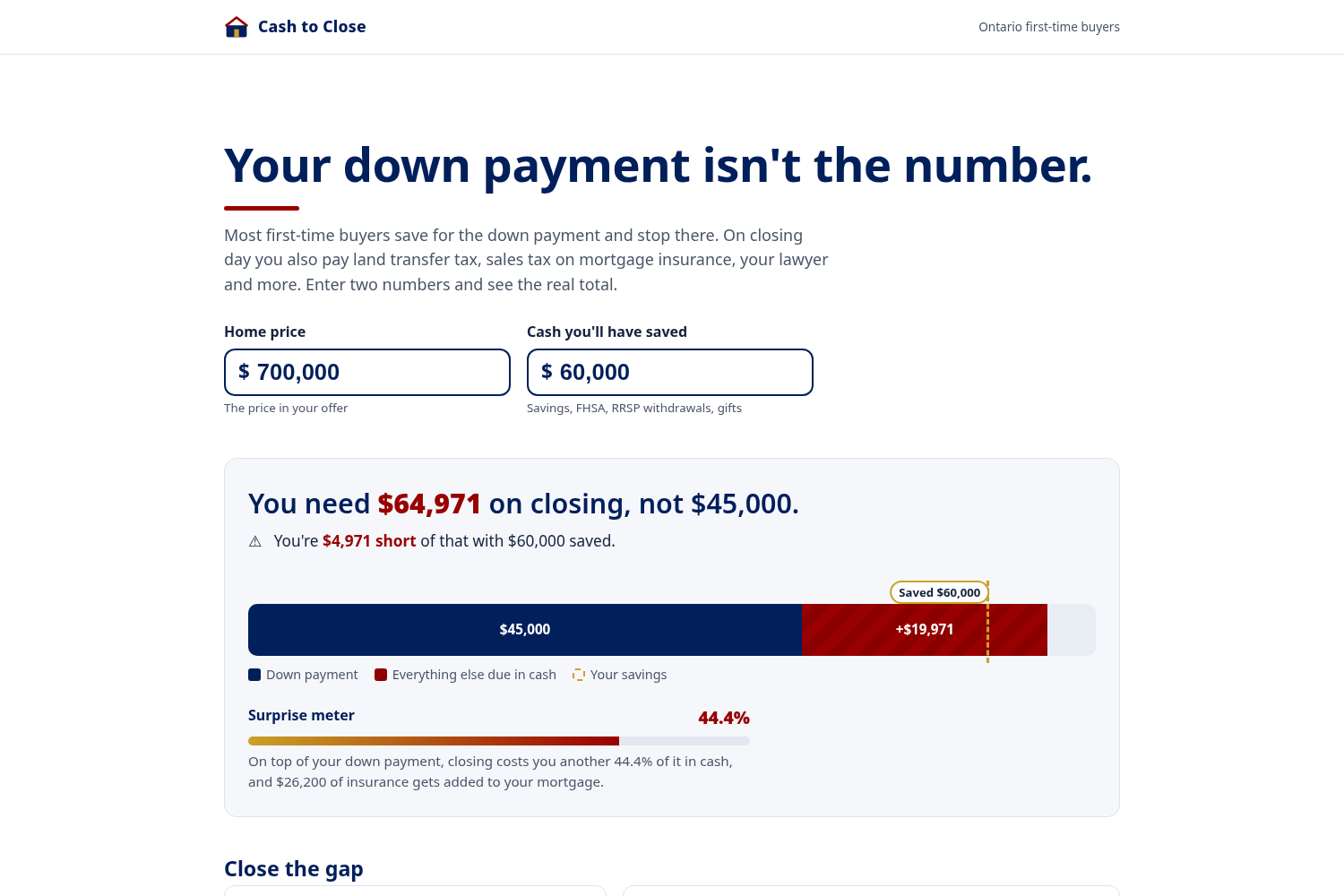
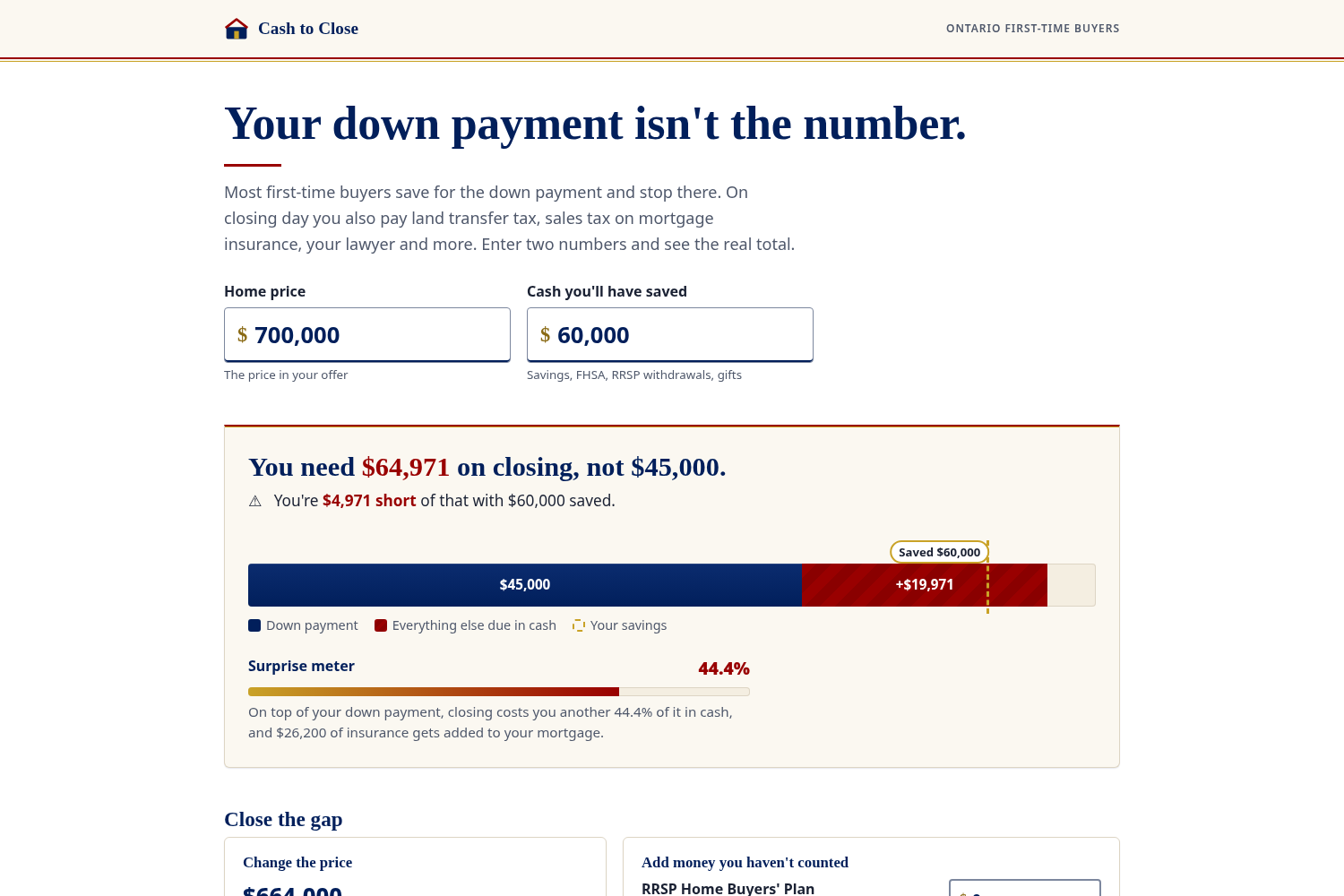
I work in Canadian mortgage finance, and the cheque at closing surprises people more than the mortgage does. Ask a first-time buyer in Toronto how much they need and you'll hear one number: the down payment. On a $700,000 home with the minimum down, that's $45,000. The cash they actually need by closing day is about $65,000. Toronto charges land transfer tax on top of Ontario's. Mortgage insurance goes on the loan, but the 8% Ontario sales tax on it can't, so it comes out of savings. Then the lawyer, title insurance and adjustments to the seller. A buyer who did everything right can be thousands short the week they close.
I wanted a page that makes that gap obvious in about ten seconds, without a form, and then helps you do something about it.
Who it's for
Maya, 29, rents in Toronto. She has $60,000 saved between an FHSA and a savings account and is looking at townhouses around $700,000. She knows what 5% down means. She doesn't know about the second land transfer tax, or that her deposit is due within a day of her offer being accepted.
What it does
- The reveal. Two inputs: home price and savings. A bar fills with the down payment, then the other cash costs stack on top until they cross a dashed line marking your savings. The headline says what you need and whether you're short.
- Surprise meter. Closing costs as a share of the down payment. For Maya it's 44%.
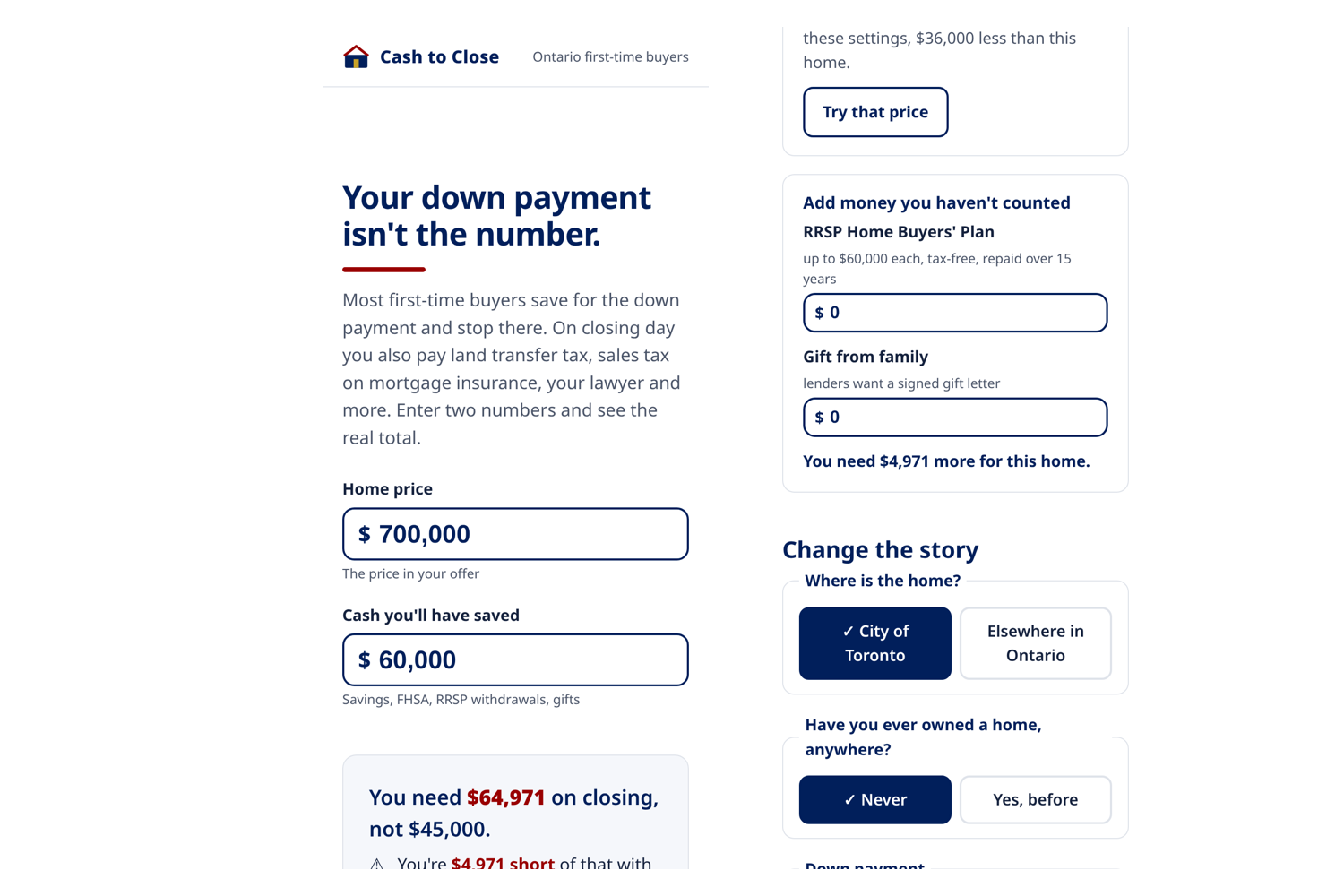
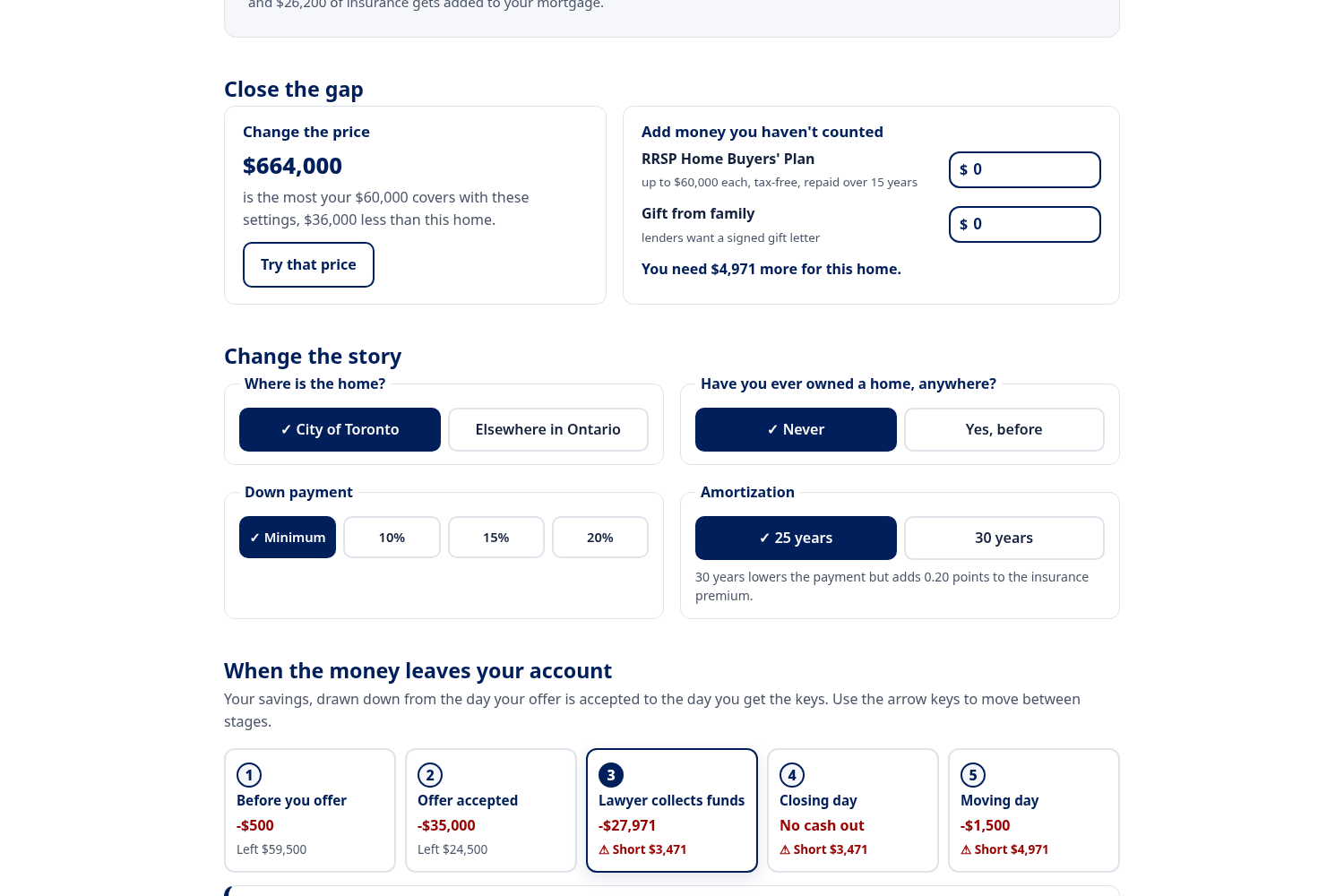
- Close the gap. Being short isn't the end of the flow. The page works out the highest price your savings cover with the same settings ($664,000 for Maya), with a button to try it. You can also add money you haven't counted, like an RRSP Home Buyers' Plan withdrawal or a gift from family, and see where that leaves you.
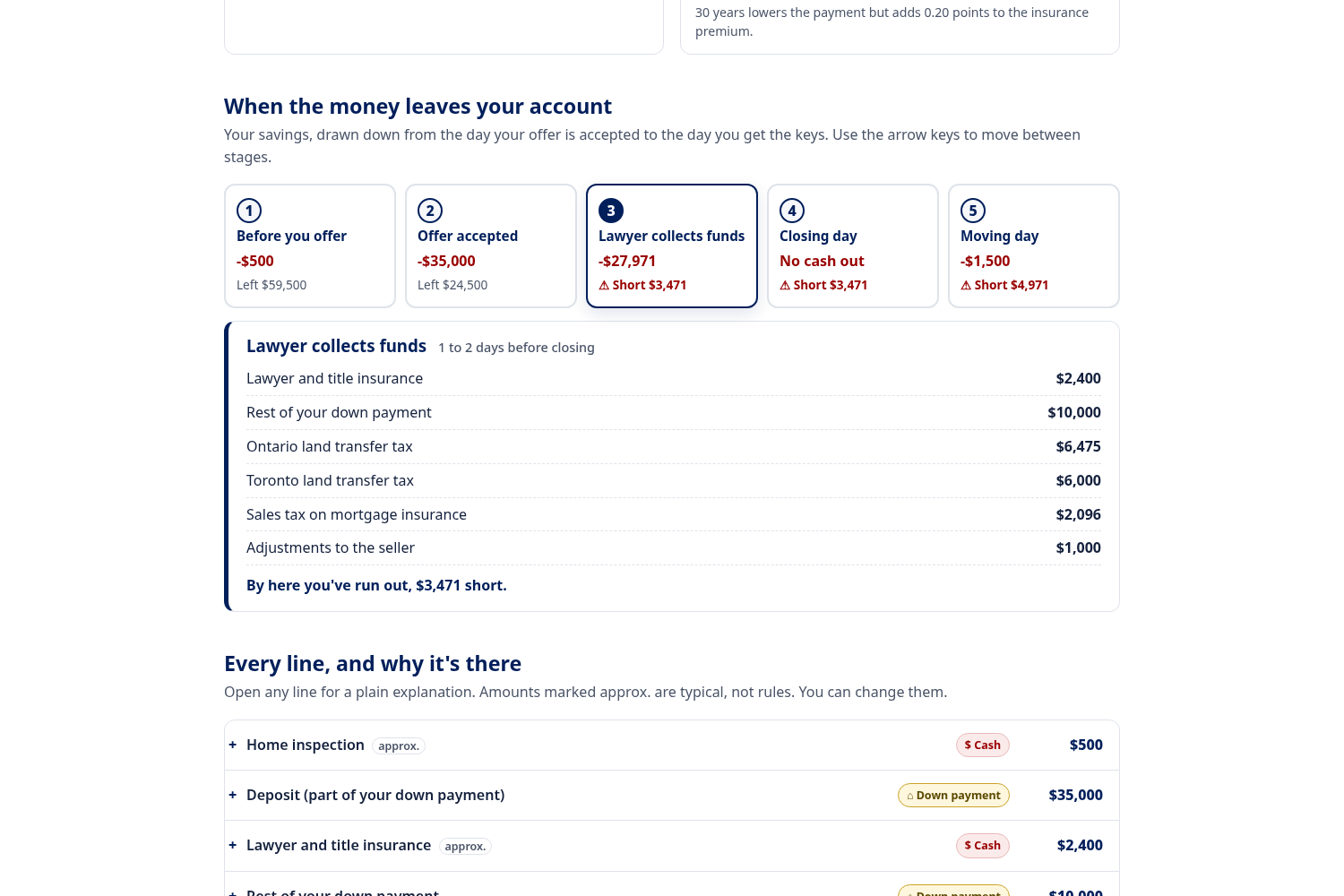
- When the money leaves. Five stages from "before you offer" to "moving day", each with what's due and what's left. The deposit (often 5% in the GTA) is due within about 24 hours of acceptance, weeks before everything else.
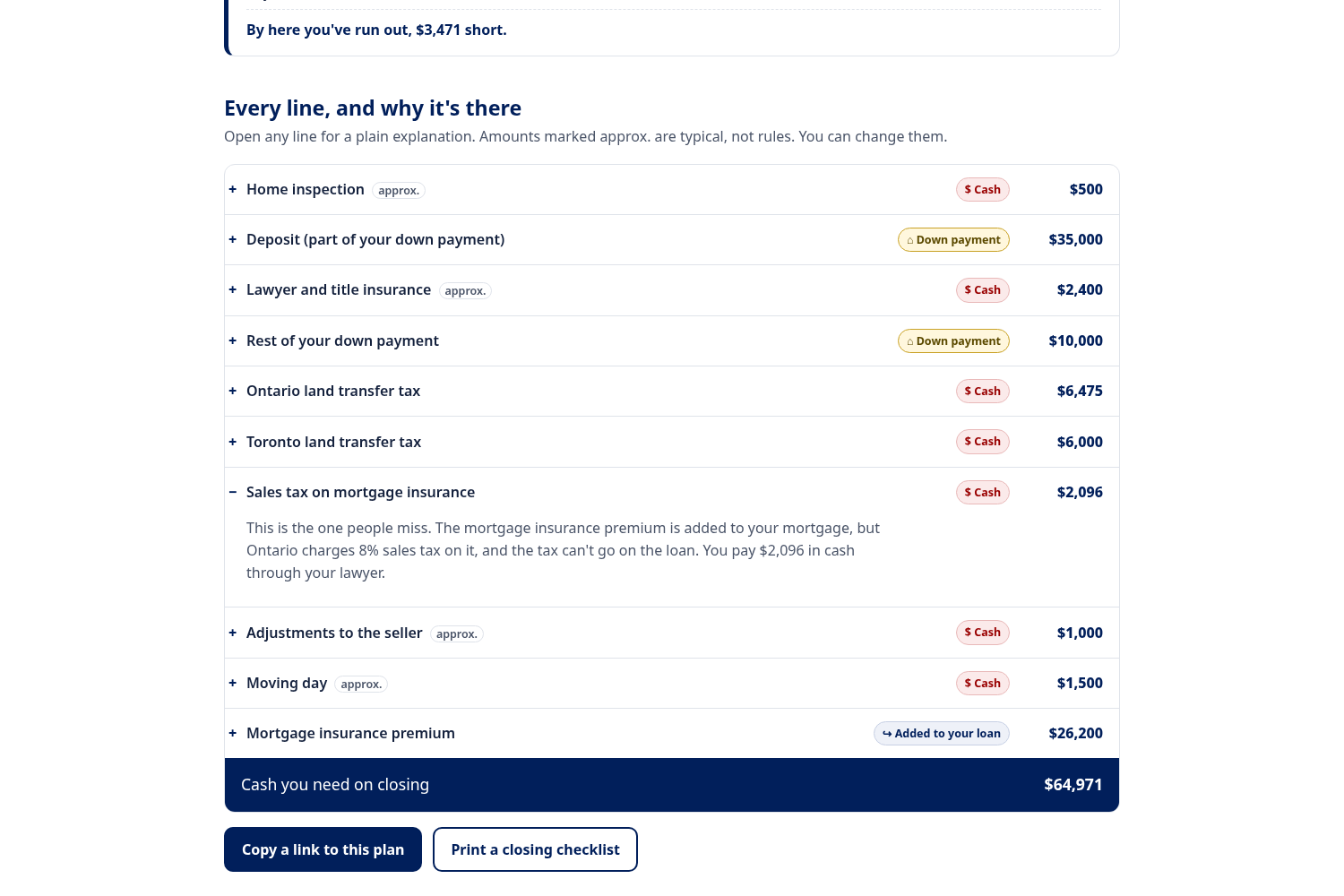
- Every line, explained. Open any cost for a short paragraph and a tag: paid in cash, part of your down payment, or added to your loan. Typical amounts like legal fees and moving are marked approx. and can be edited in place.
- Four toggles. Toronto or elsewhere in Ontario, first-time buyer or not, down payment from the minimum to 20%, and 25 or 30-year amortization. Switch Toronto off and $6,000 disappears. Switch to 20% down and the insurance disappears, but the cash you need jumps.
- Share and print. The plan lives in the URL, so a link reopens it exactly. Print gives a one-page closing checklist.
The flow
Price and savings → the reveal → close the gap → change the story (toggles) → when the money leaves → every line explained → share or print.
The order follows the questions a buyer asks: How much do I need? Can I afford it? What if I change something? When is it due? Why is this here?
Design decisions
- Two inputs, then the answer. No sign-up and no long form. Price and savings are enough to show the gap. Everything else is optional and comes later.
- Don't end on bad news. My first version stopped at "You're $4,971 short." That's the most emotional moment on the page, so I added the close-the-gap panel right under it.
- Timing, not only totals. Someone with enough money overall can still miss the deposit, so the timeline tracks a running balance and flags the first stage where it goes negative.
- Never colour alone. The extra-cost segment is striped as well as red. Tags carry a symbol and a word. Warnings carry an icon. Selected toggles show a check mark.
- Keyboard and screen reader support. The stages are an ARIA tablist with arrow keys, Home and End. A polite live region reads out the new total about a second after you stop typing, rather than on every keystroke. Costs use native details elements, focus rings are thick gold outlines, and animation turns off when the system asks for reduced motion.
- Mobile. At phone width the inputs, toggles and timeline stack into one column, and the timeline becomes a vertical list.
- Show the sources. Every rule sits in one file with a link to the government page it comes from, and the footer shows the date the rules were checked.
How I built it
Plain HTML, CSS and JavaScript, no framework and no build step, hosted on GitHub Pages. The maths lives in pure functions (calc.js) with tests that check results against published figures, for example that Ontario's $4,000 refund covers the tax on roughly the first $368,000, and that Toronto's $4,475 rebate covers its tax up to $400,000. "Highest price you can afford" is a binary search over price using the same functions. Nothing you type leaves the browser.
Rules it uses
- Minimum down payment: 5% of the first $500,000, 10% of the rest up to $1.5 million, 20% at $1.5 million or more (Government of Canada)
- CMHC premiums: 2.80%, 3.10% and 4.00% of the loan, plus 0.20 points for a 30-year amortization (CMHC)
- 8% Ontario sales tax on the premium, which can't be added to the mortgage (Government of Canada)
- Ontario land transfer tax and the first-time buyer refund of up to $4,000 (Ontario Ministry of Finance)
- Toronto land transfer tax, including the rates above $3 million that took effect April 1, 2026, and the first-time buyer rebate of up to $4,475 (City of Toronto)
- RRSP Home Buyers' Plan limit of $60,000 per person (CRA)
Challenges
- Showing a shortfall without causing panic. Red is used only for the extra costs and the shortfall figure. The next step, close the gap, sits right below in navy so the page reads as a problem with a way forward.
- Three kinds of cost, without relying on colour. Cash, down payment and added-to-loan needed to read differently in greyscale and to a screen reader, which is why each tag has its own symbol and label.
- Deciding what to leave out. New builds, condo status certificates and lender fees all matter, but each one adds a question. They're listed on the page as limitations instead.
What I learned
The order of the page mattered more than any single visual. My first version ended at the shortfall, and feedback on it was blunt: so what does Maya do now? Moving close-the-gap directly under the headline fixed that. I also learned how much a running balance explains on its own. "How much, by when" is a better question than "how much".
What's next
A new-build mode (HST rebates and development charges), land transfer taxes for other provinces, and a French version.


Log in or sign up for Devpost to join the conversation.