-
-
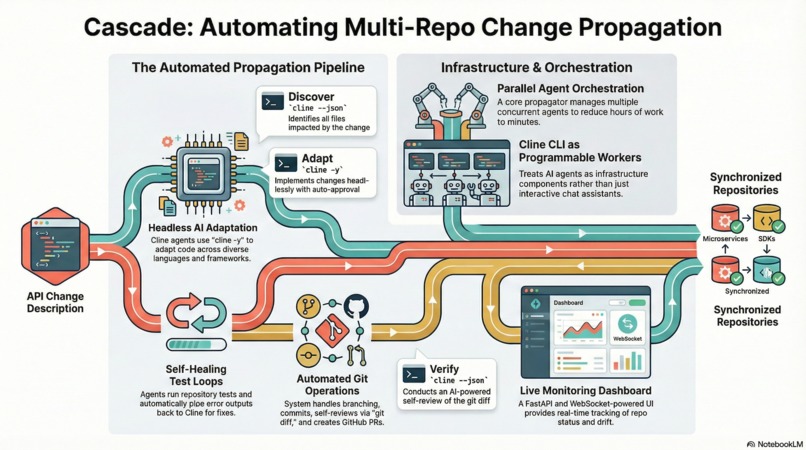
Cascade: Multi-Repo Change Propagator Overview
-
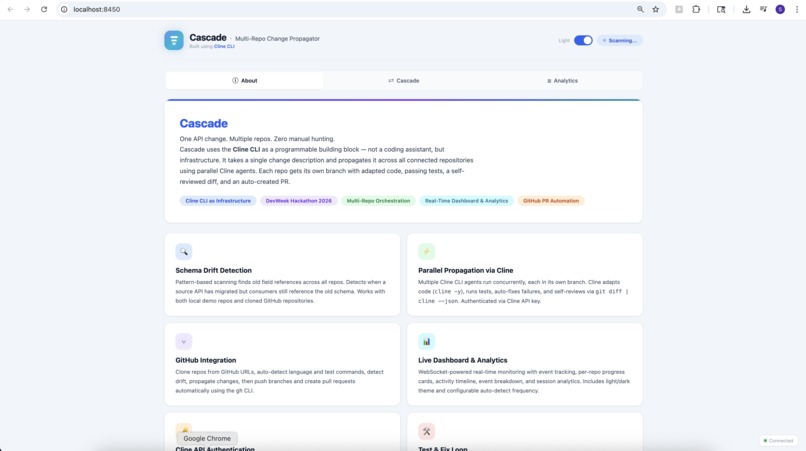
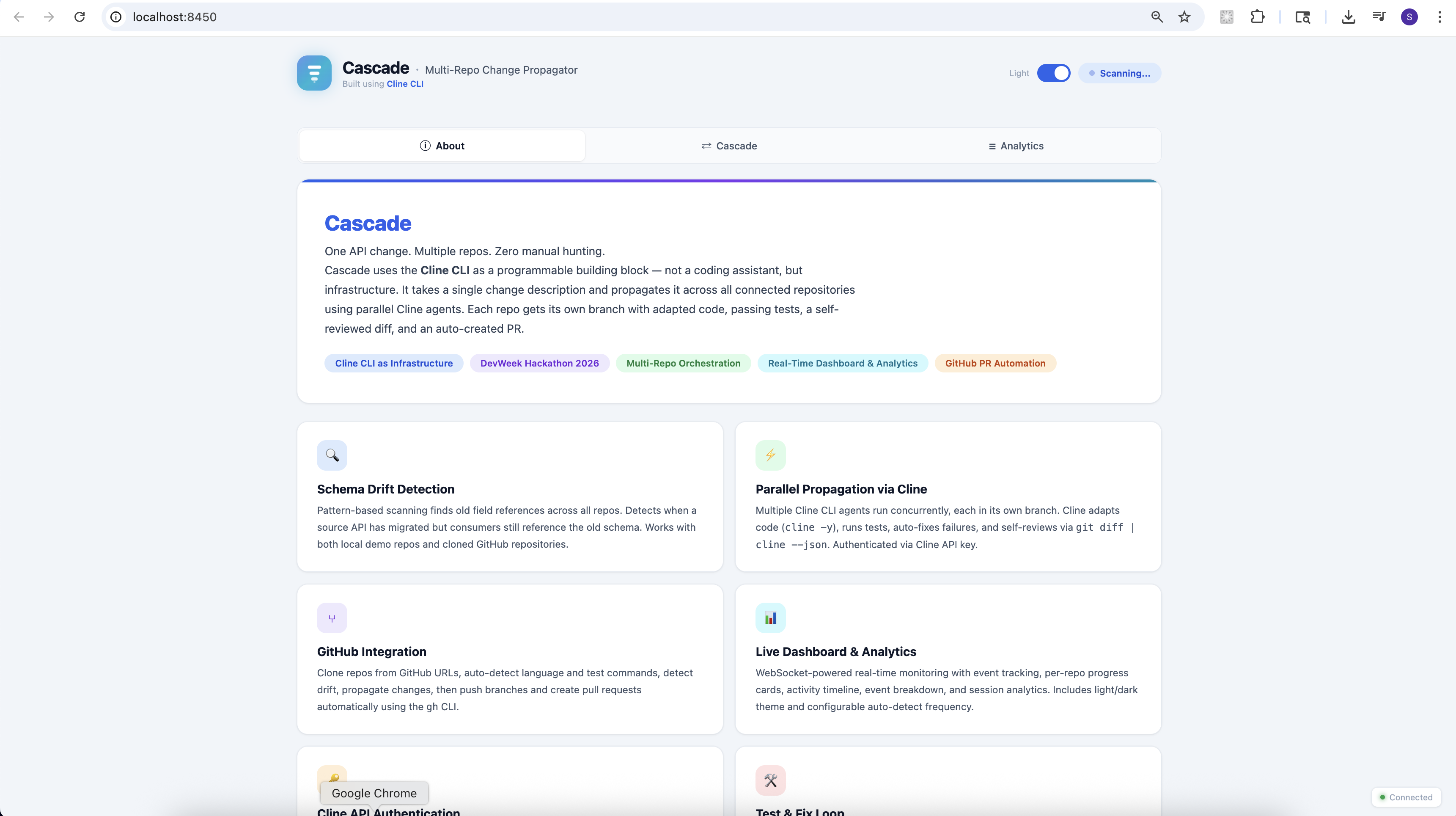
Cascade - About App
-
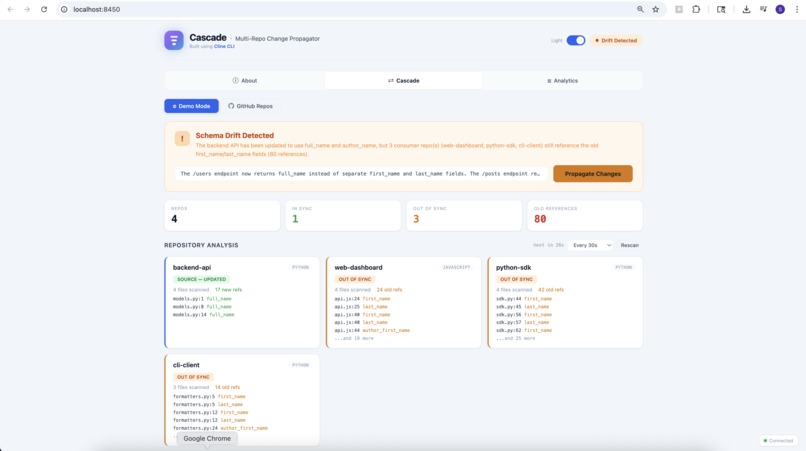
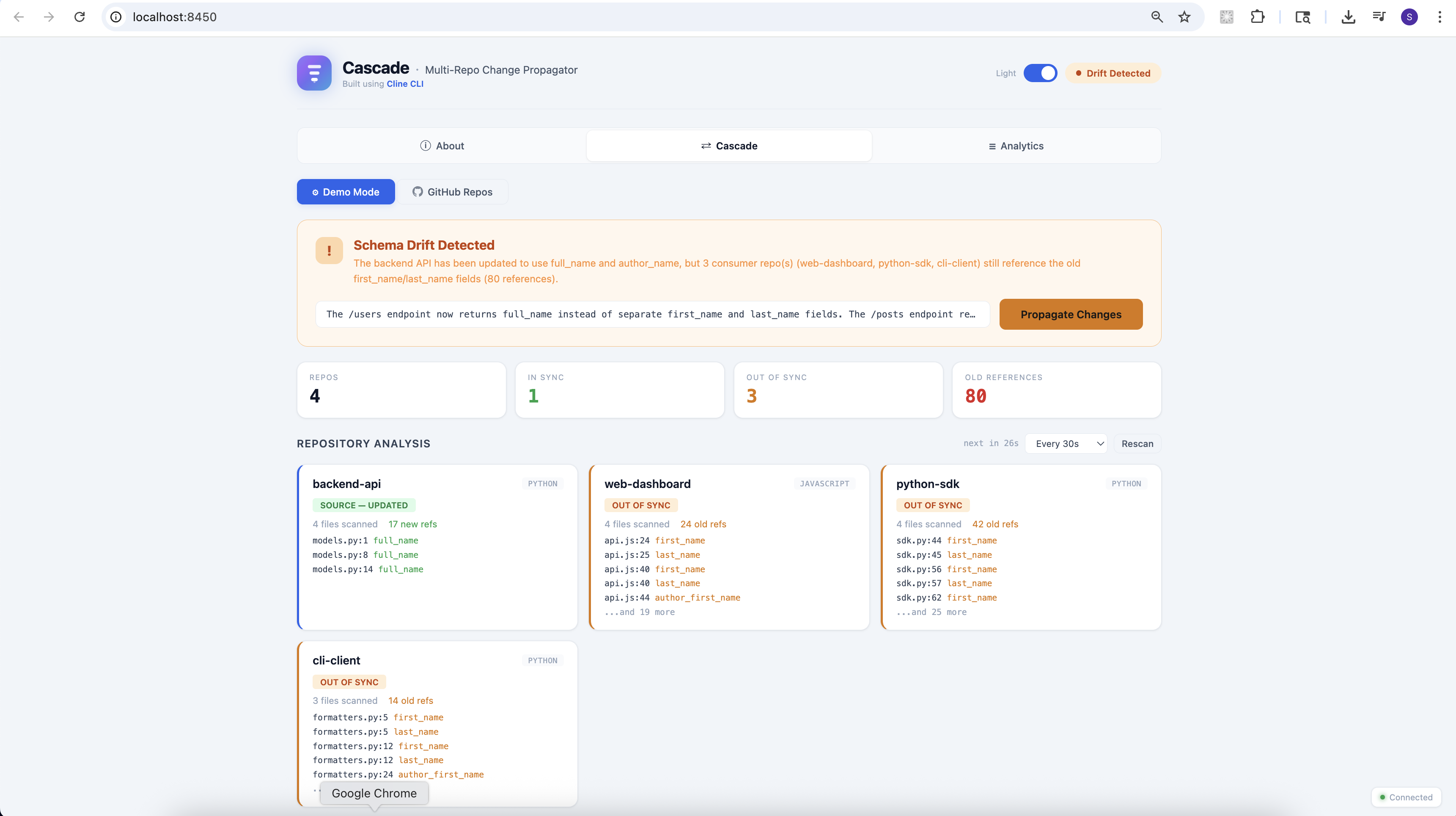
Cascade - Demo
-
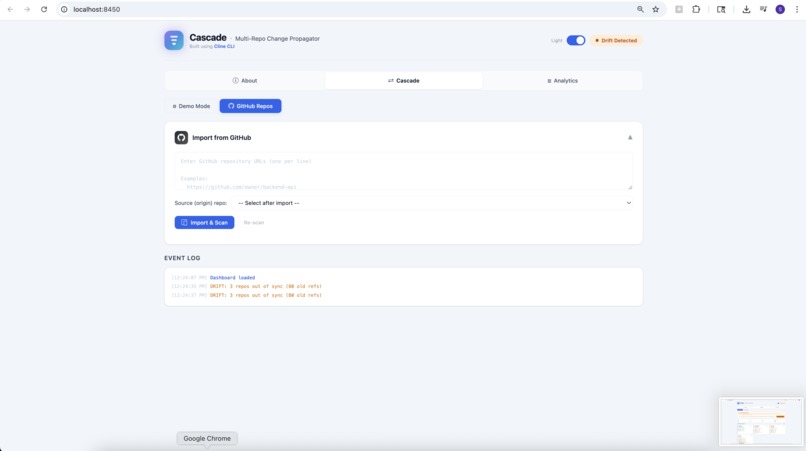
Cascade - Github repo integration
-
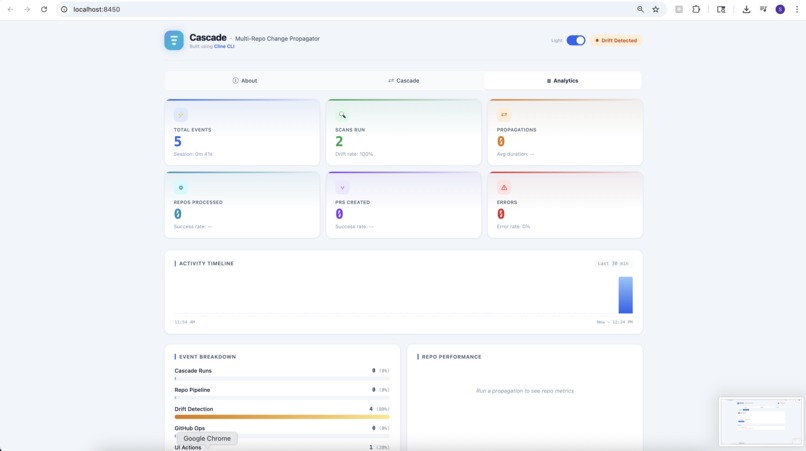
Cascade - Analytics
Inspiration
Anyone who has worked on a cross-platform product knows the pain. You rename a field in your backend API -- say, merging first_name and last_name into full_name -- and suddenly you're spelunking through four or five separate repositories, adapting each one by hand. The web frontend uses JavaScript. The SDK is in Python. The CLI tool has its own data models. Each repo has its own test suite, its own naming conventions, its own way of referencing the same data. You open a dozen files across a dozen repos, make the changes manually, run the tests, fix what broke, and pray you didn't miss a reference somewhere deep in a helper function.
We've all been there. It takes hours, it's tedious, and it's the kind of work that feels like it should be automatable.
When we saw the DevWeek hackathon challenge -- "Use Cline not as your coding assistant, but as a building block" -- it clicked. What if Cline wasn't the thing you talked to for help, but the engine inside a larger system? What if you could describe a single API change in plain English and have multiple Cline agents fan out across your repos, each independently adapting the code in its own branch, running tests, fixing failures, and even reviewing its own diff?
That's the idea behind Cascade.
What it does
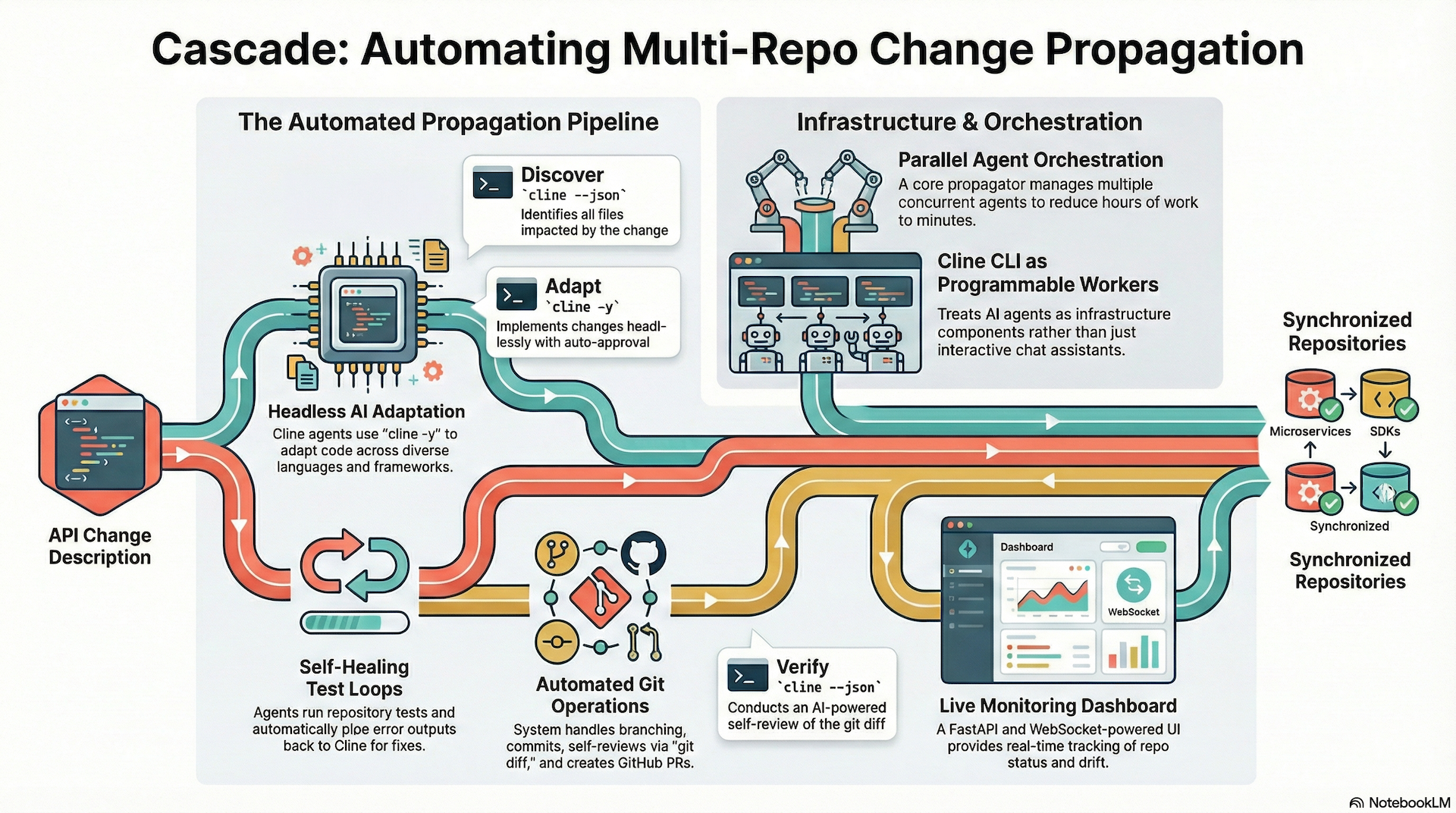
Cascade is a multi-repo change propagation tool powered by the Cline CLI. You give it one change description -- something like "The /users endpoint now returns full_name instead of first_name and last_name" -- and it handles the rest.
Here's what happens under the hood:
Drift Detection. Cascade scans all your repositories for field-name patterns, comparing the source API schema against every consumer. It flags old references as schema drift and tells you exactly which files and lines are out of sync.
Parallel Propagation. For each consumer repo, Cascade creates an isolated git branch and dispatches a headless Cline agent (
cline -y) to adapt the code. Multiple agents run concurrently -- one per repo, each working independently.Test and Fix Loop. After adaptation, each repo's configured test command runs automatically. If tests fail, the output is piped back to Cline for auto-repair. This retry loop runs up to the configured limit, so the agents don't just make changes -- they make changes that pass.
Self-Review. Once tests are green, the git diff is piped into Cline in JSON mode (
git diff | cline --json) for an automated code review. The agent checks for missed references, broken logic, and type mismatches.Commit, Push, and PR. Changes are committed to the isolated branch. For GitHub repositories, the branch is pushed to origin and a pull request is created automatically using the
ghCLI, complete with a detailed description of what changed and why.
The whole process is visible in real time through a live dashboard at localhost:8450, with WebSocket-powered progress updates for every repo at every stage of the pipeline.
The Dashboard
The dashboard has three tabs:
- About (the landing page) -- an overview of the project with features, architecture diagrams, a step-by-step workflow, tech stack, and reference links.
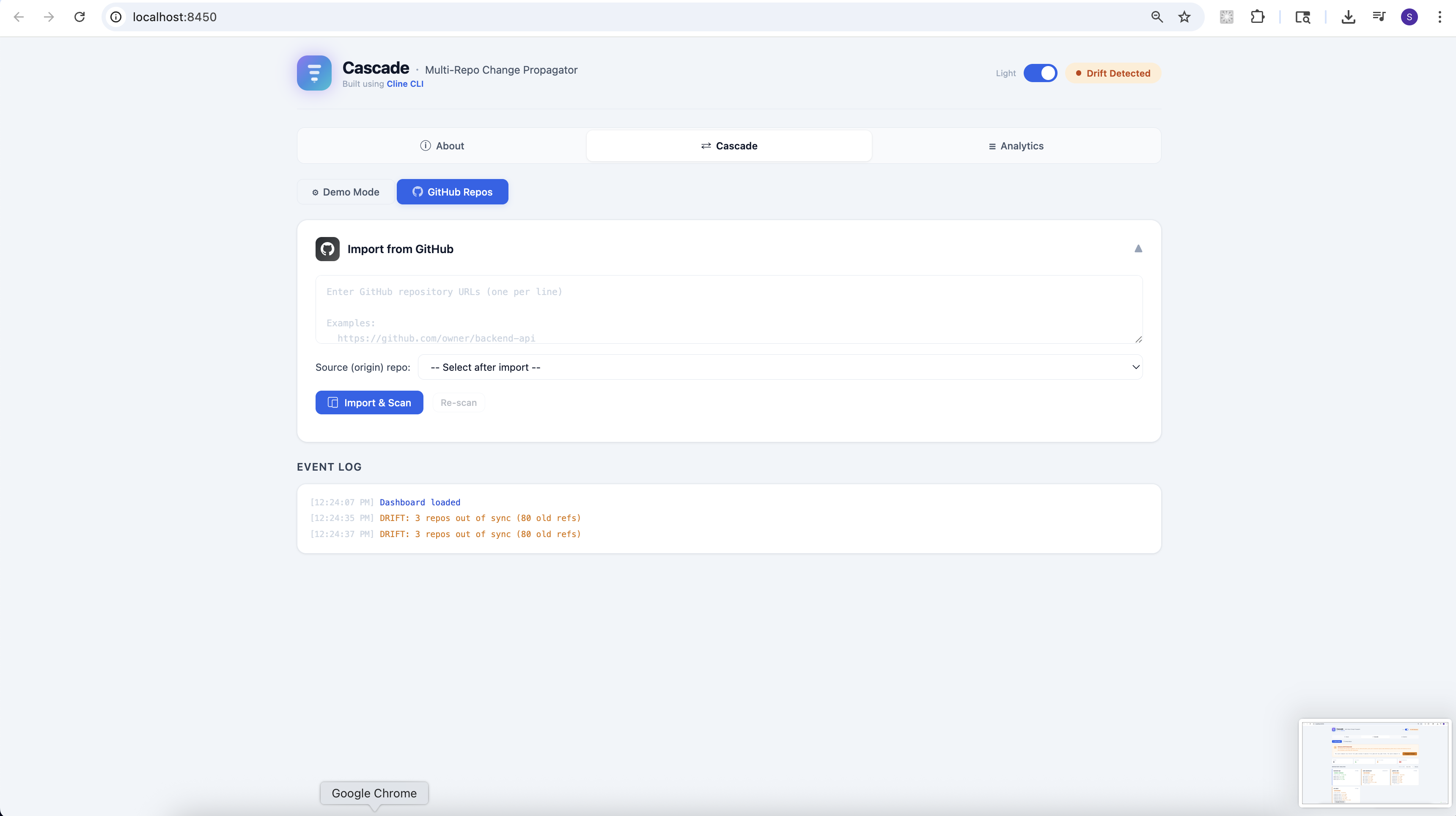
- Cascade -- the main workspace with two modes: Demo Mode for running against local sample repos, and GitHub Repos for importing real repositories from GitHub.
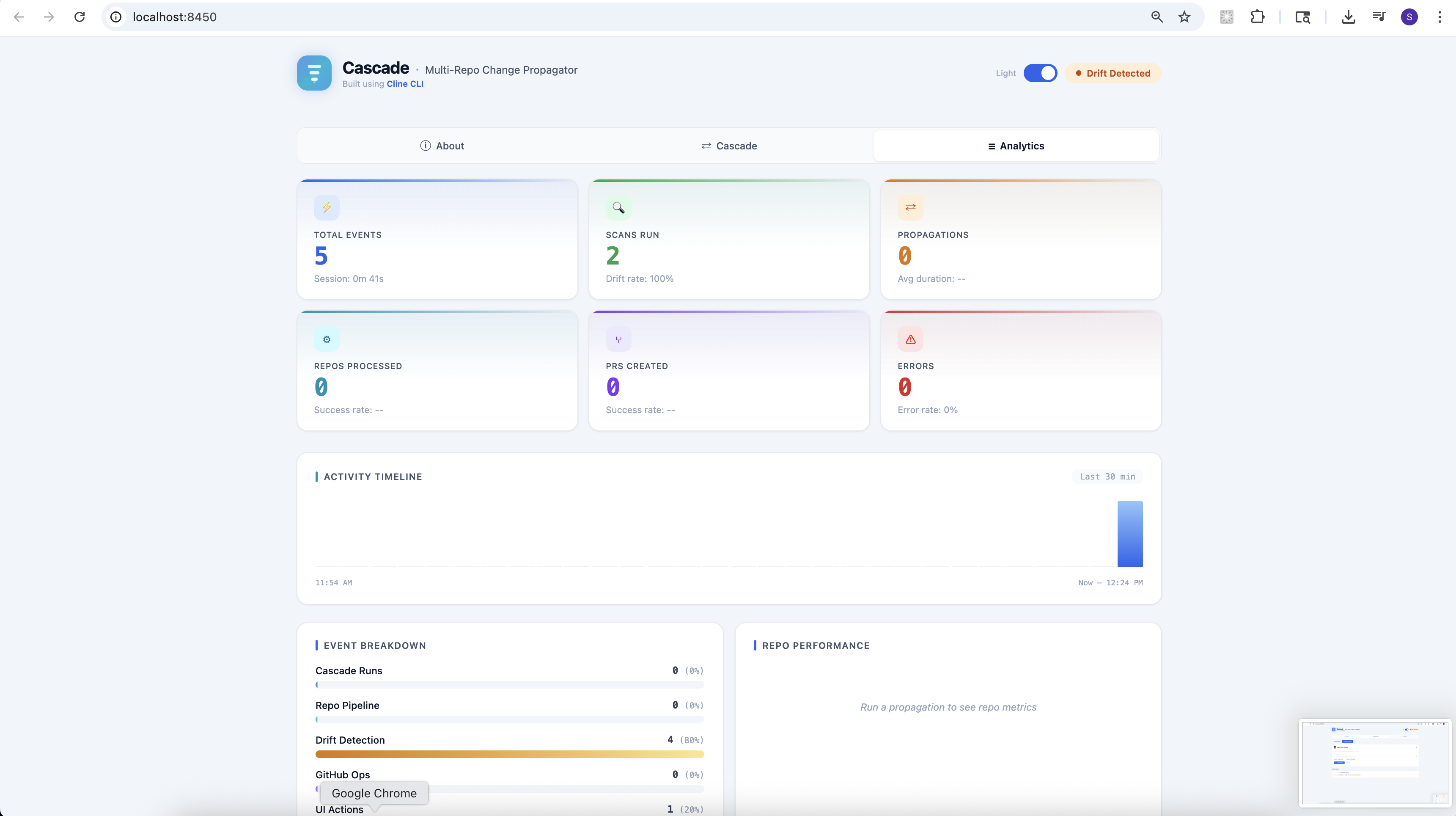
- Analytics -- session metrics, an activity timeline, event breakdown by category, and per-repo performance stats.
GitHub Integration
From the dashboard's GitHub Repos mode, you can paste in any GitHub URLs, and Cascade will clone them, auto-detect the language and test commands, scan for schema drift, run the full propagation pipeline with Cline, and create pull requests -- all without leaving the browser.
How we built it
Cline CLI as Infrastructure
The core insight is treating Cline as a subprocess, not a conversation partner. The ClineWrapper class in core/cline.py is a thin async wrapper around the real Cline binary. It maps directly to the documented CLI flags:
cline -y -c <repo> "prompt"for headless, auto-approved code adaptationcline --json "prompt"for structured JSON output during self-reviewcline -y "Fix these failures"with piped stdin for test failure repaircline auth --provider cline --apikey <key>for API key authentication
Authentication is handled via a Cline API key from app.cline.bot. In Docker, the container auto-authenticates on startup and persists credentials across restarts.
Backend
The backend is Python with FastAPI, serving both a REST API and a WebSocket endpoint. The key modules are:
- Propagator (
core/propagator.py) -- the orchestration engine. It manages a semaphore-bounded pool of async tasks, one per repo, each running the full branch-adapt-test-fix-review-commit pipeline. - Detector (
core/detector.py) -- regex-based schema drift scanner that compares old and new field-name patterns across source and consumer repos, with context-aware status reporting. - GitHub Ops (
core/github_ops.py) -- handles cloning from GitHub URLs (supporting multiple formats), pushing branches, creating PRs via theghCLI, and heuristic language/test-command detection. - Git Ops (
core/git_ops.py) -- async wrapper around git for branching, staging, committing, diffing, and checking out.
All POST endpoints accept JSON bodies via Pydantic models, and every pipeline event is broadcast over WebSocket for real-time UI updates.
Frontend
The dashboard is a single HTML file with vanilla JavaScript -- no build step, no framework. It connects via WebSocket and renders everything dynamically: repo cards with live status badges, stat counters, event logs, progress grids, and the analytics suite. The UI supports light and dark themes (with CSS custom properties), an animated SVG logo, and configurable auto-detect frequency for continuous drift monitoring.
Docker
The entire application runs in a single Docker container. The docker-compose.yml mounts the project directory, a workspace volume for cloned GitHub repos, the GitHub CLI config for authentication, and a Cline config volume. An entrypoint script checks whether Cline has been authenticated and runs cline auth automatically if needed.
Challenges we ran into
1. Getting Cline CLI to work headlessly in Docker.
The Cline CLI was designed for interactive use. Getting it to authenticate non-interactively inside a container took some trial and error. The cline auth command launched an interactive TUI by default, and we had to discover the right combination of flags (--provider cline --apikey <key> --modelid "anthropic/claude-3.5-sonnet") and the CI=true environment variable to bypass it. We also needed to figure out the exact model ID format (provider/model) that the API expected.
2. FastAPI parameter parsing mismatches.
Our frontend sent JSON bodies via fetch(), but our FastAPI endpoints initially used bare function parameters, which FastAPI interprets as query parameters. This caused silent 422 Unprocessable Entity errors that were tricky to trace. We fixed it by introducing Pydantic request models for every POST endpoint.
3. Context-aware drift status.
Early on, the dashboard showed contradictory information -- the top banner said "All Repositories In Sync" while individual repo cards said "OUT_OF_SYNC." The root cause was that the status logic didn't account for whether the source repo had actually migrated yet. We added a get_display_status(source_updated) method that computes the consumer's status relative to the source's actual state, not just the presence of old fields.
4. Making the demo self-contained.
The demo repos needed to be git repositories with initial commits, but Docker's RUN commands are ephemeral when volume mounts overwrite /app. We ended up initializing the demo repos on the host before docker compose up and handling simulation/reset through dedicated API endpoints rather than Dockerfile steps.
5. Keeping real-time updates coherent across modes. WebSocket events from the propagation pipeline needed to route correctly whether the user was in Demo Mode or GitHub Repos mode. Since we merged both into a single Cascade tab with sub-navigation, we had to track the active sub-pane and conditionally render updates to the right DOM elements.
Accomplishments that we're proud of
Cline as true infrastructure. We didn't just call Cline for help -- we built a system where Cline is the engine. It adapts code, fixes test failures, and reviews its own diffs, all orchestrated programmatically through subprocess calls. This is the "Cline as a building block" idea taken to its full extent.
End-to-end GitHub workflow. You can paste GitHub URLs into the dashboard, and Cascade will clone the repos, detect schema drift, dispatch Cline agents to propagate changes, run tests, and create pull requests -- all from one interface, in real time.
Real-time pipeline visibility. Every stage of every repo's pipeline streams to the dashboard via WebSocket. You can watch branches being created, Cline adapting code, tests running, and PRs being opened. Nothing is a black box.
Self-healing agents. When tests fail after Cline adapts the code, the test output is piped back to Cline for automatic repair. This retry loop means the system doesn't just make changes -- it makes changes that work.
A polished, demoable product. The dashboard has a clean UI with dark/light themes, an animated logo, sub-navigation, analytics, and an about page -- all shipped as a single HTML file with no build tooling. It works out of the box with
docker compose up.
What we learned
CLI tools are underrated as AI infrastructure. The Cline CLI's headless mode (
-y), JSON output (--json), working directory flag (-c), and stdin piping make it genuinely composable. Treating an AI coding agent as a subprocess rather than a chat partner opens up a different class of automation.Authentication is always harder than expected. Programmatic auth for the Cline CLI -- discovering the right flags, model ID format, and non-interactive mode -- took more debugging time than writing the actual propagation logic. The lesson: always budget time for auth.
Pydantic models save debugging hours. The switch from bare FastAPI parameters to explicit Pydantic request models eliminated an entire class of serialization bugs and made the API contract self-documenting.
WebSockets transform the UX of long-running tasks. Without real-time streaming, a multi-repo propagation run would just be a spinner for two minutes. With WebSocket events for every pipeline stage, users can see exactly what's happening and where. The perceived performance difference is enormous.
Keep the demo self-contained. A hackathon project that requires 15 setup steps won't get demoed. Docker Compose with auto-authentication, volume-persisted state, and a pre-built demo scenario was worth the investment.
What's next for Cascade - Multi-Repo Change Propagator
Smarter drift detection. Move beyond regex pattern matching to AST-level analysis that understands type systems, import graphs, and cross-language API contracts.
Multi-model support. Let users choose which model powers the Cline agents (Claude, GPT, Gemini) per repo or per pipeline stage, optimizing for cost, speed, or quality depending on the task.
Incremental propagation. Instead of re-running the full pipeline, detect only what changed since the last run and propagate incrementally. This would make Cascade practical for CI/CD integration.
Conflict resolution UI. When Cline's adaptation is ambiguous -- say, a field rename that could map to two different new fields -- surface the decision in the dashboard and let the user choose before committing.
Monorepo support. Extend the repo model to handle monorepos with multiple packages, each treated as a separate consumer within the same git repository.
Webhook triggers. Allow Cascade to listen for GitHub webhooks so that when a source repo merges a breaking change, propagation starts automatically across all registered consumers.
Team collaboration. Add multi-user support with role-based access, so teams can review and approve Cascade-generated PRs through the dashboard before they're merged.
Production hardening. Add proper error recovery, persistent run history in a database, retry with exponential backoff for API failures, and structured logging for observability.


Log in or sign up for Devpost to join the conversation.