-
-
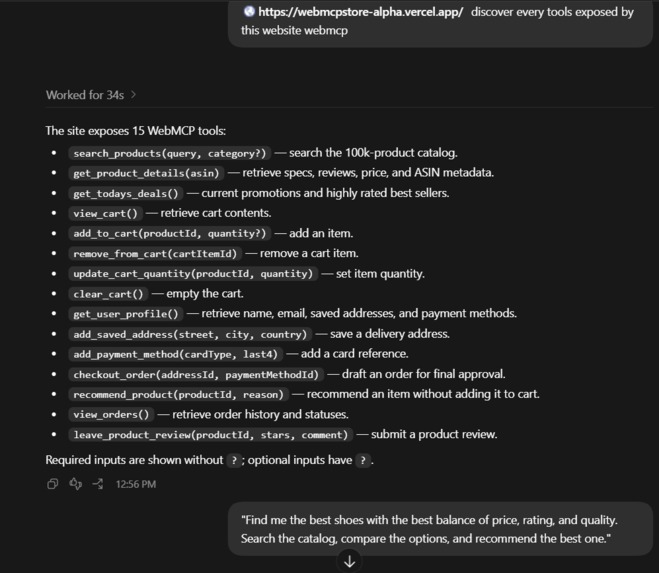
Wcp tools listed on chatgpt
-
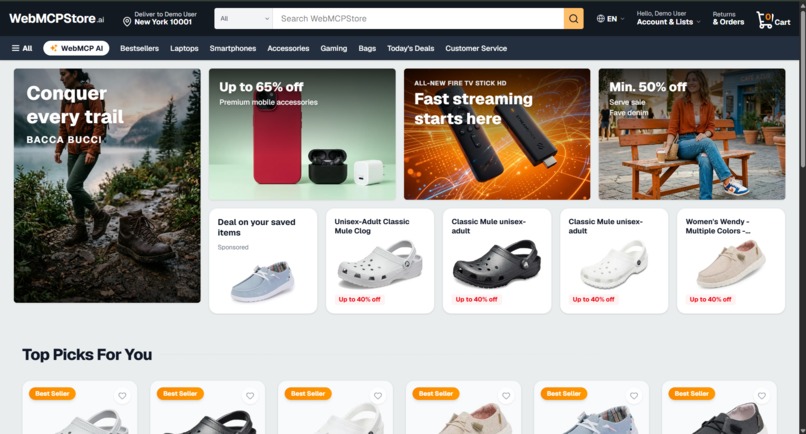
Ecom webiste
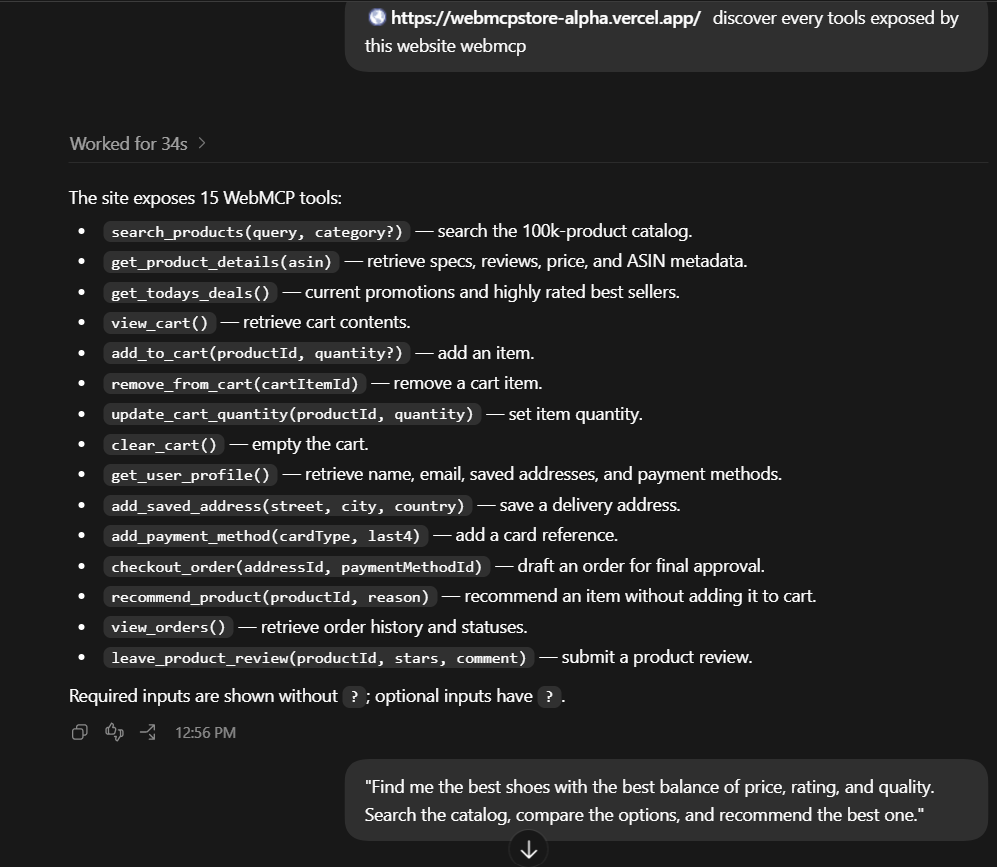
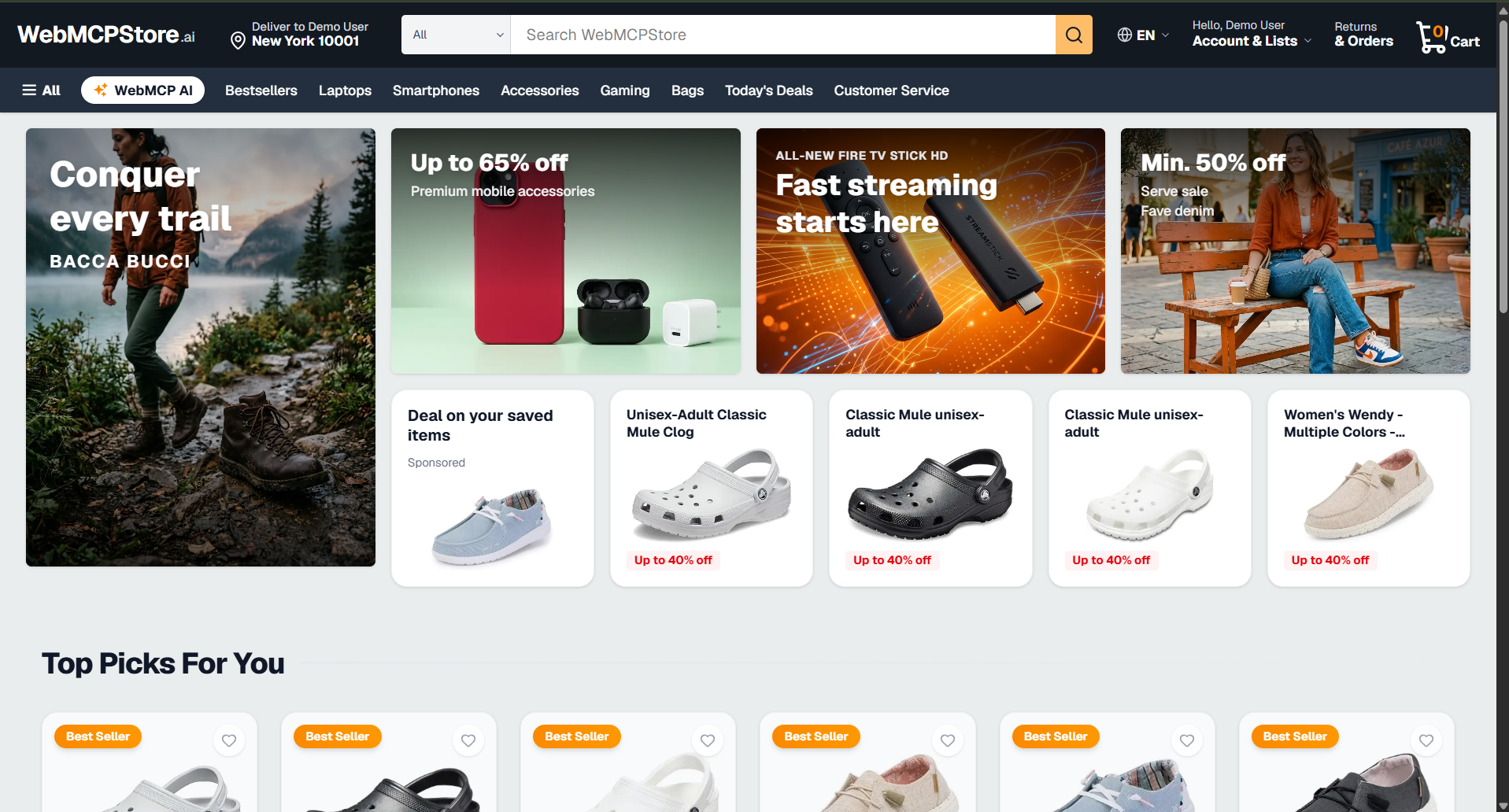
CARTOS — Where Humans Shop. Agents Act.
An agent-native e-commerce experience powered by WebMCP
💡 The Idea
Shopping online is still fundamentally designed around humans.
We search through products, open multiple pages, compare specifications, check reviews, evaluate prices, add items to our cart, enter delivery details, and finally complete the purchase.
But as AI agents become increasingly capable, we asked a different question:
What if an AI agent could actually use an e-commerce website instead of simply talking about it?
That question inspired us to build CARTOS — an AI-native e-commerce experience powered by WebMCP.
We built a complete shopping application backed by a real-world Amazon product dataset containing 123,133 products.
Our goal wasn't to build another chatbot that recommends products.
Our goal was to make the website itself usable by an AI agent.
🛒 What We Built
CARTOS is a complete e-commerce experience with:
- 🔎 Product discovery
- 📦 Product details
- 🔥 Today's deals
- 🛒 Cart management
- 👤 User information
- 💳 Checkout
- 📋 Order history
- ⭐ Product reviews
But underneath the interface, we built a WebMCP capability layer that exposes the application's functionality directly to AI agents.
CARTOS currently exposes 15 WebMCP tools:
🔎 Product Discovery
search_products(query, category?)
Searches our 123,133-product catalog.
get_product_details(asin)
Retrieves product specifications, reviews, price, and ASIN metadata.
get_todays_deals()
Retrieves current promotions and highly-rated best sellers.
recommend_product(productId, reason)
Allows the agent to recommend a specific product with a reason without automatically adding it to the cart.
🛒 Cart Operations
view_cart()
Retrieves the current cart.
add_to_cart(productId, quantity?)
Adds a product to the cart.
remove_from_cart(cartItemId)
Removes an item from the cart.
update_cart_quantity(productId, quantity)
Updates the quantity of an item.
clear_cart()
Completely clears the cart.
👤 User & Checkout
get_user_profile()
Retrieves the user's name, email, saved addresses, and payment methods.
add_saved_address(street, city, country)
Adds a delivery address.
add_payment_method(cardType, last4)
Adds a payment-method reference.
checkout_order(addressId, paymentMethodId)
Creates an order draft for final human approval.
📦 Post-Purchase
view_orders()
Retrieves order history and statuses.
leave_product_review(productId, stars, comment)
Allows a product review to be submitted.
🤖 WebMCP in Action
The most important part of our project isn't simply exposing these tools.
It is what happens when an AI agent actually uses them.
For our demonstration, we give the agent access to our live CARTOS storefront.
Instead of manually explaining the application's capabilities, the agent can discover the WebMCP tools exposed directly by the website.
The agent discovers CARTOS's capabilities and can then use them to perform a real shopping workflow.
We give it a real shopping task:
"Find me the best shoes with the best balance of price, rating, and quality. Search the catalog, compare the options, and recommend the best one."
The agent can now use CARTOS's application capabilities to perform the research.
It can:
Search
   ↓
Inspect product details
   ↓
Evaluate alternatives
   ↓
Recommend the best option
   ↓
Add to cart

---


# 🤝 Human + Agent Collaboration

This is where we believe **WebMCP becomes especially powerful**.

We don't want an AI agent to completely replace the human.

We want the agent to **handle the complexity while the human retains control**.

### 🤖 What the Agent Handles

- Finding relevant products
- Searching the catalog
- Inspecting product information
- Evaluating alternatives
- Making recommendations
- Managing the cart
- Preparing the checkout

### 👤 What the Human Handles

- The final purchasing decision
- Approval before the order is placed

When the agent reaches checkout, our `checkout_order()` tool creates an **order draft for final human approval** rather than blindly completing the purchase.

This creates a clear boundary:

> **The agent does the work. The human makes the final commitment.**

---

# 🌐 Why WebMCP?

Traditional websites expose information primarily for **humans**.

AI agents can potentially read that information, but **reading a webpage is very different from using an application**.

WebMCP gives CARTOS a structured **capability layer**.

Instead of an agent trying to figure out how to navigate buttons, pages, and UI elements, CARTOS exposes meaningful actions such as:

```javascript
search_products()
get_product_details()
add_to_cart()
view_cart()
checkout_order()

# 🧠 What We Learned

Building **CARTOS** changed how we think about web applications.

We initially thought of an e-commerce website as a collection of pages and UI components.

Through **WebMCP**, we started thinking about it differently:

> **Every important capability of an application can become a capability that an agent can discover and use.**

We learned how important it is to design tools around **meaningful application actions**, rather than simply exposing backend functions.

For example, `search_products()` is useful to an agent because it represents an actual **user-level capability**.

Likewise, `add_to_cart()` and `checkout_order()` allow the agent to progress through a **real shopping workflow**.

This helped us think about web development from two perspectives:

### **Human UX + Agent UX**

---

# ⚙️ Challenges We Faced

One of our biggest challenges was deciding **what should actually become a WebMCP tool**.

It would have been easy to expose dozens of tiny functions simply to increase the tool count.

Instead, we focused on capabilities that correspond to **meaningful shopping actions**.

Another challenge was designing the boundary between **agent autonomy and human control**.

Searching and comparing products are low-risk actions that an agent can perform independently.

Purchasing is different.

That's why our checkout flow deliberately stops at a **human approval point**.

We also had to connect the agent-facing tools to **real application state** so that actions such as adding an item to the cart weren't just simulated responses — they actually affected the shopping experience.

This made the WebMCP layer more than a collection of callable functions. It became a way for the agent to **participate in the application's actual workflow**.

---

# 🚀 What's Next?

We see this architecture extending far beyond shopping.

Today, **CARTOS** demonstrates an agent operating an e-commerce application.

Tomorrow, the same model could allow agents to interact with:

- ✈️ **Travel platforms**
- 🏦 **Banking applications**
- 📅 **Productivity tools**
- 🏨 **Booking systems**
- 💼 **Business applications**
- 🛍️ **Marketplaces**
- 🎧 **Customer-service platforms**

The underlying idea remains the same:

> **Build applications that don't just display information to AI, but expose meaningful capabilities that AI agents can discover and use.**

Instead of creating separate AI integrations for every possible workflow, websites can expose their own capabilities in a structured, agent-accessible way.

This opens the door to a web where agents can interact with applications **directly, reliably, and with clearly defined capabilities**.

---

# 🌟 Our Vision

We're not trying to build a smarter Amazon clone.

**We're exploring what happens when websites become agent-accessible applications.**

Our **123,133-product catalog** gives the agent a realistic environment to solve a genuine shopping problem.

Our **15 WebMCP tools** give it the capabilities to interact with that environment.

And our **human approval boundary** ensures that automation doesn't mean giving up control.

Today, a user might ask an AI about a product, manually open an online store, repeat the search, compare options, manage the cart, and finally complete the purchase themselves.

With an agent-native storefront like **CARTOS**, the website can become an active participant in that workflow.

> **The human sets the goal.**
>
> **The agent handles the complexity.**
>
> **The website provides the capabilities.**
>
> **The human remains in control.**

The future of the web may not be humans using websites alone.

It may be:

# **Humans + AI Agents + Websites**

**working together.**

And **CARTOS is our step toward that future.**
Built With
- chatgpt
- nextjs
- webmcp

Log in or sign up for Devpost to join the conversation.