-
-
CartPilot
"Average ecommerce conversion rates are around 2.5% to 3% according to industry leaders." - Shopify.
CartPilot
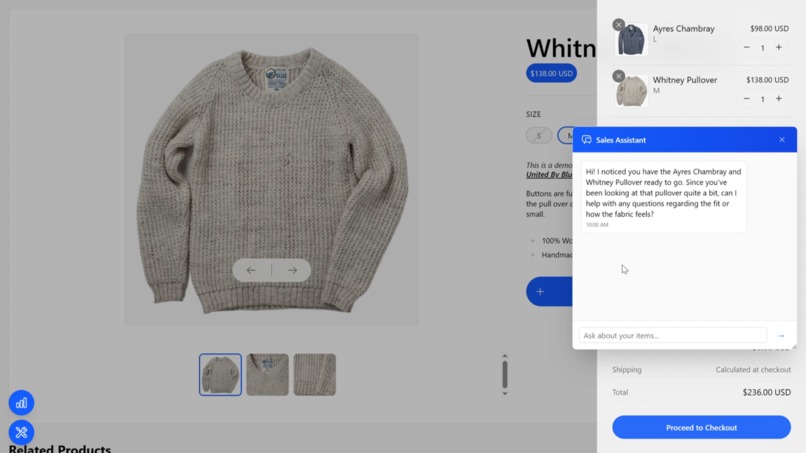
CartPilot is an e-commerce AI sales and store associate agent on an online storefront augmented with a telemetry pipeline that proactively engages users when behavioral signals indicate uncertainty or intent.
What’s Built
Storefront (Shopify)
- Next.js App Router storefront with server-first data fetching via
lib/shopify/*. - Cart state provided through
CartProviderand server actions.
Telemetry
- Basic telemetry via
hooks/use-cart-pulse.ts(UI + cart interactions, mouse velocity, tab switching). - Advanced telemetry via
hooks/use-advanced-tracking.ts(scroll depth, click positions, page engagement, product view time). - Streams telemetry to Kafka (Confluent) for downstream analytics and real-time processing.
AI Sales Assistant
- Floating “Sales Chat” widget.
- Auto-opens based on intent signals.
- Uses
/api/chatand Google Gemini via@google/genai. - Uses cart snapshots (when available) + page context + browsing summary.
Architecture Walkthrough
1) Telemetry data flow
Client-side hooks queue events and periodically POST them to API routes.
UI interaction
  -> useCartPulse / useAdvancedTracking
  -> POST /api/telemetry or /api/telemetry/advanced
  -> Kafka topic for streaming
See TELEMETRY.md for the full event catalog and component coverage.
2) AI triggers & context propagation
CartPilot uses browser-side detectors that dispatch custom events. SalesChat listens and auto-opens, then sends a chat init request containing:
trigger: why the chat openedpageContext: what page the user is on + intent signalsbrowsingContext: recent products + last search + session start time
Shared types/constants live in lib/types/ai-chat.ts.
Current auto-open triggers:
- Cart hesitation (cart idle / add-remove indecision)
- Product dwell (staying on a PDP with engagement)
- Search hesitation (scrolling / query refinement without clicks)
- Product comparison (3+ distinct PDP views within a short window)
3) Chat API (/api/chat)
/api/chat:
- Looks up session context from KV (when configured) or in-memory fallback.
- Uses a cart snapshot when present to give the model specific product details.
- Adds page context + browsing summary to the system prompt.
- Caches replies in KV (when configured) and rate-limits per session.
Local Development
Prereqs
- Node.js +
pnpm
Install + run
pnpm install
pnpm dev
Scripts
pnpm dev: local dev serverpnpm build: production buildpnpm start: run production buildpnpm test: runsprettier:checkpnpm prettier --write: format the repo
Environment Variables
Required (storefront)
SHOPIFY_STORE_DOMAINSHOPIFY_STOREFRONT_ACCESS_TOKEN
Required (AI)
GEMINI_API_KEY
Required (Kafka / Confluent)
Kafka is part of the core pipeline and is required.
KAFKA_BROKERKAFKA_USERNAMEKAFKA_PASSWORD
Optional (Durable session context + caching)
This project uses Vercel KV when configured.
KV_REST_API_URLKV_REST_API_TOKEN
Debugging & Observability
Quick Demo Script (2–3 minutes)
This is a repeatable walkthrough to demonstrate the AI triggers and confirm the end-to-end context wiring.
Setup
- Run the app:
pnpm dev - Ensure
GEMINI_API_KEYis set (otherwise chat replies will fallback). - Optional: open the telemetry dashboard (
Ctrl + Shift + T) to watch events live.
Demo 1 — Product dwell (eyeing a product)
- Open any product page:
/product/[handle] - Engage lightly: click a couple gallery images or change a variant.
- Stay on the page ~20 seconds.
Expected:
- Sales Chat auto-opens.
/api/chatreceivestrigger: "product_dwell"andpageContext.pageType: "product".
Demo 2 — Search hesitation
- Go to
/search?q=shoes(or use the navbar search). - Scroll through results and/or change sort a couple times.
- Avoid clicking into any product.
Expected:
- Sales Chat auto-opens.
/api/chatreceivestrigger: "search_hesitation"andpageContext.pageType: "search".
Demo 3 — Product comparison behavior
- Click into 3 different product pages within ~2 minutes.
Expected:
- Sales Chat auto-opens.
/api/chatreceivestrigger: "product_comparison"and a comparisonpageContextlisting recent product handles.
Demo 4 — Cart hesitation
- Add an item to cart.
- Open cart and idle on it (>10s), or add/remove items several times.
Expected:
- Cart snapshot is POSTed to
/api/telemetry/cart-snapshot. - Sales Chat auto-opens after the cart snapshot is processed.
/api/chatuses cart snapshot context when available.
Telemetry dashboard
There is an in-app real-time dashboard that visualizes events.
Docs:
TELEMETRY_DASHBOARD.mdDASHBOARD_GUIDE.mdTOAST_NOTIFICATIONS.md
Helpful debug routes
/api/debug/*(sessions, telemetry, kafka status)
Repository Map
app/— Next.js routes (storefront + API)app/api/chat/route.ts— Gemini chat endpointapp/api/telemetry/*— telemetry endpoints and cart snapshot ingest
components/— UI components + trackerscomponents/sales-chat.tsx— floating chat widget + auto-open listenerscomponents/cart/cart-hesitation-tracker.tsx— cart intent detection + snapshot sendcomponents/product/tracking-wrapper.tsx— PDP dwell/comparison detection
hooks/— telemetry hookslib/kafka/— producer/consumer integrationlib/shopify/— Storefront API integrationlib/types/ai-chat.ts— shared AI trigger/context types and event names
Built With
- confluent
- gemini

Log in or sign up for Devpost to join the conversation.