Inspiration
Hospitals can be overwhelming, isolating, and disorienting places—especially for elderly patients or individuals struggling with traditional, tiny-text TV remotes and complex hospital menus. When someone is admitted, simple questions like "Where is the cafeteria?", "When are visiting hours?", or "How do I contact my nurse?" shouldn't require navigating confusing sub-menus or squinting at a remote control. We built CareView.AI to transform the standard hospital room television into a warm, empathetic, and effortless digital companion. By combining voice-first interaction, large-format typography, and intelligent knowledge retrieval, CareView.AI bridges the communication gap between patients and hospital staff—restoring dignity, comfort, and independence to the patient experience.
What it does
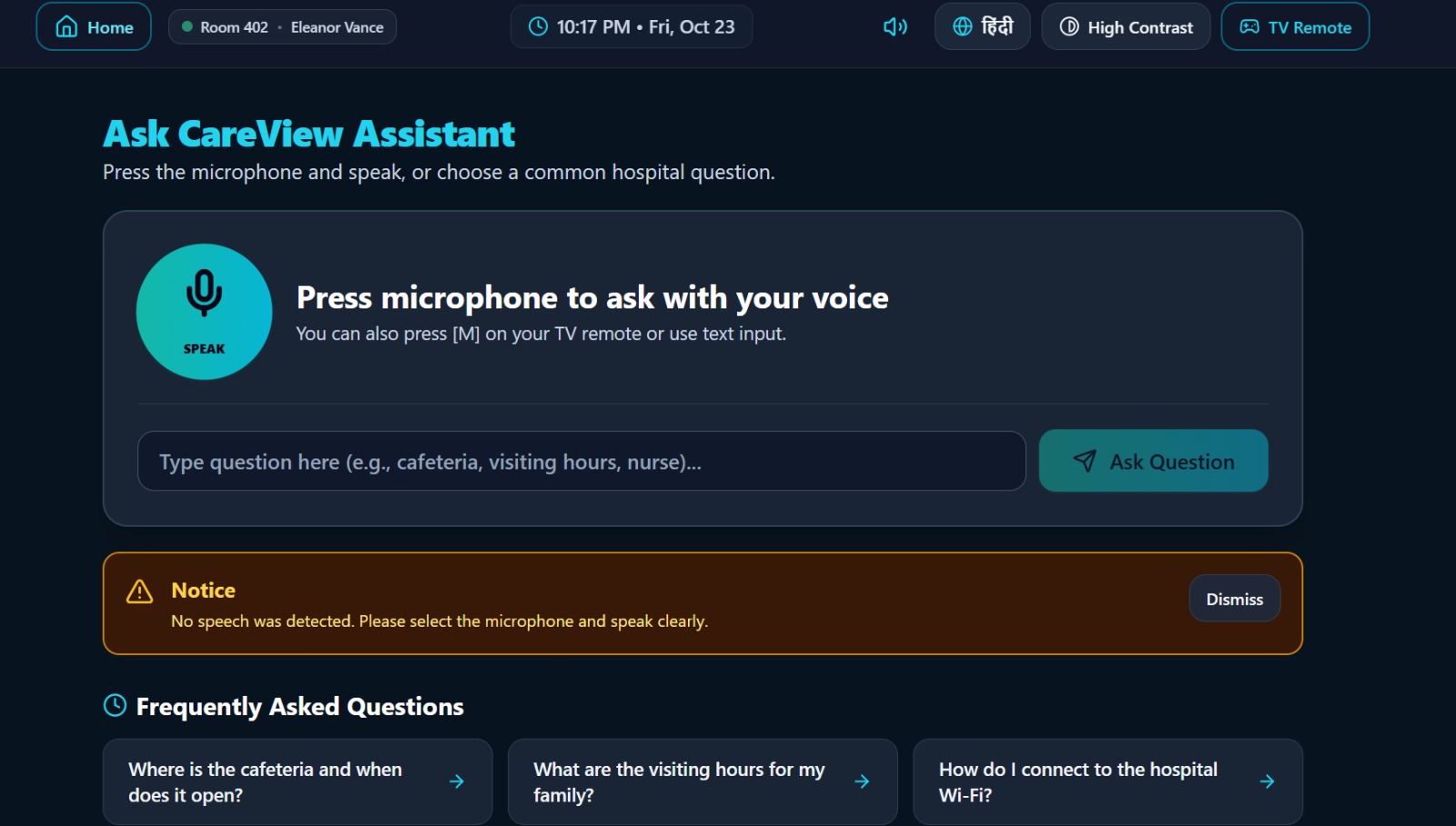
CareView.AI is an AI-powered smart hospital television assistant optimized for a 10-foot TV viewing experience and traditional remote control navigation. Its core capabilities include: Voice & Text Q&A Assistant: Patients can speak or type questions in English or Hindi. The assistant instantly responds with large, high-contrast on-screen text and speaks the answer aloud using browser speech synthesis. Ground-Truth Hospital Knowledge Base: Answers are strictly pulled from a verified, structured hospital knowledge base (covering visiting hours, cafeteria locations, Wi-Fi instructions, emergency protocols, and department directories) to prevent hallucinations. Assistance Request Ticketing: Patients can summon help with a single voice command or remote click (e.g., "Please contact a nurse"). Requests are categorized, timestamped, and immediately routed to a live staff dashboard. Staff Dashboard: A real-time queue for hospital personnel to review, acknowledge, and resolve patient assistance requests. Universal Accessibility Settings: Features instant high-contrast mode toggles, adjustable text scaling (Normal, Large, Extra Large), speech speed controls, and robust D-pad remote navigation (Arrow keys, Enter, Escape).
How we built it
CareView.AI was designed as a production-ready, highly accessible MVP tailored for both modern web browsers and smart TV environments (such as the Amazon Fire TV hackathon track): Frontend & UI/UX: Built with a responsive, modern web stack utilizing Tailwind CSS for clean, high-contrast styling, deep navy/teal hospital-friendly palettes, and prominent touch/remote focus states. Voice Integration: Leveraged the native Web Speech API (SpeechRecognition / SpeechSynthesis) for seamless speech-to-text input and multilingual audio feedback, complete with robust offline fallback mechanisms. Knowledge & State Architecture: Engineered a deterministic, hallucination-free assistant service backed by a structured hospital knowledge configuration and persistent local storage for user preferences and assistance tickets. Remote-First Navigation: Implemented custom keyboard event handlers simulating D-pad remote control actions (Up, Down, Left, Right, Enter, Back) to ensure effortless 10-foot UI usability without requiring a mouse or touch screen.
Challenges we ran into
Voice Recognition Constraints Across Browsers: Different browsers handle SpeechRecognition permissions and continuous listening states differently. We had to build graceful fallback text-input modes and clear visual listening indicators so users never get stuck in an endless listening loop. 10-Foot UI & Remote Accessibility: Designing an interface that looks stunning on a laptop while remaining completely legible and fully navigable from a distance using only arrow keys required meticulous focus on visual hierarchy, large tap targets, and distinct focus ring states. Preventing AI Hallucinations: In a medical environment, incorrect information (like fake room numbers or wrong visiting hours) can cause real distress. We solved this by anchoring the assistant service to a strict, structured local knowledge base with clear fallback instructions to contact hospital reception.
Accomplishments that we're proud of
True Accessibility-First Design: Creating an interface that genuinely serves elderly or tech-hesitant patients by stripping away visual clutter, maximizing text contrast, and providing dual voice-and-visual outputs in both English and Hindi. End-to-End Patient-to-Staff Workflow: Successfully closing the loop between a patient asking for help on the TV screen and a nurse seeing, acknowledging, and resolving that ticket on a live staff dashboard. Zero-Configuration Demo Mode: Ensuring the application functions smoothly out-of-the-box with a local deterministic assistant even when external AI API keys are missing, making it instantly testable anywhere.
What we learned
Simplicity Wins: When designing for elderly users or hospital environments, removing features and reducing cognitive load is far more powerful than adding complexity. Every interaction must be obvious at a glance. The Importance of Defensive Voice UX: Voice technology is wonderful when it works, but browser permissions and microphone blocks are common. Designing robust, frictionless text fallbacks is essential for reliable healthcare applications.
What's next for CareView.AI
Native Fire TV / Android TV Packaging: Compiling and packaging the web application into a native Amazon Fire TV app bundle (APK) for rigorous testing on physical TV hardware and Fire OS simulators. Real Hospital EMR / Nurse Call System Integration: Integrating with hospital middleware and Enterprise Nurse Call hardware protocols (like Rauland or Hillrom) to dispatch alerts directly to wearable nurse pagers. Multilingual Expansion: Expanding speech synthesis and recognition support to regional Indian languages and international dialects to serve diverse patient demographics globally.
Built With
- css3
- html5
- javascript
- json
- node.js
- num.py
- tailwind

Log in or sign up for Devpost to join the conversation.