-
-
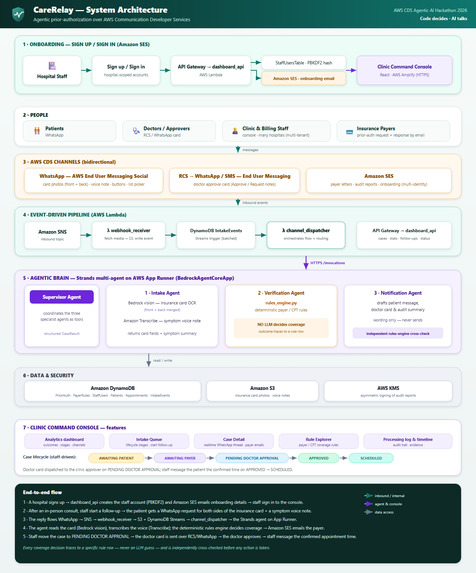
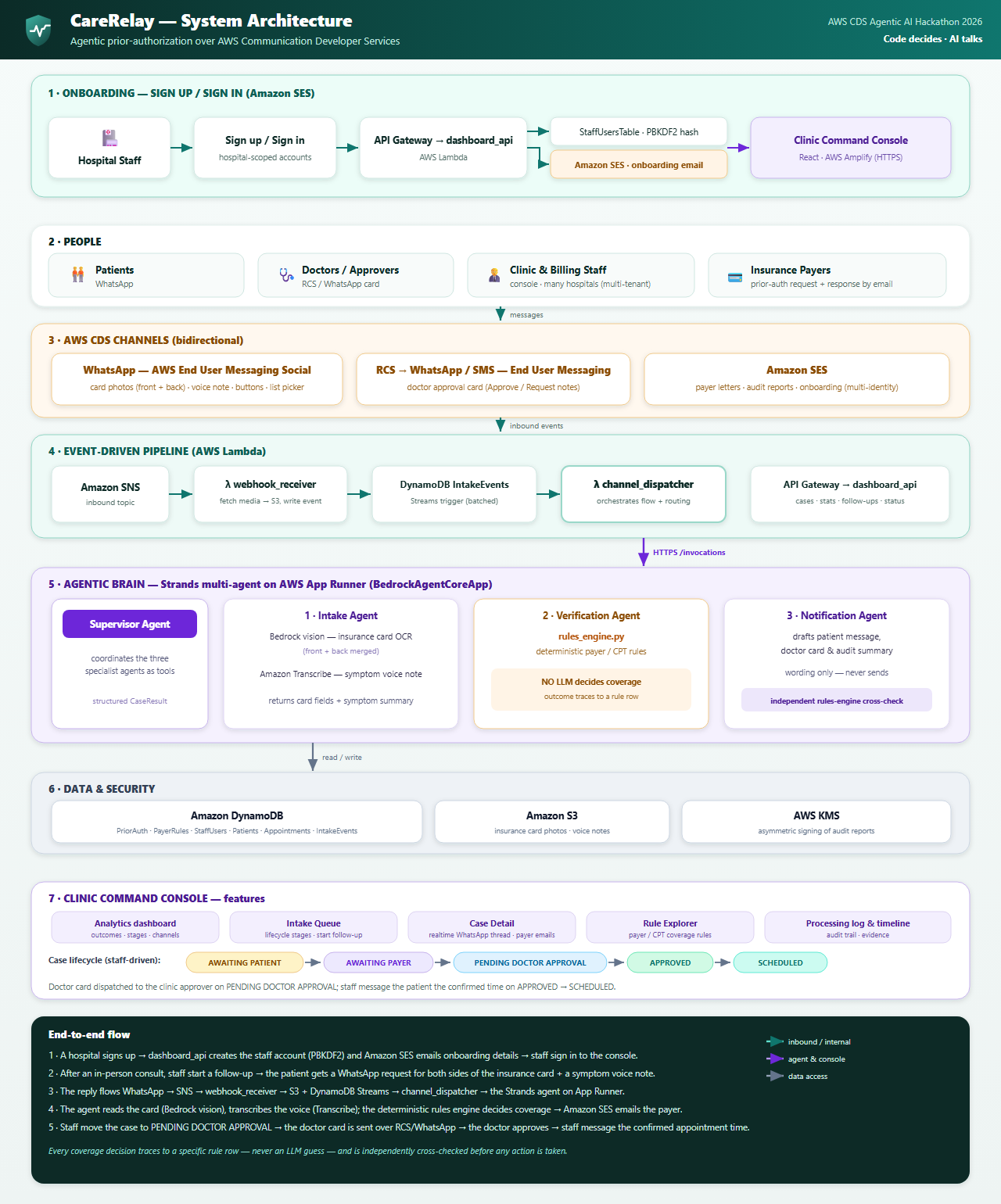
Archietecture Diagram
-
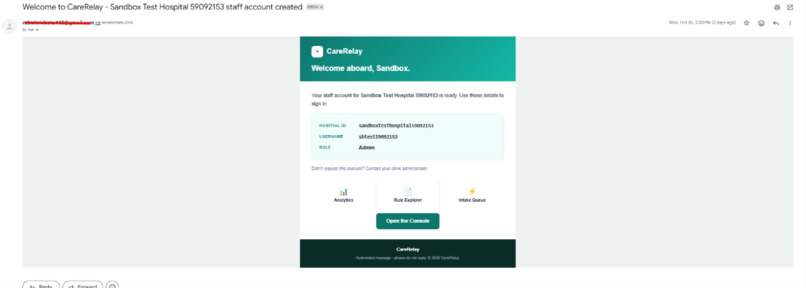
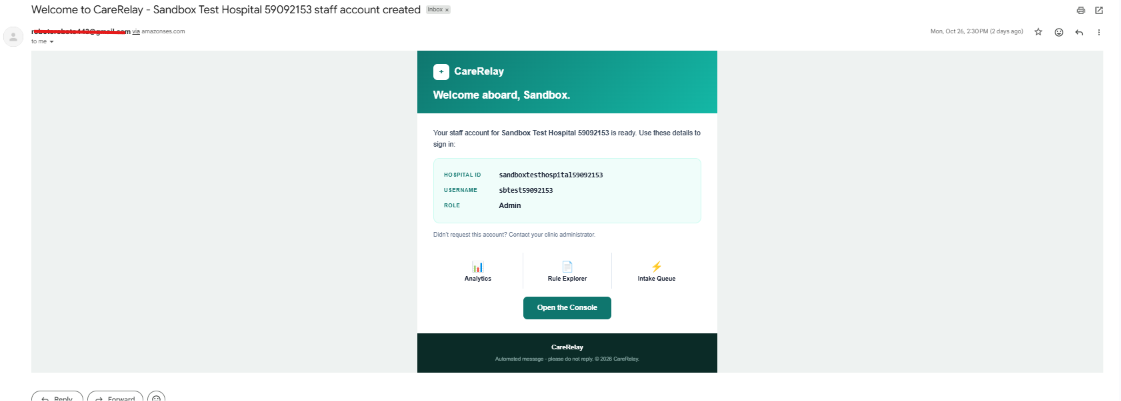
Signup onboarding email through SES
-
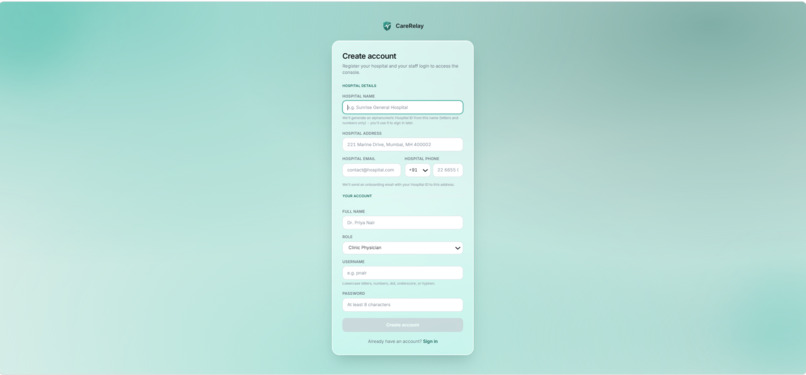
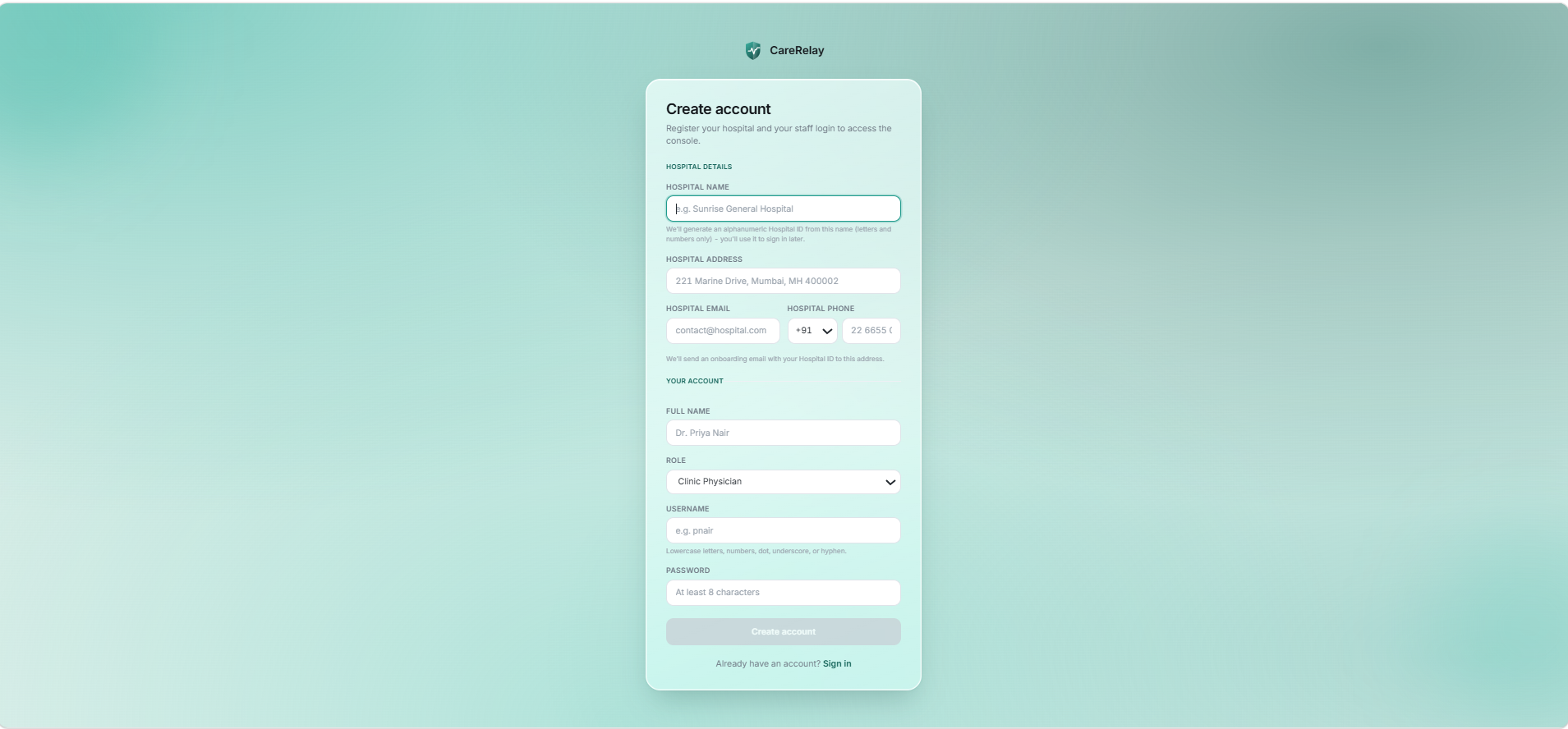
signup
-
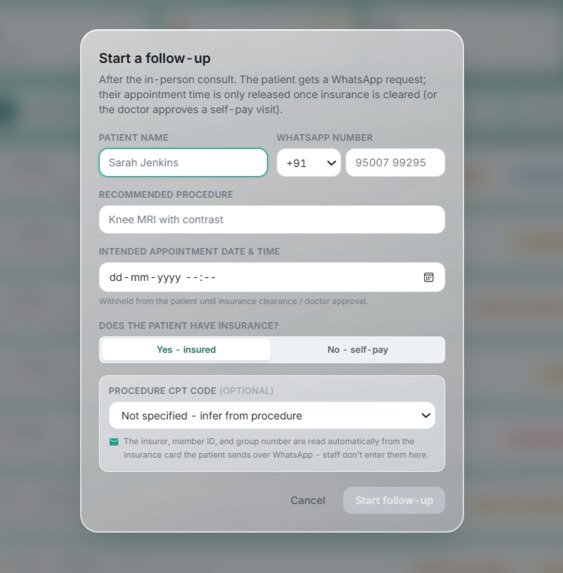
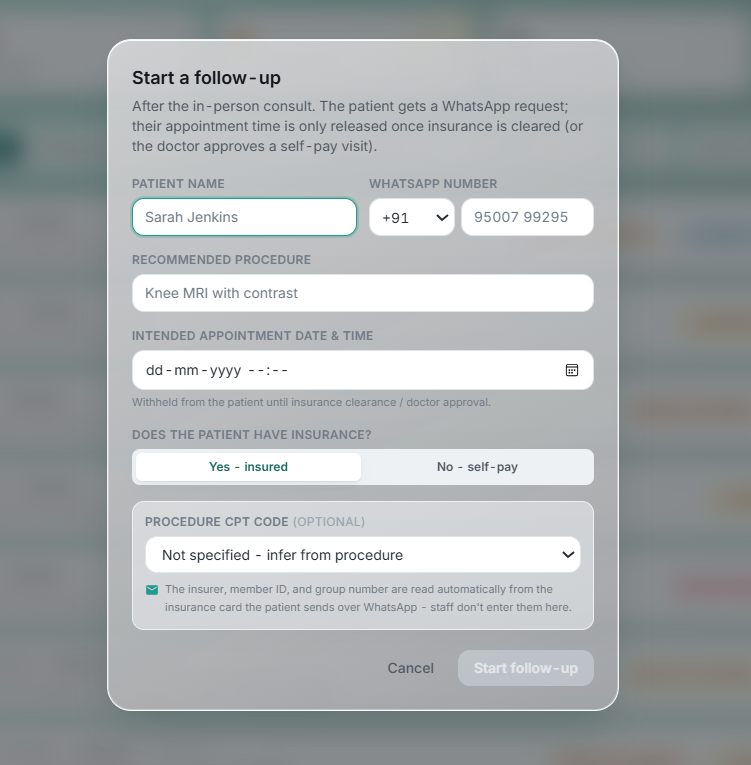
patient followup form
-
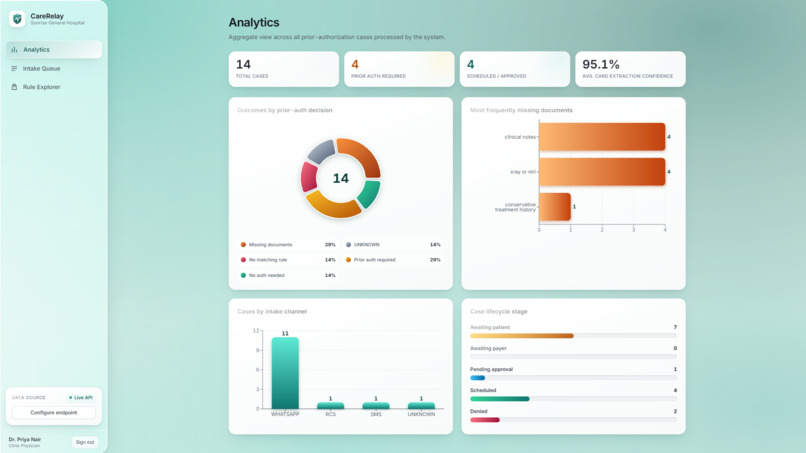
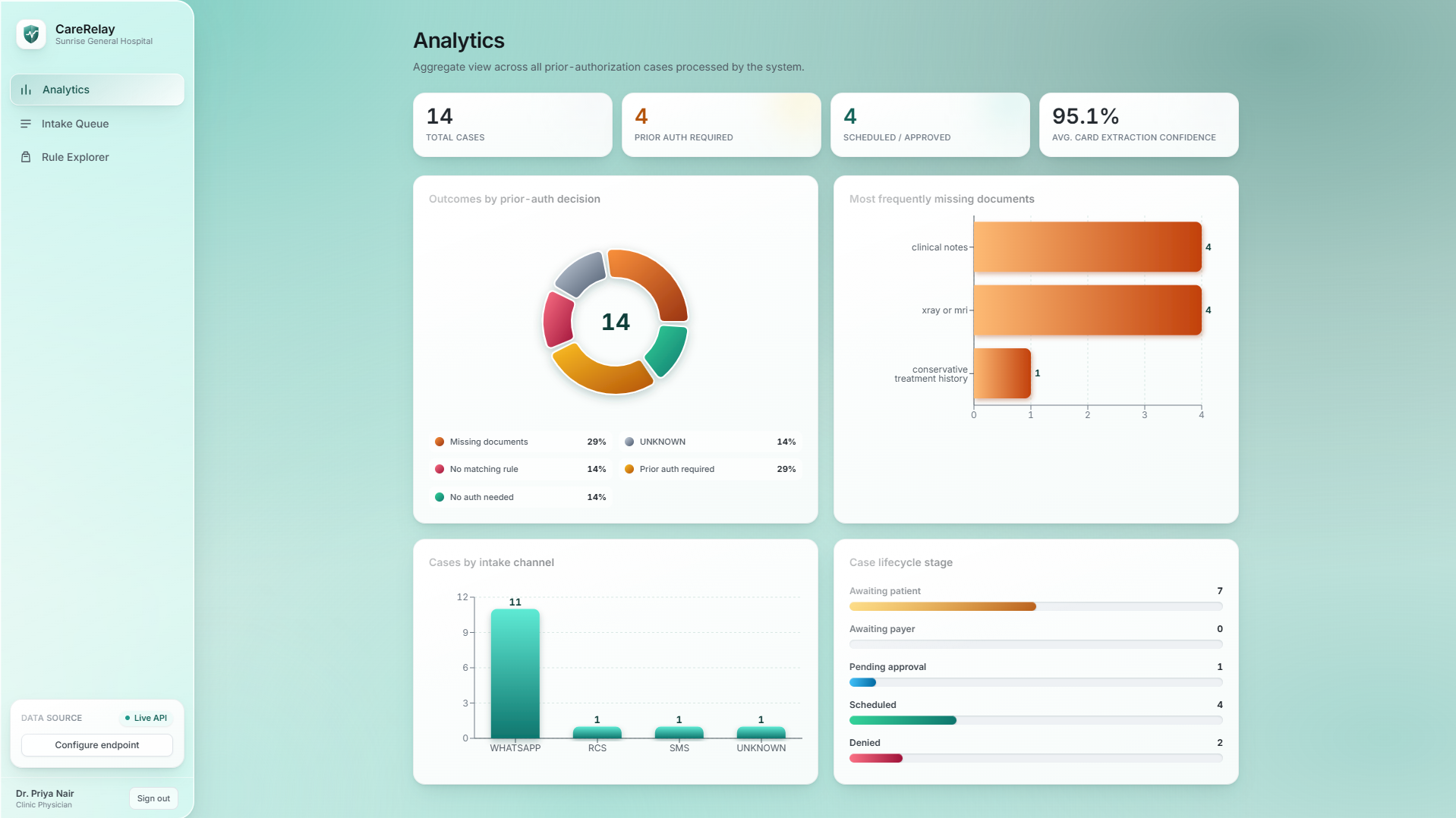
Analytics dashboard
-
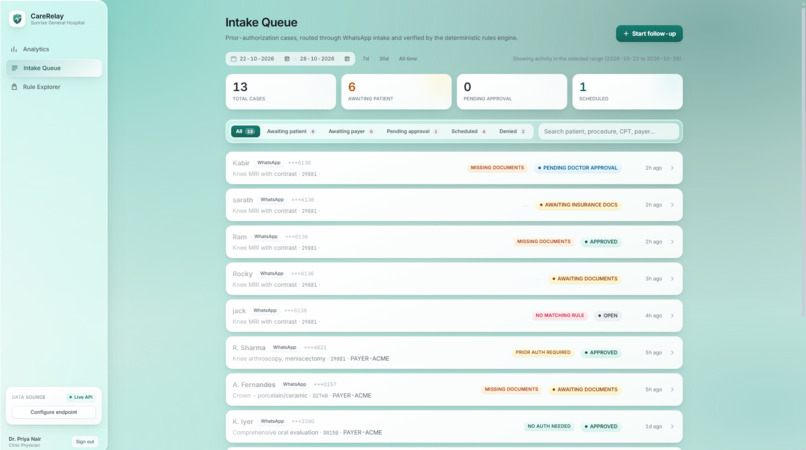
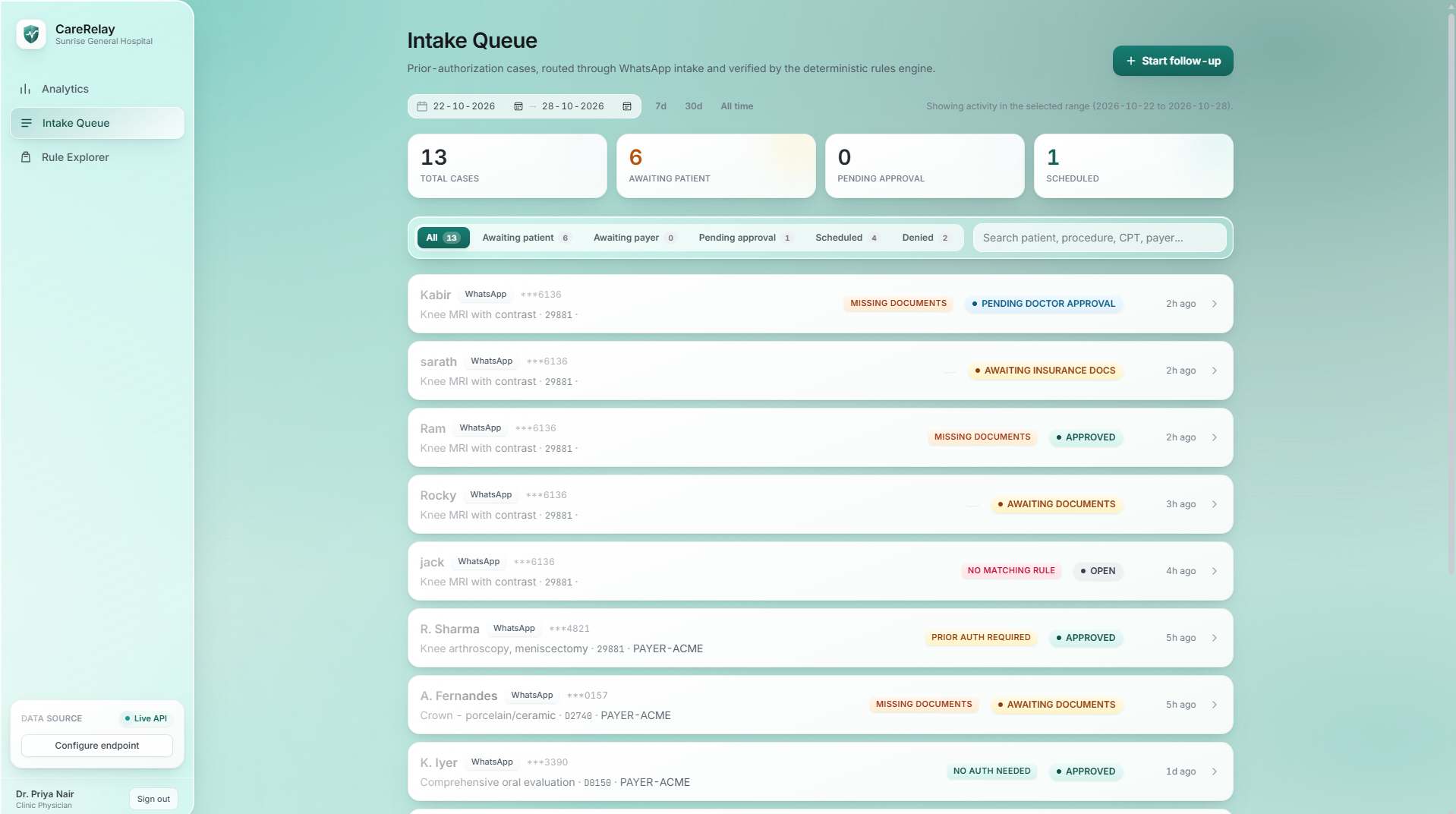
patient maintanance and intake dashboard
-
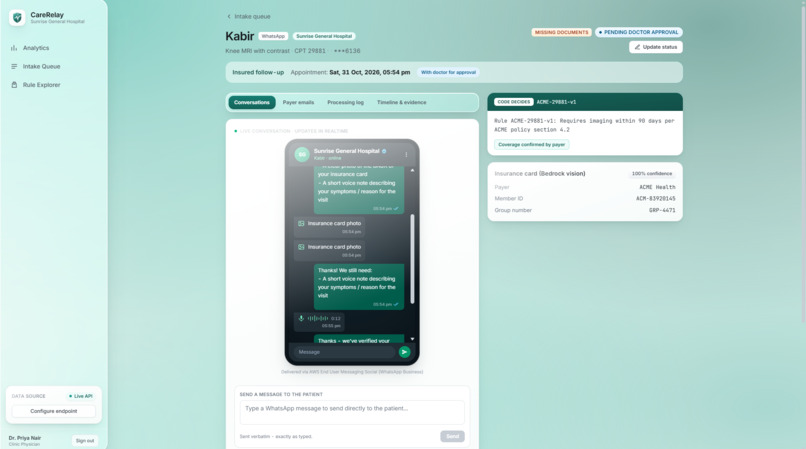
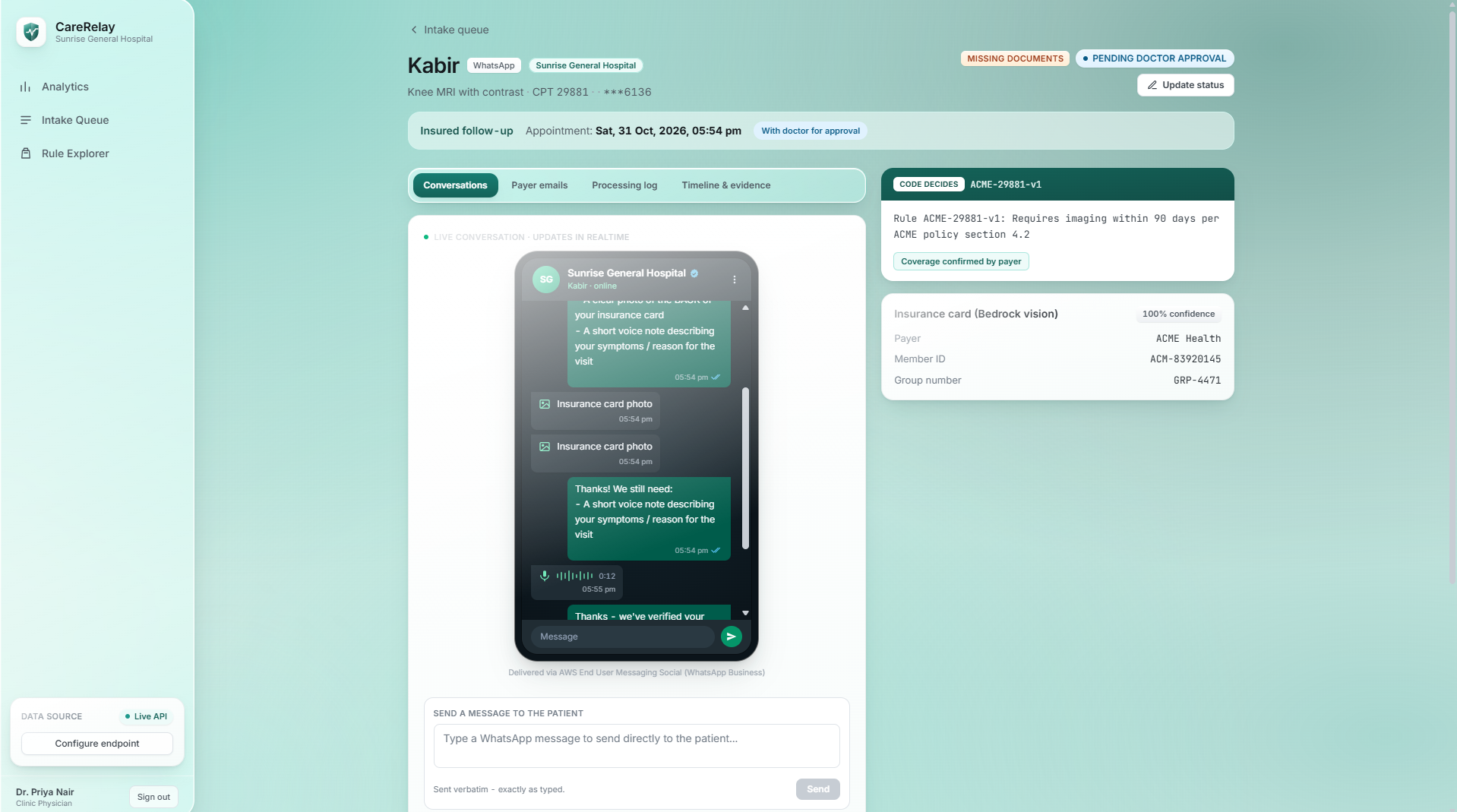
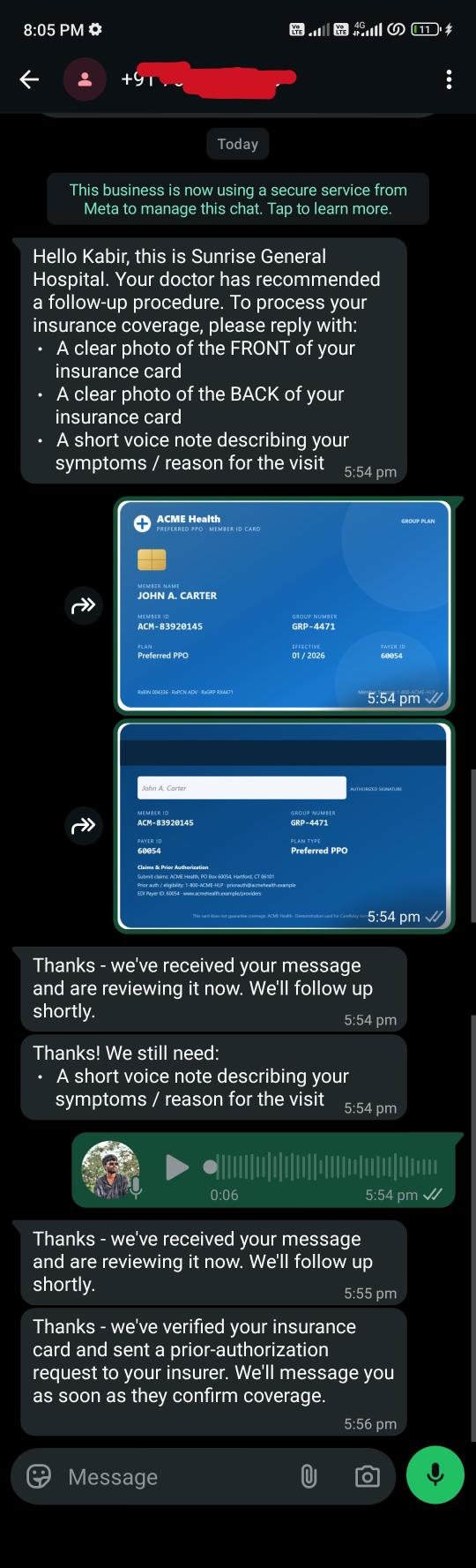
whatsapp integration to get the symtoms and insurance card from patient through whatsapp and process it with aws transcribe and vision model
-
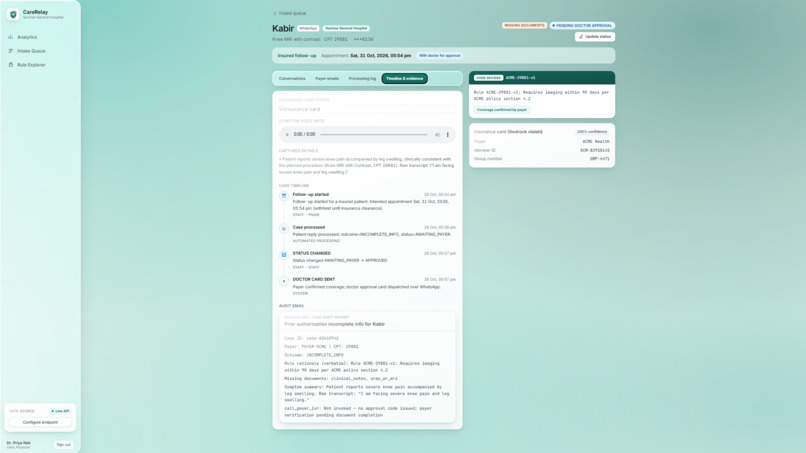
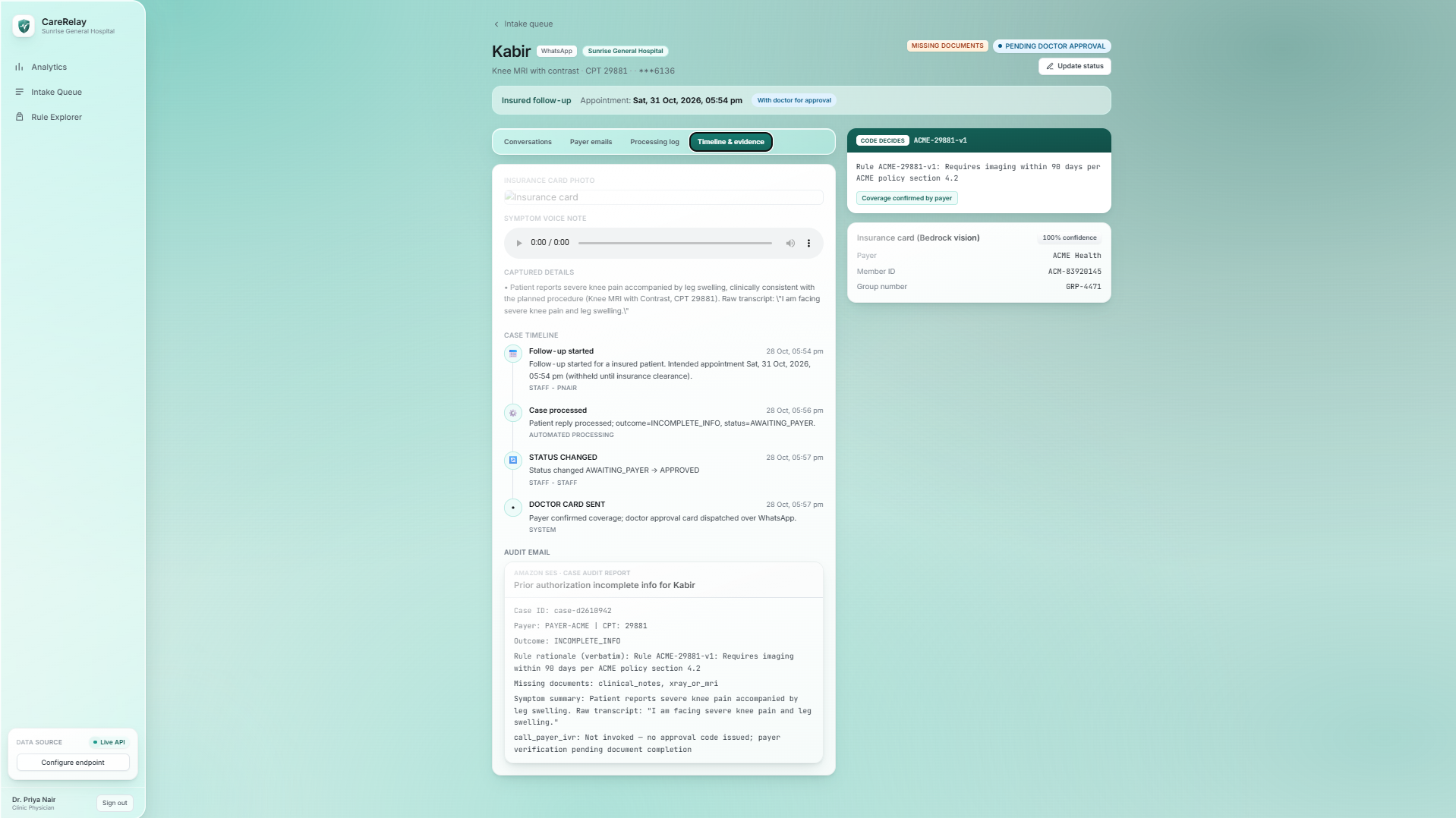
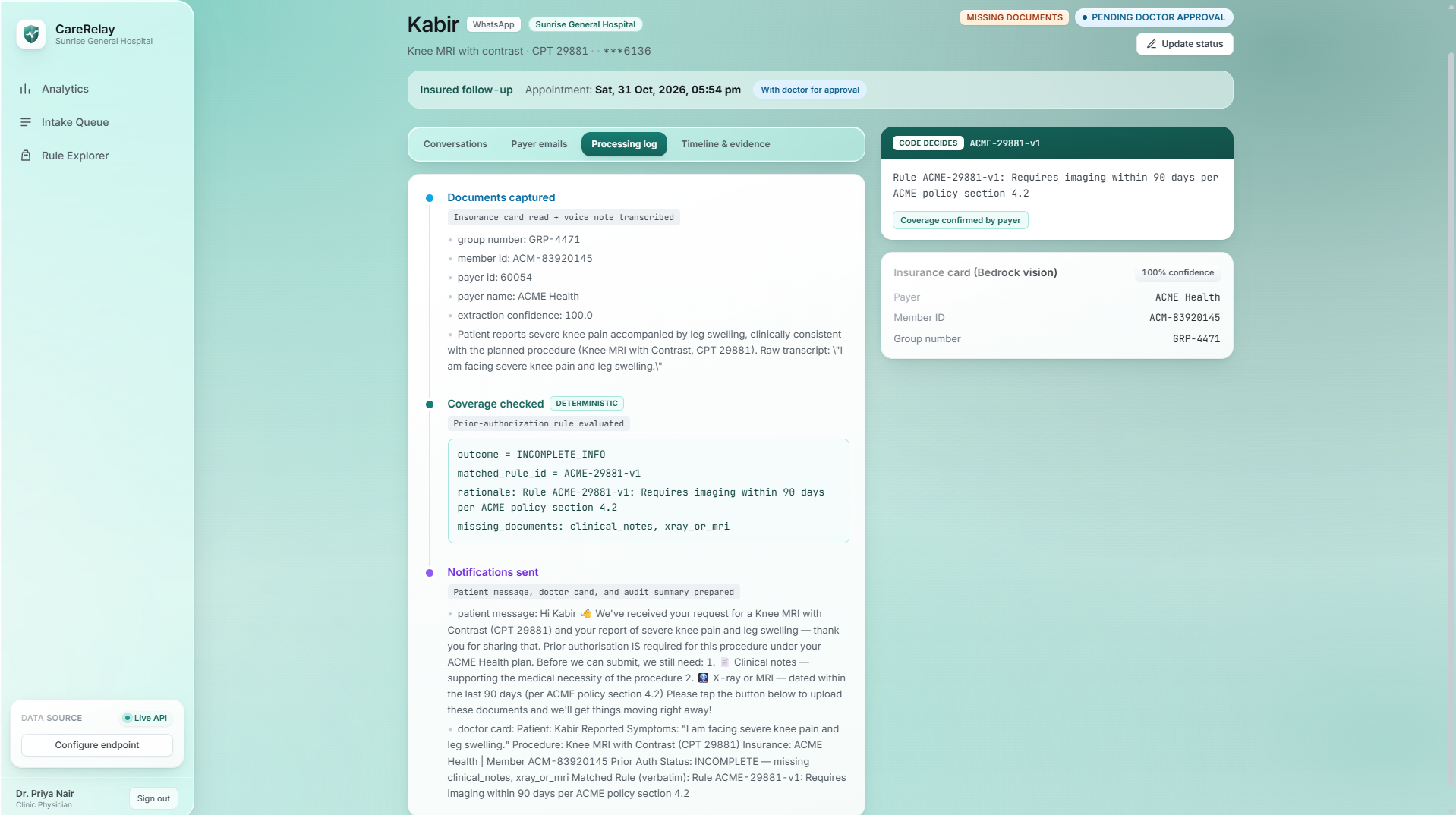
timelines and activities
-
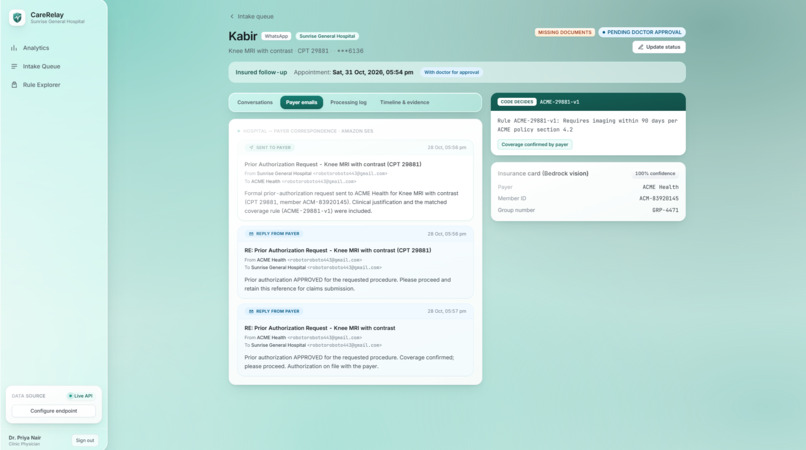
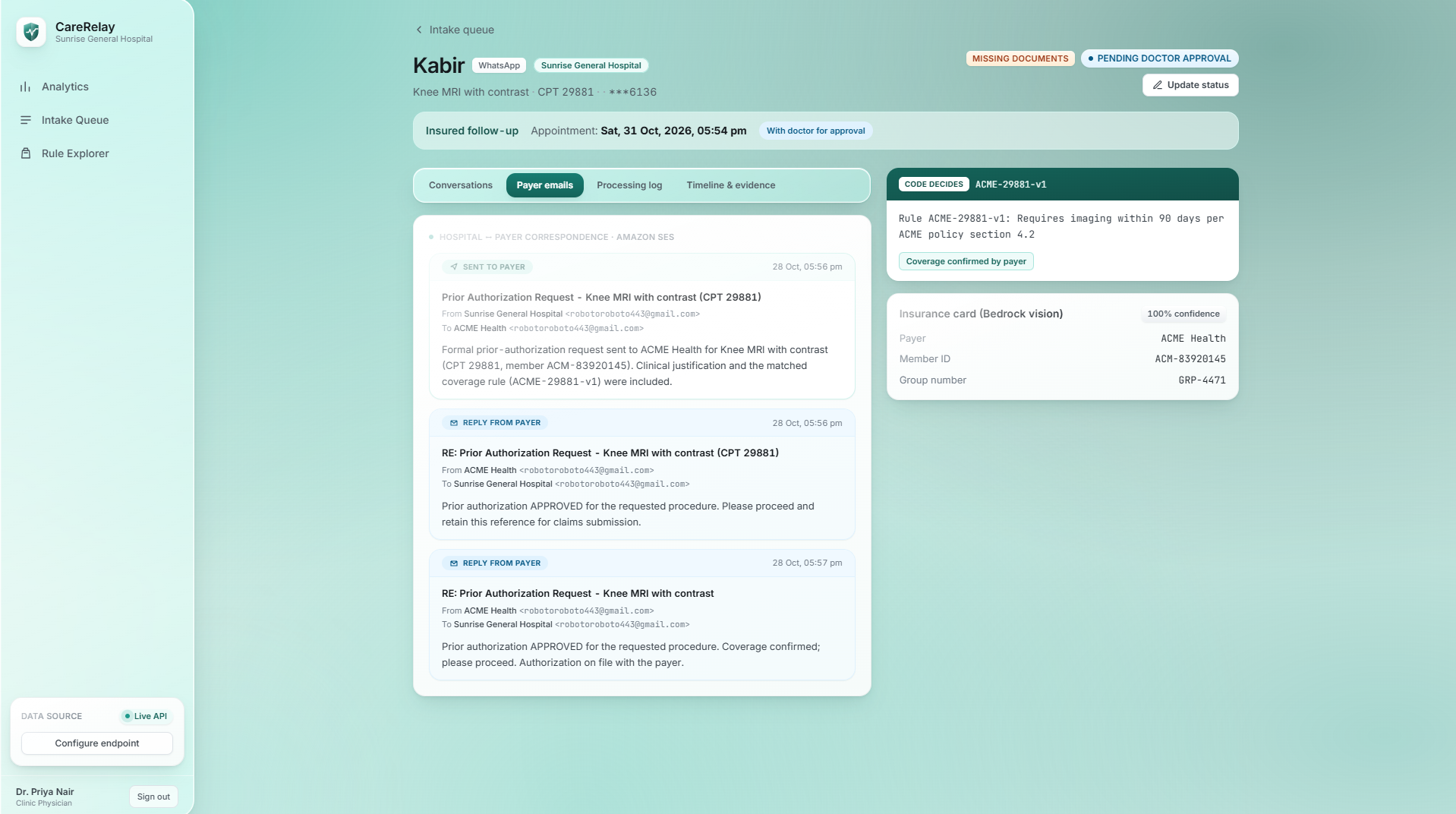
Email(SES) convo with the insurance payer
-
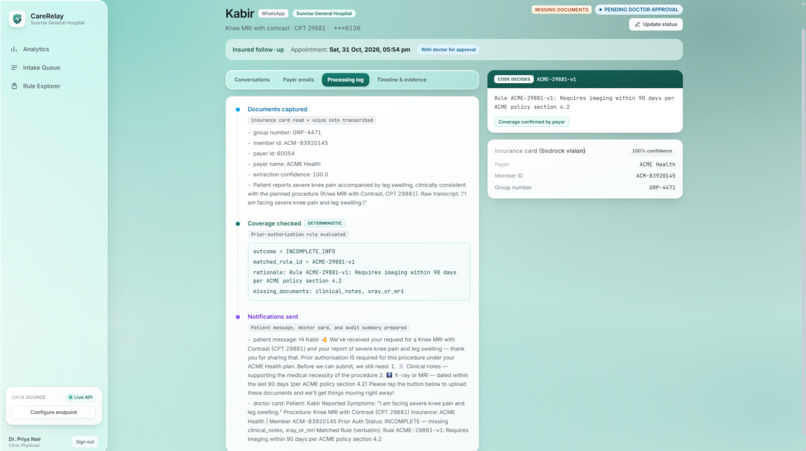
flow activities
-
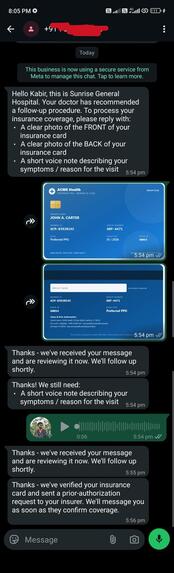
whatsapp messages with the patient.
-
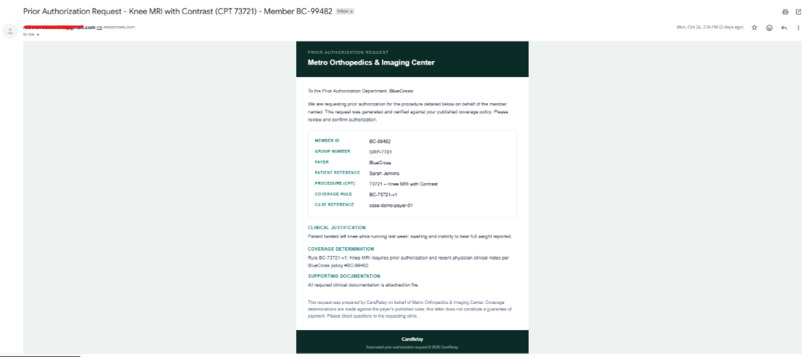
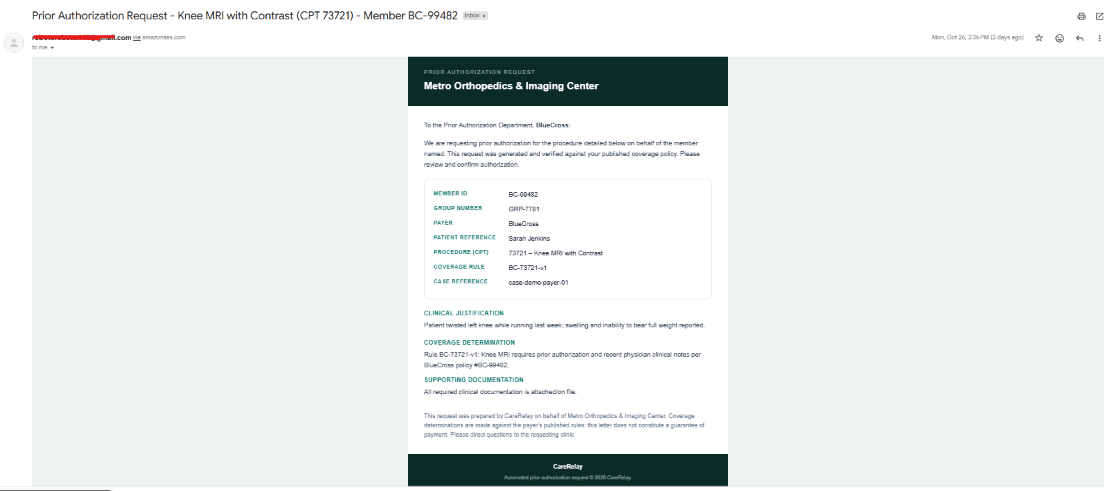
Mail recieved by the insurance agent
CareRelay — prior-authorization as a conversation
Prior-authorization is where care stalls. After a consult, a patient's follow-up procedure often waits days while clinic staff sit on hold with insurers, re-key member IDs off a photo of a card, fax clinical notes, and play phone tag. Patients are left in the dark — many don't even learn their appointment time until coverage finally clears.
We asked one question: what if the entire prior-auth back-and-forth happened in the channel patients already use every day — a chat thread — while staff got a clean, auditable cockpit instead of a phone queue?
CareRelay is that system. A hospital signs up, staff start a follow-up from a web console, and the patient simply has a conversation over WhatsApp. Behind that conversation, a team of AI agents does the paperwork and a deterministic rules engine makes the actual coverage decision. Our guiding principle: code decides, AI talks — the AI handles language, reading insurance cards, and transcribing speech, but approvals are driven by auditable rules, never a model's guess.
The complete flow, end to end
1. Hospital sign-up and onboarding
Everything starts on the sign-up screen. A hospital registers with its name, address, contact email, and phone (captured with an explicit country code), plus the first staff member's name, role (Clinic Physician, Billing Coordinator, Front Desk, or Admin), username, and password.
- From the hospital name we generate an alphanumeric Hospital ID that every staff account at that clinic shares — this is what makes CareRelay multi-tenant: each hospital's cases, rules, and conversations are scoped to its own Hospital ID.
- On successful sign-up, CareRelay sends a branded onboarding email over Amazon SES to the hospital's registered address, confirming the Hospital ID, username, and role so staff can sign in. The email is sent from the hospital's own name, so it reads as the clinic's communication, not a third party's.
- Staff then sign in with Hospital ID + username + password and land in the console.
Why SES here: the same transactional email channel we use for onboarding is the one that later carries payer correspondence — one verified, auditable email path for every outbound message the system sends.
2. Starting a follow-up
From the console, staff click Start a follow-up and enter:
- Patient name and WhatsApp number with country code (a dial-code selector guarantees a valid E.164 number).
- The recommended procedure and an optional CPT code (staff can let the system infer the code from the procedure, or pick a specific one).
- Whether the patient is insured or self-pay.
- The intended appointment date and time — deliberately withheld from the patient until coverage is cleared or a doctor approves a self-pay visit. This is a core product decision: the appointment is leverage that keeps the prior-auth loop moving.
Crucially, staff never type the insurer, member ID, or group number — those are read automatically from the card the patient sends over WhatsApp.
3. The patient conversation on WhatsApp
The patient receives a WhatsApp message from the clinic and is asked for two things:
- A clear photo of their insurance card — both front and back. CareRelay waits until it has received both sides before it processes anything, so a half-complete submission never produces a half-wrong decision.
- A short voice note describing their symptoms / reason for the visit.
The conversation is idempotent: one inbound photo means one action, so the "please send your card" prompt never loops or duplicates, even if delivery receipts or retries arrive more than once.
4. Automatic intake — OCR and transcription
As soon as both card sides and the voice note are in, the agents go to work:
- OCR reads the front and back of the insurance card and merges them into a single structured record: insurer name, member ID, group number, and payer ID.
- Amazon Transcribe turns the voice note into a symptom summary that becomes part of the clinical picture for the case.
- The extracted fields populate the case in the console automatically — no manual data entry.
5. Verification — the deterministic rules engine
A Verification agent runs the case through a standalone rules engine:
- It canonicalizes the payer — mapping an insurer name or payer ID read
off the card (e.g., "ACME Health" / payer id
60054) to a known payer and policy. - It evaluates the CPT-level rule for that payer and returns one of a few structured outcomes: approved, prior-auth required, or incomplete information — along with the list of any missing documents (clinical notes, imaging, etc.).
- Every outcome carries a verbatim rule rationale (e.g., "Rule ACME-29881-v1: requires imaging within 90 days per policy section 4.2"), so the decision is explainable and auditable.
The agent narrates this result back into the conversation and the console — it never invents the decision. That separation is what makes an AI system safe to use in a regulated workflow.
6. Payer correspondence
If prior-auth is required, a Notification agent opens an email thread with the payer over Amazon SES and moves the case to Awaiting Payer. Both inbound and outbound payer emails are captured with timestamps and shown in the console as an evidence trail, so staff can see the entire negotiation with the insurer in one place.
7. Human-in-the-loop doctor approval
When documentation is complete, staff move the case to Pending Doctor Approval. This transition dispatches an approval card to the doctor over WhatsApp, routed to the approver configured for that clinic. The doctor taps approve, and the case advances to Approved.
This keeps a human — the physician — in control of the clinical decision, while CareRelay handles all the mechanics around it.
8. Releasing the appointment
Only after approval does staff message the patient their appointment time from the console, moving the case to Scheduled. The patient has now gone from "send me your card" to a confirmed, insurance-cleared appointment — entirely within a chat thread.
Case lifecycle
Open → Awaiting Documents → Awaiting Payer → Pending Doctor Approval →
Approved → Scheduled        (or → Denied)
Every transition is visible to staff, reversible, and recorded in the activity log.
The staff cockpit (web console)
- Live analytics with accurate status counts across the case lifecycle.
- An intake queue of every WhatsApp case, triaged automatically.
- A real-time, WhatsApp-style conversation view showing the patient's photos, voice note, and the agent's replies exactly as they happened.
- A payer email thread view with inbound/outbound messages and timestamps.
- A rule explorer showing exactly which payer rule decided a case, plus the ability to add new payer rules.
- Activity logs describing everything the system did on a case.
- Per-case status controls that drive the real-world side effects (payer email, doctor card dispatch, appointment release).
Architecture and the AWS services we used — and why
CareRelay is a cloud-native, event-driven system with a Strands multi-agent core.
Messaging and channels
- AWS End User Messaging (WhatsApp) — the patient-facing channel for card photos, voice notes, and agent replies. WhatsApp is where patients already are, which is what makes the flow feel effortless.
- AWS End User Messaging (RCS / SMS) — a second rich channel for reaching patients and for approval interactions, with SMS as a universal fallback.
- Amazon SES — all transactional and payer email: the onboarding email at sign-up and the full prior-auth email thread with insurers. One verified, auditable outbound email path.
The agent brain
- Strands Agents SDK — orchestrates a Supervisor agent over specialized agents: Intake (card OCR + voice transcription), Verification (rules engine), and Notification (payer email + channel dispatch). A clean, inspectable multi-agent design.
- Amazon Bedrock — the vision and language model behind the agents: it reads insurance-card images and drives natural-language conversation.
- Amazon Bedrock AgentCore — the managed agent-runtime target for hosting the Strands agents, aligning the system with AWS's agentic platform.
- Amazon Transcribe — converts patient voice notes into text symptom summaries, so patients can just talk instead of typing.
Decisioning
- A standalone rules engine (our own deterministic code) owns every coverage decision and emits a verbatim rationale. This is the heart of code decides, AI talks and the reason the system is trustworthy.
Eventing, state, and storage
- Amazon API Gateway — the HTTPS front door for inbound channel webhooks and for the console's dashboard API.
- AWS Lambda — event-driven compute: a webhook receiver for inbound messages, a channel dispatcher for outbound WhatsApp/RCS/SMS and payer email, and a dashboard API for the console. Serverless means it scales to zero between messages and up on demand.
- Amazon SNS — fans inbound events out to the right handlers, decoupling ingestion from processing.
- Amazon DynamoDB (with Streams) — the system of record for cases, messages, rules, and the audit trail; Streams trigger downstream reactions to state changes.
- Amazon S3 — stores patient card images and voice-note audio.
- AWS KMS — encrypts sensitive data at rest, keeping PHI protected and the design audit-friendly.
Delivery and packaging
- Amazon ECR — container registry for the agent image.
- AWS Amplify — hosts and ships the staff web console (React + TypeScript
- Vite).
Why this shape: event-driven serverless (API Gateway → SNS → Lambda → DynamoDB Streams) gives us resilience and the ability to add channels one at a time, while the agent layer stays focused on perception and language and the rules engine stays focused on decisions. Each service does one job well.
Challenges we ran into
- Making an AI system trustworthy for a regulated workflow. Letting a model "decide" coverage is a non-starter. We split responsibilities so the rules engine owns the decision and the agents own the conversation — our code decides, AI talks architecture — so every outcome ties back to a specific, quotable rule.
- Reliable extraction from messy inputs. Cards arrive as angled phone photos, front and back separately; we merged both sides into one structured record and made the flow wait for both before processing. Voice notes needed robust storage handling so transcription never silently failed.
- Idempotency and duplicate events. Early on, a single inbound photo could be processed multiple times and re-trigger the "send your card" prompt. We hardened event handling so one message means one action, and the conversation never loops.
- Keeping the dashboard honest. We reconciled status counts, collapsed noisy categories into a few meaningful ones, and made the WhatsApp and email panels real-time and faithful to what actually happened on the channels.
- Human-in-the-loop routing. We added a dedicated Pending Doctor Approval transition that dispatches the doctor's card at exactly the right moment, with approver routing driven by configuration rather than hard-coded values.
What we learned
- For regulated, high-stakes workflows, the winning pattern is to narrow the AI's job: use it for perception (reading cards, transcribing speech) and language (talking to people), and keep the decision in deterministic, auditable code.
- Event-driven design pays off — API Gateway + SNS + Lambda + DynamoDB Streams made the system resilient and easy to extend channel by channel.
- Conversation UX is a feature, not a wrapper. Getting idempotency, "both sides of the card," and withheld appointment times right is what made the flow feel trustworthy.
What's next for CareRelay
- Deeper payer integrations (structured EDI/API where available) alongside the email fallback.
- Richer RCS experiences — carousels and quick-reply approval cards for doctors.
- A self-service policy editor so clinics can encode payer rules without code.
- Analytics on turnaround time and approval rates to show clinics exactly where care was accelerated.
Built With
- amazon-api-gateway
- amazon-bedrock
- amazon-bedrock-agentcore
- amazon-cloudwatch
- amazon-dynamodb
- amazon-ecr
- amazon-ses
- amazon-sns
- amazon-transcribe
- amazon-web-services
- aws-amplify
- aws-app-runner
- aws-end-user-messaging
- aws-kms
- aws-lambda
- python
- rcs
- react
- strands-agents
- typescript
- vite

Log in or sign up for Devpost to join the conversation.