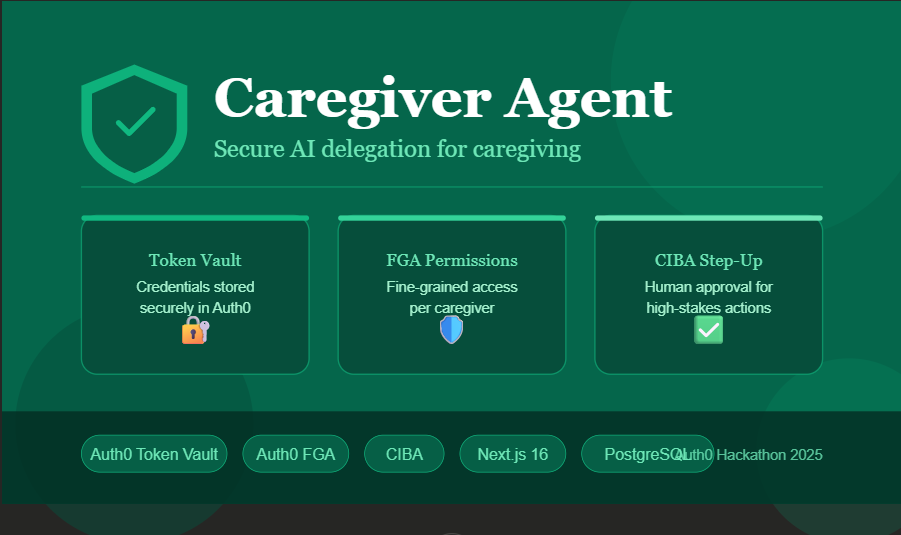
Caregiver Agent — Secure AI Delegation for Caregiving
What inspired me
My grandmother lives alone and needs help managing her bills, medical appointments, and daily logistics. Like millions of families, we cobble together a patchwork of shared passwords, phone calls, and manual workarounds. It works — barely — but it's insecure, unauditable, and stressful for everyone involved.
When I saw the Auth0 "Authorized to Act" hackathon, the theme hit me immediately: this is exactly the problem delegated access was designed to solve. What if a caregiver could act on behalf of a care recipient — paying bills, booking appointments — without ever getting access to raw credentials? What if every action was logged, permissioned, and reversible?
That became Caregiver Agent.
What I built
Caregiver Agent is an AI-powered delegation platform that allows trusted caregivers to act securely on behalf of elderly or disabled care recipients.
The agent can:
- Pay bills on behalf of the care recipient (with FGA permission checks)
- Book medical appointments via Google Calendar (using Token Vault credentials)
- Pause for approval on high-stakes actions over $200 (CIBA step-up)
- Invite caregivers via shareable links with automatic FGA provisioning
- Audit every action with an immutable PostgreSQL log
How I built it
The architecture
The stack is Next.js 16 on Vercel, PostgreSQL on Neon, and three core Auth0 features that make the whole thing work:
1. Auth0 Token Vault — solving the Secret Zero problem
The biggest challenge with AI agents acting on users' behalf is: where do you store the credentials? The naive answer — store OAuth tokens in your database — creates a "Secret Zero" that, if leaked, exposes every user's accounts.
Token Vault eliminates this entirely. When a care recipient connects their Google Calendar, the OAuth refresh token is stored inside Auth0's vault, not our database. When the agent needs to book a calendar event, it performs a token exchange:
const res = await fetch(`https://${AUTH0_DOMAIN}/oauth/token`, {
  method: "POST",
  body: JSON.stringify({
    grant_type: "urn:auth0:params:oauth:grant-type:token-exchange:federated-connection-access-token",
    subject_token: refreshToken,
    subject_token_type: "urn:ietf:params:oauth:token-type:refresh_token",
    connection: "google-oauth2",
  }),
});
// Returns a fresh Google access token — we never stored it
The Google access token flows directly to the API call and is never stored anywhere.
2. Auth0 FGA — fine-grained permissions per caregiver
Not all caregivers should have the same access. FGA lets us define permissions at the resource level:
type bill
  relations
    define caregiver: [user]
    define can_pay: caregiver

type appointment
  relations
    define caregiver: [user]
    define can_book: caregiver
Every agent action checks FGA before executing:
const allowed = await fgaClient.check({
  user: `user:${caregiverUserId}`,
  relation: "can_pay",
  object: `bill:${billId}`
});
if (!allowed) return 403;
When a caregiver accepts an invite, FGA tuples are written automatically. When access is revoked, they're deleted immediately.
3. CIBA step-up — humans in the loop for high-stakes actions
For payments over $200, the agent doesn't just execute — it pauses and requires explicit approval from the care recipient. This is the AI safety layer that prevents the agent from ever acting beyond what the care recipient intended.
The flow:
- Agent detects payment > $200 threshold
- Creates pending approval record in PostgreSQL
- Shows amber CIBA approval card in UI
- Care recipient clicks Approve or Deny
- Only then does the payment execute
Challenges I faced
Token Vault endpoint discovery was the hardest part. The documentation describes the Connected Accounts flow, but getting the exact API paths, required scopes, and token exchange grant type right took significant iteration. The key insight was that retrieving tokens from the vault uses a completely different endpoint than storing them — a refresh token exchange at /oauth/token with a special grant type, not a direct vault read.
Multi-user FGA provisioning was the second challenge. The invite flow needed to automatically write FGA tuples when a caregiver accepted an invite, and delete them on revoke. Getting the FGA client credentials, API URL, and model ID all correct — and handling the "tuple already exists" edge case gracefully — required careful error handling.
Windows EPERM issues plagued local development. Next.js 16 with Turbopack occasionally locks .next build files on Windows, requiring process kills and cache clears between restarts.
What I learned
- Token Vault is the right model for AI agents. Agents that hold credentials are a liability. Agents that exchange short-lived tokens via a secure backchannel are dramatically safer.
- FGA and Token Vault are complementary. Token Vault answers "how do we get credentials securely?" FGA answers "who is allowed to use them for what?" Together they create a complete delegated access system.
- CIBA is underused. Most apps implement simple approve/deny flows manually. Auth0's CIBA gives you a standardized, auditable step-up pattern that's much more robust.
- The invite flow is the UX that matters most. The technical security is impressive, but the moment that felt most real was generating an invite link and watching a second user accept it — with permissions automatically provisioned. That's when the product felt genuinely useful.
What's next
- Tier 4: Replace keyword matching with real Claude API tool-calling for natural language understanding
- Tier 5: Mobile push notifications for CIBA approvals — so care recipients get a phone notification when a caregiver requests approval, not just a browser UI
- Production hardening: HIPAA compliance layer for PHI data, rate limiting, and end-to-end encryption for audit logs
- More integrations: Pharmacy refills, ride booking for medical transport, read-only medical records access with document-level FGA
📝 Bonus Blog Post: Solving the "Secret Zero" Problem in AI Agents with Auth0 Token Vault
When I started building Caregiver Agent, I ran into a problem that every developer building AI agents eventually faces: where do you store the user's API credentials?
The agent needs to call Google Calendar on the user's behalf. That means it needs a Google OAuth token. The naive approach is obvious — get the token during login, store it in your database, retrieve it when needed. Simple. And completely wrong.
That stored token is your Secret Zero. It's the credential that, if your database is breached, gives an attacker access to every user's Google account. It's the thing you have to rotate when it leaks. It's the liability that makes your security team nervous.
Auth0 Token Vault eliminates the Secret Zero entirely.
How it works
When a care recipient connects their Google Calendar, we use Auth0's Connected Accounts flow. The user approves access on Google's consent screen, and Auth0 intercepts the resulting tokens and stores them inside the Token Vault. Our application receives a completion response but never sees the raw refresh token.
POST /me/v1/connected-accounts/connect   → get auth_session + ticket
↓ redirect user to Google consent screen
POST /me/v1/connected-accounts/complete  → Auth0 stores token in vault
↓ we receive { id: "cac_...", connection: "google-oauth2" }
When the agent needs to call Google Calendar, it doesn't retrieve a stored token from our database. Instead, it performs a token exchange — trading an Auth0 refresh token for a fresh Google access token via a secure backchannel:
POST /oauth/token
{
  grant_type: "urn:auth0:params:oauth:grant-type:token-exchange:federated-connection-access-token",
  subject_token: "<auth0_refresh_token>",
  subject_token_type: "urn:ietf:params:oauth:token-type:refresh_token",
  connection: "google-oauth2"
}
// Returns: { access_token: "ya29...", expires_in: 3600 }
The Google access token flows directly to the Google Calendar API call and is never stored anywhere. When the call completes, it's gone. Our database contains zero Google credentials.
Why this matters for AI agents specifically
AI agents are different from traditional web apps. A web app makes API calls in response to explicit user actions. An AI agent makes API calls autonomously, potentially long after the user has left the session, based on its own reasoning.
This autonomy is what makes the Secret Zero problem so dangerous for agents. If the agent holds a stored credential, that credential must exist somewhere accessible to the agent's runtime — which means it's accessible to anyone who compromises the agent. The attack surface is enormous.
Token Vault breaks this dependency. The agent doesn't hold credentials. It holds an Auth0 refresh token, which it exchanges for a short-lived access token exactly when needed. If the agent is compromised, the attacker gets an Auth0 refresh token — which can be revoked immediately — not a Google OAuth token that might be valid for months.
Combining Token Vault with FGA
Token Vault solves credential storage. But delegated access has a second problem: authorization scope. Just because a caregiver has access to a care recipient's Google Calendar doesn't mean they should be able to do anything with it.
In Caregiver Agent, we combine Token Vault with Auth0 FGA to create layered security:
- Token Vault controls credential access — the agent can get a Google token
- FGA controls action authorization — the agent checks if this specific caregiver can book this specific appointment
Every agent action goes through an FGA check before the token exchange even happens:
const allowed = await fgaClient.check({
  user: `user:${caregiverUserId}`,
  relation: "can_book",
  object: `appointment:${appointmentId}`
});
if (!allowed) return 403; // Never even touches Token Vault
This means a caregiver can be blocked by FGA even if Token Vault access exists. The two systems are complementary — Token Vault handles the "how do we get credentials" problem, FGA handles the "who is allowed to use them for what" problem.
CIBA as the human-in-the-loop
The final piece is CIBA — Client-Initiated Backchannel Authentication. For high-stakes actions like large payments, we don't just check FGA and execute. We pause the agent and require explicit real-time approval from the care recipient.
This is the AI safety layer. Even if an agent's reasoning goes wrong, the CIBA step-up catches it. The care recipient sees a clear Approve/Deny prompt and must actively consent before anything executes.
Together, Token Vault + FGA + CIBA creates a security model appropriate for AI agents acting on users' behalf: credentials never stored, permissions finely scoped, and humans in the loop for consequential actions.
This is what "authorized to act" actually means.
Live demo: https://caregiver-agent.vercel.app Source code: https://github.com/kiranvasala24/Caregiver-agent
Built With
- auth0
- auth0-fga
- ciba
- google-calendar-api
- neon
- next.js
- postgresql
- tailwindcss
- token-vault
- typescript
- vercel


Log in or sign up for Devpost to join the conversation.