-
-
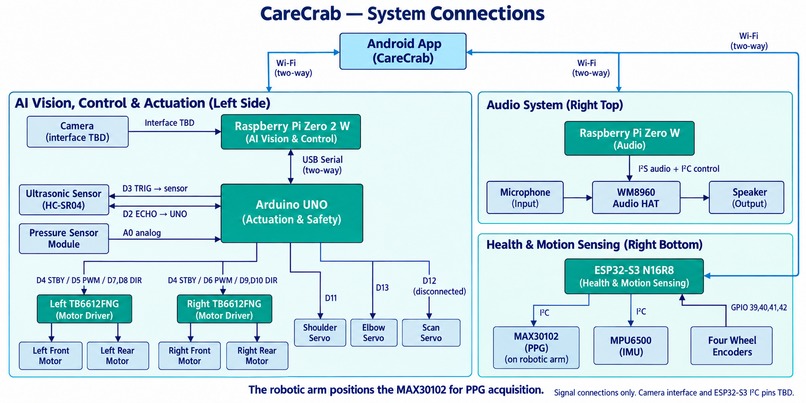
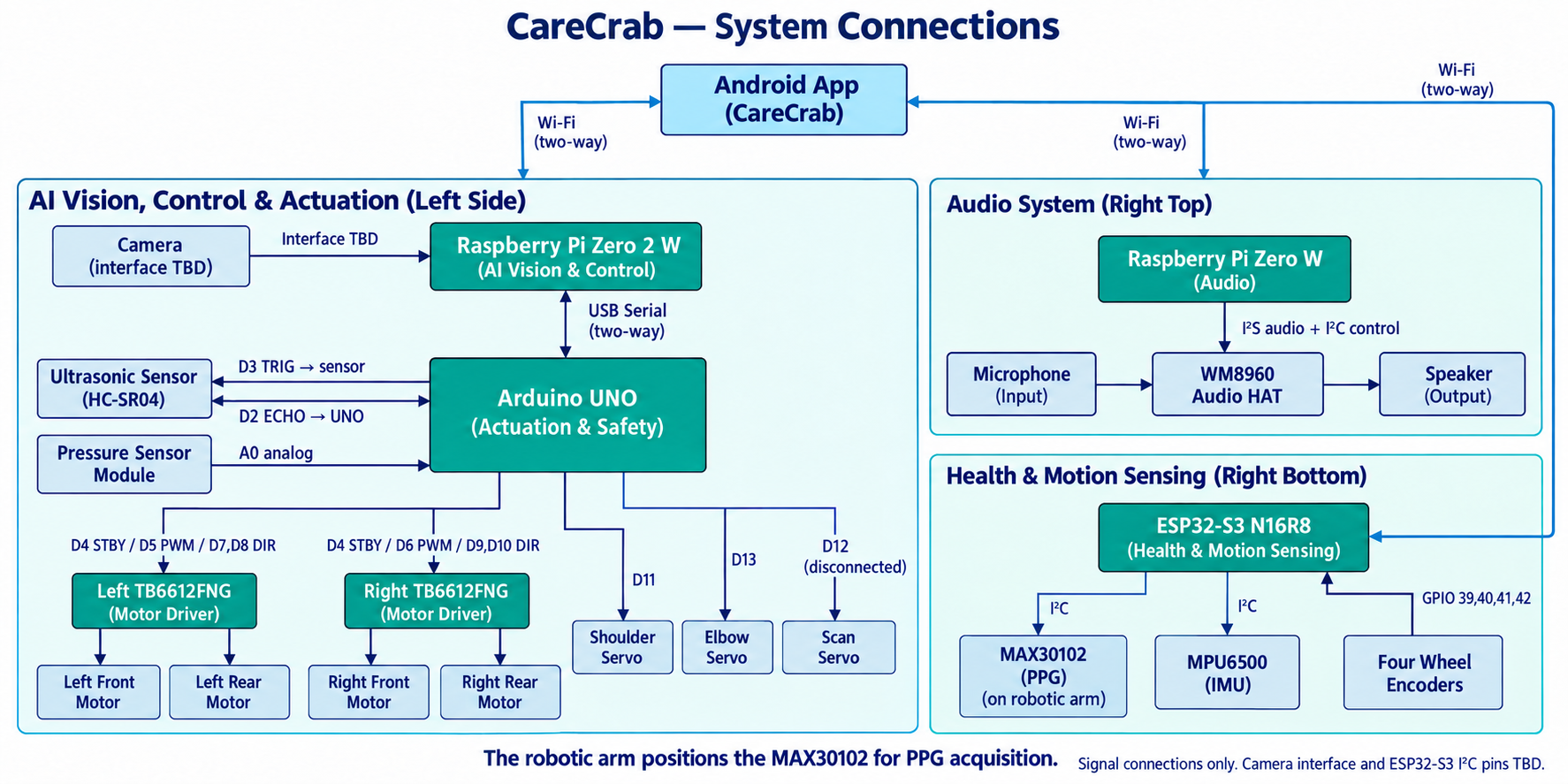
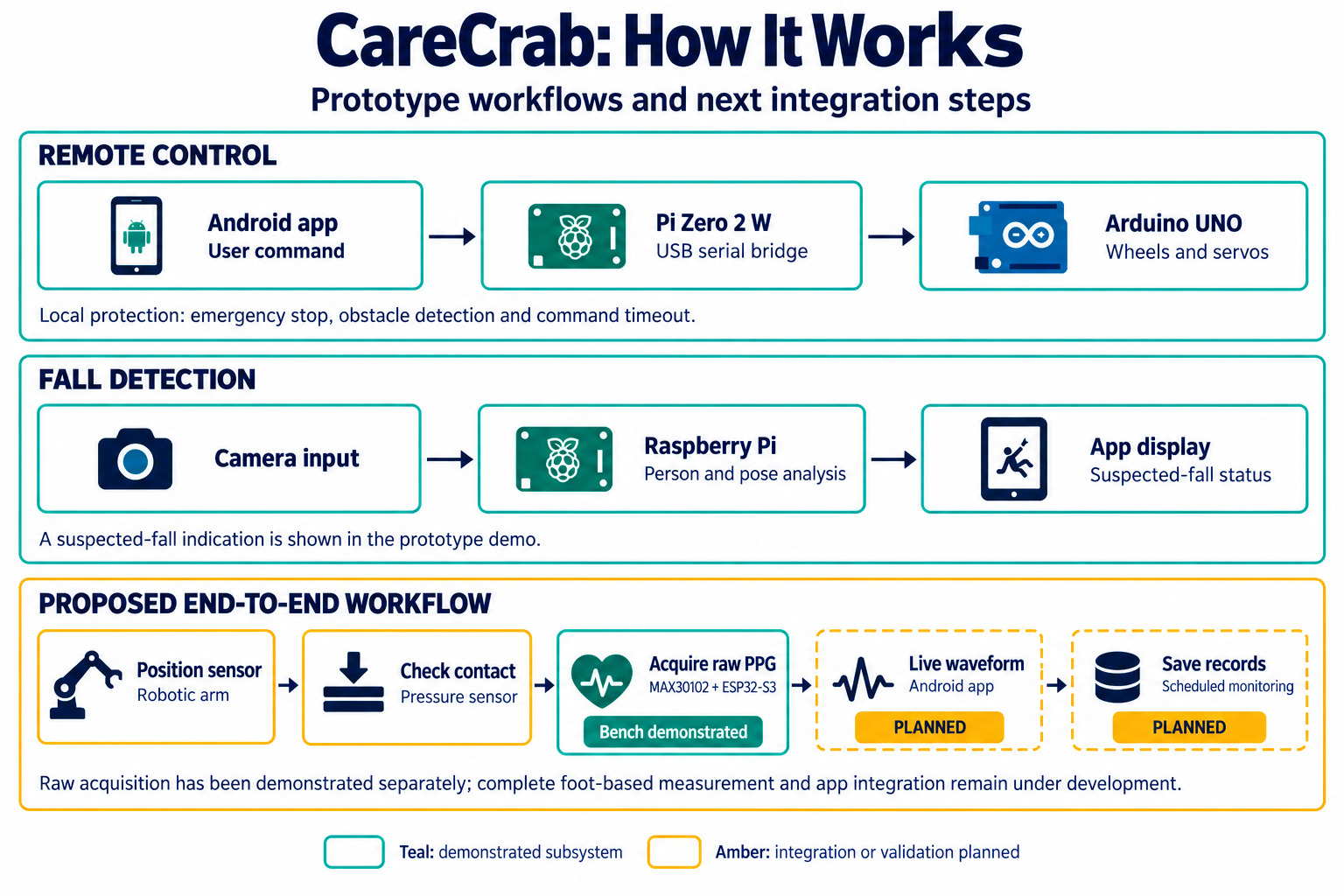
System Connections
-
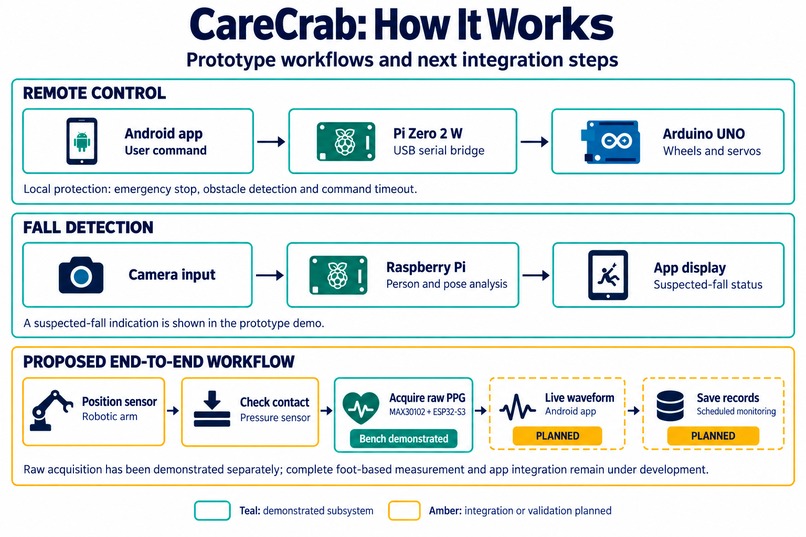
System Workflow
-
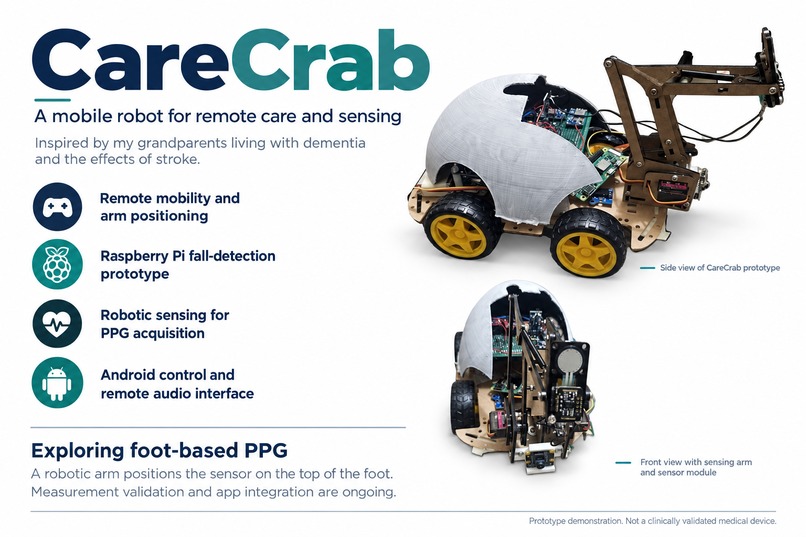
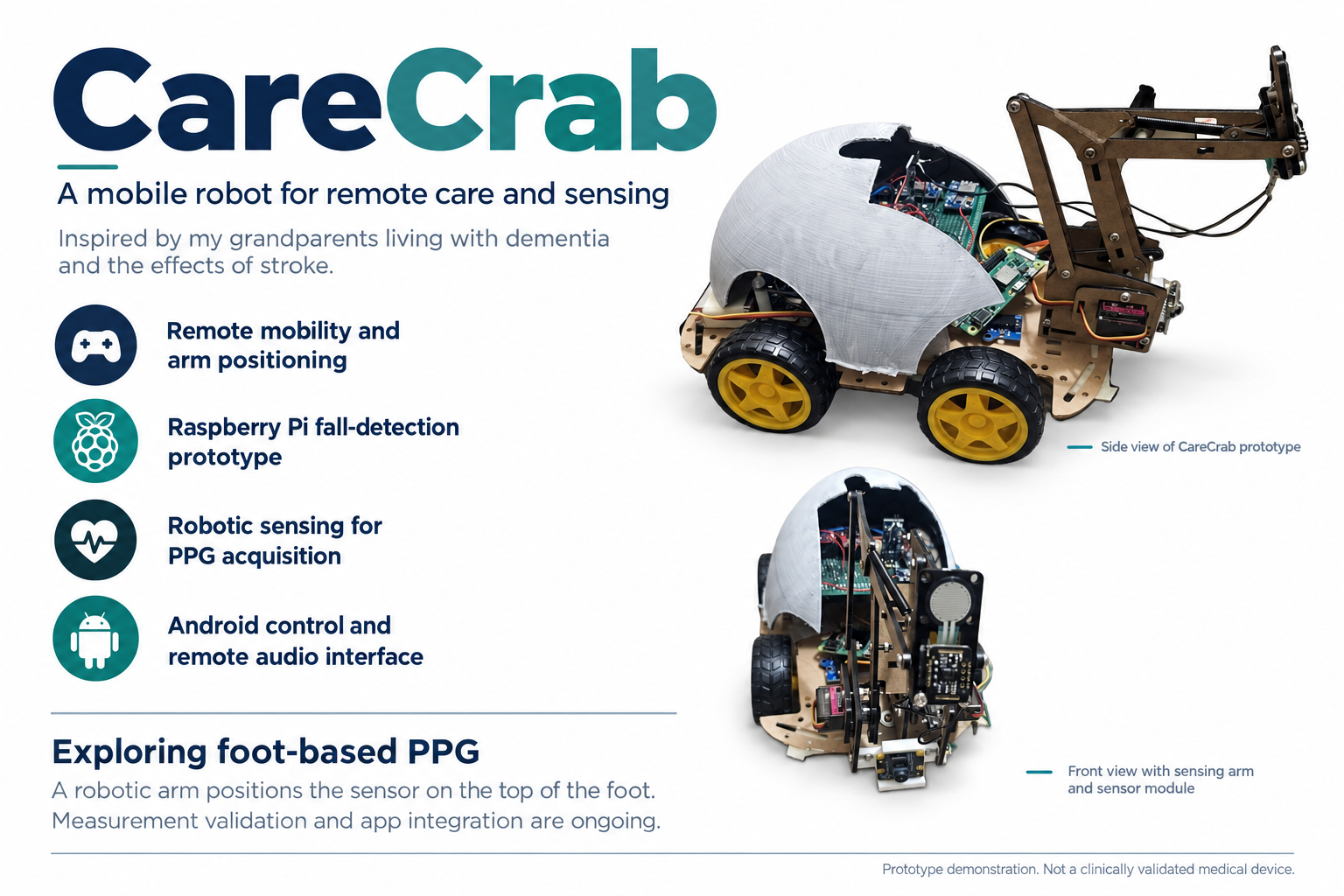
Project Overview
Inspiration
CareCrab started with my grandparents. One lives with dementia, and the other has experienced a stroke. Their experiences made me think about the moments when family members need help but no one is nearby to notice. I kept returning to one question: What if a home camera could move? Could it help us check on a loved one, recognize a possible fall, and respond sooner? Could it help someone notice earlier if my grandmother fell at home? The care robots I encountered felt financially out of reach for many families. I wanted to explore a more accessible approach using readily available development boards, sensors, and a small mobile platform. That idea became CareCrab, a mobile care robot prototype designed to help families stay connected and support everyday monitoring at home.
What it does
CareCrab brings a mobile camera, a robotic arm, and health-sensing hardware into one platform with an Android app. Its core functions and development goals include:
- Remote mobility: Operate the four-wheel platform from the app to adjust the robot’s position.
- Fall detection: Display camera footage and identify suspected falls through a Raspberry Pi vision pipeline.
- Robotic arm positioning: Move a sensing module toward a measurement location.
- PPG signal acquisition: Collect optical signals using a MAX30102 sensor and an ESP32-S3.
- Remote audio communication: Provide an interface for voice communication between the caregiver and the robot.
- Health records: Develop an app workflow for viewing measurements and recording changes over time. The prototype currently demonstrates the app interface, suspected-fall detection, robot control, and raw sensor signal acquisition. Live PPG integration into the app and reliable scheduled measurements are the next development steps. Exploring PPG measurement on the top of the foot A distinctive part of CareCrab is its exploration of robot-assisted PPG measurement on the top of the foot, also called the dorsum of the foot. Instead of relying only on a person holding a finger sensor, I want the robotic arm to help position the sensor at an accessible measurement site. A pressure sensor at the sensing end provides contact information for the control system. The goal is to investigate whether this approach can make repeated measurements more convenient for people with limited mobility. However, foot placement introduces challenges in sensor alignment, contact pressure, movement, and signal quality. This is an experimental direction. Reliable pulse-rate and oxygen-saturation estimates will require further signal processing, calibration, and comparison with reference measurements. The current prototype demonstrates sensor acquisition, not clinically validated measurements.
How i built it
I divided the system across several controllers so that each could handle a specific responsibility.
- Raspberry Pi Zero 2 W: Runs the vision functions and bridges motion commands to the Arduino through USB serial.
- Raspberry Pi Zero W: Handles the audio subsystem using a WM8960 Audio HAT, microphone, and speaker.
- Arduino UNO: Controls the wheel motors and servos, reads pressure and ultrasonic data, and implements local stopping logic.
- ESP32-S3 N16R8: Handles the health and motion sensing subsystem, including the MAX30102, MPU6500, and wheel encoders. The mechanical platform uses a four-wheel chassis, two TB6612FNG motor drivers, a servo-driven arm, and a 3D-printed enclosure. I built the Android interface in Android Studio. It includes robot controls, device connection settings, user and caregiver roles, an emergency-stop interface, and screens for health measurements and records. I developed the prototype incrementally: testing individual components, establishing communication between controllers, and then connecting the hardware behavior to the app.
Challenges i ran into
Keeping the wiring and software consistent was one of the biggest challenges. A servo connected to one pin could behave unexpectedly if the firmware assigned that pin to another function. I learned to treat the physical wiring and the code as one system and verify both before testing. Coordinating communication was another challenge. The robot combines Wi-Fi connections, USB serial, sensor interfaces, and several processors. I had to distinguish between a command being sent, a controller accepting it, and the hardware actually completing the action. Making motion predictable required careful testing. I worked with small servo movements and short motor commands, while checking emergency-stop behavior, obstacle detection, and communication timeouts. Moving from raw PPG data to useful information remains a major challenge. Displaying a sensor trace is only the beginning. Consistent measurements also depend on contact, motion, filtering, and validation. These problems showed me why a dedicated PCB matters: it can make power distribution and connections more organized and easier to verify than a prototype built with many individual wires.
Accomplishments that we're proud of
I am proud of turning a personal concern for my grandparents into a physical prototype that I can test and improve. The demonstration brings together an Android care interface, a Raspberry Pi vision pipeline that flags a suspected fall, robot actuation, and an ESP32-based sensor acquisition workflow. I am also proud of developing the mechanical sensing concept beyond a fixed camera. CareCrab explores how a mobile platform and a robotic arm could help bring sensing closer to the person who needs it.
What we learned
I learned that a care robot needs more than a collection of working components. The camera, app, sensors, and actuators must communicate reliably, and their behavior must remain understandable when something goes wrong. I also learned to separate what a demonstration shows from what still needs validation. A suspected-fall alert does not establish detection accuracy, and a PPG trace does not yet establish a reliable health measurement. Most importantly, I learned to keep the caregiver’s experience at the center of the design. Clear controls, visible connection status, and predictable stopping behavior matter as much as adding new features.
What's next for CareCrab
My next priorities are:
- Integrate PPG data into the Android app. Stream readings from the ESP32-S3, display live waveforms, and clearly indicate signal quality.
- Evaluate foot-based sensing. Test sensor placement, contact pressure, and repeatability before implementing reliable pulse-rate and oxygen-saturation estimates.
- Design a dedicated PCB. Finalize the schematic, confirm pin assignments, and organize power distribution and module connectors.
- Improve system reliability. Test communication recovery, motion safety, and fall detection across a wider range of conditions.
- Develop scheduled health records and remote communication. Explore how these features could support family check-ins and future telehealth workflows. CareCrab is intended to support caregivers and communication with healthcare professionals, rather than replace medical assessment or emergency services. My long-term goal is to make this kind of assistance accessible at a lower cost. I started with my grandparents in mind, but I hope CareCrab can eventually help other people stay connected to the family and friends they care about.


Log in or sign up for Devpost to join the conversation.