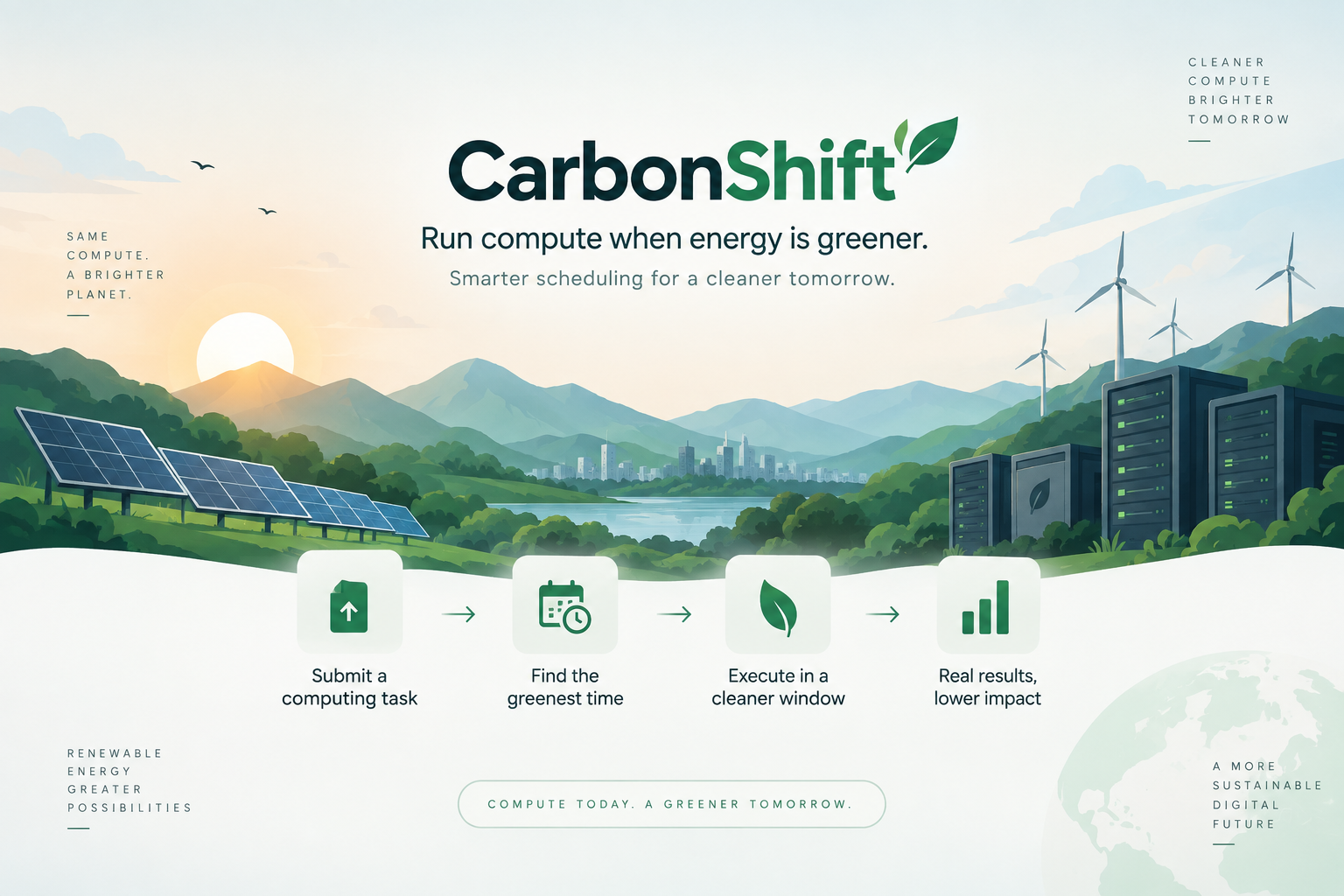
CarbonShift: Run Compute When Energy Is Greener 🌱
Inspiration
Computing is becoming an increasingly important part of our everyday lives. From artificial intelligence and cloud infrastructure to video processing and automated backups, companies run enormous numbers of computing jobs every day. All of these workloads require electricity, and the environmental impact of that electricity depends partly on how it is generated.
What interested me was a simple observation: not every computing task needs to run immediately.
A database backup scheduled for completion by the next morning does not necessarily need to start at midnight. An image processing batch can often wait a few hours. Certain AI training jobs, data analysis tasks and video rendering operations can also be scheduled flexibly as long as they finish before their deadlines.
Meanwhile, renewable energy availability changes throughout the day. Solar generation increases and decreases with sunlight, and the carbon intensity of grid electricity can also vary over time.
This led me to a question.
What if computing infrastructure could adapt to cleaner energy availability instead of executing every workload the moment it was submitted?
That question became CarbonShift.
Inspired by the Earth Forward theme of NextStep Hacks 2026, I wanted to build something that went beyond presenting environmental statistics on a dashboard. I wanted a system that could make a scheduling decision, act on that decision and provide evidence that the computing task actually executed.
The goal was to explore how existing computing resources could be used more intelligently without requiring users to sacrifice the deadlines of their workloads.
What it does
CarbonShift is a carbon aware workload scheduling prototype that determines when a flexible computing task should execute based on its deadline and estimated environmental impact.
Instead of immediately executing every submitted job, CarbonShift evaluates multiple possible execution windows and recommends one that minimizes estimated grid electricity consumption or associated carbon emissions, depending on the selected optimization objective.
The system considers several inputs, including the workload's estimated power consumption, expected duration, earliest permitted start, completion deadline, estimated solar generation and grid carbon intensity.
It compares the earliest possible execution time against alternative windows and selects a suitable schedule.
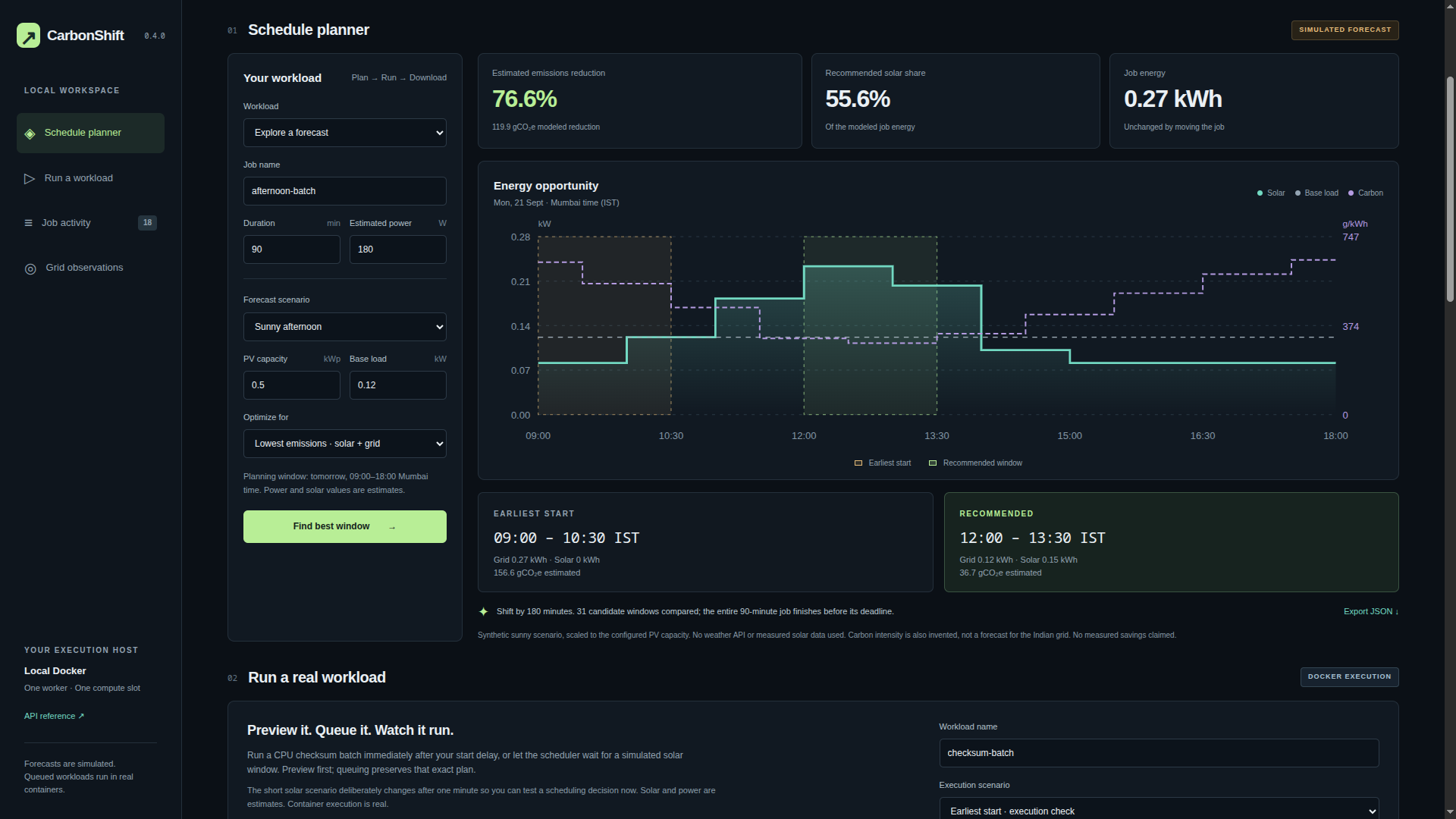
For example, imagine a facility that needs to process a large batch of images before 6 PM. Its solar panels might produce relatively little electricity in the morning but generate substantially more around midday.
CarbonShift can evaluate whether delaying that workload would allow a greater proportion of its estimated electricity requirement to be supplied by available solar generation.
The important distinction is that CarbonShift does not necessarily reduce the amount of electricity required to complete the task. Instead, it attempts to reduce dependence on grid electricity or the estimated emissions associated with the chosen execution time.
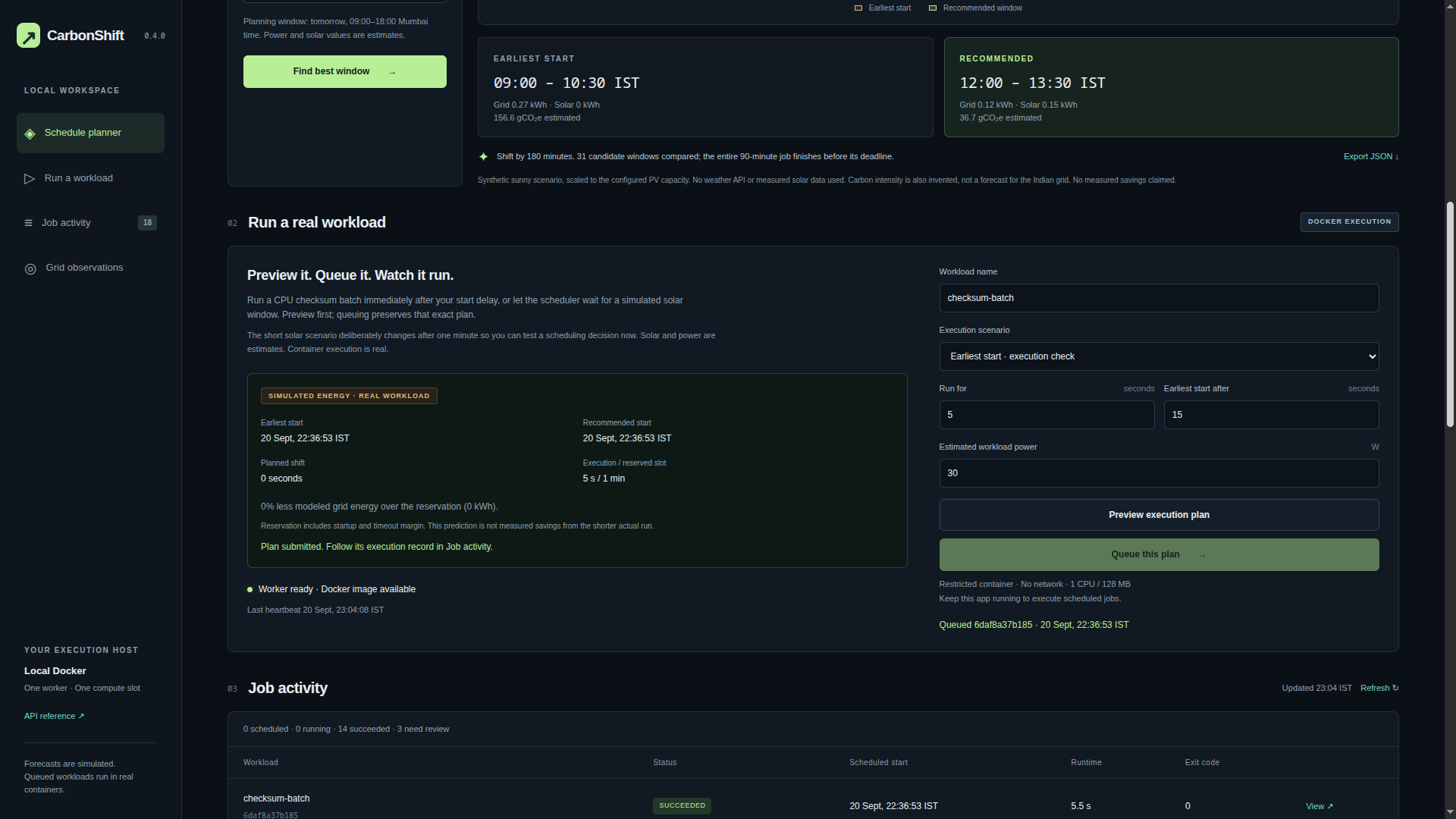
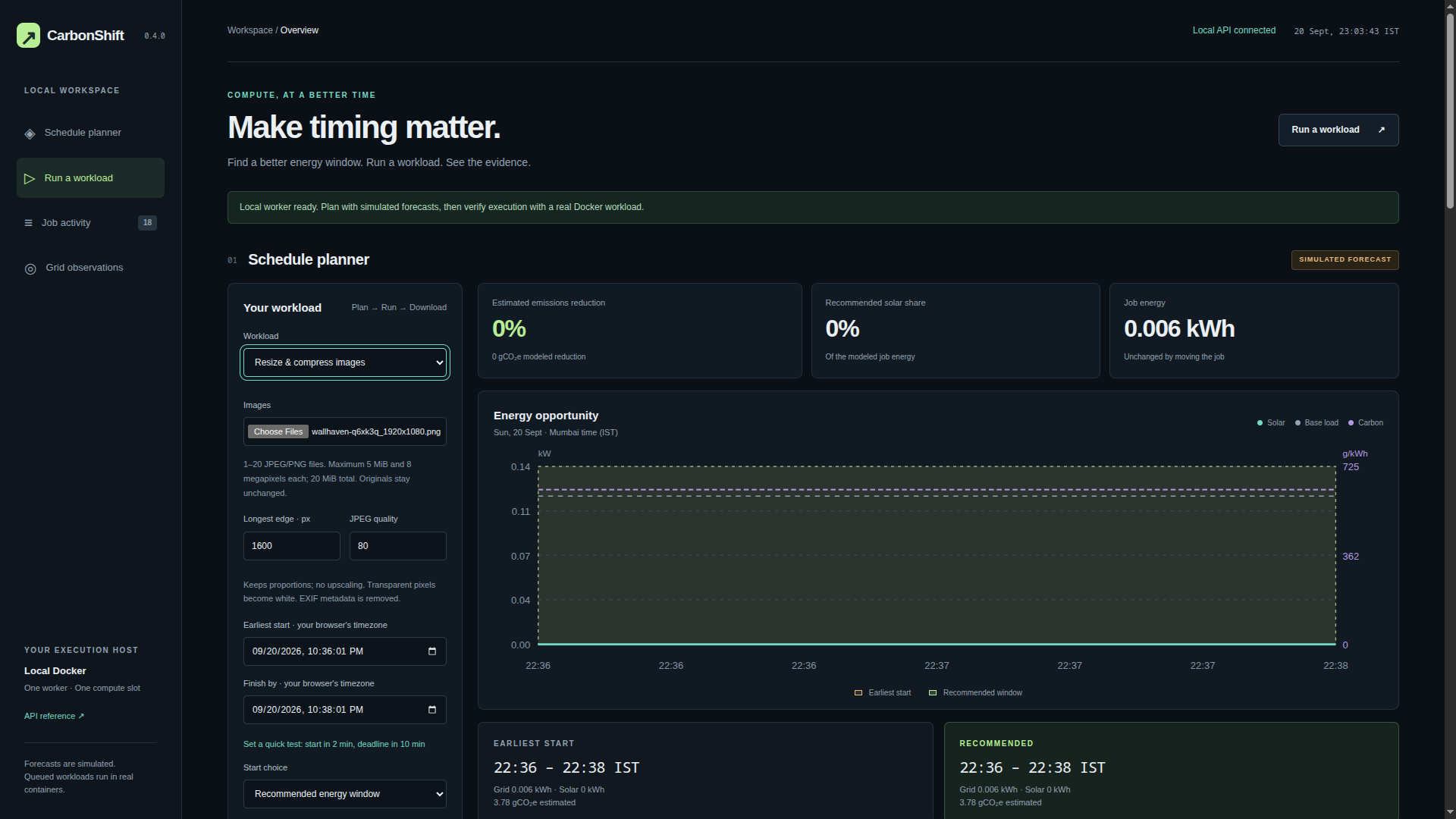
The application provides an interactive dashboard where users can examine environmental scenarios, configure computing workloads, compare execution windows and inspect estimated energy consumption.
The project also goes beyond scheduling recommendations. It can execute actual computing workloads.
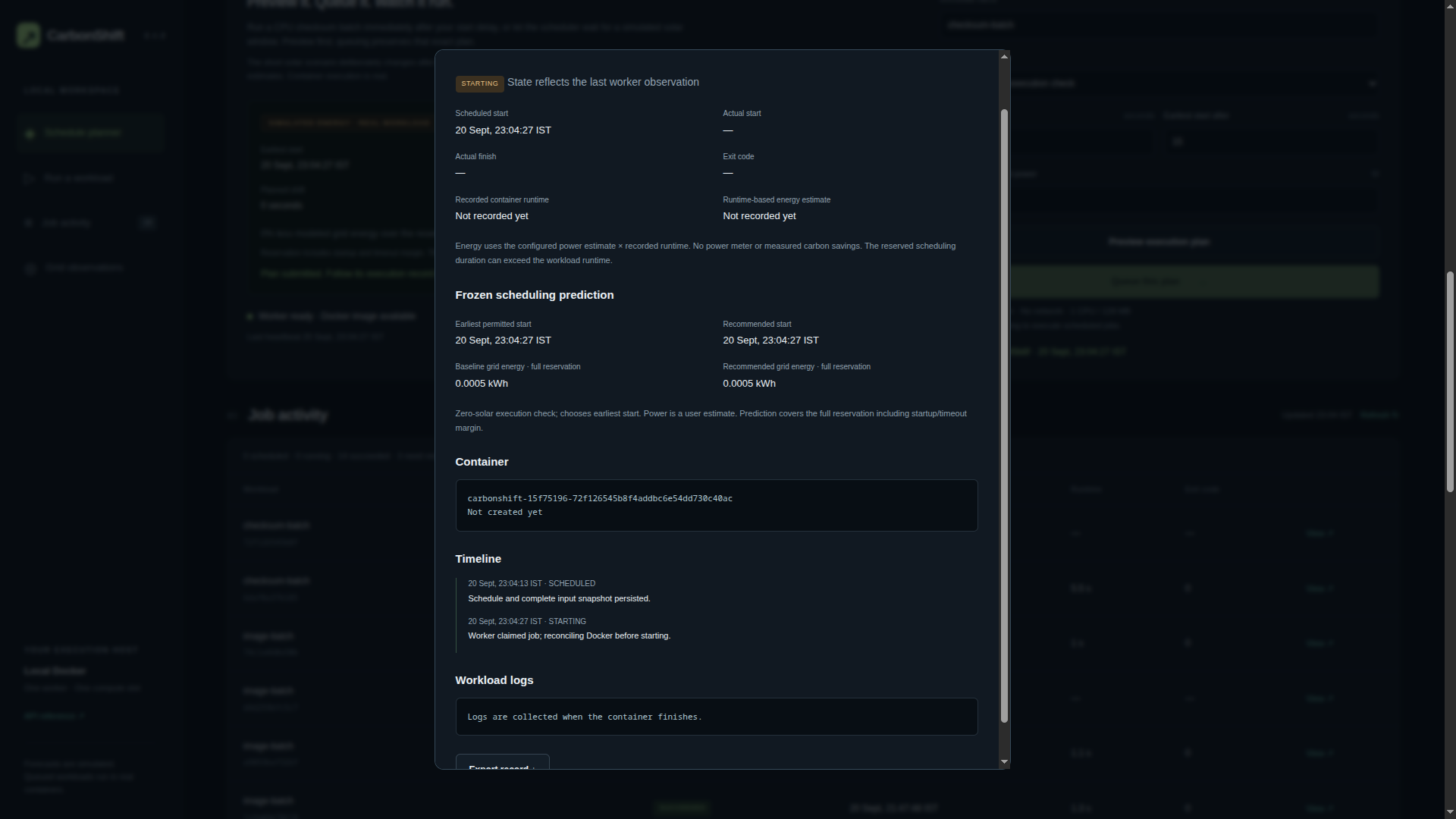
Once a user queues a task, CarbonShift stores the job and its selected schedule in a persistent SQLite database. A Docker worker subsequently claims the job, launches the appropriate container, monitors its execution and records the result.
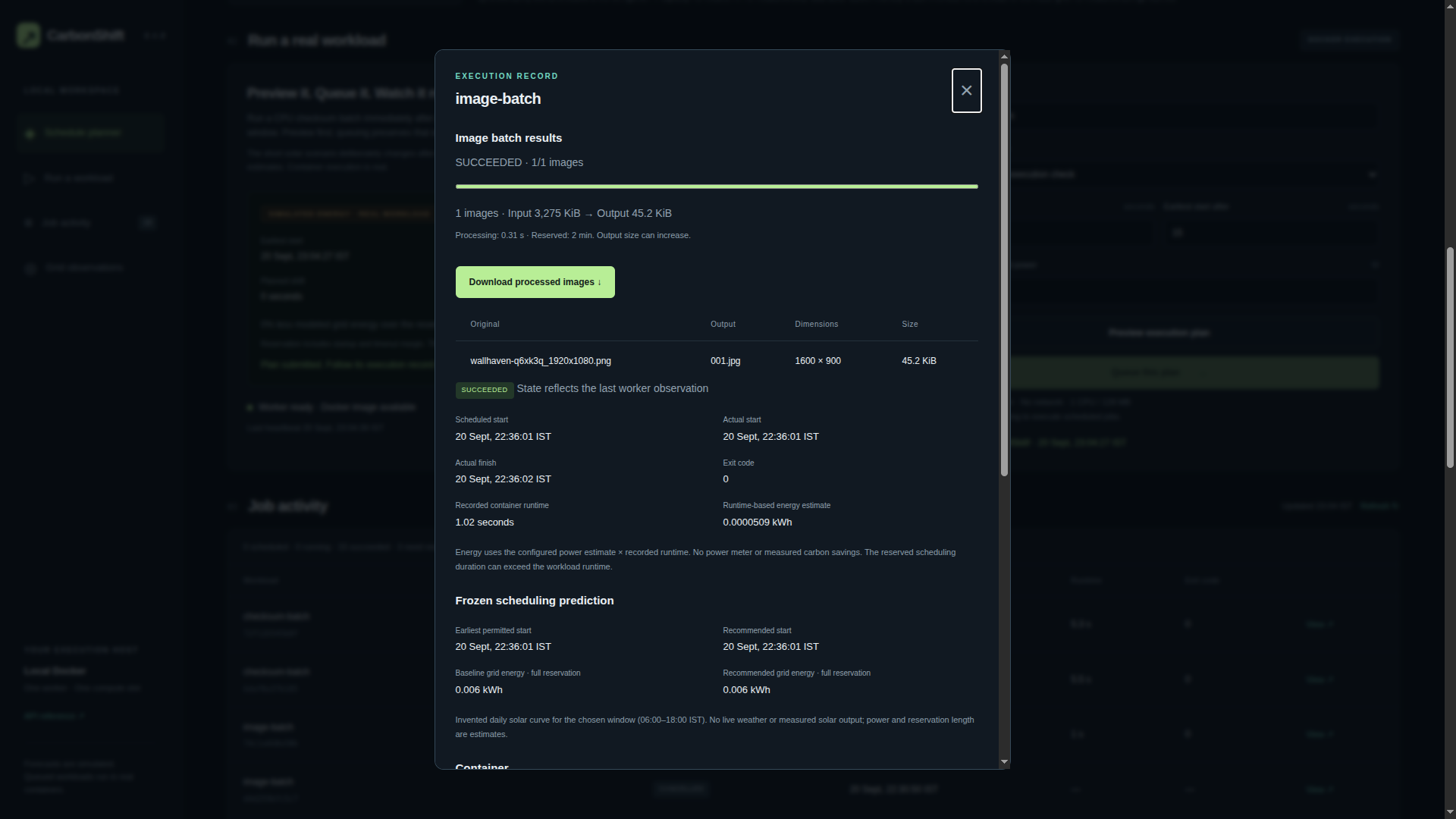
I implemented image processing as a practical example of a batch computing workload. Users can upload images, configure conversion settings, schedule the processing job and download the resulting JPG files in a ZIP archive after successful execution.
The application also supports a checksum workload that demonstrates scheduled execution independently of image processing.
Completed jobs retain execution information such as container identifiers, start and finish timestamps, exit codes, logs, runtime and generated artifacts.
For the current prototype, the dashboard uses simulated solar and carbon intensity scenarios. These allow the scheduling algorithm to be tested and demonstrated under different environmental conditions. Actual Docker execution is real, while energy consumption and environmental benefits are estimates rather than direct measurements.
How we built it
I built CarbonShift using Python, FastAPI, SQLite, Docker, HTML, CSS and JavaScript.
The system is divided into several interconnected components.
Scheduling and optimization engine
The scheduling engine forms the core of CarbonShift.
It receives the workload's estimated duration, power requirement, earliest permissible start and deadline. It then evaluates multiple candidate execution windows against the configured environmental scenario.
For solar optimization, the model estimates how much solar generation remains available after accounting for the facility's existing electricity demand.
For carbon optimization, it estimates emissions associated with the workload's grid electricity consumption using carbon intensity values.
The hybrid objective considers both local solar availability and estimated grid emissions.
The energy estimation follows a straightforward principle:
$$ E=\frac{P\times t}{1000} $$
Here, (E) represents energy in kilowatt hours, (P) is power in watts and (t) is duration in hours.
For emissions estimates, the model combines estimated grid energy with the applicable carbon intensity.
The optimizer compares candidate windows, checks that they satisfy the workload deadline and chooses the window with the lowest estimated impact under the selected objective.
The dashboard displays the earliest and recommended windows alongside their estimated energy and emissions values.
Environmental modelling
I implemented simulated solar generation and carbon intensity profiles to demonstrate how scheduling decisions change under different conditions.
The solar model also accounts for the facility's existing base load, meaning the entire solar output is not automatically assumed to be available for a new computing job.
The project includes a separate Open-Meteo command line integration for obtaining real weather forecasts and estimating solar availability. It also includes optional Electricity Maps integration for grid observations.
However, the current dashboard scheduling workflow uses simulated environmental scenarios. The real weather integration is not yet connected to the dashboard optimizer.
This distinction is important because I wanted the prototype to demonstrate its capabilities without misrepresenting simulated results as real environmental measurements.
Persistent job scheduling
SQLite stores submitted workloads, their configuration, scheduling decisions and execution history.
The scheduler saves the selected execution window and associated input snapshot when a job is queued.
This preserves the original scheduling prediction and allows the application to distinguish between what was expected before execution and what actually happened afterward.
The queue also includes safeguards for duplicate submissions and overlapping reservations.
Docker execution worker
A separate worker supervises the queue and identifies jobs that are ready to execute.
When a scheduled job becomes eligible, the worker creates and launches its Docker container.
The worker tracks execution states, manages timeouts, collects logs and records the container's final status.
This allows CarbonShift to demonstrate a complete process, from workload submission and optimization to scheduled execution and completion.
Image processing
I implemented image conversion as a real, verifiable computing workload.
The application accepts uploaded images and processes them inside Docker using configurable output settings.
Once processing finishes, the generated JPG files are packaged into a downloadable ZIP archive.
The execution record stores details about the output, including file sizes, image dimensions and processing information.
Dashboard and testing
The web interface brings these components together through a scheduling planner, forecast visualization, workload configuration, job activity and execution results.
I also developed an automated test suite covering the application's scheduling logic, API behaviour, queue operations, image processing and other components.
The final audit reported 108 passing automated tests with no failures or skips.
In addition to automated testing, I tested actual Docker execution on my local machine. An image processing job successfully completed with exit code zero and produced a valid downloadable result.
Challenges we ran into
One of the biggest challenges was turning the scheduling concept into an actual execution system.
Building an optimizer that recommends a time is relatively straightforward compared with ensuring that the job really starts at that time, executes reliably and produces a usable result.
The first major challenge involved Docker execution.
During development, a container failed to start because of an incompatible Docker logging configuration. Compression had been enabled while the maximum log file count was set to one.
The failure revealed why checking only whether a container was created was insufficient. I needed to verify actual execution and the final job result.
Another challenge involved persistent scheduling and worker timing.
The system needed to distinguish between a job being scheduled, claimed by the worker, started inside Docker and successfully completed.
Some execution attempts missed their reserved windows, highlighting the importance of scheduling margins, worker availability and clear job states.
I also encountered local server conflicts when attempting to launch another application instance while the existing server was already using the same port.
These problems reinforced the importance of debugging the complete system rather than assuming that individual components working in isolation meant the entire workflow was reliable.
Environmental modelling presented a different challenge.
Real grid carbon intensity data and forecasts are not always freely available through APIs. Rather than make the project dependent on paid access, I retained an explicitly simulated environmental model that allows the optimizer to be demonstrated reproducibly.
Another important consideration was separating predictions from measurements.
A workload may reserve two minutes of execution time but finish in only a few seconds. The energy predicted for the reserved scheduling window is therefore not the same as the runtime based energy estimate recorded after execution.
I made sure the system preserves these distinctions instead of presenting all calculated values as measured environmental savings.
Finally, preparing the project for demonstration was a challenge of its own. The system contains several moving parts, and I needed to make the relationship between the planner, job queue, Docker worker and execution results understandable through a single interface.
Accomplishments that we're proud of
The accomplishment I am most proud of is successfully connecting the optimization engine to real workload execution.
CarbonShift does not stop after displaying a recommended execution time.
The system can persist a job, wait until its scheduled execution window, launch a Docker container and record the outcome.
I successfully tested an image processing job that reached the SUCCEEDED state with exit code zero. The container processed the uploaded image, generated the expected JPG output and made the result available for download.
I also demonstrated a checksum workload being intentionally delayed by the scheduler and subsequently launched by the Docker worker.
These tests helped establish that the application was doing more than simply displaying a simulated scheduling recommendation.
Another accomplishment was building an integrated application rather than several disconnected scripts.
The optimizer, persistent queue, execution worker, image processing system and dashboard communicate as parts of one workflow.
The automated test suite also reached 108 passing tests in the final audit.
I am proud that the project maintains a clear distinction between simulated environmental inputs, estimated energy consumption and actual execution evidence.
For me, making the prototype technically honest was just as important as making it functional.
CarbonShift is not a production ready data centre scheduler yet, but it demonstrates the underlying scheduling and execution mechanisms in a working local system.
What we learned
CarbonShift taught me that scheduling computing workloads involves much more than choosing the hour with the highest renewable energy generation.
A scheduler must consider workload duration, deadlines, facility electricity demand, available renewable energy, worker availability and execution constraints.
I also learned how important it is to distinguish power from energy.
Power describes the rate at which electricity is consumed, while energy represents electricity consumption over time.
A workload consuming 180 watts for two minutes has a different energy requirement from the same workload running for two hours.
Understanding this relationship was essential for implementing meaningful energy estimates.
Another important lesson was understanding the distinction between grid electricity reduction and carbon emissions reduction.
Two execution windows may require the same amount of grid electricity but have different estimated emissions because their electricity carbon intensity differs.
I also gained practical experience integrating a persistent job queue with Docker execution, handling worker states, managing timeouts and recording execution evidence.
Testing the complete workflow taught me that a passing unit test or mocked Docker response cannot replace an actual execution test.
Finally, I learned that responsible environmental software needs transparent assumptions.
Forecasts are predictions, configured power values are estimates and modelled emissions reductions are not proof of real world carbon savings.
Building CarbonShift helped me understand both the potential of carbon aware computing and the engineering work required to turn a scheduling prototype into a reliable production system.
What's next for Carbon Shift
The next major step is integrating real environmental forecasts directly into the scheduling engine.
CarbonShift already includes a separate Open-Meteo integration, and connecting its weather forecasts to the dashboard would allow the scheduler to estimate solar availability using real forecast data rather than predefined scenarios.
I also want to integrate grid carbon intensity forecasts when suitable data access becomes available.
Another improvement is automatic workload power profiling.
Currently, users provide an estimated power requirement. A future implementation could use hardware telemetry, historical workload behaviour and calibrated energy models to estimate power consumption automatically.
This would make the system easier to use and improve the quality of its energy predictions.
I would also like to extend CarbonShift beyond a single local Docker worker.
A distributed version could coordinate workloads across multiple servers, consider available computing capacity at different locations and potentially select both the execution time and execution location based on environmental conditions.
Additional improvements could include more advanced workload prioritization, deadline handling, renewable energy forecasting and integration with existing cloud infrastructure.
In the long term, I envision CarbonShift as a carbon aware orchestration layer that could integrate with data centres, AI training infrastructure, automated backup systems and media processing pipelines.
The ultimate goal is to make environmental impact another practical consideration in computing infrastructure, alongside performance, cost and reliability.
CarbonShift started with one simple question: what if we did not have to run every computing task immediately?
This prototype is my first attempt at turning that question into a working system.


Log in or sign up for Devpost to join the conversation.