CaptionForge AI
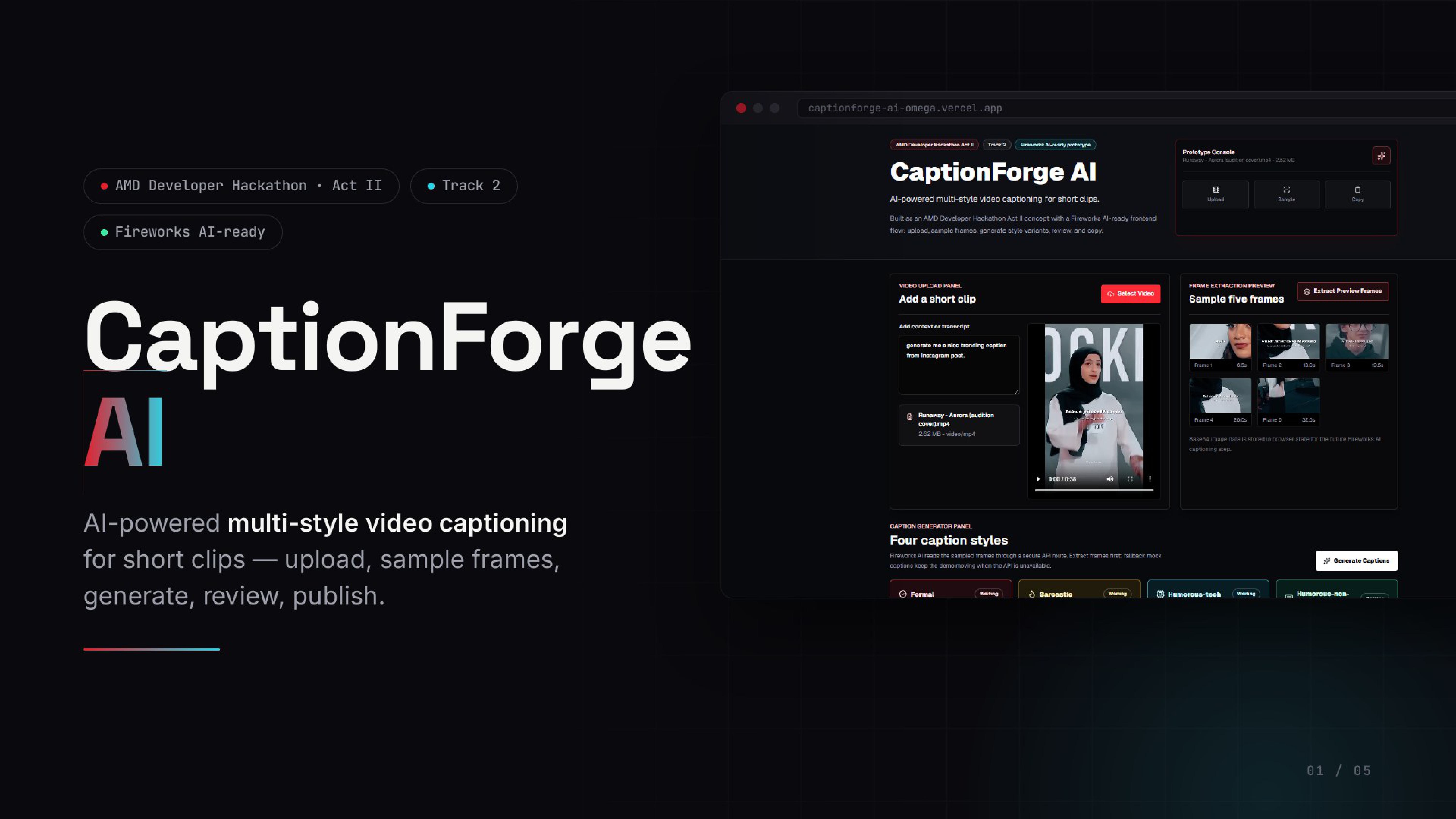
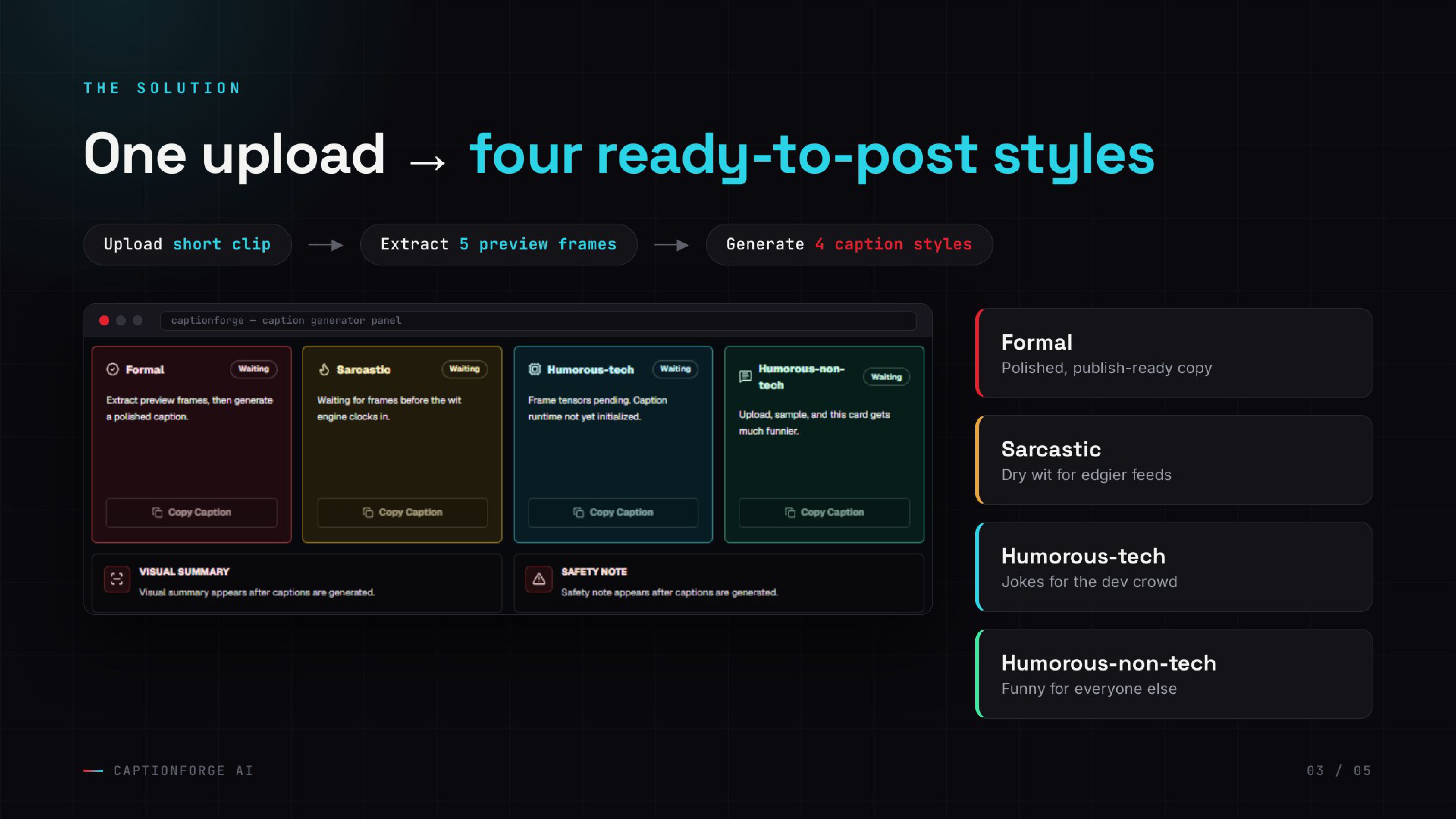
CaptionForge AI is a hackathon-ready Next.js MVP for turning short video clips into four caption styles: formal, sarcastic, humorous-tech, and humorous-non-tech.
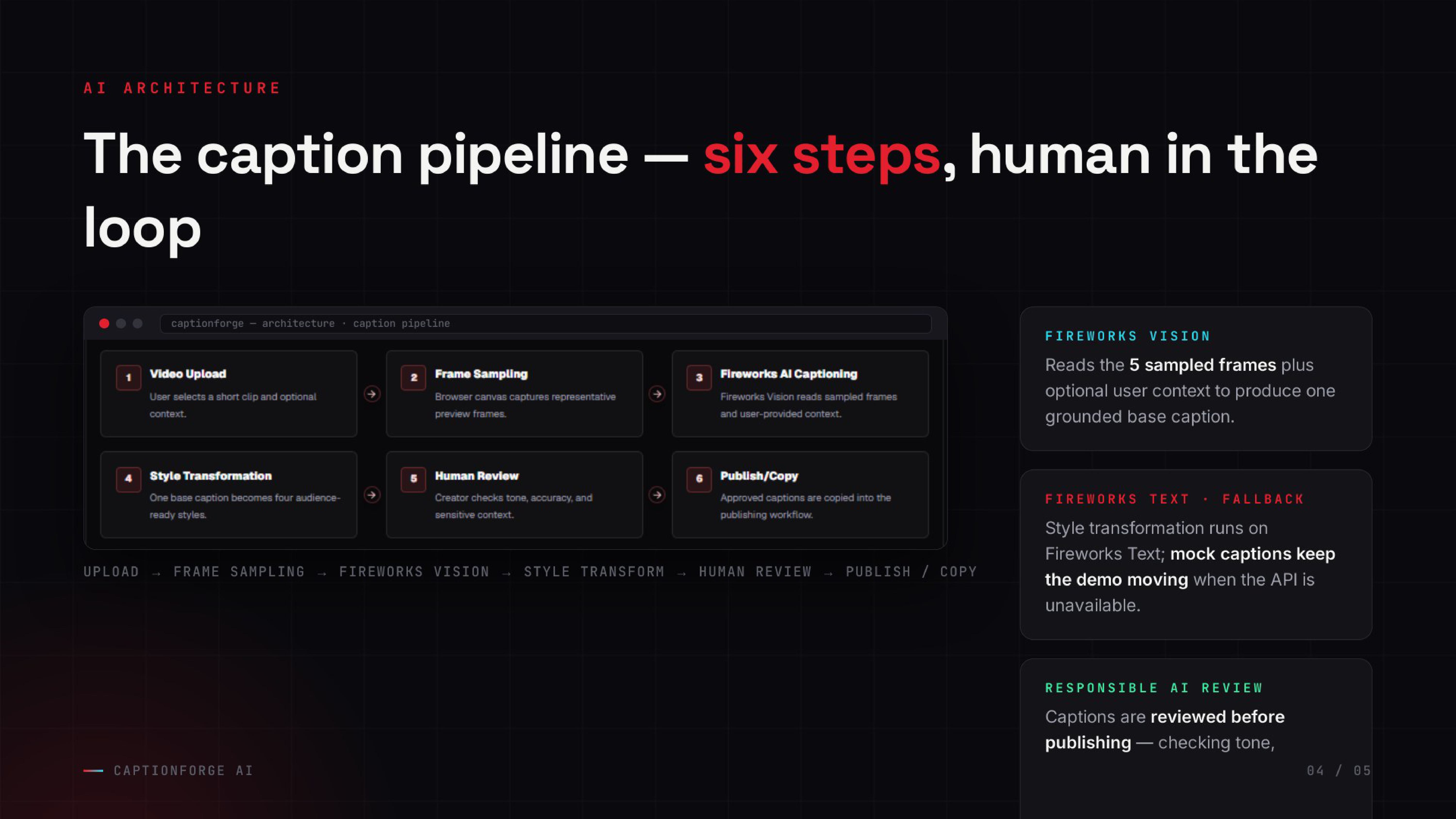
Built for the AMD Developer Hackathon Act II Track 2, the project demonstrates a Fireworks AI-ready captioning workflow with client-side video frame sampling, a secure server-side inference route, responsible fallback behavior, and human review before publishing.
Features
- Upload a short local video and preview it in the browser.
- Add optional context or transcript text to guide caption generation.
- Extract up to five downsized preview frames with HTML video and canvas.
- Generate four social-media-ready caption styles.
- Use Fireworks Vision when the configured vision model is available.
- Fall back to Fireworks Text when the vision model is unavailable.
- Fall back to mock captions when Fireworks is unavailable, so the demo keeps moving.
- Copy any caption to the clipboard.
- Show visual summary and safety note cards alongside generated captions.
- Keep all API keys server-side through a Next.js API route.
Tech Stack
- Next.js App Router
- TypeScript
- Tailwind CSS
- ESLint
- lucide-react
- OpenAI SDK with the Fireworks OpenAI-compatible endpoint
- Lightweight Node.js and FFmpeg Docker judging agent
Fireworks Vision Flow
The browser extracts five small JPEG preview frames from the uploaded video and stores them in React state as base64 data URLs. When the user clicks Generate Captions, the frontend sends those frames, optional context or transcript, the video filename, and the duration to /api/captions.
The API route validates the request, limits frame count and payload size, and calls Fireworks through the OpenAI-compatible SDK:
baseURL:https://api.fireworks.ai/inference/v1apiKey:FIREWORKS_API_KEY- vision model:
FIREWORKS_MODEL
If the vision call succeeds, the UI labels the caption cards as Fireworks Vision.
Fireworks Text Fallback
If the configured vision model returns an unavailable server status such as 404 or 500, the API route immediately tries the text fallback model from FIREWORKS_TEXT_MODEL.
The text fallback intentionally uses only:
- user-provided context or transcript
- video filename
- video duration
It does not pretend to analyze audio, pitch, voice, identity, hidden video details, or unavailable frames. If this fallback succeeds, the UI labels the result as Fireworks Text and shows the warning Vision model unavailable: using Fireworks text fallback.
If both Fireworks paths fail, CaptionForge AI returns safe mock captions and labels the cards as Mock.
Responsible AI Notes
- Captions should be reviewed before publishing.
- AI may miss context, speech, sarcasm, or sensitive content.
- Users should not use captions to misrepresent people or events.
- The prototype uses uploaded video frames and optional user-provided context.
- The app avoids naming private people unless the user provides names in context.
- Technical limitations are kept in the visual summary and safety note, not inside the caption cards.
Local Setup
Install dependencies:
npm install
Create a local environment file:
Copy-Item .env.example .env.local
Add your Fireworks API key to .env.local, then start the dev server:
npm run dev
Open http://localhost:3000.
Environment Variables
FIREWORKS_API_KEY=
FIREWORKS_MODEL=accounts/fireworks/models/minimax-m3
FIREWORKS_TEXT_MODEL=accounts/fireworks/models/deepseek-v4-pro
.env.local is ignored by git and should never be committed.
Track 2 Docker Judge
The Vercel deployment remains the interactive CaptionForge AI web demo. The root Dockerfile is a separate, one-shot Track 2 judging agent: it reads tasks from /input/tasks.json, samples each video with FFmpeg, calls the deployed caption API, writes /output/results.json, and exits. It never starts the Next.js server and contains no Fireworks or Vercel secrets.
The previous production web image is retained in Dockerfile.web for reference. Vercel continues to build and host the existing Next.js frontend and /api/captions route independently.
Input Schema
[
  {
    "task_id": "v1",
    "video_url": "https://example.com/video.mp4",
    "styles": [
      "formal",
      "sarcastic",
      "humorous_tech",
      "humorous_non_tech"
    ]
  }
]
Supported style values are formal, sarcastic, humorous_tech, and humorous_non_tech. The result contains every requested supported style.
Output Schema
[
  {
    "task_id": "v1",
    "captions": {
      "formal": "...",
      "sarcastic": "...",
      "humorous_tech": "...",
      "humorous_non_tech": "..."
    }
  }
]
Local Docker Test
The repository includes a public boulevard sample at judge-test/input/tasks.json.
Build and run it on Linux or macOS:
mkdir -p judge-test/output
docker build --platform linux/amd64 -t captionforge-ai:track2 .
docker run --rm \
  -v "$PWD/judge-test/input:/input:ro" \
  -v "$PWD/judge-test/output:/output" \
  captionforge-ai:track2
cat judge-test/output/results.json
PowerShell:
New-Item -ItemType Directory -Force judge-test/output | Out-Null
docker build --platform linux/amd64 -t captionforge-ai:track2 .
docker run --rm `
  --mount "type=bind,source=$((Resolve-Path judge-test/input).Path),target=/input,readonly" `
  --mount "type=bind,source=$((Resolve-Path judge-test/output).Path),target=/output" `
  captionforge-ai:track2
Get-Content judge-test/output/results.json
The judge image requires outbound HTTPS access to download task videos and call the deployed CaptionForge API. No API key or .env file should be passed into or baked into this image.
Demo Workflow
- Open the app.
- Upload a 30 to 60 second video.
- Add optional context or transcript.
- Click
Extract Preview Frames. - Confirm five thumbnails appear.
- Click
Generate Captions. - Review the source badge:
Fireworks Vision,Fireworks Text, orMock. - Read the visual summary and safety note.
- Copy the best caption after human review.
Useful Commands
npm run lint
npm run build
Built With
- css
- dockerfile
- javascript
- typescript

Log in or sign up for Devpost to join the conversation.