CaptionForge
Captions that are present and actually usable.
Inspiration
I needed something to test against, so I built a fake safety briefing. Three synthetic voices, a few sound effects, and an evacuation alarm partway through. Then I deliberately broke the caption file so I'd have known defects to hunt for.
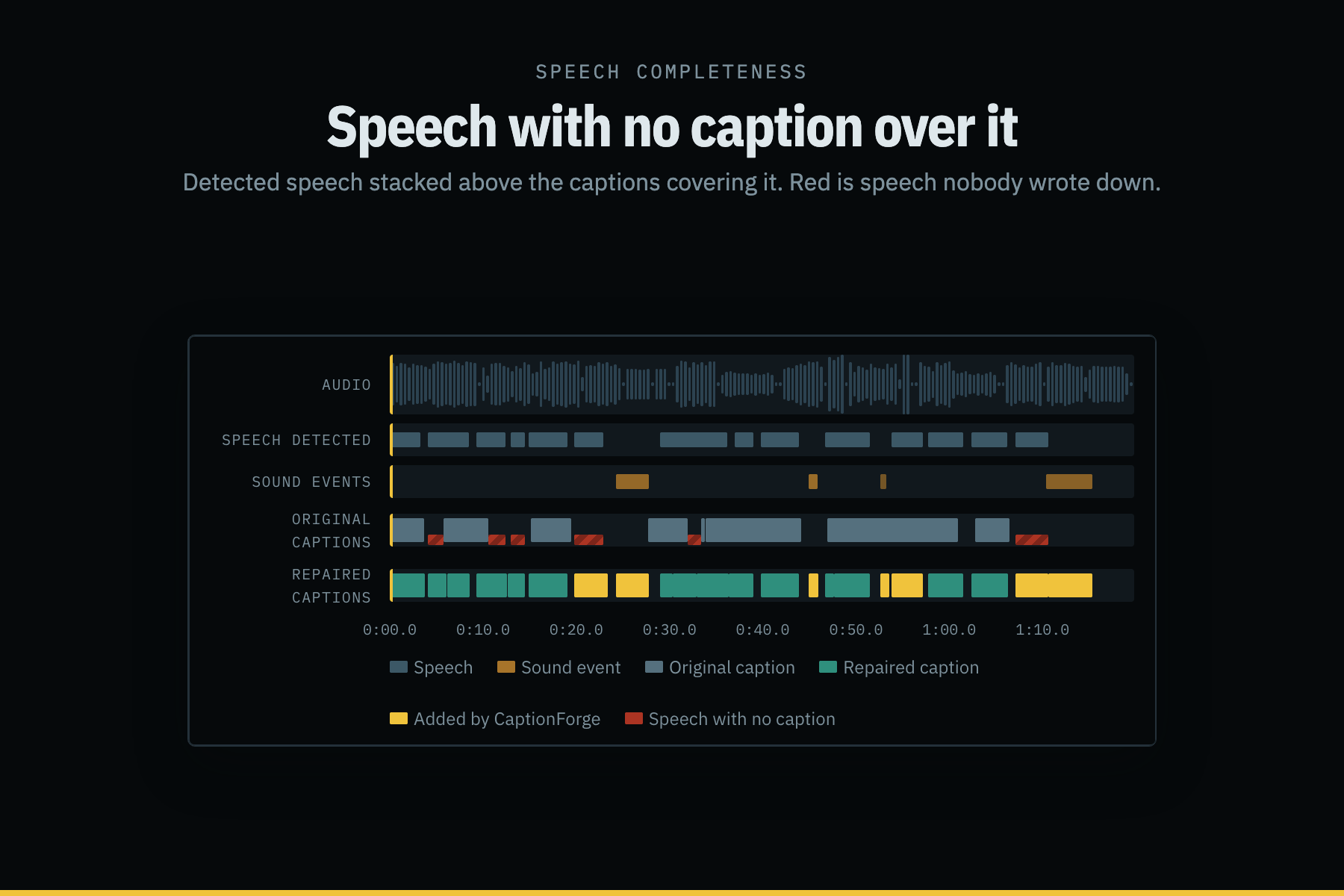
When I played it back with those captions on, there's a stretch around twenty seconds in where someone says which exit to use in an emergency, and then the alarm goes off, and the caption area is just empty. Nothing. I had written that gap myself, on purpose, and it still bothered me to watch.
That's the whole problem in one shot. Captions get treated as a yes/no. The file has a CC badge, the box is ticked, and someone signs off. But a track can contain every word that was said and still be useless: a second behind the voice, three lines deep, never telling you who's speaking, and completely silent about the alarm.
Nobody's checking for that. So I wrote something that does.
What it does
Drop in a video or audio file, plus an SRT or VTT if you have one. It'll:
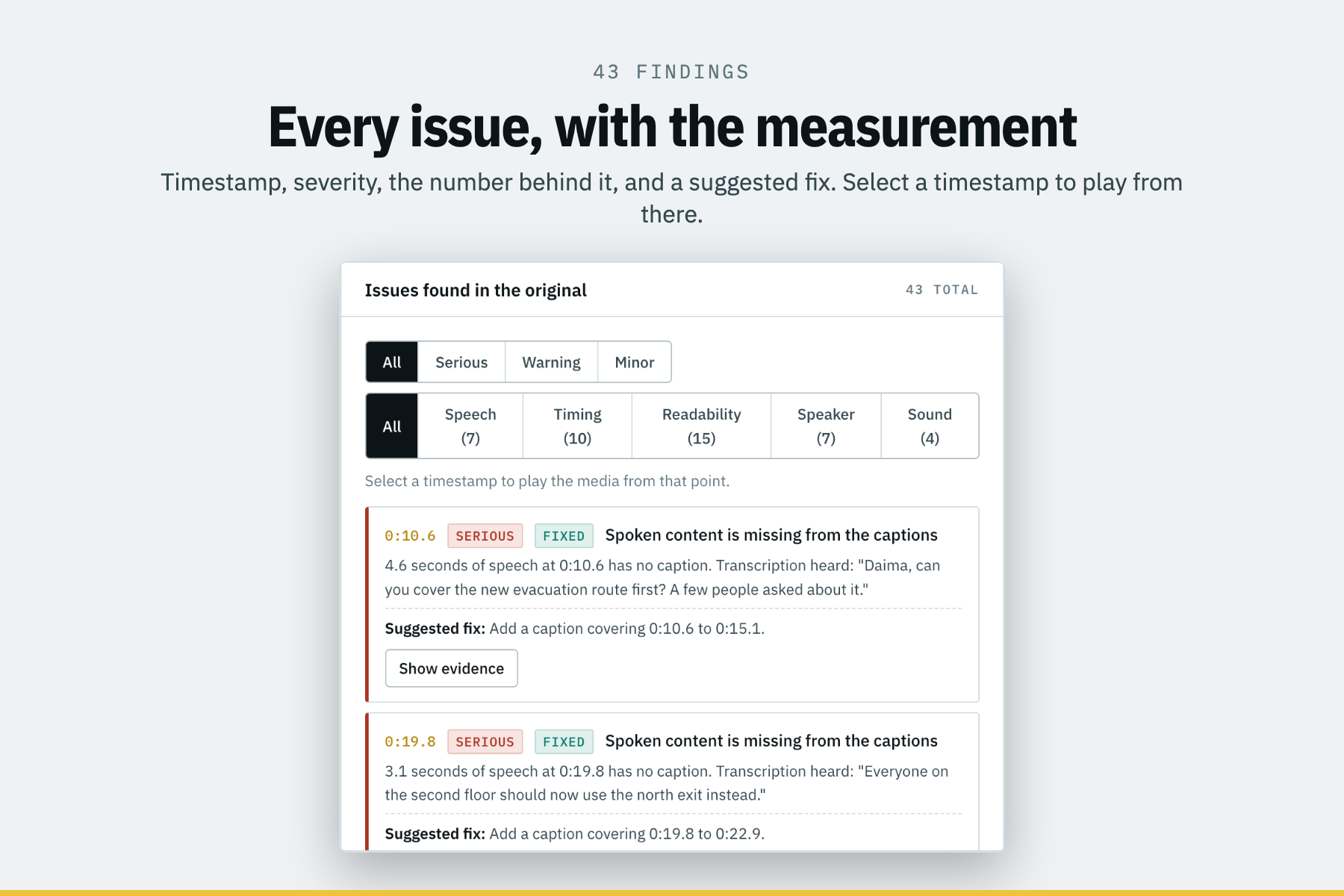
- Audit the captions and give you every problem with a timestamp, a severity, the actual number behind it, and what to do about it.
- Score five categories: speech completeness, timing, readability, speaker clarity, and sound context.
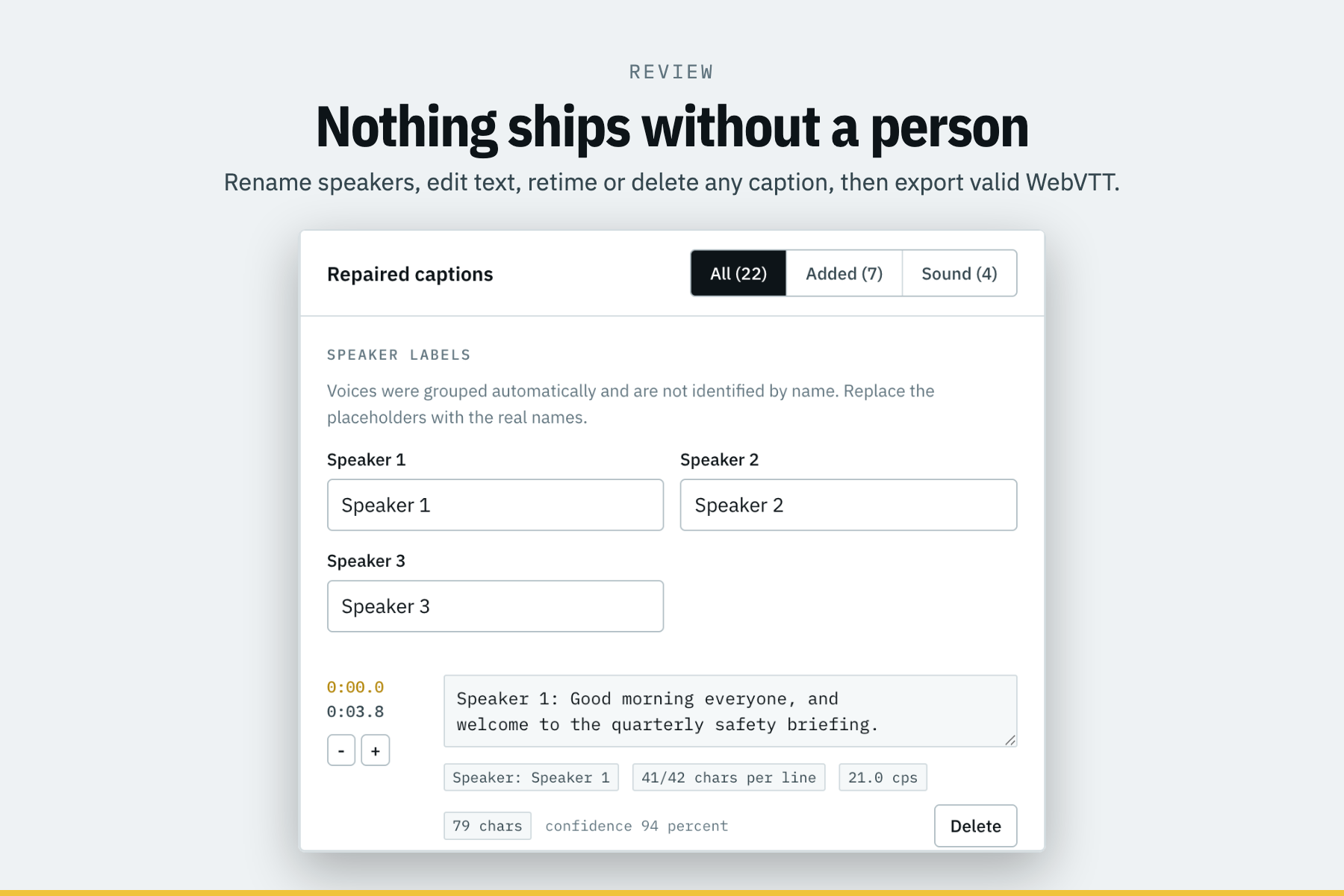
- Repair what's fixable. Realign captions to where the words actually are, write in speech that was never captioned at all, re-wrap lines, split captions that don't fit, label speakers when the voice changes, and describe sounds that matter.
- Let you play both tracks side by side and jump straight to any issue
- Export valid WebVTT (or SRT)
No caption file? It transcribes locally and builds one from scratch.
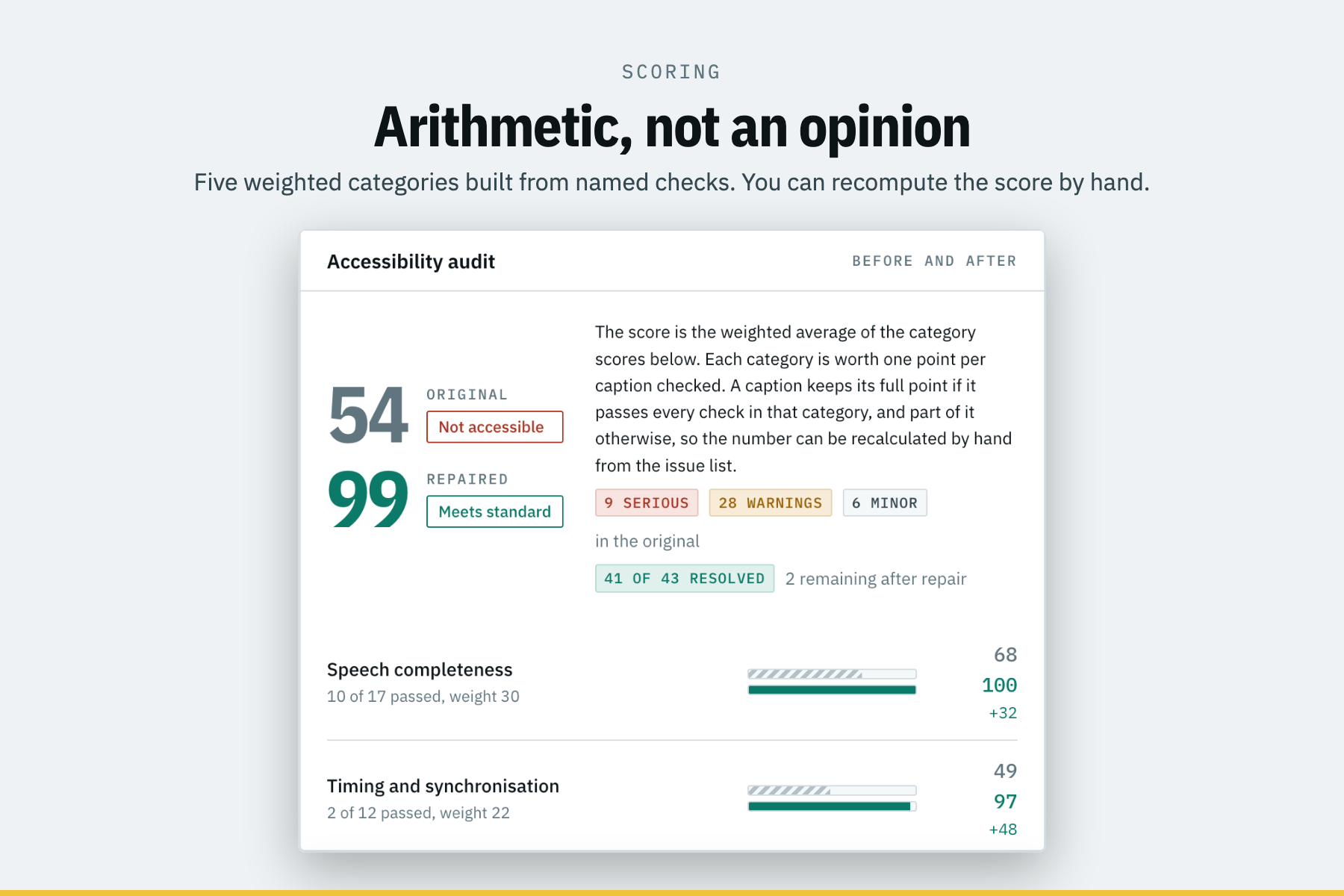
On the bundled sample it goes from 54 out of 100, "Not accessible," to 99, "Meets standard." 43 problems found, 41 fixed. 12 captions become 22. It picks out three speakers and all four sound events.
Everything's local. No API keys, no accounts, and no network calls once it's set up.
How we built it
Python does the analysis, and React does the reviewing. The repaired track gets run through the exact same audit code as the original, which is the only way the before and after numbers mean anything.
The part I cared most about was making the score checkable. Every category is a list of named rules with thresholds pulled from the BBC Subtitle Guidelines, the DCMP Captioning Key, and WCAG 2.1. Each caption is worth a point in each category. Pass everything, keep the point. Fail something, keep a fraction of it depending on how bad. The category score is the percentage you kept, the overall is the weighted average, and the weights are printed on screen. If you don't believe the number, you can add it up yourself from the issue list. If a category has nothing to check, it gets excluded and says so, instead of quietly defaulting to something.
For the detectors, speech activity is an adaptive energy threshold sitting between the noise floor and the speech peaks, with a few spectral tests on top. Speaker grouping is twenty MFCCs averaged over the voiced frames of each region, clustered by cosine distance. I cut the dendrogram at a fixed voice distance instead of searching for a cluster count, because you can measure how different two recordings of one voice are, but you can't know in advance how many people are in the room. Sound classification measures eight things about each segment (centroid, flatness, zero crossings, duration, attack, tonality, periodicity, and decay shape) and matches them against profiles for ten classes.
The repair that does the heavy lifting is caption realignment. It takes a caption's words and goes looking for them in the transcript, sliding a window of transcript words along and keeping whichever run matches best. Sounds obvious, but it's what lets you fix a caption whose duration is wrong, not just its position. Anything based on overlap can't do that, because a caption squeezed into one second only overlaps a sliver of its own speech and stays squeezed.
The sample itself is generated, not downloaded. A script synthesizes three voices with macOS say, builds the alarm and knocking and door and applause out of ffmpeg signal generators, mixes in low-level room tone so the detectors have a real noise floor to deal with, and renders slides so the clip still makes sense muted. Then it breaks the captions in fifteen specific, documented ways. That gave me ground truth to check against instead of just vibes.
Challenges we ran into
The alarm kept getting detected as speech. This one ate hours. A 1 kHz evacuation tone sits right in the middle of the 300 to 3400 Hz speech band and sailed through every test I had. I eventually dumped the raw feature distributions and found out why: frame by frame, a tone and a voice genuinely look the same. There's nothing to separate them at that resolution. You only see it across a whole region, where a tone keeps basically all its energy in the same six frequency bins the entire time (0.999) and speech never does (0.67 to 0.76). Had to move the check up a level.
Sound detection found 18 events in a file that has 4. Turned out the speech detector clips the edges of words, and the leftover fragments look like loud mystery noises. Three fixes: pad the exclusion zone around speech, only apply the speech-shaped test near actual speech (otherwise a real knock in the middle of silence gets suppressed by a test meant for word edges), and throw out anything sitting inside a conversational pause shorter than two seconds. That last rule means real sounds in short gaps get missed. I decided that's fine. Telling a deaf viewer a door slammed when someone just took a breath is worse than saying nothing.
Splitting captions to fix reading speed doesn't work, which took me embarrassingly long to accept. My first repair pass split anything over 21 characters per second. It cascaded into fragments and helped nothing, because the same text still has to be read in the same amount of time. Cutting it in half doesn't change the rate. Obvious in hindsight. The split trigger is now whether it physically fits on screen, and reading speed gets fixed by giving captions more time where the neighbors allow it and reporting honestly when they don't.
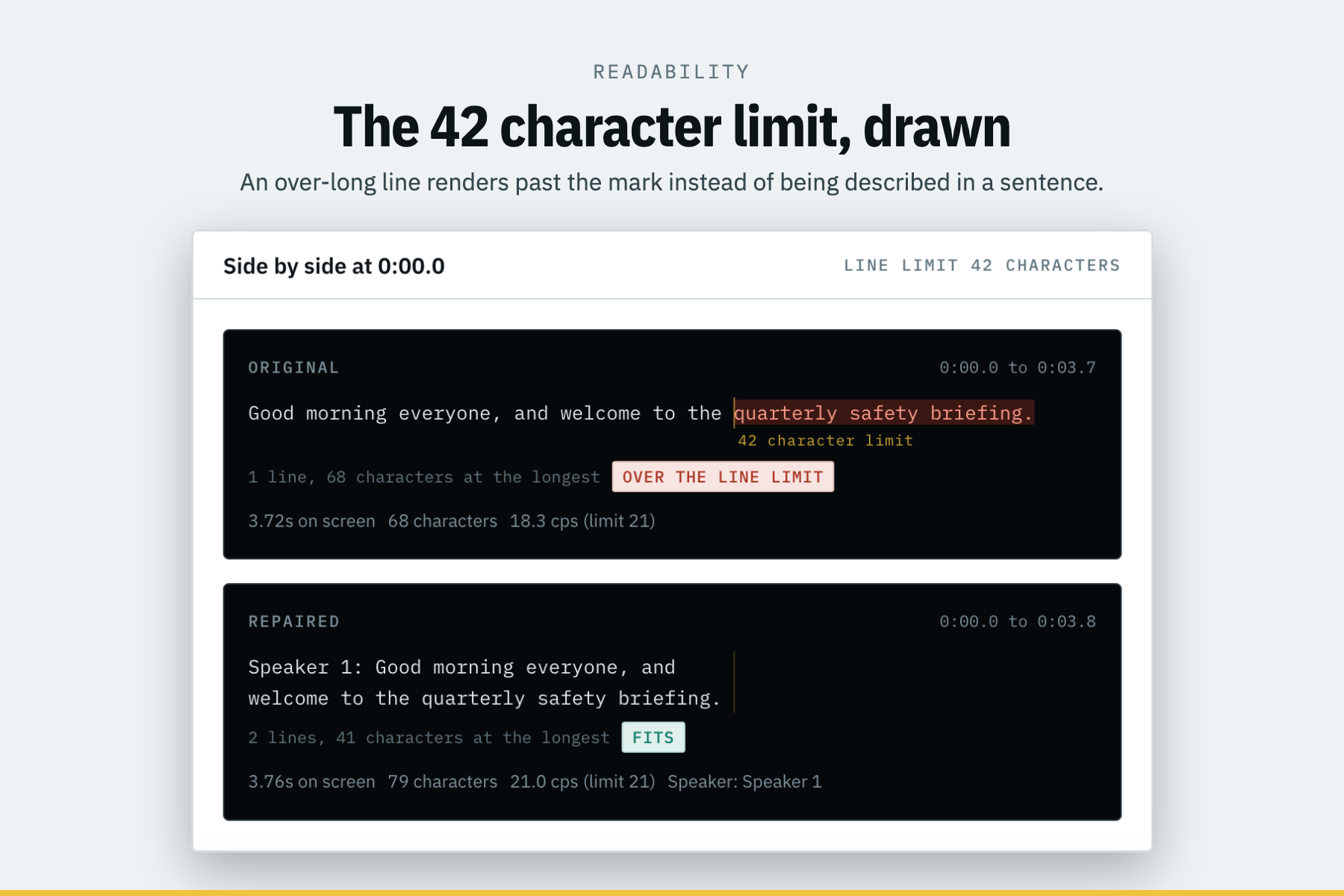
My own tool broke its own rule. Speaker labels were being added after line wrapping, so a caption I'd just "repaired" could blow past the 42-character limit once the label was on it. I found it by staring at a screenshot of the character ruler and noticing that a repaired caption was crossing the mark. The tests all passed. The feature I built to make violations visible is what caught me violating it.
Knocks and alarm beeps looked identical for a while. Both pulse. I was measuring across the whole event, so the silence between pulses dragged every number toward the room tone and made a steady alarm look unsteady, which got it classified as laughter. Fixed by measuring per burst instead: a knock collapses from its peak in a couple of frames, and a beep holds.
Text alignment kept preferring longer matches, because I was scoring by recall alone, and a run that swallowed the next sentence always contained every word it was looking for. Divide by the longer side instead, and the exact match wins.
Accomplishments that we're proud of
The score is checkable. You can recompute it by hand from what's on screen. I think that matters more than the number being good.
The character ruler is the thing I'd show first. The 42-character line limit is the fundamental constraint of captioning, and writing "42 characters" in a sentence tells you nothing. So the caption gets set in monospace against a mark at exactly 42 characters, and anything past it renders in red on the other side of the line. You see the violation instead of reading about it.
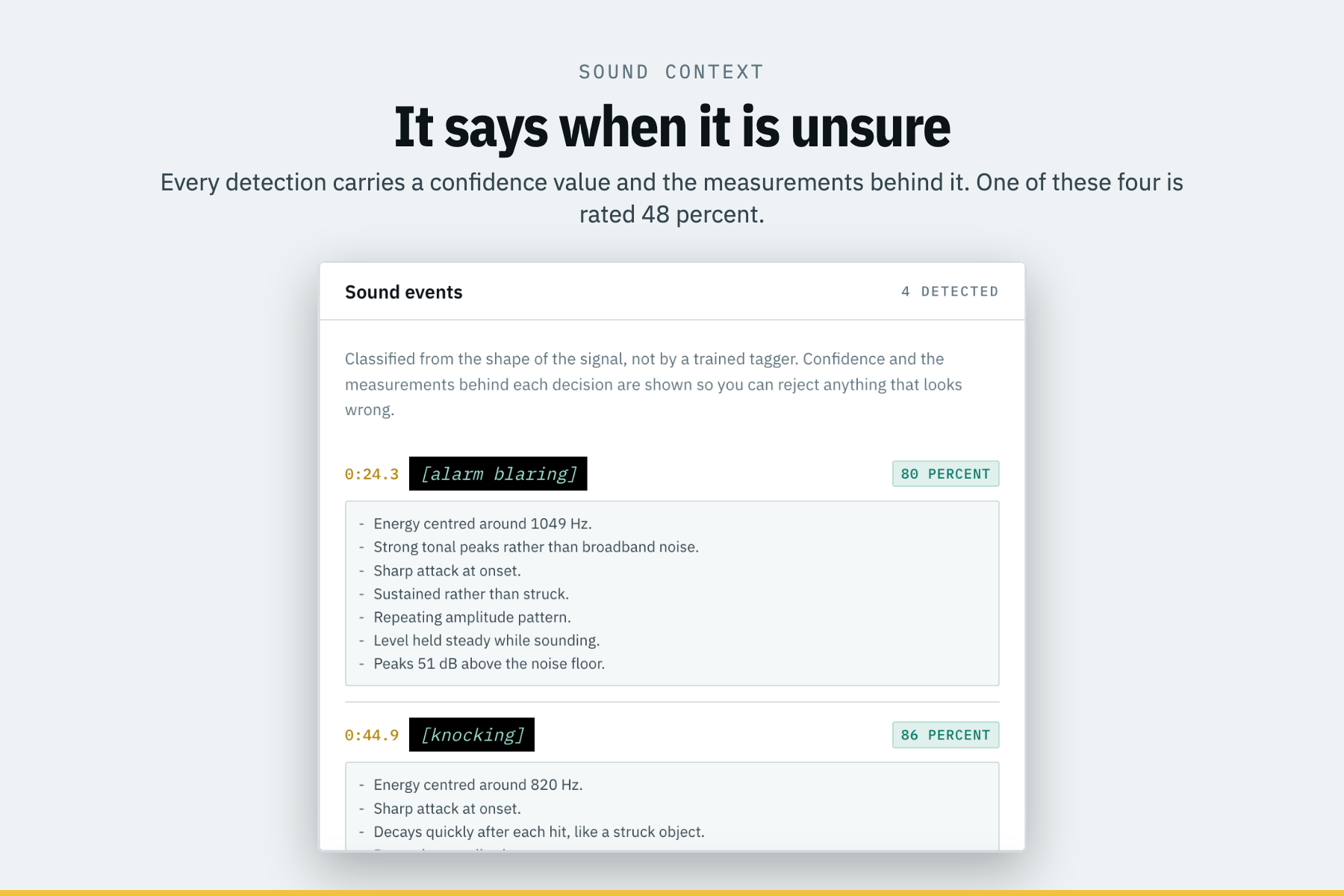
Detector results held up against ground truth: all four planted sound events were found and correctly classified, with zero false positives and three voices separated cleanly. Checked against the file the generator wrote, not against my own impression of how it sounded.
It admits when it's unsure. One of the four sound detections comes back at 48 percent confidence, and the interface says 48 percent, rather than rounding it into something reassuring. The sample also still contains a real transcription error (it hears "Dana" as "Daima"), and I left it in, because noticing that is exactly what the review screen is for.
110 tests, covering the boring stuff that actually breaks: timecode round trips, malformed SRT, every threshold boundary, the scoring arithmetic, the repair pipeline, and API error paths.
The demo video passes CaptionForge's own audit. Its subtitle file gets run through the product's parser and checks as part of the render, and it comes back clean. Felt like the least I could do.
It also degrades gracefully. Skip the optional speech recognition, and it still works, takes the sample from 55 to 88, and tells you exactly which checks it couldn't run. I tested that in a clean venv rather than assuming.
What we learned
The hard parts weren't the models. They were the judgement calls: when to shut up instead of guessing, how to make a number someone can argue with, and how to show an automated finding so a human can overrule it without thinking too hard.
Being conservative turned out to be a feature. My sound detector deliberately stays quiet about events in short gaps and will miss real ones because of it. That's the right trade. A caption track full of confident wrong guesses is worse than one with a few honest holes, because after two bad guesses the viewer stops trusting any of it.
And I learned not to trust my own output. That 42-character bug survived a green test suite. What caught it was looking at the picture.
One other thing, on the demo video: I set it up so the narration script is the only file I edit, and the scene timings get computed by measuring the synthesized audio. No frame numbers written by hand anywhere. That meant I could keep rewriting lines right up until the end instead of locking the script early and living with it, which I've regretted doing before.
What's Next for CaptionForge
A real sound event model. Right now it's ten hand-tuned acoustic profiles, which works but is obviously a ceiling. Something like YAMNet or PANNs would widen the classes a lot, handle overlapping events, and let me drop that conservative gap rule.
Proper speaker embeddings. MFCC clustering merges voices that genuinely sound alike. An ECAPA-TDNN embedding would separate them and make the speaker count more trustworthy than my fixed distance cut.
Forced alignment, to beat word-level Whisper timings, especially for caption tracks that condense speech rather than transcribing it word for word.
Shot change awareness. Captions shouldn't cross a cut. That's basic broadcast practice, and I don't do it at all, because the tool currently ignores the video image completely.
Caption positioning, so a caption can move out from over someone's face or over burned-in text. Needs face and text detection in the picture.
Batch mode, so you can point it at a folder instead of one file at a time. That's what makes it useful to an organization with a back catalogue.
More languages. Reading speed limits don't transfer between scripts, so this needs per-language thresholds rather than just swapping the model.
TTML and SCC for broadcast, and reading caption tracks embedded in MP4 instead of requiring a sidecar.

Log in or sign up for Devpost to join the conversation.