Inspiration
Financial advisors are some of the busiest professionals in the industry. They juggle hundreds of client relationships, attend back-to-back meetings, complete mandatory learning requirements, and coordinate with business partners all while trying to deliver personalised, high-quality advice. Yet most advisors still rely on scattered tools, disconnected spreadsheets, and manual note-taking to manage their day.We saw a real gap. There was no single, secure, self-contained platform built specifically for financial advisors. Every productivity tool was either too generic or too fragmented. Client relationships were falling through the cracks, learning was being neglected, and meeting insights were being lost the moment the call ended.That inspired us to build CapSight a platform that doesn't just organise an advisor's work, but actively makes them smarter, faster, and more present for their clients.
What it does
Advisor Productivity Dashboard: A personalised homepage that greets advisors every morning with an AI-generated briefing summarising their day upcoming meetings, urgent follow-ups, CPD progress, and announcements. An interactive weekly calendar lets advisors add, edit, and delete tasks in real time, with changes saved automatically.2. Proactive Follow-Up System
Client relationship cards flag advisors when a client hasn't been contacted in too long, or when a policy renewal is approaching. No client falls through the cracks.3. Living Learning Hub: A CPD tracking system where advisors earn points by completing modules across risk management, wealth accumulation, retirement planning, and estate planning. Course content refreshes annually so advisors cannot repeat the same material to game their points.
3.Partnership Ecosystem & Referral Leaderboard: A live leaderboard that ranks advisors by performance score. Businesses seeking financial help can post their needs in the announcement board, and any advisor can pick up the opportunity based on their expertise and success rate.
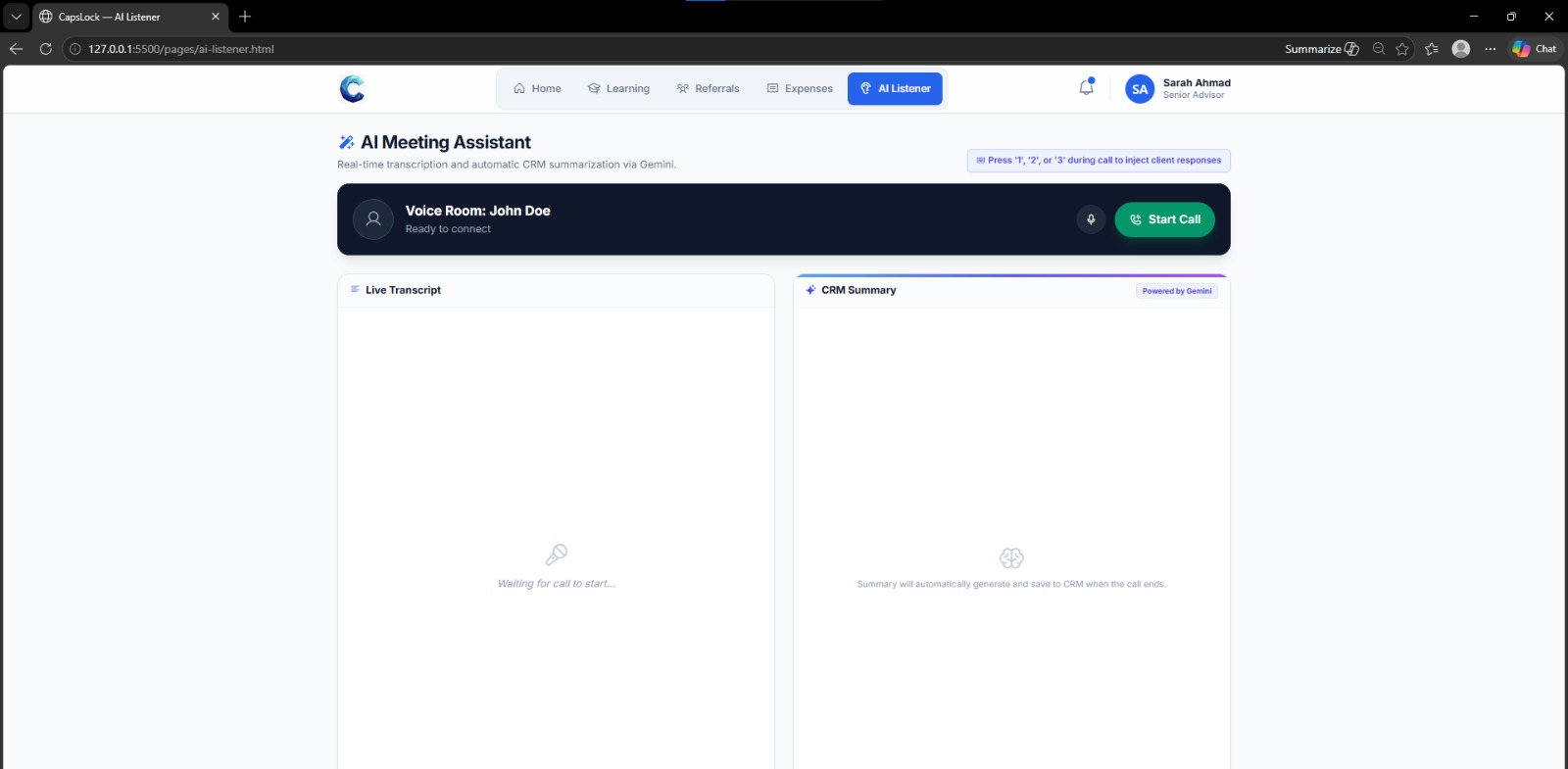
- AI Listener (Our Main Feature): The AI Listener is the heart of CapSight. Before a client call, the advisor opens the AI Listener page and presses Start Call. The system transcribes the entire conversation in real time. When the call ends, the AI automatically generates a structured CRM summary covering key discussion points, client concerns, and recommended follow-up actions. This summary is saved directly to the client's profile. What used to take 20 minutes of post-meeting notes now happens instantly and automatically.
How we built it
Frontend: HTML, CSS, JavaScript for all page structure and interactivity Tailwind CSS for rapid, consistent UI styling Phosphor Icons for professional iconography Inter font for clean, modern typography
AI Features: Gemini AI for real-time transcription and CRM summary generation in the AI Listener Claude AI for the morning briefing generation
Data & State Management: localStorage for saving calendar tasks, login state, and schedule data across sessions Mock data arrays for expenses, leaderboard scores, and client profiles
Version Control: GitHub for team collaboration with separate frontend and backend branches VS Code with Live Server for local development
Backend: Python for server-side logic and API endpoints RESTful API architecture for connecting frontend to backend data
Team Structure: Frontend team handled all UI pages, homepage, login, learning, referrals, expenses, AI listener Backend team handled server logic, database, and AI integrations
Challenges we ran into
Navbar consistency across pages Each page had its own navbar and dropdown logic, leading to conflicts between JavaScript files. We solved this by creating a shared nav.js file that handles all dropdown toggling and logout functionality across every page.
CSS conflicts between Tailwind and plain CSS Some pages used Tailwind while others used plain CSS, causing styling inconsistencies. We gradually unified everything under Tailwind with a shared style.css for custom components.
Real-time transcription Building a live transcription feature that accurately captures spoken words and feeds them into an AI summarisation pipeline was technically challenging. Getting the timing right between transcription end and CRM summary generation required careful coordination.
Keeping the calendar in sync with meeting counts The homepage showed a hardcoded meeting count that didn't match the actual calendar data. We fixed this by dynamically counting client meetings from the schedule data on every render and update.
GitHub branch management As a team of first-time GitHub collaborators, managing multiple branches without overwriting each other's work was a learning curve. We established clear file ownership rules to avoid merge conflicts.
Accomplishments that we're proud of
- Built a fully functional, multi-page web application within the hackathon timeframe
- Implemented a working AI Listener with real-time transcription and automatic CRM summary generation a feature that genuinely solves a real advisor pain point
- Created a consistent, professional design system across all pages that looks and feels like a real enterprise product
- Built an interactive calendar that saves data persistently using localStorage, so advisors don't lose their schedule on refresh
- Successfully collaborated as a team using GitHub branches for the first time, with clear separation between frontend and backend work
- Designed a CPD system with annual content refresh logic that prevents gaming something most learning platforms don't address
What we learned
- GitHub collaboration — We learned how to work as a team using branches, pull requests, and commit conventions. Managing code across multiple people taught us the importance of clear file ownership and communication.
- Frontend architecture — Building multiple connected pages taught us how to structure shared CSS, shared JavaScript, and consistent navigation across a large project.
- AI integration — Integrating Gemini and Claude into a live product showed us how powerful AI can be when applied to a specific, real-world problem rather than as a gimmick.
- User-centred design — We started with the advisor's daily pain points and built backwards from there. This kept every feature focused and relevant rather than just technically impressive.
- Handling complexity under time pressure — A hackathon forces you to make quick decisions about what to build and what to cut. We learned to prioritise ruthlessly and ship working features over perfect ones.
What's next for CapSight
Multi-advisor accounts Support multiple advisor logins with role-based access , junior advisors, senior advisors, and team leaders would each see a different view tailored to their responsibilities.
Mobile app Build a React Native mobile version so advisors can access their morning briefing, follow-up alerts, and AI Listener on the go especially useful during client site visits.
AI Morning Briefing personalisation Connect the briefing to real calendar data, client profiles, and market news so the morning summary is truly personalised and dynamic every single day.
Client portal Give corporate clients their own secure login with an API key to view simplified, relevant information about their own accounts with full data isolation for security.
Advanced AI Listener features Add sentiment analysis to detect client emotions during calls, keyword flagging for compliance monitoring, and automatic task creation from action items mentioned in the meeting.
CPD certification integration Partner with recognised financial industry bodies to make CPD points earned on CapSight count toward official certifications removing the need for advisors to track external learning separately.

Log in or sign up for Devpost to join the conversation.