Inspiration
Financial anxiety is a major source of stress. People are often stuck in debt, not because they don't want to pay it off, but because they don't know how to do so safely. They're forced to guess: "Can I afford to pay an extra $100 this month? What happens if I have an emergency?"
We were inspired to change the Capital One app from a passive tool for viewing debt into an active, intelligent partner that coaches you. We wanted to build a feature that not only shows you the "what if" scenarios but also protects you from making risky decisions, acting as a financial advisor right in your pocket.
What it does
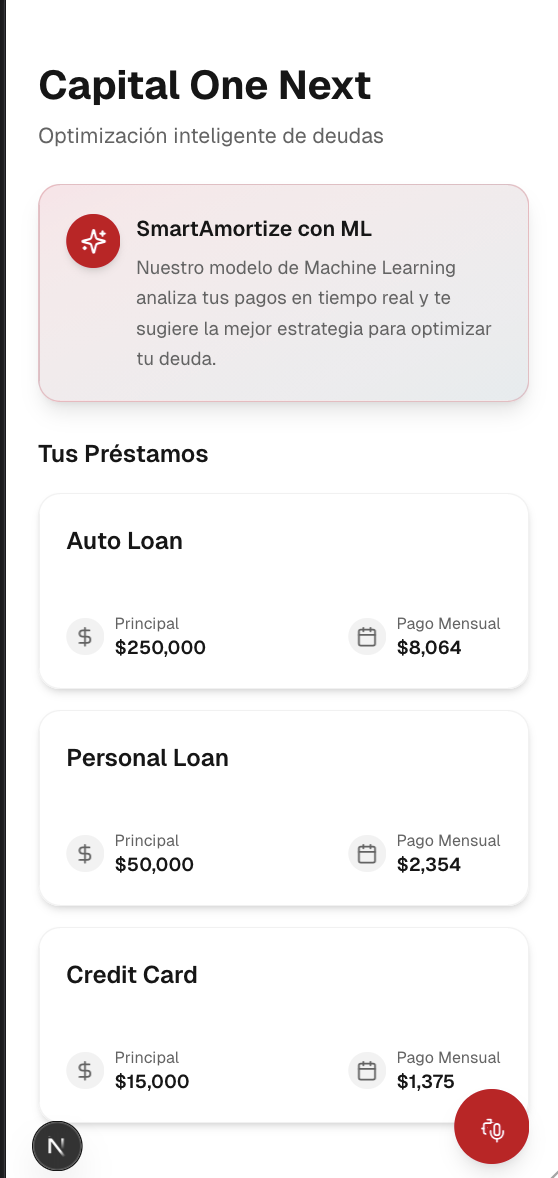
Capital One Next is a proactive amortization simulator that helps users pay off their debt faster and more safely.
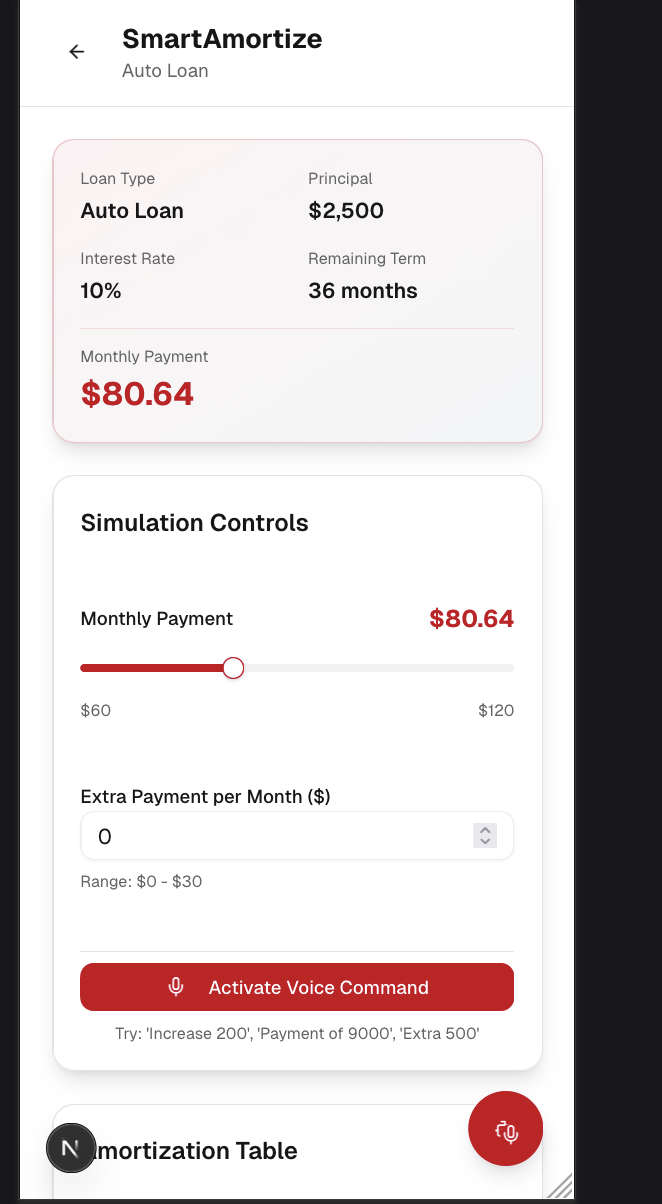
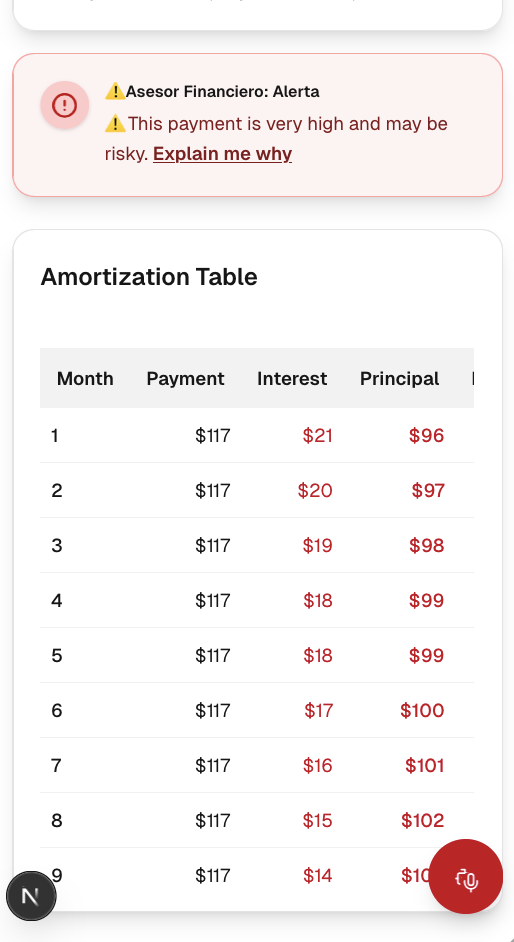
Interactive Simulation: Users can see a full amortization table for their debt. Using simple sliders and inputs, they can simulate "what-if" scenarios: "What if I increase my monthly payment?" or "What if I add an extra $50 payment each month?" The app instantly recalculates their payoff date and total interest saved.

Voice-Powered Control: The entire simulation is hands-free. A user can press the mic button and say, "Set my extra payment to 75 dollars," and the UI updates in real-time.

Proactive ML-Powered Advice: This is the core of our feature. As the user simulates a new payment, a machine learning model runs in the background. It analyzes a (currently simulated) profile of the user's finances—their monthly income, fixed expenses, and recent spending.

    If the model detects the user can afford to pay more, it gives a green nudge: "You can pay more to save on interest."

    If the user tries to pay an amount that is too aggressive and would put their financial health at risk, it provides a red warning: "This payment seems too high for your current budget."

Natural Language Explanation: If a user sees a warning, they can click "Explain me why." Our voice agent activates and provides a clear, spoken explanation, like, "I noticed some unusual spending this month. This high payment would leave you with a very small emergency buffer."
How we built it
We built this feature as a responsive web app using a modern tech stack.
Frontend: We used React to build a component-based, interactive UI.

State Management: React Hooks (useState, useEffect) were used to manage the state of the payment sliders, extra payments, and the amortization schedule itself.

Voice I/O: We used the browser's built-in Web Speech API.

    SpeechRecognition captures the user's voice commands (e.g., "add 50 dollars").

    speechSynthesis powers the voice agent that provides the "Explain me why" feedback.

The AI "Model": For this hackathon, we built a simulated ML model in JavaScript. We created a function that takes in a hard-coded JSON object representing the user's financial profile (income, expenses, etc.) and the proposed payment. It runs a set of business rules to classify the user's decision into one of three categories: HIGH_RISK, SUGGEST_INCREASE, or NEUTRAL. This simulates the output of a real classification model.
Challenges we ran into
Real-time Recalculation: Re-calculating the entire amortization schedule (potentially hundreds of rows) and running the AI check on every single drag of the slider, without the UI lagging, was a significant performance challenge.

Defining "Risky": The hardest part was tuning our "ML" model. We had to create financial rules from scratch. We debated what constitutes "too risky" (e.g., leaving less than $250 in disposable income) versus an "opportunity" (e.g., having over $1,000 in surplus).

Voice Parsing: Parsing the natural language from the SpeechRecognition API was tricky. A user might say "fifty," "50," "fifteen," or "one-five-zero." We had to write logic to normalize this diverse input into a simple number.
Accomplishments that we're proud of
We are incredibly proud of the "Explain me why" feature. It's the moment the app truly comes alive. It's one thing to show a red error message; it's another to have a voice calmly explain the financial reasoning. It turns a moment of user friction into a moment of trust and education.
We're also proud of how seamlessly the voice commands, the UI, and the AI logic work together. Saying "add 100 dollars" and watching the entire interface react instantly feels like a genuinely next-generation banking experience.
What we learned
Proactive is Better than Reactive: The best UI doesn't just give users tools; it guides them to better decisions. By warning a user before they make a potentially harmful financial move, we build trust and improve their long-term financial health.
Voice is for More Than Input: We learned that using speechSynthesis for output is just as powerful as using SpeechRecognition for input. Spoken advice feels more personal and is more accessible than a dense block of text.
Simulate to Innovate: We didn't need a massive, fully-trained model to prove our concept. By building a simulated model based on clear business logic, we were able to prototype a powerful AI-driven feature in just a weekend.
What's next for Capital One Next
Integrate Real Data: We would connect our feature to Capital One's APIs to pull the user's actual anonymized transaction data, income, and spending patterns. This would make the advice hyper-personalized and incredibly accurate.
Build a Real ML Model: With real, historical data, we would train a true classification model (e.g., in TensorFlow.js or on a backend) to identify complex patterns of financial risk and opportunity that simple rules might miss.
Expand to Total Debt: We would expand this tool to become a "Total Debt Coach," helping users optimize payments across all their accounts (credit cards, auto loans, etc.) to see which to pay off first, all guided by the same safe, intelligent AI.


Log in or sign up for Devpost to join the conversation.