Inspiration
Most people do not arrive at a software website with a perfect technical specification. They arrive with a problem: I need public data to make sense on mobile. I need a field workflow that still works offline. I need to replace a fragile manual process.
A human can spend time translating that need into a vendor's vocabulary. A browser agent has an even stranger problem: it usually has to infer what a website means from pixels, labels, buttons, and page structure.
That led to the core idea behind Capability Navigator:
Agents shouldn't have to guess what your website means. Give them tools, not pixels.
WebMCP made it possible to explore what a more agent-native web could look like—one where a website exposes the small set of actions it genuinely understands while keeping evidence, uncertainty, and final authority visible to the human.
What it does
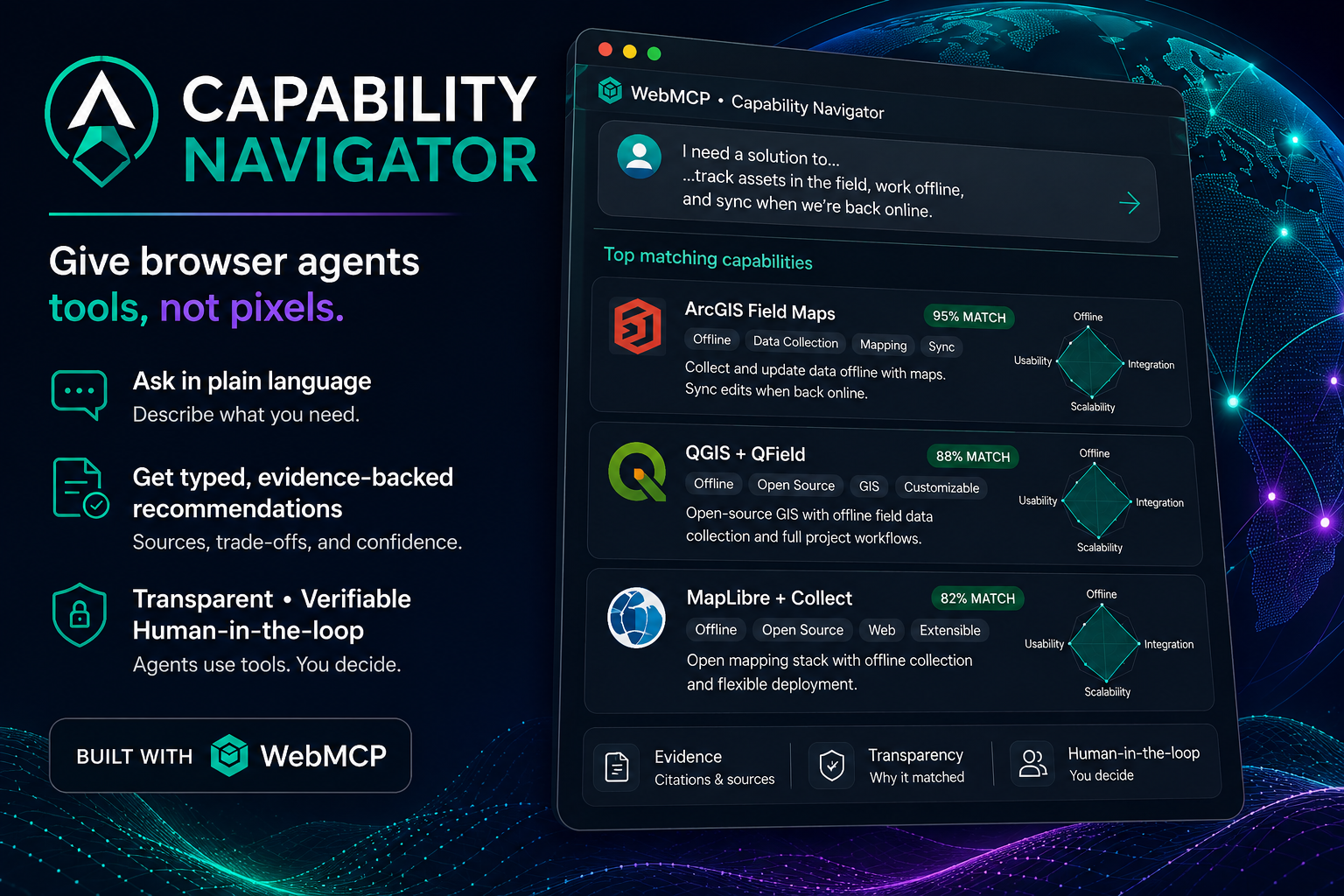
Capability Navigator turns a fuzzy software need into an evidence-backed, nonbinding decision packet.
The human interface and the browser agent share the same capability model, evidence, constraints, and decision surface. On a WebMCP-enabled browser, the page registers six typed tools:
list_capabilitiesget_capabilityfind_examplesdraft_scopeprepare_decision_packetstage_human_review
An agent can discover relevant capabilities, inspect their proof boundaries, find public evidence, draft a bounded scope, prepare a structured recommendation, and finally stage that recommendation directly into the visible page for human review.
The last step is important. The goal is not invisible automation. The agent's work converges back into the interface the person is already looking at.
Every WebMCP invocation is reflected in the visible Agent Trace, so the user can see what tool was called, what bounded input was used, and whether it succeeded.
Five tools are read-only. stage_human_review changes only reversible state in the current browser tab. It cannot contact anyone, submit anything, make a payment, sign something, modify an account, or persist a decision.
The human remains the authority boundary.
How we built it
Capability Navigator uses the WebMCP Imperative API and registers its tools through document.modelContext.registerTool(...).
Each tool has a deliberately narrow purpose, explicit JSON Schema, agent-facing parameter descriptions, annotations, bounded outputs, and additional runtime validation. We do not rely on schema validation alone: malformed types, unsupported capability IDs, oversized inputs, and empty selections fail visibly rather than producing a plausible-looking recommendation.
The same deterministic JavaScript core powers both the human workflow and the WebMCP tools. There is no separate "agent truth" hidden behind the interface.
Natural-language discovery is deterministic and tied directly to the public capability and evidence model. That keeps the demo reproducible and avoids requiring an external AI model or search service just to determine what the website itself knows.
The production deployment is also configured specifically for WebMCP's browser requirements, including origin isolation and the tools=(self) permissions policy.
The project includes an ordinary-browser fallback, responsive/mobile behavior, accessibility safeguards, deterministic regression tests, a release preflight, and a short judge path printed directly on the product.
Challenges
The hardest part was not simply registering a tool. It was deciding what authority an agent should actually have.
A single giant "do everything" tool would have made the demo easier, but it would also undermine the point of the project. We instead separated discovery, evidence inspection, scope generation, packet preparation, and human handoff into small tools with different authority boundaries.
Another challenge was making the agent behavior judgeable. A technically successful WebMCP call hidden in a console is not a good human experience, so we added the visible Agent Trace and made stage_human_review update the same decision surface the human uses.
We also had to handle the progressive-enhancement boundary correctly. In a browser without WebMCP, the product still works and truthfully reports that WebMCP is unavailable; it does not pretend that six tools were registered simply because six tools are defined.
Finally, we spent substantial time on failure behavior: malformed inputs, unknown IDs, empty selections, output limits, mobile overflow, reduced motion, deployment headers, and distinguishing an actual WebMCP execution from a normal UI interaction.
What we learned
The biggest lesson is that WebMCP is more interesting than "letting an AI click a website faster."
The website itself knows the semantics of its domain. When those semantics become a typed browser contract, an agent can operate with far less guesswork—and the developer can define much clearer limits around what the agent may do.
We also learned that human-in-the-loop does not have to mean bolting an approval modal onto the end of autonomous behavior. The human and agent can share state from the beginning: the same evidence, the same constraints, and the same visible output.
That feels like a promising direction for the open web.
What was built during the challenge
Maps + Apps and the public case-study evidence used by Capability Navigator existed before the challenge.
The WebMCP-specific product layer was built or meaningfully extended during the challenge period: the typed browser tools and schemas, deterministic capability discovery, evidence-aware lookup, decision-packet generation, visible Agent Trace, shared human/agent review surface, reversible local staging, safety validation, ordinary-browser fallback, judge workflow, testing, and challenge release packaging.
What's next
Capability Navigator is intentionally narrow today, but the pattern is much larger.
A travel site could expose trip-planning primitives. A government portal could expose eligibility and application-preparation tools. A healthcare site could expose carefully bounded navigation tools. A software company could expose capability discovery without giving an agent permission to initiate sales actions.
The idea is simple:
A website should not have to be only a collection of pixels that an agent learns to operate. It can become a collaborator with an explicit contract.


Log in or sign up for Devpost to join the conversation.