Inspiration
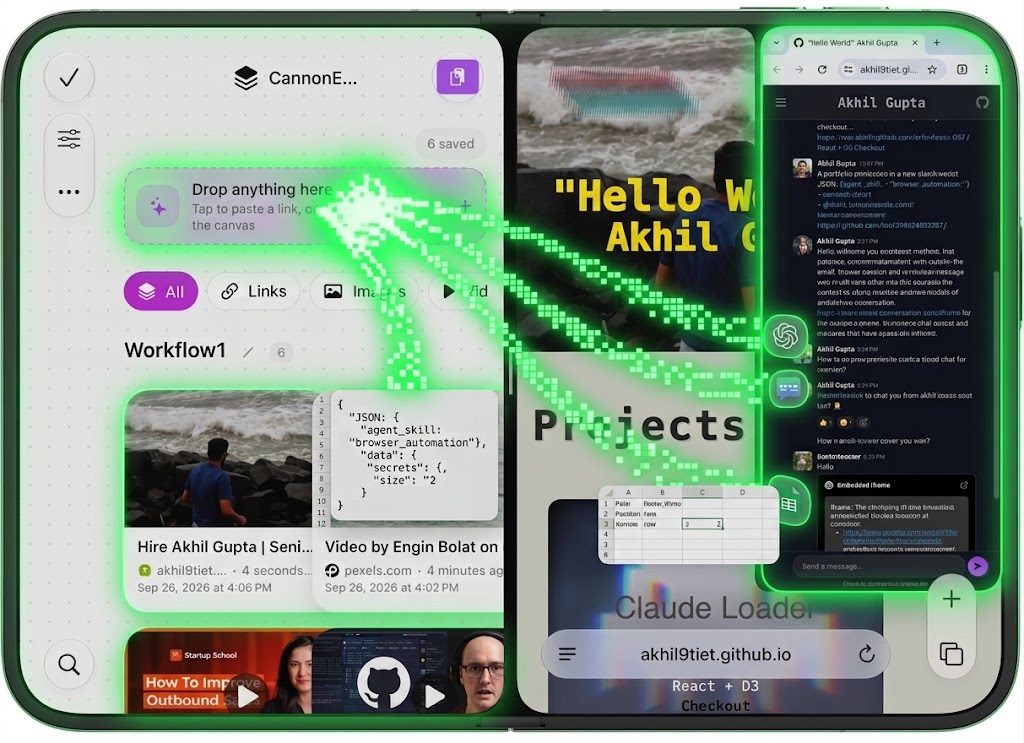
Dragging and dropping content into AI apps like ChatGPT or Claude is clunky and manual—you are forced to pick files by name or deal with rigid attachment buttons. We built CannonEvents to eliminate this friction: a side-by-side workspace where you drag anything (videos, text, emails, CRM records) directly onto a canvas to trigger automated visual workflows.
What it does
graph TD
    A[Login Page] -->|Authenticate| B[Card View Page]

    subgraph Card View Page [Card View Page]
        B1[View All Workflows]
        B2[Upload Workflow File]
        B3[Go to Workflow Marketplace]
        B4[Create New / Delete Selected]
    end

    B --> B1
    B --> B2
    B --> B3

    subgraph Workflow Marketplace [Workflow Marketplace]
        M1[Browse Community Workflows]
        M2[Download Workflow] -->|Free or Paid Purchase| B1
    end

    B1 -->|Select Workflow| C[Workflow Details Page]

    subgraph Workflow Details Page [Workflow Details Page - Dot Grid Canvas]
        C1[Dot Grid Canvas View]
        C2[Share Workflow Option] -->|Export & Set Price| M1
        C3[Manage Page: Add New / Select & Delete]
        C4[Follow / Run Mode]
    end

    C4 -->|Trigger Follow Mode| D[Split Screen View - 50/50]

    subgraph Split Screen View [Split Screen View - iPhone / Desktop]
        D1[CannonEvents App - Half Screen]
        D2[iOS Shortcuts / Native Automation App - Half Screen]
        D1 -->|Executes Step-by-Step| D2
    end
CannonEvents is a dual-sided automation platform and AI context bridge:
- Free Tier (Workflow Builder): Visually build drag-and-drop workflows using plugins (e.g., watch YouTube video $\rightarrow$ scrape forms $\rightarrow$ search Gmail leads $\rightarrow$ save to Salesforce).
- Paid Tier (Agent Execution Engine): Access community workflows and assign autonomous AI agents to execute them (browser navigation, form filling, account management, task delegation).
- Adaptive Human-in-the-Loop:
- Single-Screen Mode: Agent opens a modal when stuck or missing data, waiting for user input.
- Dual-Screen / iPhone Duo Mode: Agent renders a live interactive field on the second screen so you can fill in details mid-execution without interrupting the flow.
How we built it
We built CannonEvents with a modular frontend canvas linked to an adaptive execution engine. Incoming drops are normalized into a unified schema, allowing agents to load only required skills rather than running heavy background tools continuously.
graph TD
    A[User Drag & Drop / Canvas Input] --> B[onCannonDrop Callback]
    B --> C[Unified Context & Skill Schema]
    C --> D{Subscription Level}
    D -->|Free| E[Manual / Plugin Execution Pipeline]
    D -->|Paid| F[Autonomous AI Agent Runner]
    F --> G{Requires Human Input?}
    G -->|Single Screen Mode| H[Pause & Trigger Modal Query]
    G -->|Dual Screen / iPhone Duo| I[Render Live Interactive Form on Screen 2]
    H --> J[Resume Execution Workflow]
    I --> J
    J --> K[External App Integrations: Salesforce, Gmail, Web]
// Universal Drop Callback
export function onCannonDrop(dragEvent: DragEvent, isDualScreen: boolean): ContextPayload {
  const payload = extractPayload(dragEvent);

  return {
    eventId: `evt_${crypto.randomUUID()}`,
    timestamp: new Date().toISOString(),
    mediaType: payload.type, // 'youtube', 'salesforce_object', 'form', 'email'
    requiredSkills: mapPayloadToSkills(payload.type),
    displayMode: isDualScreen ? 'DUAL_SCREEN_LIVE' : 'SINGLE_SCREEN_MODAL',
    data: payload.content
  };
}

// Pseudo Code: Agent Workflow Loop
async function executeWorkflowStep(step: WorkflowStep, context: ContextPayload) {
  if (step.requiresInput && !context.data[step.fieldKey]) {
    if (context.displayMode === 'DUAL_SCREEN_LIVE') {
      await renderInteractiveFieldOnScreen2(step.fieldKey);
    } else {
      await openUserModalPrompt(step.question);
    }
  }
  return await runAgentAction(step.actionType, step.params);
}
Challenges we ran into
- Cross-App Payload Normalization: Unifying raw browser drops, file paths, and custom enterprise payloads (like Salesforce objects) into a single agent-readable schema.
- Dual-Screen State Sync: Maintaining low-latency, real-time state synchronization between the active agent runner on Screen 1 and live human inputs on Screen 2.
Accomplishments that we're proud of
- Zero-Bloat Agent Context: Designed a schema that lets agents dynamically load only required skills per step, cutting token costs and runtime bloat.
- Seamless Human-in-the-Loop UX: Implemented dual-screen adaptive fallback options tailored for multi-screen workflows and foldable hardware like iPhone Duo.
What we learned
Drag and drop events on iphone duo needs a callback as all apps wont support an api for drag and drop. Also, there is an urgent requirement for mcp servers that can convert drag and drop events callback payload to llm understandable context.
What's next for CannonEvents
- Expanded Plugin Marketplace: Enable third-party developers to publish custom action nodes and monetize their specialized agent workflows.
- On-Device Local Agent Models: Run lightweight agent executors locally on desktop and mobile hardware for instant UI automation without cloud latency.
- Deeper OS-Level Integration: Expand beyond side-by-side app windows to global OS gesture support for continuous cross-application context sharing.

Log in or sign up for Devpost to join the conversation.