Inspiration
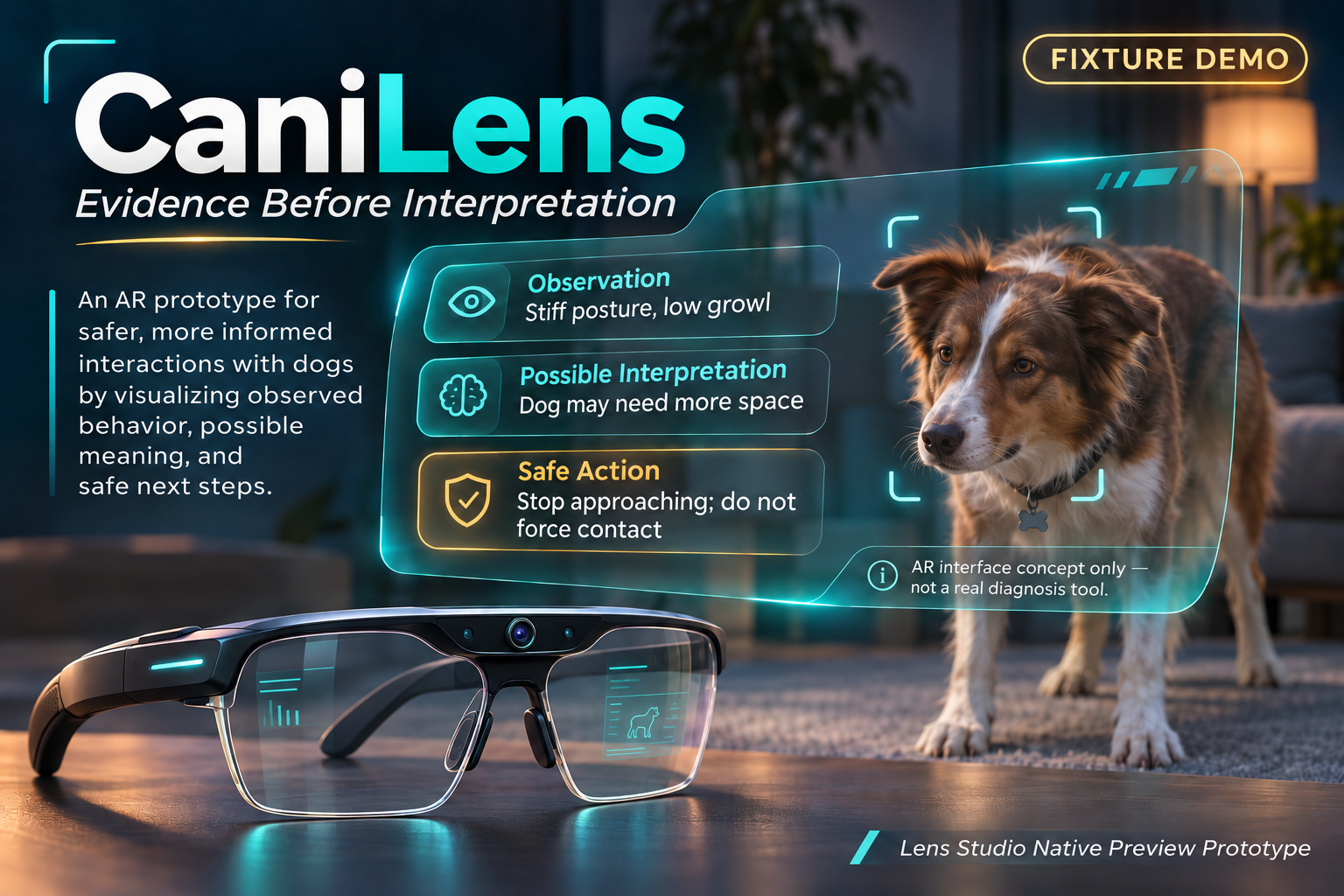
CaniLens started with a simple question: what if AR could help people observe their pets more carefully, without pretending that technology can read an animal's mind?
People love their pets, but dogs cannot explain discomfort, uncertainty, or their needs in human language. A single gesture or sound is rarely enough to know what a dog means. We wanted to explore a more responsible interface that separates what was observed, what it might mean, and what a person could safely do next.
What it does
CaniLens is an early SPECS-oriented augmented reality interface prototype for companion-animal observation. Its Lens Studio screen-space HUD walks through a small, clearly labeled synthetic demonstration:
- IDLE — the interface waits for an observation.
- INTERPRET — it presents a fixture-based example of a behavior signal and a cautious, contextual interpretation.
- RESET — it clears the example and returns to IDLE.
The HUD displays FIXTURE DEMO throughout. The current build does not detect real dogs, recognize live vocalizations, infer emotional states, diagnose illness, or provide verified behavioral advice. The poster illustrates the product vision, not the current detection capabilities.
How we built it
We started with a SPECS Base Template in Lens Studio 5.23.2, then assembled screen-space Text components and a JavaScript controller. The controller manages the state cycle and updates the HUD while keeping the disclaimer visible. We iterated on script import, Inspector component binding, and preview behavior, and added a fallback automatic cycle so the core demo would not depend on an unverified gesture input.
We used Codex and AI-assisted development to prepare and test the HUD control scripts. We also attempted to connect Codex to Lens Studio through the Lens Studio MCP. The local endpoint was reachable, but authentication and MCP tool discovery failed, so we completed the demonstrated scene manually in Lens Studio. We cannot claim a successful CLAD-driven Lens construction.
Challenges
Our biggest challenge was tooling reliability rather than the screen UI itself. Lens Studio 5.24 initially presented rendering problems in our Windows environment, so we moved to 5.23.2. Then repeated Lens Studio MCP connection and authorization failures blocked the intended agent-to-editor workflow. We stopped treating troubleshooting commands as product progress and focused on a smaller, observable Native Preview deliverable.
Another design challenge was avoiding anthropomorphism. A dog turning its head, licking its lips, or vocalizing can have different meanings depending on context. CaniLens deliberately presents an observation separately from any possible interpretation, without asserting certainty.
Accomplishments
- Created a four-line, screen-space HUD in Lens Studio.
- Demonstrated IDLE → INTERPRET → RESET → IDLE in Native Preview.
- Kept the FIXTURE DEMO disclosure visible throughout the observed cycle.
- Built an independently testable JavaScript state controller and mock tests.
- Preserved a clear distinction between simulated observations and actual animal-sensing functionality.
What we learned
The most important design lesson is that AR should not just place more information in front of someone's eyes. It should communicate evidence, uncertainty, and appropriate next steps without distracting them from the real animal. Equally, a passing mock test or an accessible MCP port does not prove a native integration works: each claim needs its own observable verification.
What's next
Next we would validate a small set of behavior observations with veterinary behavior professionals, test comprehension with pet owners, and study whether conservative, context-aware prompts improve decisions. Only then would we explore supported SPECS interaction inputs and a carefully evaluated multimodal sensing pipeline.
Prototype status: Native Preview state cycling confirmed by the builder; live pet detection, hardware execution, CLAD-driven building, and SIK gesture interaction remain unverified.
Built With
- augmented-reality
- codex
- javascript
- lens-studio
- specs
