-
-
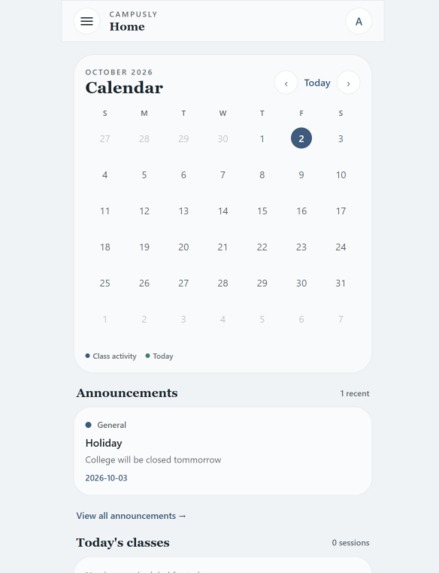
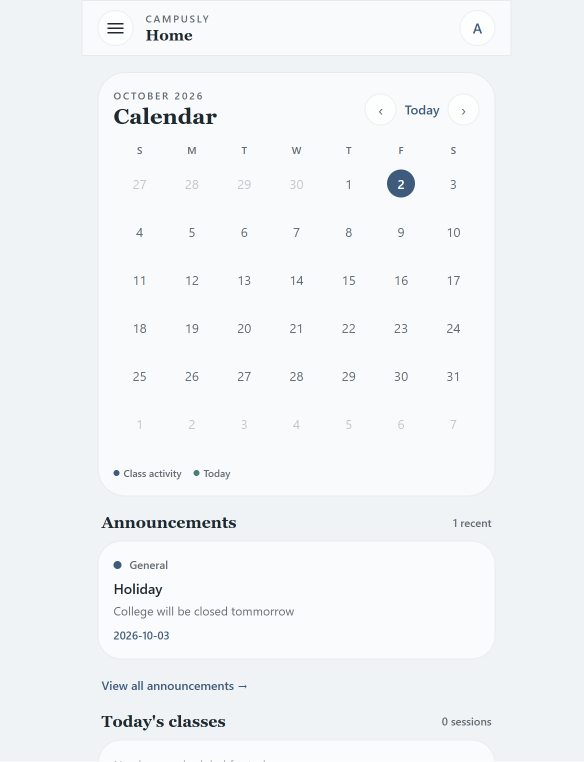
Home page with calender, announcement, and time table section
-
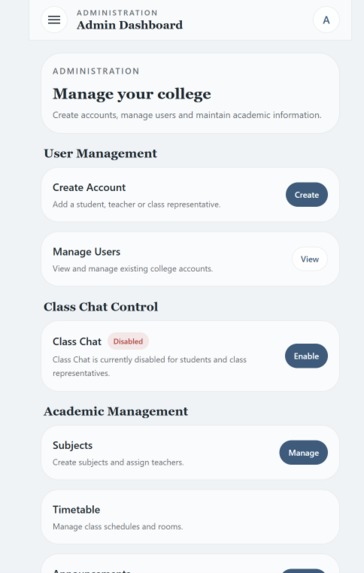
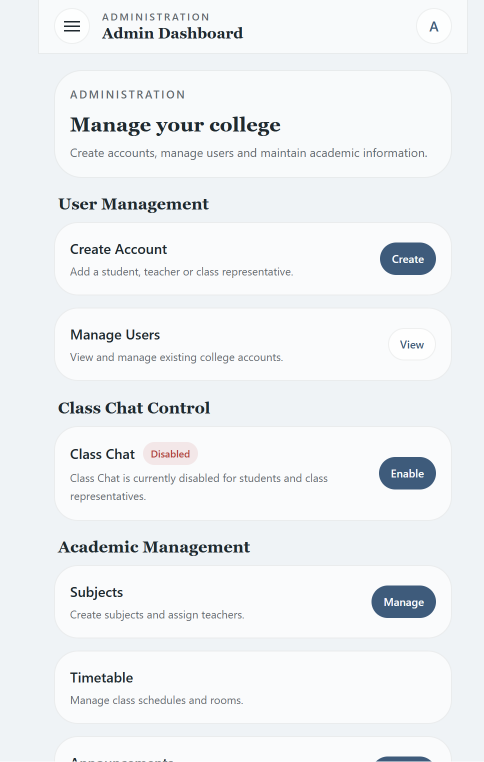
Admin Dasboard only for admin accounts
-
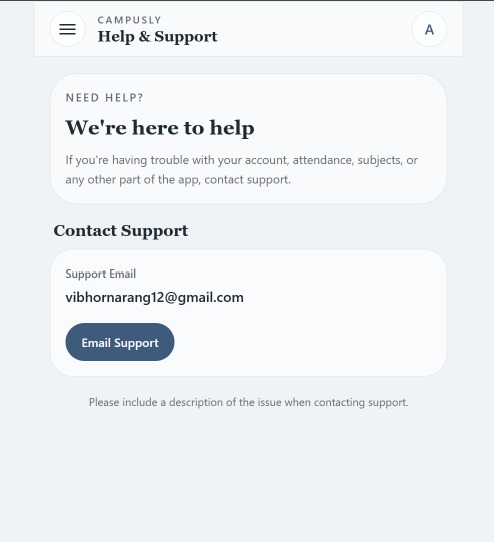
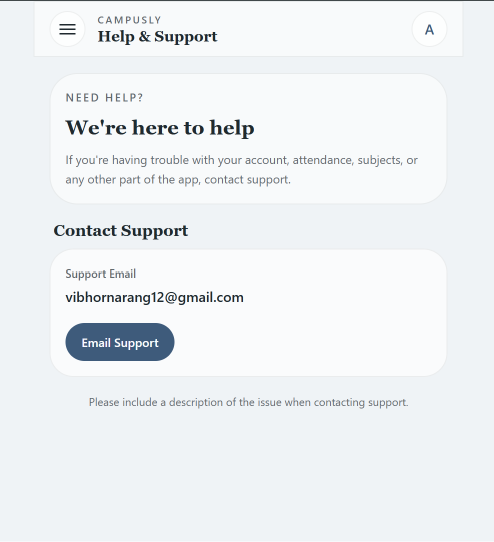
Help and support section
-
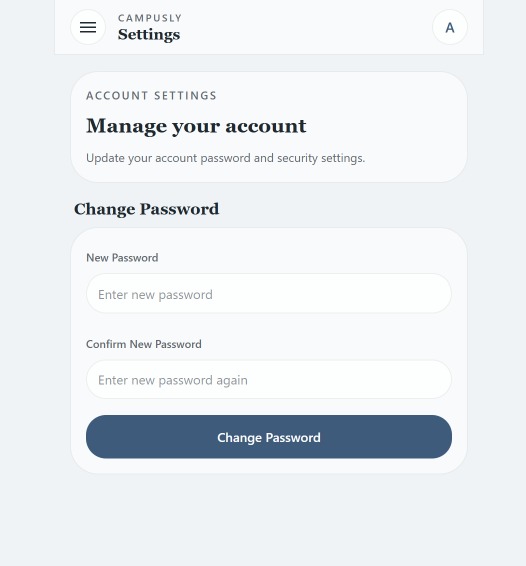
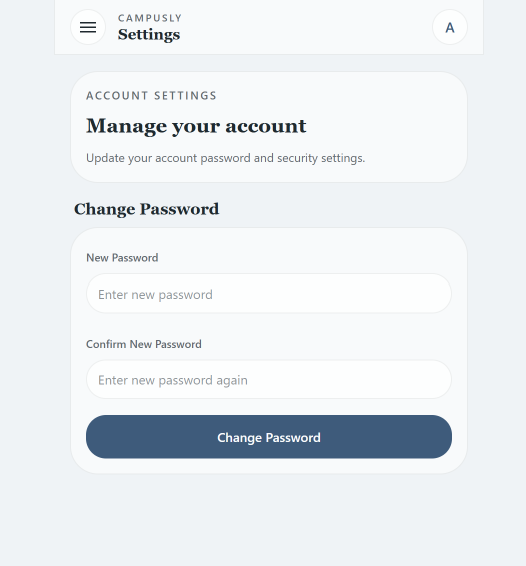
Password change section
-
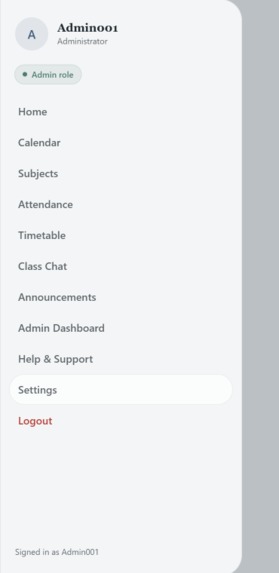
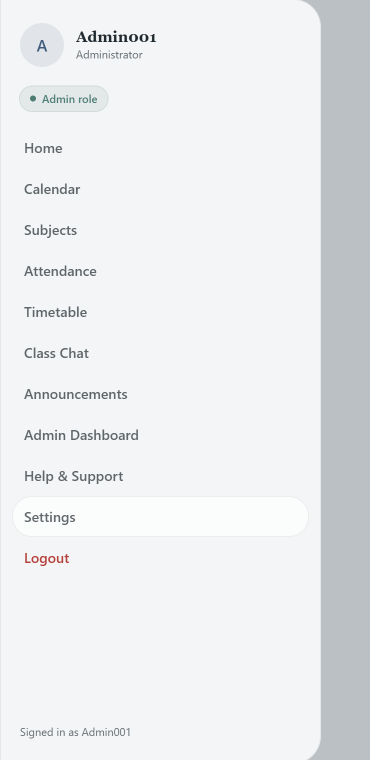
Side Bar which mentions your role
-
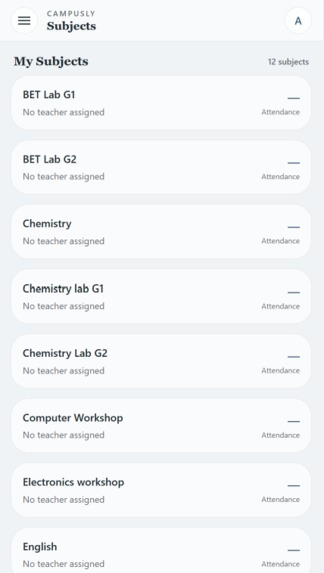
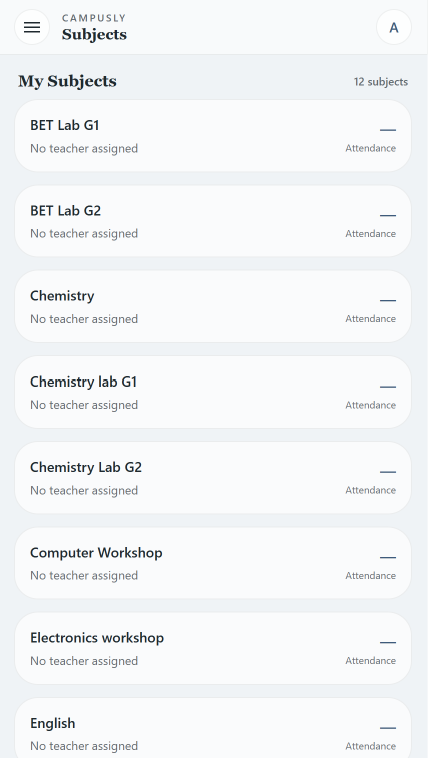
Subjects added by admin shown to everyone
-
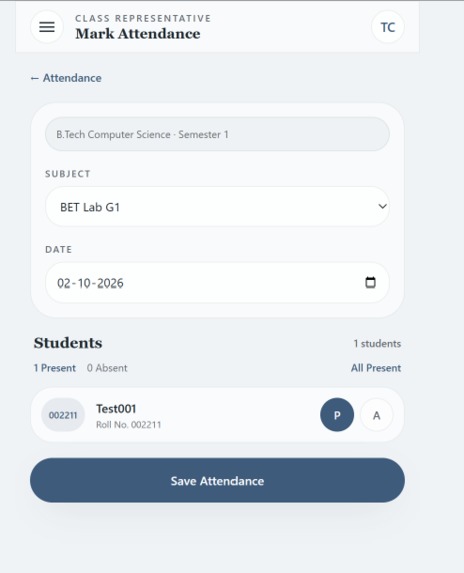
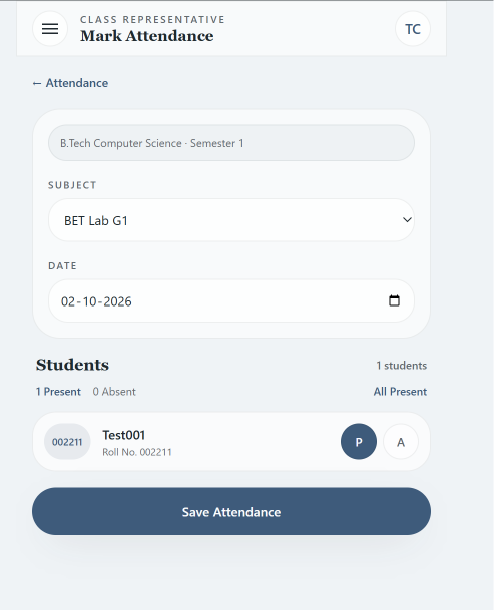
Attendance marking feature only for Class Representatives
-
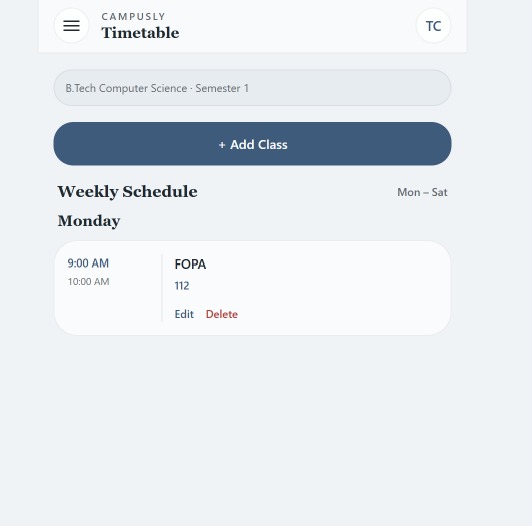
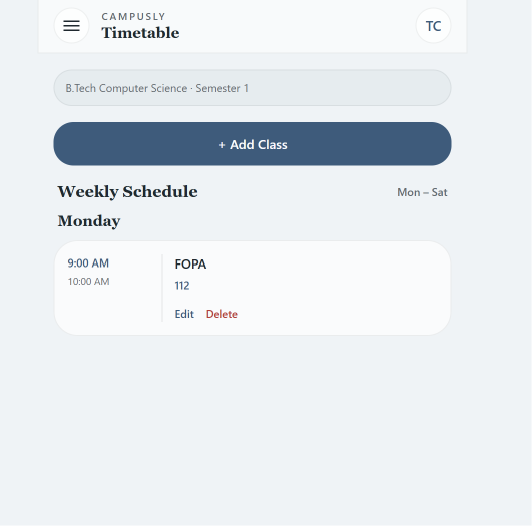
Timetable
-
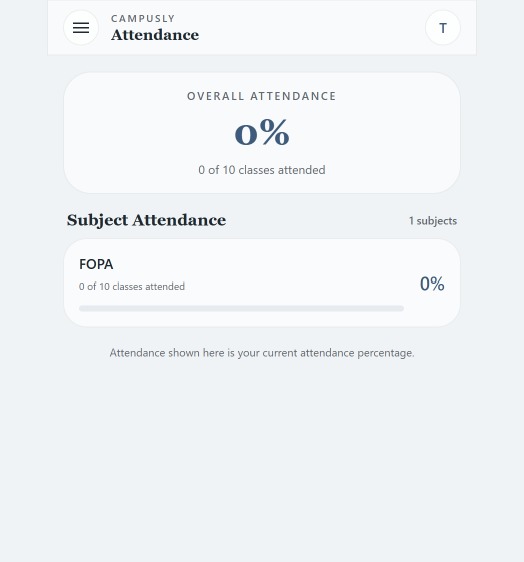
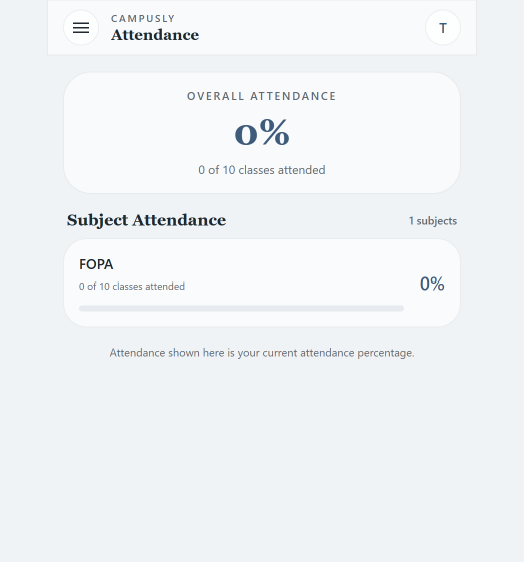
Attendance percentage shown to every student.
-
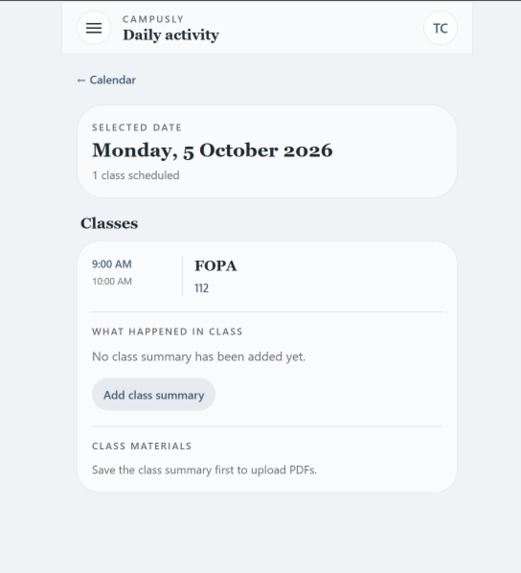
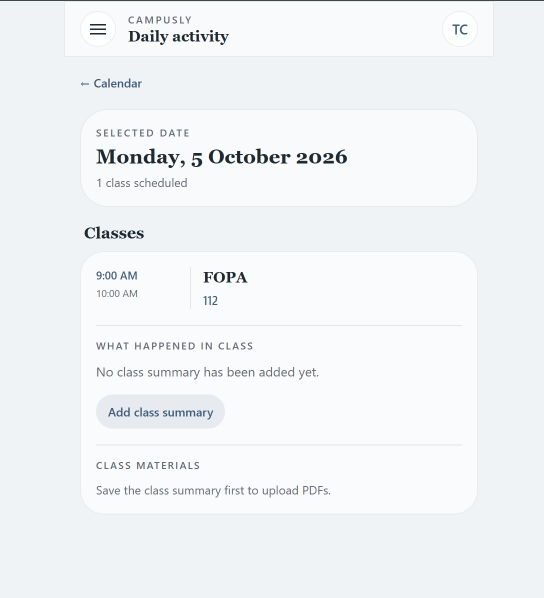
Feature to add Class Summary and upload detailed notes in pdf form only for CR
Inspiration
The idea for Campusly came from something I experience in everyday college life. A lot of important academic information is available, but it is scattered across too many different places. Timetables and schedule changes are often shared through messages, attendance is maintained separately, notes and PDFs get buried in group chats, and important announcements can easily be missed among hundreds of other messages.
As a student, I realized that the problem wasn't necessarily the lack of information — it was the lack of one organized place to access it.
That made me think: why can't all of these everyday academic activities be available through one simple platform?
This question became the starting point for Campusly.
I wanted to build something that wasn't just another student dashboard, but a platform that could connect the different people involved in managing a class. That's why Campusly has separate experiences for Students, Class Representatives (CRs), and Admins.
Students get a simple place to check their classes, attendance, timetable, study materials, and announcements. CRs get additional tools to manage things such as attendance, class activities, study materials, and timetable entries. Admins get a separate dashboard to manage users, subjects, announcements, and other platform-level controls.
Another major motivation was reducing the dependence on WhatsApp groups for academic management. WhatsApp is great for communication, but when it becomes the place where timetables, PDFs, announcements, class updates, and other important information are all shared together, finding something later becomes difficult.
With Campusly, I wanted that information to remain structured and easy to find instead of disappearing in a long conversation.
The goal behind Campusly is ultimately very simple:
Instead of using multiple disconnected tools for everyday college activities, why not bring them together into one organized platform?
That is what inspired me to build Campusly — One Campus. One Platform.
What it does
Campusly is a centralized academic management and communication platform that brings the most important parts of everyday college life into one place.
Instead of students having to check different WhatsApp groups, spreadsheets, PDFs, and other platforms for academic information, Campusly provides a single dashboard where everything is organized and easy to access.
The platform currently has three main user roles: Student, Class Representative (CR), and Admin. Each role gets a different experience and different permissions based on what they need to do.
👨🎓 Student
For students, Campusly acts as a personal academic dashboard.
Students can:
- View an interactive monthly calendar
- Select a particular date and see the classes scheduled for that day
- View their timetable
- Check subject-wise attendance percentages
- See their overall attendance percentage
- Access their subjects and academic information
- Read class summaries
- Access PDFs and other study materials
- View important announcements and updates
The idea is that when a student opens Campusly, they should be able to quickly understand what is happening academically without searching through multiple apps or old messages.
👤 Class Representative (CR)
CRs have access to the student-facing features, but they also receive additional tools for managing their class.
One of the main features is attendance management. A CR can select a subject, mark students as present or absent, and submit the attendance directly through Campusly.
The attendance records are connected to Google Sheets through Google Apps Script, creating a structured attendance record that can also be maintained outside the application.
CRs can also manage their class timetable. When timetable information needs to be added or changed, the CR can update it through Campusly and students can see the updated schedule from their accounts.
Another important feature is class activity and study material management. CRs can add information about what happened in a class and upload relevant PDFs or academic material. These resources can then be accessed by students through their academic calendar.
This helps create a simple academic history where students can go back to a particular date and find the relevant class information and material.
🛡️ Admin
Campusly also includes a separate Admin Dashboard for managing the platform.
Admins can:
- Create and manage authorized user accounts
- Create CR accounts
- Manage subjects
- Create and manage announcements
- Control important application settings
- Manage platform-level functionality
The announcement system allows important academic information to be published in a structured way instead of depending entirely on group messages. Relevant announcements can appear directly on the student's dashboard and can also be accessed through the dedicated announcements section.
📅 Academic Calendar
The calendar is one of the central parts of Campusly.
Rather than being just a normal date picker, it connects dates with actual academic activity. Students can select a day and see the classes scheduled for that date along with available class information, summaries, and study material.
This makes it easier to answer a simple question such as:
"What happened in class on this day?"
without searching through old messages.
📊 Attendance
Campusly provides different attendance functionality depending on the user's role.
CRs can record attendance, while students can only view their attendance percentages.
Students can see both their individual subject percentages and their overall attendance, while the underlying attendance records are maintained through Google Sheets and Google Apps Script.
📚 Study Materials
Campusly integrates with Google Drive for academic material.
PDFs uploaded through the platform can be connected with the appropriate class activity and later accessed by students directly from Campusly.
This makes notes and resources easier to find instead of allowing important files to disappear inside long group conversations.
📢 Announcements
Campusly provides a dedicated announcement system for important academic communication.
Admins can publish announcements, while students can view relevant updates from their dashboard and the complete announcements section.
This gives important information a permanent and organized place inside the platform.
🔐 Role-Based Access
Campusly is designed around role-based access, meaning that simply logging into a different account changes what the user is allowed to see and do.
A student should not be able to modify attendance or manage administrative information, while a CR needs additional permissions to manage class-level activities. Admins require another level of access for managing the platform.
Campusly uses Supabase Authentication and Row Level Security (RLS) to support this access model at the backend level as well.
Overall, Campusly is designed to connect the flow of academic information:
Admin / CR → Campusly → Student
The goal is not to create another place students have to check. The goal is to replace several disconnected academic tools with one simple, organized platform for everyday college life.
How we built it
We built Campusly as a full-stack web application with the goal of keeping the interface simple for students while supporting multiple roles, real academic data, authentication, attendance, file storage, and administrative controls behind the scenes.
The project was built step by step, starting with the basic user interface and then gradually connecting each feature to real backend services.
💻 Frontend
The frontend of Campusly was built using:
- React for building the user interface
- TypeScript for writing more structured and reliable code
- TanStack Start for routing and the overall application structure
- Tailwind CSS for styling and creating the mobile-first interface
- Vite for development and production builds
We designed Campusly with a mobile-first approach because students are most likely to access the platform from their phones.
The interface was designed to feel closer to a mobile application than a traditional college website, with a simple dashboard, navigation menu, cards, calendars, and dedicated pages for each academic feature.
🔐 Authentication and User Roles
For authentication and backend functionality, we used Supabase.
Campusly currently has three main roles:
- Student
- Class Representative (CR)
- Admin
When a user logs in, Campusly retrieves their profile and role from Supabase. The application then changes the available functionality depending on that role.
For example, a student can view attendance but cannot mark it, while a CR receives additional tools for attendance and timetable management. Admins get access to administrative features.
We also used Row Level Security (RLS) in Supabase so that access control is not based only on hiding buttons in the frontend. Database access can also be restricted according to the authenticated user and their role.
🗄️ Database
Supabase PostgreSQL is used for the main application data.
Different parts of Campusly use structured database tables for information such as:
- User profiles and roles
- Subjects
- Timetable entries
- Class records
- Announcements
- Study material metadata
- Application settings
This allowed us to move from static demo data to information that could actually be created, updated, and retrieved by different users.
📊 Building the Attendance System
Attendance required a slightly different approach.
Instead of storing attendance only inside the main application database, we connected Campusly with Google Sheets.
The flow works roughly like this:
CR marks attendance → Campusly → Google Apps Script → Google Sheets
When a CR submits attendance, Campusly sends the attendance records to a Google Apps Script Web App, which then writes the records into a structured Google Sheet.
Each attendance record can contain information such as the date, course, semester, subject, student, attendance status, and who recorded it.
When a student opens their Attendance page, Campusly retrieves the relevant records and calculates their subject-wise and overall attendance percentages.
This also means the Google Sheet acts as an accessible record of the attendance data.
📚 Google Drive Integration
We wanted study materials to be accessible through Campusly without building an entirely separate file-storage system.
For this, we integrated the Google Drive API.
CRs can upload PDF study materials through Campusly. The files are stored using Google Drive, while Campusly keeps the relevant metadata needed to connect those materials with the correct academic activity.
Students can then open the material directly from Campusly.
The basic flow is:
CR uploads PDF → Google Drive → Campusly stores material information → Student accesses PDF
This allowed us to combine external file storage with the academic information already available inside the platform.
📅 Calendar and Class Activity
The academic calendar was designed to be more than a simple calendar.
Campusly connects the selected date with timetable information and class records.
When a student selects a date, the application determines which classes are scheduled and can display the academic information associated with that day.
Class summaries and uploaded study material can then be connected to those activities.
This creates a simple timeline of academic activity and makes older class information easier to find.
📢 Announcement System
We also built a centralized announcement system using Supabase.
Admins can create announcements, and relevant announcements can then be displayed to users inside Campusly.
Recent announcements can appear directly on the home dashboard, while a separate announcements page provides a more complete view.
This was designed to give important information a structured place instead of allowing it to disappear inside group chats.
⚙️ Admin Controls
A separate Admin Dashboard was created for platform-level management.
From the administrative side of Campusly, we implemented functionality for managing things such as:
- User accounts
- CR accounts
- Subjects
- Announcements
- Application settings
This helped us separate normal academic usage from administrative control.
🔗 Connecting Everything Together
One of the most interesting parts of building Campusly was that the project does not rely on a single service.
Several technologies work together:
React + TypeScript + TanStack Start
↓
Application interface and routing
Supabase
↓
Authentication + Database + Role-based access
Google Drive API
↓
PDF and study material storage
Google Sheets + Google Apps Script
↓
Attendance records
GitHub
↓
Version control and source code
Vercel
↓
Production deployment
Getting all of these systems to communicate correctly was a major part of building the project.
🚀 Deployment
Throughout development, the project was managed using Git and GitHub.
Once Campusly was working locally, we created a production build and deployed the application using Vercel.
The GitHub repository is connected to the deployment workflow, allowing the production application to be updated as the project develops.
🧩 Building Campusly Step by Step
Campusly was not built all at once.
We started with the basic interface and navigation, then gradually added authentication and user roles. After that, individual features such as subjects, timetable management, attendance, class records, study materials, announcements, and administrative controls were connected to real services.
Each new feature introduced a different problem to solve, especially when multiple services had to work together.
That process turned Campusly from a simple interface into a working role-based academic platform with real authentication, persistent data, external integrations, and a deployed production application.
Challenges we ran into
Building Campusly came with a lot of challenges because we weren't just creating a frontend interface — we were trying to make multiple roles, databases, APIs, external services, and deployment systems work together as one application.
A feature could look completely fine on the screen but still require a lot of work behind the scenes to make sure the correct data was being stored, retrieved, and shown only to the right users.
🔐 Building a Role-Based System
One of the first major challenges was implementing different experiences for Students, Class Representatives (CRs), and Admins.
Each role needed different permissions.
For example:
- Students should be able to view attendance, but never modify it.
- CRs should be able to mark attendance and manage their class timetable.
- Admins should have access to platform-level management features.
Initially, controlling which buttons and pages appeared was relatively straightforward. The harder part was making sure these restrictions also existed at the backend level.
We worked with Supabase Row Level Security (RLS) so that permissions were not dependent only on what the frontend displayed.
This taught us that proper authorization is much more than simply hiding a button from a user.
📊 Connecting Attendance with Google Sheets
Attendance was one of the most challenging integrations.
We wanted CRs to mark attendance from inside Campusly while maintaining the actual attendance records in a structured Google Sheet.
To make this work, we had to connect:
Campusly → Google Apps Script → Google Sheets
This introduced several problems around sending data correctly, identifying students, handling dates, preventing incorrect records, and then retrieving the data again for students.
We also had to deal with details that initially seemed very small but became important. For example, student IDs containing leading zeroes could be interpreted differently by Google Sheets.
Another challenge was making sure that attendance recorded by a CR could later be converted into meaningful subject-wise and overall percentages for the correct student.
Getting the complete attendance flow working was one of the most satisfying parts of the project.
📚 Google Drive Integration
Integrating study materials with Google Drive was another challenge.
We didn't want Campusly to simply contain random external links. We wanted CRs to be able to upload academic PDFs through the application and students to access those materials from the relevant class activity.
This required working with the Google Drive API, authentication, file uploads, permissions, and storing the corresponding material information in Campusly.
Connecting an externally stored file with the correct class and then making it accessible from the student side required multiple systems to work together correctly.
📅 Connecting Timetables with the Calendar
The calendar initially looks like a simple UI feature, but making it useful required much more logic.
When a student selects a date, Campusly needs to understand which day of the week that date represents, retrieve the appropriate timetable information, and show the relevant classes.
We then wanted those classes to connect with class summaries and study materials.
This turned the calendar from a visual component into something connected with several parts of the application.
🔒 Database Security and RLS
Working with Row Level Security was another major learning curve.
It was important that users could only access or modify information they were supposed to.
A feature could work perfectly with RLS disabled but suddenly fail after security policies were introduced. Debugging these situations required understanding whether the problem was coming from the frontend, authentication, the database query, or an RLS policy.
Although this made development more difficult, it also helped us understand how access control works in a real application.
🔗 Managing Multiple Services
Campusly uses several technologies together:
- Supabase
- Google Drive
- Google Sheets
- Google Apps Script
- React
- TanStack Start
- Vercel
Individually, each service was manageable. The bigger challenge was making all of them work together reliably.
Sometimes an issue that appeared to be a frontend bug was actually caused by an API configuration. At other times, the data was correct but database permissions prevented it from being accessed.
Learning how to identify where a problem was actually coming from became an important part of the development process.
🚀 Production Deployment
Deployment turned out to be one of the biggest unexpected challenges.
Campusly worked correctly during local development, but deploying it wasn't as simple as uploading static files.
Because the project uses TanStack Start with server-side functionality, the production build generated both client and server output.
We initially ran into problems where the project would build successfully but would not run correctly in the deployed environment.
We had to understand the difference between development, production builds, server environments, and different deployment targets.
Eventually, we configured and deployed Campusly through Vercel, where the production application could run correctly.
This was a good reminder that:
A project working on localhost and a project working in production are two very different milestones.
🐛 Debugging
A large part of building Campusly was simply debugging.
We encountered issues involving:
- Routing
- TypeScript errors
- Authentication
- User roles
- Database queries
- RLS policies
- Attendance records
- API configuration
- Google Drive permissions
- Environment variables
- Production builds
- Deployment configuration
Some bugs had obvious error messages, while others required testing the complete flow step by step to understand where something was going wrong.
Instead of trying to build everything at once, we learned to break larger problems into smaller ones:
Build → Test → Find the problem → Fix → Test again
That approach became extremely useful as Campusly grew.
💡 Working With Limited Development Experience
Probably the biggest overall challenge was the learning curve itself.
We started this project without deep experience in building a full-stack application of this size. Many concepts — authentication, database security, APIs, server-side applications, deployment, and external integrations — had to be understood while actually building the project.
There were many moments where a feature didn't work on the first attempt and had to be rebuilt, debugged, or approached differently.
But that also became one of the most valuable parts of the project.
Instead of building only what we already knew how to build, Campusly forced us to learn what was necessary to make the idea work.
By the end, the biggest achievement wasn't just getting individual features working. It was getting authentication, role-based access, academic data, attendance, Google Drive, Google Sheets, and deployment to work together as parts of one functioning application.
Accomplishments that we're proud of
The biggest accomplishment with Campusly is that we were able to turn a simple idea into a working, full-stack platform rather than stopping at a prototype or UI concept.
When we started, the idea was straightforward: bring the different parts of everyday college life into one place. But as we continued building, Campusly grew into a system with real authentication, multiple user roles, attendance management, timetables, academic materials, announcements, external integrations, and administrative controls.
🎭 Building a Real Role-Based Platform
One of the things we're most proud of is successfully creating different experiences for Students, Class Representatives (CRs), and Admins.
The platform doesn't simply show the same dashboard to everyone.
Students get an academic-focused experience where they can view their classes, attendance, timetable, materials, and announcements.
CRs receive additional tools for managing class-level activities such as attendance, timetable entries, and academic materials.
Admins have their own dashboard for managing users, subjects, announcements, and platform settings.
Getting these different roles to work together inside the same application was a major milestone for us.
📊 Creating a Working Attendance System
The attendance system is another feature we're particularly proud of because it connects multiple technologies together.
A CR can mark attendance directly through Campusly, and those records are sent through Google Apps Script and stored in a structured Google Sheet.
Campusly can then retrieve those records and calculate the relevant attendance percentages for students.
The complete flow looks like:
CR → Campusly → Google Apps Script → Google Sheets → Campusly → Student
Seeing attendance marked from one account and then reflected correctly for the appropriate student made this feel much more like a real product rather than just a demonstration.
📅 Turning the Calendar Into an Academic Timeline
We're also proud of how the calendar developed.
Instead of creating a calendar that only displays dates, we connected it with actual academic information.
Students can select a date and view the classes associated with that day. Class information, summaries, and available study materials can also be connected to those activities.
This means the calendar becomes a simple academic timeline where students can go back and understand what happened on a particular day.
📚 Integrating Google Drive for Study Materials
Successfully integrating Google Drive was another major accomplishment.
CRs can upload PDF material through Campusly, and students can later access those resources through the platform.
This required us to connect file uploads, Google Drive, permissions, application data, and the student interface.
It was especially rewarding because this directly addresses one of the original problems that inspired Campusly: important PDFs and notes getting lost inside group chats.
🔐 Implementing Authentication and Database Security
We didn't want Campusly's role system to exist only visually.
Using Supabase Authentication and Row Level Security (RLS) helped us create a more realistic access-control system.
Users authenticate with real accounts, their role is associated with their profile, and database permissions can restrict what different users are allowed to access or modify.
Learning how to implement this was challenging, so getting it working became one of the accomplishments we're most proud of.
🔗 Making Multiple Technologies Work Together
Campusly is built using several different technologies rather than relying on one service for everything.
We successfully connected:
- React + TypeScript + TanStack Start for the application
- Supabase for authentication and database functionality
- Google Drive for academic material storage
- Google Sheets for attendance records
- Google Apps Script for connecting attendance with the application
- GitHub for version control
- Vercel for production deployment
Getting each of these services to work individually was one challenge. Getting them to work together as one application was a much bigger accomplishment.
🚀 Taking Campusly From Localhost to Production
Another important milestone was successfully deploying Campusly.
During development, the application worked locally, but moving it into a production environment introduced an entirely new set of challenges.
We had to work through production builds, environment variables, server-side configuration, and deployment issues before finally getting Campusly running online through Vercel.
Having an actual deployed version that judges and users can open and interact with is something we're very proud of.
🌱 How Much We Learned While Building It
Perhaps our biggest accomplishment isn't a single feature.
We started Campusly with limited experience building a full-stack application involving this many different systems.
Throughout the project, we had to learn about authentication, databases, RLS policies, APIs, Google services, routing, TypeScript, production builds, environment variables, Git, GitHub, and deployment.
Instead of limiting the project to what we already knew how to do, we kept learning whenever the next feature required something new.
That process took Campusly from an idea into a working platform with real users, real data, multiple roles, external integrations, and a production deployment.
Ultimately, that's what we're most proud of:
We didn't just design what Campusly could look like — we actually built it and made the different pieces work together.
What we learned
Building Campusly was a huge learning experience for us. We started with an idea of creating a single platform for everyday college activities, but turning that idea into a working product required us to learn much more than just frontend development.
One of our biggest takeaways was understanding how a real application is made up of many different systems working together. Building a good interface was only one part of the project. We also had to think about authentication, databases, user permissions, APIs, file storage, security, deployment, and how data moves between different services.
💻 Building With React and TypeScript
Campusly gave us practical experience working with React, TypeScript, TanStack Start, Tailwind CSS, and Vite.
We learned how to break a larger application into different pages and reusable components rather than trying to build everything in one place.
We also became much more comfortable with concepts such as:
- Components and reusable UI
- State management
- Routing
- Forms and validation
- Fetching and displaying data
- Conditional interfaces based on user roles
- Handling loading and error states
- TypeScript types and errors
TypeScript initially added another layer of complexity, but over time we understood how useful it is for catching problems before they become runtime bugs.
🔐 Authentication Is Different From Authorization
One of the most important things we learned was the difference between authentication and authorization.
Authentication answers:
"Who is this user?"
Authorization answers:
"What is this user allowed to do?"
Campusly has different functionality for Students, CRs, and Admins, so simply logging users in wasn't enough.
We learned how to use Supabase Authentication for user accounts and how user profiles and roles can determine which functionality should be available.
More importantly, we learned that hiding a button on the frontend is not real security.
That led us to work with Row Level Security (RLS) so permissions could also be enforced at the database level.
🗄️ Working With a Real Database
Before building Campusly, it was easy to think of a database as simply somewhere an application stores information.
Working with Supabase PostgreSQL showed us that database design affects almost every part of an application.
We had to think about how users, roles, subjects, timetable entries, class records, announcements, materials, and settings relate to each other.
We learned how frontend actions translate into database operations and how the application retrieves that information again for different users.
This helped us understand the importance of designing data around how the application will actually use it.
📊 Working With Google Sheets and Apps Script
Building the attendance system taught us a lot about connecting an application with an external service.
We used Google Apps Script as a bridge between Campusly and Google Sheets.
The attendance flow became:
CR → Campusly → Google Apps Script → Google Sheets
Students then need the same data in another form:
Google Sheets → Campusly → Attendance Percentage
This taught us about sending structured data between services, processing responses, handling student identifiers, working with dates, and converting raw attendance records into useful information.
It also showed us that sometimes existing tools such as Google Sheets can be integrated into a larger application instead of rebuilding everything from scratch.
📚 Working With APIs
The Google Drive integration gave us practical experience working with APIs.
Uploading a PDF sounds simple from a user's perspective, but behind that button there are several steps.
We had to understand how the application communicates with Google Drive, uploads a file, handles permissions, receives information about that file, and connects it back to the appropriate academic activity.
This helped us understand how APIs allow completely different platforms to work together.
🔗 Integrating Multiple Technologies
One of our biggest lessons was learning how to connect technologies rather than treating each technology as an isolated tool.
Campusly combines:
React + TypeScript + TanStack Start
for the application
Supabase
for authentication, database functionality, and access control
Google Drive
for study material storage
Google Sheets + Google Apps Script
for attendance
GitHub
for source control
Vercel
for deployment
A problem in one system could affect another part of the application, so we learned to think about the complete flow of data instead of looking at only what appeared on the screen.
🐛 Debugging Became a Major Skill
A large part of building Campusly involved things not working the first time.
We encountered problems with routing, authentication, permissions, TypeScript, APIs, attendance data, environment variables, production builds, and deployment.
Over time, we learned that debugging is less about randomly changing code and more about finding exactly where the problem begins.
Our approach gradually became:
Reproduce the problem → Identify the failing step → Check the data → Fix one thing → Test again
That process made solving later problems much easier.
🚀 Local Development vs Production
Deployment taught us another important lesson:
Working on localhost does not automatically mean an application will work in production.
Campusly worked locally, but production introduced different challenges involving build targets, server-side functionality, environment variables, and hosting configuration.
Working through those problems helped us understand the difference between development and production environments.
Eventually deploying Campusly through Vercel gave us experience taking a project beyond our own computer and making it accessible to actual users.
🔄 Git and GitHub
We also became much more comfortable using Git and GitHub throughout the project.
Instead of thinking of GitHub as simply somewhere to upload code, we learned how version control fits into an actual development workflow.
Changes could be developed locally, tested, committed, pushed to GitHub, and then used for production deployment.
This made the development process much more organized as Campusly became larger.
🎨 Building for Real Users
Campusly also taught us that building features isn't enough — those features need to be understandable to the people actually using them.
Students should be able to open the application and quickly find their attendance or timetable without needing instructions.
CRs should be able to mark attendance without dealing with the complexity happening behind the scenes.
Admins should have their management functionality separated from normal student features.
This made us think much more about user experience and simplicity, not just whether a feature technically works.
🌱 Learning While Building
The biggest lesson from Campusly was that we didn't need to know how to build every part of the project before starting.
Many of the technologies and concepts used in Campusly were things we had limited experience with when we began.
Whenever we reached a feature we didn't know how to implement, we had to understand the problem, learn the required technology, experiment with it, debug it, and then integrate it into the project.
That changed the way we think about development.
Instead of asking:
"Do we already know how to build this?"
we started asking:
"What do we need to learn to make this work?"
By building Campusly, we learned not only how to use individual technologies, but also how to take an idea, break it into smaller problems, connect different systems together, debug failures, and gradually turn that idea into a working product.
What's next for Campusly
Campusly currently focuses on bringing the most important academic activities for Students, Class Representatives (CRs), and Admins into one platform. However, what we have built so far is only the foundation of what Campusly could eventually become.
Our long-term vision is to make Campusly the single app a student needs throughout their college life, rather than another platform they have to use alongside several others.
👨🏫 Building the Teacher Side
One of the biggest next steps for Campusly is developing a complete Teacher experience.
Currently, most class-level management is handled through CRs. In the future, teachers could have their own dedicated dashboard and tools.
Teachers could potentially:
- View the classes and subjects assigned to them
- Access class attendance information
- Upload notes, PDFs, assignments, and other resources
- Share class updates directly with students
- Publish assignments and deadlines
- Upload marks and academic feedback
- View academic information for their classes
- Communicate directly with students when required
This would complete the flow between the main people involved in everyday academic life:
Admin → Teacher / CR → Student
Instead of teachers having to distribute information through multiple groups and platforms, they could manage their academic communication directly through Campusly.
🏫 Expanding Beyond a Single College
Another major goal is to make Campusly a platform that isn't designed around just one college or university.
In the future, different universities could have their own Campusly spaces while still using the same application.
A student could select or join their university and Campusly would automatically provide the subjects, timetable, announcements, academic structure, and features relevant to that institution.
The structure could eventually look something like:
Campusly
→ University
→ Course
→ Semester
→ Subjects
→ Classes
→ Students
Each university could have its own administrators, academic structure, users, announcements, and data while still being part of the same Campusly ecosystem.
This would allow Campusly to grow from a college project into a platform that could potentially support students across multiple universities and institutions.
📱 One App for Everything a Student Needs
The bigger vision behind Campusly is to reduce the number of different applications and platforms students need for everyday college life.
Right now, a student might use one platform for attendance, another for official information, WhatsApp for class communication, Google Drive for notes, spreadsheets for records, and several other tools for different academic activities.
We want Campusly to eventually bring these experiences together.
A student should be able to open one application and find:
- Attendance
- Timetable
- Daily classes
- Academic calendar
- Notes and PDFs
- Assignments
- Announcements
- Examination schedules
- Marks and results
- Academic deadlines
- Class communication
- Direct messages
- Important college information
The goal is not simply to keep adding features. The goal is to make Campusly the central academic companion for a student's entire university journey.
💬 Direct Messaging and Better Communication
Communication is another area we want to expand significantly.
Campusly currently has the foundation for class communication, but we want to go beyond only having a common group chat.
In the future, users could also have one-to-one conversations inside Campusly.
For example, a student could privately message their CR instead of asking something in front of the entire class. Similarly, users could communicate directly when a conversation does not need to involve everyone in the group.
Campusly could therefore provide both:
- Class/group conversations for information relevant to everyone
- Direct messages for one-to-one conversations
This would make communication much more organized and reduce the need to move to another messaging application for every conversation.
Over time, this could be expanded with features such as message notifications, file sharing, replies, search, and dedicated academic discussion spaces.
🔔 Notifications and Reminders
Another important future feature is a proper notification system.
Campusly could notify students when:
- A new announcement is published
- A timetable changes
- New study material is uploaded
- An assignment is approaching its deadline
- An examination is scheduled
- Attendance falls below a certain level
- A new direct message is received
This would make Campusly more proactive instead of requiring students to manually check every section.
📊 Academic Insights
As more academic information becomes available through Campusly, we could also provide students with useful insights.
For example, students could see attendance trends, upcoming academic deadlines, subject progress, and other useful information through a personalized dashboard.
The goal would be to turn academic data into something students can actually understand and use.
🚀 The Bigger Vision
Campusly started with a simple question:
Why should students need so many different platforms to manage their everyday college life?
What we have built so far addresses part of that problem, but the long-term idea is much bigger.
We envision Campusly becoming a platform where students, CRs, teachers, and administrators can all interact through the same ecosystem, while different universities can manage their own communities independently.
Instead of installing a different set of applications every time a student joins a new institution, Campusly could provide one familiar experience that adapts to their university.
Ultimately, we want Campusly to become more than an attendance or timetable application.
The vision is to build one app that a student can open every day and find everything they need for their university life in one place.
One Campus. One Platform. Campusly.
Built With
- github
- google-apps-script
- googledriveapi
- googlesheets
- postgresql
- react
- supabase
- tailwind
- tanstack
- typescript
- vercel
- vite


Log in or sign up for Devpost to join the conversation.