-
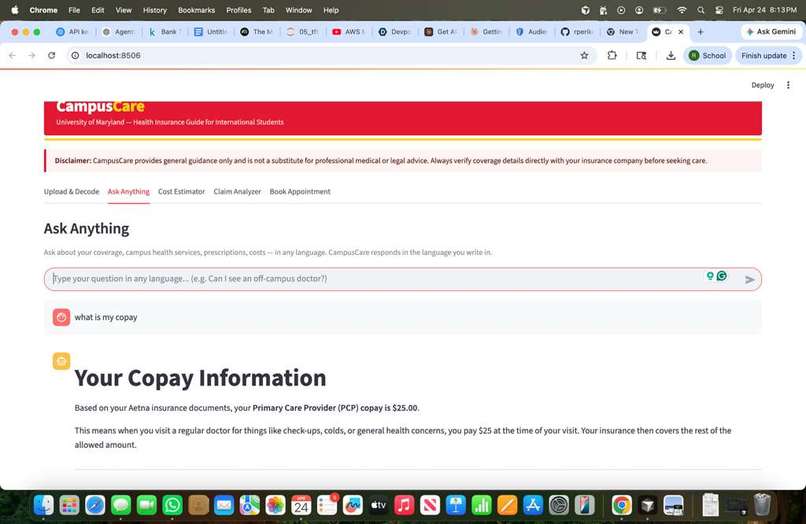
Asking questions on the uploaded eob
-
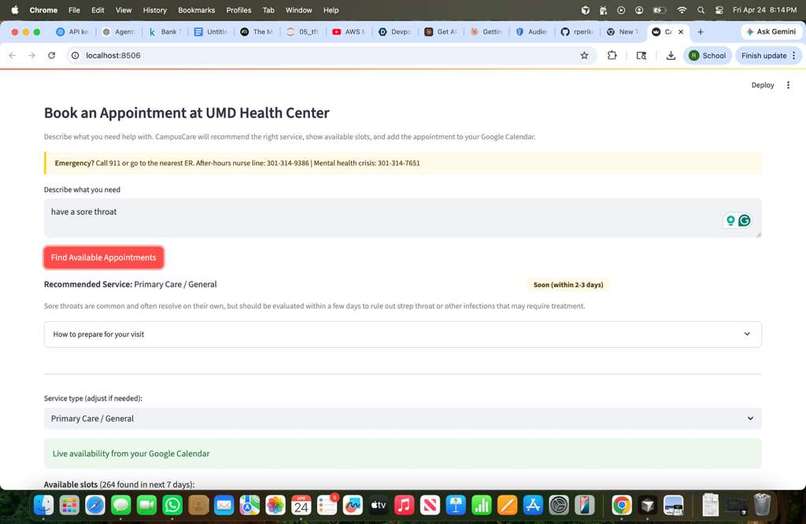
appointment booking
Inspiration
We are international students at UMD. Last year I got sick, went to the health center, and received an Explanation of Benefits I genuinely could not understand. I didn't know what I owed, why a claim was denied, or even if I'd gone to the right place. And I knew I wasn't alone — every international student I know has felt this. So we built CampusCare.
What it does
You upload your insurance card or policy PDF, and Claude instantly translates it into plain English — your deductible, your copay, what's covered, what's not. Then you can chat with it in any language, get a cost estimate before you go to the doctor, decode a confusing bill, and even book an appointment at the simulated UMD Health Center. The application suggests the best doctor based on user needs, shows the availability from the google calendar integration and makes the appointment booking process seamless.
How we built it
CampusCare is a Streamlit web app organized into five purpose-built tabs, powered entirely by Claude (claude-opus-4-5) via the Anthropic Python SDK.
Document Ingestion (ingestion/loader.py): We handle three input types — PDF (via pdfplumber), images/insurance cards (base64-encoded for Claude Vision), and plain text — with a unified LoadedDocument dataclass so every downstream agent gets the same interface regardless of format.
Extraction Agent (agents/extractor_agent.py): When a user uploads a document, Claude is prompted at temperature 0.1 to return a strict JSON blob of ~20 policy fields (deductible, copays, coinsurance, coverage flags, Rx tiers, international coverage, etc.). For images, we pass the raw base64 bytes directly as a vision message. The response is parsed into a typed PolicyTerms dataclass, with graceful fallback if Claude wraps JSON in markdown fences.
Q&A Agent with RAG (agents/qa_agent.py, processing/parser.py): The uploaded policy is chunked into segments and indexed with TF-IDF (scikit-learn). When a student asks a question, we select the top-5 most relevant chunks, combine them with a policy summary, and send everything to Claude at temperature 0.4. Claude responds in whatever language the student writes in, and we include the last three conversation turns for context.
Cost Estimator: Same Q&A agent, but with a separate structured prompt (temperature 0.2) that produces a JSON estimate with a low/high cost range, step-by-step reasoning, and flags for which cost-sharing mechanisms apply (deductible, copay, coinsurance).
Claim Analyzer (agents/classifier_agent.py): Claude parses Explanation of Benefits (EOB) documents, classifies each line item (Covered / Partially Covered / Denied / Mixed), extracts billed vs. paid amounts, determines if an appeal is warranted, and drafts a complete appeal letter — all returned as structured JSON and displayed in a pd.DataFrame.
Scheduler Agent (agents/scheduler_agent.py): Claude classifies a free-text symptom description into the correct UMD Health Center service type and urgency level. Appointment slots are generated from a simulated UMD clinic schedule, and confirmed bookings are written to Google Calendar via the Google Calendar API (OAuth 2.0).
Challenges we ran into
Reliable structured output from LLMs: Getting Claude to always return valid, parseable JSON — and not wrap it in prose or markdown fences — required careful prompt engineering. We solved this by using very low temperature (0.1) for extraction tasks and writing a robust _parse_response method that strips code fences and handles edge cases before attempting json.loads.
RAG without a vector database: We wanted to run the app locally without spinning up Pinecone or any external vector store. We implemented TF-IDF chunk selection via scikit-learn so the Q&A agent retrieves the top-5 most relevant policy chunks per query — lightweight, zero extra infrastructure, and effective enough for documents up to ~6,000 words
Google Calendar OAuth in a local Streamlit app: The browser-redirect OAuth flow doesn't map cleanly onto a Streamlit sidebar button. We had to implement a separate setup_google_auth.py script for the initial authorization, cache the token, and gracefully degrade to a simulated schedule when Google is not connected.
Accomplishments that we're proud of
Full EOB analysis pipeline: upload a multi-line Explanation of Benefits, and the app decodes every line item, explains each denial reason in plain English, and writes a ready-to-send appeal letter — reducing what could be hours of confusion to under a minute. End-to-end appointment booking: from a free-text symptom description to a confirmed event in Google Calendar, with Claude handling the triage step (service type + urgency) so students don't have to navigate confusing clinic menus. Zero PII stored: all uploaded documents and conversation history live only in st.session_state and are cleared on page reload — no database, no logging, no data retention. The entire app is a single streamlit run app.py command with no external services required beyond an Anthropic API key.
What we learned
Prompt engineering is an architecture decision. The separation of utils/prompts.py as a single source of truth for all Claude prompts — each with its own temperature, token budget, and output schema — made the difference between an app that sometimes works and one that works reliably. Tuning temperature independently per task (extraction vs. conversation vs. cost estimation) matters significantly.
TF-IDF is still remarkably effective for document RAG at this scale. We went in expecting to need embeddings, but TF-IDF chunk selection over a ~50-page policy PDF consistently surfaces the right passages. For a domain this narrow and structured, it's the right tool.
What's next for CampusCare
Built With
- anthropic
- google-calendar
- python
- streamlit

Log in or sign up for Devpost to join the conversation.