-
-
Icon
-
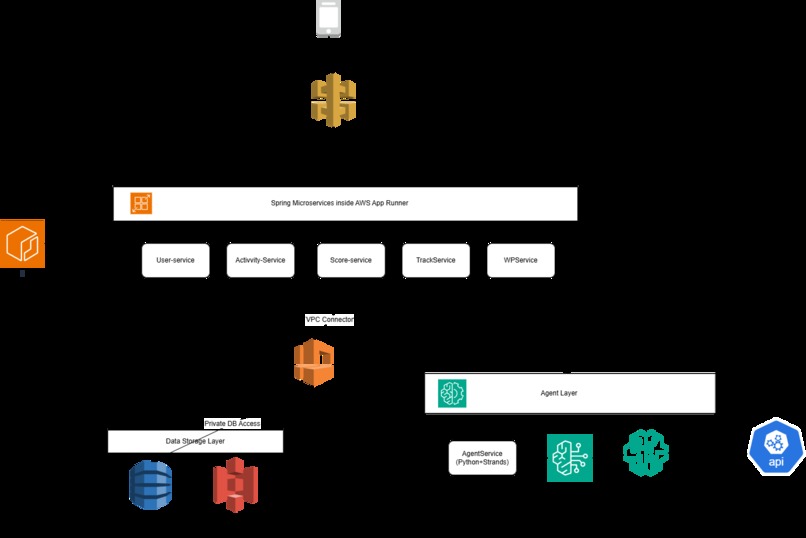
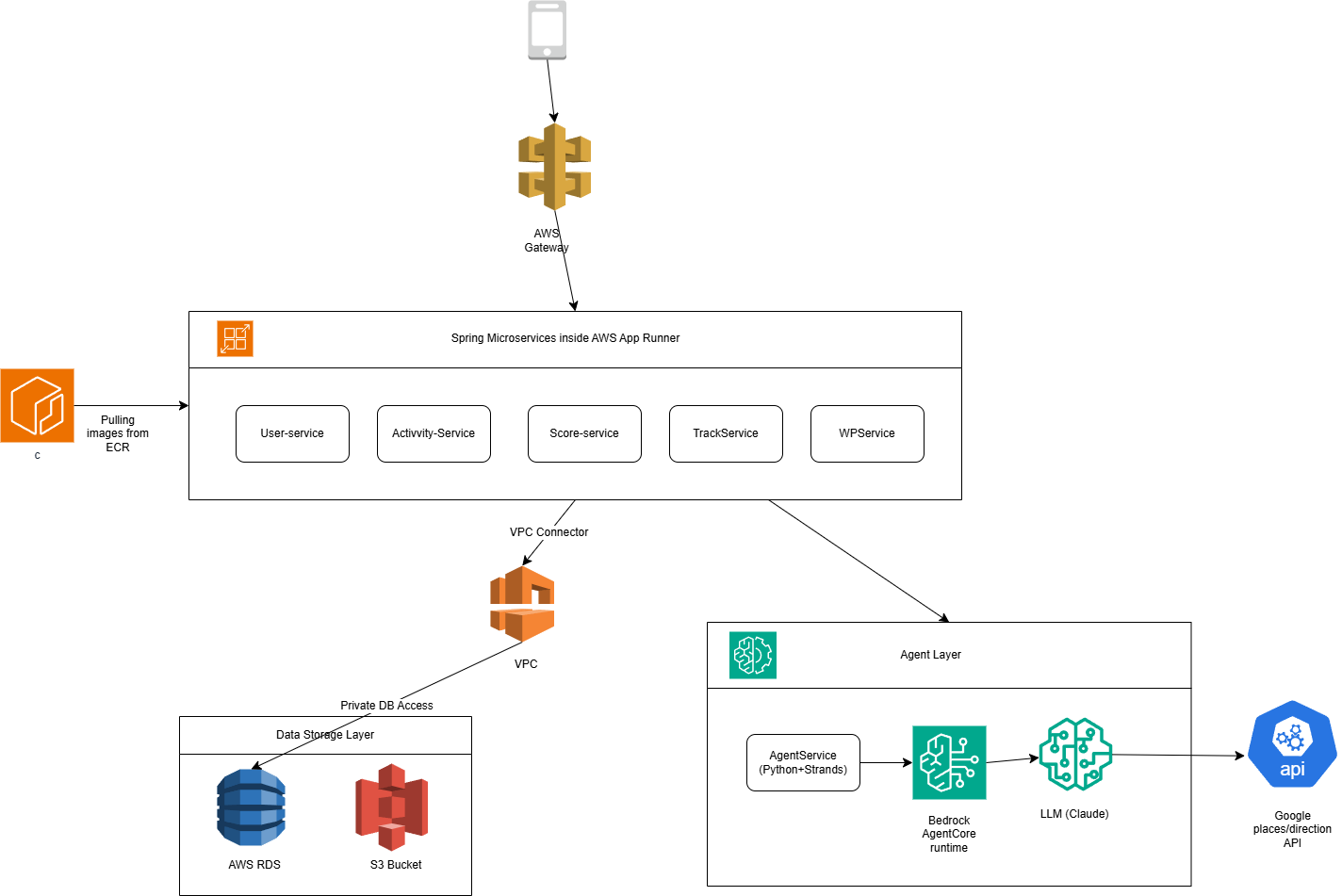
architechture
-
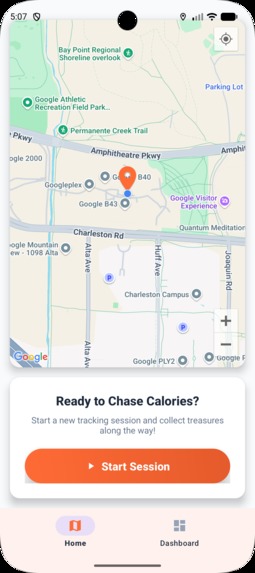
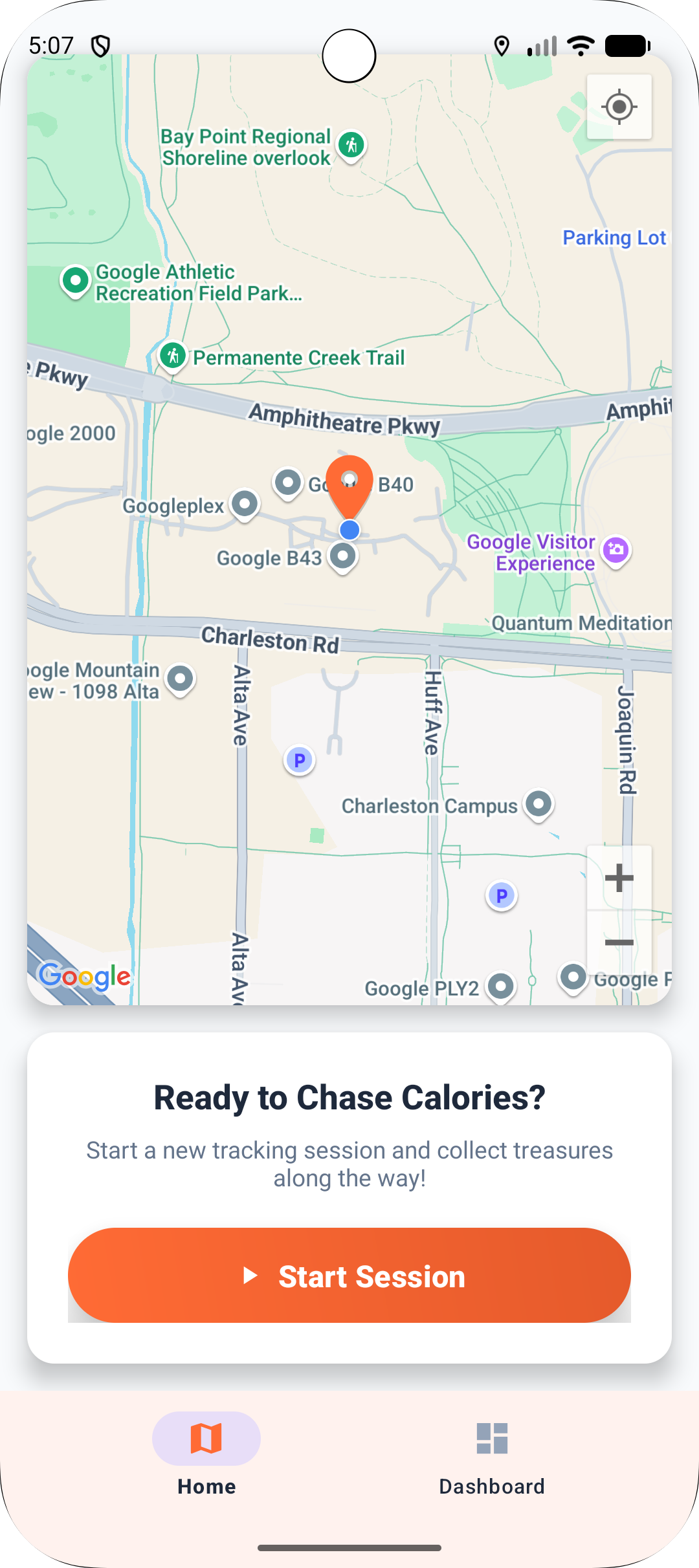
This is the home screen.
-
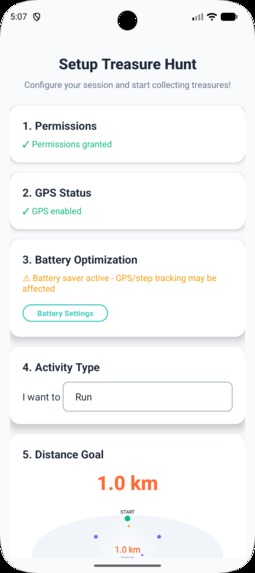
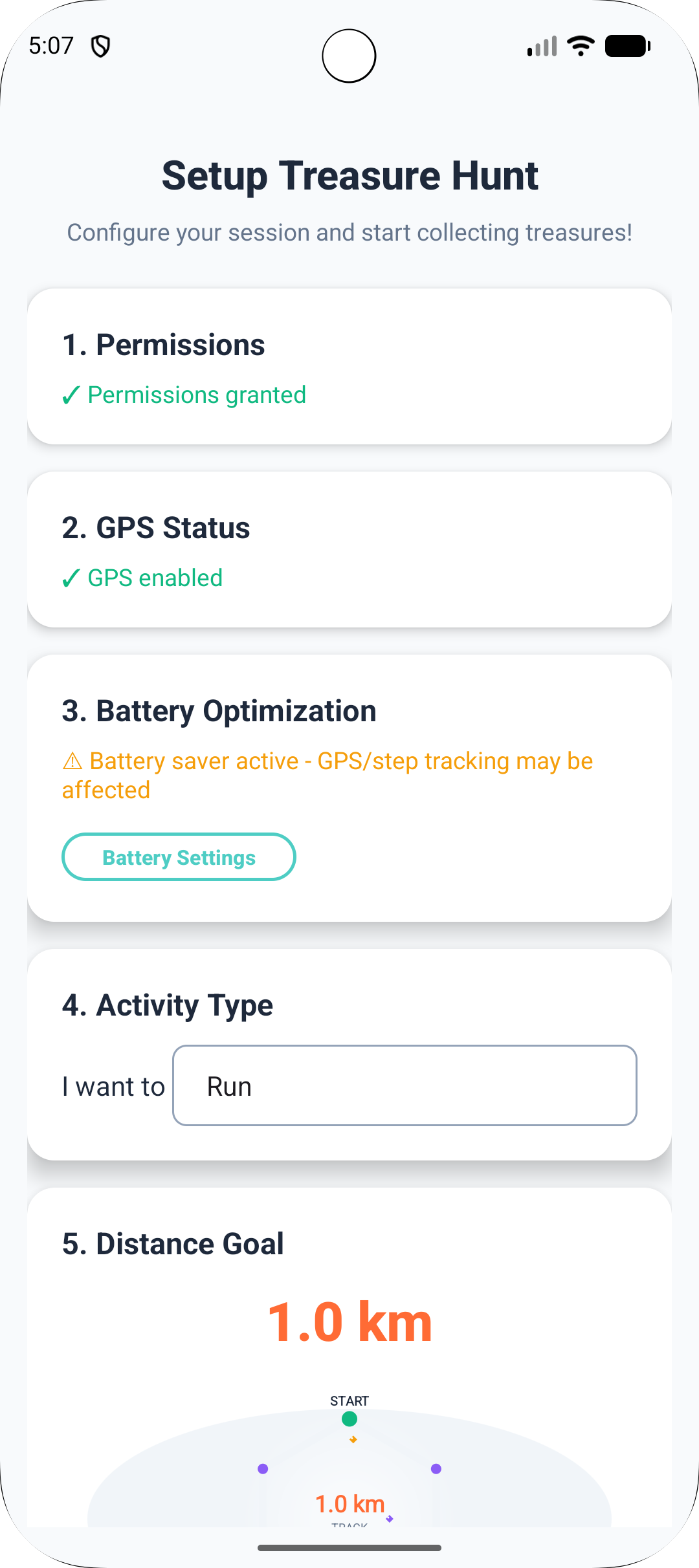
While creating the game, he first can see the permission status. He has to specify mode, distance.
-
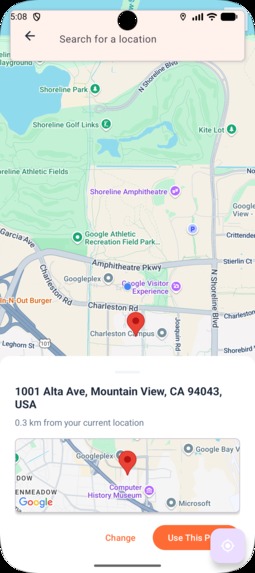
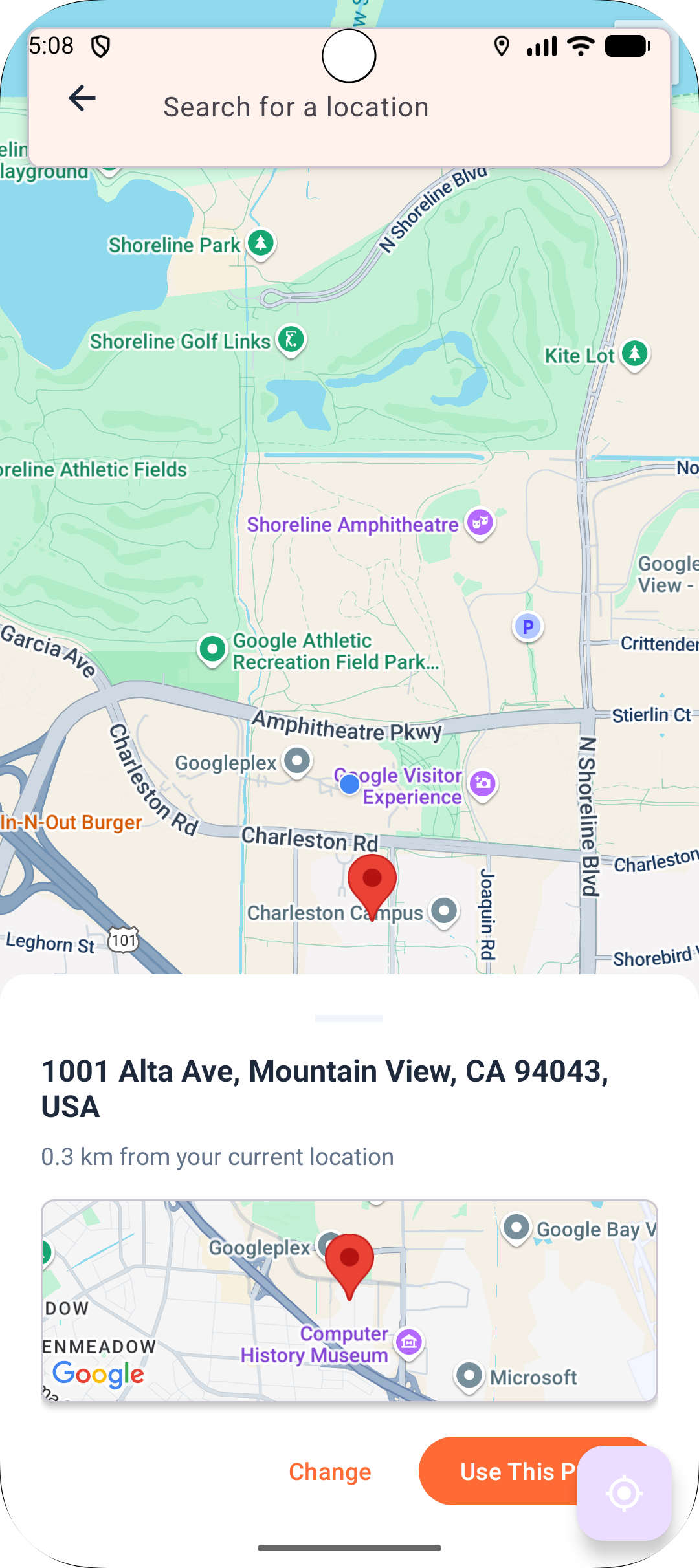
Start point selection page
-
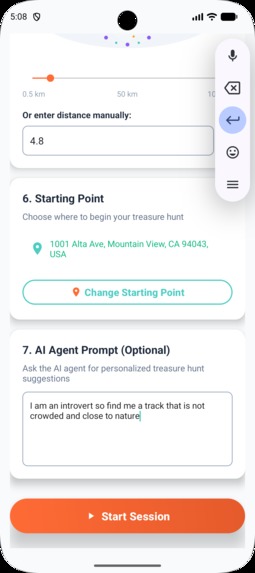
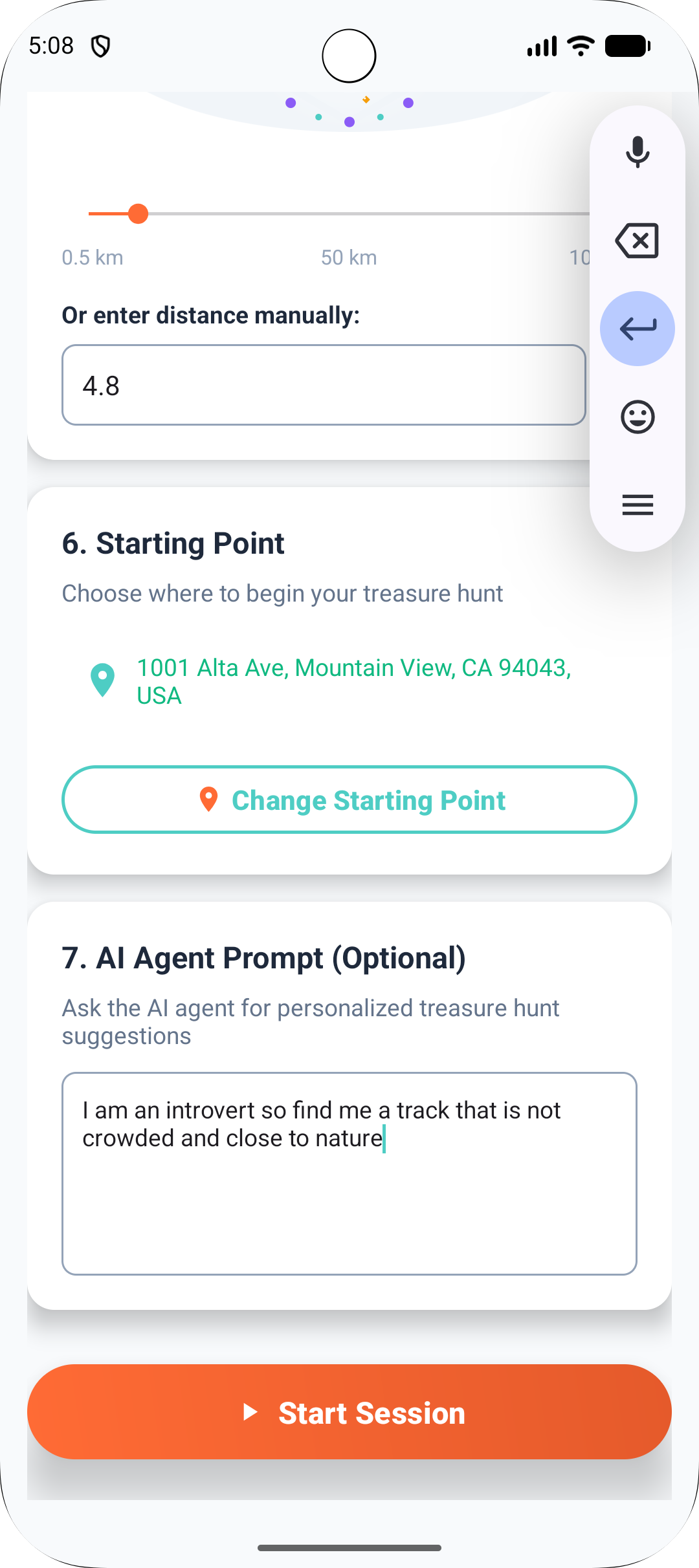
Adding a prompt
-
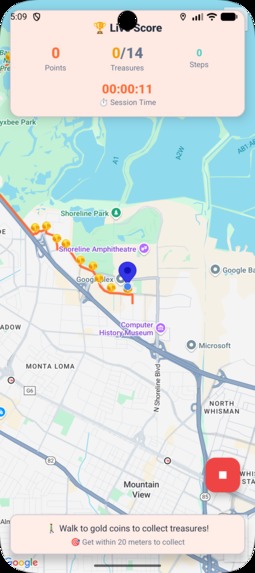
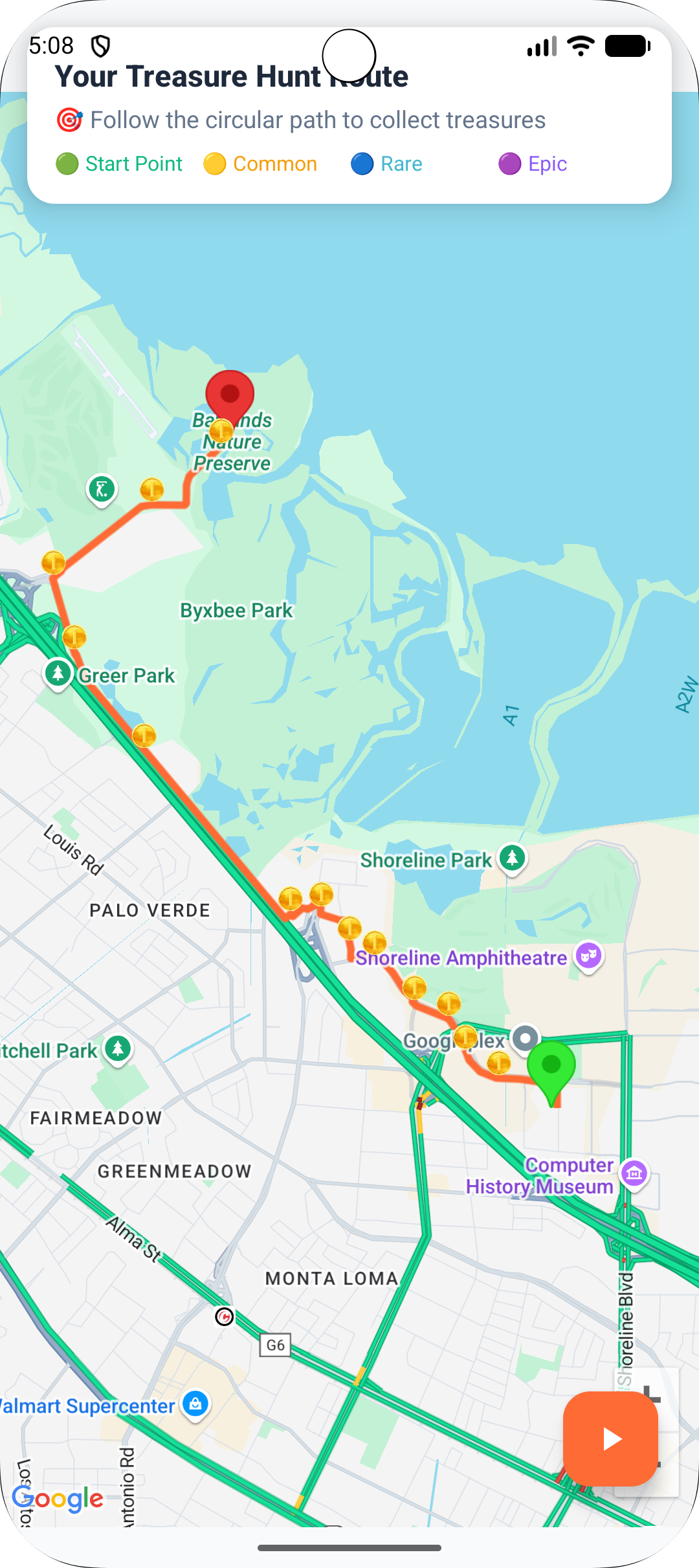
The track generated by the AI agent
-
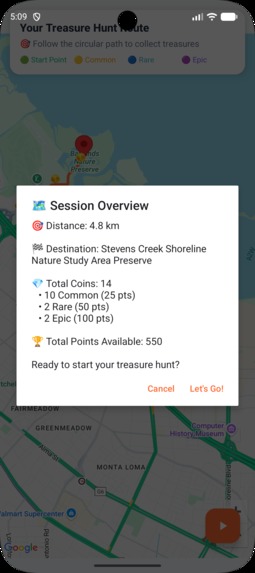
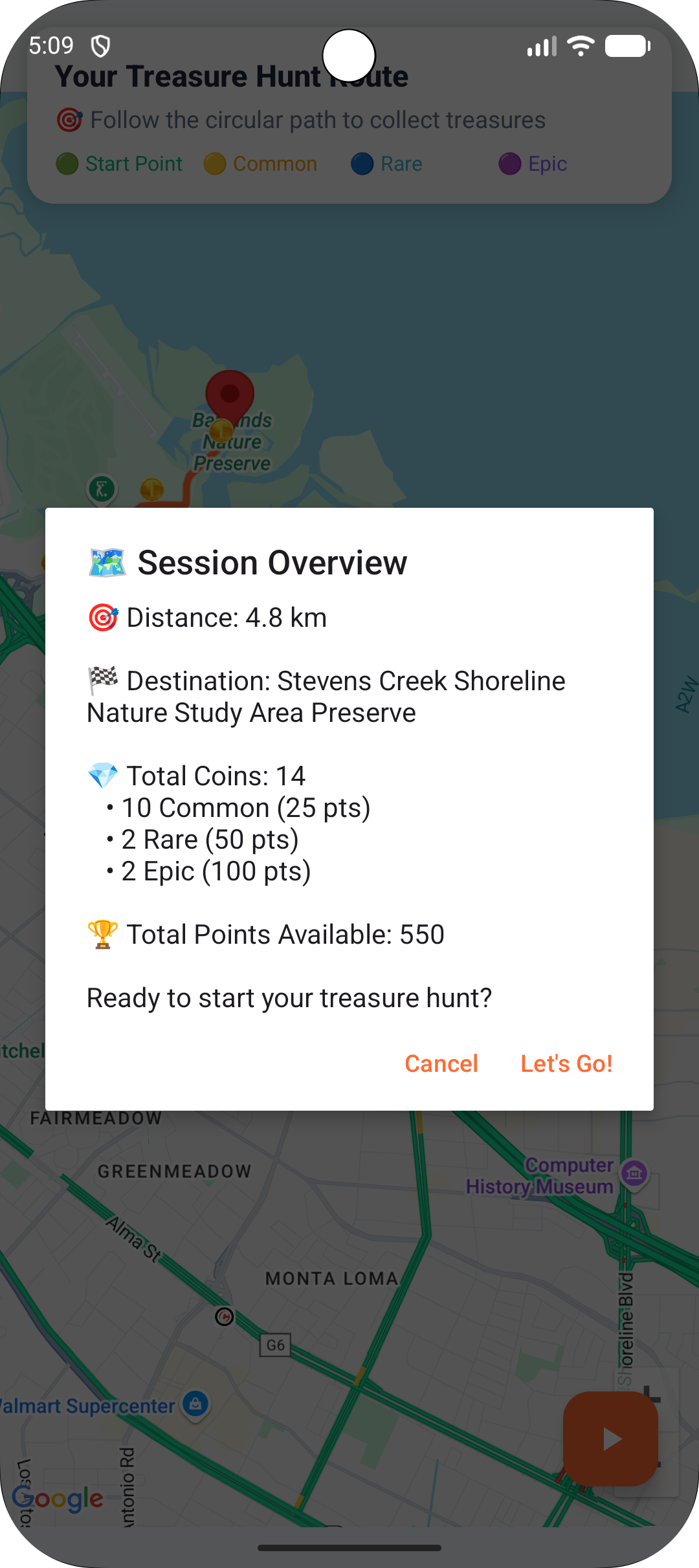
Before starting the game an overview about the game
-
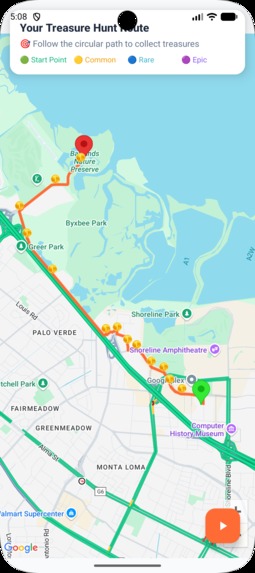
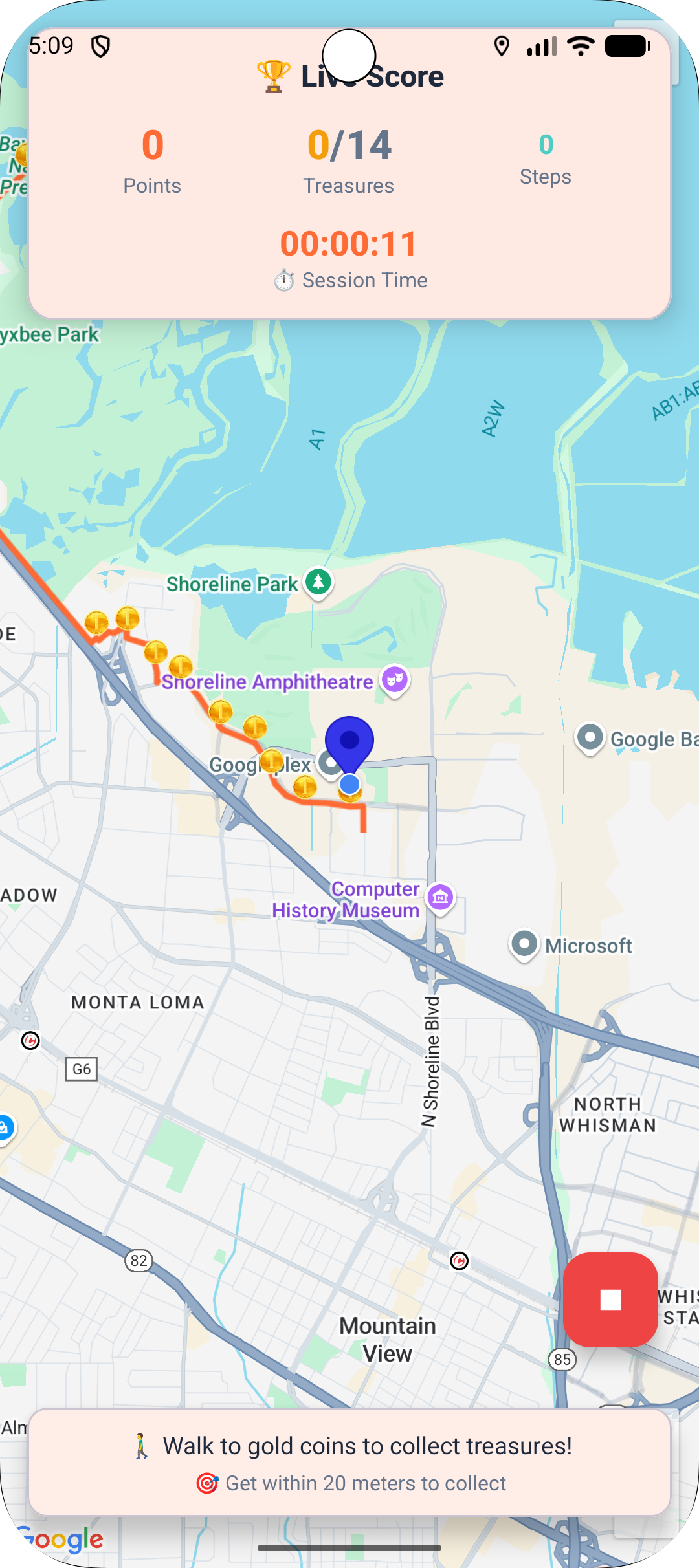
the game screen, with live scoreboard on top
-
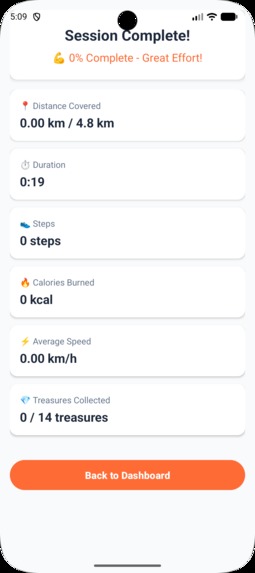
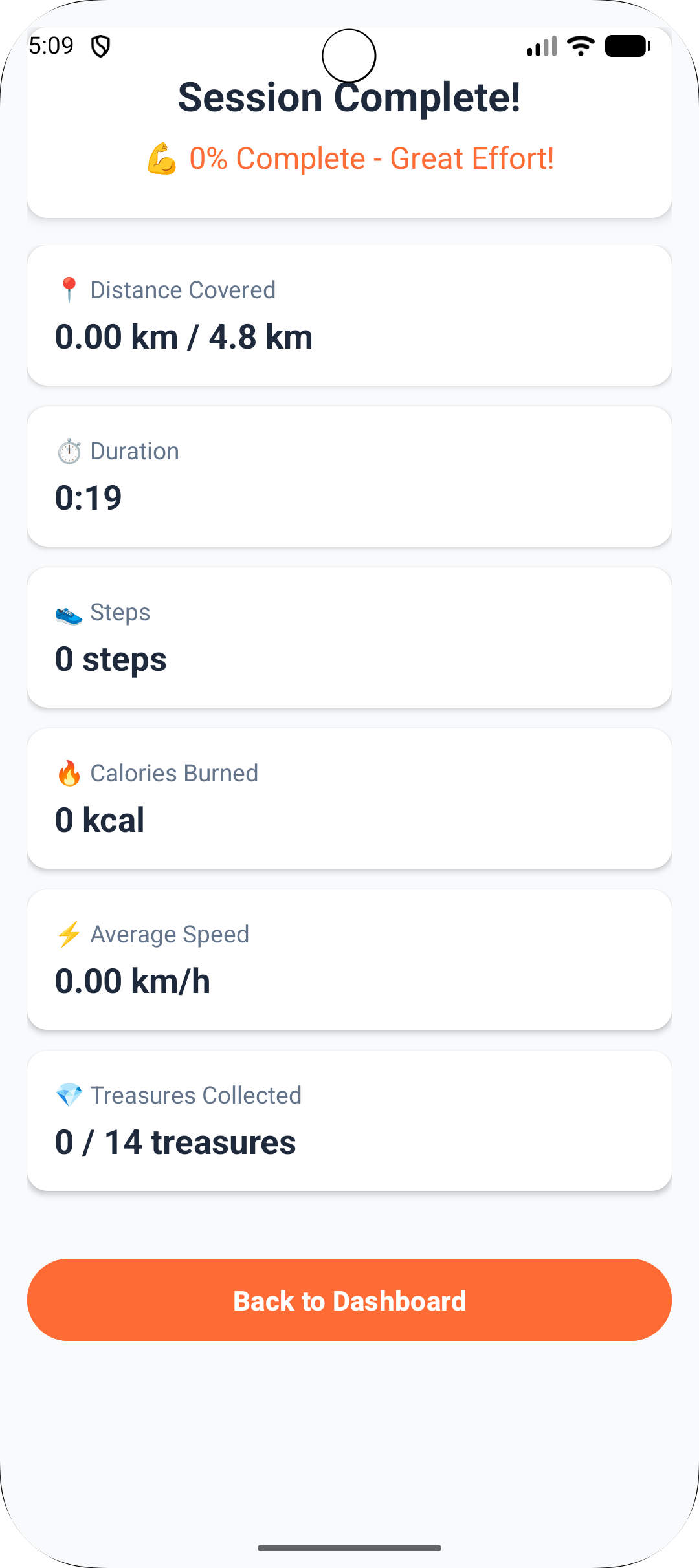
the final detailed scoreboard after each game
-
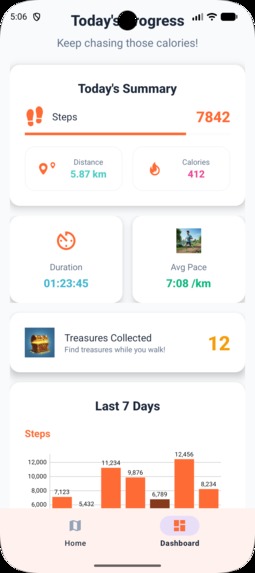
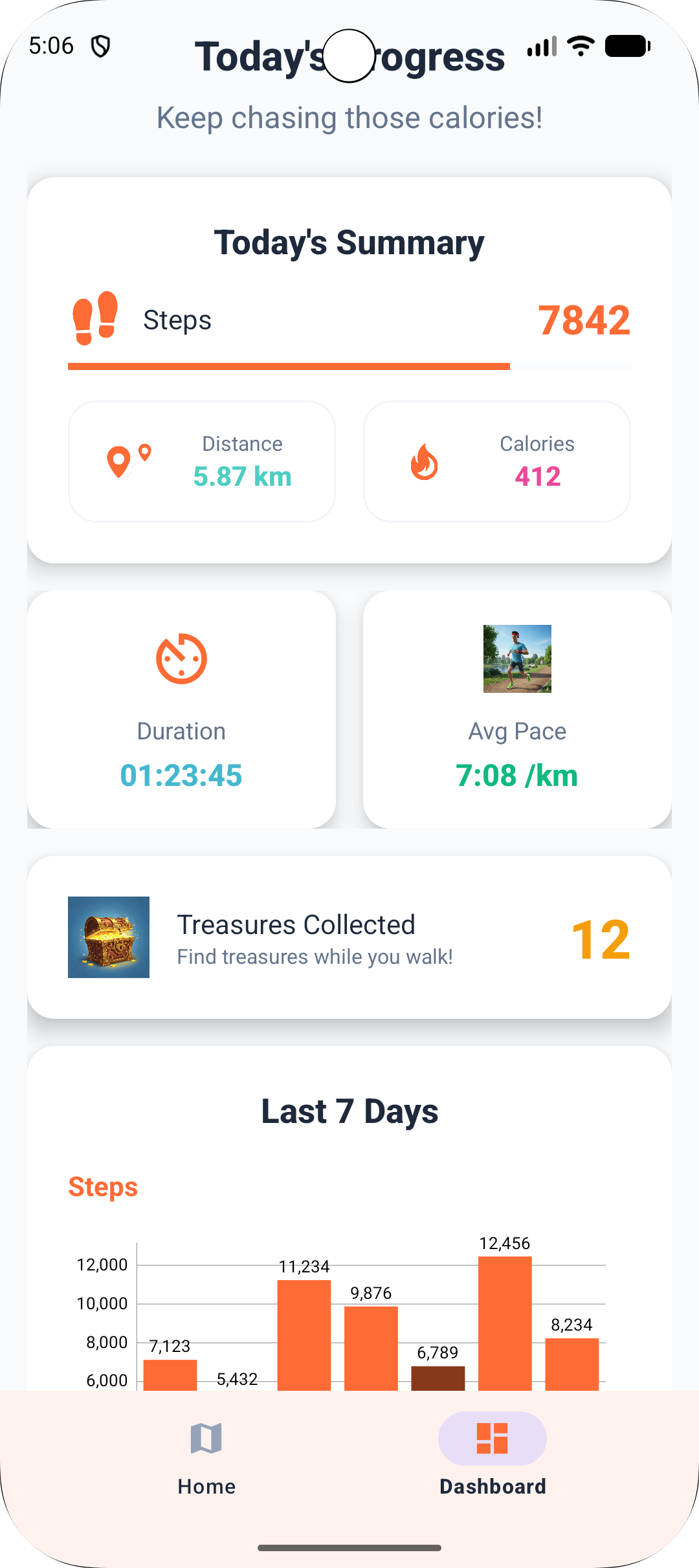
dashboard page top which shows daily data
-
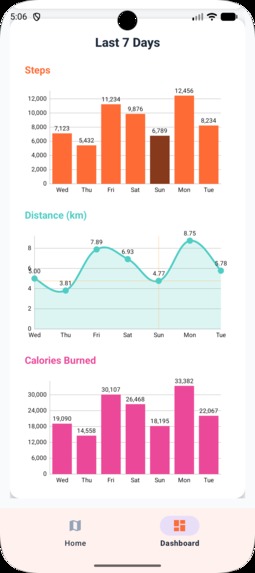
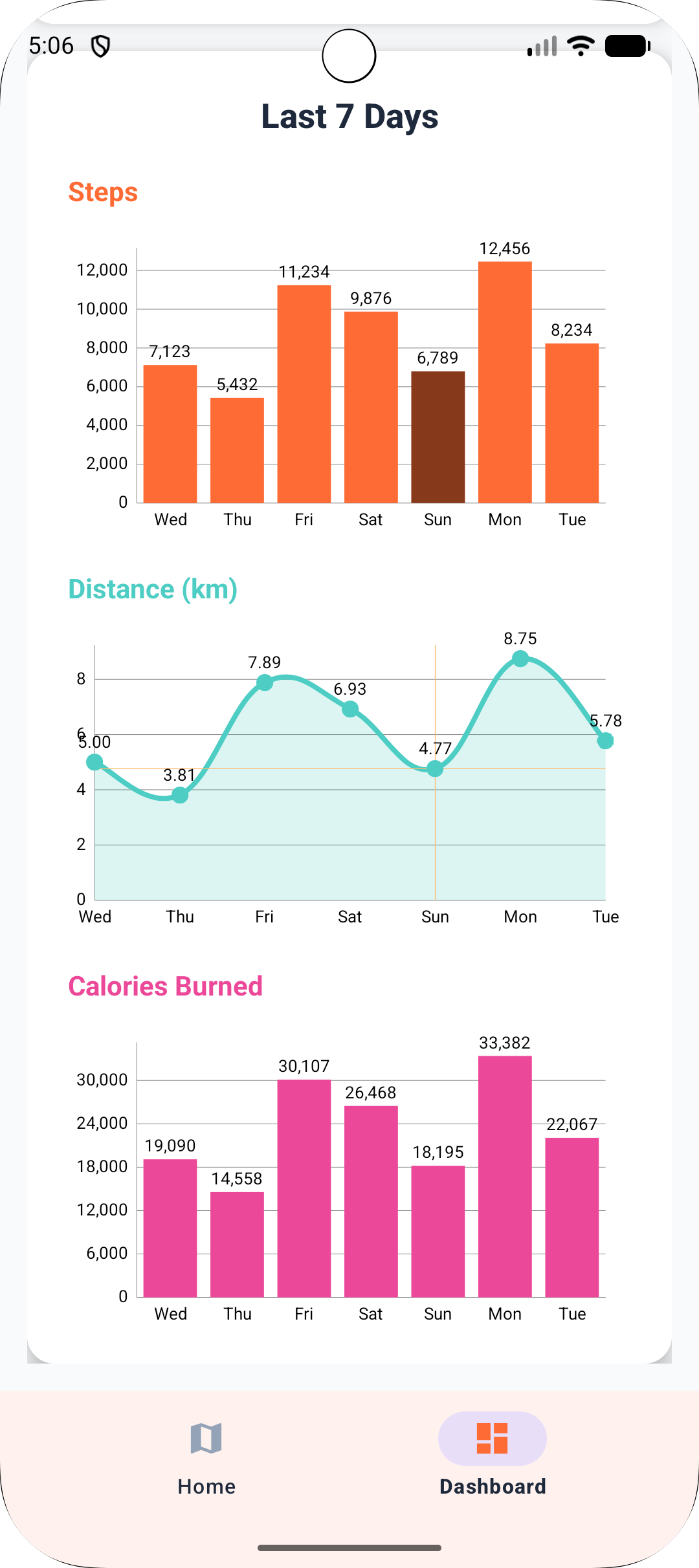
dashboard page bottom which shows weekly data
Inspiration
My goal is to tackle two major problems: (1) Obesity and (2) Lack of time to fight it.
With CalorieChase, users can burn calories in a fun and effortless way — seamlessly fitting fitness into their busy schedules.
What It Does
CalorieChase is a mobile application that allows users to create customized running, walking, or jogging tracks tailored to their preferences.
Users can specify:
- (a) the distance or steps they want to cover
- (b) a prompt, such as “I love nature. Find me a route to my workplace so I can complete 10K steps while enjoying some greenery.”
The app then generates a personalized route, where users collect treasures scattered along the track — each worth points, making the experience game-like and engaging (inspired by Pokémon GO).
It features live scoring, timing, step and distance tracking, and real-time navigation, similar to Google Maps.
The dashboard provides weekly and monthly performance insights, including total steps, distance covered, and past sessions — all displayed through clean text and visuals.
🛠️ How We Built It
Business Logic Layer
The business logic layer is divided into two main parts:
- Spring Boot Microservices – User, Session, Score, Track, and Waypoint Services
- Agent Service – Powered by AWS Bedrock AgentCore Runtime
The user’s info (name, email, age, gender, height, weight) is first stored inside AWS RDS via the UserService.
Inside the home screen, the user creates a game (session) by choosing the type (walk/jog/run), distance or steps to cover, starting point, and an optional prompt (vibe/safety/surface).
These details are sent to the Agent running on Bedrock AgentCore Runtime.
🗺️ How the Agent Creates the Track
planroute(start_lat, start_lng, mode, distance_m=None, prompt="")
What it is:
This tool creates a track by finding the nearest relevant place around the user’s starting point and then generating a one-way route to that location.
It uses the Google Places API to discover nearby destinations that match the user’s intent, and the Google Directions API to convert that destination into a navigable path.
How it works:
Extract Keywords
A lightweight LLM processes the user’s prompt (e.g., “quiet park near water”) and extracts 3–5 focused keywords such as["park", "river", "quiet"].
These keywords guide the place search to keep the results context-aware.Find Nearest Place (rankby=distance)
The tool calls Google Places NearbySearch with the parameterrankby=distance, which returns results sorted by proximity to(start_lat, start_lng).
It biases the query toward open and safe categories such as park, natural_feature, or tourist_attraction.
The closest result is directly selected as the destination.Generate the Route
The selected destination’s coordinates are passed to the Google Directions API along with the chosen mode (walk, jog, or run).
The API returns an encoded polyline, representing the exact one-way track from the user’s starting point to the chosen place.Estimate Duration
The tool uses fixed average paces per mode to estimate completion time:- Walk ≈ 13.5 min/km
- Jog ≈ 7.5 min/km
- Run ≈ 5.5 min/km
est_duration = pace(mode) × (route_distance_m / 1000)
- Walk ≈ 13.5 min/km
Fallback Handling
If no matching places are found, it retries with a simple keyword ("park") or creates a synthetic point about 700–1000 m away in a random direction and routes to it.
Return type:
{
  "polyline": "encoded_polyline_string",
  "est_duration": 9.4,
  "dest": {
    "lat": 41.8826,
    "long": -87.6231
  }
}
🔥 Calorie Estimation
estimate_calories(user_id, mode, duration_min=None, distance_m=None, elev_gain_m=0)
What it does
This tool first calls GET /user/{userId} from the User Microservice to fetch the user’s height, weight, age, and gender.
Using those attributes—along with the provided mode (walk, jog, or run), distance, and duration—it estimates how many calories were burned during that session.
It then returns a JSON object containing the calculated calories, effective MET value, and pace summary.
How it works
Calculates average pace:
pace = duration / (distance / 1000) # min/kmMET Calculation
Assigns a MET (Metabolic Equivalent of Task) based on mode:
Walk → ~3.5 MET
Jog → ~7.0 MET
Run → ~10.0 MET
Adjusts MET slightly (+1% per 10 m elevation gain per km) to account for uphill effort.
Applies the standard energy formula:
kcal = (MET × 3.5 × weight(kg) / 200) × duration(min)Output Example
{
  "mode_used": "jog",
  "pace_min_per_km": 6.7,
  "met_eff": 7.1,
  "kcal": 171.5
}
Agent Orchestration (7-Step Flow)
Together, these two tools — planroute and estimate_calories — form the core capabilities of the Bedrock Agent.
The agent orchestrates them through a structured sequence that connects the frontend with backend microservices.
1. Input Gathering
When the user creates a new session, they select the mode, target distance or steps, starting point, and optional prompt.
The frontend sends this payload to the Agent Runtime hosted on AWS Bedrock AgentCore.
2. Tool Selection and Routing
The agent analyzes the payload and determines which tool to invoke:
planroute()→ For generating tracks based on mode and distance.estimate_calories()→ For post-session analytics using user data.
Agent Orchestration (7-Step Flow)
Together, these two tools — planroute and estimate_calories — form the core capabilities of the Bedrock Agent.
The agent orchestrates them through a structured sequence that connects the frontend with backend microservices.
1. Input Gathering
When the user creates a new session, they select the mode, target distance or steps, starting point, and optional prompt.
The frontend sends this payload to the Agent Runtime hosted on AWS Bedrock AgentCore.
2. Tool Selection and Routing
The agent analyzes the payload and determines which tool to invoke:
planroute()→ For generating tracks based on mode and distance.estimate_calories()→ For post-session analytics using user data. ### 3. Track Generation The agent invokes:
planroute(start_lat, start_lng, mode, distance_m, prompt)
and receives a one-way track with:
polyline → encoded route
est_duration → time estimate
dest → destination coordinates
The TrackService stores this data in the database (AWS RDS) under the active session.
4. Game Execution
As the session begins, the Android app records steps, distance, and time through built-in sensors, updating backend data via the SessionService.
5. Post-Session Analysis
After completion, the app sends the recorded stats to the agent:
estimate_calories(user_id, mode, distance_m, duration_min, elev_gain_m)
The agent retrieves user attributes from UserService, calculates energy expenditure using the MET-based formula, and returns calorie results.
6. Data Persistence
The backend updates sequentially:
- ActivityService creates a new record with all metrics (distance, time, calories, destination).
- ScoreService updates cumulative scores and leaderboards.
7. Continuous Feedback Loop
All results are returned to the frontend, where users can visualize their route, calories burned, and progression. The agent thus forms a feedback loop—combining LLM reasoning, route discovery, and scientific calorie estimation in one adaptive pipeline.
This agent-driven architecture transforms fitness tracking into an intelligent, adaptive experience—where every route, step, and calorie is guided by real-time reasoning.
Challenges We Ran Into
Deploying the Spring Boot application was the toughest challenge. Setting up servers, containers, and cloud configurations required multiple iterations to finally get it running smoothly.
Accomplishments That We're Proud Of
Before this hackathon, I had limited experience with AWS. I took the time to learn the essentials — EC2, Clusters, Lambda, Strands SDK, and Bedrock AgentCore — and successfully integrated them to build and deploy my first AI-powered app.
Achieving this as a first-time AWS developer is something I’m genuinely proud of.
What We Learned
I gained hands-on experience in understanding and implementing AI agents — from creation to integration and deployment — using Amazon Bedrock AgentCore and Strands SDK.
What's Next for CalorieChase
Coming straight from my functional requirements document:
- Users will be able to create tracks and share them to challenge their friends.
- Introduce a leaderboard and social ranking system to make the experience more competitive and community-driven.
- Integrate with wearable devices (e.g., Fitbit, Galaxy Watch) for real-time step and heart rate tracking.
- Enhance AI-based recommendations for personalized track generation based on user habits and goals.

Log in or sign up for Devpost to join the conversation.